-
chrome extensions mv3通过content scripts注入/获取原网站的window数据
开发插件的都知道插件的content scripts和top window只共享Dom不共享window和其他数据,如果想拿挂载在window的数据还有点难度,下面会通过事件的方式传递cs和top window之间的数据写一个例子
代码
manifest.json
这里只搞了2个js,content.js是content scripts,main.js是在top window里运行的
{ "version": "0.0.1", "author": "apades", "name": "ext-hack", "description": "", "manifest_version": 3, "content_scripts": [ { "matches": ["" ], "js": ["content.js"], "run_at": "document_end", "all_frames": true }, { "matches": ["" ], "js": ["main.js"], "run_at": "document_end", "world": "MAIN" } ] }- 1
- 2
- 3
- 4
- 5
- 6
- 7
- 8
- 9
- 10
- 11
- 12
- 13
- 14
- 15
- 16
- 17
- 18
- 19
- 20
- 21
content.js
async function sendExtMessage(type, data) { window.dispatchEvent(new CustomEvent('ext-req', { detail: { type, data } })) return new Promise((res) => { function handleResponse(e) { const detail = e.detail if (detail.type == type) { window.removeEventListener('ext-res', handleResponse) return res(detail.data) } } window.addEventListener('ext-res', handleResponse) }) } // 暴露到content script的window里测试 window.sendExtMessage = sendExtMessage- 1
- 2
- 3
- 4
- 5
- 6
- 7
- 8
- 9
- 10
- 11
- 12
- 13
- 14
- 15
- 16
- 17
main.js
window.addEventListener('ext-req', async (e) => { const { type, data } = e.detail switch (type) { case 'run-code': { let fn = new Function(`return (${data.function})(...arguments)`) let rs = await fn(...(data.args ?? [])) sendExtResponse(type, rs) break } } }) function sendExtResponse(type, data) { window.dispatchEvent( new CustomEvent('ext-res', { detail: { type, data }, }) ) }- 1
- 2
- 3
- 4
- 5
- 6
- 7
- 8
- 9
- 10
- 11
- 12
- 13
- 14
- 15
- 16
- 17
- 18
- 19
- 20
- 21
运行测试
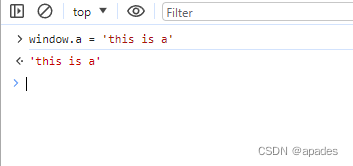
首先我先在top window里随便写个window.a的值
然后切换到ext-hack的window里,再测试sendExtMessage
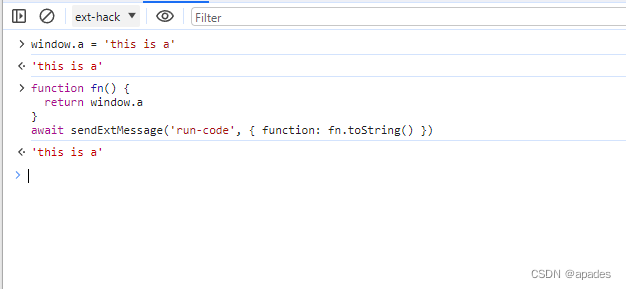
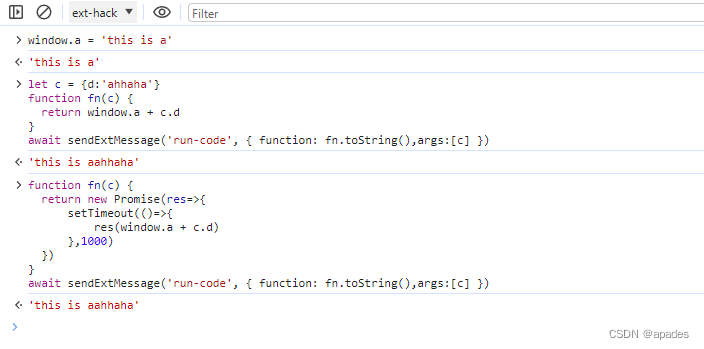
然后发现可以拿到top window的数据了;以上方法还能传入content script window里的对象参数到top window里使用,也可以传入异步方法
最后要说的
通过事件里互相传的数据会经过插件内部的序列化,地址、Object.defineProperty都是不共享的。而且这个方法相较于script标签插入,可以绕开doc response的Content-Security-Policy
-
相关阅读:
宝塔面板部署nginx+springboot+netty
【AGC】【认证服务】认证服务Android sdk 登录返回7400
用Python写一个去文档水印的算法
RS-485设计指南
VMware vSphere 虚拟交换机绑定和故障切换策略
list的特性及使用
知网网站地址更换
NNDL 作业11:优化算法比较
11月5日 OpenCV 实战基础学习笔记——图像金字塔、轮廓、模板匹配
区间调度问题 ----- 贪心算法
- 原文地址:https://blog.csdn.net/qq_41535611/article/details/133313202
