-
今日学习 Mybatis 的关联映射
关联映射的三种关系:
我们首先绘制一个简化的 E-R 图来表示三种关联关系。

上图表示的三种关系:
- 一对一:一个班主任只属于一个班级,一个班级也只能有一个班主任
- 一对多:一个班级有多个学生,一个学生只属于一个班级
- 多对多:一个学生可以选多门课,一门课可以有多个学生选
一对一关联映射
新建一个数据库并取名
mybatis,在数据库里创建班主任表 tb_head_teacher 并插入一条数据,创建班级表 tb_class 并插入一条数据。创建项目OneToOne。
项目文件结构如图

具体步骤如下:
在
src/main/java的包shiyanlou.mybatis.onetoone.model下新建类 HeadTeacher.java,一个班主任具有 id、name、age 属性。HeadTeacher.java 的代码如下:- package shiyanlou.mybatis.onetoone.model;
- public class HeadTeacher {
- private Integer id;
- private String name;
- private Integer age;
- public HeadTeacher() {
- }
- public HeadTeacher(Integer id, String name, Integer age) {
- this.id = id;
- this.name = name;
- this.age = age;
- }
- public Integer getId() {
- return id;
- }
- public void setId(Integer id) {
- this.id = id;
- }
- public String getName() {
- return name;
- }
- public void setName(String name) {
- this.name = name;
- }
- public Integer getAge() {
- return age;
- }
- public void setAge(Integer age) {
- this.age = age;
- }
- }
再在包
shiyanlou.mybatis.onetoone.model下新建类 Classes.java,一个班级有 id,name,teacher(HeadTeacher teacher)属性。teacher属性用来映射一对一的关联关系,表示这个班级的班主任。Classes.java 的代码如下:- package shiyanlou.mybatis.onetoone.model;
- public class Classes {
- private Integer id;
- private String name;
- private HeadTeacher teacher;
- public Classes() {
- }
- public Classes(Integer id, String name, HeadTeacher teacher) {
- this.id = id;
- this.name = name;
- this.teacher = teacher;
- }
- public Integer getId() {
- return id;
- }
- public void setId(Integer id) {
- this.id = id;
- }
- public String getName() {
- return name;
- }
- public void setName(String name) {
- this.name = name;
- }
- public HeadTeacher getTeacher() {
- return teacher;
- }
- public void setTeacher(HeadTeacher teacher) {
- this.teacher = teacher;
- }
- }
新建包
shiyanlou.mybatis.onetoone.mapper,并在包下新建方法接口 ClassesMapper.java。ClassesMapper 接口的代码如下:
- package shiyanlou.mybatis.onetoone.mapper;
- import shiyanlou.mybatis.onetoone.model.Classes;
- public interface ClassesMapper {
- /*
- * 根据 id 查询班级 Classes
- * @param id
- * @return
- * @throws Exception
- */
- public Classes selectClassById(Integer id) throws Exception;
- }
在包
shiyanlou.mybatis.onetoone.mapper下新建映射文件ClassesMapper.xml,映射文件与接口名相同。ClassesMapper.xml 的配置如下:
- <?xml version="1.0" encoding="UTF-8"?>
- <!DOCTYPE mapper PUBLIC "-//mybatis.org/DTD Mapper 3.0" "http://mybatis.org/dtd/mybatis-3-mapper.dtd">
- <mapper namespace="shiyanlou.mybatis.onetoone.mapper.ClassesMapper">
- <select id="selectClassById" parameterType="int" resultMap="classmap">
- select * from tb_class c, tb_head_teacher t where c.c_ht_id = t.ht_id and c.c_id=#{id}
- </select>
- <!-- resultMap: 映射实体类和字段之间的一一对应的关系 -->
- <resultMap id="classmap" type="Classes">
- <id property="id" column="c_id" />
- <result property="name" column="c_name" />
- <!-- 一对一关联映射:association -->
- <association property="teacher" javaType="HeadTeacher">
- <id property="id" column="ht_id" />
- <result property="name" column="ht_name" />
- <result property="age" column="ht_age" />
- </association>
- </resultMap>
- </mapper>
在这里,采用的是关联的
嵌套结果映射的方式,使用了元素 如果想要 HeadTeacher 的结果映射可以重用,我们可以采用下面的方式,先定义 HeadTeacher 的 resultMap:
- <resultMap id="teachermap" type="HeadTeacher">
- <id property="id" column="ht_id"/>
- <result property="name" column="ht_name" />
- <result property="age" column="ht_age" />
- </resultMap>
- <resultMap id="classmap" type="Classes">
- <id property="id" column="c_id" />
- <result property="name" column="c_name" />
- <!-- 一对一关联映射:association -->
- <association property="teacher" column="c_ht_id" javaType="HeadTeacher" resultMap="teachermap" />
- </resultMap>
在项目目录
src/main/resources下新建 MyBatis 配置文件mybatis.cfg.xml,用来配置 Mybatis 的运行环境、数据源、事务等。mybatis.cfg.xml 的配置如下,具体解释注释已经给出:
- "1.0" encoding="UTF-8"?>
- configuration PUBLIC "-//mybatis.org//DTD Config 3.0//EN" "http://mybatis.org/dtd/mybatis-3-config.dtd">
- <configuration>
- <typeAliases>
- <package name="shiyanlou.mybatis.onetoone.model" />
- typeAliases>
- <environments default="development">
- <environment id="development">
- <transactionManager type="JDBC" />
- <dataSource type="POOLED">
- <property name="driver" value="com.mysql.jdbc.Driver" />
- <property name="url" value="jdbc:mysql://localhost:3306/mybatis" />
- <property name="username" value="root" />
- <property name="password" value="" />
- dataSource>
- environment>
- environments>
- <mappers>
- <package name="shiyanlou.mybatis.onetoone.mapper" />
- mappers>
- configuration>
使用日志文件是为了查看控制台输出的 SQL 语句。
在项目目录
src/main/resources下新建 MyBatis 日志记录文件 log4j.properties ,在里面添加如下内容:- # Global logging configuration
- log4j.rootLogger=DEBUG, stdout
- # Console output...
- log4j.appender.stdout=org.apache.log4j.ConsoleAppender
- log4j.appender.stdout.layout=org.apache.log4j.PatternLayout
- log4j.appender.stdout.layout.ConversionPattern=%5p [%t] - %m%n
在包
shiyanlou.mybatis.onetoone.test下新建测试类Test.java,代码如下:- package shiyanlou.mybatis.onetoone.test;
- import java.io.IOException;
- import java.io.InputStream;
- import org.apache.ibatis.io.Resources;
- import org.apache.ibatis.session.SqlSession;
- import org.apache.ibatis.session.SqlSessionFactory;
- import org.apache.ibatis.session.SqlSessionFactoryBuilder;
- import shiyanlou.mybatis.onetoone.mapper.ClassesMapper;
- import shiyanlou.mybatis.onetoone.model.Classes;
- public class Test {
- private static SqlSessionFactory sqlSessionFactory;
- public static void main(String[] args) {
- // Mybatis 配置文件
- String resource = "mybatis.cfg.xml";
- // 得到配置文件流
- InputStream inputStream = null;
- try {
- inputStream = Resources.getResourceAsStream(resource);
- } catch (IOException e) {
- e.printStackTrace();
- }
- // 创建会话工厂,传入 MyBatis 的配置文件信息
- sqlSessionFactory = new SqlSessionFactoryBuilder().build(inputStream);
- // 通过工厂得到 SqlSession
- SqlSession session = sqlSessionFactory.openSession();
- ClassesMapper mapper = session.getMapper(ClassesMapper.class);
- try {
- Classes classes = mapper.selectClassById(1);
- session.commit();
- System.out.println(classes.getId() + "," + classes.getName() + ",["
- + classes.getTeacher().getId() + ","
- + classes.getTeacher().getName() + ","
- + classes.getTeacher().getAge()+"]");
- } catch (Exception e) {
- e.printStackTrace();
- session.rollback();
- }
- // 释放资源
- session.close();
- }
- }
运行测试类 Test.java, 查询 对应班级的所有信息及其班主任的信息,得到的输出信息与数据库中的数据一致。
一对多关联映射
项目文件结构

打开数据库,新建一个数据库并取名
mybatis,创建班级表 tb_class 并插入数据,创建学生表 tb_student 并插入数据。新建项目
OneToMany。在
src/main/java的包shiyanlou.mybatis.onetomany.model下新建类 Student.java,一个学生具有 id、name、sex、age 属性。Student.java 的代码如下:- package shiyanlou.mybatis.onetomany.model;
- public class Student {
- private Integer id;
- private String name;
- private String sex;
- private Integer age;
- public Student() {
- }
- public Student(Integer id, String name, String sex, Integer age) {
- this.id = id;
- this.name = name;
- this.sex = sex;
- this.age = age;
- }
- public Integer getId() {
- return id;
- }
- public void setId(Integer id) {
- this.id = id;
- }
- public String getName() {
- return name;
- }
- public void setName(String name) {
- this.name = name;
- }
- public String getSex() {
- return sex;
- }
- public void setSex(String sex) {
- this.sex = sex;
- }
- public Integer getAge() {
- return age;
- }
- public void setAge(Integer age) {
- this.age = age;
- }
- }
再在包
shiyanlou.mybatis.onetomany.model下新建类 Classes.java,一个班级有 id,name,students 属性。List用来表示一对多的关系,一个班级可以有多个学生。students 是一个 List 集合。Classes.java 的代码如下:students - package shiyanlou.mybatis.onetomany.model;
- import java.util.List;
- public class Classes {
- private Integer id;
- private String name;
- // 班级和学生是一对多的关系,即一个班级可以有多个学生
- private List<Student> students;
- public Classes() {
- }
- public Classes(Integer id, String name, List<Student> students) {
- this.id = id;
- this.name = name;
- this.students = students;
- }
- public Integer getId() {
- return id;
- }
- public void setId(Integer id) {
- this.id = id;
- }
- public String getName() {
- return name;
- }
- public void setName(String name) {
- this.name = name;
- }
- public List<Student> getStudents() {
- return students;
- }
- public void setStudents(List
students ) { - this.students = students;
- }
- }
新建包
shiyanlou.mybatis.onetomany.mapper,并在包下新建方法接口 ClassesMapper.java。ClassesMapper 接口的代码如下:
- package shiyanlou.mybatis.onetomany.mapper;
- import shiyanlou.mybatis.onetomany.model.Classes;
- public interface ClassesMapper {
- /*
- * 根据 id 查询班级 Classes 和它的学生
- * @param id
- * @return
- * @throws Exception
- */
- public Classes selectClassAndStudentsById(Integer id) throws Exception;
- }
在包
shiyanlou.mybatis.onetomany.mapper下新建映射文件ClassesMapper.xml,映射文件与接口名相同。ClassesMapper.xml 的配置如下:
- <?xml version="1.0" encoding="UTF-8"?>
- <!DOCTYPE mapper PUBLIC "-//mybatis.org/DTD Mapper 3.0" "http://mybatis.org/dtd/mybatis-3-mapper.dtd">
- <mapper namespace="shiyanlou.mybatis.onetomany.mapper.ClassesMapper">
- <select id="selectClassAndStudentsById" parameterType="int" resultMap="classmap">
- select c.c_id,c.c_name,s.s_id,s.s_name,s.s_sex,s.s_age from tb_class c left outer join tb_student s on c.c_id = s.s_c_id where c.c_id=#{id}
- </select>
- <!-- resultMap: 映射实体类和字段之间的一一对应的关系 -->
- <resultMap id="classmap" type="Classes">
- <id property="id" column="c_id" />
- <result property="name" column="c_name" />
- <!-- 一对多关联映射:collection -->
- <collection property="students" ofType="Student">
- <id property="id" column="s_id" />
- <result property="name" column="s_name" />
- <result property="sex" column="s_sex" />
- <result property="age" column="s_age" />
- </collection>
- </resultMap>
- </mapper>
在这里,采用的是集合的
嵌套结果映射的方式,使用了元素 如果想要 Student 的结果映射可以重用,我们可以定义一个 Student 类型的 resultMap,再在
resultMap=引用,同一对一关联映射的在项目目录
src/main/resources下新建 MyBatis 配置文件mybatis.cfg.xml,用来配置 Mybatis 的运行环境、数据源、事务等。mybatis.cfg.xml 的配置如下,具体解释注释已经给出:
- "1.0" encoding="UTF-8"?>
- configuration PUBLIC "-//mybatis.org//DTD Config 3.0//EN" "http://mybatis.org/dtd/mybatis-3-config.dtd">
- <configuration>
- <typeAliases>
- <package name="shiyanlou.mybatis.onetomany.model" />
- typeAliases>
- <environments default="development">
- <environment id="development">
- <transactionManager type="JDBC" />
- <dataSource type="POOLED">
- <property name="driver" value="com.mysql.jdbc.Driver" />
- <property name="url" value="jdbc:mysql://localhost:3306/mybatis" />
- <property name="username" value="root" />
- <property name="password" value="" />
- dataSource>
- environment>
- environments>
- <mappers>
- <package name="shiyanlou.mybatis.onetomany.mapper" />
- mappers>
- configuration>
使用日志文件是为了查看控制台输出的 SQL 语句。
在项目目录
src/main/resources下新建 MyBatis 日志记录文件 log4j.properties ,在里面添加如下内容:- # Global logging configuration
- log4j.rootLogger=DEBUG, stdout
- # Console output...
- log4j.appender.stdout=org.apache.log4j.ConsoleAppender
- log4j.appender.stdout.layout=org.apache.log4j.PatternLayout
- log4j.appender.stdout.layout.ConversionPattern=%5p [%t] - %m%n
在包
shiyanlou.mybatis.onetomany.test下新建测试类Test.java,代码如下:- package shiyanlou.mybatis.onetomany.test;
- import java.io.IOException;
- import java.io.InputStream;
- import org.apache.ibatis.io.Resources;
- import org.apache.ibatis.session.SqlSession;
- import org.apache.ibatis.session.SqlSessionFactory;
- import org.apache.ibatis.session.SqlSessionFactoryBuilder;
- import java.util.List;
- import shiyanlou.mybatis.onetomany.mapper.ClassesMapper;
- import shiyanlou.mybatis.onetomany.model.Classes;
- import shiyanlou.mybatis.onetomany.model.Student;
- public class Test {
- private static SqlSessionFactory sqlSessionFactory;
- public static void main(String[] args) {
- // Mybatis 配置文件
- String resource = "mybatis.cfg.xml";
- // 得到配置文件流
- InputStream inputStream = null;
- try {
- inputStream = Resources.getResourceAsStream(resource);
- } catch (IOException e) {
- e.printStackTrace();
- }
- // 创建会话工厂,传入 MyBatis 的配置文件信息
- sqlSessionFactory = new SqlSessionFactoryBuilder().build(inputStream);
- // 通过工厂得到 SqlSession
- SqlSession session = sqlSessionFactory.openSession();
- ClassesMapper mapper = session.getMapper(ClassesMapper.class);
- try {
- Classes classes = mapper.selectClassAndStudentsById(1);
- session.commit();
- System.out.println("班级信息:"+classes.getId()+","+classes.getName());
- List<Student> students = classes.getStudents();
- System.out.println("班级的所有学生信息:");
- for(Student stu:students){
- System.out.println(stu.getId()+","+stu.getName()+","+stu.getSex()+","+stu.getAge());
- }
- } catch (Exception e) {
- e.printStackTrace();
- session.rollback();
- }
- // 释放资源
- session.close();
- }
- }
运行测试类 Test.java,查询 对应id 的班级的所有信息及其班主任的信息。
多对一的实现和一对一的方式一样。
多对多关联映射
项目文件结构
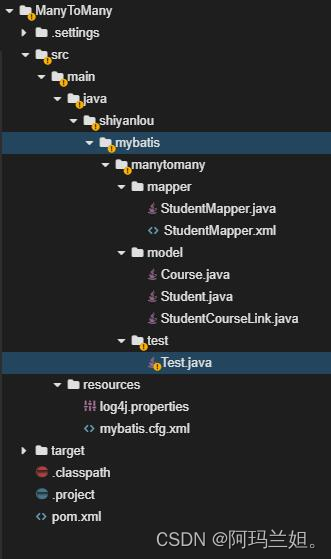
新建一个数据库并取名
mybatis,创建学生表 tb_student 并插入数据- create table tb_student(
- s_id int primary key auto_increment,
- s_name varchar(20),
- s_sex varchar(10),
- s_age int);
- insert into tb_student(s_name,s_sex,s_age) values('Tom','male',18);
- insert into tb_student(s_name,s_sex,s_age) values('Jack','male',19);
创建课程表 tb_course 并插入数据
- create table tb_course(
- c_id int primary key auto_increment,
- c_name varchar(20),
- c_credit int);
- insert into tb_course(c_name,c_credit) values('Math',5);
- insert into tb_course(c_name,c_credit) values('Computer',4);
由于学生和课程是多对多的关联关系,因此创建中间表:选课表 tb_select_course 并插入数据
- create table tb_select_course(
- sc_s_id int,
- sc_c_id int,
- sc_date date,
- primary key(sc_s_id,sc_c_id),
- foreign key(sc_s_id) references tb_student(s_id),
- foreign key(sc_c_id) references tb_course(c_id));
- insert into tb_select_course(sc_s_id,sc_c_id,sc_date) values(1,1,'2017-03-01');
- insert into tb_select_course(sc_s_id,sc_c_id,sc_date) values(1,2,'2017-03-01');
- insert into tb_select_course(sc_s_id,sc_c_id,sc_date) values(2,1,'2017-03-02');
- insert into tb_select_course(sc_s_id,sc_c_id,sc_date) values(2,2,'2017-03-02');
新建项目
ManyToMany。导入所需 jar 包,打开 pom.xml,修改为以下内容(前两个没加,感觉没必要,如果需要,就看这样照着改一下)
- <project xmlns="http://maven.apache.org/POM/4.0.0" xmlns:xsi="http://www.w3.org/2001/XMLSchema-instance"
- xsi:schemaLocation="http://maven.apache.org/POM/4.0.0 http://maven.apache.org/maven-v4_0_0.xsd">
- <modelVersion>4.0.0</modelVersion>
- <groupId>shiyanlou.mybatis.manytomany</groupId>
- <artifactId>ManyToMany</artifactId>
- <packaging>jar</packaging>
- <version>1.0-SNAPSHOT</version>
- <name>ManyToMany</name>
- <url>http://maven.apache.org</url>
- <dependencies>
- <dependency>
- <groupId>org.mybatis</groupId>
- <artifactId>mybatis</artifactId>
- <version>3.4.6</version>
- </dependency>
- <dependency>
- <groupId>mysql</groupId>
- <artifactId>mysql-connector-java</artifactId>
- <version>6.0.6</version>
- </dependency>
- <dependency>
- <groupId>log4j</groupId>
- <artifactId>log4j</artifactId>
- <version>1.2.17</version>
- </dependency>
- </dependencies>
- <build>
- <resources>
- <resource>
- <directory>src/main/java</directory>
- <includes>
- <include>**/*.xml</include>
- </includes>
- </resource>
- <resource>
- <directory>src/main/resources</directory>
- <includes>
- <include>**/*.*</include>
- </includes>
- </resource>
- </resources>
- </build>
- </project>
实体类
在
src/main/java的包shiyanlou.mybatis.manytomany.model下新建类 Student.java,一个学生具有id、name、sex、age、courses(List属性。学生和课程之间是多对多关系,一个学生可以选多门课。) Student.java 的代码如下:
- package shiyanlou.mybatis.manytomany.model;
- import java.util.List;
- public class Student {
- private Integer id;
- private String name;
- private String sex;
- private Integer age;
- private List<Course> courses;
- public Student() {
- }
- public Student(Integer id, String name, String sex, Integer age,List<Course> courses) {
- this.id = id;
- this.name = name;
- this.sex = sex;
- this.age = age;
- this.courses = courses;
- }
- public Integer getId() {
- return id;
- }
- public void setId(Integer id) {
- this.id = id;
- }
- public String getName() {
- return name;
- }
- public void setName(String name) {
- this.name = name;
- }
- public String getSex() {
- return sex;
- }
- public void setSex(String sex) {
- this.sex = sex;
- }
- public Integer getAge() {
- return age;
- }
- public void setAge(Integer age) {
- this.age = age;
- }
- public List<Course> getCourses() {
- return courses;
- }
- public void setCourses(List
courses ) { - this.courses = courses;
- }
- }
再在包
shiyanlou.mybatis.manytomany.model下新建类 Course.java,一个班级有id,name,credit、students(List属性。课程和学生之间是多对多关系,一个课程可以由多个学生选。) Course.java 的代码如下:
- package shiyanlou.mybatis.manytomany.model;
- import java.util.List;
- public class Course {
- private Integer id;
- private String name;
- private Integer credit;
- private List<Student> students;
- public Course() {
- }
- public Course(Integer id, String name, Integer credit,
- List<Student> students) {
- this.id = id;
- this.name = name;
- this.credit = credit;
- this.students = students;
- }
- public Integer getId() {
- return id;
- }
- public void setId(Integer id) {
- this.id = id;
- }
- public String getName() {
- return name;
- }
- public void setName(String name) {
- this.name = name;
- }
- public Integer getCredit() {
- return credit;
- }
- public void setCredit(Integer credit) {
- this.credit = credit;
- }
- public List<Student> getStudents() {
- return students;
- }
- public void setStudents(List
students ) { - this.students = students;
- }
- }
最后在包
shiyanlou.mybatis.manytomany.model下新建类 StudentCourseLink.java,用来描述学生和课程之间的关系,其包含student(Student)、course(Course)、date属性。- package shiyanlou.mybatis.manytomany.model;
- import java.util.Date;
- public class StudentCourseLink {
- private Student student;
- private Course course;
- private Date date;
- public StudentCourseLink() {
- }
- public StudentCourseLink(Student student, Course course, Date date) {
- this.student = student;
- this.course = course;
- this.date = date;
- }
- public Student getStudent() {
- return student;
- }
- public void setStudent(Student student) {
- this.student = student;
- }
- public Course getCourse() {
- return course;
- }
- public void setCourse(Course course) {
- this.course = course;
- }
- public Date getDate() {
- return date;
- }
- public void setDate(Date date) {
- this.date = date;
- }
- }
创建方法接口和定义映射文件
新建包
shiyanlou.mybatis.manytomany.mapper,并在包下新建方法接口 StudentMapper.java。StudentMapper 接口的代码如下:
- package shiyanlou.mybatis.manytomany.mapper;
- import shiyanlou.mybatis.manytomany.model.Student;
- import shiyanlou.mybatis.manytomany.model.StudentCourseLink;
- import java.util.List;
- public interface StudentMapper {
- /*
- * 查询所有学生及他们的选择课程的信息
- * @return
- * @throws Exception
- */
- public List
selectStudentCourse() throws Exception; - /*
- * 删除指定 id 用户的某门课(根据课程 id)的选课情况
- * @param StudentCourseLink
- * @throws Exception
- */
- public void deleteStudentCourseById(StudentCourseLink scLink) throws Exception;
- }
在包
shiyanlou.mybatis.onetomany.mapper下新建映射文件StudentMapper.xml,映射文件与接口名相同。StudentMapper.xml 的配置如下:
- <?xml version="1.0" encoding="UTF-8"?>
- <!DOCTYPE mapper PUBLIC "-//mybatis.org/DTD Mapper 3.0" "http://mybatis.org/dtd/mybatis-3-mapper.dtd">
- <mapper namespace="shiyanlou.mybatis.manytomany.mapper.StudentMapper">
- <!-- 查询所有学生及他们的选择课程的信息 -->
- <select id="selectStudentCourse" resultMap="studentCourseMap">
- select
- s.*,c.* from
- tb_student s,tb_course c,tb_select_course sc
- where s.s_id=sc.sc_s_id
- and c.c_id=sc.sc_c_id
- </select>
- <!-- 根据学生 id 和课程 id 删除该学生该门课的选课情况 -->
- <delete id="deleteStudentCourseById" parameterType="StudentCourseLink">
- delete from tb_select_course where sc_s_id=#{student.id} and sc_c_id=#{course.id}
- </delete>
- <!-- resultMap: 映射实体类和字段之间的一一对应的关系 -->
- <resultMap id="studentCourseMap" type="Student">
- <id property="id" column="s_id" />
- <result property="name" column="s_name" />
- <result property="sex" column="s_sex" />
- <result property="age" column="s_age" />
- <!-- 多对多关联映射:collection -->
- <collection property="courses" ofType="Course">
- <id property="id" column="c_id" />
- <result property="name" column="c_name" />
- <result property="credit" column="c_credit" />
- </collection>
- </resultMap>
- </mapper>
在这里,采用的是集合的
嵌套结果映射的方式,使用了配置文件 mybatis.cfg.xml
在项目目录
src/main/resources下新建 MyBatis 配置文件mybatis.cfg.xml,用来配置 Mybatis 的运行环境、数据源、事务等。mybatis.cfg.xml 的配置如下,具体解释注释已经给出:
- "1.0" encoding="UTF-8"?>
- configuration PUBLIC "-//mybatis.org//DTD Config 3.0//EN" "http://mybatis.org/dtd/mybatis-3-config.dtd">
- <configuration>
- <typeAliases>
- <package name="shiyanlou.mybatis.manytomany.model" />
- typeAliases>
- <environments default="development">
- <environment id="development">
- <transactionManager type="JDBC" />
- <dataSource type="POOLED">
- <property name="driver" value="com.mysql.jdbc.Driver" />
- <property name="url" value="jdbc:mysql://localhost:3306/mybatis" />
- <property name="username" value="root" />
- <property name="password" value="" />
- dataSource>
- environment>
- environments>
- <mappers>
- <package name="shiyanlou.mybatis.manytomany.mapper" />
- mappers>
- configuration>
日志记录 log4j.properties
感觉也不必要
使用日志文件是为了查看控制台输出的 SQL 语句。
在项目目录
src/main/resources下新建 MyBatis 日志记录文件 log4j.properties ,在里面添加如下内容:- # Global logging configuration
- log4j.rootLogger=DEBUG, stdout
- # Console output...
- log4j.appender.stdout=org.apache.log4j.ConsoleAppender
- log4j.appender.stdout.layout=org.apache.log4j.PatternLayout
- log4j.appender.stdout.layout.ConversionPattern=%5p [%t] - %m%n
测试类 Test
在包
shiyanlou.mybatis.manytomany.test下新建测试类Test.java,代码如下:- package shiyanlou.mybatis.manytomany.test;
- import shiyanlou.mybatis.manytomany.mapper.StudentMapper;
- import shiyanlou.mybatis.manytomany.model.Course;
- import shiyanlou.mybatis.manytomany.model.Student;
- import shiyanlou.mybatis.manytomany.model.StudentCourseLink;
- import java.io.IOException;
- import java.io.InputStream;
- import java.util.List;
- import org.apache.ibatis.io.Resources;
- import org.apache.ibatis.session.SqlSession;
- import org.apache.ibatis.session.SqlSessionFactory;
- import org.apache.ibatis.session.SqlSessionFactoryBuilder;
- public class Test {
- private static SqlSessionFactory sqlSessionFactory;
- public static void main(String[] args) {
- // Mybatis 配置文件
- String resource = "mybatis.cfg.xml";
- // 得到配置文件流
- InputStream inputStream = null;
- try {
- inputStream = Resources.getResourceAsStream(resource);
- } catch (IOException e) {
- e.printStackTrace();
- }
- // 创建会话工厂,传入 MyBatis 的配置文件信息
- sqlSessionFactory = new SqlSessionFactoryBuilder().build(inputStream);
- selectStudentCourse();
- //deleteStudentCourseById();
- }
- // 查询所有学生及他们的选择课程的信息
- private static void selectStudentCourse(){
- // 通过工厂得到 SqlSession
- SqlSession session = sqlSessionFactory.openSession();
- StudentMapper mapper = session.getMapper(StudentMapper.class);
- try {
- List<Student> students = mapper.selectStudentCourse();
- session.commit();
- for(Student stu:students){
- System.out.println(stu.getId()+","+stu.getName()+","+stu.getSex()+","+stu.getAge()+":");
- List<Course> courses = stu.getCourses();
- for(Course cou:courses){
- System.out.println(cou.getId()+","+cou.getName()+","+cou.getCredit());
- }
- }
- } catch (Exception e) {
- e.printStackTrace();
- session.rollback();
- }
- // 释放资源
- session.close();
- }
- // 根据学生 id 和课程 id 删除该学生该门课的选课情况
- private static void deleteStudentCourseById(){
- SqlSession session = sqlSessionFactory.openSession();
- StudentMapper mapper = session.getMapper(StudentMapper.class);
- try {
- Student student = new Student();
- student.setId(1);
- Course course = new Course();
- course.setId(2);
- StudentCourseLink scLink = new StudentCourseLink();
- scLink.setStudent(student);
- scLink.setCourse(course);
- mapper.deleteStudentCourseById(scLink);
- session.commit();
- } catch (Exception e) {
- e.printStackTrace();
- session.rollback();
- }
- session.close();
- }
- }
运行测试类 Test.java。
-
相关阅读:
cglib FastClass机制
用Python采集世界杯球队热搜数据 并发送邮箱通知
密码技术 (3) - 单向散列函数
华为云2023年双十一服务器优惠价格表及活动大全
ai绘画部署教程
jQuery的使用
【博学谷学习记录】超强总结,用心分享丨大数据超神之路(五):Hadooop基础篇
服了,头条4面:因为一个问题问题砍了我10万薪水
Composite Patterns :如果想用表达 部分-整体的继承关系,组合模式一定是不二之选了
C#中的delegate和event,及他们的区别
- 原文地址:https://blog.csdn.net/m0_63297917/article/details/133251671
