-
react-route的路由
React-Router是一个基于React的强大路由库,它可以帮助我们在React应用中实现页面之间的跳转和路由管理。本文将详细介绍React-Router的路由功能、常用功能模块、路由传参和路由嵌套,并提供相关代码和解释。
路由功能
React-Router通过管理URL和组件的映射关系,可以帮助我们实现以下路由功能:
- 路由跳转:通过URL的改变,实现页面之间的跳转。
- 嵌套路由:将多个组件按照层次结构嵌套在一起,形成复杂的页面结构。
- 路由传参:将参数传递给组件,实现动态的页面展示。
- 路由守卫:在路由跳转前,进行权限验证或其他操作,控制页面的访问权限。
- 动态路由:根据URL的不同,动态地加载不同的组件。
常用功能模块
React-Router提供了多种功能模块,可以帮助我们实现路由管理。以下是常用的功能模块:
BrowserRouter
BrowserRouter是React-Router的核心组件之一,它使用HTML5的history API来实现路由跳转。在应用中只需要使用一个BrowserRouter组件即可。
import { BrowserRouter } from 'react-router-dom'; ReactDOM.render( <BrowserRouter> <App /> </BrowserRouter>, document.getElementById('root') );- 1
- 2
- 3
- 4
- 5
- 6
- 7
- 8
Route
Route组件是React-Router中最重要的组件之一,它用于将URL和组件进行映射。可以使用exact属性来指定精确匹配,使用path属性来指定URL路径,使用component属性来指定对应的组件。
import { Route } from 'react-router-dom'; <Route exact path="/" component={Home} /> <Route path="/about" component={About} /> <Route path="/contact" component={Contact} />- 1
- 2
- 3
- 4
- 5
Link
Link组件用于在应用中实现路由跳转,它可以生成一个可点击的链接,点击后会跳转到指定的URL路径。
import { Link } from 'react-router-dom'; <Link to="/">Home</Link> <Link to="/about">About</Link> <Link to="/contact">Contact</Link>- 1
- 2
- 3
- 4
- 5
Switch
Switch组件用于在多个Route组件中选择一个匹配的组件进行渲染。它会遍历所有的Route组件,找到第一个匹配的组件进行渲染。
import { Switch, Route } from 'react-router-dom'; <Switch> <Route exact path="/" component={Home} /> <Route path="/about" component={About} /> <Route path="/contact" component={Contact} /> </Switch>- 1
- 2
- 3
- 4
- 5
- 6
- 7
路由传参
React-Router可以通过URL参数的方式,将参数传递给组件。可以使用props.match.params来获取URL参数。
import { Route } from 'react-router-dom'; <Route path="/user/:id" component={User} /> class User extends React.Component { render() { const { id } = this.props.match.params; return <div>User ID: {id}</div>; } }- 1
- 2
- 3
- 4
- 5
- 6
- 7
- 8
- 9
- 10
<NavLink to="/home/router?like='结衣'&say=121212">路由组件的传参</NavLink>- 1
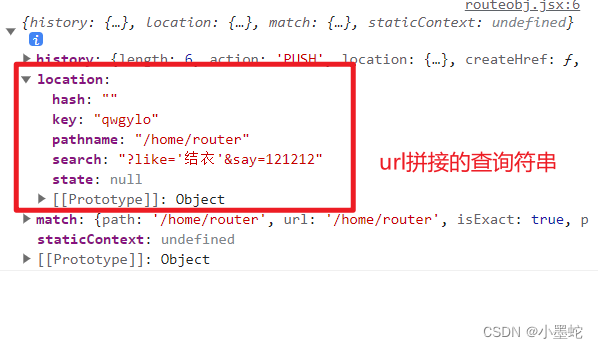
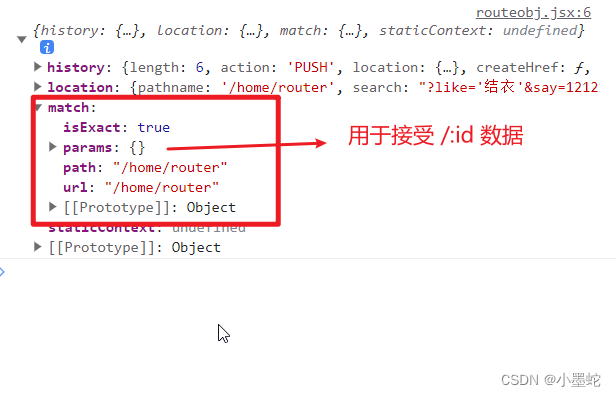
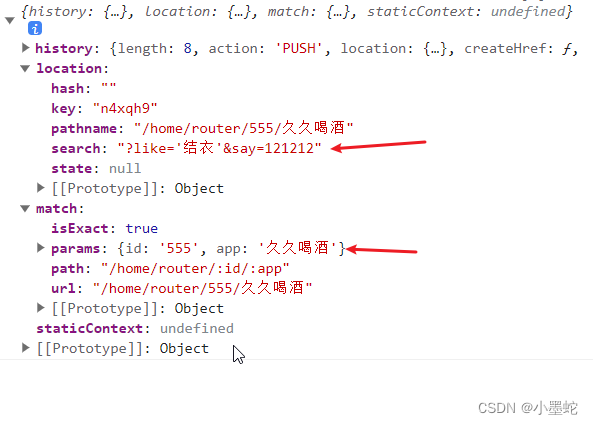
//跳转 <NavLink to="/home/router/555/久久喝酒?like='结衣'&say=121212">路由组件的传参</NavLink> //显示 <Route path={'/home/router/:id/:app'} component={Routeobj}></Route>- 1
- 2
- 3
- 4
<NavLink to={{pathname:"/home/router",search:"?like='结衣'&say=121212"}}>路由组件的传参</NavLink> <NavLink to={{pathname:"/home/router",state:{name:'影子'}}} >路由组件的传参</NavLink>- 1
- 2
路由嵌套
React-Router可以将多个组件按照层次结构嵌套在一起,形成复杂的页面结构。在父组件中使用Route组件来定义子组件的路由。
import { Route } from 'react-router-dom'; <Route path="/about" component={About}> <Route path="/about/history" component={History} /> <Route path="/about/team" component={Team} /> <Route path="/about/contact" component={Contact} /> </Route>- 1
- 2
- 3
- 4
- 5
- 6
- 7
以上就是React-Router的路由功能、常用功能模块、路由传参和路由嵌套的详细介绍。希望本文能够帮助您更好地了解React-Router,并在实际开发中使用它来实现路由管理。
-
相关阅读:
k8s部署rook ceph
中国象棋(人机)
物流企业的“海外战事”
【Python 千题 —— 基础篇】句子单词小写
已解决:云原生领域的超时挂载Bug — Kubernetes深度剖析
arcgis栅格按某列属性导出
[go]gg库绘图与添加文字
著者 许少辉 著. 乡村振兴战略下传统村落文化旅游设计 [专著] / 许少辉著中文文献总库 - 北京交通大学馆藏辉少许
git的基本使用1
金仓数据库KingbaseES运维工具参考手册(2. 通用环境变量参数文件)
- 原文地址:https://blog.csdn.net/weiyi47/article/details/132999742
- 最新文章
-
【FHE】我们如何实现同态加密推理(八):SiLU 的密文化——两条路径,和一个 8 字节的开关
SQLcl 中 c/old/new 替换变量为何失效?先定位再替换
不让模型写作文,直接从它脑子里读答案:Jev 决策在 .NET 的两条路线
Halo插件:支持GitHub的图床附件策略
电视投屏界的“一股清流”!SimpleTVCast 6.0.0-beta 抢先体验:无需TV端App,界面大换血!✨
华三VXLAN集中式网关实战指南:Spine多活网关 + 双活接入(M-LAG)
软件更好写之后口碑会更重要
大 O、大 Omega、大 Theta 的区别,O(n) 复杂度是什么意思
Java标签跳转:一个鲜为人知但却很实用的小技巧
多智能体系统论文速读