-
CockroachDB集群部署
CockroachDB集群部署
1、CockroachDB简介
CockroachDB(有时简称为CRDB)是一个免费的、开源的分布式 SQL 数据库,它建立在一个事务性和强一致性的键
值存储之上。它由 PebbleDB(一个受 RocksDB/leveldb 启发的 K/B 存储库)支持,并使用 Raft 分布式共识算法来
确保一致性。
官方文档:
https://www.cockroachlabs.com/docs/常用命令:
https://www.cockroachlabs.com/docs/v22.2/cockroach-commands2、集群安装环境准备
2.1 集群环境和数据库版本说明
# 操作系统 $ cat /etc/centos-release CentOS Linux release 7.9.2009 (Core)- 1
- 2
- 3
# 数据库安装版本:v22.1.0 # 数据库安装包:cockroach-v22.1.0.linux-amd64.tgz- 1
- 2
如果想要安装其它版本,可以去下面的地址进行下载:
https://www.cockroachlabs.com/docs/releases/index.html2.2 集群环境服务器规划
本次使用的是 3 台机虚拟机组成的集群,一主两备。
主机ip 主机name 角色 192.168.164.170 master master 192.168.164.171 slave1 slave1 192.168.164.172 slave2 slave2 192.168.164.173 slave3 slave3 192.168.164.174 slave4 slave4 2.3 关闭防火墙
# 停止防火墙 $ systemctl stop firewalld # 关闭防火墙 $ systemctl disable firewalld # 查看防火墙状态 $ systemctl status firewalld- 1
- 2
- 3
- 4
- 5
- 6
2.4 配置hosts
修改
/etc/hosts:$ cat <<EOF >> /etc/hosts 192.168.164.170 master 192.168.164.171 slave1 192.168.164.172 slave2 192.168.164.173 slave3 192.168.164.174 slave4 EOF- 1
- 2
- 3
- 4
- 5
- 6
- 7
确认是否成功,ping一下即可。
2.5 设置hostname
每台机器都需要设置 hostname。
# 每个节点分别设置 $ hostnamectl set-hostname master $ hostnamectl set-hostname slave1 $ hostnamectl set-hostname slave2 $ hostnamectl set-hostname slave3 $ hostnamectl set-hostname slave4- 1
- 2
- 3
- 4
- 5
- 6
# 查看设置是否生效 $ cat /etc/hostname- 1
- 2
3、CockroachDB安装(每个节点)
参考地址:
https://www.cockroachlabs.com/docs/v22.1/install-cockroachdb-linux3.1 安装包下载和解压
本文下载的版本:
https://binaries.cockroachdb.com/cockroach-v22.1.0.linux-amd64.tgzcd ~ mkdir software cd software curl https://binaries.cockroachdb.com/cockroach-v22.1.0.linux-amd64.tgz -o cockroach-v22.1.0.linux-amd64.tgz tar -xzvf cockroach-v22.1.0.linux-amd64.tgz cd cockroach-v22.1.0.linux-amd64 cp -i cockroach /usr/local/bin/- 1
- 2
- 3
- 4
- 5
- 6
- 7
$ which cockroach /usr/local/bin/cockroach- 1
- 2
$ cockroach --version cockroach version details: Build Tag: v22.1.0 Build Time: 2022/05/23 16:27:47 Distribution: CCL Platform: linux amd64 (x86_64-pc-linux-gnu) Go Version: go1.17.6 C Compiler: gcc 6.5.0 Build Commit ID: 5b78463ed2e7106a8477b63fa837564ad02bb510 Build Type: release (use 'cockroach version --build-tag' to display only the build tag)- 1
- 2
- 3
- 4
- 5
- 6
- 7
- 8
- 9
- 10
- 11
下面的三步是地理空间函数支持,如果不需要可以跳过。
3.2 创建外部存储库
mkdir -p /usr/local/lib/cockroach- 1
3.3 将库文件复制到外部存储库
cp -i lib/libgeos.so /usr/local/lib/cockroach/ cp -i lib/libgeos_c.so /usr/local/lib/cockroach/- 1
- 2
3.4 验证CockroachDB可以执行空间查询
# 在内存中建立一个临时的连接 $ cockroach demo- 1
- 2
# 执行SQL > SELECT ST_IsValid(ST_MakePoint(1,2));- 1
- 2
4、集群搭建
参考地址:
https://www.cockroachlabs.com/docs/stable/start-a-local-cluster.html4.1 master节点启动集群
[root@master ~]# cockroach start --insecure --store=master --listen-addr=192.168.164.170:26257 --http-addr=192.168.164.170:8080 --join=192.168.164.170:26257,192.168.164.171:26258,192.168.164.172:26259 --background * * WARNING: ALL SECURITY CONTROLS HAVE BEEN DISABLED! * * This mode is intended for non-production testing only. * * In this mode: * - Your cluster is open to any client that can access 192.168.164.170. * - Intruders with access to your machine or network can observe client-server traffic. * - Intruders can log in without password and read or write any data in the cluster. * - Intruders can consume all your server's resources and cause unavailability. * * * INFO: To start a secure server without mandating TLS for clients, * consider --accept-sql-without-tls instead. For other options, see: * * - https://go.crdb.dev/issue-v/53404/v22.1 * - https://www.cockroachlabs.com/docs/v22.1/secure-a-cluster.html * * * INFO: initial startup completed. * Node will now attempt to join a running cluster, or wait for `cockroach init`. * Client connections will be accepted after this completes successfully. * Check the log file(s) for progress. *- 1
- 2
- 3
- 4
- 5
- 6
- 7
- 8
- 9
- 10
- 11
- 12
- 13
- 14
- 15
- 16
- 17
- 18
- 19
- 20
- 21
- 22
- 23
- 24
- 25
可选参数介绍:
https://www.cockroachlabs.com/docs/v22.2/cockroach-start#flags下面是一些常用的参数:
--insecure:表示通信数据未被加密,不安全。--listen-addr:表示数据库实例的监听地址。--http-addr:表示数据库实例 web 端的管理地址。--store:表示数据存放路径,默认为执行命令时的当前路径下的 cockroach-data 文件夹下(如果没有该文件夹则会自动创建)。
--join:表示集群初始化时所有集群中的节点。--background:表示在后台启动进程,您可以继续使用同一终端进行其他操作。# 查看进程 [root@master ~]# ps -ef | grep cockroach root 55463 1 2 13:37 pts/1 00:00:01 cockroach start --insecure --store=master --listen-addr=192.168.164.170:26257 --http-addr=192.168.164.170:8080 --join=192.168.164.170:26257,192.168.164.171:26258,192.168.164.172:26259 root 55817 42150 0 13:38 pts/1 00:00:00 grep --color=auto cockroach- 1
- 2
- 3
- 4
4.2 slave1节点启动集群
[root@slave1 ~]# cockroach start --insecure --store=slave1 --listen-addr=192.168.164.171:26258 --http-addr=192.168.164.171:8081 --join=192.168.164.170:26257,192.168.164.171:26258,192.168.164.172:26259 --background * * WARNING: ALL SECURITY CONTROLS HAVE BEEN DISABLED! * * This mode is intended for non-production testing only. * * In this mode: * - Your cluster is open to any client that can access 192.168.164.171. * - Intruders with access to your machine or network can observe client-server traffic. * - Intruders can log in without password and read or write any data in the cluster. * - Intruders can consume all your server's resources and cause unavailability. * * * INFO: To start a secure server without mandating TLS for clients, * consider --accept-sql-without-tls instead. For other options, see: * * - https://go.crdb.dev/issue-v/53404/v22.1 * - https://www.cockroachlabs.com/docs/v22.1/secure-a-cluster.html * * * INFO: initial startup completed. * Node will now attempt to join a running cluster, or wait for `cockroach init`. * Client connections will be accepted after this completes successfully. * Check the log file(s) for progress. *- 1
- 2
- 3
- 4
- 5
- 6
- 7
- 8
- 9
- 10
- 11
- 12
- 13
- 14
- 15
- 16
- 17
- 18
- 19
- 20
- 21
- 22
- 23
- 24
- 25
查看进程:
[root@slave1 ~]# ps -ef | grep cockroach root 18247 1 4 13:40 pts/1 00:00:03 cockroach start --insecure --store=slave1 --listen-addr=192.168.164.171:26258 --http-addr=192.168.164.171:8081 --join=192.168.164.170:26257,192.168.164.171:26258,192.168.164.172:26259 root 18442 15594 0 13:41 pts/1 00:00:00 grep --color=auto cockroach- 1
- 2
- 3
4.3 slave2节点启动集群
[root@slave2 ~]# cockroach start --insecure --store=slave2 --listen-addr=192.168.164.172:26259 --http-addr=192.168.164.172:8082 --join=192.168.164.170:26257,192.168.164.171:26258,192.168.164.172:26259 --background * * WARNING: ALL SECURITY CONTROLS HAVE BEEN DISABLED! * * This mode is intended for non-production testing only. * * In this mode: * - Your cluster is open to any client that can access 192.168.164.172. * - Intruders with access to your machine or network can observe client-server traffic. * - Intruders can log in without password and read or write any data in the cluster. * - Intruders can consume all your server's resources and cause unavailability. * * * INFO: To start a secure server without mandating TLS for clients, * consider --accept-sql-without-tls instead. For other options, see: * * - https://go.crdb.dev/issue-v/53404/v22.1 * - https://www.cockroachlabs.com/docs/v22.1/secure-a-cluster.html * * * INFO: initial startup completed. * Node will now attempt to join a running cluster, or wait for `cockroach init`. * Client connections will be accepted after this completes successfully. * Check the log file(s) for progress. *- 1
- 2
- 3
- 4
- 5
- 6
- 7
- 8
- 9
- 10
- 11
- 12
- 13
- 14
- 15
- 16
- 17
- 18
- 19
- 20
- 21
- 22
- 23
- 24
- 25
查看进程:
[root@slave2 ~]# ps -ef | grep cockroach root 31015 1 5 13:40 pts/1 00:00:04 cockroach start --insecure --store=slave2 --listen-addr=192.168.164.172:26259 --http-addr=192.168.164.172:8081 --join=192.168.164.170:26257,192.168.164.171:26258,192.168.164.172:26259 root 31422 19727 0 13:42 pts/1 00:00:00 grep --color=auto cockroach- 1
- 2
- 3
4.4 集群初始化(master节点)
[root@master ~]# cockroach init --insecure --host=192.168.164.170:26257 Cluster successfully initialized- 1
- 2
使用
cockroach init命令执行集群的一次性初始化,将请求发送到--join列表中的任何节点。可以查看启动日志:
[root@master ~]# grep 'node starting' master/logs/cockroach.log -A 11 I230423 05:42:59.759084 64 1@cli/start.go:1028 ⋮ [n1] 555 +CockroachDB node starting at 2023-04-23 05:42:59.758971263 +0000 UTC (took 309.5s) I230423 05:42:59.759084 64 1@cli/start.go:1028 ⋮ [n1] 555 +build: CCL v22.1.0 @ 2022/05/23 16:27:47 (go1.17.6) I230423 05:42:59.759084 64 1@cli/start.go:1028 ⋮ [n1] 555 +webui: ‹http://192.168.164.170:8080› I230423 05:42:59.759084 64 1@cli/start.go:1028 ⋮ [n1] 555 +sql: ‹postgresql://root@192.168.164.170:26257/defaultdb?sslmode=disable› I230423 05:42:59.759084 64 1@cli/start.go:1028 ⋮ [n1] 555 +sql (JDBC): ‹jdbc:postgresql://192.168.164.170:26257/defaultdb?sslmode=disable&user=root› I230423 05:42:59.759084 64 1@cli/start.go:1028 ⋮ [n1] 555 +RPC client flags: ‹cockroach <client cmd> --host=192.168.164.170:26257 --insecure› I230423 05:42:59.759084 64 1@cli/start.go:1028 ⋮ [n1] 555 +logs: ‹/root/master/logs› I230423 05:42:59.759084 64 1@cli/start.go:1028 ⋮ [n1] 555 +temp dir: ‹/root/master/cockroach-temp755285367› I230423 05:42:59.759084 64 1@cli/start.go:1028 ⋮ [n1] 555 +external I/O path: ‹/root/master/extern› I230423 05:42:59.759084 64 1@cli/start.go:1028 ⋮ [n1] 555 +store[0]: ‹path=/root/master› I230423 05:42:59.759084 64 1@cli/start.go:1028 ⋮ [n1] 555 +storage engine: pebble I230423 05:42:59.759084 64 1@cli/start.go:1028 ⋮ [n1] 555 +clusterID: ‹19278025-71b4-4162-b8cc-12e692867f40›- 1
- 2
- 3
- 4
- 5
- 6
- 7
- 8
- 9
- 10
- 11
- 12
- 13
[root@slave1 ~]# grep 'node starting' slave1/logs/cockroach.log -A 11 I230423 05:42:59.792531 49 1@cli/start.go:1028 ⋮ [n2] 249 +CockroachDB node starting at 2023-04-23 05:42:59.792449189 +0000 UTC (took 165.2s) I230423 05:42:59.792531 49 1@cli/start.go:1028 ⋮ [n2] 249 +build: CCL v22.1.0 @ 2022/05/23 16:27:47 (go1.17.6) I230423 05:42:59.792531 49 1@cli/start.go:1028 ⋮ [n2] 249 +webui: ‹http://192.168.164.171:8081› I230423 05:42:59.792531 49 1@cli/start.go:1028 ⋮ [n2] 249 +sql: ‹postgresql://root@192.168.164.171:26258/defaultdb?sslmode=disable› I230423 05:42:59.792531 49 1@cli/start.go:1028 ⋮ [n2] 249 +sql (JDBC): ‹jdbc:postgresql://192.168.164.171:26258/defaultdb?sslmode=disable&user=root› I230423 05:42:59.792531 49 1@cli/start.go:1028 ⋮ [n2] 249 +RPC client flags: ‹cockroach <client cmd> --host=192.168.164.171:26258 --insecure› I230423 05:42:59.792531 49 1@cli/start.go:1028 ⋮ [n2] 249 +logs: ‹/root/slave1/logs› I230423 05:42:59.792531 49 1@cli/start.go:1028 ⋮ [n2] 249 +temp dir: ‹/root/slave1/cockroach-temp267500894› I230423 05:42:59.792531 49 1@cli/start.go:1028 ⋮ [n2] 249 +external I/O path: ‹/root/slave1/extern› I230423 05:42:59.792531 49 1@cli/start.go:1028 ⋮ [n2] 249 +store[0]: ‹path=/root/slave1› I230423 05:42:59.792531 49 1@cli/start.go:1028 ⋮ [n2] 249 +storage engine: pebble I230423 05:42:59.792531 49 1@cli/start.go:1028 ⋮ [n2] 249 +clusterID: ‹19278025-71b4-4162-b8cc-12e692867f40›- 1
- 2
- 3
- 4
- 5
- 6
- 7
- 8
- 9
- 10
- 11
- 12
- 13
[root@slave2 ~]# grep 'node starting' slave2/logs/cockroach.log -A 11 I230423 05:43:00.067598 72 1@cli/start.go:1028 ⋮ [n3] 196 +CockroachDB node starting at 2023-04-23 05:43:00.067426003 +0000 UTC (took 129.2s) I230423 05:43:00.067598 72 1@cli/start.go:1028 ⋮ [n3] 196 +build: CCL v22.1.0 @ 2022/05/23 16:27:47 (go1.17.6) I230423 05:43:00.067598 72 1@cli/start.go:1028 ⋮ [n3] 196 +webui: ‹http://192.168.164.172:8082› I230423 05:43:00.067598 72 1@cli/start.go:1028 ⋮ [n3] 196 +sql: ‹postgresql://root@192.168.164.172:26259/defaultdb?sslmode=disable› I230423 05:43:00.067598 72 1@cli/start.go:1028 ⋮ [n3] 196 +sql (JDBC): ‹jdbc:postgresql://192.168.164.172:26259/defaultdb?sslmode=disable&user=root› I230423 05:43:00.067598 72 1@cli/start.go:1028 ⋮ [n3] 196 +RPC client flags: ‹cockroach <client cmd> --host=192.168.164.172:26259 --insecure› I230423 05:43:00.067598 72 1@cli/start.go:1028 ⋮ [n3] 196 +logs: ‹/root/slave2/logs› I230423 05:43:00.067598 72 1@cli/start.go:1028 ⋮ [n3] 196 +temp dir: ‹/root/slave2/cockroach-temp3856293659› I230423 05:43:00.067598 72 1@cli/start.go:1028 ⋮ [n3] 196 +external I/O path: ‹/root/slave2/extern› I230423 05:43:00.067598 72 1@cli/start.go:1028 ⋮ [n3] 196 +store[0]: ‹path=/root/slave2› I230423 05:43:00.067598 72 1@cli/start.go:1028 ⋮ [n3] 196 +storage engine: pebble I230423 05:43:00.067598 72 1@cli/start.go:1028 ⋮ [n3] 196 +clusterID: ‹19278025-71b4-4162-b8cc-12e692867f40›- 1
- 2
- 3
- 4
- 5
- 6
- 7
- 8
- 9
- 10
- 11
- 12
- 13
4.5 使用内置的SQL客户端
[root@master ~]# cockroach sql --insecure --host=192.168.164.170:26257 # # Welcome to the CockroachDB SQL shell. # All statements must be terminated by a semicolon. # To exit, type: \q. # # Server version: CockroachDB CCL v22.1.0 (x86_64-pc-linux-gnu, built 2022/05/23 16:27:47, go1.17.6) (same version as client) # Cluster ID: 19278025-71b4-4162-b8cc-12e692867f40 # # Enter \? for a brief introduction. # root@192.168.164.170:26257/defaultdb> CREATE DATABASE bank; CREATE DATABASE Time: 23ms total (execution 23ms / network 0ms) root@192.168.164.170:26257/defaultdb> CREATE TABLE bank.accounts (id INT PRIMARY KEY, balance DECIMAL); CREATE TABLE Time: 25ms total (execution 25ms / network 0ms) root@192.168.164.170:26257/defaultdb> INSERT INTO bank.accounts VALUES (1, 1000.50); INSERT 1 Time: 32ms total (execution 32ms / network 0ms) root@192.168.164.170:26257/defaultdb> SELECT * FROM bank.accounts; id | balance -----+---------- 1 | 1000.50 (1 row) Time: 1ms total (execution 1ms / network 0ms) root@192.168.164.170:26257/defaultdb> \q- 1
- 2
- 3
- 4
- 5
- 6
- 7
- 8
- 9
- 10
- 11
- 12
- 13
- 14
- 15
- 16
- 17
- 18
- 19
- 20
- 21
- 22
- 23
- 24
- 25
- 26
- 27
- 28
- 29
- 30
- 31
- 32
- 33
- 34
- 35
- 36
- 37
- 38
- 39
[root@slave1 ~]# cockroach sql --insecure --host=192.168.164.171:26258 # # Welcome to the CockroachDB SQL shell. # All statements must be terminated by a semicolon. # To exit, type: \q. # # Server version: CockroachDB CCL v22.1.0 (x86_64-pc-linux-gnu, built 2022/05/23 16:27:47, go1.17.6) (same version as client) # Cluster ID: 19278025-71b4-4162-b8cc-12e692867f40 # # Enter \? for a brief introduction. # root@192.168.164.171:26258/defaultdb> SELECT * FROM bank.accounts; id | balance -----+---------- 1 | 1000.50 (1 row) Time: 37ms total (execution 37ms / network 0ms) root@192.168.164.171:26258/defaultdb> \q- 1
- 2
- 3
- 4
- 5
- 6
- 7
- 8
- 9
- 10
- 11
- 12
- 13
- 14
- 15
- 16
- 17
- 18
- 19
- 20
- 21
[root@slave2 ~]# cockroach sql --insecure --host=192.168.164.172:26259 # # Welcome to the CockroachDB SQL shell. # All statements must be terminated by a semicolon. # To exit, type: \q. # # Server version: CockroachDB CCL v22.1.0 (x86_64-pc-linux-gnu, built 2022/05/23 16:27:47, go1.17.6) (same version as client) # Cluster ID: 19278025-71b4-4162-b8cc-12e692867f40 # # Enter \? for a brief introduction. # root@192.168.164.172:26259/defaultdb> SELECT * FROM bank.accounts; id | balance -----+---------- 1 | 1000.50 (1 row) Time: 2ms total (execution 2ms / network 0ms) root@192.168.164.172:26259/defaultdb> \q- 1
- 2
- 3
- 4
- 5
- 6
- 7
- 8
- 9
- 10
- 11
- 12
- 13
- 14
- 15
- 16
- 17
- 18
- 19
- 20
- 21
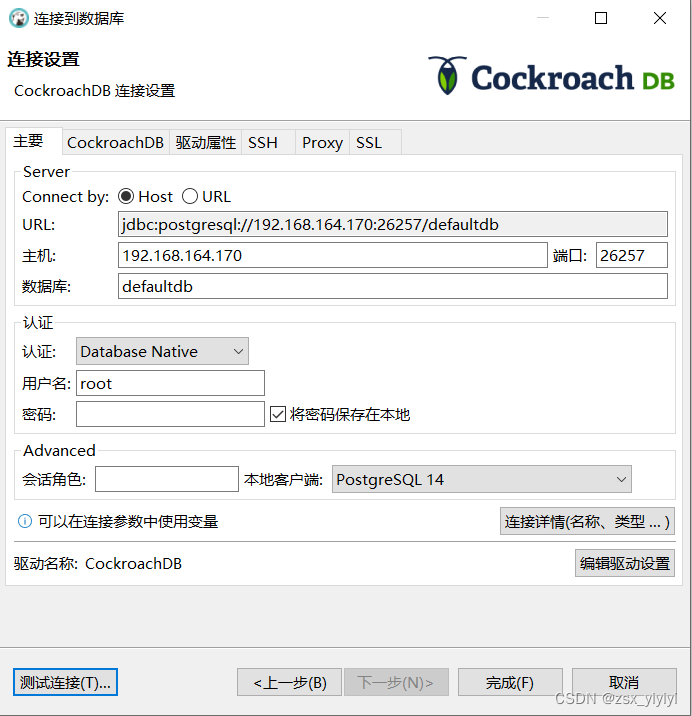
4.6 使用dbeaver进行连接


4.7 运行一个简单的工作负载
CockroachDB 还附带了许多用于模拟客户端流量的内置工作负载,让我们运行基于 CockroachDB 的示例车辆共
享应用程序 MovR 的工作负载。
1、加载初始数据集:
[root@master ~]# cockroach workload init movr 'postgresql://root@192.168.164.170:26257?sslmode=disable' I230423 05:49:57.284356 1 workload/workloadsql/dataload.go:146 [-] 1 imported users (0s, 50 rows) I230423 05:49:57.298137 1 workload/workloadsql/dataload.go:146 [-] 2 imported vehicles (0s, 15 rows) I230423 05:49:57.342088 1 workload/workloadsql/dataload.go:146 [-] 3 imported rides (0s, 500 rows) I230423 05:49:57.389217 1 workload/workloadsql/dataload.go:146 [-] 4 imported vehicle_location_histories (0s, 1000 rows) I230423 05:49:57.450854 1 workload/workloadsql/dataload.go:146 [-] 5 imported promo_codes (0s, 1000 rows) I230423 05:49:57.470483 1 workload/workloadsql/dataload.go:146 [-] 6 imported user_promo_codes (0s, 5 rows) I230423 05:49:57.506481 1 workload/workloadsql/workloadsql.go:136 [-] 7 starting 8 splits I230423 05:49:57.695964 1 workload/workloadsql/workloadsql.go:136 [-] 8 starting 8 splits I230423 05:49:57.899969 1 workload/workloadsql/workloadsql.go:136 [-] 9 starting 8 splits- 1
- 2
- 3
- 4
- 5
- 6
- 7
- 8
- 9
- 10
2、运行工作负载5分钟:
[root@master ~]# cockroach workload run movr --duration=5m 'postgresql://root@192.168.164.170:26257?sslmode=disable' I230423 05:54:34.453949 1 workload/cli/run.go:414 [-] 1 creating load generator... I230423 05:54:34.454167 1 workload/cli/run.go:445 [-] 2 creating load generator... done (took 221.841µs) _elapsed___errors__ops/sec(inst)___ops/sec(cum)__p50(ms)__p95(ms)__p99(ms)_pMax(ms) 1.0s 0 7.0 7.0 4.2 10.0 10.0 10.0 addUser 1.0s 0 2.0 2.0 8.1 8.9 8.9 8.9 addVehicle 1.0s 0 6.0 6.0 7.3 11.5 11.5 11.5 applyPromoCode 1.0s 0 3.0 3.0 3.0 4.7 4.7 4.7 createPromoCode 1.0s 0 3.0 3.0 5.5 6.3 6.3 6.3 endRide 1.0s 0 452.4 452.6 0.7 1.3 2.0 6.8 readVehicles 1.0s 0 10.0 10.0 14.2 17.8 17.8 17.8 startRide 1.0s 0 31.0 31.0 8.4 37.7 39.8 39.8 updateActiveRides ......- 1
- 2
- 3
- 4
- 5
- 6
- 7
- 8
- 9
- 10
- 11
- 12
- 13
4.8 访问数据库控制台
CockroachDB 控制台让您深入了解集群的整体健康状况以及客户端工作负载的性能。
访问地址:
http://192.168.164.170:8080在
Overview中,请注意有三个节点处于活动状态,每个节点上具有相同的副本计数:
单击
Metrics可访问各种时间序列仪表板,包括SQL查询和服务延迟随时间变化的图表:
使用Databases、SQL Activity和Jobs可以分别查看数据库和表的详细信息,评估特定查询的性能,以及监视长时间运行的操作(如架构更改)的状态。


4.9 模拟节点维护
在新终端中,优雅地关闭节点,这通常在节点维护之前完成。
获取节点的进程ID:
[root@master ~]# ps -ef | grep cockroach | grep -v grep root 55463 1 12 13:37 pts/1 00:02:54 cockroach start --insecure --store=master --listen-addr=192.168.164.170:26257 --http-addr=192.168.164.170:8080 --join=192.168.164.170:26257,192.168.164.171:26258,192.168.164.172:26259- 1
- 2
[root@slave1 ~]# ps -ef | grep cockroach | grep -v grep root 18247 1 9 13:40 pts/1 00:01:55 cockroach start --insecure --store=slave1 --listen-addr=192.168.164.171:26258 --http-addr=192.168.164.171:8081 --join=192.168.164.170:26257,192.168.164.171:26258,192.168.164.172:26259- 1
- 2
[root@slave2 ~]# ps -ef | grep cockroach | grep -v grep root 31015 1 10 13:40 pts/1 00:02:05 cockroach start --insecure --store=slave2 --listen-addr=192.168.164.172:26259 --http-addr=192.168.164.172:8081 --join=192.168.164.170:26257,192.168.164.171:26258,192.168.164.172:26259- 1
- 2
关闭掉
slave2节点:[root@slave2 ~]# kill -TERM 31015 [root@slave2 ~]# initiating graceful shutdown of server server drained and shutdown completed- 1
- 2
- 3
回到数据库控制台,尽管有一个节点是可疑的,但请注意持续的SQL流量:

重新启动slave2:[root@slave2 ~]# cockroach start --insecure --store=slave2 --listen-addr=192.168.164.172:26259 --http-addr=192.168.164.172:8081 --join=192.168.164.170:26257,192.168.164.171:26258,192.168.164.172:26259 --background * * WARNING: ALL SECURITY CONTROLS HAVE BEEN DISABLED! * * This mode is intended for non-production testing only. * * In this mode: * - Your cluster is open to any client that can access 192.168.164.172. * - Intruders with access to your machine or network can observe client-server traffic. * - Intruders can log in without password and read or write any data in the cluster. * - Intruders can consume all your server's resources and cause unavailability. * * * INFO: To start a secure server without mandating TLS for clients, * consider --accept-sql-without-tls instead. For other options, see: * * - https://go.crdb.dev/issue-v/53404/v22.1 * - https://www.cockroachlabs.com/docs/v22.1/secure-a-cluster.html *- 1
- 2
- 3
- 4
- 5
- 6
- 7
- 8
- 9
- 10
- 11
- 12
- 13
- 14
- 15
- 16
- 17
- 18
- 19
4.10 缩放群集
增加容量非常简单,再启动2个节点:
[root@slave3 ~]# cockroach start --insecure --store=slave3 --listen-addr=192.168.164.173:26260 --http-addr=192.168.164.173:8083 --join=192.168.164.170:26257,192.168.164.171:26258,192.168.164.172:26259 --background * * WARNING: ALL SECURITY CONTROLS HAVE BEEN DISABLED! * * This mode is intended for non-production testing only. * * In this mode: * - Your cluster is open to any client that can access 192.168.164.173. * - Intruders with access to your machine or network can observe client-server traffic. * - Intruders can log in without password and read or write any data in the cluster. * - Intruders can consume all your server's resources and cause unavailability. * * * INFO: To start a secure server without mandating TLS for clients, * consider --accept-sql-without-tls instead. For other options, see: * * - https://go.crdb.dev/issue-v/53404/v22.1 * - https://www.cockroachlabs.com/docs/v22.1/secure-a-cluster.html * * * INFO: initial startup completed. * Node will now attempt to join a running cluster, or wait for `cockroach init`. * Client connections will be accepted after this completes successfully. * Check the log file(s) for progress. * [root@slave3 ~]# ps -ef | grep cockroach root 3834 1 23 14:43 pts/0 00:00:04 cockroach start --insecure --store=slave3 --listen-addr=192.168.164.173:26260 --http-addr=192.168.164.173:8083 --join=192.168.164.170:26257,192.168.164.171:26258,192.168.164.172:26259 root 3967 2870 0 14:43 pts/0 00:00:00 grep --color=auto cockroach [root@slave3 ~]# grep 'node starting' slave3/logs/cockroach.log -A 11 I230423 06:43:04.532190 77 1@cli/start.go:1028 ⋮ [n4] 62 +CockroachDB node starting at 2023-04-23 06:43:04.532073647 +0000 UTC (took 0.2s) I230423 06:43:04.532190 77 1@cli/start.go:1028 ⋮ [n4] 62 +build: CCL v22.1.0 @ 2022/05/23 16:27:47 (go1.17.6) I230423 06:43:04.532190 77 1@cli/start.go:1028 ⋮ [n4] 62 +webui: ‹http://192.168.164.173:8083› I230423 06:43:04.532190 77 1@cli/start.go:1028 ⋮ [n4] 62 +sql: ‹postgresql://root@192.168.164.173:26260/defaultdb?sslmode=disable› I230423 06:43:04.532190 77 1@cli/start.go:1028 ⋮ [n4] 62 +sql (JDBC): ‹jdbc:postgresql://192.168.164.173:26260/defaultdb?sslmode=disable&user=root› I230423 06:43:04.532190 77 1@cli/start.go:1028 ⋮ [n4] 62 +RPC client flags: ‹cockroach <client cmd> --host=192.168.164.173:26260 --insecure› I230423 06:43:04.532190 77 1@cli/start.go:1028 ⋮ [n4] 62 +logs: ‹/root/slave3/logs› I230423 06:43:04.532190 77 1@cli/start.go:1028 ⋮ [n4] 62 +temp dir: ‹/root/slave3/cockroach-temp3567256357› I230423 06:43:04.532190 77 1@cli/start.go:1028 ⋮ [n4] 62 +external I/O path: ‹/root/slave3/extern› I230423 06:43:04.532190 77 1@cli/start.go:1028 ⋮ [n4] 62 +store[0]: ‹path=/root/slave3› I230423 06:43:04.532190 77 1@cli/start.go:1028 ⋮ [n4] 62 +storage engine: pebble I230423 06:43:04.532190 77 1@cli/start.go:1028 ⋮ [n4] 62 +clusterID: ‹19278025-71b4-4162-b8cc-12e692867f40›- 1
- 2
- 3
- 4
- 5
- 6
- 7
- 8
- 9
- 10
- 11
- 12
- 13
- 14
- 15
- 16
- 17
- 18
- 19
- 20
- 21
- 22
- 23
- 24
- 25
- 26
- 27
- 28
- 29
- 30
- 31
- 32
- 33
- 34
- 35
- 36
- 37
- 38
- 39
- 40
- 41
- 42
- 43
[root@slave4 ~]# cockroach start --insecure --store=slave4 --listen-addr=192.168.164.174:26261 --http-addr=192.168.164.174:8084 --join=192.168.164.170:26257,192.168.164.171:26258,192.168.164.172:26259 --background * * WARNING: ALL SECURITY CONTROLS HAVE BEEN DISABLED! * * This mode is intended for non-production testing only. * * In this mode: * - Your cluster is open to any client that can access 192.168.164.174. * - Intruders with access to your machine or network can observe client-server traffic. * - Intruders can log in without password and read or write any data in the cluster. * - Intruders can consume all your server's resources and cause unavailability. * * * INFO: To start a secure server without mandating TLS for clients, * consider --accept-sql-without-tls instead. For other options, see: * * - https://go.crdb.dev/issue-v/53404/v22.1 * - https://www.cockroachlabs.com/docs/v22.1/secure-a-cluster.html * * * INFO: initial startup completed. * Node will now attempt to join a running cluster, or wait for `cockroach init`. * Client connections will be accepted after this completes successfully. * Check the log file(s) for progress. * [root@slave4 ~]# ps -ef | grep cockroach root 6541 1 26 14:43 pts/0 00:00:18 cockroach start --insecure --store=slave4 --listen-addr=192.168.164.174:26261 --http-addr=192.168.164.174:8084 --join=192.168.164.170:26257,192.168.164.171:26258,192.168.164.172:26259 root 6829 2344 0 14:44 pts/0 00:00:00 grep --color=auto cockroach [root@slave4 ~]# grep 'node starting' slave4/logs/cockroach.log -A 11 I230423 06:43:48.753541 71 1@cli/start.go:1028 ⋮ [n5] 66 +CockroachDB node starting at 2023-04-23 06:43:48.753388019 +0000 UTC (took 0.3s) I230423 06:43:48.753541 71 1@cli/start.go:1028 ⋮ [n5] 66 +build: CCL v22.1.0 @ 2022/05/23 16:27:47 (go1.17.6) I230423 06:43:48.753541 71 1@cli/start.go:1028 ⋮ [n5] 66 +webui: ‹http://192.168.164.174:8084› I230423 06:43:48.753541 71 1@cli/start.go:1028 ⋮ [n5] 66 +sql: ‹postgresql://root@192.168.164.174:26261/defaultdb?sslmode=disable› I230423 06:43:48.753541 71 1@cli/start.go:1028 ⋮ [n5] 66 +sql (JDBC): ‹jdbc:postgresql://192.168.164.174:26261/defaultdb?sslmode=disable&user=root› I230423 06:43:48.753541 71 1@cli/start.go:1028 ⋮ [n5] 66 +RPC client flags: ‹cockroach <client cmd> --host=192.168.164.174:26261 --insecure› I230423 06:43:48.753541 71 1@cli/start.go:1028 ⋮ [n5] 66 +logs: ‹/root/slave4/logs› I230423 06:43:48.753541 71 1@cli/start.go:1028 ⋮ [n5] 66 +temp dir: ‹/root/slave4/cockroach-temp3631943978› I230423 06:43:48.753541 71 1@cli/start.go:1028 ⋮ [n5] 66 +external I/O path: ‹/root/slave4/extern› I230423 06:43:48.753541 71 1@cli/start.go:1028 ⋮ [n5] 66 +store[0]: ‹path=/root/slave4› I230423 06:43:48.753541 71 1@cli/start.go:1028 ⋮ [n5] 66 +storage engine: pebble I230423 06:43:48.753541 71 1@cli/start.go:1028 ⋮ [n5] 66 +clusterID: ‹19278025-71b4-4162-b8cc-12e692867f40›- 1
- 2
- 3
- 4
- 5
- 6
- 7
- 8
- 9
- 10
- 11
- 12
- 13
- 14
- 15
- 16
- 17
- 18
- 19
- 20
- 21
- 22
- 23
- 24
- 25
- 26
- 27
- 28
- 29
- 30
- 31
- 32
- 33
- 34
- 35
- 36
- 37
- 38
- 39
- 40
- 41
- 42
- 43
在数据库控制台查看
Overview,可以看到5个节点:
4.11 停止群集(每个节点)
完成测试集群后,停止节点。
获取节点的进程ID:
$ ps -ef | grep cockroach | grep -v grep- 1
优雅地关闭每个节点,指定其进程ID:
$ kill -TERM pid- 1
如果您不打算重新启动集群,您可能希望删除节点的数据存储:
$ cd ~ $ rm -rf master $ rm -rf slave1 $ rm -rf slave2 $ rm -rf slave3 $ rm -rf slave4- 1
- 2
- 3
- 4
- 5
- 6
5、集群安全模式搭建
根据 4.11 中的操作停止集群,然后重新进行搭建。
参考文档:
https://www.cockroachlabs.com/docs/v21.1/secure-a-cluster5.1 生成证书
您可以使用 cockroach 证书命令或 openssl 命令来生成安全证书,本节介绍 cockroach 证书命令。
5.1.1 创建两个目录(每个节点)
$ mkdir certs my-safe-directory- 1
5.1.2 创建CA(证书授权中心)证书和密钥对(master节点)
$ cockroach cert create-ca --certs-dir=certs --ca-key=my-safe-directory/ca.key $ zip -r certs.zip certs/ my-safe-directory/ $ scp certs.zip root@slave1:~ $ scp certs.zip root@slave2:~ $ scp certs.zip root@slave3:~ $ scp certs.zip root@slave4:~- 1
- 2
- 3
- 4
- 5
- 6
5.1.3 为节点创建证书和密钥对(每个节点)
$ unzip certs.zip $ cockroach cert create-node $(hostname) --certs-dir=certs --ca-key=my-safe-directory/ca.key- 1
- 2
5.1.4 为root用户创建客户端证书和密钥对(每个节点)
$ cockroach cert create-client root --certs-dir=certs --ca-key=my-safe-directory/ca.key- 1
5.2 启动集群
使用
cockroach start命令启动第一个节点:[root@master ~]# cockroach start --certs-dir=certs --store=master --listen-addr=master:26257 --http-addr=master:8080 --join=master:26257,slave1:26258,slave2:26259 --background * * INFO: initial startup completed. * Node will now attempt to join a running cluster, or wait for `cockroach init`. * Client connections will be accepted after this completes successfully. * Check the log file(s) for progress. * [root@master ~]# ps -ef | grep cockroach root 109054 1 12 20:06 pts/0 00:00:00 cockroach start --certs-dir=certs --store=master --listen-addr=master:26257 --http-addr=master:8080 --join=master:26257,slave1:26258,slave2:26259 root 109101 94099 0 20:06 pts/0 00:00:00 grep --color=auto cockroach- 1
- 2
- 3
- 4
- 5
- 6
- 7
- 8
- 9
- 10
- 11
其它两个节点:
[root@slave1 ~]# cockroach start --certs-dir=certs --store=slave1 --listen-addr=slave1:26258 --http-addr=slave1:8081 --join=master:26257,slave1:26258,slave2:26259 --background * * INFO: initial startup completed. * Node will now attempt to join a running cluster, or wait for `cockroach init`. * Client connections will be accepted after this completes successfully. * Check the log file(s) for progress. * [root@slave1 ~]# ps -ef | grep cockroach root 24756 1 17 20:06 pts/0 00:00:00 cockroach start --certs-dir=certs --store=slave1 --listen-addr=slave1:26258 --http-addr=slave1:8081 --join=master:26257,slave1:26258,slave2:26259 root 24797 20785 0 20:06 pts/0 00:00:00 grep --color=auto cockroach- 1
- 2
- 3
- 4
- 5
- 6
- 7
- 8
- 9
- 10
- 11
[root@slave2 ~]# cockroach start --certs-dir=certs --store=slave2 --listen-addr=slave2:26259 --http-addr=slave2:8082 --join=master:26257,slave1:26258,slave2:26259 --background * * INFO: initial startup completed. * Node will now attempt to join a running cluster, or wait for `cockroach init`. * Client connections will be accepted after this completes successfully. * Check the log file(s) for progress. * [root@slave2 ~]# ps -ef | grep cockroach root 47348 1 13 20:07 pts/0 00:00:00 cockroach start --certs-dir=certs --store=slave2 --listen-addr=slave2:26259 --http-addr=slave2:8082 --join=master:26257,slave1:26258,slave2:26259 root 47395 41565 0 20:07 pts/0 00:00:00 grep --color=auto cockroach- 1
- 2
- 3
- 4
- 5
- 6
- 7
- 8
- 9
- 10
- 11
5.3 初始化(master节点)
[root@master ~]# cockroach init --certs-dir=certs --host=master:26257 Cluster successfully initialized- 1
- 2
查看日志:
[root@master ~]# grep 'node starting' master/logs/cockroach.log -A 11 I230423 12:07:15.981008 82 1@cli/start.go:1028 ⋮ [n1] 138 +CockroachDB node starting at 2023-04-23 12:07:15.980761826 +0000 UTC (took 37.4s) I230423 12:07:15.981008 82 1@cli/start.go:1028 ⋮ [n1] 138 +build: CCL v22.1.0 @ 2022/05/23 16:27:47 (go1.17.6) I230423 12:07:15.981008 82 1@cli/start.go:1028 ⋮ [n1] 138 +webui: ‹https://master:8080› I230423 12:07:15.981008 82 1@cli/start.go:1028 ⋮ [n1] 138 +sql: ‹postgresql://root@master:26257/defaultdb?sslcert=certs%2Fclient.root.crt&sslkey=certs%2Fclient.root.key&sslmode=verify-full&sslrootcert=certs%2Fca.crt› I230423 12:07:15.981008 82 1@cli/start.go:1028 ⋮ [n1] 138 +sql (JDBC): ‹jdbc:postgresql://master:26257/defaultdb?sslcert=certs%2Fclient.root.crt&sslkey=certs%2Fclient.root.key&sslmode=verify-full&sslrootcert=certs%2Fca.crt&user=root› I230423 12:07:15.981008 82 1@cli/start.go:1028 ⋮ [n1] 138 +RPC client flags: ‹cockroach <client cmd> --host=master:26257 --certs-dir=certs› I230423 12:07:15.981008 82 1@cli/start.go:1028 ⋮ [n1] 138 +logs: ‹/root/master/logs› I230423 12:07:15.981008 82 1@cli/start.go:1028 ⋮ [n1] 138 +temp dir: ‹/root/master/cockroach-temp1023318723› I230423 12:07:15.981008 82 1@cli/start.go:1028 ⋮ [n1] 138 +external I/O path: ‹/root/master/extern› I230423 12:07:15.981008 82 1@cli/start.go:1028 ⋮ [n1] 138 +store[0]: ‹path=/root/master› I230423 12:07:15.981008 82 1@cli/start.go:1028 ⋮ [n1] 138 +storage engine: pebble I230423 12:07:15.981008 82 1@cli/start.go:1028 ⋮ [n1] 138 +clusterID: ‹ca6b2b9a-bd80-41e7-858b-17286c037742›- 1
- 2
- 3
- 4
- 5
- 6
- 7
- 8
- 9
- 10
- 11
- 12
- 13
[root@slave1 ~]# grep 'node starting' slave1/logs/cockroach.log -A 11 I230423 12:07:16.260805 63 1@cli/start.go:1028 ⋮ [n2] 95 +CockroachDB node starting at 2023-04-23 12:07:16.259982879 +0000 UTC (took 25.2s) I230423 12:07:16.260805 63 1@cli/start.go:1028 ⋮ [n2] 95 +build: CCL v22.1.0 @ 2022/05/23 16:27:47 (go1.17.6) I230423 12:07:16.260805 63 1@cli/start.go:1028 ⋮ [n2] 95 +webui: ‹https://slave1:8081› I230423 12:07:16.260805 63 1@cli/start.go:1028 ⋮ [n2] 95 +sql: ‹postgresql://root@slave1:26258/defaultdb?sslcert=certs%2Fclient.root.crt&sslkey=certs%2Fclient.root.key&sslmode=verify-full&sslrootcert=certs%2Fca.crt› I230423 12:07:16.260805 63 1@cli/start.go:1028 ⋮ [n2] 95 +sql (JDBC): ‹jdbc:postgresql://slave1:26258/defaultdb?sslcert=certs%2Fclient.root.crt&sslkey=certs%2Fclient.root.key&sslmode=verify-full&sslrootcert=certs%2Fca.crt&user=root› I230423 12:07:16.260805 63 1@cli/start.go:1028 ⋮ [n2] 95 +RPC client flags: ‹cockroach <client cmd> --host=slave1:26258 --certs-dir=certs› I230423 12:07:16.260805 63 1@cli/start.go:1028 ⋮ [n2] 95 +logs: ‹/root/slave1/logs› I230423 12:07:16.260805 63 1@cli/start.go:1028 ⋮ [n2] 95 +temp dir: ‹/root/slave1/cockroach-temp108267462› I230423 12:07:16.260805 63 1@cli/start.go:1028 ⋮ [n2] 95 +external I/O path: ‹/root/slave1/extern› I230423 12:07:16.260805 63 1@cli/start.go:1028 ⋮ [n2] 95 +store[0]: ‹path=/root/slave1› I230423 12:07:16.260805 63 1@cli/start.go:1028 ⋮ [n2] 95 +storage engine: pebble I230423 12:07:16.260805 63 1@cli/start.go:1028 ⋮ [n2] 95 +clusterID: ‹ca6b2b9a-bd80-41e7-858b-17286c037742›- 1
- 2
- 3
- 4
- 5
- 6
- 7
- 8
- 9
- 10
- 11
- 12
- 13
[root@slave2 ~]# grep 'node starting' slave2/logs/cockroach.log -A 11 I230423 12:07:16.351527 83 1@cli/start.go:1028 ⋮ [n3] 77 +CockroachDB node starting at 2023-04-23 12:07:16.350705255 +0000 UTC (took 13.2s) I230423 12:07:16.351527 83 1@cli/start.go:1028 ⋮ [n3] 77 +build: CCL v22.1.0 @ 2022/05/23 16:27:47 (go1.17.6) I230423 12:07:16.351527 83 1@cli/start.go:1028 ⋮ [n3] 77 +webui: ‹https://slave2:8082› I230423 12:07:16.351527 83 1@cli/start.go:1028 ⋮ [n3] 77 +sql: ‹postgresql://root@slave2:26259/defaultdb?sslcert=certs%2Fclient.root.crt&sslkey=certs%2Fclient.root.key&sslmode=verify-full&sslrootcert=certs%2Fca.crt› I230423 12:07:16.351527 83 1@cli/start.go:1028 ⋮ [n3] 77 +sql (JDBC): ‹jdbc:postgresql://slave2:26259/defaultdb?sslcert=certs%2Fclient.root.crt&sslkey=certs%2Fclient.root.key&sslmode=verify-full&sslrootcert=certs%2Fca.crt&user=root› I230423 12:07:16.351527 83 1@cli/start.go:1028 ⋮ [n3] 77 +RPC client flags: ‹cockroach <client cmd> --host=slave2:26259 --certs-dir=certs› I230423 12:07:16.351527 83 1@cli/start.go:1028 ⋮ [n3] 77 +logs: ‹/root/slave2/logs› I230423 12:07:16.351527 83 1@cli/start.go:1028 ⋮ [n3] 77 +temp dir: ‹/root/slave2/cockroach-temp1112707351› I230423 12:07:16.351527 83 1@cli/start.go:1028 ⋮ [n3] 77 +external I/O path: ‹/root/slave2/extern› I230423 12:07:16.351527 83 1@cli/start.go:1028 ⋮ [n3] 77 +store[0]: ‹path=/root/slave2› I230423 12:07:16.351527 83 1@cli/start.go:1028 ⋮ [n3] 77 +storage engine: pebble I230423 12:07:16.351527 83 1@cli/start.go:1028 ⋮ [n3] 77 +clusterID: ‹ca6b2b9a-bd80-41e7-858b-17286c037742›- 1
- 2
- 3
- 4
- 5
- 6
- 7
- 8
- 9
- 10
- 11
- 12
- 13
查看节点状态:
[root@master ~]# cockroach node status --certs-dir certs --host master:26257 id | address | sql_address | build | started_at | updated_at | locality | is_available | is_live -----+--------------+--------------+---------+----------------------------+----------------------------+----------+--------------+---------- 1 | master:26257 | master:26257 | v22.1.0 | 2023-04-23 12:07:15.734543 | 2023-04-23 12:07:20.249576 | | true | true 2 | slave1:26258 | slave1:26258 | v22.1.0 | 2023-04-23 12:07:16.120306 | 2023-04-23 12:07:20.637823 | | true | true 3 | slave2:26259 | slave2:26259 | v22.1.0 | 2023-04-23 12:07:16.196019 | 2023-04-23 12:07:20.711792 | | true | true (3 rows)- 1
- 2
- 3
- 4
- 5
- 6
- 7
5.4 使用内置的SQL客户端
[root@master ~]# cockroach sql --certs-dir=certs --host=master:26257 # # Welcome to the CockroachDB SQL shell. # All statements must be terminated by a semicolon. # To exit, type: \q. # # Server version: CockroachDB CCL v22.1.0 (x86_64-pc-linux-gnu, built 2022/05/23 16:27:47, go1.17.6) (same version as client) # Cluster ID: ca6b2b9a-bd80-41e7-858b-17286c037742 # # Enter \? for a brief introduction. # root@master:26257/defaultdb> CREATE DATABASE bank; CREATE DATABASE Time: 20ms total (execution 19ms / network 0ms) root@master:26257/defaultdb> CREATE TABLE bank.accounts (id INT PRIMARY KEY, balance DECIMAL); CREATE TABLE Time: 21ms total (execution 21ms / network 0ms) root@master:26257/defaultdb> INSERT INTO bank.accounts VALUES (1, 1000.50); INSERT 1 root@master:26257/defaultdb> SELECT * FROM bank.accounts; id | balance -----+---------- 1 | 1000.50 (1 row) Time: 1ms total (execution 1ms / network 0ms) root@master:26257/defaultdb> \q- 1
- 2
- 3
- 4
- 5
- 6
- 7
- 8
- 9
- 10
- 11
- 12
- 13
- 14
- 15
- 16
- 17
- 18
- 19
- 20
- 21
- 22
- 23
- 24
- 25
- 26
- 27
- 28
- 29
- 30
- 31
- 32
- 33
- 34
- 35
- 36
现在创建一个带有密码的用户,您需要该密码才能访问DB控制台:
[root@master ~]# cockroach sql --certs-dir=certs --host=master:26257 # # Welcome to the CockroachDB SQL shell. # All statements must be terminated by a semicolon. # To exit, type: \q. # # Server version: CockroachDB CCL v22.1.0 (x86_64-pc-linux-gnu, built 2022/05/23 16:27:47, go1.17.6) (same version as client) # Cluster ID: ca6b2b9a-bd80-41e7-858b-17286c037742 # # Enter \? for a brief introduction. # root@master:26257/defaultdb> CREATE USER max WITH PASSWORD 'roach'; CREATE ROLE Time: 130ms total (execution 129ms / network 0ms) root@master:26257/defaultdb> GRANT admin TO max; GRANT Time: 63ms total (execution 63ms / network 0ms) root@master:26257/defaultdb> \q- 1
- 2
- 3
- 4
- 5
- 6
- 7
- 8
- 9
- 10
- 11
- 12
- 13
- 14
- 15
- 16
- 17
- 18
- 19
- 20
- 21
- 22
- 23
- 24
- 25
5.5 使用dbeaver进行连接


5.6 运行一个简单的工作负载
加载初始化数据集:
[root@master ~]# cockroach workload init movr 'postgresql://root@master:26257?sslcert=certs%2Fclient.root.crt&sslkey=certs%2Fclient.root.key&sslmode=verify-full&sslrootcert=certs%2Fca.crt' I230423 12:21:00.606622 1 workload/workloadsql/dataload.go:146 [-] 1 imported users (0s, 50 rows) I230423 12:21:00.620323 1 workload/workloadsql/dataload.go:146 [-] 2 imported vehicles (0s, 15 rows) I230423 12:21:00.681262 1 workload/workloadsql/dataload.go:146 [-] 3 imported rides (0s, 500 rows) I230423 12:21:00.733286 1 workload/workloadsql/dataload.go:146 [-] 4 imported vehicle_location_histories (0s, 1000 rows) I230423 12:21:00.810774 1 workload/workloadsql/dataload.go:146 [-] 5 imported promo_codes (0s, 1000 rows) I230423 12:21:00.822346 1 workload/workloadsql/dataload.go:146 [-] 6 imported user_promo_codes (0s, 5 rows) I230423 12:21:00.840055 1 workload/workloadsql/workloadsql.go:136 [-] 7 starting 8 splits I230423 12:21:00.979159 1 workload/workloadsql/workloadsql.go:136 [-] 8 starting 8 splits I230423 12:21:01.154081 1 workload/workloadsql/workloadsql.go:136 [-] 9 starting 8 splits- 1
- 2
- 3
- 4
- 5
- 6
- 7
- 8
- 9
- 10
运行5分钟:
[root@master ~]# cockroach workload run movr --duration=5m 'postgresql://root@master:26257?sslcert=certs%2Fclient.root.crt&sslkey=certs%2Fclient.root.key&sslmode=verify-full&sslrootcert=certs%2Fca.crt' I230423 12:21:57.311429 1 workload/cli/run.go:414 [-] 1 creating load generator... I230423 12:21:57.312644 1 workload/cli/run.go:445 [-] 2 creating load generator... done (took 1.218486ms) _elapsed___errors__ops/sec(inst)___ops/sec(cum)__p50(ms)__p95(ms)__p99(ms)_pMax(ms) 1.0s 0 6.0 6.0 2.8 3.5 3.5 3.5 addUser 1.0s 0 2.0 2.0 5.8 8.9 8.9 8.9 addVehicle 1.0s 0 4.0 4.0 11.5 14.7 14.7 14.7 applyPromoCode 1.0s 0 3.0 3.0 3.1 3.8 3.8 3.8 createPromoCode 1.0s 0 3.0 3.0 3.5 5.5 5.5 5.5 endRide 1.0s 0 380.0 380.7 1.4 3.0 4.5 10.5 readVehicles 1.0s 0 7.0 7.0 13.1 14.7 14.7 14.7 startRide 1.0s 0 24.9 25.0 6.0 23.1 26.2 26.2 updateActiveRides- 1
- 2
- 3
- 4
- 5
- 6
- 7
- 8
- 9
- 10
- 11
- 12
5.7 访问数据库控制台
CockroachDB 控制台让您深入了解集群的整体健康状况以及客户端工作负载的性能。
访问地址:
http://192.168.164.170:8080需要输入用户名和密码:

输入刚才创建的用户名和密码:

5.8 模拟节点维护
1、模拟一个失败的节点
[root@slave2 ~]# cockroach quit --certs-dir=certs --host=slave2:26259 Command "quit" is deprecated, see 'cockroach node drain' instead to drain a server without terminating the server process (which can in turn be done using an orchestration layer or a process manager, or by sending a termination signal directly). warning: draining a node without node ID or passing --self explicitly is deprecated. node is draining... remaining: 39 node is draining... remaining: 0 (complete) ok- 1
- 2
- 3
- 4
- 5
- 6
- 7
- 8
- 9
2、查看节点状态

3、启动节点
[root@slave2 ~]# cockroach quit --certs-dir=certs --host=slave2:26259 Command "quit" is deprecated, see 'cockroach node drain' instead to drain a server without terminating the server process (which can in turn be done using an orchestration layer or a process manager, or by sending a termination signal directly). warning: draining a node without node ID or passing --self explicitly is deprecated. node is draining... remaining: 39 node is draining... remaining: 0 (complete) ok- 1
- 2
- 3
- 4
- 5
- 6
- 7
- 8
- 9
4、再次查看节点状态

5.9 缩放群集
增加容量非常简单,再启动2个节点:
[root@slave3 ~]# cockroach start --certs-dir=certs --store=slave3 --listen-addr=slave3:26260 --http-addr=slave3:8083 --join=master:26257,slave1:26258,slave2:26259 --background * * INFO: initial startup completed. * Node will now attempt to join a running cluster, or wait for `cockroach init`. * Client connections will be accepted after this completes successfully. * Check the log file(s) for progress. * [root@slave3 ~]# ps -ef | grep cockroach root 17440 1 22 20:37 pts/0 00:00:02 cockroach start --certs-dir=certs --store=slave3 --listen-addr=slave3:26260 --http-addr=slave3:8083 --join=master:26257,slave1:26258,slave2:26259 root 17505 16678 0 20:37 pts/0 00:00:00 grep --color=auto cockroach [root@slave3 ~]# grep 'node starting' slave3/logs/cockroach.log -A 11 I230423 12:37:06.538812 64 1@cli/start.go:1028 ⋮ [n4] 62 +CockroachDB node starting at 2023-04-23 12:37:06.538251957 +0000 UTC (took 0.3s) I230423 12:37:06.538812 64 1@cli/start.go:1028 ⋮ [n4] 62 +build: CCL v22.1.0 @ 2022/05/23 16:27:47 (go1.17.6) I230423 12:37:06.538812 64 1@cli/start.go:1028 ⋮ [n4] 62 +webui: ‹https://slave3:8083› I230423 12:37:06.538812 64 1@cli/start.go:1028 ⋮ [n4] 62 +sql: ‹postgresql://root@slave3:26260/defaultdb?sslcert=certs%2Fclient.root.crt&sslkey=certs%2Fclient.root.key&sslmode=verify-full&sslrootcert=certs%2Fca.crt› I230423 12:37:06.538812 64 1@cli/start.go:1028 ⋮ [n4] 62 +sql (JDBC): ‹jdbc:postgresql://slave3:26260/defaultdb?sslcert=certs%2Fclient.root.crt&sslkey=certs%2Fclient.root.key&sslmode=verify-full&sslrootcert=certs%2Fca.crt&user=root› I230423 12:37:06.538812 64 1@cli/start.go:1028 ⋮ [n4] 62 +RPC client flags: ‹cockroach <client cmd> --host=slave3:26260 --certs-dir=certs› I230423 12:37:06.538812 64 1@cli/start.go:1028 ⋮ [n4] 62 +logs: ‹/root/slave3/logs› I230423 12:37:06.538812 64 1@cli/start.go:1028 ⋮ [n4] 62 +temp dir: ‹/root/slave3/cockroach-temp2625116361› I230423 12:37:06.538812 64 1@cli/start.go:1028 ⋮ [n4] 62 +external I/O path: ‹/root/slave3/extern› I230423 12:37:06.538812 64 1@cli/start.go:1028 ⋮ [n4] 62 +store[0]: ‹path=/root/slave3› I230423 12:37:06.538812 64 1@cli/start.go:1028 ⋮ [n4] 62 +storage engine: pebble I230423 12:37:06.538812 64 1@cli/start.go:1028 ⋮ [n4] 62 +clusterID: ‹ca6b2b9a-bd80-41e7-858b-17286c037742›- 1
- 2
- 3
- 4
- 5
- 6
- 7
- 8
- 9
- 10
- 11
- 12
- 13
- 14
- 15
- 16
- 17
- 18
- 19
- 20
- 21
- 22
- 23
- 24
- 25
[root@slave4 ~]# cockroach start --certs-dir=certs --store=slave4 --listen-addr=slave4:26261 --http-addr=slave4:8084 --join=master:26257,slave1:26258,slave2:26259 --background * * INFO: initial startup completed. * Node will now attempt to join a running cluster, or wait for `cockroach init`. * Client connections will be accepted after this completes successfully. * Check the log file(s) for progress. * [root@slave4 ~]# ps -ef | grep cockroach root 20234 1 27 20:40 pts/0 00:00:02 cockroach start --certs-dir=certs --store=slave4 --listen-addr=slave4:26261 --http-addr=slave4:8084 --join=master:26257,slave1:26258,slave2:26259 root 20287 18651 0 20:40 pts/0 00:00:00 grep --color=auto cockroach [root@slave4 ~]# grep 'node starting' slave4/logs/cockroach.log -A 11 I230423 12:40:49.598861 82 1@cli/start.go:1028 ⋮ [n5] 65 +CockroachDB node starting at 2023-04-23 12:40:49.597667487 +0000 UTC (took 0.3s) I230423 12:40:49.598861 82 1@cli/start.go:1028 ⋮ [n5] 65 +build: CCL v22.1.0 @ 2022/05/23 16:27:47 (go1.17.6) I230423 12:40:49.598861 82 1@cli/start.go:1028 ⋮ [n5] 65 +webui: ‹https://slave4:8084› I230423 12:40:49.598861 82 1@cli/start.go:1028 ⋮ [n5] 65 +sql: ‹postgresql://root@slave4:26261/defaultdb?sslcert=certs%2Fclient.root.crt&sslkey=certs%2Fclient.root.key&sslmode=verify-full&sslrootcert=certs%2Fca.crt› I230423 12:40:49.598861 82 1@cli/start.go:1028 ⋮ [n5] 65 +sql (JDBC): ‹jdbc:postgresql://slave4:26261/defaultdb?sslcert=certs%2Fclient.root.crt&sslkey=certs%2Fclient.root.key&sslmode=verify-full&sslrootcert=certs%2Fca.crt&user=root› I230423 12:40:49.598861 82 1@cli/start.go:1028 ⋮ [n5] 65 +RPC client flags: ‹cockroach <client cmd> --host=slave4:26261 --certs-dir=certs› I230423 12:40:49.598861 82 1@cli/start.go:1028 ⋮ [n5] 65 +logs: ‹/root/slave4/logs› I230423 12:40:49.598861 82 1@cli/start.go:1028 ⋮ [n5] 65 +temp dir: ‹/root/slave4/cockroach-temp3992876162› I230423 12:40:49.598861 82 1@cli/start.go:1028 ⋮ [n5] 65 +external I/O path: ‹/root/slave4/extern› I230423 12:40:49.598861 82 1@cli/start.go:1028 ⋮ [n5] 65 +store[0]: ‹path=/root/slave4› I230423 12:40:49.598861 82 1@cli/start.go:1028 ⋮ [n5] 65 +storage engine: pebble I230423 12:40:49.598861 82 1@cli/start.go:1028 ⋮ [n5] 65 +clusterID: ‹ca6b2b9a-bd80-41e7-858b-17286c037742›- 1
- 2
- 3
- 4
- 5
- 6
- 7
- 8
- 9
- 10
- 11
- 12
- 13
- 14
- 15
- 16
- 17
- 18
- 19
- 20
- 21
- 22
- 23
- 24
- 25
在数据库控制台查看
Overview,可以看到5个节点:
5.10 停止集群
$ cockroach quit --certs-dir=certs --host=master:26257- 1
$ cockroach quit --certs-dir=certs --host=slave1:26258- 1
$ ockroach quit --certs-dir=certs --host=slave2:26259- 1
$ cockroach quit --certs-dir=certs --host=slave3:26260- 1
$ cockroach quit --certs-dir=certs --host=slave4:26261- 1
$ cd ~ $ rm -rf master $ rm -rf slave1 $ rm -rf slave2 $ rm -rf slave3 $ rm -rf slave4- 1
- 2
- 3
- 4
- 5
- 6
至此,CockroachDB集群搭建完毕!
-
相关阅读:
关于空洞填充和求重心
SQL教学:掌握MySQL数据操作核心技能--DML语句基本操作之“增删改查“
SpringBoot【集成 jasypt】实现配置信息自定义加解密(自定义的属性探测和密码解析器)
思维导图:定时器设计
通过jsoup抓取谷歌商店评分
Collectors.toMap()方法——Java8
基于 Docker 的 MySQL 主从复制搭建(Mac M1版本)
单调栈及其应用
xavier china server
Python文件高阶操作:复制、删除、移动、压缩文件夹
- 原文地址:https://blog.csdn.net/qq_30614345/article/details/130330192
