-
Java操作Influxdb2.x
1.创建数据库
Influxdb2.x是有管理界面平台的,以本地为例,游览器访问 :http://127.0.0.1:8086,登录后,即可看到该界面,根据图片顺序操作即可- 1

这里的bucket(桶)就是数据库

选择(配置)数据库数据保存策略

2.为bucket添加TELEGRAF配置

这里选择第1步创建的数据库
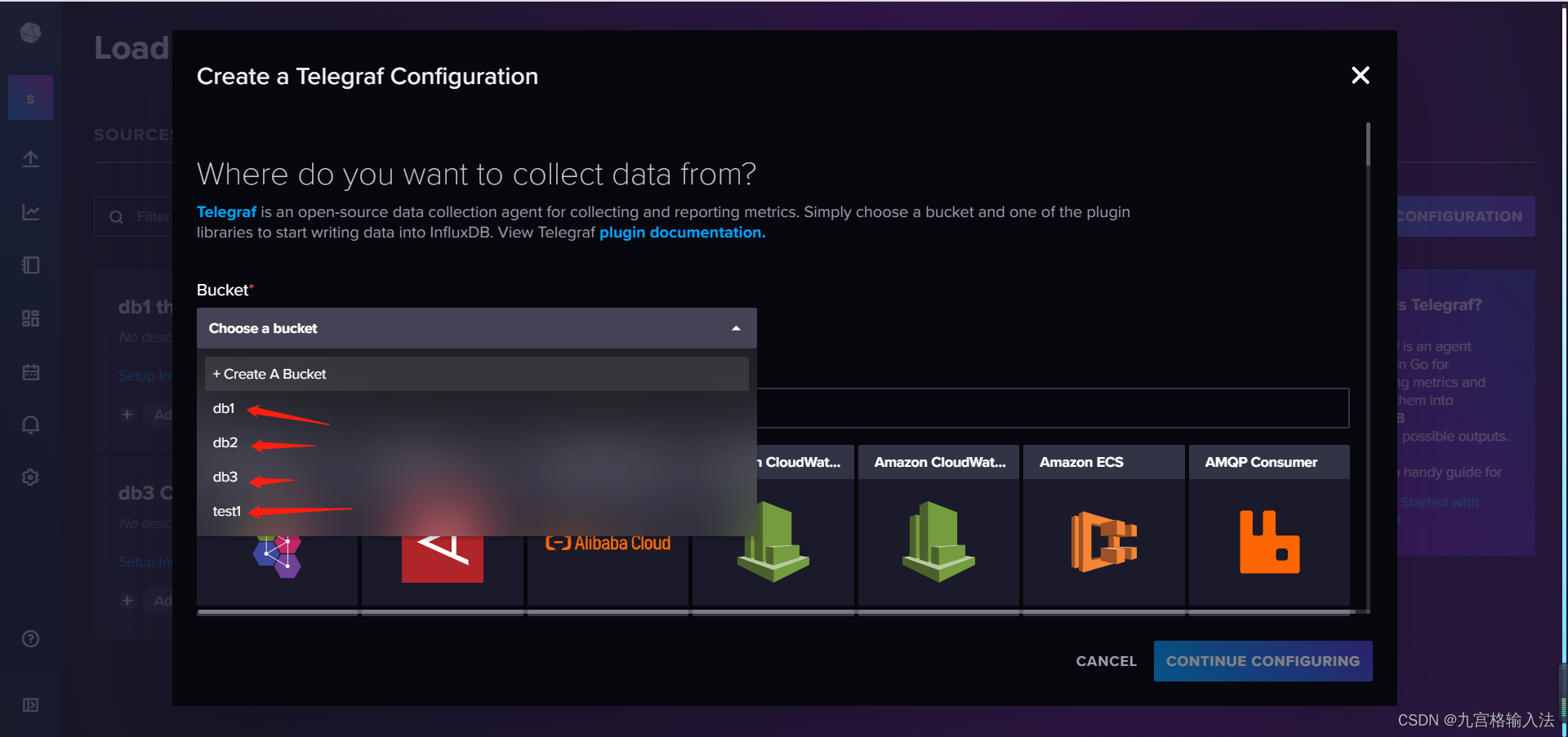
来源这里数据sys后会自动筛选,点击即可

点击后,右下角的创建按钮会亮起,点击按钮进行配置

数据库的配置文件名称后,点击保存和测试,配置内容不需要自己填写会自动生成

保存后出现该界面代表创建完成,会返回给两个配置信息:export INFLUX_TOKEN 和 telegraf --config
点击后关闭界面
点击配置文件名称会打开配置文件的内容
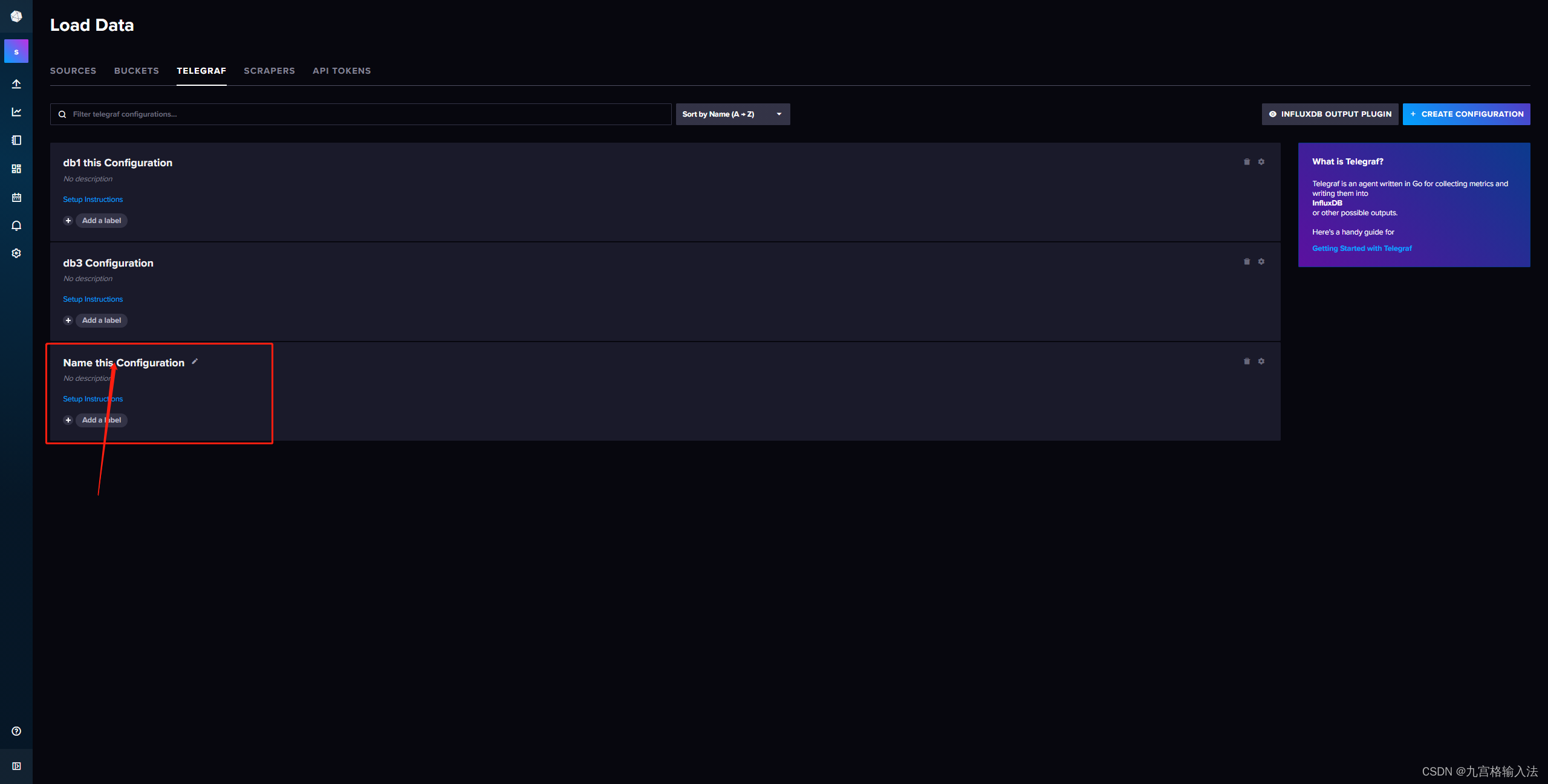
配置内容如下:
# Configuration for telegraf agent [agent] ## Default data collection interval for all inputs interval = "10s" ## Rounds collection interval to 'interval' ## ie, if interval="10s" then always collect on :00, :10, :20, etc. round_interval = true ## Telegraf will send metrics to outputs in batches of at most ## metric_batch_size metrics. ## This controls the size of writes that Telegraf sends to output plugins. metric_batch_size = 1000 ## Maximum number of unwritten metrics per output. Increasing this value ## allows for longer periods of output downtime without dropping metrics at the ## cost of higher maximum memory usage. metric_buffer_limit = 10000 ## Collection jitter is used to jitter the collection by a random amount. ## Each plugin will sleep for a random time within jitter before collecting. ## This can be used to avoid many plugins querying things like sysfs at the ## same time, which can have a measurable effect on the system. collection_jitter = "0s" ## Default flushing interval for all outputs. Maximum flush_interval will be ## flush_interval + flush_jitter flush_interval = "10s" ## Jitter the flush interval by a random amount. This is primarily to avoid ## large write spikes for users running a large number of telegraf instances. ## ie, a jitter of 5s and interval 10s means flushes will happen every 10-15s flush_jitter = "0s" ## By default or when set to "0s", precision will be set to the same ## timestamp order as the collection interval, with the maximum being 1s. ## ie, when interval = "10s", precision will be "1s" ## when interval = "250ms", precision will be "1ms" ## Precision will NOT be used for service inputs. It is up to each individual ## service input to set the timestamp at the appropriate precision. ## Valid time units are "ns", "us" (or "µs"), "ms", "s". precision = "" ## Log at debug level. # debug = false ## Log only error level messages. # quiet = false ## Log target controls the destination for logs and can be one of "file", ## "stderr" or, on Windows, "eventlog". When set to "file", the output file ## is determined by the "logfile" setting. # logtarget = "file" ## Name of the file to be logged to when using the "file" logtarget. If set to ## the empty string then logs are written to stderr. # logfile = "" ## The logfile will be rotated after the time interval specified. When set ## to 0 no time based rotation is performed. Logs are rotated only when ## written to, if there is no log activity rotation may be delayed. # logfile_rotation_interval = "0d" ## The logfile will be rotated when it becomes larger than the specified ## size. When set to 0 no size based rotation is performed. # logfile_rotation_max_size = "0MB" ## Maximum number of rotated archives to keep, any older logs are deleted. ## If set to -1, no archives are removed. # logfile_rotation_max_archives = 5 ## Pick a timezone to use when logging or type 'local' for local time. ## Example: America/Chicago # log_with_timezone = "" ## Override default hostname, if empty use os.Hostname() hostname = "" ## If set to true, do no set the "host" tag in the telegraf agent. omit_hostname = false [[outputs.influxdb_v2]] ## The URLs of the InfluxDB cluster nodes. ## ## Multiple URLs can be specified for a single cluster, only ONE of the ## urls will be written to each interval. ## ex: urls = ["https://us-west-2-1.aws.cloud2.influxdata.com"] urls = ["http://127.0.0.1:8086"] ## Token for authentication. token = "$INFLUX_TOKEN" ## Organization is the name of the organization you wish to write to; must exist. organization = "org" ## Destination bucket to write into. bucket = "db2" ## The value of this tag will be used to determine the bucket. If this ## tag is not set the 'bucket' option is used as the default. # bucket_tag = "" ## If true, the bucket tag will not be added to the metric. # exclude_bucket_tag = false ## Timeout for HTTP messages. # timeout = "5s" ## Additional HTTP headers # http_headers = {"X-Special-Header" = "Special-Value"} ## HTTP Proxy override, if unset values the standard proxy environment ## variables are consulted to determine which proxy, if any, should be used. # http_proxy = "http://corporate.proxy:3128" ## HTTP User-Agent # user_agent = "telegraf" ## Content-Encoding for write request body, can be set to "gzip" to ## compress body or "identity" to apply no encoding. # content_encoding = "gzip" ## Enable or disable uint support for writing uints influxdb 2.0. # influx_uint_support = false ## Optional TLS Config for use on HTTP connections. # tls_ca = "/etc/telegraf/ca.pem" # tls_cert = "/etc/telegraf/cert.pem" # tls_key = "/etc/telegraf/key.pem" ## Use TLS but skip chain & host verification # insecure_skip_verify = false # Read metrics about system load & uptime [[inputs.system]] # no configuration- 1
- 2
- 3
- 4
- 5
- 6
- 7
- 8
- 9
- 10
- 11
- 12
- 13
- 14
- 15
- 16
- 17
- 18
- 19
- 20
- 21
- 22
- 23
- 24
- 25
- 26
- 27
- 28
- 29
- 30
- 31
- 32
- 33
- 34
- 35
- 36
- 37
- 38
- 39
- 40
- 41
- 42
- 43
- 44
- 45
- 46
- 47
- 48
- 49
- 50
- 51
- 52
- 53
- 54
- 55
- 56
- 57
- 58
- 59
- 60
- 61
- 62
- 63
- 64
- 65
- 66
- 67
- 68
- 69
- 70
- 71
- 72
- 73
- 74
- 75
- 76
- 77
- 78
- 79
- 80
- 81
- 82
- 83
- 84
- 85
- 86
- 87
- 88
- 89
- 90
- 91
- 92
- 93
- 94
- 95
- 96
- 97
- 98
- 99
- 100
- 101
- 102
- 103
- 104
- 105
- 106
- 107
- 108
- 109
- 110
- 111
- 112
- 113
- 114
- 115
- 116
- 117
- 118
- 119
- 120
- 121
- 122
- 123
- 124
- 125
- 126
- 127
- 128
- 129
- 130
3.TELEGRAF配置参数说明
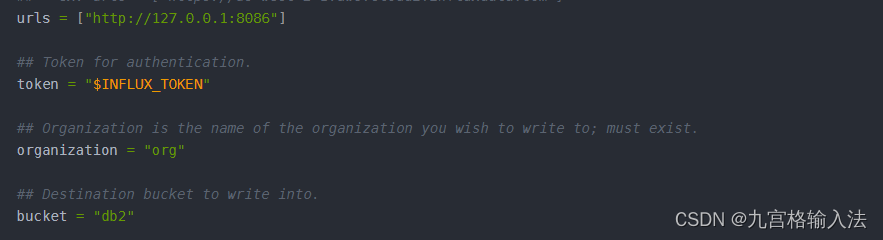
这四个key的值就对应的是JAVA应用程序中yaml中的配置的四个属性值,分别是url、token、org、bucket
注意:2.x版本是通过这四个属性来访问的,不再是账号和密码了
其中token需要提一嘴,token的值就是第二步创建完配置文件后返回的两个配置文件中的 export INFLUX_TOKEN得到这四个配置属性后就可以操作数据库了吗 ???
NONONO,网上的资料比较杂乱,很多文章并没有讲到这一步,我是在这一步踩坑了,继续往看经过测试发现了问题,注意这个TOKEN是数据库配置的TOKEN虽然可以连接到数据库并成功插入数据,但是并不具备访问的权限的,也就是说只能保存不能进行其他操作。查询报错:HTTP status code: 404; Message: failed to initialize execute state: could not find bucket “XX”
应用程序通过依赖中的API来访问的库,报错的原因其实就是缺少了最重要的API访问权限配置,网上的资料里没讲这块,贼坑
4.配置数据库的访问权限API TOKENS

勾选需要通过API访问的库和库的配置文件,其他权限根据自己情况来

点击创建后,会弹出生成的API访问的TOKENS,该TOKENS直接替换掉yaml配置文件中的token即可

5.JAVA代码操作库表
5.1 yaml
#influx配置 influx2: url: http://127.0.0.1:8086 token: XXXXXXXXXXXXXXXXXXXXXXXXXXXXXXXXXXXXXXXXXXXXXXXXXXXXXXXXXXXXXXXXXXXXXXXXXXX==写自己的 org: org bucket: db2- 1
- 2
- 3
- 4
- 5
- 6
5.2 pom依赖
这里我没选择高版本依赖是因为和项目中的依赖存在冲突,高版本依赖提供了对2.x以上版本的兼容API
高版本和低版本的依赖都可以操作2.x版本,这里根据自己的实际情况来决定即可<!--InfluxDB--> <dependency> <groupId>com.influxdb</groupId> <artifactId>influxdb-client-java</artifactId> <!--<version>6.9.0</version>--> <version>3.0.1</version> </dependency>- 1
- 2
- 3
- 4
- 5
- 6
- 7
5.3 config
package net.influx.com.config; import com.influxdb.client.InfluxDBClient; import com.influxdb.client.InfluxDBClientFactory; import org.slf4j.Logger; import org.slf4j.LoggerFactory; import org.springframework.boot.context.properties.ConfigurationProperties; import org.springframework.context.annotation.Bean; import org.springframework.context.annotation.Configuration; /** * @author luo zhuo tao * @create 2023/8/29 */ @Configuration @ConfigurationProperties(prefix = "influx2") public class InfluxdbConfig { private static final Logger logger = LoggerFactory.getLogger(InfluxdbConfig.class); private String url; private String token; private String org; private String bucket; @Bean public InfluxDBClient influxDBClient(){ InfluxDBClient influxDBClient = InfluxDBClientFactory.create(url,token.toCharArray(),org,bucket); //日志级别可用可不用 influxDBClient.setLogLevel(LogLevel.BASIC); if (influxDBClient.ping()){ logger.info("InfluxDB时序数据库2.x---------------------------------------------连接成功!"); }else { logger.info("InfluxDB时序数据库2.x---------------------------------------------连接失败!"); } return influxDBClient; } public void setUrl(String url) { this.url = url; } public void setToken(String token) { this.token = token; } public void setOrg(String org) { this.org = org; } public void setBucket(String bucket) { this.bucket = bucket; } }- 1
- 2
- 3
- 4
- 5
- 6
- 7
- 8
- 9
- 10
- 11
- 12
- 13
- 14
- 15
- 16
- 17
- 18
- 19
- 20
- 21
- 22
- 23
- 24
- 25
- 26
- 27
- 28
- 29
- 30
- 31
- 32
- 33
- 34
- 35
- 36
- 37
- 38
- 39
- 40
- 41
- 42
- 43
- 44
- 45
- 46
- 47
- 48
- 49
- 50
- 51
- 52
- 53
- 54
- 55
- 56
5.4 controller
package net.influx.com.controller; import com.alibaba.fastjson.JSON; import com.influxdb.client.*; import com.influxdb.client.domain.InfluxQLQuery; import com.influxdb.client.domain.WritePrecision; import com.influxdb.client.write.Point; import com.influxdb.query.FluxTable; import com.influxdb.query.InfluxQLQueryResult; import org.slf4j.Logger; import org.slf4j.LoggerFactory; import org.springframework.beans.factory.annotation.Value; import org.springframework.web.bind.annotation.GetMapping; import org.springframework.web.bind.annotation.RequestMapping; import org.springframework.web.bind.annotation.RestController; import javax.annotation.Resource; import java.time.Instant; import java.time.OffsetDateTime; import java.util.List; import java.util.UUID; /** * @author luo zhuo tao * @create 2023/8/29 */ @RestController @RequestMapping("influxdb") public class InfluxdbController { private static final Logger logger = LoggerFactory.getLogger(InfluxdbController.class); @Resource private InfluxDBClient influxDBClient; @Value("${influx2.org:''}") private String org; @Value("${influx2.bucket:''}") private String bucket; private String table = "test1"; @GetMapping("test") public String test() { /** * 写入:WriteApiBlocking 同步写入API WriteApi 异步写入API */ if (false) { WriteApiBlocking writeApiBlocking = influxDBClient.getWriteApiBlocking(); Point point = Point .measurement(table) .addField(String.valueOf(System.currentTimeMillis()), UUID.randomUUID().toString()) .time(Instant.now(), WritePrecision.NS); writeApiBlocking.writePoint(point); } /** * 查询:QueryApi 同步查询API InfluxQLQueryApi SQL查询API */ if (false){ InfluxQLQueryApi influxQLQueryApi = influxDBClient.getInfluxQLQueryApi(); InfluxQLQuery influxQLQuery = new InfluxQLQuery("SELECT * FROM test1", bucket); InfluxQLQueryResult query = influxQLQueryApi.query(influxQLQuery); logger.info("query:{}", JSON.toJSONString(query)); findAll(); } /** * 删除 */ DeleteApi deleteApi = influxDBClient.getDeleteApi(); deleteApi.delete(OffsetDateTime.now(), OffsetDateTime.now(),"",bucket,org); return "查询成功"; } /** * @param measurement 表名 */ public void save(String measurement) { WriteOptions writeOptions = WriteOptions.builder() .batchSize(5000) .flushInterval(1000) .bufferLimit(10000) .jitterInterval(1000) .retryInterval(5000) .build(); try (WriteApi writeApi = influxDBClient.getWriteApi(writeOptions)) { Point point = Point .measurement(measurement) .addField("MMSI".concat(UUID.randomUUID().toString()), UUID.randomUUID().toString()) .time(Instant.now(), WritePrecision.NS); writeApi.writePoint(bucket, org, point); } } public List<FluxTable> findAll() { String flux = "from(bucket: \"db3\")\n" + " |> range(start:0)\n" + " |> filter(fn: (r) => r[\"_measurement\"] == \"test1\")\n" + " |> yield(name: \"mean\")"; QueryApi queryApi = influxDBClient.getQueryApi(); List<FluxTable> tables = queryApi.query(flux, org); logger.info("tables:{}", JSON.toJSONString(tables)); return tables; } }- 1
- 2
- 3
- 4
- 5
- 6
- 7
- 8
- 9
- 10
- 11
- 12
- 13
- 14
- 15
- 16
- 17
- 18
- 19
- 20
- 21
- 22
- 23
- 24
- 25
- 26
- 27
- 28
- 29
- 30
- 31
- 32
- 33
- 34
- 35
- 36
- 37
- 38
- 39
- 40
- 41
- 42
- 43
- 44
- 45
- 46
- 47
- 48
- 49
- 50
- 51
- 52
- 53
- 54
- 55
- 56
- 57
- 58
- 59
- 60
- 61
- 62
- 63
- 64
- 65
- 66
- 67
- 68
- 69
- 70
- 71
- 72
- 73
- 74
- 75
- 76
- 77
- 78
- 79
- 80
- 81
- 82
- 83
- 84
- 85
- 86
- 87
- 88
- 89
- 90
- 91
- 92
- 93
- 94
- 95
- 96
- 97
- 98
- 99
- 100
- 101
- 102
- 103
- 104
- 105
- 106
- 107
- 108
- 109
- 110
- 111
- 112
- 113
5.5 查询方法、结果集提取方法
这里用了两种方式查询,一个是直接通过key查、一个是根据时间维度查询,具体的自己去研究flux语法这里不详细讲
package net.superlucy.departure.monitor.app.service.impl; import cn.hutool.core.collection.CollectionUtil; import com.influxdb.client.InfluxDBClient; import com.influxdb.client.QueryApi; import com.influxdb.client.WriteApi; import com.influxdb.client.WriteOptions; import com.influxdb.client.domain.WritePrecision; import com.influxdb.client.write.Point; import com.influxdb.query.FluxRecord; import com.influxdb.query.FluxTable; import net.superlucy.departure.monitor.app.service.InfluxdbService; import net.superlucy.departure.monitor.app.util.CommonUtil; import net.superlucy.departure.monitor.dto.enums.InfluxdbEnum; import net.superlucy.departure.monitor.dto.model.DepartureShipPosition; import org.apache.commons.compress.utils.Lists; import org.slf4j.Logger; import org.slf4j.LoggerFactory; import org.springframework.beans.factory.annotation.Value; import org.springframework.stereotype.Service; import javax.annotation.Resource; import java.time.Instant; import java.util.Date; import java.util.HashMap; import java.util.List; import java.util.Map; /** * @author luo zhuo tao * @create 2023/9/4 */ @Service public class InfluxdbServiceImpl implements InfluxdbService { private static final Logger logger = LoggerFactory.getLogger(InfluxdbServiceImpl.class); /** * 通过MMSI号查询SQL:响应单条数据 */ private String queryValueFluxOne = "from(bucket: \"%s\") " + "|> range(start: %s) " + "|> filter(fn: (r) => r._measurement == \"%s\" and r._field == \"%s\")" + "" + ""; /** * 通过时间范围查询SQL:响应多条数据 */ private String queryValueFluxTwo = "from(bucket: \"%s\") " + "|> range(start: %s) " + "|> filter(fn: (r) => r._measurement == \"%s\")" + "" + ""; @Resource private InfluxDBClient influxDBClient; @Value("${influx2.org:''}") private String org; @Value("${influx2.bucket:''}") private String bucket; @Override public Map<String, Object> findOne(InfluxdbEnum influxdbEnum, String mmsi) { String flux = String.format(queryValueFluxOne, bucket, 0, influxdbEnum.getValue(), mmsi); QueryApi queryApi = influxDBClient.getQueryApi(); List<FluxTable> tables = queryApi.query(flux, org); return qryVal(tables); } public Map<String, Object> qryVal(List<FluxTable> tables) { Map<String, Object> map = new HashMap<>(); if (CollectionUtil.isNotEmpty(tables)) { for (FluxTable table : tables) { List<FluxRecord> records = table.getRecords(); for (FluxRecord fluxRecord : records) { map.put("value", fluxRecord.getValue().toString()); map.put("field", fluxRecord.getField()); map.put("valueTime", Date.from(fluxRecord.getTime())); } } } return map; } @Override public List<Map<String, Object>> findList(InfluxdbEnum influxdbEnum, String date) { String flux = String.format(queryValueFluxTwo, bucket, date, influxdbEnum.getValue()); QueryApi queryApi = influxDBClient.getQueryApi(); List<FluxTable> tables = queryApi.query(flux, org); return qryValList(tables); } @Override public Map<String, DepartureShipPosition> getDynamicList(InfluxdbEnum influxdbEnum, String date) { String flux = String.format(queryValueFluxTwo, bucket, date, influxdbEnum.getValue()); QueryApi queryApi = influxDBClient.getQueryApi(); List<FluxTable> tables = queryApi.query(flux, org); return dynamicList(tables); } /** * 查询所有船舶最新位置信息 * @param tables * @return */ private Map<String, DepartureShipPosition> dynamicList(List<FluxTable> tables) { Map<String, DepartureShipPosition> map = new HashMap<>(); if (CollectionUtil.isNotEmpty(tables)) { for (FluxTable table : tables) { List<FluxRecord> records = table.getRecords(); //直接用时间维度查询,会出 // 现同一个Field多条数据的情况,这里只需要最新的数据,时间的排序是从远到近的,所以直接拿最后一条即可 FluxRecord fluxRecord = records.get(records.size() - 1); DepartureShipPosition position = new DepartureShipPosition(); String mmsi = fluxRecord.getField(); String value = fluxRecord.getValue().toString(); /** * 动态格式转换方法是我自己业务里面的方法,不用管 * String mmsi = fluxRecord.getField(); * String value = fluxRecord.getValue().toString(); * 这两个get方法是已经获取到存储的数据结果了,后续处理根据自己业务需求来即可 */ // 动态格式转换 DepartureShipPosition dynamic = CommonUtil.dynamic(position, value); map.put(mmsi,dynamic); } } return map; } /** * * @param tables * @return */ public List<Map<String, Object>> qryValList(List<FluxTable> tables) { List<Map<String, Object>> mapList = Lists.newArrayList(); if (CollectionUtil.isNotEmpty(tables)) { for (FluxTable table : tables) { List<FluxRecord> records = table.getRecords(); //直接用时间维度查询,会出现同一个Field多条数据的情况,这里只需要最新的数据,时间的排序是从远到近的,所以直接拿最后一条即可 FluxRecord fluxRecord = records.get(records.size() - 1); Map<String, Object> map = new HashMap<>(1); map.put("value", fluxRecord.getValue().toString()); map.put("field", fluxRecord.getField()); map.put("valueTime", Date.from(fluxRecord.getTime())); mapList.add(map); } } return mapList; } /** * @param measurement 表名 * @param k MMSI号 * @param v ASI数据 */ @Override public void save(String measurement, String k, String v) { WriteOptions writeOptions = WriteOptions.builder() .batchSize(5000) .flushInterval(1000) .bufferLimit(10000) .jitterInterval(1000) .retryInterval(5000) .build(); try (WriteApi writeApi = influxDBClient.getWriteApi(writeOptions)) { Point point = Point .measurement(measurement) .addField(k, v) .time(Instant.now(), WritePrecision.NS); writeApi.writePoint(bucket, org, point); } } }- 1
- 2
- 3
- 4
- 5
- 6
- 7
- 8
- 9
- 10
- 11
- 12
- 13
- 14
- 15
- 16
- 17
- 18
- 19
- 20
- 21
- 22
- 23
- 24
- 25
- 26
- 27
- 28
- 29
- 30
- 31
- 32
- 33
- 34
- 35
- 36
- 37
- 38
- 39
- 40
- 41
- 42
- 43
- 44
- 45
- 46
- 47
- 48
- 49
- 50
- 51
- 52
- 53
- 54
- 55
- 56
- 57
- 58
- 59
- 60
- 61
- 62
- 63
- 64
- 65
- 66
- 67
- 68
- 69
- 70
- 71
- 72
- 73
- 74
- 75
- 76
- 77
- 78
- 79
- 80
- 81
- 82
- 83
- 84
- 85
- 86
- 87
- 88
- 89
- 90
- 91
- 92
- 93
- 94
- 95
- 96
- 97
- 98
- 99
- 100
- 101
- 102
- 103
- 104
- 105
- 106
- 107
- 108
- 109
- 110
- 111
- 112
- 113
- 114
- 115
- 116
- 117
- 118
- 119
- 120
- 121
- 122
- 123
- 124
- 125
- 126
- 127
- 128
- 129
- 130
- 131
- 132
- 133
- 134
- 135
- 136
- 137
- 138
- 139
- 140
- 141
- 142
- 143
- 144
- 145
- 146
- 147
- 148
- 149
- 150
- 151
- 152
- 153
- 154
- 155
- 156
- 157
- 158
- 159
- 160
- 161
- 162
- 163
- 164
- 165
- 166
- 167
- 168
- 169
- 170
- 171
- 172
- 173
- 174
- 175
- 176
- 177
- 178
- 179
- 180
- 181
-
相关阅读:
自行实现字符串转浮点数函数atof()
安装Microsoft visual c++ 2022 X86 minimum runtime报错
软考高级系统架构设计师系列之:系统架构设计案例分析常考知识点
腾讯云什么服务器值得买?
【Azure 架构师学习笔记】-Azure Storage Account(7)- 权限控制
开发过程中常见数据库。
141 环形链表
虚拟机如何连接MobaXterm
MindSpore数据集加载-调试小工具 py-spy
专业修图软件 Affinity Photo 2 mac中文版编辑功能
- 原文地址:https://blog.csdn.net/Stubborn_bull/article/details/132606611
