-
Python爬虫实现(requests、BeautifulSoup和selenium)
Python爬虫实现(requests、BeautifulSoup和selenium)
requests实现
Python requests 是一个常用的 HTTP 请求库,可以方便地向网站发送 HTTP 请求,并获取响应结果。
下载requests库
pip install requests
实例:
# 导入 requests 包 import requests # 发送请求 x = requests.get('https://www.runoob.com/') # 返回网页内容 print(x.text)- 1
- 2
- 3
- 4
- 5
- 6
- 7
- 8
属性和方法
属性或方法 说明 content 返回响应的内容,以字节为单位 headers 返回响应头,字典格式 json() 返回结果的 JSON 对象 request 返回请求此响应的请求对象 status_code 返回 http 的状态码 text 返回响应的内容,unicode 类型数据 url 返回响应的 URL 附加请求参数
发送请求我们可以在请求中附加额外的参数,例如请求头、查询参数、请求体等,例如:
headers = {'User-Agent': 'Mozilla/5.0'} # 设置请求头 params = {'key1': 'value1', 'key2': 'value2'} # 设置查询参数 data = {'username': 'example', 'password': '123456'} # 设置请求体 response = requests.post('https://www.runoob.com', headers=headers, params=params, data=data)- 1
- 2
- 3
- 4
上述代码发送一个 POST 请求,并附加了请求头、查询参数和请求体。
除了基本的 GET 和 POST 请求外,requests 还支持其他 HTTP 方法,如 PUT、DELETE、HEAD、OPTIONS 等。
使用 Beautiful Soup 解析 html 文件
Beautiful Soup is a library that makes it easy to scrape information from web pages. It sits atop an HTML or XML parser, providing Pythonic idioms for iterating, searching, and modifying the parse tree.
Beautiful Soup 是一个可以轻松从网页中抓取信息的库。它位于 HTML 或 XML 解析器之上,提供用于迭代、搜索和修改解析树的 Pythonic 习惯用法。beautifulsoup包安装
pip install beautifulsoup4
实例:
from bs4 import BeautifulSoup html_doc = """The Dormouse's story The Dormouse's story
Once upon a time there were three little sisters; and their names were Elsie, Lacie and Tillie; and they lived at the bottom of a well.
...
""" # 创建一个BeautifulSoup解析对象 soup = BeautifulSoup(html_doc, "html.parser", from_encoding="utf-8") # 获取所有的链接 links = soup.find_all('a') print("所有的链接") for link in links: print(link.name, link['href'], link.get_text()) print("获取特定的URL地址") link_node = soup.find('a', href="http://example.com/elsie") print(link_node.name, link_node['href'], link_node['class'], link_node.get_text())- 1
- 2
- 3
- 4
- 5
- 6
- 7
- 8
- 9
- 10
- 11
- 12
- 13
- 14
- 15
- 16
- 17
- 18
- 19
- 20
- 21
- 22
- 23
- 24
运行结果如下:
所有的链接 a http://example.com/elsie Elsie a http://example.com/lacie Lacie a http://example.com/tillie Tillie 获取特定的URL地址 a http://example.com/elsie ['sister'] Elsie- 1
- 2
- 3
- 4
- 5
- 6
selenium实现
Selenium是广泛使用的模拟浏览器运行的库,它是一个用于Web应用程序测试的工具。 Selenium测试直接运行在浏览器中,就像真正的用户在操作一样,并且支持大多数现代 Web 浏览器。因此可以利用Selenium进行爬虫操作。
selenium官网:https://www.selenium.dev/zh-cn/
selenium库安装
pip install selenium
浏览器驱动下载:
针对不同的浏览器,需要安装不同的驱动。下面以安装 Chrome 驱动作为演示。
查看浏览器版本
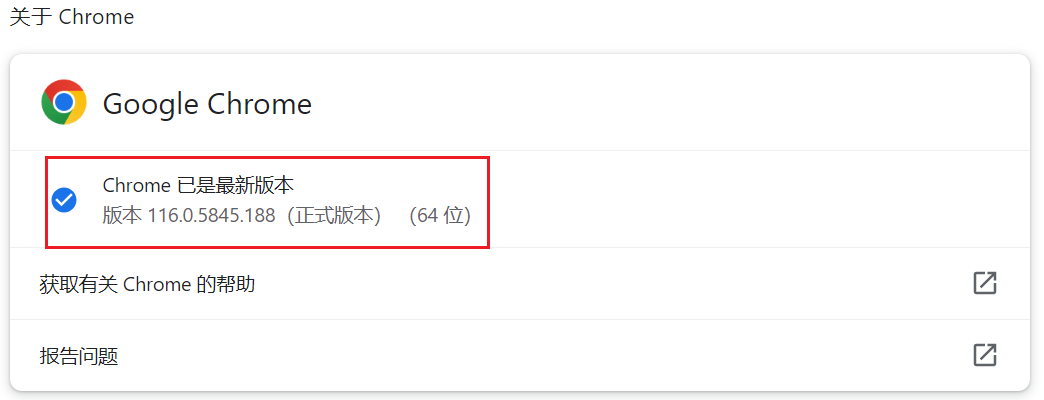
点击设置,找到“关于Chrome”,即可查看浏览器的版本。
下载驱动
下载地址:https://chromedriver.storage.googleapis.com/index.html
下载地址2:https://chromedriver.chromium.org/downloads
选择chrome版本对应的驱动下载

环境变量配置
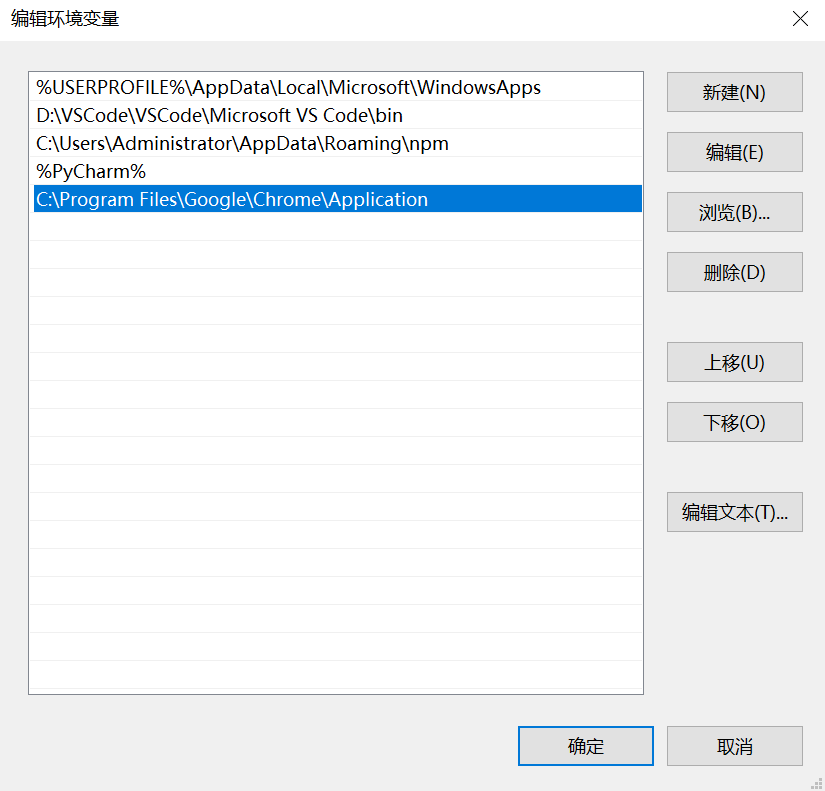
将下载的驱动复制到chrome的安装目录下

配置环境变量
此电脑——属性——高级系统设置——环境变量——用户变量——Path——新建——复制粘贴chrome安装路径——确定
运行测试
运行如下代码,如果能弹出Chrome浏览器,则说明安装成功。
from selenium import webdriver # Chrome浏览器 driver = webdriver.Chrome()- 1
- 2
- 3
代码实战
from selenium import webdriver from selenium.webdriver.common.by import By browser = webdriver.Chrome() url = 'https://www.csdn.net/' browser.get(url) titles = browser.find_elements(By.CLASS_NAME, 'navigation-right') for item in titles: print(item.text)- 1
- 2
- 3
- 4
- 5
- 6
- 7
- 8
- 9
- 10
运行结果如下:
后端 前端 移动开发 编程语言 Java Python 人工智能 AIGC 大数据 数据库 数据结构与算法 音视频 云原生 云平台- 1
- 2
- 3
- 4
- 5
- 6
- 7
- 8
- 9
- 10
- 11
- 12
- 13
- 14
-
相关阅读:
工作积累——Web请求中使用ThreadLocal遇见的问题
一文搞定Linux信号
Django与Ajax
语文课内外杂志语文课内外杂志社语文课内外编辑部2022年第3期目录
node.js的pat/fs/events模块以及磁盘遍历的实现
四种静态查找方法(c代码解析)
Codeforces Round #835 (Div. 4) G. SlavicG‘s Favorite Problem
Flume在大数据集群下的配置以及监控工具Ganglia的部署安装
java性能优化实战:谈一谈服务性能衡量指标有哪些?
Makefile 初期学习笔记
- 原文地址:https://blog.csdn.net/weixin_53065229/article/details/132834202
