-
【uni-app】
准备工作(Hbuilder)
1.下载hbuilder,插件使用Vue3的uni-app项目
2.需要安装编译器

3.下载微信开发者工具
4.点击运行->微信开发者工具
5.打开微信开发者工具的服务端口
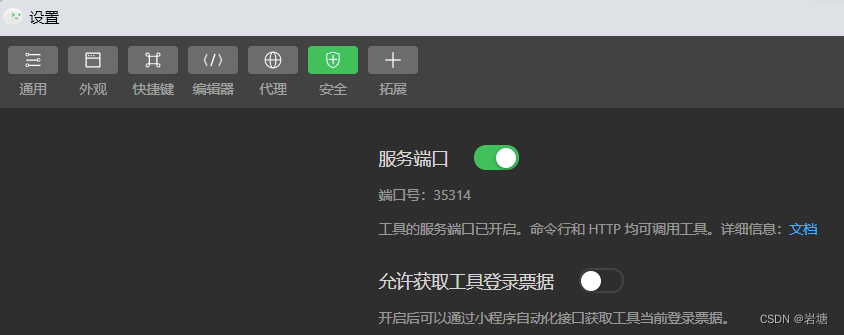
效果图

准备工作(VScode)
插件
uni-create-view

uni-helper

uniapp小程序扩展

page.json(添加路由,修改底层导航栏,背景色)
添加路由
- "pages": [ //pages数组中第一项表示应用启动页,参考:https://uniapp.dcloud.io/collocation/pages
- {
- "path": "pages/index/index",
- "style": {
- "navigationBarTitleText": "首页"
- }
- }
- ,{
- "path" : "pages/my/my",
- "style" :
- {
- "navigationBarTitleText": "我的"
- }
- }
- ]
修改背景颜色
- "globalStyle": {
- "navigationBarTextStyle": "black",
- "navigationBarTitleText": "uni-app",
- "navigationBarBackgroundColor": "#F8F8F8",
- "backgroundColor": "#F8F8F8"
- }
添加导航栏(至少两个)
- "tabBar": {
- "list": [
- {
- "pagePath": "pages/index/index","text": "首页"
- },{
- "pagePath": "pages/my/my","text": "我的"
- }
- ]
- },
manifest.json(添加AppID)
添加AppID
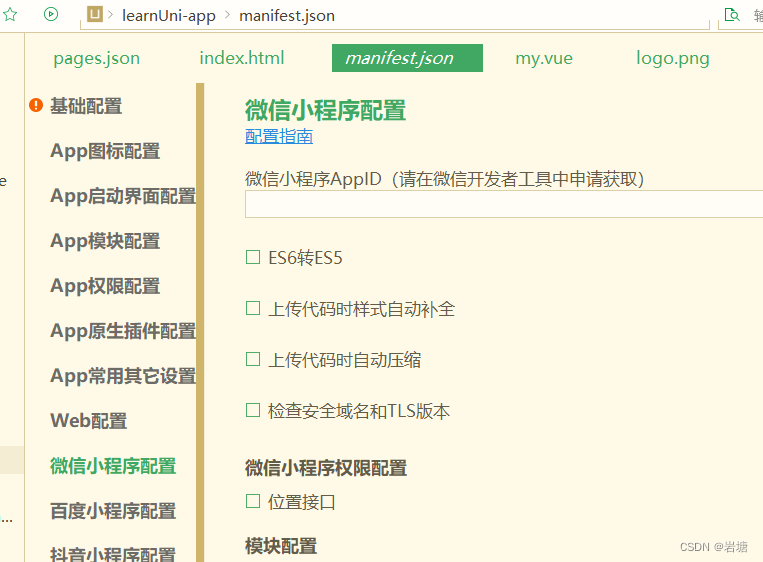
轮播图实现
- <template>
- <swiper class="banner" indicator-dots circular :autoplay="false">
- <swiper-item v-for="item in pictures" :key="item.id">
- <image @tap="onPreviewImage(item.url)" :src="item.url">image>
- swiper-item>
- swiper>
- template>
- <script>
- export default {
- data() {
- return {
- title: 'Hello',
- pictures: [{
- id: '1',
- url: "../../static/uploads/goods_preview_1.jpg"
- },
- {
- id: '2',
- url: "../../static/uploads/goods_preview_2.jpg"
- },
- {
- id: '3',
- url: "../../static/uploads/goods_preview_3.jpg"
- },
- {
- id: '4',
- url: "../../static/uploads/goods_preview_4.jpg"
- },
- {
- id: '5',
- url: "../../static/uploads/goods_preview_5.jpg"
- },
- ]
- }
- },
- onLoad() {
- },
- methods: {
- onPreviewImage(url) {
- // console(url);
- wx.previewImage({
- urls: this.pictures.map(v => v.url),
- current: url
- })
- }
- }
- }
- script>
- <style>
- .banner,
- .banner image {
- width: 750rpx;
- height: 750rpx;
- }
- .content {
- display: flex;
- flex-direction: column;
- align-items: center;
- justify-content: center;
- }
- .logo {
- height: 200rpx;
- width: 200rpx;
- margin-top: 200rpx;
- margin-left: auto;
- margin-right: auto;
- margin-bottom: 50rpx;
- }
- .text-area {
- display: flex;
- justify-content: center;
- }
- .title {
- font-size: 36rpx;
- color: #8f8f94;
- }
- style>
-
相关阅读:
Linux yum,vim详解
微服务:服务拆分和远程调用
计算机毕设(附源码)JAVA-SSM基于课程群的实验管理平台
SQL Server安装
技术成神之路:设计模式(一)单例模式
Socket 服务端实例学习笔记
Java项目在linux上部署步骤
Java中transient关键字的详细总结
LeetCode-538. Convert BST to Greater Tree [C++][Java]
10-网络篇-DHCP获取的参数详解
- 原文地址:https://blog.csdn.net/David_Hzy/article/details/132744648

- 最新文章
-
【FHE】我们如何实现同态加密推理(八):SiLU 的密文化——两条路径,和一个 8 字节的开关
SQLcl 中 c/old/new 替换变量为何失效?先定位再替换
不让模型写作文,直接从它脑子里读答案:Jev 决策在 .NET 的两条路线
Halo插件:支持GitHub的图床附件策略
电视投屏界的“一股清流”!SimpleTVCast 6.0.0-beta 抢先体验:无需TV端App,界面大换血!✨
华三VXLAN集中式网关实战指南:Spine多活网关 + 双活接入(M-LAG)
软件更好写之后口碑会更重要
大 O、大 Omega、大 Theta 的区别,O(n) 复杂度是什么意思
Java标签跳转:一个鲜为人知但却很实用的小技巧
多智能体系统论文速读