-
STM32-HAL库07-软件SPI驱动0.96寸OLED
STM32-HAL库07-软件SPI驱动0.96寸OLED
一、所用材料:
STM32VGT6自制控制板
STM32CUBEMX(HAL库软件)
MDK5二、所学内容:
通过HAL库配置四个GPIO输出口,对其进行软件模拟SPI发送规则,进而驱动OLED进行数字或字母显示,暂不设计中文文字显示。
三、CUBEMX配置:
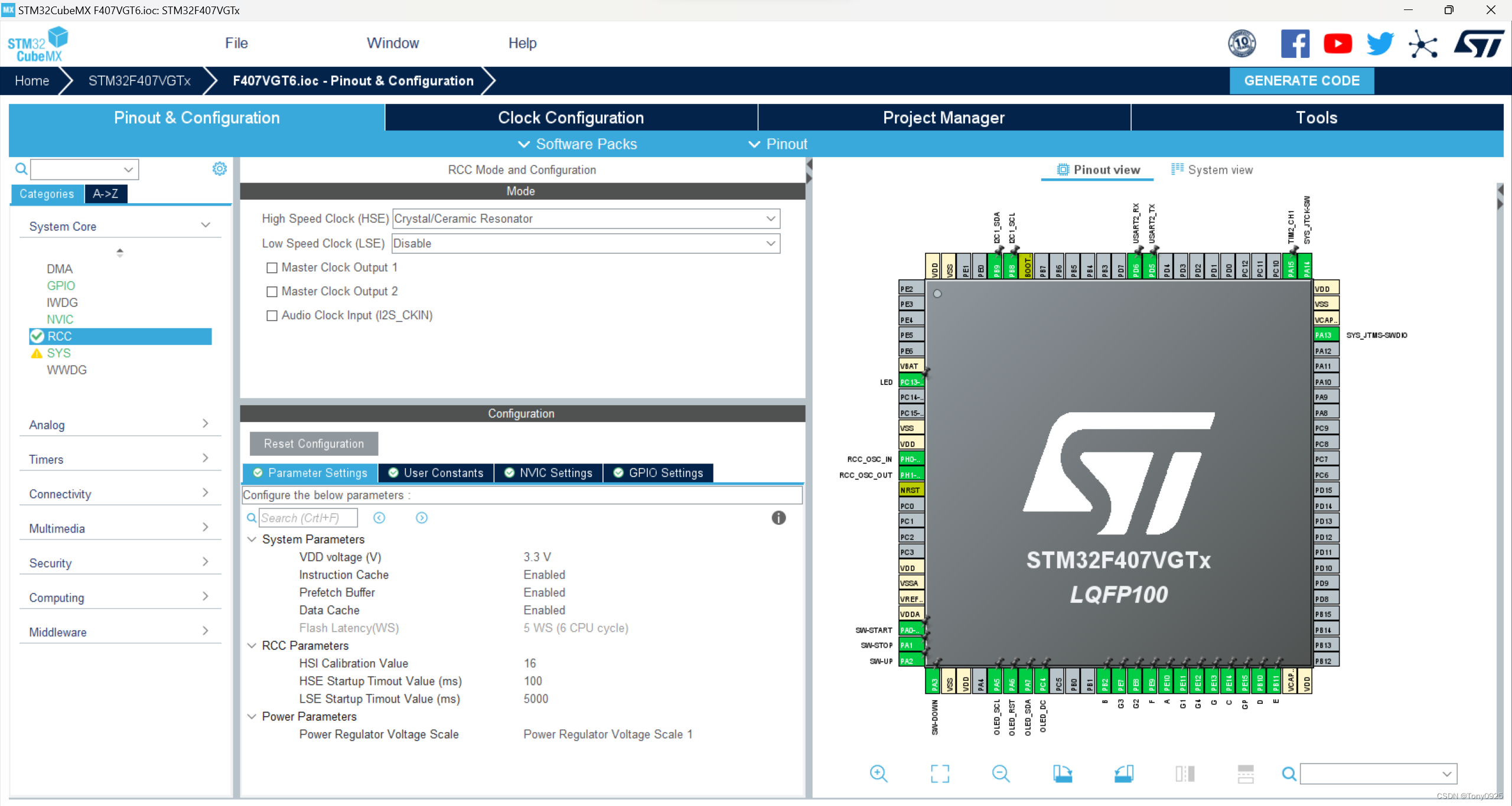
第一步:选取四个模拟GPIO输出引脚

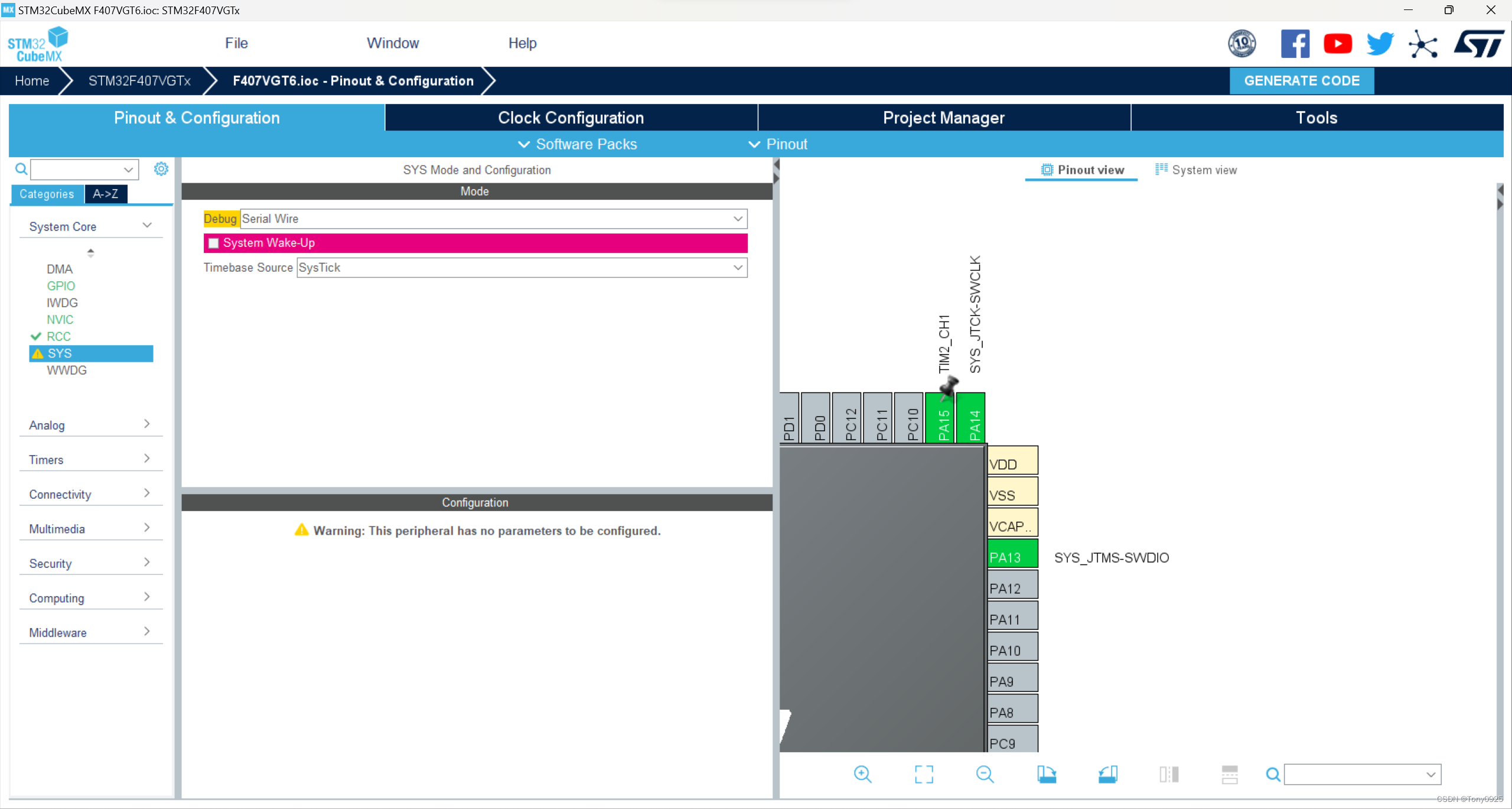
第二步:配置SYS
第三步:配置RCC
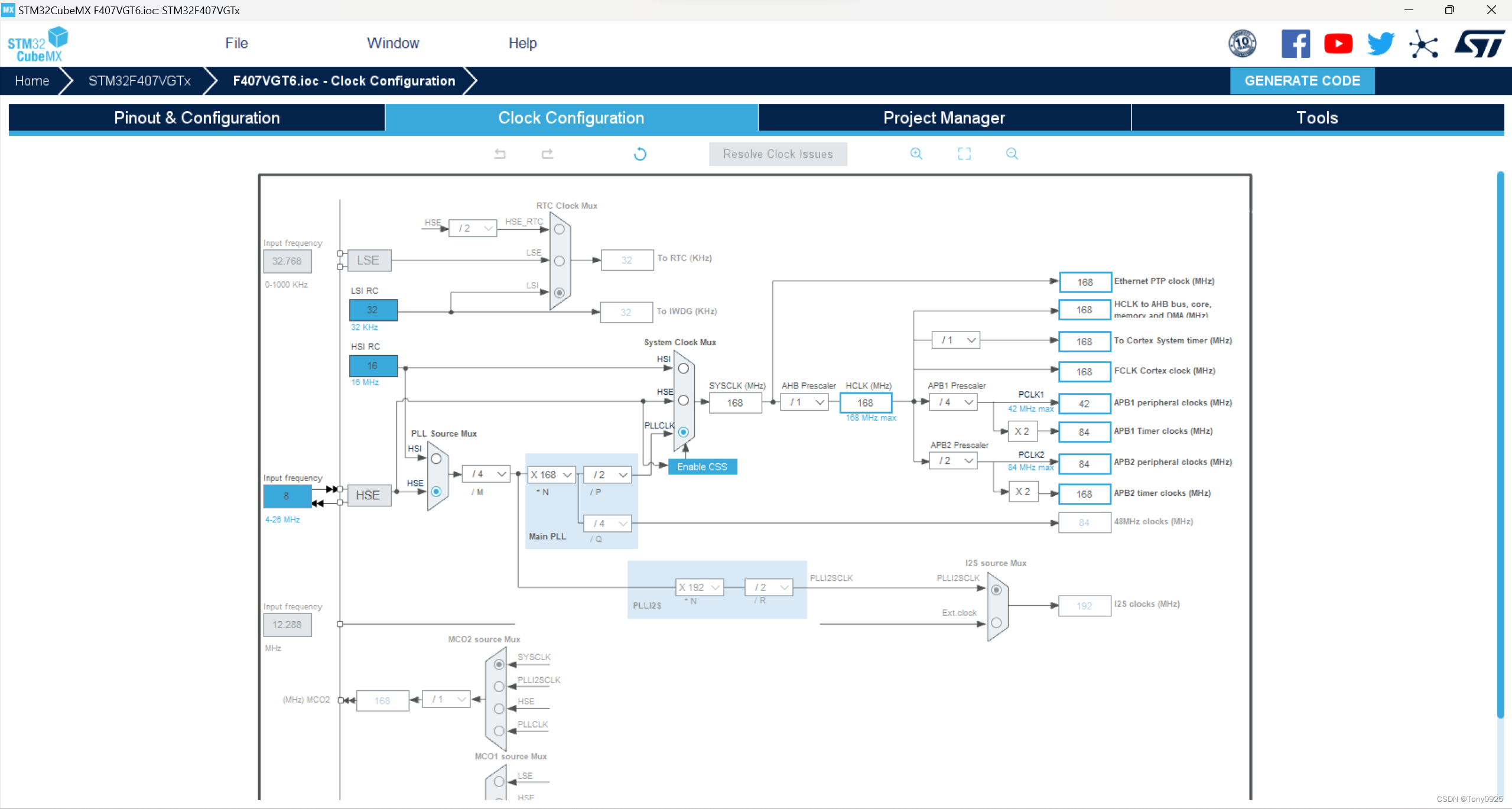
第四步:配置时钟
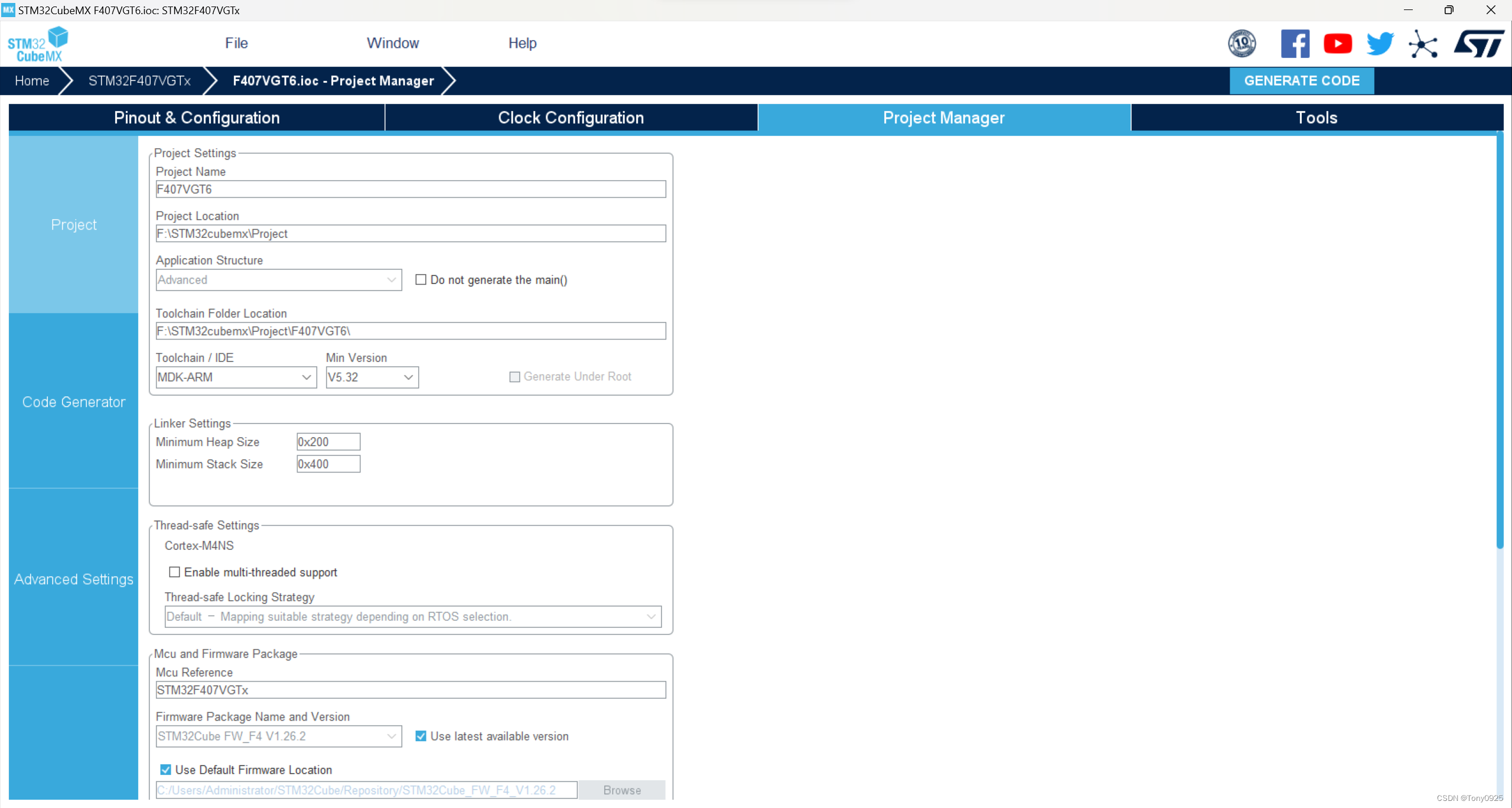
第五步:文件配置
四、MDK5程序编写:
1.配置OLED.h文件
#ifndef __OLED_H #define __OLED_H //========移植的时候,根据所选芯片引入相应的头文件==========,在main.h里面查看 #include "stm32f4xx_hal.h" #include "gpio.h" //OLED模式设置 //0:4线串行模式 //1:并行8080模式 #define OLED_MODE 0 #define SIZE 16 #define XLevelL 0x00 #define XLevelH 0x10 #define Max_Column 128 #define Max_Row 64 #define Brightness 0xFF #define X_WIDTH 128 #define Y_WIDTH 64 //========移植的时候,根据引脚分配进行修改========== //使用4线串行接口时使用 //RES #define OLED_RST_Clr() HAL_GPIO_WritePin(OLED_RST_GPIO_Port, OLED_RST_Pin, GPIO_PIN_RESET) //RES RES => 接RES(RST)引脚 #define OLED_RST_Set() HAL_GPIO_WritePin(OLED_RST_GPIO_Port, OLED_RST_Pin, GPIO_PIN_SET) //DC #define OLED_DC_Clr() HAL_GPIO_WritePin(OLED_DC_GPIO_Port, OLED_DC_Pin, GPIO_PIN_RESET) #define OLED_DC_Set() HAL_GPIO_WritePin(OLED_DC_GPIO_Port, OLED_DC_Pin, GPIO_PIN_SET) //SCLK,D0 #define OLED_SCLK_Clr() HAL_GPIO_WritePin(OLED_SCL_GPIO_Port, OLED_SCL_Pin, GPIO_PIN_RESET) #define OLED_SCLK_Set() HAL_GPIO_WritePin(OLED_SCL_GPIO_Port, OLED_SCL_Pin, GPIO_PIN_SET) //SDIN,D1 #define OLED_SDIN_Clr() HAL_GPIO_WritePin(OLED_SDA_GPIO_Port, OLED_SDA_Pin, GPIO_PIN_RESET) #define OLED_SDIN_Set() HAL_GPIO_WritePin(OLED_SDA_GPIO_Port, OLED_SDA_Pin, GPIO_PIN_SET) #define OLED_CMD 0 //写命令 #define OLED_DATA 1 //写数据 //OLED控制用函数 void OLED_WR_Byte(unsigned char dat,unsigned char cmd); void OLED_Display_On(void); void OLED_Display_Off(void); void OLED_Init(void); void OLED_Clear(void); void OLED_DrawPoint(unsigned char x,unsigned char y,unsigned char t); void OLED_Fill(unsigned char x1,unsigned char y1,unsigned char x2,unsigned char y2,unsigned char dot); void OLED_ShowChar(unsigned char x,unsigned char y,unsigned char chr); void OLED_ShowNum(unsigned char x,unsigned char y,unsigned long num,unsigned char len,unsigned char size); void OLED_Showint (unsigned char x,unsigned char y,unsigned long num); void OLED_ShowString(unsigned char x,unsigned char y, unsigned char *p); void OLED_Set_Pos(unsigned char x, unsigned char y); void OLED_ShowCHinese(unsigned char x,unsigned char y,unsigned char no); void OLED_DrawBMP(unsigned char x0, unsigned char y0,unsigned char x1, unsigned char y1,unsigned char BMP[]); #endif- 1
- 2
- 3
- 4
- 5
- 6
- 7
- 8
- 9
- 10
- 11
- 12
- 13
- 14
- 15
- 16
- 17
- 18
- 19
- 20
- 21
- 22
- 23
- 24
- 25
- 26
- 27
- 28
- 29
- 30
- 31
- 32
- 33
- 34
- 35
- 36
- 37
- 38
- 39
- 40
- 41
- 42
- 43
- 44
- 45
- 46
- 47
- 48
- 49
- 50
- 51
- 52
- 53
- 54
- 55
- 56
- 57
- 58
- 59
- 60
- 61
- 62
2.配置OLED.c文件
#include#include #include "OLED.h" #include "OLED_Font.h" //0.96寸OLED 屏幕简称SSD1106 //OLED的显存 //存放格式如下. //[0]0 1 2 3 ... 127 //[1]0 1 2 3 ... 127 //[2]0 1 2 3 ... 127 //[3]0 1 2 3 ... 127 //[4]0 1 2 3 ... 127 //[5]0 1 2 3 ... 127 //[6]0 1 2 3 ... 127 //[7]0 1 2 3 ... 127 #if OLED_MODE==1 //向SSD1106写入一个字节。 //dat:要写入的数据/命令 //cmd:数据/命令标志 0,表示命令;1,表示数据; void OLED_WR_Byte(unsigned char dat,unsigned char cmd) { DATAOUT(dat); if(cmd) OLED_DC_Set(); else OLED_DC_Clr(); OLED_WR_Clr(); OLED_WR_Set(); OLED_DC_Set(); } #else //向SSD1106写入一个字节。 //dat:要写入的数据/命令 //cmd:数据/命令标志 0,表示命令;1,表示数据; void OLED_WR_Byte(unsigned char dat,unsigned char cmd) { unsigned char i; if(cmd) OLED_DC_Set(); else OLED_DC_Clr(); for(i=0;i<8;i++) { OLED_SCLK_Clr(); if(dat&0x80) OLED_SDIN_Set(); else OLED_SDIN_Clr(); OLED_SCLK_Set(); dat<<=1; } OLED_DC_Set(); } #endif void OLED_Set_Pos(unsigned char x, unsigned char y) { OLED_WR_Byte(0xb0+y,OLED_CMD); OLED_WR_Byte(((x&0xf0)>>4)|0x10,OLED_CMD); OLED_WR_Byte((x&0x0f)|0x01,OLED_CMD); } //开启OLED显示 void OLED_Display_On(void) { OLED_WR_Byte(0X8D,OLED_CMD); //SET DCDC命令 OLED_WR_Byte(0X14,OLED_CMD); //DCDC ON OLED_WR_Byte(0XAF,OLED_CMD); //DISPLAY ON } //关闭OLED显示 void OLED_Display_Off(void) { OLED_WR_Byte(0X8D,OLED_CMD); //SET DCDC命令 OLED_WR_Byte(0X10,OLED_CMD); //DCDC OFF OLED_WR_Byte(0XAE,OLED_CMD); //DISPLAY OFF } //清屏函数,清完屏,整个屏幕是黑色的!和没点亮一样!!! void OLED_Clear(void) { unsigned char i,n; for(i=0;i<8;i++) { OLED_WR_Byte (0xb0+i,OLED_CMD); //设置页地址(0~7) OLED_WR_Byte (0x02,OLED_CMD); //设置显示位置—列低地址 OLED_WR_Byte (0x10,OLED_CMD); //设置显示位置—列高地址 for(n=0;n<128;n++)OLED_WR_Byte(0,OLED_DATA); } //更新显示 } //在指定位置显示一个字符,包括部分字符 //x:0~127 //y:0~63 //mode:0,反白显示;1,正常显示 //size:选择字体 16/12 void OLED_ShowChar(unsigned char x,unsigned char y,unsigned char chr) { unsigned char c=0,i=0; c=chr-' ';//得到偏移后的值 if(x>Max_Column-1){x=0;y=y+2;} if(SIZE ==16) { OLED_Set_Pos(x,y); for(i=0;i<8;i++) OLED_WR_Byte(F8X16[c*16+i],OLED_DATA); OLED_Set_Pos(x,y+1); for(i=0;i<8;i++) OLED_WR_Byte(F8X16[c*16+i+8],OLED_DATA); } else { OLED_Set_Pos(x,y+1); for(i=0;i<6;i++) OLED_WR_Byte(F6x8[c][i],OLED_DATA); } } //m^n函数 unsigned long oled_pow(unsigned char m,unsigned char n) { unsigned long result=1; while(n--)result*=m; return result; } //显示2个数字 //x,y :起点坐标 //len :数字的位数 //size:字体大小 //mode:模式 0,填充模式;1,叠加模式 //num:数值(0~4294967295); void OLED_ShowNum(unsigned char x,unsigned char y,unsigned long num,unsigned char len,unsigned char size) { unsigned char t,temp; unsigned char enshow=0; for(t=0;t<len;t++) { temp=(num/oled_pow(10,len-t-1))%10; if(enshow==0&&t<(len-1)) { if(temp==0) { OLED_ShowChar(x+(size/2)*t,y,'0'); continue; }else enshow=1; } OLED_ShowChar(x+(size/2)*t,y,temp+'0'); } } void OLED_Showint (unsigned char x,unsigned char y,unsigned long num) { unsigned long output; output = num/10000; OLED_ShowChar(x+8*0,y,output+'0'); num = num % 10000; output = num/1000; OLED_ShowChar(x+8*1,y,output+'0'); num = num % 1000; output = num/100; OLED_ShowChar(x+8*2,y,output+'0'); num = num % 100; output = num/10; OLED_ShowChar(x+8*3,y,output+'0'); num = num % 10; output = num; OLED_ShowChar(x+8*4,y,output+'0'); } /** * @brief 显示一个字符号串 * @param x : uint8_t 起点列坐标 * @param y : uint8_t 起点行坐标 * @param chr : uint8_t *字符串指针 * @retval 无 */ void OLED_ShowString(unsigned char x,unsigned char y,unsigned char *chr) { unsigned char j=0; while (chr[j]!='\0') { OLED_ShowChar(x,y,chr[j]); x+=8; if(x>120){x=0;y+=2;} j++; } } //显示汉字 void OLED_ShowCHinese(unsigned char x,unsigned char y,unsigned char no) { unsigned char t,adder=0; OLED_Set_Pos(x,y); for(t=0;t<16;t++) { OLED_WR_Byte(Hzk[2*no][t],OLED_DATA); adder+=1; } OLED_Set_Pos(x,y+1); for(t=0;t<16;t++) { OLED_WR_Byte(Hzk[2*no+1][t],OLED_DATA); adder+=1; } } /***********功能描述:显示显示BMP图片128×64起始点坐标(x,y),x的范围0~127,y为页的范围0~7*****************/ void OLED_DrawBMP(unsigned char x0, unsigned char y0,unsigned char x1, unsigned char y1,unsigned char BMP[]) { unsigned int j=0; unsigned char x,y; if(y1%8==0) y=y1/8; else y=y1/8+1; for(y=y0;y<y1;y++) { OLED_Set_Pos(x0,y); for(x=x0;x<x1;x++) { OLED_WR_Byte(BMP[j++],OLED_DATA); } } } //初始化SH1106 void OLED_Init(void) { OLED_RST_Set(); HAL_Delay(100); OLED_RST_Clr(); HAL_Delay(100); OLED_RST_Set(); OLED_WR_Byte(0xAE,OLED_CMD);//--turn off oled panel OLED_WR_Byte(0x02,OLED_CMD);//---set low column address OLED_WR_Byte(0x10,OLED_CMD);//---set high column address OLED_WR_Byte(0x40,OLED_CMD);//--set start line address Set Mapping RAM Display Start Line (0x00~0x3F) OLED_WR_Byte(0x81,OLED_CMD);//--set contrast control register OLED_WR_Byte(0xCF,OLED_CMD); // Set SEG Output Current Brightness OLED_WR_Byte(0xA1,OLED_CMD);//--Set SEG/Column Mapping 0xa0左右反置 0xa1正常 OLED_WR_Byte(0xC8,OLED_CMD);//Set COM/Row Scan Direction 0xc0上下反置 0xc8正常 OLED_WR_Byte(0xA6,OLED_CMD);//--set normal display OLED_WR_Byte(0xA8,OLED_CMD);//--set multiplex ratio(1 to 64) OLED_WR_Byte(0x3f,OLED_CMD);//--1/64 duty OLED_WR_Byte(0xD3,OLED_CMD);//-set display offset Shift Mapping RAM Counter (0x00~0x3F) OLED_WR_Byte(0x00,OLED_CMD);//-not offset OLED_WR_Byte(0xd5,OLED_CMD);//--set display clock divide ratio/oscillator frequency OLED_WR_Byte(0x80,OLED_CMD);//--set divide ratio, Set Clock as 100 Frames/Sec OLED_WR_Byte(0xD9,OLED_CMD);//--set pre-charge period OLED_WR_Byte(0xF1,OLED_CMD);//Set Pre-Charge as 15 Clocks & Discharge as 1 Clock OLED_WR_Byte(0xDA,OLED_CMD);//--set com pins hardware configuration OLED_WR_Byte(0x12,OLED_CMD); OLED_WR_Byte(0xDB,OLED_CMD);//--set vcomh OLED_WR_Byte(0x40,OLED_CMD);//Set VCOM Deselect Level OLED_WR_Byte(0x20,OLED_CMD);//-Set Page Addressing Mode (0x00/0x01/0x02) OLED_WR_Byte(0x02,OLED_CMD);// OLED_WR_Byte(0x8D,OLED_CMD);//--set Charge Pump enable/disable OLED_WR_Byte(0x14,OLED_CMD);//--set(0x10) disable OLED_WR_Byte(0xA4,OLED_CMD);// Disable Entire Display On (0xa4/0xa5) OLED_WR_Byte(0xA6,OLED_CMD);// Disable Inverse Display On (0xa6/a7) OLED_WR_Byte(0xAF,OLED_CMD);//--turn on oled panel OLED_WR_Byte(0xAF,OLED_CMD); /*display ON*/ OLED_Clear(); OLED_Set_Pos(0,0); } - 1
- 2
- 3
- 4
- 5
- 6
- 7
- 8
- 9
- 10
- 11
- 12
- 13
- 14
- 15
- 16
- 17
- 18
- 19
- 20
- 21
- 22
- 23
- 24
- 25
- 26
- 27
- 28
- 29
- 30
- 31
- 32
- 33
- 34
- 35
- 36
- 37
- 38
- 39
- 40
- 41
- 42
- 43
- 44
- 45
- 46
- 47
- 48
- 49
- 50
- 51
- 52
- 53
- 54
- 55
- 56
- 57
- 58
- 59
- 60
- 61
- 62
- 63
- 64
- 65
- 66
- 67
- 68
- 69
- 70
- 71
- 72
- 73
- 74
- 75
- 76
- 77
- 78
- 79
- 80
- 81
- 82
- 83
- 84
- 85
- 86
- 87
- 88
- 89
- 90
- 91
- 92
- 93
- 94
- 95
- 96
- 97
- 98
- 99
- 100
- 101
- 102
- 103
- 104
- 105
- 106
- 107
- 108
- 109
- 110
- 111
- 112
- 113
- 114
- 115
- 116
- 117
- 118
- 119
- 120
- 121
- 122
- 123
- 124
- 125
- 126
- 127
- 128
- 129
- 130
- 131
- 132
- 133
- 134
- 135
- 136
- 137
- 138
- 139
- 140
- 141
- 142
- 143
- 144
- 145
- 146
- 147
- 148
- 149
- 150
- 151
- 152
- 153
- 154
- 155
- 156
- 157
- 158
- 159
- 160
- 161
- 162
- 163
- 164
- 165
- 166
- 167
- 168
- 169
- 170
- 171
- 172
- 173
- 174
- 175
- 176
- 177
- 178
- 179
- 180
- 181
- 182
- 183
- 184
- 185
- 186
- 187
- 188
- 189
- 190
- 191
- 192
- 193
- 194
- 195
- 196
- 197
- 198
- 199
- 200
- 201
- 202
- 203
- 204
- 205
- 206
- 207
- 208
- 209
- 210
- 211
- 212
- 213
- 214
- 215
- 216
- 217
- 218
- 219
- 220
- 221
- 222
- 223
- 224
- 225
- 226
- 227
- 228
- 229
- 230
- 231
- 232
- 233
- 234
- 235
- 236
- 237
- 238
- 239
- 240
- 241
- 242
- 243
- 244
- 245
- 246
- 247
- 248
- 249
- 250
- 251
- 252
- 253
- 254
- 255
- 256
- 257
- 258
- 259
- 260
- 261
- 262
- 263
- 264
- 265
- 266
- 267
- 268
-
相关阅读:
C语言—窄字符或宽字符
学习c#的第一天
算法自学__扫描线
使用docker安装redis
Prometheus部署
required a bean of type …… that could not be found.
2022年ccpc桂林站
ACM-POJ-No. 1182-食物链-并查集
Hadoop:HDFS--分布式文件存储系统
【MySQL系列】MySQL表的增删改查(基础)
- 原文地址:https://blog.csdn.net/qq_45854134/article/details/132819139
