-
LAMP搭建wordpress并使用reids加速网页
L linux A apache hhtpd M mysql/maridb P PHP- 1
- 2
- 3
- 4
1、 安装php
rpm -ivh http://rpms.famillecollet.com/enterprise/remi-release-7.rpm yum install -y --enablerepo=remi --enablerepo=remi-php72 php php-opcache php-devel php-mysqlnd php-gd php-redis- 1
- 2
2、 安装mysql5.7
2.1、搭建mysql源
cd /etc/yum.repos.d- 1
vim mysql.repo
[mysql] name=mysql baseurl=http://mirrors.tuna.tsinghua.edu.cn/mysql/yum/mysql-5.7-community-el7-x86_64/ enabled=1 gpgcheck=0- 1
- 2
- 3
- 4
- 5
2.2、安装mysql
yum -y install mysql mysql-server- 1
2.3、启动并自启mysql
systemctl enable mysqld --now systemctl status mysqld- 1
- 2
● mysqld.service - MySQL Server Loaded: loaded (/usr/lib/systemd/system/mysqld.service; enabled; vendor preset: disabled) Active: active (running) since Thu 2023-09-07 13:26:43 CST; 50s ago Docs: man:mysqld(8) http://dev.mysql.com/doc/refman/en/using-systemd.html Process: 8682 ExecStart=/usr/sbin/mysqld --daemonize --pid-file=/var/run/mysqld/mysqld.pid $MYSQLD_OPTS (code=exited, status=0/SUCCESS) Process: 8632 ExecStartPre=/usr/bin/mysqld_pre_systemd (code=exited, status=0/SUCCESS) Main PID: 8686 (mysqld) CGroup: /system.slice/mysqld.service └─8686 /usr/sbin/mysqld --daemonize --pid-file=/var/run/mysqld/mysqld.pid Sep 07 13:26:37 ecs-1cee systemd[1]: Starting MySQL Server... Sep 07 13:26:43 ecs-1cee systemd[1]: Started MySQL Server.- 1
- 2
- 3
- 4
- 5
- 6
- 7
- 8
- 9
- 10
- 11
- 12
- 13
cat /var/log/mysqld.log | grep pass- 1
2023-09-07T06:47:10.572362Z 1 [Note] A temporary password is generated for root@localhost: /#7BEsP?dh1P # mysql启动日志里面会包含临时密码- 1
mysql -uroot -p'/#7BEsP?dh1P'- 1
mysql: [Warning] Using a password on the command line interface can be insecure. Welcome to the MySQL monitor. Commands end with ; or \g. Your MySQL connection id is 2 Server version: 5.7.43 Copyright (c) 2000, 2023, Oracle and/or its affiliates. Oracle is a registered trademark of Oracle Corporation and/or its affiliates. Other names may be trademarks of their respective owners. Type 'help;' or '\h' for help. Type '\c' to clear the current input statement. mysql> mysql> ALTER USER 'root'@'localhost' IDENTIFIED WITH mysql_native_password BY 'o*zu+1FzyG3'; #修改密码为o*zu+1FzyG3 Query OK, 0 rows affected (0.00 sec) [root@ecs-1cee yum.repos.d]# mysql -uroot -p'o*zu+1FzyG3' #使用新密码登录 mysql: [Warning] Using a password on the command line interface can be insecure. Welcome to the MySQL monitor. Commands end with ; or \g. Your MySQL connection id is 3 Server version: 5.7.43 MySQL Community Server (GPL) Copyright (c) 2000, 2023, Oracle and/or its affiliates. Oracle is a registered trademark of Oracle Corporation and/or its affiliates. Other names may be trademarks of their respective owners. Type 'help;' or '\h' for help. Type '\c' to clear the current input statement. mysql> create database wordpress default character set utf8 collate utf8_general_ci #创建wordpress数据库,字符集是utf8 -> ; Query OK, 1 row affected (0.00 sec)- 1
- 2
- 3
- 4
- 5
- 6
- 7
- 8
- 9
- 10
- 11
- 12
- 13
- 14
- 15
- 16
- 17
- 18
- 19
- 20
- 21
- 22
- 23
- 24
- 25
- 26
- 27
- 28
- 29
- 30
- 31
- 32
- 33
- 34
3、 安装部署httpd服务
3.1、安装httpd服务
yum -y install httpd- 1
3.2、启动并自启
systemctl enable httpd --now systemctl status httpd- 1
- 2
● httpd.service - The Apache HTTP Server Loaded: loaded (/usr/lib/systemd/system/httpd.service; enabled; vendor preset: disabled) Active: active (running) since Thu 2023-09-07 13:35:48 CST; 9s ago Docs: man:httpd(8) man:apachectl(8) Main PID: 8774 (httpd) Status: "Total requests: 0; Current requests/sec: 0; Current traffic: 0 B/sec" CGroup: /system.slice/httpd.service Created symlink from /etc/systemd/system/multi-user.target.wants/httpd.service to /usr/lib/systemd/system/httpd.service. ├─8774 /usr/sbin/httpd -DFOREGROUND ├─8775 /usr/sbin/httpd -DFOREGROUND ├─8776 /usr/sbin/httpd -DFOREGROUND ├─8777 /usr/sbin/httpd -DFOREGROUND ├─8778 /usr/sbin/httpd -DFOREGROUND └─8779 /usr/sbin/httpd -DFOREGROUND Sep 07 13:35:48 ecs-1cee systemd[1]: Starting The Apache HTTP Server... Sep 07 13:35:48 ecs-1cee httpd[8774]: AH00558: httpd: Could not reliably determine the server's fully qualified domain name, using 127.0.0.1. Set the...is message Sep 07 13:35:48 ecs-1cee systemd[1]: Started The Apache HTTP Server. Hint: Some lines were ellipsized, use -l to show in full.- 1
- 2
- 3
- 4
- 5
- 6
- 7
- 8
- 9
- 10
- 11
- 12
- 13
- 14
- 15
- 16
- 17
- 18
- 19
4、 部署WordPress
4.1、下载WordPress
官网下载地址:https://cn.wordpress.org/download/
cd /opt wget https://cn.wordpress.org/latest-zh_CN.zip- 1
- 2
4.2、部署WordPress
unzip latest-zh_CN.zip cp -r wordpress/ /var/www/html/ cd /var/www/html/wordpress cp wp-config-sample.php wp-config.php- 1
- 2
- 3
- 4
vi wp-config.php
// ** Database settings - You can get this info from your web host ** // /** The name of the database for WordPress */ define( 'DB_NAME', 'wordpress' ); /** Database username */ define( 'DB_USER', 'root' ); /** Database password */ define( 'DB_PASSWORD', 'o*zu+1FzyG3' ); /** Database hostname */ define( 'DB_HOST', 'localhost' ); /** Database charset to use in creating database tables. */ define( 'DB_CHARSET', 'utf8' ); /** The database collate type. Don't change this if in doubt. */ define( 'DB_COLLATE', '' );- 1
- 2
- 3
- 4
- 5
- 6
- 7
- 8
- 9
- 10
- 11
- 12
- 13
- 14
- 15
- 16
- 17
- 18
chmod -R 777 /var/www/html/ systemctl restart httpd- 1
- 2
4.3、访问wordpress
114.115.151.96/wordpress #根据实际的IP或者域名进行访问- 1
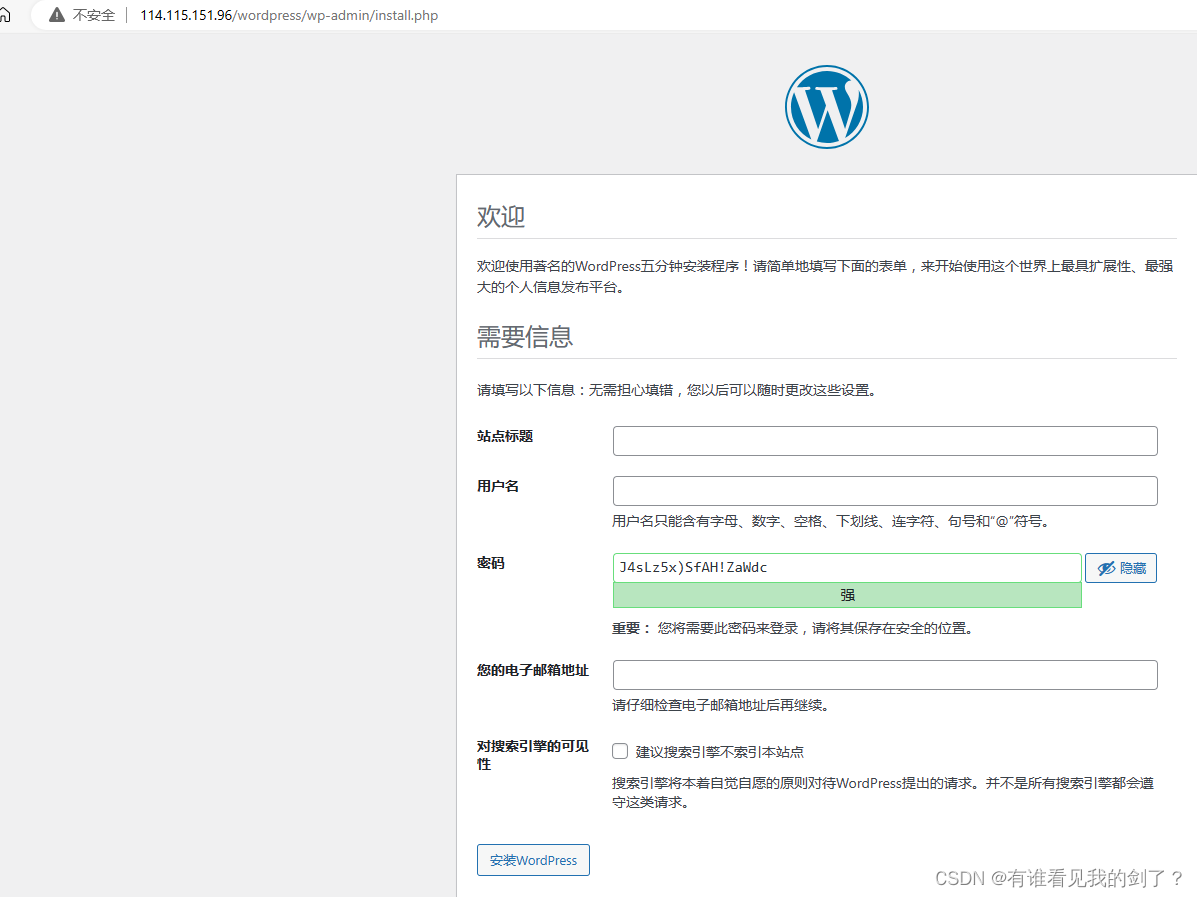
以下内容均可自定义站点: wordpress 用户名:admin 密码:admin 您的电子邮箱地址:111@qq.com 最后点击安装WordPress- 1
- 2
- 3
- 4
- 5

4.2、查看网页加载时间
- 浏览器页面按"F12"键,勾选"Disable cache"(停用缓存)选
项,查看页面加载时间。刷新 WordPress 界面,待其完全加载完成,可以在页面下方看到加
载时间为31.18秒

5、部署redis
5.1、安装redis
yum -y install redis- 1
5.2、启动自启
systemctl enable redis --now systemctl status redis- 1
- 2
● redis.service - Redis persistent key-value database Loaded: loaded (/usr/lib/systemd/system/redis.service; enabled; vendor preset: disabled) Drop-In: /etc/systemd/system/redis.service.d └─limit.conf Active: active (running) since Thu 2023-09-07 15:23:24 CST; 1min 59s ago Main PID: 22558 (redis-server) CGroup: /system.slice/redis.service └─22558 /usr/bin/redis-server 127.0.0.1:6379 Sep 07 15:23:24 ecs-6822 systemd[1]: Starting Redis persistent key-value database... Sep 07 15:23:24 ecs-6822 systemd[1]: Started Redis persistent key-value database- 1
- 2
- 3
- 4
- 5
- 6
- 7
- 8
- 9
- 10
- 11
5.3、redis配置密码
vim /etc/redis.conf- 1
requirepass 123456 bind 0.0.0.0- 1
- 2
systemctl restart redis- 1
5.3、在 wp-config.php 配置中配置redis连接信息
cd /var/www/html/wordpress/- 1
vi wp-config.php
// ** Database settings - You can get this info from your web host ** // /** The name of the database for WordPress */ define( 'DB_NAME', 'wordpress' ); /** Database username */ define( 'DB_USER', 'root' ); /** Database password */ define( 'DB_PASSWORD', 'o*zu+1FzyG3' ); /** Database hostname */ define( 'DB_HOST', 'localhost' ); /** Database charset to use in creating database tables. */ define( 'DB_CHARSET', 'utf8' ); /** The database collate type. Don't change this if in doubt. */ define( 'DB_COLLATE', '' ); /*redis config*/ define('WP_REDIS_HOST', '127.0.0.1'); define('WP_REDIS_PORT', '6379'); define('WP_REDIS_PASSWORD', '123456');- 1
- 2
- 3
- 4
- 5
- 6
- 7
- 8
- 9
- 10
- 11
- 12
- 13
- 14
- 15
- 16
- 17
- 18
- 19
- 20
- 21
- 22
- 23
redis连接信息一定要放到数据库连接信息后面才能生效
配置一下wordpress目录权限
cd /var/www/html/wordpress- 1
放到最下面了
vi wp-config.php
define("FS_METHOD", "direct"); define("FS_CHMOD_DIR", 0777); define("FS_CHMOD_FILE", 0777);- 1
- 2
- 3
重启启动httpd服务并安装redis插件
systemctl restart httpd- 1

点击启用


如下图,已经连接上了reids

5.4、访问网页测试浏览速度

可以发现访问速度明显提升了很多
!!!到这里使用LAMP建WordPress并使用redis加速网页就已经实现了
-
相关阅读:
微服务从代码到k8s部署应有尽有系列(十一、日志收集)
HTTP 和 HTTPS
@Validated指定校验顺序
Java idea查看自定义注解的调用地方
构建Flink第一个应用程序
一次 OOM 线上排查实录
带您了解ChatGPT强大功能!
如何修改X12端口的ControlNumber?
数据挖掘与分析课程笔记(Chapter 1)
ChatGPT 桌面客户端正式发布
- 原文地址:https://blog.csdn.net/qq_50247813/article/details/132738130

- 最新文章
-
沪漂五周年了:我越来越迷茫了
Agentic Skill Routing 实战:别再把所有 Skill 塞进 AI Agent 上下文
MySQL-Seconds_behind_master的精度误差
[MAF预定义ChatClient中间件-03]CachingChatClient——利用缓存省钱省时间
AI的至暗历史:从万众期待到被政府撤资,AI的两次死亡徘徊
Agent OS :五种驯服不确定性的范式
PortSwigger SQL注入LAB11
数据库即时编译JIT
[Begin]AI Learn Data Day 0
深度学习进阶(二十七)现代 LLM 的核心架构设计其二:SwiGLU