-
RecyclerView+Flexbox实现流式布局
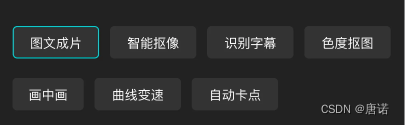
之前使用 FlexboxLayout 实现流式布局,但是选中和反选效果不好实现,就改用RecyclerView+FlexboxLayoutManager 实现流式布局:
说明:如果是直接展示标签,没有其他选中效果时,建议直接使用 FlexboxLayout实现:
- 1
- 2
- 3
- 4
- 5
- 6
导入依赖库:
implementation 'com.google.android.flexbox:flexbox:3.0.0'- 1
@Route(path = RouterPath.helpCenterPath) class HelpCenterActivity : BaseActivity() { private lateinit var binding: ActivityHelpCenterBinding private var lastPosition = -1 private lateinit var mAdapter: BaseQuickAdapter() for (i in 0..8) { list.add(TagInfo("Type${i + 1}", "${i + 1}", false)) } with(binding.rvTag) { layoutManager = FlexboxLayoutManager(context, FlexDirection.ROW, FlexWrap.WRAP) mAdapter = object : BaseQuickAdapter (R.id.ll_root) if (item.isSelect) { rlItem.background = getDrawable(R.drawable.shape_stroke_00d1d3_solid_black_3_radius8) } else { rlItem.background = getDrawable(R.drawable.shape_black_3_radius8) } } } mAdapter.setOnItemClickListener { adapter, view, position -> setSelected(position) val itemBean = adapter.getItem(position) if (itemBean is TagInfo) { ToastUtils.showShort("选择了${itemBean.type}") } } mAdapter.setNewInstance(list) adapter = mAdapter setSelected(0) } } private fun setSelected(position: Int) { val list: MutableList = mAdapter.data // 选中 list[position].isSelect = true mAdapter.notifyItemChanged(position) // 取消选中 if (lastPosition > -1 && lastPosition < list.size) { list[lastPosition].isSelect = false mAdapter.notifyItemChanged(lastPosition) } lastPosition = position } data class TagInfo( var text: String, var type: String, var isSelect: Boolean = false, ) } - 1
- 2
- 3
- 4
- 5
- 6
- 7
- 8
- 9
- 10
- 11
- 12
- 13
- 14
- 15
- 16
- 17
- 18
- 19
- 20
- 21
- 22
- 23
- 24
- 25
- 26
- 27
- 28
- 29
- 30
- 31
- 32
- 33
- 34
- 35
- 36
- 37
- 38
- 39
- 40
- 41
- 42
- 43
- 44
- 45
- 46
- 47
- 48
- 49
- 50
- 51
- 52
- 53
- 54
- 55
- 56
- 57
- 58
- 59
- 60
- 61
- 62
- 63
- 64
- 65
- 66
- 67
- 68
-
相关阅读:
nginx配置密码访问
echarts地图各种点位实现
centos7中mysql5.7.32服务离线升级到5.7.39教程
MyBatisPlus又在搞事了,发布神器,一个依赖轻松搞定权限问题?
阻止网络钓鱼诈骗的技巧
创建数据库报错--MySQL server is running with the --super-read-only option
4-6:关注列表,粉丝列表
Kafka(一)
【数据治理】2021年 中国数据治理行业:全链产业图谱梳理
matlab中绘制 维诺图(Voronoi Diagram)
- 原文地址:https://blog.csdn.net/zhijiandedaima/article/details/132733057