-
基于springboot实现了后台定时统计数据报表并将数据生成excel文件作为附件,然后通过邮件发送通知的功能
概述
本例子基于springboot实现了后台定时统计数据报表并将数据生成excel文件作为附件,然后通过邮件发送通知的功能。
详细
一、准备工作
1、首先注册两个邮箱,一个发送邮箱,一个接收邮箱。
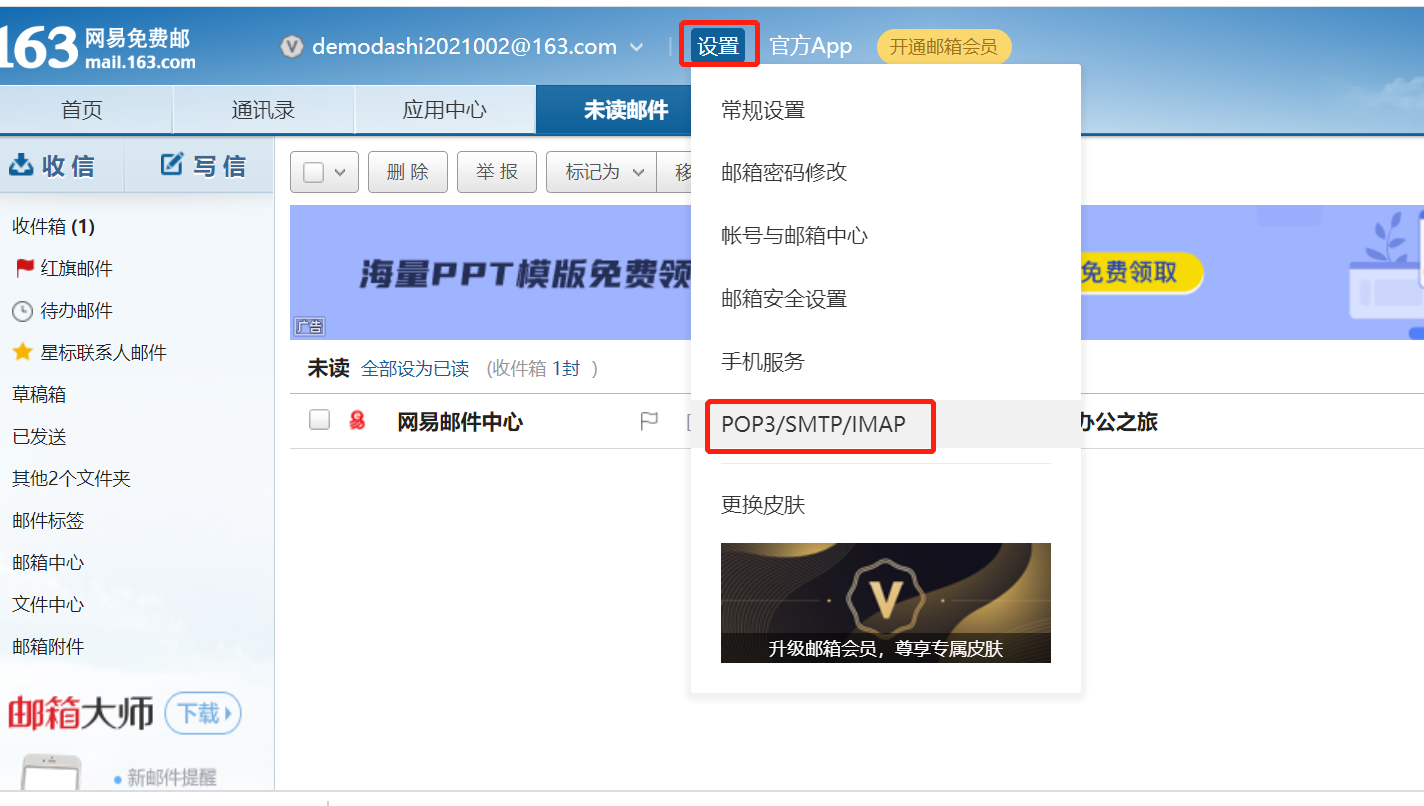
2、发送邮箱开启IMAP/SMTP/POP3服务,记录得到的授权码
二、项目结构及具体实现
1、项目结构

2、实现代码
配置文件:
- server:
- port: 8088
- spring:
- mail:
- host: smtp.163.com
- port:
- username: demodashi2021002@163.com
- password: WGWRIGYQSCPGBJCC
- protocol: smtp
- test-connection: true
- default-encoding: UTF-8
- email:
- temp: C:/email/
- receiver: demodashi2021001@163.com
邮件服务接口:实现邮件发送功能。
- /**
- * 发送带附件的邮件
- *
- * @param receiver 收件人地址
- * @param subject 邮件主题
- * @param content 邮件内容
- * @param filePath 附件地址
- * @param cc 抄送地址
- * @throws MessagingException 邮件发送异常
- */
- @Override
- public void sendAttachmentsMail(String receiver, String subject, String content, String filePath, String... cc) throws MessagingException {
- MimeMessage message = mailSender.createMimeMessage();
- MimeMessageHelper helper = new MimeMessageHelper(message, true);
- helper.setFrom(sender);
- helper.setTo(receiver);
- helper.setSubject(subject);
- helper.setText(content, true);
- if (ArrayUtil.isNotEmpty(cc)) {
- helper.setCc(cc);
- }
- FileSystemResource file = new FileSystemResource(new File(filePath));
- String fileName = filePath.substring(filePath.lastIndexOf(File.separator)+1);
- helper.addAttachment(fileName, file);
- mailSender.send(message);
- }
定时发送任务:本地测试设置每十秒运行一次定时任务。
- @Scheduled(cron = "10/20 * * ? * ?")
- private void sendEventEmailTask() {
- LOGGER.info("=========启动邮件发送任务=============");
- SimpleDateFormat sdf = new SimpleDateFormat("yyyy-MM-dd");
- String startTime = getPastDate(7) + " 00:00:00";
- String endTime = sdf.format(new Date()) + " 23:59:59";
- String subject = "最近一周的数据";
- this.emailJob(startTime, endTime,subject);
- LOGGER.info("=========结束邮件发送任务=============");
- }
三、演示效果
运行项目后等待十秒,查看日志:

查看接收邮箱:

附件:

-
相关阅读:
nginx
7zip自带hash校验功能
混沌工程平台 ChaosBlade-Box 新版重磅发布
BN的作用原理
使用VueCli快速搭建项目
为什么访问同一个网址却返回不同的内容
在找工作时的准备工作:结合现状,针对意向企业做好充分准备
Django实现Hello World
RK3568-mpp(Media Process Platform)媒体处理软件平台
这份神仙面试笔记,简直把所有Java知识面试题写出来了
- 原文地址:https://blog.csdn.net/hanjiepo/article/details/132690838
