-
node版本问题
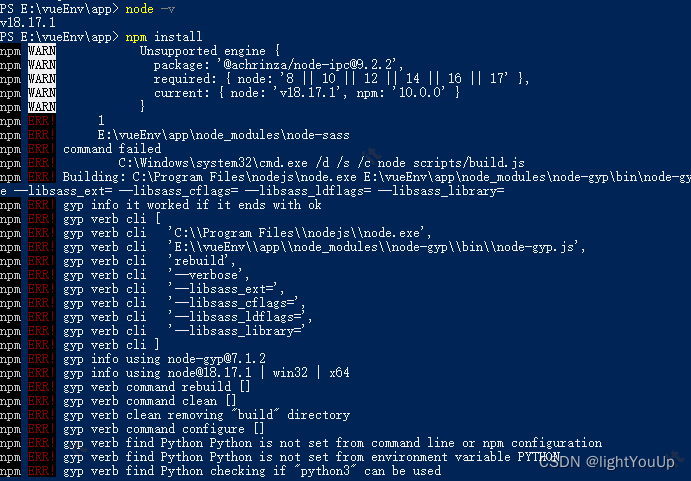
服务器下载下来的vue项目启动出现下列问题
npm ERR! path E:\vueEnv\app\node_modules\node-sass npm ERR! command failed npm ERR! command C:\Windows\system32\cmd.exe /d /s /c node scripts/build.js npm ERR! Building: C:\Program Files\nodejs\node.exe E:\vueEnv\app\node_modules\node-gyp\bin\node-gyp.js rebuild --verbose --libsass_ext= --libsass_cflags= --libsass_ldflags= --libsass_library= npm ERR! gyp info it worked if it ends with ok npm ERR! gyp verb cli [ npm ERR! gyp verb cli 'C:\\Program Files\\nodejs\\node.exe', npm ERR! gyp verb cli 'E:\\vueEnv\\app\\node_modules\\node-gyp\\bin\\node-gyp.js', npm ERR! gyp verb cli 'rebuild', npm ERR! gyp verb cli '--verbose', npm ERR! gyp verb cli '--libsass_ext=', npm ERR! gyp verb cli '--libsass_cflags=', npm ERR! gyp verb cli '--libsass_ldflags=', npm ERR! gyp verb cli '--libsass_library=' npm ERR! gyp verb cli ] npm ERR! gyp info using node-gyp@7.1.2 npm ERR! gyp info using node@18.17.1 | win32 | x64 npm ERR! gyp verb command rebuild [] npm ERR! gyp verb command clean []- 1
- 2
- 3
- 4
- 5
- 6
- 7
- 8
- 9
- 10
- 11
- 12
- 13
- 14
- 15
- 16
- 17
- 18
- 19
解决方法一
卸载 node-sassnpm uninstall node-sass #安装 node对应版本的 npm i -D sass npm cache clean -f npm install npm serve- 1
- 2
- 3
- 4
- 5
- 6
之后启动项目又遇到

set NODE_OPTIONS=–openssl-legacy-provider
npm run serve
#启动失败可能配置失败,再次设置
$env:NODE_OPTIONS=“–openssl-legacy-provider”
npm run serve方法二:
降低node版本 直接使用yarn启动切换node版本
下载nvm管理包
https://github.com/coreybutler/nvm-windows/releases- 1
#查看当前版本号 nvm v 有说明安装成功
#输入nvm ls available查看当前版本号
安装命令 nvm install 16.17
使用命令nvm use 16.17node 常用命令记录
#npm更新到最新 npm install -g npm #npm更新指定版本 npm install npm@7.24.2 -g #强制清楚缓存 npm cache clean -f- 1
- 2
- 3
- 4
- 5
- 6
-
相关阅读:
Celery笔记六之worker介绍
JUC第十二讲:JUC锁: 锁核心类AQS详解
20天能拿下PMP吗?
js基础知识整理之 —— Date和定时器
VMware安装Centos7及静态IP网络配置详细教程
【Linux从入门到放弃】Linux基本指令大全
数据可视化实验一:Panda数据处理及matplotlib绘图初步
(附源码)ssm市级疫情防控管理 毕业设计 030957
黎曼的几何基础,维度
mysql执行计划explain
- 原文地址:https://blog.csdn.net/weixin_50491125/article/details/132709481

- 最新文章
-
沪漂五周年了:我越来越迷茫了
Agentic Skill Routing 实战:别再把所有 Skill 塞进 AI Agent 上下文
MySQL-Seconds_behind_master的精度误差
[MAF预定义ChatClient中间件-03]CachingChatClient——利用缓存省钱省时间
AI的至暗历史:从万众期待到被政府撤资,AI的两次死亡徘徊
Agent OS :五种驯服不确定性的范式
PortSwigger SQL注入LAB11
数据库即时编译JIT
[Begin]AI Learn Data Day 0
深度学习进阶(二十七)现代 LLM 的核心架构设计其二:SwiGLU