-
Java多线程之线程同步机制(锁,线程池等等)
一、概念
1、并发
同一个对象被多个线程同时操作
2、起因
处理多线程问题时,多个线程访问同一个对象,并且某些线程还想修改这个对象,就需要线程同步,线程同步其实就是一种等待机制,多个需要同时访问此对象的线程进入这个对象的等待池形成队列,等待前面线程使用完毕,下一个线程再使用。但由于同一进程的多个线程共享同一块存储空间,在带来方便的同时,也带来了访问冲突问题,为了保证数据在方法中被访问时的正确性,所以在此基础上,增加锁机制。
3、缺点
一个线程持有锁会导致其他所有需要此锁的线程挂起。
(1)在多线程竞争下,加锁,释放锁会导致比较多的上下文切换 和 调度延时,引起性能问题。
(2)如果一个优先级高的线程等待一个优先级低的线程释放锁 会导致优先级倒置,引起性能问题。二、三大不安全案例
1、样例一(模拟买票场景)
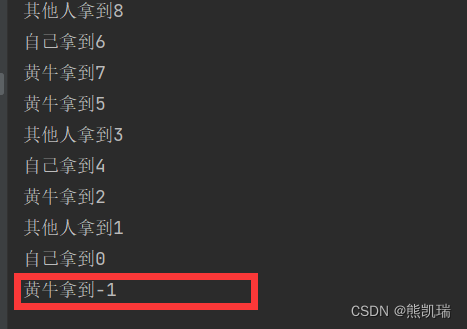
多个线程并发时,不设计好队列,结果就会出现不安全的情况,出现了-1
package com.example.multithreading.demo12_syn; // 线程不安全,有负数 public class UnsafeBuyTicket { public static void main(String[] args) { BuyTicket station = new BuyTicket(); new Thread(station, "自己").start(); new Thread(station, "其他人").start(); new Thread(station, "黄牛").start(); } } class BuyTicket implements Runnable{ // 票 private int ticketNums = 10; // 外部停止方式 boolean flag = true; @Override public void run() { // 买票 while(flag) { try { buy(); } catch (InterruptedException e) { e.printStackTrace(); } } } private void buy() throws InterruptedException { // 判断是否有票 if (ticketNums <= 0){ flag = false; return; } // 模拟延时 Thread.sleep(100); // 买票 System.out.println(Thread.currentThread().getName() + "拿到" + ticketNums--); } }- 1
- 2
- 3
- 4
- 5
- 6
- 7
- 8
- 9
- 10
- 11
- 12
- 13
- 14
- 15
- 16
- 17
- 18
- 19
- 20
- 21
- 22
- 23
- 24
- 25
- 26
- 27
- 28
- 29
- 30
- 31
- 32
- 33
- 34
- 35
- 36
- 37
- 38
- 39
- 40
- 41
- 42
- 43
- 44
- 45
- 46
结果
2、样例二(模拟取钱场景)
package com.example.multithreading.demo12_syn; import lombok.Data; public class UnsafeBank { public static void main(String[] args) { // 账户 Account account = new Account(100,"基金"); Drawing boy = new Drawing(account,50,"自己"); Drawing girlFriend = new Drawing(account,100,"女朋友"); boy.start(); girlFriend.start(); } } // 账户 @Data class Account { // 余额 int money; // 卡名 String name; public Account(int money, String name) { this.money = money; this.name = name; } } // 模拟取钱 @Data class Drawing extends Thread{ // 账户 Account account; // 取钱数 int drawingMoney; // 持有钱数 int nowMoney; public Drawing(Account account, int drawingMoney, String name) { super(name); this.account = account; this.drawingMoney = drawingMoney; this.nowMoney = nowMoney; } @Override public void run() { // 判断是否有钱 if (account.money - drawingMoney < 0){ System.out.println(Thread.currentThread().getName() + "钱不够,取不了"); return; } try{ Thread.sleep(1000); } catch (InterruptedException e) { e.printStackTrace(); } // 卡内余额 = 余额 - 取的钱 account.money = account.money - drawingMoney; // 你手里的钱 nowMoney = nowMoney + drawingMoney; System.out.println(account.name + "余额为:" + account.money); System.out.println(this.getName() + "手里的钱:" + nowMoney); } }- 1
- 2
- 3
- 4
- 5
- 6
- 7
- 8
- 9
- 10
- 11
- 12
- 13
- 14
- 15
- 16
- 17
- 18
- 19
- 20
- 21
- 22
- 23
- 24
- 25
- 26
- 27
- 28
- 29
- 30
- 31
- 32
- 33
- 34
- 35
- 36
- 37
- 38
- 39
- 40
- 41
- 42
- 43
- 44
- 45
- 46
- 47
- 48
- 49
- 50
- 51
- 52
- 53
- 54
- 55
- 56
- 57
- 58
- 59
- 60
- 61
- 62
- 63
- 64
- 65
- 66
- 67
- 68
- 69
- 70
- 71
- 72
- 73
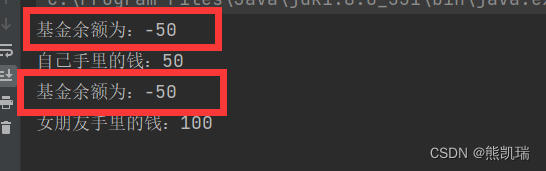
结果
3、样例三(模拟集合)
package com.example.multithreading.demo12_syn; import java.util.ArrayList; import java.util.List; // 线程不安全的集合 public class UnsafeList { public static void main(String[] args) { List<String> list = new ArrayList<>(); for (int i = 0; i < 1000; i++) { new Thread(()->{ list.add(Thread.currentThread().getName()); }).start(); } System.out.println(list.size()); } }- 1
- 2
- 3
- 4
- 5
- 6
- 7
- 8
- 9
- 10
- 11
- 12
- 13
- 14
- 15
- 16
- 17
- 18
- 19
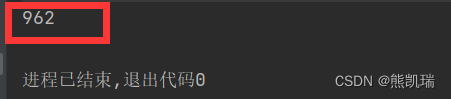
结果(真正应该为1000)
三、同步方法及同步块
1、同步方法
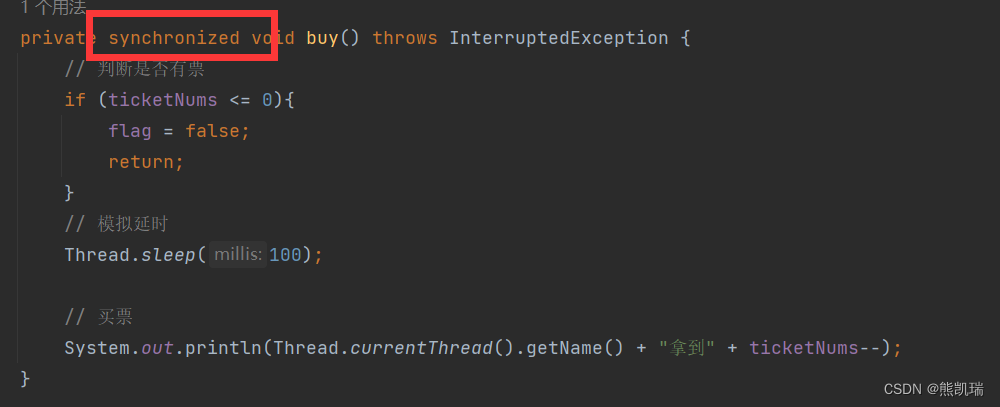
由于可以通过private关键字来保证数据对象只能被方法访问,所以只需要针对方法提出一套机制,这套机制就是synchronized关键字。两种用法(synchronized方法 和 synchronized块)
public synchronized void method(int args){}- 1
synchronized方法控制对 “对象” 的访问,每个对象对应一把锁,每个synchronized方法都必须获得调用该方法的对象的锁才能执行,否则线程会阻塞,方法一旦执行,就独占该锁,直到该方法返回才释放锁,后面被阻塞的线程才能获得这个锁,继续执行。(缺点:如果将一个大的方法申明为synchronized 将会影响效率)
2、同步块
(1)格式
synchronized(obj){}- 1
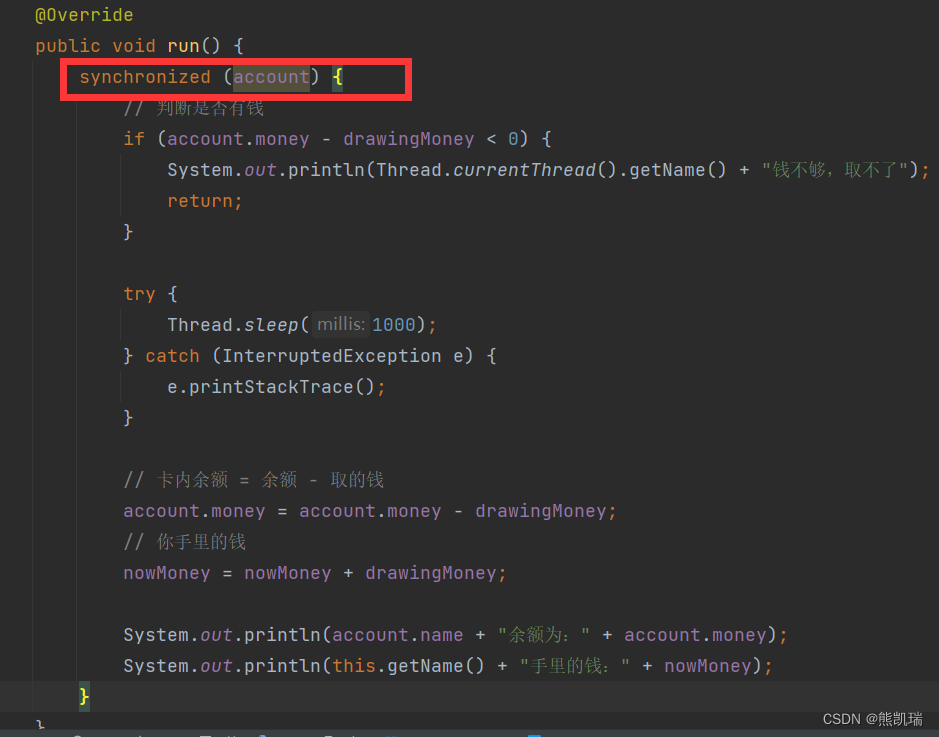
(2)Obj称之为同步监视器
Obj可以是任何对象,但是推荐使用共享资源作为同步监视器
同步方法中无需指定同步监视器,因为同步方法的同步监视器就是this,就是这个对象本身。
(3)同步监视器的执行过程
第一个线程访问,锁定同步监视器,执行其中代码。
第二个线程访问,发现同步监视器被锁定,无法访问。
第一个线程访问完毕,解锁同步监视器。
第二个线程访问,发现同步监视器没有锁,然后锁定并访问。
四、JUC安全类型的集合
1、线程安全的集合(结合延时实现)
CopyOnWriteArrayList<String> list = new CopyOnWriteArrayList<>();- 1
2、样例
package com.example.multithreading.demo12_syn; import java.util.ArrayList; import java.util.List; import java.util.concurrent.CopyOnWriteArrayList; // 线程不安全的集合 public class UnsafeList { public static void main(String[] args) { CopyOnWriteArrayList<String> list = new CopyOnWriteArrayList<>(); for (int i = 0; i < 1000; i++) { new Thread(()->{ list.add(Thread.currentThread().getName()); }).start(); } try{ Thread.sleep(3000); } catch (InterruptedException e) { e.printStackTrace(); } System.out.println(list.size()); } }- 1
- 2
- 3
- 4
- 5
- 6
- 7
- 8
- 9
- 10
- 11
- 12
- 13
- 14
- 15
- 16
- 17
- 18
- 19
- 20
- 21
- 22
- 23
- 24
- 25
- 26
结果

五、死锁
1、概念
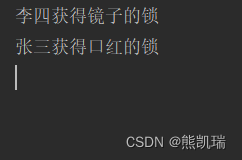
多线程各自占有一些共享资源,并且互相等待其他线程占有的资源才能运行,而导致两个或者多个线程都在等待对方释放资源,都停止执行的情形。某一个同步块同时拥有”两个以上对象的锁“时,就可能会发生”死锁“的问题。
2、死锁样例
package com.example.multithreading.demo13_DeadLock; // 死锁:多个线程互相占有需要的资源,然后形成僵持 public class DeadLock { public static void main(String[] args) { Makeup g1 = new Makeup(0,"张三"); Makeup g2 = new Makeup(1,"李四"); g1.start(); g2.start(); } } class Lipstick { } class Mirror { } class Makeup extends Thread { // 需要的资源只有一份,用static来保证只有一份 static Lipstick lipstick = new Lipstick(); static Mirror mirror = new Mirror(); // 选择 int choice; // 女孩 String girlName; Makeup(int choice, String girlName) { this.choice = choice; this.girlName = girlName; } @Override public void run() { try { makeup(); } catch (InterruptedException e) { throw new RuntimeException(e); } } private void makeup() throws InterruptedException { if (choice == 0){ synchronized (lipstick){ System.out.println(this.girlName + "获得口红的锁"); Thread.sleep(1000); synchronized (mirror){ System.out.println(this.girlName + "获得镜子的锁"); } } } else{ synchronized (mirror){ System.out.println(this.girlName + "获得镜子的锁"); Thread.sleep(2000); synchronized (lipstick){ System.out.println(this.girlName + "获得看口红的锁"); } } } } }- 1
- 2
- 3
- 4
- 5
- 6
- 7
- 8
- 9
- 10
- 11
- 12
- 13
- 14
- 15
- 16
- 17
- 18
- 19
- 20
- 21
- 22
- 23
- 24
- 25
- 26
- 27
- 28
- 29
- 30
- 31
- 32
- 33
- 34
- 35
- 36
- 37
- 38
- 39
- 40
- 41
- 42
- 43
- 44
- 45
- 46
- 47
- 48
- 49
- 50
- 51
- 52
- 53
- 54
- 55
- 56
- 57
- 58
- 59
- 60
- 61
- 62
- 63
- 64
- 65
- 66
- 67
- 68
- 69
结果(会卡死在这里)
3、解决方案
package com.example.multithreading.demo13_DeadLock; // 死锁:多个线程互相占有需要的资源,然后形成僵持 public class DeadLock { public static void main(String[] args) { Makeup g1 = new Makeup(0,"张三"); Makeup g2 = new Makeup(1,"李四"); g1.start(); g2.start(); } } class Lipstick { } class Mirror { } class Makeup extends Thread { // 需要的资源只有一份,用static来保证只有一份 static Lipstick lipstick = new Lipstick(); static Mirror mirror = new Mirror(); // 选择 int choice; // 女孩 String girlName; Makeup(int choice, String girlName) { this.choice = choice; this.girlName = girlName; } @Override public void run() { try { makeup(); } catch (InterruptedException e) { throw new RuntimeException(e); } } private void makeup() throws InterruptedException { if (choice == 0){ synchronized (lipstick){ System.out.println(this.girlName + "获得口红的锁"); Thread.sleep(1000); } synchronized (mirror){ System.out.println(this.girlName + "获得镜子的锁"); } } else{ synchronized (mirror){ System.out.println(this.girlName + "获得镜子的锁"); Thread.sleep(2000); } synchronized (lipstick){ System.out.println(this.girlName + "获得看口红的锁"); } } } }- 1
- 2
- 3
- 4
- 5
- 6
- 7
- 8
- 9
- 10
- 11
- 12
- 13
- 14
- 15
- 16
- 17
- 18
- 19
- 20
- 21
- 22
- 23
- 24
- 25
- 26
- 27
- 28
- 29
- 30
- 31
- 32
- 33
- 34
- 35
- 36
- 37
- 38
- 39
- 40
- 41
- 42
- 43
- 44
- 45
- 46
- 47
- 48
- 49
- 50
- 51
- 52
- 53
- 54
- 55
- 56
- 57
- 58
- 59
- 60
- 61
- 62
- 63
- 64
- 65
- 66
- 67
- 68
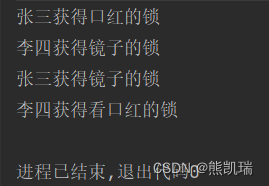
结果
4、产生死锁的四个必要条件
(1)互斥条件:一个资源每次只能被一个进程使用。
(2)请求与保持条件:一个进程因请求资源而阻塞时,对已获得的资源保持不放。
(3)不剥夺条件:进程已获得的资源,在未使用完之前,不能强行剥夺。
(4)循环等待条件:若干进程之间形成一种头尾相接的循环等待资源关系。
破坏其中的任意一个或多个条件就可以避免死锁的发生。六、Lock(锁)
1、概念
从JDK5.0开始,Java提供了更强大的线程同步机制——通过显式定义同步锁对象来实现同步,同步锁使用Lock对象充当。
java.util.concurrent.locks.Lock接口是控制多个线程对共享资源进行访问的工具。
锁提供了对共享资源的独占访问,每次只能有一-个线程对L ock对象加锁,线程开始访问共享资源之前应先获得L ock对象。
ReentrantLock 类实现了Lock,它拥有与synchronized相同的并发性和内存语义,在实现线程安全的控制中,比较常用的是ReentrantLock,可以显式加锁、释放锁。2、synchronized 与 Lock的对比
(1)Lock是显式锁(手动开启和关闭锁),synchronized是隐式锁,出了作用域自动释放。
(2)Lock只有代码块锁,synchronized有代码块锁和方法锁。
(3)使用Lock锁,JVM将花费较少的时间来调度线程,性能更好。并且具有更好的扩展性(提供更多的子类)
优先使用的顺序
Lock > 同步代码块 (已经进入了方法体,分配了相应资源) > 同步方法(在方法体之外)3、样例
package com.example.multithreading.demo14_Lock; import java.util.concurrent.locks.ReentrantLock; public class LockTest { public static void main(String[] args) { TicketLock threadTest1 = new TicketLock(); new Thread(threadTest1).start(); new Thread(threadTest1).start(); new Thread(threadTest1).start(); } } class TicketLock implements Runnable{ int ticketNums = 10; // 定义lock锁 private final ReentrantLock lock = new ReentrantLock(); @Override public void run() { while (true) { try{ // 加锁 lock.lock(); if(ticketNums > 0){ try { Thread.sleep(1000); } catch (InterruptedException e) { throw new RuntimeException(e); } System.out.println(ticketNums--); }else { break; } }finally { // 解锁 lock.unlock(); } } } }- 1
- 2
- 3
- 4
- 5
- 6
- 7
- 8
- 9
- 10
- 11
- 12
- 13
- 14
- 15
- 16
- 17
- 18
- 19
- 20
- 21
- 22
- 23
- 24
- 25
- 26
- 27
- 28
- 29
- 30
- 31
- 32
- 33
- 34
- 35
- 36
- 37
- 38
- 39
- 40
- 41
- 42
- 43
- 44
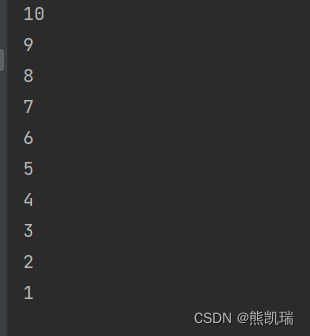
结果
七、线程协作
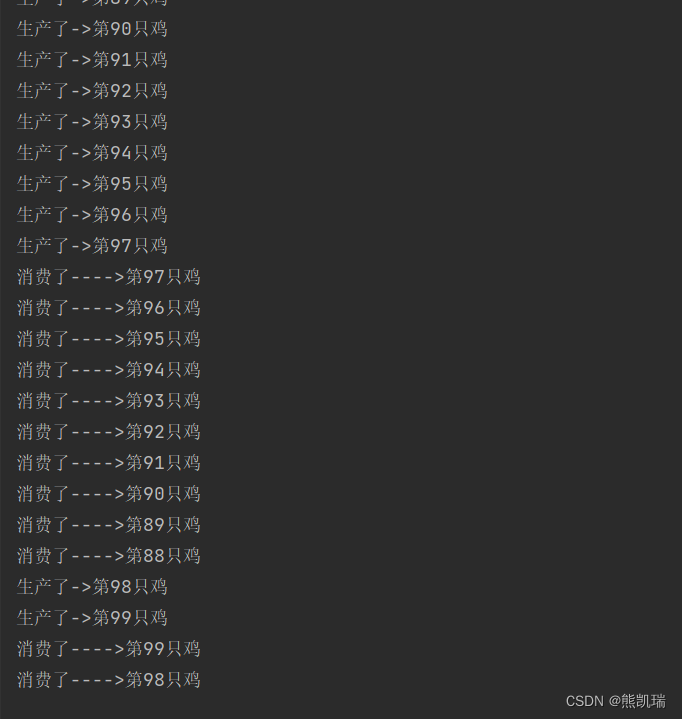
1、管程法
生产者:负责生产数据的模块(可能是方法、对象、线程、进程)
消费者:负责处理数据的模块(可能是方法、对象、线程、进程)
缓冲区:消费者不能直接使用生产者的数据,两者之间有个缓冲区。
生产者将生产好的数据放入缓冲区,消费者从缓冲区拿出数据。package com.example.multithreading.demo15_PC; import java.beans.Customizer; // 管程法 // 生产者,消费者,产品,缓冲区 public class PcTest { public static void main(String[] args) { SynContainer container = new SynContainer(); new Productor(container).start(); new Consumer(container).start(); } } // 生产者 class Productor extends Thread{ SynContainer container; public Productor(SynContainer container){ this.container = container; } // 生产 @Override public void run(){ for(int i = 0; i < 100; i++){ container.push(new Chicken(i)); System.out.println("生产了->第" + i + "只鸡"); } } } // 消费者 class Consumer extends Thread{ SynContainer container; public Consumer(SynContainer container){ this.container = container; } // 消费 @Override public void run(){ for(int i = 0; i < 100; i++){ System.out.println("消费了---->第" + container.pop().id + "只鸡"); } } } // 产品 class Chicken{ // 产品编号 int id; public Chicken(int id) { this.id = id; } } // 缓冲区 class SynContainer { // 需要一个容器大小 Chicken[] chickens = new Chicken[10]; // 容器计数器 int count = 0; // 生产者放入产品 public synchronized void push(Chicken chicken){ // 如果容器满了,就需要等待消费者消费 if (count == chickens.length){ // 通知消费者消费,生产等待 try { this.wait(); }catch (InterruptedException e) { e.printStackTrace(); } } // 如果没有满,我们就需要丢入产品 chickens[count] = chicken; count++; // 可以通知消费者消费了 this.notifyAll(); } // 消费者消费产品 public synchronized Chicken pop(){ // 判断能否消费 if (count == 0){ // 等待生产者生产,消费者等待 try{ this.wait(); }catch (InterruptedException e){ e.printStackTrace(); } } // 如果可以消费 count--; Chicken chicken = chickens[count]; // 吃完了,通知生产者生产 this.notifyAll(); return chicken; } }- 1
- 2
- 3
- 4
- 5
- 6
- 7
- 8
- 9
- 10
- 11
- 12
- 13
- 14
- 15
- 16
- 17
- 18
- 19
- 20
- 21
- 22
- 23
- 24
- 25
- 26
- 27
- 28
- 29
- 30
- 31
- 32
- 33
- 34
- 35
- 36
- 37
- 38
- 39
- 40
- 41
- 42
- 43
- 44
- 45
- 46
- 47
- 48
- 49
- 50
- 51
- 52
- 53
- 54
- 55
- 56
- 57
- 58
- 59
- 60
- 61
- 62
- 63
- 64
- 65
- 66
- 67
- 68
- 69
- 70
- 71
- 72
- 73
- 74
- 75
- 76
- 77
- 78
- 79
- 80
- 81
- 82
- 83
- 84
- 85
- 86
- 87
- 88
- 89
- 90
- 91
- 92
- 93
- 94
- 95
- 96
- 97
- 98
- 99
- 100
- 101
- 102
- 103
- 104
- 105
- 106
- 107
- 108
- 109
- 110
- 111
- 112
- 113
结果
2、信号灯法
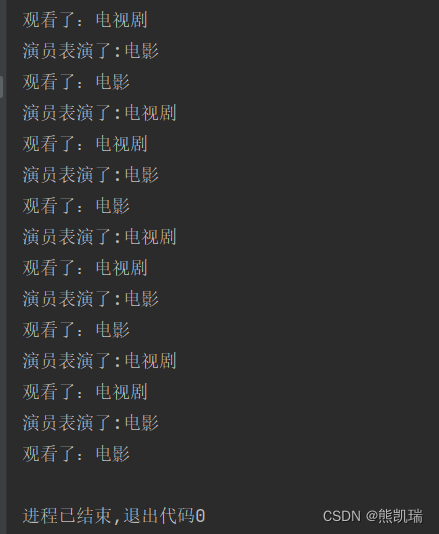
通过标志位控制
package com.example.multithreading.demo15_PC; // 信号灯法,标志位解决 public class PcTest2 { public static void main(String[] args) { TV tv = new TV(); new Player(tv).start(); new Watcher(tv).start(); } } // 生产者 --> 演员 class Player extends Thread{ TV tv; public Player(TV tv) { this.tv = tv; } @Override public void run() { for (int i = 0; i < 20; i++) { if(i%2==0){ this.tv.play("电视剧"); } else{ this.tv.play("电影"); } } } } // 消费者 --> 观众 class Watcher extends Thread{ TV tv; public Watcher(TV tv) { this.tv = tv; } @Override public void run() { for (int i = 0; i < 20; i++) { tv.watch(); } } } // 产品 --> 节目 class TV{ // 演员表演,观众等待 T // 观众观看,演员等待 F // 表演的节目 String voice; // 表演的节目 boolean flag = true; // 表演 public synchronized void play(String voice){ if (!flag){ try{ this.wait(); } catch (InterruptedException e) { e.printStackTrace(); } } System.out.println("演员表演了:" + voice); // 通知观众观看 // 通知唤醒 this.notifyAll(); this.voice = voice; this.flag = false; } // 观看 public synchronized void watch(){ if(flag){ try{ this.wait(); }catch (InterruptedException e){ e.printStackTrace(); } } System.out.println("观看了:" + voice); // 通知演员表演 this.notifyAll(); this.flag = !this.flag; } }- 1
- 2
- 3
- 4
- 5
- 6
- 7
- 8
- 9
- 10
- 11
- 12
- 13
- 14
- 15
- 16
- 17
- 18
- 19
- 20
- 21
- 22
- 23
- 24
- 25
- 26
- 27
- 28
- 29
- 30
- 31
- 32
- 33
- 34
- 35
- 36
- 37
- 38
- 39
- 40
- 41
- 42
- 43
- 44
- 45
- 46
- 47
- 48
- 49
- 50
- 51
- 52
- 53
- 54
- 55
- 56
- 57
- 58
- 59
- 60
- 61
- 62
- 63
- 64
- 65
- 66
- 67
- 68
- 69
- 70
- 71
- 72
- 73
- 74
- 75
- 76
- 77
- 78
- 79
- 80
- 81
- 82
- 83
- 84
- 85
- 86
结果
3、线程池
3.1 背景
经常创建和销毁、使用量特别大的资源,比如并发情况下的线程,对性能影响很大。
3.2 思路
提前创建好多个线程,放入线程池中,使用时直接获取,使用完放回池中。可以避免频繁创建销毁、实现重复利用。
3.3 好处
(1)提高响应速度(减少了创建新线程的时间)
(2)降低资源消耗(重复利用线程池中线程,不需要每次都创建)
(3)便于线程管理
corePoolSize:核心池的大小
maximumPoolSize:最大线程数
keepAliveTime:线程没有任务时最多保持多长时间后会终止3.4 ExecutorService和Executors
ExecutorService:真正的线程池接口(常见子类ThreadPoolExecutor)
void execute(Runnable command):执行任务/命令,没有返回值,一般用来执行Runnable。
Future submit(Callable task):执行任务,有返回值,一般用来执行Callable。
void shutdown() :关闭连接池。
Executors:工具类、线程池的工厂类,用于创建并返回不同类型的线程池。3.5 样例
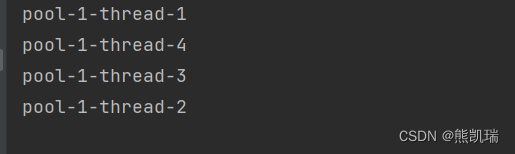
package com.example.multithreading.demo16_Pool; import java.util.concurrent.ExecutorService; import java.util.concurrent.Executors; // 测试线程池 public class PoolTest { public static void main(String[] args) throws Exception { // 1、创建服务,创建线程池 // newFixedThreadPool 参数为:线程池大小 ExecutorService service = Executors.newFixedThreadPool(10); // 执行 service.execute(new MyThread()); service.execute(new MyThread()); service.execute(new MyThread()); service.execute(new MyThread()); // 2、关闭链接 service.shutdown(); } } class MyThread implements Runnable { @Override public void run() { System.out.println(Thread.currentThread().getName()); } }- 1
- 2
- 3
- 4
- 5
- 6
- 7
- 8
- 9
- 10
- 11
- 12
- 13
- 14
- 15
- 16
- 17
- 18
- 19
- 20
- 21
- 22
- 23
- 24
- 25
- 26
- 27
- 28
- 29
- 30
- 31
结果
-
相关阅读:
docker容器数据卷
手写数组方法之用于遍历的方法
中小河流水文监测系统
笔记本CPU天梯图(2024年8月),含AMD/骁龙等新CPU
【Linux】基础指令(三) —— 收尾篇
Redis进阶知识一览
从零开始配置 vim(16)——启动界面配置
用FIR滤波器设计数字微分器和数字希尔伯特变换器
基于华为云服务器docker配置Elasticsearch集群
450-500未传计算机毕业设计安卓App毕设项目之ssm公园植物介绍APP
- 原文地址:https://blog.csdn.net/qq_46106857/article/details/128204183