-
线上应用故障排查之一:高CPU占用
一个应用占用CPU很高,除了确实是计算密集型应用之外,通常原因都是出现了死循环。
以我们最近出现的一个实际故障为例,介绍怎么定位和解决这类问题。

根据top命令,发现PID为28555的Java进程占用CPU高达200%,出现故障。
通过ps aux | grep PID命令,可以进一步确定是tomcat进程出现了问题。但是,怎么定位到具体线程或者代码呢?
首先显示线程列表:
ps -mp pid -o THREAD,tid,time

找到了耗时最高的线程28802,占用CPU时间快两个小时了!
其次将需要的线程ID转换为16进制格式:
printf "%x\n" tid

最后打印线程的堆栈信息:
jstack pid |grep tid -A 30
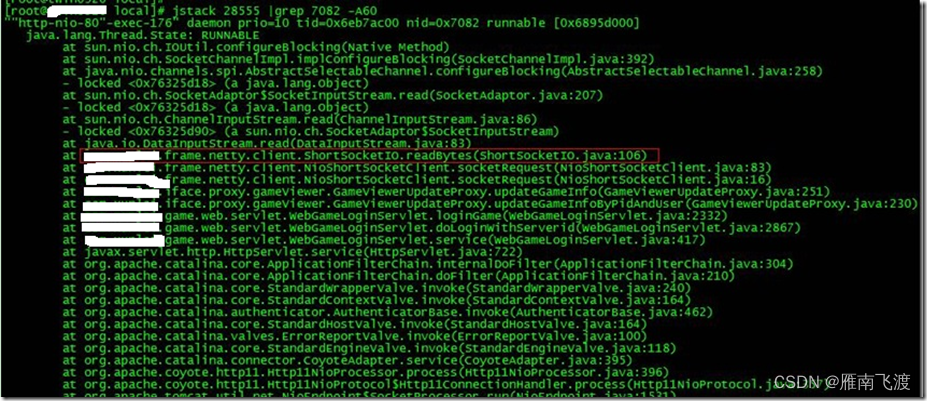
找到出现问题的代码了!
现在来分析下具体的代码:ShortSocketIO.readBytes(ShortSocketIO.java:106)
ShortSocketIO是应用封装的一个用短连接Socket通信的工具类。readBytes函数的代码如下:
- public byte[] readBytes(int length) throws IOException {
- if ((this.socket == null) || (!this.socket.isConnected())) {
- throw new IOException("++++ attempting to read from closed socket");
- }
- byte[] result = null;
- ByteArrayOutputStream bos = new ByteArrayOutputStream();
- if (this.recIndex >= length) {
- bos.write(this.recBuf, 0, length);
- byte[] newBuf = new byte[this.recBufSize];
- if (this.recIndex > length) {
- System.arraycopy(this.recBuf, length, newBuf, 0, this.recIndex - length);
- }
- this.recBuf = newBuf;
- this.recIndex -= length;
- } else {
- int totalread = length;
- if (this.recIndex > 0) {
- totalread -= this.recIndex;
- bos.write(this.recBuf, 0, this.recIndex);
- this.recBuf = new byte[this.recBufSize];
- this.recIndex = 0;
- }
- int readCount = 0;
- while (totalread > 0) {
- if ((readCount = this.in.read(this.recBuf)) > 0) {
- if (totalread > readCount) {
- bos.write(this.recBuf, 0, readCount);
- this.recBuf = new byte[this.recBufSize];
- this.recIndex = 0;
- } else {
- bos.write(this.recBuf, 0, totalread);
- byte[] newBuf = new byte[this.recBufSize];
- System.arraycopy(this.recBuf, totalread, newBuf, 0, readCount - totalread);
- this.recBuf = newBuf;
- this.recIndex = (readCount - totalread);
- }
- totalread -= readCount;
- }
- }
- }
问题就出在readCount 部分。如果this.in.read()返回的数据小于等于0时,循环就一直进行下去了。而这种情况在网络拥塞的时候是可能发生的。
至于具体怎么修改就看业务逻辑应该怎么对待这种特殊情况了。
最后,总结下排查CPU故障的方法和技巧有哪些:
1、top命令:Linux命令。可以查看实时的CPU使用情况。也可以查看最近一段时间的CPU使用情况。
2、PS命令:Linux命令。强大的进程状态监控命令。可以查看进程以及进程中线程的当前CPU使用情况。属于当前状态的采样数据。
3、jstack:Java提供的命令。可以查看某个进程的当前线程栈运行情况。根据这个命令的输出可以定位某个进程的所有线程的当前运行状态、运行代码,以及是否死锁等等。
4、pstack:Linux命令。可以查看某个进程的当前线程栈运行情况。
(友情提示:本博文章欢迎转载,但请注明出处:雁南飞渡)
-
相关阅读:
如何在 Ubuntu上使用 Nginx 设置密码验证
(动手学习深度学习)第13章 实战kaggle竞赛:狗的品种识别
长沙周边最美露营基地:安化云台山风景区星空露营公园
Nginx服务优化
Mac os 安装homebrew
Gitea 仓库事件触发Jenkins远程构建
SQL 之 小技巧总结
基于端智能的播放QoE优化
使用mybatis标签规避空where
PaddleOCR系列-训练模型并部署android手机
- 原文地址:https://blog.csdn.net/qq_34755766/article/details/128185105