-
微信支付回调,内网穿透详细过程
微信支付流程图

微信配置类
public class MyPayConfig implements WXPayConfig { @Override public String getAppID() { return "wx632c8f211f8122c6"; } @Override public String getMchID() { return "1497984412"; } @Override public String getKey() { return "sbNCm1JnevqI36LrEaxFwcaT0hkGxFnC"; } @Override public InputStream getCertStream() { return null; } @Override public int getHttpConnectTimeoutMs() { return 0; } @Override public int getHttpReadTimeoutMs() { return 0; } }- 1
- 2
- 3
- 4
- 5
- 6
- 7
- 8
- 9
- 10
- 11
- 12
- 13
- 14
- 15
- 16
- 17
- 18
- 19
- 20
- 21
- 22
- 23
- 24
- 25
- 26
- 27
- 28
- 29
- 30
- 31
- 32
- 33
- 34
- 35
支付回调接口
支付回调: 用户支付成功之后,微信平台向我们指定接口发送请求传递订单状态数据的过程。
根据 notify_url参数,wechat会给我们指定的value路径,返回相关订单信息。微信会向自己的ip(https://ip:8080/pay/success)地址发送请求
公网ip: 直接连入到互联网中的ip
同一个交换机下面的ip地址可以相互发现
一般我们可以看到公网ip,但是公网看不到我们的ip,我们的项目是运行在本地的计算机上面,微信支付平台没有办法访问我们的内网ip的。
微信怎么访问我们的回调接口?
通过Ngrock为我们进行内网穿透,首次认证关注微信公众号,付费2元通过Ngrok进行内网穿透步骤
1. 根据邮箱注册一个账号

2. 获取隧道id
获取隧道id: 182810384749

3.下载Ngrok客户端
4. 双击这个 Sunny-Ngrok启动工具.bat 文件
5. 填写你的 隧道id 回车
6.客户端启动成功
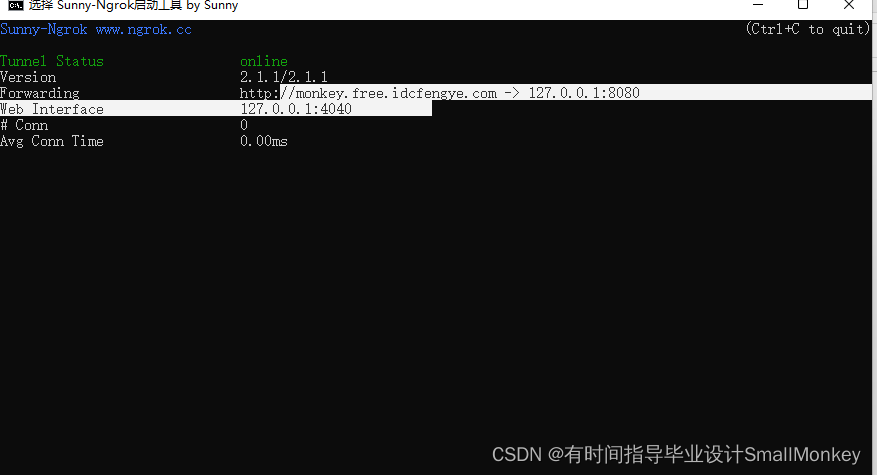
相当于访问url: http://monkey.free.idcfengye.com 就是访问 我们的 localhost:80807. 所以你的notify_url对应的value需要改为内网穿透的地址为
http://monkey.free.idcfengye.com/pay/success- 1
8.支付成功之后微信平台会发来消息
需要给微信支付平台进行响应,如果没有响应会一起给你请求,频率会慢慢降低。
@PostMapping("/add/{cids}") public ResultVO add(@PathVariable("cids") List<Integer> cids, @RequestBody Orders orders){ ResultVO resultVO=null; // 测试用的OrderId try { Map<String, String> orderInfo = orderService.addOrder(cids, orders); String orderId=orderInfo.get("orderId"); // 订单快照创建成功,申请支付链接 HashMap<String,String> data=new HashMap<>(); // 设置当前订单信息 data.put("body",orderInfo.get("productNames")); //商品描述 data.put("out_trade_no", orderId.substring(0,30));//使用当前用户订单编号作为当前支付交易的交易编号 data.put("fee_type","CNY"); //支付币种 data.put("total_fee", orders.getTotalAmount() +""); //支付金额 data.put("trade_type","NATIVE");//交易类型 // 必填选项 用于设置支付完成时的回调方法接口 data.put("notify_url","/pay/success"); WXPay wxPay=new WXPay(new MyPayConfig()); Map<String, String> resp = wxPay.unifiedOrder(data); // 把微信支付平台生成的链接获取到 orderInfo.put("payUrl",resp.get("code_url")); resultVO=new ResultVO(ResultStatus.OK,"提交订单成功!",orderInfo); System.out.println(resp); // code_url -> weixin://wxpay/bizpayurl?pr=Iv5Fsq6zz } catch (SQLException e) { resultVO= new ResultVO(ResultStatus.NO,"下单失败",null); } catch (Exception e) { e.printStackTrace(); } return resultVO; }- 1
- 2
- 3
- 4
- 5
- 6
- 7
- 8
- 9
- 10
- 11
- 12
- 13
- 14
- 15
- 16
- 17
- 18
- 19
- 20
- 21
- 22
- 23
- 24
- 25
- 26
- 27
- 28
- 29
- 30
- 31
- 32
- 33
- 34
- 35
- 36
- 37
- 38
- 39
- 40
- 41
- 42
- 43
- 44
1. 创建一个控制器定义回调接口 里面有微信返回的xml文件,通过WXPUtil.xmltoMap()转换为Map
package com.qfedu.fmmall.controller; import com.github.wxpay.sdk.WXPayUtil; import com.qfedu.fmmall.service.OrderService; import io.swagger.annotations.Api; import org.springframework.beans.factory.annotation.Autowired; import org.springframework.web.bind.annotation.PostMapping; import org.springframework.web.bind.annotation.RequestMapping; import org.springframework.web.bind.annotation.RestController; import javax.servlet.ServletInputStream; import javax.servlet.http.HttpServletRequest; import java.io.IOException; import java.util.HashMap; import java.util.Map; @RestController @RequestMapping("/pay") @Api(value = "微信支付接口",tags = "微信支付回调接口测试") public class PayController { @Autowired private OrderService orderService; @RequestMapping("/success") public String success(HttpServletRequest request) throws Exception { System.out.println("支付成功-------------------------------------------------"); // 通过request的输入流接收微信支付平台传递过来的数据 ServletInputStream inputStream = request.getInputStream(); byte[] bs = new byte[1024]; int len = -1; StringBuilder stringBuilder = new StringBuilder(); while ((len = inputStream.read(bs)) != -1){ stringBuilder.append(new String(bs,0,len)); } String s = stringBuilder.toString(); //可以看到微信支付平台传递过来的是xml文件 System.out.println(s); Map<String, String> map = WXPayUtil.xmlToMap(s); if (map != null && "success".equalsIgnoreCase(map.get("result_code")) ) { //支付成功 // 2.根据微信支付返回的订单编号 修改订单状态为“待发货/已支付” // 3.响应微信支付平台,使用微信不用继续请求 //2. String orderid = map.get("out_trade_no"); System.out.println("orderid:---------------------"+orderid); int i = orderService.updateOrderStatus(orderid, "2"); if(i > 0){ //3. Map<String, String> map1 = new HashMap<>(16); map.put("result_code","success"); map.put("return_msg","OK"); map.put("appid",map.get("appid")); map.put("return_code","success"); return WXPayUtil.mapToXml(map1); } } //支付失败 return null; } }- 1
- 2
- 3
- 4
- 5
- 6
- 7
- 8
- 9
- 10
- 11
- 12
- 13
- 14
- 15
- 16
- 17
- 18
- 19
- 20
- 21
- 22
- 23
- 24
- 25
- 26
- 27
- 28
- 29
- 30
- 31
- 32
- 33
- 34
- 35
- 36
- 37
- 38
- 39
- 40
- 41
- 42
- 43
- 44
- 45
- 46
- 47
- 48
- 49
- 50
- 51
- 52
- 53
- 54
- 55
- 56
- 57
- 58
- 59
- 60
- 61
- 62
- 63
- 64
2. 支付成功更新订单状态
3. 返回信息给微信支付接口,否则微信将以不同的频率进行请求你。
Map<String, String> map1 = new HashMap<>(16); map.put("result_code","success"); map.put("return_msg","OK"); map.put("appid",map.get("appid")); map.put("return_code","success"); return WXPayUtil.mapToXml(map1);- 1
- 2
- 3
- 4
- 5
- 6
前端进行轮询查询数据库订单信息
间隔1秒请求后端,查询订单状态。
//前端轮询查询数据是否付款成功 //mounted的里面的方法不可以直接调用methods里面的isPay(); var oid = this.orderInfo.orderId; setInterval(function(){ console.log("------轮询调用-----"); var url = baseUrl + "order/queryOrderByid?oid=" + oid; axios({ url:url, method:"get", headers:{ token:getCookieValue("token") } }).then(res =>{ if(res.data.data == "1"){ //订单没有支付 }else if(res.data.data == "2"){ $("#message").html(""); return; } }); },1000);- 1
- 2
- 3
- 4
- 5
- 6
- 7
- 8
- 9
- 10
- 11
- 12
- 13
- 14
- 15
- 16
- 17
- 18
- 19
- 20
- 21
- 22
- 23
- 24
- 25
- 26
- 27
1. 整个前端页面信息
DOCTYPE html PUBLIC "-//W3C//DTD XHTML 1.0 Transitional//EN" "http://www.w3.org/TR/xhtml1/DTD/xhtml1-transitional.dtd"> <html xmlns="http://www.w3.org/1999/xhtml"> <head> <meta http-equiv="Content-Type" content="text/html; charset=utf-8" /> <meta name="viewport" content="width=device-width, initial-scale=1.0, minimum-scale=1.0, maximum-scale=1.0, user-scalable=no"> <title>购物车页面title> <link href="static/css/amazeui.css" rel="stylesheet" type="text/css" /> <link href="static/css/demo.css" rel="stylesheet" type="text/css" /> <link href="static/css/cartstyle.css" rel="stylesheet" type="text/css" /> <link href="static/css/optstyle.css" rel="stylesheet" type="text/css" /> <link rel="stylesheet" href="https://unpkg.com/element-ui/lib/theme-chalk/index.css"> <script type="text/javascript" src="static/js/jquery.js">script> head> <body> <div id="container"> <div class="am-container header"> <ul class="message-l"> <div class="topMessage"> <div class="menu-hd" v-if="username!=null" style="color: teal;font-size: 20px;"> {{username}},欢迎您 div> <div class="menu-hd" v-else> <a href="#" target="_top" class="h">亲,请登录a> <a href="#" target="_top">免费注册a> div> div> ul> <ul class="message-r"> <div class="topMessage home"> <div class="menu-hd"><a href="index.html" target="_top" class="h">商城首页a>div> div> <div class="topMessage my-shangcheng"> <div class="menu-hd MyShangcheng"><a href="user-center.html" target="_top"><i class="am-icon-user am-icon-fw">i>个人中心a>div> div> <div class="topMessage mini-cart"> <div class="menu-hd"><a id="mc-menu-hd" href="shopcart.html" target="_top"><i class="am-icon-shopping-cart am-icon-fw">i><span>购物车span><strong id="J_MiniCartNum" class="h">0strong>a>div> div> <div class="topMessage favorite"> <div class="menu-hd"><a href="#" target="_top"><i class="am-icon-heart am-icon-fw">i><span>收藏夹span>a>div> ul> div> <div class="nav white"> <div class="logo"><img src="static/images/logo.png" />div> <div class="logoBig"> <li><img src="static/images/threeMouse.jpg" />li> div> <div class="search-bar pr"> <a name="index_none_header_sysc" href="#">a> <form> <input id="searchInput" name="index_none_header_sysc" type="text" placeholder="搜索" autocomplete="off"> <input id="ai-topsearch" class="submit am-btn" value="搜索" index="1" type="submit"> form> div> div> <div class="clear">div> <div style="background: lightgrey; height: 600px; margin-top: 40px; padding: 15px;"> <div style="width:65%; background: white; height: 540px; margin: auto; padding-left: 50px;"> <p> p> <p> p> <h3>订单编号:{{orderInfo.orderId}}h3> <p> p> <h3>订单金额:¥ <strong style="color:red; font-size:22px;"> {{orderInfo.totalPrice}}strong> 元 h3> <hr/> <div id="message"> <div onLoad="init()" id="qrcode" style="width: 200px;height:200px;border: 2px red solid;border-radius: 1px;">div> div> div> div> <div class="theme-popover-mask">div> <div class="theme-popover"> <div class="theme-span">div> <div class="theme-poptit h-title"> <a href="javascript:;" title="关闭" class="close">×a> div> <div class="theme-popbod dform"> <form class="theme-signin" name="loginform" action="" method="post"> <div class="theme-signin-left"> <li class="theme-options"> <div class="cart-title">颜色:div> <ul> <li class="sku-line selected">12#川南玛瑙<i>i>li> <li class="sku-line">10#蜜橘色+17#樱花粉<i>i>li> ul> li> <li class="theme-options"> <div class="cart-title">包装:div> <ul> <li class="sku-line selected">包装:裸装<i>i>li> <li class="sku-line">两支手袋装(送彩带)<i>i>li> ul> li> <div class="theme-options"> <div class="cart-title number">数量div> <dd> <input class="min am-btn am-btn-default" name="" type="button" value="-" /> <input class="text_box" name="" type="text" value="1" style="width:30px;" /> <input class="add am-btn am-btn-default" name="" type="button" value="+" /> <span class="tb-hidden">库存<span class="stock">1000span>件span> dd> div> <div class="clear">div> <div class="btn-op"> <div class="btn am-btn am-btn-warning">确认div> <div class="btn close am-btn am-btn-warning">取消div> div> div> <div class="theme-signin-right"> <div class="img-info"> <img src="static/images/kouhong.jpg_80x80.jpg" /> div> <div class="text-info"> <span class="J_Price price-now">¥39.00span> <span id="Stock" class="tb-hidden">库存<span class="stock">1000span>件span> div> div> form> div> div> <div class="navCir"> <li><a href="home.html"><i class="am-icon-home ">i>首页a>li> <li><a href="sort.html"><i class="am-icon-list">i>分类a>li> <li class="active"><a href="shopcart.html"><i class="am-icon-shopping-basket">i>购物车a>li> <li><a href="person/index.html"><i class="am-icon-user">i>我的a>li> div> div> <script type="text/javascript" src="static/js/cookie_utils.js" >script> <script type="text/javascript" src="static/js//vue.min.js">script> <script src="https://unpkg.com/element-ui/lib/index.js"> script> <script type="text/javascript" src="static/js/axios.min.js" >script> <script type="text/javascript" src="static/js/base.js" >script> <script src="static/js/qrcode.js">script> <script type="text/javascript"> new Vue({ el:"#container", data:{ username:"", orderInfo:{}, }, // vue的生命周期 创建对象---》beforeCreate--->created---->加载模板 created() { this.username=getCookieValue("username"); var jsonstr=localStorage.getItem("orderinfo"); console.log(jsonstr); // if(jsonstr!=null){ // localStorage.removeItem("orderinfo"); // } this.orderInfo=eval("("+jsonstr+")"); console.log(this.orderInfo); }, // 渲染二维码放在mounted中,不可以放在created中 mounted(){ var url=this.orderInfo.payUrl; console.log("url="+url); new QRCode(document.getElementById("qrcode"), url); //前端轮询查询数据是否付款成功 //mounted的里面的方法不可以直接调用methods里面的isPay(); var oid = this.orderInfo.orderId; setInterval(function(){ console.log("------轮询调用-----"); var url = baseUrl + "order/queryOrderByid?oid=" + oid; axios({ url:url, method:"get", headers:{ token:getCookieValue("token") } }).then(res =>{ if(res.data.data == "1"){ //订单没有支付 }else if(res.data.data == "2"){ $("#message").html(""); return; } }); },1000); // setTimeout(() => { // ELEMENT.Message.success("支付成功"); // 3秒之后,再执行这段代码。 // }, 6000); }, // methods: { // isPay:function(){ // var url = baseUrl + "order/queryByid?oid=" + this.orderInfo.orderId; // axios({ // url:url, // method:"get", // headers:{ // token:getCookieValue("token") // } // }).then(res =>{ // if(res.data.data == "1"){ // //订单没有支付 // setTimeout("isPay", 1000); // }else if(res.data.data == "2"){ // $("#message").html(""); // } // }); // } // } }) script> body> html>- 1
- 2
- 3
- 4
- 5
- 6
- 7
- 8
- 9
- 10
- 11
- 12
- 13
- 14
- 15
- 16
- 17
- 18
- 19
- 20
- 21
- 22
- 23
- 24
- 25
- 26
- 27
- 28
- 29
- 30
- 31
- 32
- 33
- 34
- 35
- 36
- 37
- 38
- 39
- 40
- 41
- 42
- 43
- 44
- 45
- 46
- 47
- 48
- 49
- 50
- 51
- 52
- 53
- 54
- 55
- 56
- 57
- 58
- 59
- 60
- 61
- 62
- 63
- 64
- 65
- 66
- 67
- 68
- 69
- 70
- 71
- 72
- 73
- 74
- 75
- 76
- 77
- 78
- 79
- 80
- 81
- 82
- 83
- 84
- 85
- 86
- 87
- 88
- 89
- 90
- 91
- 92
- 93
- 94
- 95
- 96
- 97
- 98
- 99
- 100
- 101
- 102
- 103
- 104
- 105
- 106
- 107
- 108
- 109
- 110
- 111
- 112
- 113
- 114
- 115
- 116
- 117
- 118
- 119
- 120
- 121
- 122
- 123
- 124
- 125
- 126
- 127
- 128
- 129
- 130
- 131
- 132
- 133
- 134
- 135
- 136
- 137
- 138
- 139
- 140
- 141
- 142
- 143
- 144
- 145
- 146
- 147
- 148
- 149
- 150
- 151
- 152
- 153
- 154
- 155
- 156
- 157
- 158
- 159
- 160
- 161
- 162
- 163
- 164
- 165
- 166
- 167
- 168
- 169
- 170
- 171
- 172
- 173
- 174
- 175
- 176
- 177
- 178
- 179
- 180
- 181
- 182
- 183
- 184
- 185
- 186
- 187
- 188
- 189
- 190
- 191
- 192
- 193
- 194
- 195
- 196
- 197
- 198
- 199
- 200
- 201
- 202
- 203
- 204
- 205
- 206
- 207
- 208
- 209
- 210
- 211
- 212
- 213
- 214
- 215
- 216
- 217
- 218
- 219
- 220
- 221
- 222
- 223
- 224
- 225
- 226
- 227
- 228
- 229
- 230
- 231
- 232
- 233
- 234
- 235
- 236
- 237
- 238
- 239
- 240
- 241
- 242
- 243
- 244
- 245
- 246
- 247
- 248
- 249
- 250
- 251
- 252
- 253
- 254
通过WebSocket进行消息的推送,减少前端请求的次数,直接推送一次就行 推荐使用
1 WebSocketConfig
package com.qfedu.fmmall.websocket;/* ** *@author SmallMonkey *@Date 2022/12/10 17:20 * * **/ import org.springframework.context.annotation.Bean; import org.springframework.context.annotation.Configuration; import org.springframework.web.socket.server.standard.ServerEndpointExporter; @Configuration public class WebSocketConfig { @Bean public ServerEndpointExporter getServerEndpointExporter(){ return new ServerEndpointExporter(); } }- 1
- 2
- 3
- 4
- 5
- 6
- 7
- 8
- 9
- 10
- 11
- 12
- 13
- 14
- 15
- 16
- 17
- 18
- 19
- 20
- 21
- 22
- 23
- 24
2. WebSocketServer
package com.qfedu.fmmall.websocket;/* ** *@author SmallMonkey *@Date 2022/12/10 17:31 * * **/ import org.springframework.stereotype.Component; import javax.websocket.OnClose; import javax.websocket.OnOpen; import javax.websocket.Session; import javax.websocket.server.PathParam; import javax.websocket.server.ServerEndpoint; import java.io.IOException; import java.util.concurrent.ConcurrentHashMap; @Component @ServerEndpoint("/webSocket/{oid}") public class WebSocketServer { private static ConcurrentHashMap<String,Session> sessionConcurrentHashMap = new ConcurrentHashMap<>(); /*前端发送请求建立webSocket连接,就会执行@OnOpen方法 * @param oid @PathParam 用来获取参数 * * */ @OnOpen public void open(@PathParam("oid") String orderId, Session session){ System.out.println("连接成功---------"); sessionConcurrentHashMap.put(orderId,session); } /*前端关闭页面和断开连接关闭webSocket时都会执行*/ @OnClose public void close(@PathParam("oid") String orderId,Session session){ sessionConcurrentHashMap.remove(orderId); } public static void sendMsg(String orderId,String msg){ try { Session session = sessionConcurrentHashMap.get(orderId); session.getBasicRemote().sendText(msg); } catch (Exception e) { e.printStackTrace(); } } }- 1
- 2
- 3
- 4
- 5
- 6
- 7
- 8
- 9
- 10
- 11
- 12
- 13
- 14
- 15
- 16
- 17
- 18
- 19
- 20
- 21
- 22
- 23
- 24
- 25
- 26
- 27
- 28
- 29
- 30
- 31
- 32
- 33
- 34
- 35
- 36
- 37
- 38
- 39
- 40
- 41
- 42
- 43
- 44
- 45
- 46
- 47
- 48
- 49
- 50
- 51
3. 支付成功,修改订单状态后进行推送
package com.qfedu.fmmall.controller; import com.github.wxpay.sdk.WXPayUtil; import com.qfedu.fmmall.service.OrderService; import com.qfedu.fmmall.websocket.WebSocketServer; import io.swagger.annotations.Api; import org.springframework.beans.factory.annotation.Autowired; import org.springframework.web.bind.annotation.PostMapping; import org.springframework.web.bind.annotation.RequestMapping; import org.springframework.web.bind.annotation.RestController; import javax.servlet.ServletInputStream; import javax.servlet.http.HttpServletRequest; import java.io.IOException; import java.util.HashMap; import java.util.Map; @RestController @RequestMapping("/pay") @Api(value = "微信支付接口",tags = "微信支付回调接口测试") public class PayController { @Autowired private OrderService orderService; @RequestMapping("/success") public String success(HttpServletRequest request) throws Exception { System.out.println("支付成功-------------------------------------------------"); // 通过request的输入流接收微信支付平台传递过来的数据 ServletInputStream inputStream = request.getInputStream(); byte[] bs = new byte[1024]; int len = -1; StringBuilder stringBuilder = new StringBuilder(); while ((len = inputStream.read(bs)) != -1){ stringBuilder.append(new String(bs,0,len)); } String s = stringBuilder.toString(); //可以看到微信支付平台传递过来的是xml文件 System.out.println(s); Map<String, String> map = WXPayUtil.xmlToMap(s); if (map != null && "success".equalsIgnoreCase(map.get("result_code"))) { //支付成功 // 2.根据微信支付返回的订单编号 修改订单状态为“待发货/已支付” // 3.响应微信支付平台,使用微信不用继续请求 //2. String orderid = map.get("out_trade_no"); System.out.println("orderid:---------------------" + orderid); int i = orderService.updateOrderStatus(orderid, "2"); // 使用webSocket向前端进行消息的推送,比前端通过轮询的方式进行获取承受的并发要小,否则多个前端的多个请求会一起请求后端,导致后端服务器压力过大 WebSocketServer.sendMsg(orderid,"1"); if(i > 0){ //3. Map<String, String> map1 = new HashMap<>(16); map.put("result_code","success"); map.put("return_msg","OK"); map.put("appid",map.get("appid")); map.put("return_code","success"); return WXPayUtil.mapToXml(map1); } } //支付失败 return null; } }- 1
- 2
- 3
- 4
- 5
- 6
- 7
- 8
- 9
- 10
- 11
- 12
- 13
- 14
- 15
- 16
- 17
- 18
- 19
- 20
- 21
- 22
- 23
- 24
- 25
- 26
- 27
- 28
- 29
- 30
- 31
- 32
- 33
- 34
- 35
- 36
- 37
- 38
- 39
- 40
- 41
- 42
- 43
- 44
- 45
- 46
- 47
- 48
- 49
- 50
- 51
- 52
- 53
- 54
- 55
- 56
- 57
- 58
- 59
- 60
- 61
- 62
- 63
- 64
- 65
- 66
- 67
- 68
- 69
4 前端修改之后的code
DOCTYPE html PUBLIC "-//W3C//DTD XHTML 1.0 Transitional//EN" "http://www.w3.org/TR/xhtml1/DTD/xhtml1-transitional.dtd"> <html xmlns="http://www.w3.org/1999/xhtml"> <head> <meta http-equiv="Content-Type" content="text/html; charset=utf-8" /> <meta name="viewport" content="width=device-width, initial-scale=1.0, minimum-scale=1.0, maximum-scale=1.0, user-scalable=no"> <title>购物车页面title> <link href="static/css/amazeui.css" rel="stylesheet" type="text/css" /> <link href="static/css/demo.css" rel="stylesheet" type="text/css" /> <link href="static/css/cartstyle.css" rel="stylesheet" type="text/css" /> <link href="static/css/optstyle.css" rel="stylesheet" type="text/css" /> <link rel="stylesheet" href="https://unpkg.com/element-ui/lib/theme-chalk/index.css"> <script type="text/javascript" src="static/js/jquery.js">script> head> <body> <div id="container"> <div class="am-container header"> <ul class="message-l"> <div class="topMessage"> <div class="menu-hd" v-if="username!=null" style="color: teal;font-size: 20px;"> {{username}},欢迎您 div> <div class="menu-hd" v-else> <a href="#" target="_top" class="h">亲,请登录a> <a href="#" target="_top">免费注册a> div> div> ul> <ul class="message-r"> <div class="topMessage home"> <div class="menu-hd"><a href="index.html" target="_top" class="h">商城首页a>div> div> <div class="topMessage my-shangcheng"> <div class="menu-hd MyShangcheng"><a href="user-center.html" target="_top">后台管理a>div> div> <div class="topMessage mini-cart"> <div class="menu-hd"><a id="mc-menu-hd" href="shopcart.html" target="_top"><i class="am-icon-shopping-cart am-icon-fw">i><span>购物车span><strong id="J_MiniCartNum" class="h">0strong>a>div> div> <div class="topMessage favorite"> <div class="menu-hd"><a href="#" target="_top"><i class="am-icon-heart am-icon-fw">i><span>收藏夹span>a>div> ul> div> <div class="nav white"> <div class="logo"><img src="static/images/logo.png" />div> <div class="logoBig"> <li><img src="static/images/threeMouse.jpg" />li> div> <div class="search-bar pr"> <a name="index_none_header_sysc" href="#">a> <form> <input id="searchInput" name="index_none_header_sysc" type="text" placeholder="搜索" autocomplete="off"> <input id="ai-topsearch" class="submit am-btn" value="搜索" index="1" type="submit"> form> div> div> <div class="clear">div> <div style="background: lightgrey; height: 600px; margin-top: 40px; padding: 15px;"> <div style="width:65%; background: white; height: 540px; margin: auto; padding-left: 50px;"> <p> p> <p> p> <h3>订单编号:{{orderInfo.orderId}}h3> <p> p> <h3>订单金额:¥ <strong style="color:red; font-size:22px;"> {{orderInfo.totalPrice}}strong> 元 h3> <hr/> <div id="message"> <div onLoad="init()" id="qrcode" style="width: 200px;height:200px;border: 2px red solid;border-radius: 1px;">div> div> div> div> <div class="theme-popover-mask">div> <div class="theme-popover"> <div class="theme-span">div> <div class="theme-poptit h-title"> <a href="javascript:;" title="关闭" class="close">×a> div> <div class="theme-popbod dform"> <form class="theme-signin" name="loginform" action="" method="post"> <div class="theme-signin-left"> <li class="theme-options"> <div class="cart-title">颜色:div> <ul> <li class="sku-line selected">12#川南玛瑙<i>i>li> <li class="sku-line">10#蜜橘色+17#樱花粉<i>i>li> ul> li> <li class="theme-options"> <div class="cart-title">包装:div> <ul> <li class="sku-line selected">包装:裸装<i>i>li> <li class="sku-line">两支手袋装(送彩带)<i>i>li> ul> li> <div class="theme-options"> <div class="cart-title number">数量div> <dd> <input class="min am-btn am-btn-default" name="" type="button" value="-" /> <input class="text_box" name="" type="text" value="1" style="width:30px;" /> <input class="add am-btn am-btn-default" name="" type="button" value="+" /> <span class="tb-hidden">库存<span class="stock">1000span>件span> dd> div> <div class="clear">div> <div class="btn-op"> <div class="btn am-btn am-btn-warning">确认div> <div class="btn close am-btn am-btn-warning">取消div> div> div> <div class="theme-signin-right"> <div class="img-info"> <img src="static/images/kouhong.jpg_80x80.jpg" /> div> <div class="text-info"> <span class="J_Price price-now">¥39.00span> <span id="Stock" class="tb-hidden">库存<span class="stock">1000span>件span> div> div> form> div> div> <div class="navCir"> <li><a href="home.html"><i class="am-icon-home ">i>首页a>li> <li><a href="sort.html"><i class="am-icon-list">i>分类a>li> <li class="active"><a href="shopcart.html"><i class="am-icon-shopping-basket">i>购物车a>li> <li><a href="person/index.html"><i class="am-icon-user">i>我的a>li> div> div> <script type="text/javascript" src="static/js/cookie_utils.js" >script> <script type="text/javascript" src="static/js//vue.min.js">script> <script src="https://unpkg.com/element-ui/lib/index.js"> script> <script type="text/javascript" src="static/js/axios.min.js" >script> <script type="text/javascript" src="static/js/base.js" >script> <script src="static/js/qrcode.js">script> <script type="text/javascript"> new Vue({ el:"#container", data:{ username:"", orderInfo:{}, }, // vue的生命周期 创建对象---》beforeCreate--->created---->加载模板 created() { this.username=getCookieValue("username"); var jsonstr=localStorage.getItem("orderinfo"); console.log(jsonstr); // if(jsonstr!=null){ // localStorage.removeItem("orderinfo"); // } this.orderInfo=eval("("+jsonstr+")"); console.log(this.orderInfo); }, // 渲染二维码放在mounted中,不可以放在created中 mounted(){ var url=this.orderInfo.payUrl; console.log("url="+url); new QRCode(document.getElementById("qrcode"), url); //通过webSocket实现支付成功提示 var websocket = null; let websocketUrl = "ws://127.0.0.1:8080/" +"webSocket/" + this.orderInfo.orderId; console.log(1111111111111111); //建立和webSocket的连接 websocket = new WebSocket(websocketUrl); websocket.onmessage = function(event){ let msg = event.data; if(msg == "1"){ $("#message").html(""); } } //前端轮询查询数据是否付款成功 //mounted的里面的方法不可以直接调用methods里面的isPay(); // var oid = this.orderInfo.orderId; // setInterval(function(){ // console.log("------轮询调用-----"); // var url = baseUrl + "order/queryOrderByid?oid=" + oid; // axios({ // url:url, // method:"get", // headers:{ // token:getCookieValue("token") // } // }).then(res =>{ // if(res.data.data == "2"){ // $("#message").html(""); // return; // } // }); // },1000); // setTimeout(() => { // ELEMENT.Message.success("支付成功"); // 3秒之后,再执行这段代码。 // }, 6000); }, // methods: { // isPay:function(){ // var url = baseUrl + "order/queryByid?oid=" + this.orderInfo.orderId; // axios({ // url:url, // method:"get", // headers:{ // token:getCookieValue("token") // } // }).then(res =>{ // if(res.data.data == "1"){ // //订单没有支付 // setTimeout("isPay", 1000); // }else if(res.data.data == "2"){ // $("#message").html(""); // } // }); // } // } }) script> body> html>- 1
- 2
- 3
- 4
- 5
- 6
- 7
- 8
- 9
- 10
- 11
- 12
- 13
- 14
- 15
- 16
- 17
- 18
- 19
- 20
- 21
- 22
- 23
- 24
- 25
- 26
- 27
- 28
- 29
- 30
- 31
- 32
- 33
- 34
- 35
- 36
- 37
- 38
- 39
- 40
- 41
- 42
- 43
- 44
- 45
- 46
- 47
- 48
- 49
- 50
- 51
- 52
- 53
- 54
- 55
- 56
- 57
- 58
- 59
- 60
- 61
- 62
- 63
- 64
- 65
- 66
- 67
- 68
- 69
- 70
- 71
- 72
- 73
- 74
- 75
- 76
- 77
- 78
- 79
- 80
- 81
- 82
- 83
- 84
- 85
- 86
- 87
- 88
- 89
- 90
- 91
- 92
- 93
- 94
- 95
- 96
- 97
- 98
- 99
- 100
- 101
- 102
- 103
- 104
- 105
- 106
- 107
- 108
- 109
- 110
- 111
- 112
- 113
- 114
- 115
- 116
- 117
- 118
- 119
- 120
- 121
- 122
- 123
- 124
- 125
- 126
- 127
- 128
- 129
- 130
- 131
- 132
- 133
- 134
- 135
- 136
- 137
- 138
- 139
- 140
- 141
- 142
- 143
- 144
- 145
- 146
- 147
- 148
- 149
- 150
- 151
- 152
- 153
- 154
- 155
- 156
- 157
- 158
- 159
- 160
- 161
- 162
- 163
- 164
- 165
- 166
- 167
- 168
- 169
- 170
- 171
- 172
- 173
- 174
- 175
- 176
- 177
- 178
- 179
- 180
- 181
- 182
- 183
- 184
- 185
- 186
- 187
- 188
- 189
- 190
- 191
- 192
- 193
- 194
- 195
- 196
- 197
- 198
- 199
- 200
- 201
- 202
- 203
- 204
- 205
- 206
- 207
- 208
- 209
- 210
- 211
- 212
- 213
- 214
- 215
- 216
- 217
- 218
- 219
- 220
- 221
- 222
- 223
- 224
- 225
- 226
- 227
- 228
- 229
- 230
- 231
- 232
- 233
- 234
- 235
- 236
- 237
- 238
- 239
- 240
- 241
- 242
- 243
- 244
- 245
- 246
- 247
- 248
- 249
- 250
- 251
- 252
- 253
- 254
- 255
- 256
- 257
- 258
- 259
- 260
- 261
- 262
- 263
- 264
- 265
- 266
- 267
- 268
- 269
- 270
-
相关阅读:
面向对象基础案例(1)
ubuntu根目录清理
目标检测YOLO实战应用案例100讲-SAR图像多尺度舰船目标检测
从勾股定理看机器学习
VGGNet剪枝实战:使用VGGNet训练、稀疏训练、剪枝、微调等,剪枝出只有3M的模型
暑期JAVA学习(37)定时器
Python常见工厂函数用法
过滤器,simple_tag,inclusion_tag,模板继承
从过去5年CWE TOP 25的数据看软件缺陷的防护
springboot整合ELK
- 原文地址:https://blog.csdn.net/houzhicongone/article/details/128174748
