-
适合新手的Pytorch的中文文档
🔎大家好,我是Sonhhxg_柒,希望你看完之后,能对你有所帮助,不足请指正!共同学习交流🔎
📝个人主页-Sonhhxg_柒的博客_CSDN博客 📃
🎁欢迎各位→点赞👍 + 收藏⭐️ + 留言📝
📣系列专栏 - 机器学习【ML】 自然语言处理【NLP】 深度学习【DL】

🖍foreword
✔说明⇢本人讲解主要包括Python、机器学习(ML)、深度学习(DL)、自然语言处理(NLP)等内容。
如果你对这个系列感兴趣的话,可以关注订阅哟👋
文章目录
什么是 PyTorch?
PyTorch 是一个基于 Python 的科学计算包,主要定位两类人群:
- NumPy 的替代品,可以利用 GPU 的性能进行计算。
- 深度学习研究平台拥有足够的灵活性和速度
Pytorch的安装
PyTorch windows 安装教程:两行代码搞定 PyTorch 安装 PyTorch Windows 安装教程:两行代码搞定 PyTorch 安装 | PyTorch
PyTorch Mac 安装教程 PyTorch Mac 安装教程 | PyTorch
PyTorch Linux 安装教程 PyTorch Linux 安装教程 | PyTorch
开始学习
Tensors (张量)
Tensors 类似于 NumPy 的 ndarrays ,同时 Tensors 可以使用 GPU 进行计算。
- from __future__ import print_function
- import torch
构造一个5x3矩阵,不初始化。
- x = torch.empty(5, 3)
- print(x)
输出:
- tensor(1.00000e-04 *
- [[-0.0000, 0.0000, 1.5135],
- [ 0.0000, 0.0000, 0.0000],
- [ 0.0000, 0.0000, 0.0000],
- [ 0.0000, 0.0000, 0.0000],
- [ 0.0000, 0.0000, 0.0000]])
构造一个随机初始化的矩阵:
- x = torch.rand(5, 3)
- print(x)
输出:
- tensor([[ 0.6291, 0.2581, 0.6414],
- [ 0.9739, 0.8243, 0.2276],
- [ 0.4184, 0.1815, 0.5131],
- [ 0.5533, 0.5440, 0.0718],
- [ 0.2908, 0.1850, 0.5297]])
构造一个矩阵全为 0,而且数据类型是 long.
Construct a matrix filled zeros and of dtype long:
- x = torch.zeros(5, 3, dtype=torch.long)
- print(x)
输出:
- tensor([[ 0, 0, 0],
- [ 0, 0, 0],
- [ 0, 0, 0],
- [ 0, 0, 0],
- [ 0, 0, 0]])
构造一个张量,直接使用数据:
- x = torch.tensor([5.5, 3])
- print(x)
输出:
tensor([ 5.5000, 3.0000])创建一个 tensor 基于已经存在的 tensor。
- x = x.new_ones(5, 3, dtype=torch.double)
- # new_* methods take in sizes
- print(x)
- x = torch.randn_like(x, dtype=torch.float)
- # override dtype!
- print(x)
- # result has the same size
输出:
- tensor([[ 1., 1., 1.],
- [ 1., 1., 1.],
- [ 1., 1., 1.],
- [ 1., 1., 1.],
- [ 1., 1., 1.]], dtype=torch.float64)
- tensor([[-0.2183, 0.4477, -0.4053],
- [ 1.7353, -0.0048, 1.2177],
- [-1.1111, 1.0878, 0.9722],
- [-0.7771, -0.2174, 0.0412],
- [-2.1750, 1.3609, -0.3322]])
获取它的维度信息:
print(x.size())输出:
torch.Size([5, 3])注意
torch.Size是一个元组,所以它支持左右的元组操作。操作
在接下来的例子中,我们将会看到加法操作。
加法: 方式 1
- y = torch.rand(5, 3)
- print(x + y)
Out:
- tensor([[-0.1859, 1.3970, 0.5236],
- [ 2.3854, 0.0707, 2.1970],
- [-0.3587, 1.2359, 1.8951],
- [-0.1189, -0.1376, 0.4647],
- [-1.8968, 2.0164, 0.1092]])
加法: 方式2
print(torch.add(x, y))Out:
- tensor([[-0.1859, 1.3970, 0.5236],
- [ 2.3854, 0.0707, 2.1970],
- [-0.3587, 1.2359, 1.8951],
- [-0.1189, -0.1376, 0.4647],
- [-1.8968, 2.0164, 0.1092]])
加法: 提供一个输出 tensor 作为参数
- result = torch.empty(5, 3)
- torch.add(x, y, out=result)
- print(result)
Out:
- tensor([[-0.1859, 1.3970, 0.5236],
- [ 2.3854, 0.0707, 2.1970],
- [-0.3587, 1.2359, 1.8951],
- [-0.1189, -0.1376, 0.4647],
- [-1.8968, 2.0164, 0.1092]])
加法: in-place
- # adds x to y
- y.add_(x)
- print(y)
Out:
- tensor([[-0.1859, 1.3970, 0.5236],
- [ 2.3854, 0.0707, 2.1970],
- [-0.3587, 1.2359, 1.8951],
- [-0.1189, -0.1376, 0.4647],
- [-1.8968, 2.0164, 0.1092]])
Note
注意
任何使张量会发生变化的操作都有一个前缀 ''。例如:
x.copy(y),x.t_(), 将会改变x.你可以使用标准的 NumPy 类似的索引操作
print(x[:, 1])Out:
tensor([ 0.4477, -0.0048, 1.0878, -0.2174, 1.3609])改变大小:如果你想改变一个 tensor 的大小或者形状,你可以使用
torch.view:- x = torch.randn(4, 4)
- y = x.view(16)
- z = x.view(-1, 8) # the size -1 is inferred from other dimensions
- print(x.size(), y.size(), z.size())
Out:
torch.Size([4, 4]) torch.Size([16]) torch.Size([2, 8])如果你有一个元素 tensor ,使用 .item() 来获得这个 value 。
- x = torch.randn(1)
- print(x)
- print(x.item())
Out:
- tensor([ 0.9422])
- 0.9422121644020081
Pytorch自动微分
autograd 包是 PyTorch 中所有神经网络的核心。首先让我们简要地介绍它,然后我们将会去训练我们的第一个神经网络。该 autograd 软件包为 Tensors 上的所有操作提供自动微分。它是一个由运行定义的框架,这意味着以代码运行方式定义你的后向传播,并且每次迭代都可以不同。我们从 tensor 和 gradients 来举一些例子。
1、TENSOR
torch.Tensor 是包的核心类。如果将其属性 .requires_grad 设置为 True,则会开始跟踪针对 tensor 的所有操作。完成计算后,您可以调用 .backward() 来自动计算所有梯度。该张量的梯度将累积到 .grad 属性中。
要停止 tensor 历史记录的跟踪,您可以调用 .detach(),它将其与计算历史记录分离,并防止将来的计算被跟踪。
要停止跟踪历史记录(和使用内存),您还可以将代码块使用 with torch.no_grad(): 包装起来。在评估模型时,这是特别有用,因为模型在训练阶段具有 requires_grad = True 的可训练参数有利于调参,但在评估阶段我们不需要梯度。
还有一个类对于 autograd 实现非常重要那就是 Function。Tensor 和 Function 互相连接并构建一个非循环图,它保存整个完整的计算过程的历史信息。每个张量都有一个 .grad_fn 属性保存着创建了张量的 Function 的引用,(如果用户自己创建张量,则g rad_fn 是 None )。
如果你想计算导数,你可以调用 Tensor.backward()。如果 Tensor 是标量(即它包含一个元素数据),则不需要指定任何参数backward(),但是如果它有更多元素,则需要指定一个gradient 参数来指定张量的形状。
import torch创建一个张量,设置 requires_grad=True 来跟踪与它相关的计算
- x = torch.ones(2, 2, requires_grad=True)
- print(x)
输出:
- tensor([[1., 1.],
- [1., 1.]], requires_grad=True)
针对张量做一个操作
- y = x + 2
- print(y)
输出:
- tensor([[3., 3.],
- [3., 3.]], grad_fn=<AddBackward0>)
y 作为操作的结果被创建,所以它有 grad_fn
print(y.grad_fn)输出:
<AddBackward0 object at 0x7fe1db427470>针对 y 做更多的操作:
- z = y * y * 3
- out = z.mean()
- print(z, out)
输出:
- tensor([[27., 27.],
- [27., 27.]], grad_fn=<MulBackward0>) tensor(27., grad_fn=<MeanBackward0>)
.requires_grad_( ... )会改变张量的requires_grad标记。输入的标记默认为False,如果没有提供相应的参数。- a = torch.randn(2, 2)
- a = ((a * 3) / (a - 1))
- print(a.requires_grad)
- a.requires_grad_(True)
- print(a.requires_grad)
- b = (a * a).sum()
- print(b.grad_fn)
输出:
- False
- True
- <SumBackward0 object at 0x7fe1db427dd8>
梯度:
我们现在后向传播,因为输出包含了一个标量,
out.backward()等同于out.backward(torch.tensor(1.))。out.backward()打印梯度 d(out)/dx
print(x.grad)输出:
- tensor([[4.5000, 4.5000],
- [4.5000, 4.5000]])
原理解释:

现在让我们看一个雅可比向量积的例子:
- x = torch.randn(3, requires_grad=True)
- y = x 2 while y.data.norm() < 1000: y = y 2
- print(y)
输出:
tensor([ -444.6791, 762.9810, -1690.0941], grad_fn=<MulBackward0>)现在在这种情况下,y 不再是一个标量。torch.autograd 不能够直接计算整个雅可比,但是如果我们只想要雅可比向量积,只需要简单的传递向量给 backward 作为参数。
- v = torch.tensor([0.1, 1.0, 0.0001], dtype=torch.float)
- y.backward(v)
- print(x.grad)
输出:
tensor([1.0240e+02, 1.0240e+03, 1.0240e-01])你可以通过将代码包裹在 with torch.no_grad(),来停止对从跟踪历史中 的 .requires_grad=True 的张量自动求导。
- print(x.requires_grad)
- print((x ** 2).requires_grad)
- with torch.no_grad():
- print((x ** 2).requires_grad)
输出:
- True
- True
- False
稍后可以阅读:
autograd和Function的文档在: Page RedirectionPytorch神经网络
神经网络
神经网络可以通过 torch.nn 包来构建。
现在对于自动梯度(autograd)有一些了解,神经网络是基于自动梯度 (autograd)来定义一些模型。一个 nn.Module 包括层和一个方法 forward(input) 它会返回输出(output)。
例如,看一下数字图片识别的网络:

这是一个简单的前馈神经网络,它接收输入,让输入一个接着一个的通过一些层,最后给出输出。
一个典型的神经网络训练过程包括以下几点:
1.定义一个包含可训练参数的神经网络
2.迭代整个输入
3.通过神经网络处理输入
4.计算损失(loss)
5.反向传播梯度到神经网络的参数
6.更新网络的参数,典型的用一个简单的更新方法:weight = weight - learning_rate *gradient
定义神经网络
- import torch
- import torch.nn as nn
- import torch.nn.functional as F
- class Net(nn.Module):
- def __init__(self):
- super(Net, self).__init__()
- # 1 input image channel, 6 output channels, 5x5 square convolution
- # kernel
- self.conv1 = nn.Conv2d(1, 6, 5)
- self.conv2 = nn.Conv2d(6, 16, 5)
- # an affine operation: y = Wx + b
- self.fc1 = nn.Linear(16 * 5 * 5, 120)
- self.fc2 = nn.Linear(120, 84)
- self.fc3 = nn.Linear(84, 10)
- def forward(self, x):
- # Max pooling over a (2, 2) window
- x = F.max_pool2d(F.relu(self.conv1(x)), (2, 2))
- # If the size is a square you can only specify a single number
- x = F.max_pool2d(F.relu(self.conv2(x)), 2)
- x = x.view(-1, self.num_flat_features(x))
- x = F.relu(self.fc1(x))
- x = F.relu(self.fc2(x))
- x = self.fc3(x)
- return x
- def num_flat_features(self, x):
- size = x.size()[1:] # all dimensions except the batch dimension
- num_features = 1
- for s in size:
- num_features *= s
- return num_features
- net = Net()
- print(net)
输出:
- Net(
- (conv1): Conv2d(1, 6, kernel_size=(5, 5), stride=(1, 1))
- (conv2): Conv2d(6, 16, kernel_size=(5, 5), stride=(1, 1))
- (fc1): Linear(in_features=400, out_features=120, bias=True)
- (fc2): Linear(in_features=120, out_features=84, bias=True)
- (fc3): Linear(in_features=84, out_features=10, bias=True)
- )
你刚定义了一个前馈函数,然后反向传播函数被自动通过 autograd 定义了。你可以使用任何张量操作在前馈函数上。
一个模型可训练的参数可以通过调用 net.parameters() 返回:
- params = list(net.parameters())
- print(len(params))
- print(params[0].size()) # conv1's .weight
输出:
- 10
- torch.Size([6, 1, 5, 5])
让我们尝试随机生成一个 32x32 的输入。注意:期望的输入维度是 32x32 。为了使用这个网络在 MNIST 数据及上,你需要把数据集中的图片维度修改为 32x32。
- input = torch.randn(1, 1, 32, 32)
- out = net(input)
- print(out)
输出:
- tensor([[-0.0233, 0.0159, -0.0249, 0.1413, 0.0663, 0.0297, -0.0940, -0.0135,
- 0.1003, -0.0559]], grad_fn=<AddmmBackward>)
把所有参数梯度缓存器置零,用随机的梯度来反向传播
- net.zero_grad()
- out.backward(torch.randn(1, 10))
在继续之前,让我们复习一下所有见过的类。
torch.Tensor - A multi-dimensional array with support for autograd operations like backward(). Also holds the gradient w.r.t. the tensor. nn.Module - Neural network module. Convenient way of encapsulating parameters, with helpers for moving them to GPU, exporting, loading, etc. nn.Parameter - A kind of Tensor, that is automatically registered as a parameter when assigned as an attribute to a Module. autograd.Function - Implements forward and backward definitions of an autograd operation. Every Tensor operation, creates at least a single Function node, that connects to functions that created a Tensor and encodes its history.
在此,我们完成了:
1.定义一个神经网络
2.处理输入以及调用反向传播
还剩下:
1.计算损失值
2.更新网络中的权重
损失函数
一个损失函数需要一对输入:模型输出和目标,然后计算一个值来评估输出距离目标有多远。
有一些不同的损失函数在 nn 包中。一个简单的损失函数就是 nn.MSELoss ,这计算了均方误差。
例如:
- output = net(input)
- target = torch.randn(10) # a dummy target, for example
- target = target.view(1, -1) # make it the same shape as output
- criterion = nn.MSELoss()
- loss = criterion(output, target)
- print(loss)
输出:
tensor(1.3389, grad_fn=<MseLossBackward>)现在,如果你跟随损失到反向传播路径,可以使用它的 .grad_fn 属性,你将会看到一个这样的计算图:
- input -> conv2d -> relu -> maxpool2d -> conv2d -> relu -> maxpool2d
- -> view -> linear -> relu -> linear -> relu -> linear
- -> MSELoss
- -> loss
所以,当我们调用 loss.backward(),整个图都会微分,而且所有的在图中的requires_grad=True 的张量将会让他们的 grad 张量累计梯度。
为了演示,我们将跟随以下步骤来反向传播。
- print(loss.grad_fn) # MSELoss
- print(loss.grad_fn.next_functions[0][0]) # Linear
- print(loss.grad_fn.next_functions[0][0].next_functions[0][0]) # ReLU
输出:
- <MseLossBackward object at 0x7fab77615278>
- <AddmmBackward object at 0x7fab77615940>
- <AccumulateGrad object at 0x7fab77615940>
反向传播
为了实现反向传播损失,我们所有需要做的事情仅仅是使用 loss.backward()。你需要清空现存的梯度,要不然帝都将会和现存的梯度累计到一起。
现在我们调用 loss.backward() ,然后看一下 con1 的偏置项在反向传播之前和之后的变化。
- net.zero_grad() # zeroes the gradient buffers of all parameters
- print('conv1.bias.grad before backward')
- print(net.conv1.bias.grad)
- loss.backward()
- print('conv1.bias.grad after backward')
- print(net.conv1.bias.grad)
输出:
- conv1.bias.grad before backward
- tensor([0., 0., 0., 0., 0., 0.])
- conv1.bias.grad after backward
- tensor([-0.0054, 0.0011, 0.0012, 0.0148, -0.0186, 0.0087])
现在我们看到了,如何使用损失函数。
唯一剩下的事情就是更新神经网络的参数。
更新神经网络参数:
最简单的更新规则就是随机梯度下降。
weight = weight - learning_rate * gradient我们可以使用 python 来实现这个规则:
- learning_rate = 0.01
- for f in net.parameters():
- f.data.sub_(f.grad.data * learning_rate)
尽管如此,如果你是用神经网络,你想使用不同的更新规则,类似于 SGD, Nesterov-SGD, Adam, RMSProp, 等。为了让这可行,我们建立了一个小包:torch.optim 实现了所有的方法。使用它非常的简单。
- import torch.optim as optim
- # create your optimizer
- optimizer = optim.SGD(net.parameters(), lr=0.01)
- # in your training loop: optimizer.zero_grad()
- # zero the gradient buffers
- output = net(input)
- loss = criterion(output, target)
- loss.backward()
- optimizer.step() # Does the update
Pytoch图像分类器
你已经了解了如何定义神经网络,计算损失值和网络里权重的更新。
现在你也许会想应该怎么处理数据?
通常来说,当你处理图像,文本,语音或者视频数据时,你可以使用标准 python 包将数据加载成 numpy 数组格式,然后将这个数组转换成 torch.*Tensor
- 对于图像,可以用 Pillow,OpenCV
- 对于语音,可以用 scipy,librosa
- 对于文本,可以直接用 Python 或 Cython 基础数据加载模块,或者用 NLTK 和 SpaCy
特别是对于视觉,我们已经创建了一个叫做 totchvision 的包,该包含有支持加载类似Imagenet,CIFAR10,MNIST 等公共数据集的数据加载模块 torchvision.datasets 和支持加载图像数据数据转换模块 torch.utils.data.DataLoader。
这提供了极大的便利,并且避免了编写“样板代码”。
对于本教程,我们将使用CIFAR10数据集,它包含十个类别:‘airplane’, ‘automobile’, ‘bird’, ‘cat’, ‘deer’, ‘dog’, ‘frog’, ‘horse’, ‘ship’, ‘truck’。CIFAR-10 中的图像尺寸为33232,也就是RGB的3层颜色通道,每层通道内的尺寸为32*32。

训练一个图像分类器
我们将按次序的做如下几步:
- 使用torchvision加载并且归一化CIFAR10的训练和测试数据集
- 定义一个卷积神经网络
- 定义一个损失函数
- 在训练样本数据上训练网络
- 在测试样本数据上测试网络
加载并归一化 CIFAR10 使用 torchvision ,用它来加载 CIFAR10 数据非常简单。
- import torch
- import torchvision
- import torchvision.transforms as transforms
torchvision 数据集的输出是范围在[0,1]之间的 PILImage,我们将他们转换成归一化范围为[-1,1]之间的张量 Tensors。
- transform = transforms.Compose(
- [transforms.ToTensor(),
- transforms.Normalize((0.5, 0.5, 0.5), (0.5, 0.5, 0.5))])
- trainset = torchvision.datasets.CIFAR10(root='./data', train=True, download=True, transform=transform) trainloader = torch.utils.data.DataLoader(trainset, batch_size=4, shuffle=True, num_workers=2)
- testset = torchvision.datasets.CIFAR10(root='./data', train=False, download=True, transform=transform) testloader = torch.utils.data.DataLoader(testset, batch_size=4, shuffle=False, num_workers=2)
- classes = ('plane', 'car', 'bird', 'cat', 'deer', 'dog', 'frog', 'horse', 'ship', 'truck')
输出:
- Downloading https://www.cs.toronto.edu/~kriz/cifar-10-python.tar.gz to ./data/cifar-10-python.tar.gz
- Files already downloaded and verified
让我们来展示其中的一些训练图片。
- import matplotlib.pyplot as plt
- import numpy as np
- # functions to show an image
- def imshow(img):
- img = img / 2 + 0.5 # unnormalize
- npimg = img.numpy()
- plt.imshow(np.transpose(npimg, (1, 2, 0)))
- plt.show()
- # get some random training images
- dataiter = iter(trainloader)
- images, labels = dataiter.next()
- # show images
- imshow(torchvision.utils.make_grid(images))
- # print labels
- print(' '.join('%5s' % classes[labels[j]] for j in range(4)))

输出:
cat plane ship frog定义一个卷积神经网络 在这之前先 从神经网络章节 复制神经网络,并修改它为3通道的图片(在此之前它被定义为1通道)
- import torch.nn as nn
- import torch.nn.functional as F
- class Net(nn.Module):
- def init(self):
- super(Net, self).init()
- self.conv1 = nn.Conv2d(3, 6, 5)
- self.pool = nn.MaxPool2d(2, 2)
- self.conv2 = nn.Conv2d(6, 16, 5)
- self.fc1 = nn.Linear(16 5 5, 120)
- self.fc2 = nn.Linear(120, 84)
- self.fc3 = nn.Linear(84, 10)
- def forward(self,x):
- x = self.pool(F.relu(self.conv1(x)))
- x = self.pool(F.relu(self.conv2(x)))
- x = x.view(-1,16*5*5)
- x = F.relu(self.fc1(x))
- x = F.relu(self.fc2(x))
- x = self.fc3(x)
- return x
- net = Net()
定义一个损失函数和优化器 让我们使用分类交叉熵Cross-Entropy 作损失函数,动量SGD做优化器。
- import torch.optim as optim
- criterion = nn.CrossEntropyLoss()
- optimizer = optim.SGD(net.parameters(), lr=0.001, momentum=0.9)
训练网络 这里事情开始变得有趣,我们只需要在数据迭代器上循环传给网络和优化器 输入就可以。
- for epoch in range(2): # loop over the dataset multiple times
- running_loss = 0.0
- for i,data in enumerate(trainloader,0):
- # get the inputs
- inputs,labels = data
- # zero the parameter gradients
- optimizer.zero_grad()
- # forward + backward + optimize
- outputs = net(inputs)
- loss = criterion(outputs,labels)
- loss.backward()
- optimizer.step()
- # print statistics
- running_loss += loss.item()
- if i % 2000 == 1999: # print every 2000 mini-batches
- print('[%d,%5d] loss: %.3f'%(epoch+1,i+1,running_loss/2000))
- running_loss = 0.0
- print('Finished Training')
输出:
- [1, 2000] loss: 2.187
- [1, 4000] loss: 1.852
- [1, 6000] loss: 1.672
- [1, 8000] loss: 1.566
- [1, 10000] loss: 1.490
- [1, 12000] loss: 1.461
- [2, 2000] loss: 1.389
- [2, 4000] loss: 1.364
- [2, 6000] loss: 1.343
- [2, 8000] loss: 1.318
- [2, 10000] loss: 1.282
- [2, 12000] loss: 1.286
- Finished Training
在测试集上测试网络 我们已经通过训练数据集对网络进行了2次训练,但是我们需要检查网络是否已经学到了东西。
我们将用神经网络的输出作为预测的类标来检查网络的预测性能,用样本的真实类标来校对。如果预测是正确的,我们将样本添加到正确预测的列表里。
好的,第一步,让我们从测试集中显示一张图像来熟悉它。
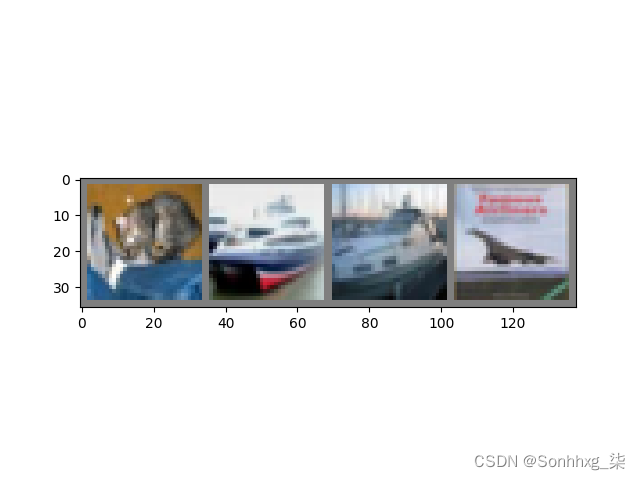
输出:
GroundTruth: cat ship ship plane现在让我们看看 神经网络认为这些样本应该预测成什么:
outputs = net(images)输出是预测与十个类的近似程度,与某一个类的近似程度越高,网络就越认为图像是属于这一类别。所以让我们打印其中最相似类别类标:
- _, predicted = torch.max(outputs, 1)
- print('Predicted: ', ' '.join('%5s' % classes[predicted[j]] for j in range(4)))
输出:
Predicted: cat ship car ship结果看起开非常好,让我们看看网络在整个数据集上的表现。
correct = 0
- total = 0
- with torch.no_grad():
- for data in testloader:
- images, labels = data
- outputs = net(images)
- _, predicted = torch.max(outputs.data, 1)
- total += labels.size(0)
- correct += (predicted == labels).sum().item()
- print('Accuracy of the network on the 10000 test images: %d %%' % ( 100 * correct / total))
输出:
Accuracy of the network on the 10000 test images: 54 %这看起来比随机预测要好,随机预测的准确率为10%(随机预测出为10类中的哪一类)。看来网络学到了东西。
- class_correct = list(0. for i in range(10))
- class_total = list(0. for i in range(10))
- with torch.no_grad():
- for data in testloader:
- images, labels = data
- outputs = net(images)
- _, predicted = torch.max(outputs, 1)
- c = (predicted == labels).squeeze()
- for i in range(4):
- label = labels[i]
- class_correct[label] += c[i].item()
- class_total[label] += 1
- for i in range(10): print('Accuracy of %5s : %2d %%' % ( classes[i], 100 * class_correct[i] / class_total[i]))
输出:
- Accuracy of plane : 57 %
- Accuracy of car : 73 %
- Accuracy of bird : 49 %
- Accuracy of cat : 54 %
- Accuracy of deer : 18 %
- Accuracy of dog : 20 %
- Accuracy of frog : 58 %
- Accuracy of horse : 74 %
- Accuracy of ship : 70 %
- Accuracy of truck : 66 %
所以接下来呢?
我们怎么在GPU上跑这些神经网络?
在GPU上训练 就像你怎么把一个张量转移到GPU上一样,你要将神经网络转到GPU上。 如果CUDA可以用,让我们首先定义下我们的设备为第一个可见的cuda设备。
- device = torch.device("cuda:0" if torch.cuda.is_available() else "cpu")
- # Assume that we are on a CUDA machine, then this should print a CUDA device:
- print(device)
输出:
cuda:0本节剩余部分都会假定设备就是台CUDA设备。
接着这些方法会递归地遍历所有模块,并将它们的参数和缓冲器转换为CUDA张量。
net.to(device)记住你也必须在每一个步骤向GPU发送输入和目标:
inputs, labels = inputs.to(device), labels.to(device)为什么没有注意到与CPU相比巨大的加速?因为你的网络非常小。
练习:尝试增加你的网络宽度(首个 nn.Conv2d 参数设定为 2,第二个nn.Conv2d参数设定为1--它们需要有相同的个数),看看会得到怎么的速度提升。
目标:
- 深度理解了PyTorch的张量和神经网络
- 训练了一个小的神经网络来分类图像
在多个GPU上训练
如果你想要来看到大规模加速,使用你的所有GPU,请查看:数据并行性(https://pytorch.org/tutorials/beginner/blitz/data_parallel_tutorial.html)。PyTorch 60 分钟入门教程:数据并行处理
PyTorch 60 分钟入门教程:数据并行处理 | PyTorch
PyTorch 数据并行处理
可选择:数据并行处理(文末有完整代码下载) 作者:Sung Kim 和 Jenny Kang
在这个教程中,我们将学习如何用 DataParallel 来使用多 GPU。 通过 PyTorch 使用多个 GPU 非常简单。你可以将模型放在一个 GPU:
- device = torch.device("cuda:0")
- model.to(device)
然后,你可以复制所有的张量到 GPU:
mytensor = my_tensor.to(device)请注意,只是调用 my_tensor.to(device) 返回一个 my_tensor 新的复制在GPU上,而不是重写 my_tensor。你需要分配给他一个新的张量并且在 GPU 上使用这个张量。
在多 GPU 中执行前馈,后馈操作是非常自然的。尽管如此,PyTorch 默认只会使用一个 GPU。通过使用 DataParallel 让你的模型并行运行,你可以很容易的在多 GPU 上运行你的操作。
model = nn.DataParallel(model)这是整个教程的核心,我们接下来将会详细讲解。 引用和参数
引入 PyTorch 模块和定义参数
- import torch
- import torch.nn as nn
- from torch.utils.data import Dataset, DataLoader
参数
- input_size = 5
- output_size = 2
- batch_size = 30
- data_size = 100
设备
device = torch.device("cuda:0" if torch.cuda.is_available() else "cpu")实验(玩具)数据
生成一个玩具数据。你只需要实现 getitem.
- class RandomDataset(Dataset):
- def __init__(self, size, length):
- self.len = length
- self.data = torch.randn(length, size)
- def __getitem__(self, index):
- return self.data[index]
- def __len__(self):
- return self.len
- rand_loader = DataLoader(dataset=RandomDataset(input_size, data_size),batch_size=batch_size, shuffle=True)
简单模型
为了做一个小 demo,我们的模型只是获得一个输入,执行一个线性操作,然后给一个输出。尽管如此,你可以使用 DataParallel 在任何模型(CNN, RNN, Capsule Net 等等.)
我们放置了一个输出声明在模型中来检测输出和输入张量的大小。请注意在 batch rank 0 中的输出。
- class Model(nn.Module):
- # Our model
- def __init__(self, input_size, output_size):
- super(Model, self).__init__()
- self.fc = nn.Linear(input_size, output_size)
- def forward(self, input):
- output = self.fc(input)
- print("\tIn Model: input size", input.size(),
- "output size", output.size())
- return output
创建模型并且数据并行处理
这是整个教程的核心。首先我们需要一个模型的实例,然后验证我们是否有多个 GPU。如果我们有多个 GPU,我们可以用 nn.DataParallel 来 包裹 我们的模型。然后我们使用 model.to(device) 把模型放到多 GPU 中。
- model = Model(input_size, output_size)
- if torch.cuda.device_count() > 1:
- print("Let's use", torch.cuda.device_count(), "GPUs!")
- # dim = 0 [30, xxx] -> [10, ...], [10, ...], [10, ...] on 3 GPUs
- model = nn.DataParallel(model)
- model.to(device)
输出:
Let's use 2 GPUs!运行模型:
现在我们可以看到输入和输出张量的大小了。
- for data in rand_loader:
- input = data.to(device)
- output = model(input)
- print("Outside: input size", input.size(),
- "output_size", output.size())
输出:
- In Model: input size torch.Size([15, 5]) output size torch.Size([15, 2])
- In Model: input size torch.Size([15, 5]) output size torch.Size([15, 2])
- Outside: input size torch.Size([30, 5]) output_size torch.Size([30, 2])
- In Model: input size torch.Size([15, 5]) output size torch.Size([15, 2])
- In Model: input size torch.Size([15, 5]) output size torch.Size([15, 2])
- Outside: input size torch.Size([30, 5]) output_size torch.Size([30, 2])
- In Model: input size torch.Size([15, 5]) output size torch.Size([15, 2])
- In Model: input size torch.Size([15, 5]) output size torch.Size([15, 2])
- Outside: input size torch.Size([30, 5]) output_size torch.Size([30, 2])
- In Model: input size torch.Size([5, 5]) output size torch.Size([5, 2])
- In Model: input size torch.Size([5, 5]) output size torch.Size([5, 2])
- Outside: input size torch.Size([10, 5]) output_size torch.Size([10, 2])
结果:
如果你没有 GPU 或者只有一个 GPU,当我们获取 30 个输入和 30 个输出,模型将期望获得 30 个输入和 30 个输出。但是如果你有多个 GPU ,你会获得这样的结果。
多 GPU
如果你有 2 个GPU,你会看到:
- # on 2 GPUs
- Let's use 2 GPUs!
- In Model: input size torch.Size([15, 5]) output size torch.Size([15, 2])
- In Model: input size torch.Size([15, 5]) output size torch.Size([15, 2])
- Outside: input size torch.Size([30, 5]) output_size torch.Size([30, 2])
- In Model: input size torch.Size([15, 5]) output size torch.Size([15, 2])
- In Model: input size torch.Size([15, 5]) output size torch.Size([15, 2])
- Outside: input size torch.Size([30, 5]) output_size torch.Size([30, 2])
- In Model: input size torch.Size([15, 5]) output size torch.Size([15, 2])
- In Model: input size torch.Size([15, 5]) output size torch.Size([15, 2])
- Outside: input size torch.Size([30, 5]) output_size torch.Size([30, 2])
- In Model: input size torch.Size([5, 5]) output size torch.Size([5, 2])
- In Model: input size torch.Size([5, 5]) output size torch.Size([5, 2])
- Outside: input size torch.Size([10, 5]) output_size torch.Size([10, 2])
如果你有 3个GPU,你会看到:
- Let's use 3 GPUs!
- In Model: input size torch.Size([10, 5]) output size torch.Size([10, 2])
- In Model: input size torch.Size([10, 5]) output size torch.Size([10, 2])
- In Model: input size torch.Size([10, 5]) output size torch.Size([10, 2])
- Outside: input size torch.Size([30, 5]) output_size torch.Size([30, 2])
- In Model: input size torch.Size([10, 5]) output size torch.Size([10, 2])
- In Model: input size torch.Size([10, 5]) output size torch.Size([10, 2])
- In Model: input size torch.Size([10, 5]) output size torch.Size([10, 2])
- Outside: input size torch.Size([30, 5]) output_size torch.Size([30, 2])
- In Model: input size torch.Size([10, 5]) output size torch.Size([10, 2])
- In Model: input size torch.Size([10, 5]) output size torch.Size([10, 2])
- In Model: input size torch.Size([10, 5]) output size torch.Size([10, 2])
- Outside: input size torch.Size([30, 5]) output_size torch.Size([30, 2])
- In Model: input size torch.Size([4, 5]) output size torch.Size([4, 2])
- In Model: input size torch.Size([4, 5]) output size torch.Size([4, 2])
- In Model: input size torch.Size([2, 5]) output size torch.Size([2, 2])
- Outside: input size torch.Size([10, 5]) output_size torch.Size([10, 2])
如果你有 8个GPU,你会看到:
- Let's use 8 GPUs!
- In Model: input size torch.Size([4, 5]) output size torch.Size([4, 2])
- In Model: input size torch.Size([4, 5]) output size torch.Size([4, 2])
- In Model: input size torch.Size([2, 5]) output size torch.Size([2, 2])
- In Model: input size torch.Size([4, 5]) output size torch.Size([4, 2])
- In Model: input size torch.Size([4, 5]) output size torch.Size([4, 2])
- In Model: input size torch.Size([4, 5]) output size torch.Size([4, 2])
- In Model: input size torch.Size([4, 5]) output size torch.Size([4, 2])
- In Model: input size torch.Size([4, 5]) output size torch.Size([4, 2])
- Outside: input size torch.Size([30, 5]) output_size torch.Size([30, 2])
- In Model: input size torch.Size([4, 5]) output size torch.Size([4, 2])
- In Model: input size torch.Size([4, 5]) output size torch.Size([4, 2])
- In Model: input size torch.Size([4, 5]) output size torch.Size([4, 2])
- In Model: input size torch.Size([4, 5]) output size torch.Size([4, 2])
- In Model: input size torch.Size([4, 5]) output size torch.Size([4, 2])
- In Model: input size torch.Size([4, 5]) output size torch.Size([4, 2])
- In Model: input size torch.Size([2, 5]) output size torch.Size([2, 2])
- In Model: input size torch.Size([4, 5]) output size torch.Size([4, 2])
- Outside: input size torch.Size([30, 5]) output_size torch.Size([30, 2])
- In Model: input size torch.Size([4, 5]) output size torch.Size([4, 2])
- In Model: input size torch.Size([4, 5]) output size torch.Size([4, 2])
- In Model: input size torch.Size([4, 5]) output size torch.Size([4, 2])
- In Model: input size torch.Size([4, 5]) output size torch.Size([4, 2])
- In Model: input size torch.Size([4, 5]) output size torch.Size([4, 2])
- In Model: input size torch.Size([4, 5]) output size torch.Size([4, 2])
- In Model: input size torch.Size([4, 5]) output size torch.Size([4, 2])
- In Model: input size torch.Size([2, 5]) output size torch.Size([2, 2])
- Outside: input size torch.Size([30, 5]) output_size torch.Size([30, 2])
- In Model: input size torch.Size([2, 5]) output size torch.Size([2, 2])
- In Model: input size torch.Size([2, 5]) output size torch.Size([2, 2])
- In Model: input size torch.Size([2, 5]) output size torch.Size([2, 2])
- In Model: input size torch.Size([2, 5]) output size torch.Size([2, 2])
- In Model: input size torch.Size([2, 5]) output size torch.Size([2, 2])
- Outside: input size torch.Size([10, 5]) output_size torch.Size([10, 2])
总结
数据并行自动拆分了你的数据并且将任务单发送到多个 GPU 上。当每一个模型都完成自己的任务之后,DataParallel 收集并且合并这些结果,然后再返回给你。
更多信息,请访问: Multi-GPU Examples — PyTorch Tutorials 1.13.0+cu117 documentation
-
相关阅读:
如何快速给图标包命名
Pandas导出美化技巧,让你的Excel更出众
微服务项目:尚融宝(50)(核心业务流程:标的管理(2))
如何做好数字乡村项目
嵌入式基础知识学习:Flash、EEPROM、RAM、ROM
vue.extend 实现表格,同时编辑多条数据
使用c#将aj-report桌面化1
开发者配置项、开发者选项自定义
win10磁盘分区解决方案
为什么说企业需要实施知识管理?
- 原文地址:https://blog.csdn.net/sikh_0529/article/details/128157869
- 最新文章
-
沪漂五周年了:我越来越迷茫了
Agentic Skill Routing 实战:别再把所有 Skill 塞进 AI Agent 上下文
MySQL-Seconds_behind_master的精度误差
[MAF预定义ChatClient中间件-03]CachingChatClient——利用缓存省钱省时间
AI的至暗历史:从万众期待到被政府撤资,AI的两次死亡徘徊
Agent OS :五种驯服不确定性的范式
PortSwigger SQL注入LAB11
数据库即时编译JIT
[Begin]AI Learn Data Day 0
深度学习进阶(二十七)现代 LLM 的核心架构设计其二:SwiGLU