-
Spring Cloud微服务迁移到Kubernetes容器化
相关文章
- kubernetes集群基于kubeadm部署以及常见问题解决
- kubernetes集群配置默认存储类(nfs)
- Docker工作中常用知识总结
- Ubuntu本地安装MySQL8.0以及常见问题设置方法
- kubernetes集群安装Ingress-nginx
- 持续补充中…
k8s容器部署流程
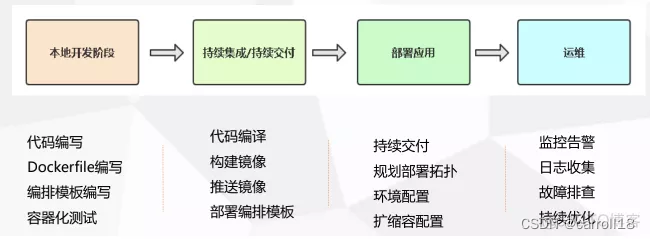
具体步骤:
- 第一步:熟悉Spring Cloud微服务项目
- 第二步:源代码编译构建
- 第三步:构建项目镜像并推送到镜像仓库
- 第四步:K8s服务编排
- 第五步:部署服务所需的基础环境
- 第六步:部署微服务程序
- 第七步:部署微服务前端
- 第八步:微服务对外发布
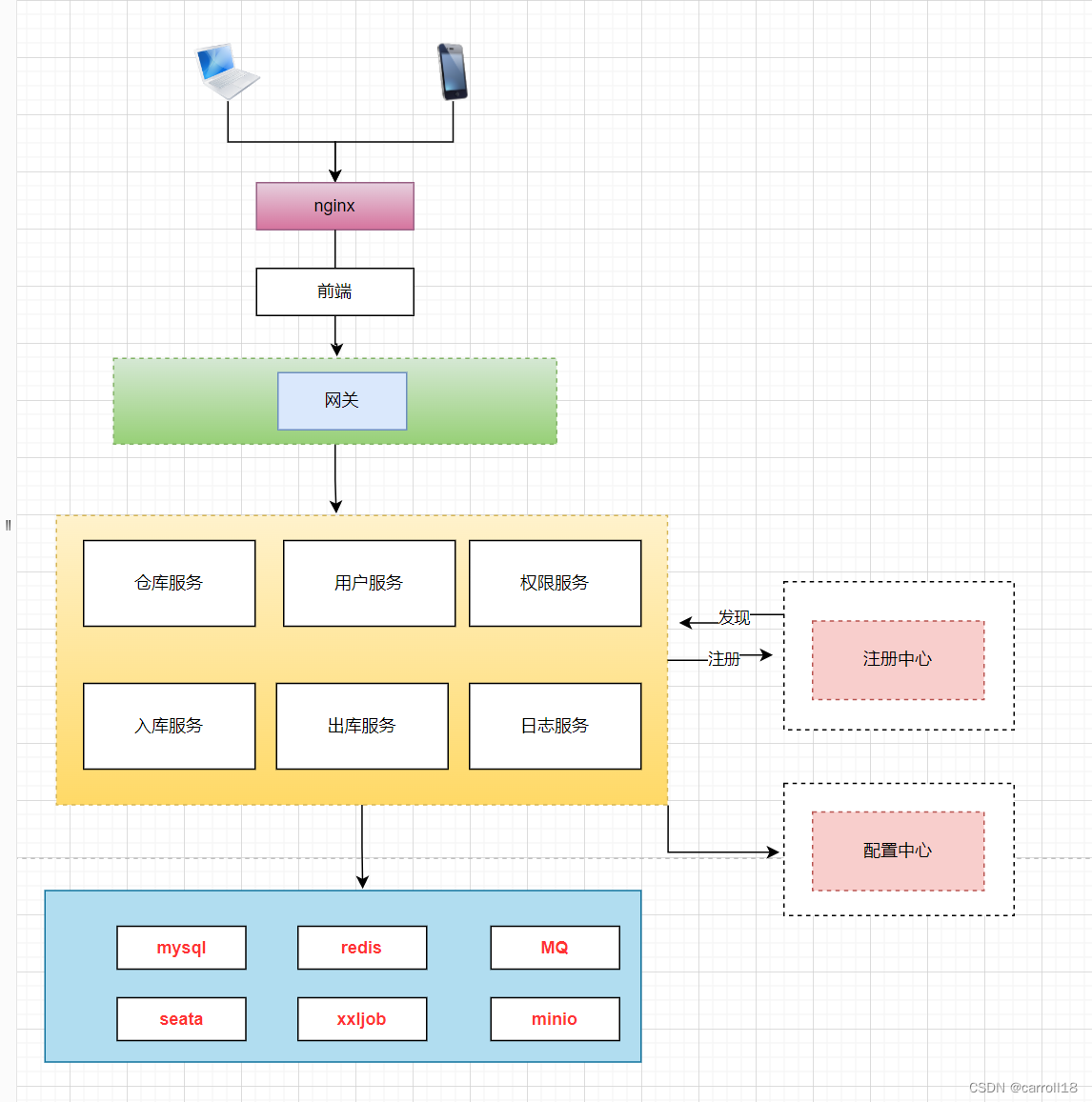
熟悉Spring Cloud微服务项目
微服务架构图
源代码编译构建
拉取仓库代码
git clone http://192.168.0.126/saas-wms/linkinsense-wms-public.git- 1
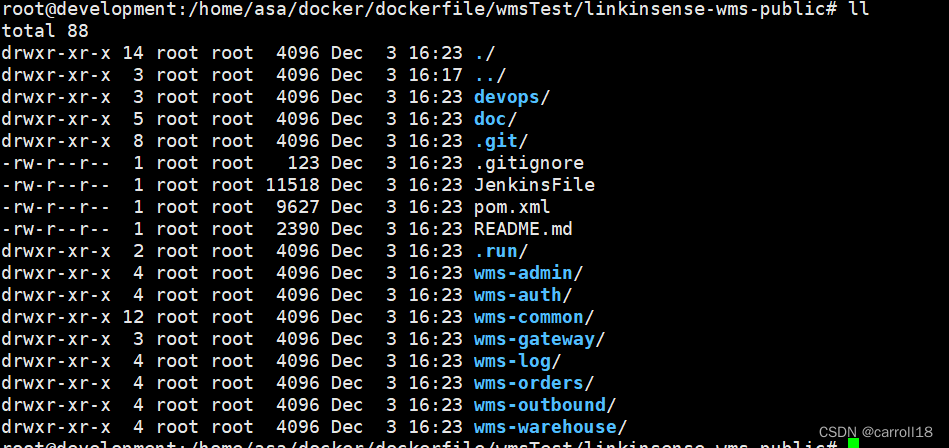
编译代码mvn clean package -Dmaven.test.skip=true -Pdev- 1

- 这儿构建时间久是因为第一次构建,需要下载maven依赖,之后构建就会很快了。
构建项目镜像并推送到镜像仓库
- 基础镜像:centos,ubuntu
- 中间件镜像:jdk,nginx
- 项目镜像:基础镜像+中间件镜像+项目代码
制作镜像
编写gateway服务的DockerFile,制作镜像
vi Dockerfile- 1
FROM openjdk:8-jre RUN ln -sf /usr/share/zoneinfo/Asia/Shanghai /etc/localtime RUN echo 'Asia/Shanghai' > /etc/timezone WORKDIR /wms-center/wms-gateway ADD ./target/wms-gateway-1.0.0.jar ./ EXPOSE 8901 CMD java -jar wms-gateway-1.0.0.jar- 1
- 2
- 3
- 4
- 5
- 6
- 7
- 8
- 9
- 10
- 11
- 12
- 编写完成的DockerFile放置的文件位置
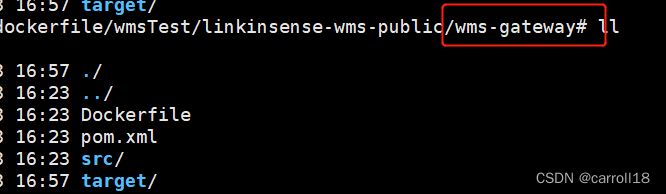
- 通过DockerFile构建镜像
docker build -t wms-gateway:v1 -f wms-gateway/Dockerfile ./wms-gateway/- 1
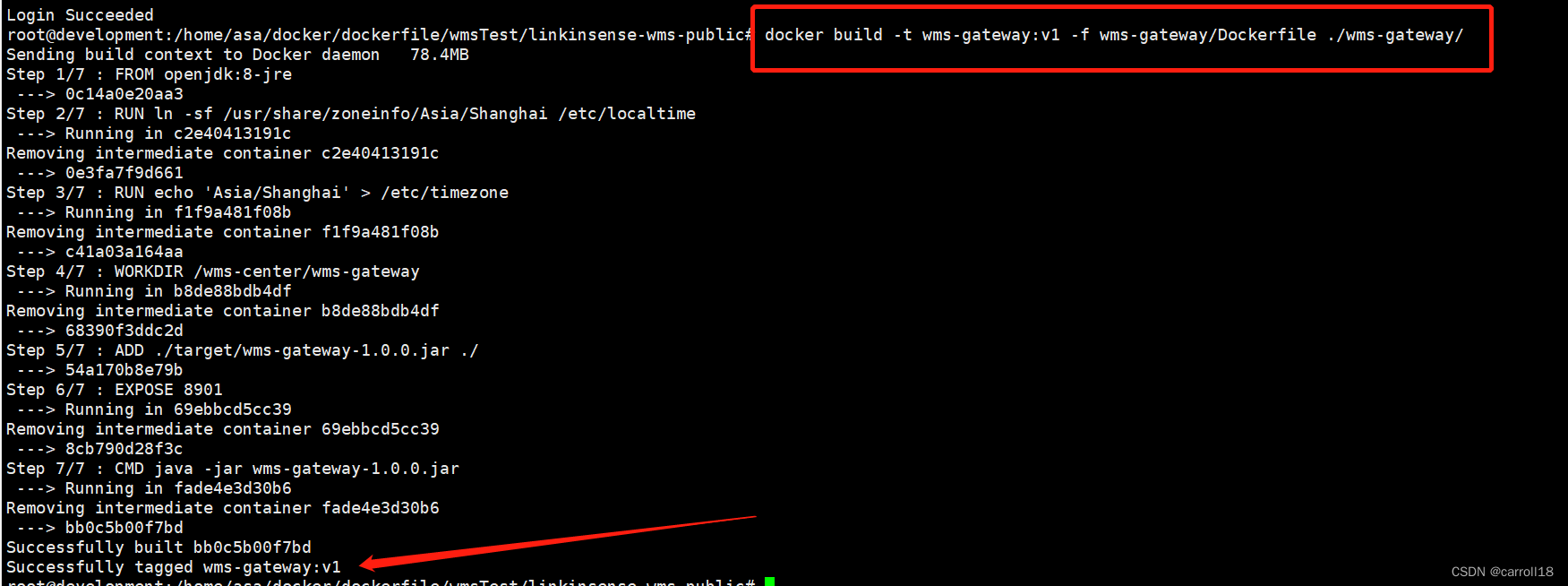
- 查看构建好的镜像
docker images- 1

将镜像推送到harbor仓库
-
之前本地部署的镜像仓库Harbor:
http://192.168.0.127:8084/,如果没有可拿docker-hub注册一个账号。 -
登录仓库
docker login 192.168.0.127:8084- 1

- 推送镜像到镜像仓库需要满足镜像仓库的镜像名称,因此需要给构建好的镜像打个tag。
- 给构建的镜像打tag
docker tag wms-gateway:v1 192.168.0.127:8084/onlee/gateway:v1- 1

- 推送镜像仓库
docker push 192.168.0.127:8084/onlee/gateway:v1- 1
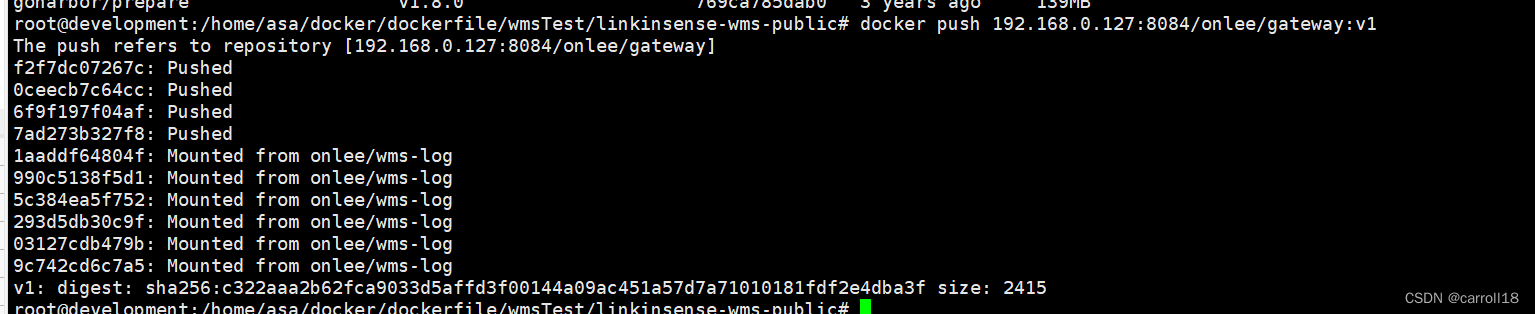
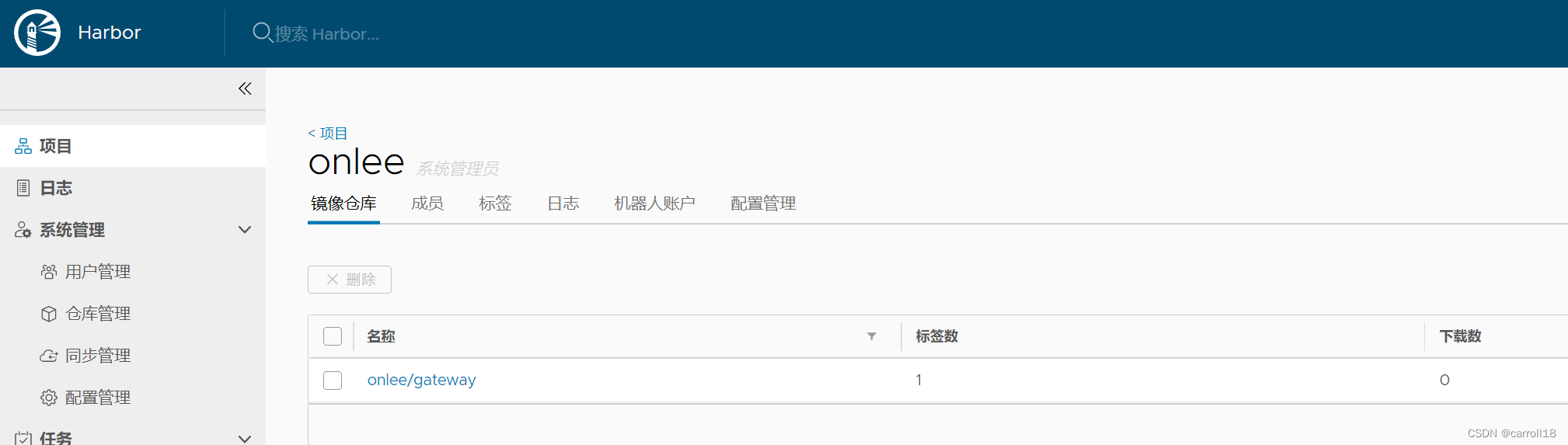
- 其他模块构建和推送参考gateway模块
K8s服务编排
- 制作gateway的k8s yaml文件(gateway.yaml)
--- apiVersion: apps/v1 kind: Deployment metadata: name: gateway namespace: wms-dev spec: replicas: 1 selector: matchLabels: project: wms-dev app: gateway template: metadata: labels: project: wms-dev app: gateway spec: imagePullSecrets: - name: registry-harbor containers: - name: gateway image: 192.168.0.127:8084/onlee/gateway:v1 imagePullPolicy: Always ports: - protocol: TCP containerPort: 8901 env: - name: JAVA_OPTS value: "-Xmx1g" resources: requests: cpu: 0.5 memory: 256Mi limits: cpu: 1 memory: 1Gi readinessProbe: tcpSocket: port: 8901 initialDelaySeconds: 60 periodSeconds: 10 livenessProbe: tcpSocket: port: 8901 initialDelaySeconds: 60 periodSeconds: 10- 1
- 2
- 3
- 4
- 5
- 6
- 7
- 8
- 9
- 10
- 11
- 12
- 13
- 14
- 15
- 16
- 17
- 18
- 19
- 20
- 21
- 22
- 23
- 24
- 25
- 26
- 27
- 28
- 29
- 30
- 31
- 32
- 33
- 34
- 35
- 36
- 37
- 38
- 39
- 40
- 41
- 42
- 43
- 44
- 45
- 46
- 47
- 48
- 其他模块编写k8s yaml文件参考gateway模块
部署基础环境
- 这一步暂时省略,后续补充…
在K8s中部署Nacos集群(注册和配置中心)
在k8s中部署Seata分布式事务
在linux部署mysql,redis,rabbitmq,minio,xxl-job
部署微服务程序
- 准备namespace
kubectl create namespace wms-dev- 1

- 部署服务
kubectl apply -f gateway.yaml- 1
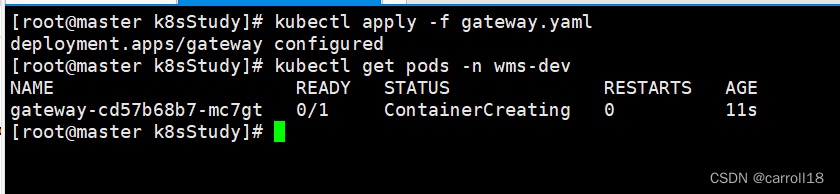
- 其他模块部署服务参考gateway模块
部署微服务前端
- 编写DockerFile文件
FROM nginx COPY dist /usr/share/nginx/html/ EXPOSE 80- 1
- 2
- 3
- 4
- 5
- 构建镜像
docker build -t wms-web:v1 -f Dockerfile .- 1
- 镜像打tag
docker tag wms-web:v1 192.168.0.127:8084/onlee/wms-web:v1- 1
- 推送到镜像仓库
docker push 192.168.0.127:8084/onlee/wms-web:v1- 1
- 服务编排(web.yaml)
apiVersion: apps/v1 kind: Deployment metadata: labels: app: wms-web name: wms-web namespace: wms-dev spec: progressDeadlineSeconds: 600 replicas: 1 selector: matchLabels: app: wms-web strategy: rollingUpdate: maxSurge: 50% maxUnavailable: 50% type: RollingUpdate template: metadata: labels: app: wms-web spec: imagePullSecrets: - name: registry-harbor containers: - image: 192.168.0.127:8084/onlee/wms-web:v1 imagePullPolicy: Always name: app ports: - containerPort: 80 protocol: TCP resources: limits: cpu: 300m memory: 600Mi terminationMessagePath: /dev/termination-log terminationMessagePolicy: File dnsPolicy: ClusterFirst restartPolicy: Always terminationGracePeriodSeconds: 30- 1
- 2
- 3
- 4
- 5
- 6
- 7
- 8
- 9
- 10
- 11
- 12
- 13
- 14
- 15
- 16
- 17
- 18
- 19
- 20
- 21
- 22
- 23
- 24
- 25
- 26
- 27
- 28
- 29
- 30
- 31
- 32
- 33
- 34
- 35
- 36
- 37
- 38
- 39
- 40
- 41
- 42
- 部署服务
kubectl apply -f web.yaml- 1
微服务对外发布
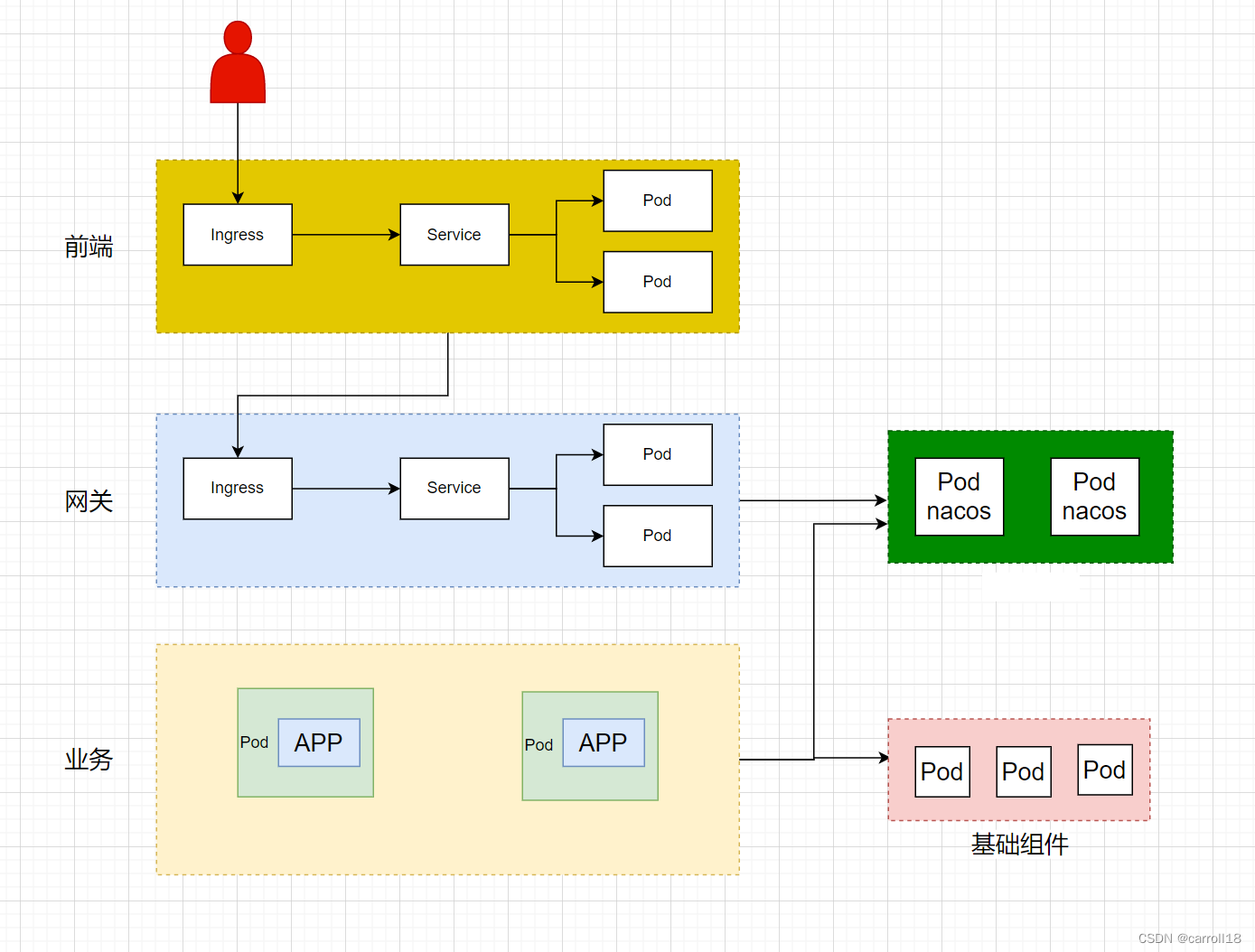
通过整个微服务架构可知,只有gateway和前端需要暴露服务。
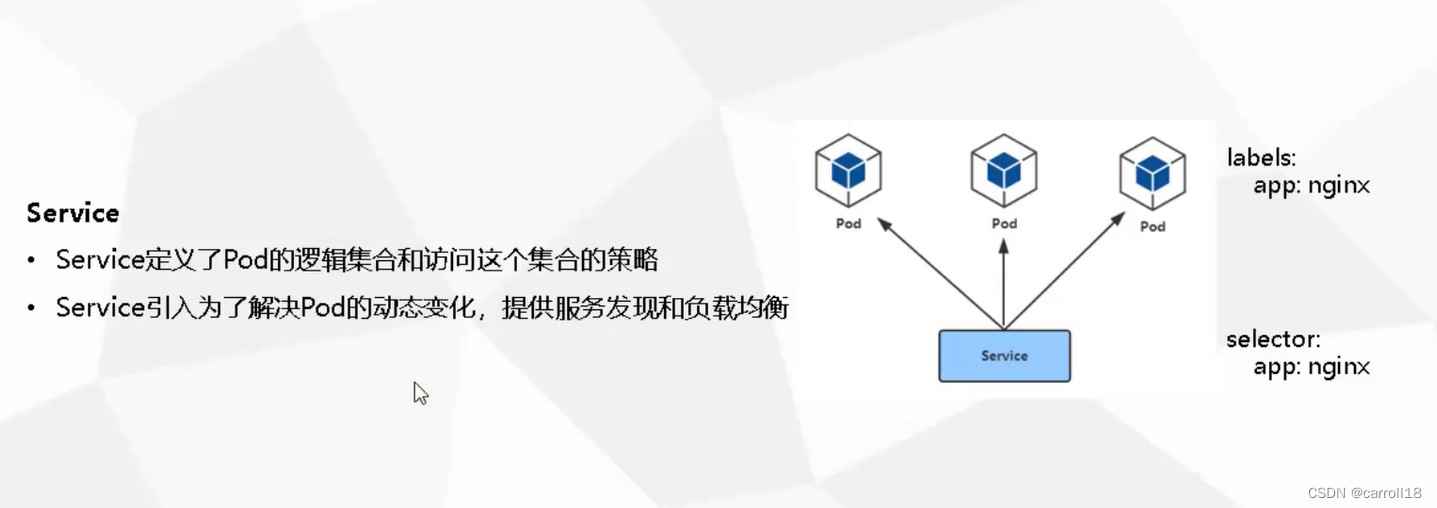
NorePort方式暴露
gateway对外暴露
- gateway-nortport.yaml
--- apiVersion: v1 kind: Service metadata: name: gateway namespace: wms-dev spec: ports: - port: 8901 name: gateway protocol: TCP targetPort: 8901 nodePort: 32074 selector: project: wms app: gateway type: NodePort- 1
- 2
- 3
- 4
- 5
- 6
- 7
- 8
- 9
- 10
- 11
- 12
- 13
- 14
- 15
- 16
- 17
- 18
前端对外暴露
- web-noreport.yaml
--- apiVersion: v1 kind: Service metadata: labels: app: wms-web name: wms-web namespace: wms-dev spec: ports: - name: http port: 80 protocol: TCP targetPort: 80 nodePort: 32248 selector: app: wms-web sessionAffinity: None type: NodePort- 1
- 2
- 3
- 4
- 5
- 6
- 7
- 8
- 9
- 10
- 11
- 12
- 13
- 14
- 15
- 16
- 17
- 18
- 19
Ingress方式暴露
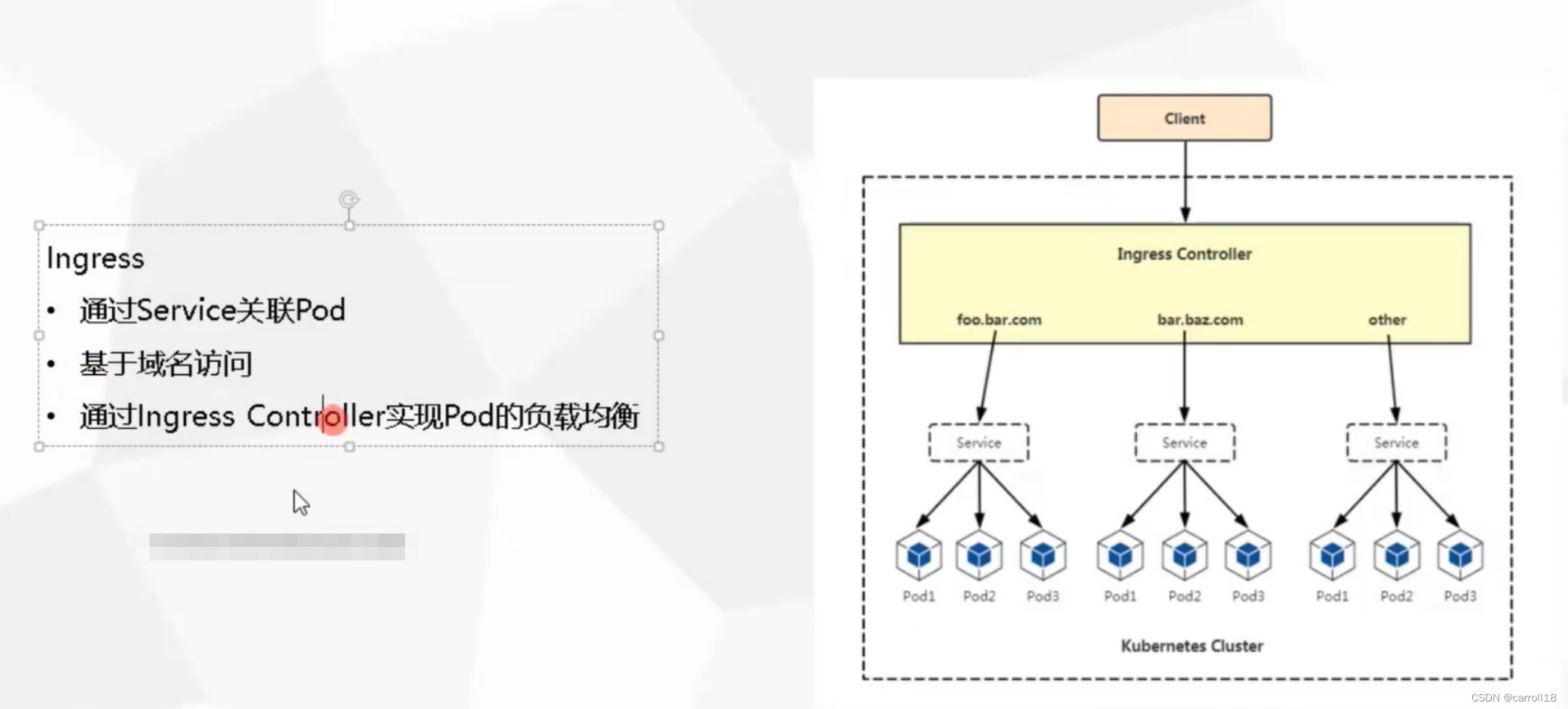
gateway对外暴露
--- apiVersion: networking.k8s.io/v1 kind: Ingress metadata: name: gateway namespace: wms-dev annotations: kubernetes.io/ingress.class: "nginx" nginx.ingress.kubernetes.io/backend-protocol: "HTTP" spec: rules: - host: gateway.wms.com http: paths: - path: / pathType: Prefix backend: service: name: gateway port: number: 8901 --- apiVersion: v1 kind: Service metadata: name: gateway namespace: wms-dev spec: ports: - port: 8901 name: gateway selector: project: wms-dev app: gateway- 1
- 2
- 3
- 4
- 5
- 6
- 7
- 8
- 9
- 10
- 11
- 12
- 13
- 14
- 15
- 16
- 17
- 18
- 19
- 20
- 21
- 22
- 23
- 24
- 25
- 26
- 27
- 28
- 29
- 30
- 31
- 32
- 33
- 34
- 35
前端对外暴露
--- apiVersion: networking.k8s.io/v1 kind: Ingress metadata: name: wms-web namespace: wms-dev annotations: kubernetes.io/ingress.class: "nginx" nginx.ingress.kubernetes.io/backend-protocol: "HTTP" spec: rules: - host: dev.wms.com http: paths: - path: / pathType: Prefix backend: service: name: wms-web port: number: 80 --- apiVersion: v1 kind: Service metadata: labels: app: wms-web name: wms-web namespace: wms-dev spec: ports: - name: http protocol: TCP port: 80 targetPort: 80 type: ClusterIP selector: app: wms-web sessionAffinity: None- 1
- 2
- 3
- 4
- 5
- 6
- 7
- 8
- 9
- 10
- 11
- 12
- 13
- 14
- 15
- 16
- 17
- 18
- 19
- 20
- 21
- 22
- 23
- 24
- 25
- 26
- 27
- 28
- 29
- 30
- 31
- 32
- 33
- 34
- 35
- 36
- 37
- 38
- 39
- 40
- 至此,所有微服务已经迁移到Kubernetes容器上了。
- 把我们上面手动做的这些,通过Jenkins等组件搭建成一个自动化部署的过程,就涉及到DevOps相关的知识了。接下来就会编写这一块的内容。
- 以上内容还有一些不够完善的地方,后续也会不断完善的。
你知道的越多,你不知道的越多。
-
相关阅读:
数据结构复盘——第六章:图
【Java八股文总结】之Spring MVC
【第二章 数据的表示和运算】2.3
使用swc 替换ts-loader 加速构建webpack-vue-tsx项目
原子性操作
IDEA 报错:Process terminated【已解决】
R语言ggplot2可视化:使用patchwork包(直接使用加号+)将一个ggplot2可视化结果和一个plot函数可视化结果横向组合起来形成最终结果图
STM32使用ThreadX示例以及tx_thread_create解析
怎么把数据有序存入map
架构师日记-如何写的一手好代码
- 原文地址:https://blog.csdn.net/qq_40722827/article/details/127958192