-
IPC for AM64x
IPC for AM64x
AM64x处理器有两个双核Cortex-R5F子系统(R5FSS)和一个Cortex-M4F子系统,此外还有一个双核Cortex-A53子系统。R5FSS支持双核模式(Split mode)和单核模式(single - cpu mode)。
理解IPC(inter-processor communication)refer link
- IPC SW 架构

用于在cpu之间交换消息的APIs:IPC Notify and IPC RP Message
- IPC RP Message:
特点: - RP Message + VRING协议实现
- 在底层使用IPC Notify进行中断,并使用共享内存(VRING)作为消息缓冲区
- 支持NORTOS、FreeRTOS和Linux cpu之间的消息传递
- 逻辑通信通道可以使用唯一的“端点”创建。这允许一个CPU上的多个任务使用相同的底层HW邮箱和共享内存与另一个CPU上的多个任务进行通信。
- IPC Notify:
底层实现将使用HW机制来中断接收核心,它也将在快速内部RAM中使用HW FIFOs(可用时)或基于共享内存的SW FIFOs来传输消息值。
AM64X使用基于HW邮箱的HW FIFOs传输消息并中断接收核心。
特点: - 低时延,能够在任意cpus之间收发消息(通过几步HW,因此需要用户检测错误;Combining the message and client ID into a single 32b value;在中断处理函数中调用回调函数)
- 客户端ID字段允许向接收端的不同SW客户端发送消息(多路复用)
- 能够为不同的客户端ID注册不同的用户处理程序
- 基于回调的机制来接收消息
- 如果底层IPC HW/SW FIFO已满,则能够阻塞消息发送或返回错误。
强烈建议在可用的地方使用SysConfig,而不是直接使用SW API调用。这将有助于简化SW应用程序,并在开发周期的早期捕获常见错误
支持的最大客户端数量限制为IPC_NOTIFY_CLIENT_ID_MAX
交换的最大消息值被限制为IPC_NOTIFY_MSG_VALUE_MAX<32b,因此不能将指针作为消息传递,推荐使用已知基址的偏移量作为值传递。
2. 如何是能IPC;环境搭建:
- Processor SDK Linux
- Processor SDK MCU
Typical Boot Flow on AM64x for ARM Linux users

正常情况下,加载程序(U-Boot/SPL)启动,在A53上装载HLOS(Linux/Android)。然后A53引导R5和M4F核心。The remoteproc driver is hard-coded to look for specific files when loading the R5F cores. 通常在目标文件系统上,Firmware File 被软链接到预期的可执行FW文件
Booting Remote Cores from Linux console/User space

root@am64xx-evm:~# ls -l /lib/firmware ... lrwxrwxrwx 1 root root 55 Jan 9 2022 am64-main-r5f0_0-fw -> /lib/firmware/mcusdk-benchmark_demo/am64-main-r5f0_0-fw lrwxrwxrwx 1 root root 55 Jan 9 2022 am64-main-r5f0_1-fw -> /lib/firmware/mcusdk-benchmark_demo/am64-main-r5f0_1-fw lrwxrwxrwx 1 root root 55 Jan 9 2022 am64-main-r5f1_0-fw -> /lib/firmware/mcusdk-benchmark_demo/am64-main-r5f1_0-fw lrwxrwxrwx 1 root root 55 Jan 9 2022 am64-main-r5f1_1-fw -> /lib/firmware/mcusdk-benchmark_demo/am64-main-r5f1_1-fw lrwxrwxrwx 1 root root 72 Jan 9 2022 am64-mcu-m4f0_0-fw -> /lib/firmware/pdk-ipc/ipc_echo_baremetal_test_mcu3_0_release_strip.xer5f- 1
- 2
- 3
- 4
- 5
- 6
- 7
Booting Remote Cores from Linux console/User space
Step:
- identify the remotproc node associated with the remote core:
root@am64xx-evm:~# head /sys/class/remoteproc/remoteproc*/name ==> /sys/class/remoteproc/remoteproc0/name <== 5000000.m4fss ==> /sys/class/remoteproc/remoteproc1/name <== 78000000.r5f ==> /sys/class/remoteproc/remoteproc2/name <== 78200000.r5f ==> /sys/class/remoteproc/remoteproc3/name <== 78400000.r5f ==> /sys/class/remoteproc/remoteproc4/name <== 78600000.r5f- 1
- 2
- 3
- 4
- 5
- 6
- 7
- 8
- 9
- 10
- 11
- 12
- 13
- 14
- 15
- use the sysfs interface to stop the remote core. For example, to stop R5F cluster0-Core0:
root@am64xx-evm:~# echo stop > /sys/class/remoteproc/remoteproc1/state [ 778.963928] remoteproc remoteproc1: stopped remote processor 78000000.r5f- 1
- 2
If needed, update the firmware symbolic link to point to a new firmware:
root@am64xx-evm:~# ln -sf /lib/firmware/pdk-ipc/ipc_echo_baremetal_test_mcu1_0_release_strip.xer5f am64-main-r5f0_0-fw- 1
- use the sysfs interface to start the remote core
root@am64xx-evm:~# echo start > /sys/class/remoteproc/remoteproc1/state [ 1141.491165] remoteproc remoteproc1: powering up 78000000.r5f [ 1141.497109] remoteproc remoteproc1: Booting fw image am64-main-r5f0_0-fw, size 86352 [ 1141.507920] remoteproc1#vdev0buffer: assigned reserved memory node r5f-dma-memory@a0000000 [ 1141.518539] virtio_rpmsg_bus virtio1: rpmsg host is online [ 1141.525859] virtio_rpmsg_bus virtio1: creating channel rpmsg_chrdev addr 0xe [ 1141.536806] remoteproc1#vdev0buffer: registered virtio1 (type 7) [ 1141.544195] remoteproc remoteproc1: remote processor 78000000.r5f is now up- 1
- 2
- 3
- 4
- 5
- 6
- 7
- 8
DMA memory Carveouts
系统内存被划分为每个远程处理器核心,用于IPC和远程处理器的代码/数据段需求。默认的内存分割(DMA池)如下所示。
默认的DMA池假设R5F子系统在Split模式下运行。如果R5F子系统在单cpu模式下运行,那么R5F Core0将继续使用内存分割。但是,R5F Core1在单cpu模式下是未使用的,因此Core1内存划分可以重新分配到其他内核。有关更多详细信息,请参阅设备树绑定文档:documentation /devicetree/bindings/remoteproc/ti,k3-r5f-rproc.yaml
tip:dmesg是一种程序,用于检测和控制内核环缓冲。程序用来帮助用户了解系统的启动信息。root@am64xx-evm:~# dmesg | grep 'Reserved' [ 0.000000] Reserved memory: created DMA memory pool at 0x00000000a0000000, size 1 MiB [ 0.000000] Reserved memory: created DMA memory pool at 0x00000000a0100000, size 15 MiB [ 0.000000] Reserved memory: created DMA memory pool at 0x00000000a1000000, size 1 MiB [ 0.000000] Reserved memory: created DMA memory pool at 0x00000000a1100000, size 15 MiB [ 0.000000] Reserved memory: created DMA memory pool at 0x00000000a2000000, size 1 MiB [ 0.000000] Reserved memory: created DMA memory pool at 0x00000000a2100000, size 15 MiB [ 0.000000] Reserved memory: created DMA memory pool at 0x00000000a3000000, size 1 MiB [ 0.000000] Reserved memory: created DMA memory pool at 0x00000000a3100000, size 15 MiB [ 0.000000] Reserved memory: created DMA memory pool at 0x00000000a4000000, size 1 MiB [ 0.000000] Reserved memory: created DMA memory pool at 0x00000000a4100000, size 15 MiB [ 0.000000] cma: Reserved 512 MiB at 0x00000000cd000000- 1
- 2
- 3
- 4
- 5
- 6
- 7
- 8
- 9
- 10
- 11
- 12
- 13
默认情况下,每个池的前1MB用于与远程处理器核心通信的Virtio和Vring缓冲区。其余15MB的切口用于远程核心外部存储器(程序代码、数据等)。
RPMsg Char Driver
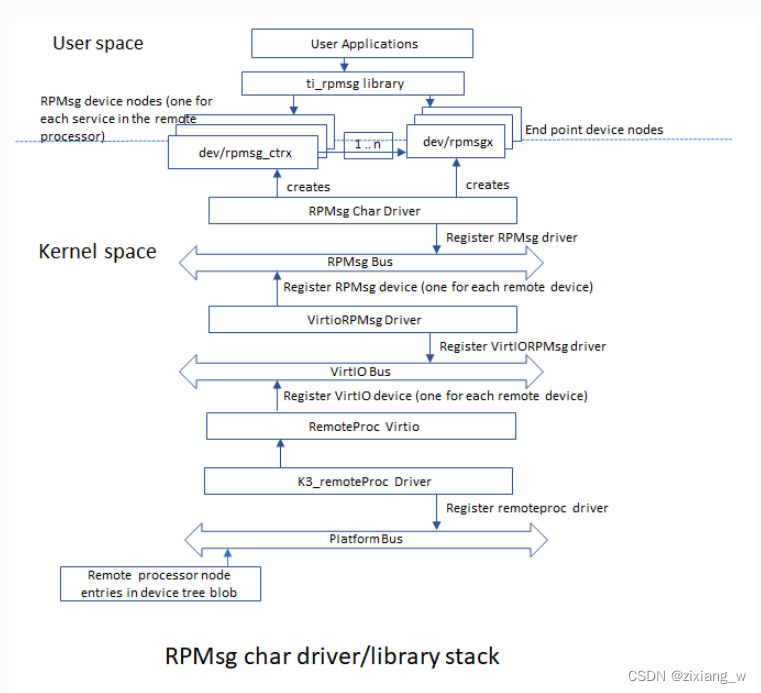
RPMsg字符驱动程序向用户空间进程公开RPMsg端点。通过请求与远程服务的不同交互,多个用户空间应用程序可以唯一地使用一个RPMsg设备。RPMsg字符驱动程序支持为每个探测的RPMsg字符设备创建多个端点,支持对不同的实例使用相同的设备。
RPMsg设备
每个创建的端点设备在/dev中显示为单个字符设备。RPMsg总线位于VirtIO总线之上。每个virtio名称服务公告消息创建一个新的RPMsg设备,该设备应该绑定到一个RPMsg驱动程序。RPMsg设备是动态创建的:
远程处理器通过发送包含服务名称(即设备名称)、源地址和目的地址的名称服务公告消息来宣布远程RPMsg服务的存在。该消息由RPMsg总线处理,它动态地创建和注册一个表示远程服务的RPMsg设备。一旦注册了相关的RPMsg驱动程序,总线就会立即探测它,双方就可以开始交换消息。
控制界面
RPMsg字符驱动程序提供控制接口(在/dev/rpmsg_ctrlX下以字符设备的形式),允许用户空间为每个公开的端点导出端点接口。控制接口提供专用的ioctl来创建端点设备。root@am64xx-evm:~# rpmsg_char_simple -r 2 -n 10 Created endpt device rpmsg-char-2-3121, fd = 3 port = 1024 Exchanging 10 messages with rpmsg device ti.ipc4.ping-pong on rproc id 2 ... Sending message #0: hello there 0! Receiving message #0: Sending message #1: hello there 1! Receiving message #1: Sending message #2: hello there 2! Receiving message #2: Sending message #3: hello there 3! Receiving message #3: Sending message #4: hello there 4! Receiving message #4: Sending message #5: hello there 5! Receiving message #5: Sending message #6: hello there 6! Receiving message #6: Sending message #7: hello there 7! Receiving message #7: Sending message #8: hello there 8! Receiving message #8: Sending message #9: hello there 9! Receiving message #9: Communicated 10 messages successfully on rpmsg-char-2-3121 TEST STATUS: PASSED- 1
- 2
- 3
- 4
- 5
- 6
- 7
- 8
- 9
- 10
- 11
- 12
- 13
- 14
- 15
- 16
- 17
- 18
- 19
- 20
- 21
- 22
- 23
- 24
- 25
- 26
- 27
- 28
- 29
modprobe是linux的一个命令,可载入指定的个别模块,或是载入一组相依的模块
root@am64xx-evm:~# modprobe rpmsg_client_sample count=10 [ 2678.541047] rpmsg_client_sample virtio0.ti.ipc4.ping-pong.-1.13: new channel: 0x400 -> 0xd! [ 2678.549634] rpmsg_client_sample virtio0.ti.ipc4.ping-pong.-1.13: incoming msg 1 (src: 0xd) root@am64xx-evm:~# [ 2678.562341] rpmsg_client_sample virtio0.ti.ipc4.ping-pong.-1.13: incoming msg 2 (src: 0xd) [ 2678.572484] rpmsg_client_sample virtio0.ti.ipc4.ping-pong.-1.13: incoming msg 3 (src: 0xd) [ 2678.581437] rpmsg_client_sample virtio0.ti.ipc4.ping-pong.-1.13: incoming msg 4 (src: 0xd) [ 2678.589886] rpmsg_client_sample virtio0.ti.ipc4.ping-pong.-1.13: incoming msg 5 (src: 0xd) [ 2678.599543] rpmsg_client_sample virtio0.ti.ipc4.ping-pong.-1.13: incoming msg 6 (src: 0xd) [ 2678.608028] rpmsg_client_sample virtio0.ti.ipc4.ping-pong.-1.13: incoming msg 7 (src: 0xd) [ 2678.616560] rpmsg_client_sample virtio0.ti.ipc4.ping-pong.-1.13: incoming msg 8 (src: 0xd) [ 2678.624971] rpmsg_client_sample virtio0.ti.ipc4.ping-pong.-1.13: incoming msg 9 (src: 0xd) [ 2678.633410] rpmsg_client_sample virtio0.ti.ipc4.ping-pong.-1.13: incoming msg 10 (src: 0xd) [ 2678.641839] rpmsg_client_sample virtio0.ti.ipc4.ping-pong.-1.13: goodbye!- 1
- 2
- 3
- 4
- 5
- 6
- 7
- 8
- 9
- 10
- 11
- 12
- 13
- 14
root@am64xx-evm:~# echo stop > /sys/class/remoteproc/remoteproc0/state [ 3381.079546] rpmsg_client_sample virtio0.ti.ipc4.ping-pong.-1.13: rpmsg sample client driver is removed [ 3381.090700] remoteproc remoteproc0: stopped remote processor 5000000.m4fss root@am64xx-evm:~# echo start > /sys/class/remoteproc/remoteproc0/state [ 3383.047379] remoteproc remoteproc0: powering up 5000000.m4fss [ 3383.053485] remoteproc remoteproc0: Booting fw image am64-mcu-m4f0_0-fw, size 85476 [ 3383.064434] remoteproc0#vdev0buffer: assigned reserved memory node m4f-dma-memory@a4000000 [ 3383.073668] virtio_rpmsg_bus virtio0: rpmsg host is online [ 3383.079387] virtio_rpmsg_bus virtio0: creating channel ti.ipc4.ping-pong addr 0xd [ 3383.092345] remoteproc0#vdev0buffer: registered virtio0 (type 7) [ 3383.099952] rpmsg_client_sample virtio0.ti.ipc4.ping-pong.-1.13: new channel: 0x400 -> 0xd! [ 3383.110926] remoteproc remoteproc0: remote processor 5000000.m4fss is now up [ 3383.119783] virtio_rpmsg_bus virtio0: creating channel rpmsg_chrdev addr 0xe root@am64xx-evm:~# rpmsg_char_simple -r 0 -n 10 _rpmsg_char_find_rproc: SoC doesn't have rproc id 0 Can't create an endpoint device: Success TEST STATUS: FAILED- 1
- 2
- 3
- 4
- 5
- 6
- 7
- 8
- 9
- 10
- 11
- 12
- 13
- 14
- 15
- 16
- 17
- 18
- 19
Bug:
在这里插入代码片- 1
- IPC SW 架构
-
相关阅读:
(1)SpringCloud 整合Python
WPF文本框中加提示语
数说故事线下美妆店铺调研:店铺运营方法论分析
力扣每日一题 6/20 数学+数组
项目管理工具dhtmlxGantt入门教程(一):如何安装dhtmlxGantt
过滤和分页源码、接口文档、jwt介绍和构成、base64编码、drf-jwt使用
【网络奇缘】- 计算机网络|网络类型|性能指标
【云原生 · Kubernetes】kubernetes v1.23.3 二进制部署(二)
基于springboot构建的mysql接口实现读写,并提供给宜搭使用
并发线程特性-可见性和有序性
- 原文地址:https://blog.csdn.net/wzx_numberone/article/details/128120954

- 最新文章
-
沪漂五周年了:我越来越迷茫了
Agentic Skill Routing 实战:别再把所有 Skill 塞进 AI Agent 上下文
MySQL-Seconds_behind_master的精度误差
[MAF预定义ChatClient中间件-03]CachingChatClient——利用缓存省钱省时间
AI的至暗历史:从万众期待到被政府撤资,AI的两次死亡徘徊
Agent OS :五种驯服不确定性的范式
PortSwigger SQL注入LAB11
数据库即时编译JIT
[Begin]AI Learn Data Day 0
深度学习进阶(二十七)现代 LLM 的核心架构设计其二:SwiGLU