-
Mongodb
目录
Working with the native mongodb driver
如何使用shell连接上mongodb数据库?
首先需要下载command line,mongodb配套的mongodb sh。
直接输入一个string(27017),所以直接就连上这个数据

呈现数据库的名字和存储空间
- 27017> show dbs
- admin 40.00 KiButError: [COMMON-10001] 'undefined' is not a valid argument for "show".
- config 60.00 KiB
- local 80.00 KiB
Set current database,创建一个数据库
- 27017> use shopDB
- switched to db shopDB
- shopDB> show dbs
- admin 40.00 KiB
- config 108.00 KiB
- local 80.00 KiB
创建一个文档,并插入数据
- shopDB> db.products.insertOne({
- ... id:1,name:"Pen",price:1.20})
- {
- acknowledged: true,
- insertedId: ObjectId("6386229c3c2493acda0fdebc")
- }
插入后的效果
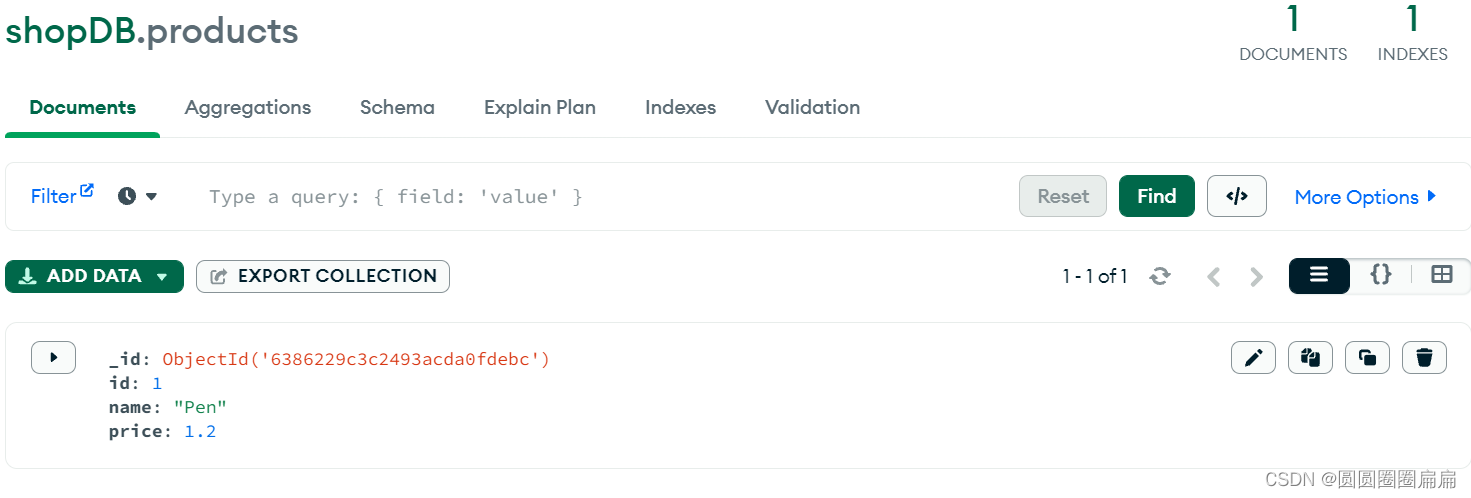
collections是集合(products),有点像数据表
shopDB是数据库
read
- shopDB> db.products.find()
- [
- {
- _id: ObjectId("6386229c3c2493acda0fdebc"),
- id: 1,
- name: 'Pen',
- price: 1.2
- },
- {
- _id: ObjectId("63862a353c2493acda0fdebd"),
- id: 2,
- name: 'Pencil',
- price: 0.8
- }
- ]
根据名字查询数据
- shopDB> db.products.find({name:"Pencil"})
- [
- {
- _id: ObjectId("63862a353c2493acda0fdebd"),
- id: 2,
- name: 'Pencil',
- price: 0.8
- }
- ]
使用指令找price:{$gt:1}
- shopDB> db.products.find({price:{$gt:1}})
- [
- {
- _id: ObjectId("6386229c3c2493acda0fdebc"),
- id: 1,
- name: 'Pen',
- price: 1.2
- }
- ]
根据两个query查找
- shopDB> db.products.find({id:1},{name:1})
- [ { _id: ObjectId("6386229c3c2493acda0fdebc"), name: 'Pen' } ]
- shopDB>
update
- shopDB> db.products.updateOne({price:0.8},{$set:{stock:32}})
- {
- acknowledged: true,
- insertedId: null,
- matchedCount: 1,
- modifiedCount: 0,
- upsertedCount: 0
- }
- shopDB> db.products.find()
- [
- {
- _id: ObjectId("6386229c3c2493acda0fdebc"),
- id: 1,
- name: 'Pen',
- price: 1.2
- },
- {
- _id: ObjectId("63862a353c2493acda0fdebd"),
- id: 2,
- name: 'Pencil',
- price: 0.8,
- stock: 32
- }
- ]
delete
- shopDB> db.products.deleteOne({stock:32})
- { acknowledged: true, deletedCount: 1 }
- shopDB> db.products.find()
- [
- {
- _id: ObjectId("6386229c3c2493acda0fdebc"),
- id: 1,
- name: 'Pen',
- price: 1.2,
- stock: 12
- }
- ]
Relationships in MongoDB
- db.products.insertOne({
- id:1,
- name:"Pen",
- price:1.20,
- reviews:[
- {
- name:"ann",
- ticket:"anue",
- reviews:"excellet"
- },
- {
- name:"Bob",
- ticket:"anue",
- reviews:"great"
- }
- ]
- })
就是在一个文档中,再添加多一点
Working with the native mongodb driver
使用bash 语句在command line 建立文件夹,并且创建app.js
并且使用npm初始化
MongoDB and Node.js Tutorial - CRUD Operations | MongoDB
随后导入以下代码到app.js中
- const { MongoClient } = require("mongodb");
- // Connection URI
- const uri =
- "mongodb://localhost:27017";
- // Create a new MongoClient
- const client = new MongoClient(uri);
- async function main() {
- try {
- // Connect the client to the server (optional starting in v4.7)
- await client.connect();
- await createMultipleListings(client, [
- {
- name: "Infinite Views",
- score: 8,
- review: "Great fruit"
- },
- {
- name: "Orange",
- score: 6,
- review: "kinda sour"
- },
- {
- name: "Banana",
- score: 9,
- review: "Great stuff"
- }
- ]);
- // Establish and verify connection
- await client.db("fruitDB").command({ ping: 1 });
- console.log("Connected successfully to server");
- } finally {
- // Ensures that the client will close when you finish/error
- await client.close();
- }
- }
- main().catch(console.error);
- //Create Multiple Documents
- async function createMultipleListings(client, newListings){
- const result = await client.db("fruitDB").collection("fruit").insertMany(newListings);
- console.log(`${result.insertedCount} new listing(s) created with the following id(s):`);
- console.log(result.insertedIds);
- }
connection+insert数据
源代码:nodejs-quickstart/create.js at master · mongodb-developer/nodejs-quickstart · GitHub
随后打开mongo自带的sh,并且连接上数据库
在使用bash启动node.js

-
相关阅读:
【刷题笔记】动态规划
STC51单片机36——51单片机简单分两路控制步进电机
MySQL的数据库是否支持分区呢?
ROS 仿真
CSS栅格布局(Grid)
QT-事件机制学习笔记
学生个人单页面网页作业 学生网页设计成品 静态HTML网页单页制作 dreamweaver网页设计与制作代码 web前端期末大作业
Git相关配置及问题解决
2022年最新Python大数据之Python基础【八】文件的操作与类
nvidia-smi
- 原文地址:https://blog.csdn.net/weixin_42173016/article/details/128107129

- 最新文章
-
沪漂五周年了:我越来越迷茫了
Agentic Skill Routing 实战:别再把所有 Skill 塞进 AI Agent 上下文
MySQL-Seconds_behind_master的精度误差
[MAF预定义ChatClient中间件-03]CachingChatClient——利用缓存省钱省时间
AI的至暗历史:从万众期待到被政府撤资,AI的两次死亡徘徊
Agent OS :五种驯服不确定性的范式
PortSwigger SQL注入LAB11
数据库即时编译JIT
[Begin]AI Learn Data Day 0
深度学习进阶(二十七)现代 LLM 的核心架构设计其二:SwiGLU