-
Linux文件搜索命令find、which和whereis应用
记录:349
场景:在CentOS 7.9操作系统上,使用find命令在指定目录搜索文件,支持精确搜索和模糊搜索;使用which命令搜索一个命令所在的目录和别名信息。使用whereis命令搜索命令所在的目录和man帮助手册等相关的文件路径。
版本:
操作系统:CentOS 7.9
1.find命令应用
使用find命令在指定目录搜索文件,支持精确搜索和模糊搜索。
符号说明:+/-符号表示大于/小于,不加则表示等于。
(1)指定文件名称精确搜索(-name选项)
格式:find 目录 -name 文件名称
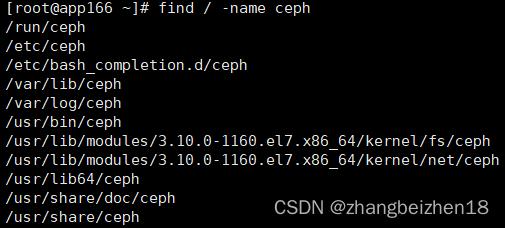
命令:find / -name ceph
解析:在根目录/下,搜索文件名为ceph的内容。后面既包括文件名称也包括目录名称。
(2)指定文件名称模糊搜索(-name选项)
格式:find 目录 -name 文件名称
命令:find / -name cep*
命令:find / -name *cep*
解析:在根目录/下,只要包含cep的都会搜索到。-name,后面既包括文件名称也包括目录名称。

(3)指定用户名搜索(-user选项)
格式:find 目录 -user 用户名称
命令:find / -user learn
解析:在根目录下,搜索用户learn拥有的目录和文件。
(4)指定用户组搜索(-group选项)
格式:find 目录 -group 用户名称
命令:find / -group learn
解析:在根目录下,搜索用户组learn拥有的目录和文件。
(5)查找指定时间内被访问的文件(-amin选项)
格式:find 目录 -amin 时间(单位分钟)
命令:find / -amin -8
解析:查出8分钟内被访问的文件。
命令:find / -amin +8
解析:查出8分钟前被访问的文件。
(6)查找指定时间内文件属性改变的文件(-cmin选项)
格式:find 目录 -cmin 时间(单位分钟)
命令:find / -cmin -8
解析:查出8分钟内文件属性被改变的目录和文件。
命令:find / -cmin +8
解析:查出8分钟前文件属性被改变的目录和文件。
(7)查找指定时间内文件内容改变的文件(-mmin选项)
格式:find 目录 -mmin 时间(单位分钟)
命令:find / -mmin -8
解析:查出8分钟内文件内容被改变的目录和文件。
命令:find / -mmin +8
解析:查出8分钟前文件内容被改变的目录和文件。
(8)查找指定文件大小的文件(-size选项)
单位说明:查找文件的默认单位是块(1块=512字节=0.5KB);单位有c(字节)、k(字节)、M(M字节)、G(G字节)。
格式:find 目录 -size 文件大小
命令:find / -size -8
解析:查找小于8*0.5Kb字节的文件。
命令:find / -size +8M
解析:查找大于8M的文件。
(9)查找满足多个条件的文件(-a选项,and)
命令:find /home/apps/work/ -size +2k -a -size -6k
解析:查找/home/apps/software/目录下,文件大小大于2k且小于6k的文件。

(10)查找满足多个条件中的一个的文件(-o选项,or)
命令:find /home/apps/work/ -size -3k -o -size +5k
解析:查找/home/apps/software/目录下,文件大小大于2k且小于6k的文件。

(11)查找指定文件类型的文件(-type选项)
文件类型说明:f、d、l分别代表文件类型、目录类型和软链接文件。
命令:find /home/apps/work/ -type f
命令:find /home/apps/work/ -type d
命令:find /home/apps/work/ -type l
解析:-type f,查找文件类型;-type d,查找目录类型;-type l,查找软链接;
(12)查找可执行的文件(-executable选项)
命令:find /home/apps/work/ -executable
解析:查找/home/apps/work/目录下可执行的文件。
2.which命令应用
使用which命令搜索一个命令所在的目录和别名信息。比如常用的ls命令,别名是ll。
(1)查找命令完整路径
命令:which cat
解析:精准搜索cat命令所在完整路径,打印信息:/usr/bin/cat。
(2)打印which命令版本
命令:which --version
解析:打印出which命令本身的版本。本例:GNU which v2.20。
3.whereis命令应用
使用whereis命令搜索命令所在的目录和man帮助手册等相关的文件路径。
(1)查找命令全路径和man帮助手册
命令:whereis cat
解析:精准搜索cat命令所在完整路径。
打印信息:cat: /usr/bin/cat /usr/share/man/man1/cat.1.gz。
(2)打印查找路径信息
命令:whereis -l cat
解析:会打印出查找cat命令时,搜索过的路径。
(3)只搜索命令的man手册
命令:whereis -m cat
解析:只查找出cat命令的man手册。打印信息:cat: /usr/share/man/man1/cat.1.gz。
4.命令帮助手册
(1)find命令帮助手册
命令:find --help
解析:查看find支持的全部命令和选项,在实际工作中,查看这个手册应该是必备之选。
- Usage: find [-H] [-L] [-P] [-Olevel] [-D help|tree|search|stat|rates|opt|exec] [path...] [expression]
- default path is the current directory; default expression is -print
- expression may consist of: operators, options, tests, and actions:
- operators (decreasing precedence; -and is implicit where no others are given):
- ( EXPR ) ! EXPR -not EXPR EXPR1 -a EXPR2 EXPR1 -and EXPR2
- EXPR1 -o EXPR2 EXPR1 -or EXPR2 EXPR1 , EXPR2
- positional options (always true): -daystart -follow -regextype
- normal options (always true, specified before other expressions):
- -depth --help -maxdepth LEVELS -mindepth LEVELS -mount -noleaf
- --version -xautofs -xdev -ignore_readdir_race -noignore_readdir_race
- tests (N can be +N or -N or N): -amin N -anewer FILE -atime N -cmin N
- -cnewer FILE -ctime N -empty -false -fstype TYPE -gid N -group NAME
- -ilname PATTERN -iname PATTERN -inum N -iwholename PATTERN -iregex PATTERN
- -links N -lname PATTERN -mmin N -mtime N -name PATTERN -newer FILE
- -nouser -nogroup -path PATTERN -perm [-/]MODE -regex PATTERN
- -readable -writable -executable
- -wholename PATTERN -size N[bcwkMG] -true -type [bcdpflsD] -uid N
- -used N -user NAME -xtype [bcdpfls]
- -context CONTEXT
- actions: -delete -print0 -printf FORMAT -fprintf FILE FORMAT -print
- -fprint0 FILE -fprint FILE -ls -fls FILE -prune -quit
- -exec COMMAND ; -exec COMMAND {} + -ok COMMAND ;
- -execdir COMMAND ; -execdir COMMAND {} + -okdir COMMAND ;
- Report (and track progress on fixing) bugs via the findutils bug-reporting
- page at http://savannah.gnu.org/ or, if you have no web access, by sending
- email to
(2)which命令帮助手册
命令:which --help
解析:查看which支持的全部命令和选项,在实际工作中,查看这个手册应该是必备之选。
- Usage: /usr/bin/which [options] [--] COMMAND [...]
- Write the full path of COMMAND(s) to standard output.
- --version, -[vV] Print version and exit successfully.
- --help, Print this help and exit successfully.
- --skip-dot Skip directories in PATH that start with a dot.
- --skip-tilde Skip directories in PATH that start with a tilde.
- --show-dot Don't expand a dot to current directory in output.
- --show-tilde Output a tilde for HOME directory for non-root.
- --tty-only Stop processing options on the right if not on tty.
- --all, -a Print all matches in PATH, not just the first
- --read-alias, -i Read list of aliases from stdin.
- --skip-alias Ignore option --read-alias; don't read stdin.
- --read-functions Read shell functions from stdin.
- --skip-functions Ignore option --read-functions; don't read stdin.
- Recommended use is to write the output of (alias; declare -f) to standard
- input, so that which can show aliases and shell functions. See which(1) for
- examples.
- If the options --read-alias and/or --read-functions are specified then the
- output can be a full alias or function definition, optionally followed by
- the full path of each command used inside of those.
- Report bugs to
(3)whereis命令帮助手册
命令:whereis --help
解析:查看whereis支持的全部命令和选项,在实际工作中,查看这个手册应该是必备之选。
- Usage:
- whereis [options] file
- Options:
- -b search only for binaries
- -B <dirs> define binaries lookup path
- -m search only for manuals
- -M <dirs> define man lookup path
- -s search only for sources
- -S <dirs> define sources lookup path
- -f terminate <dirs> argument list
- -u search for unusual entries
- -l output effective lookup paths
- For more details see whereis(1).
以上,感谢。
2022年11月28日
-
相关阅读:
前端数据可视化之【series、series饼图配置】配置项
【m98】视频帧的 jitterbuffer 1:
Python批量替换字符串中的字符组合replace()
报错:crbug/1173575 non-js module files deprecated
Java VS Go 还在纠结怎么选吗,(资深后端4000字带你深度对比)
力扣第40天----第121题、第122题
充气泵方案设计—汽车打气泵方案开发
VScode(Python)使用ssh远程开发(Linux系统树莓派)时,配置falke8和yapf总结避坑!最详细,一步到位!
Springboot之请求参数接收方式详解
项目配置vue.config jsconfig babel.config .prettierc .env .eslintrc
- 原文地址:https://blog.csdn.net/zhangbeizhen18/article/details/128085951
