-
SpringBoot整合Mybatis
xml方式整合Mybatis
xml方式在编写复杂SQL时,更适合
1.导入依赖
- <dependency>
- <groupId>mysqlgroupId>
- <artifactId>mysql-connector-javaartifactId>
- dependency>
- <dependency>
- <groupId>com.alibabagroupId>
- <artifactId>druid-spring-boot-starterartifactId>
- <version>1.1.10version>
- dependency>
- <dependency>
- <groupId>org.mybatis.spring.bootgroupId>
- <artifactId>mybatis-spring-boot-starterartifactId>
- <version>1.3.2version>
- dependency>
2.编写配置文件
- //编写实体类
- @Data
- public class User implements Serializable {
- private Integer id;
- private String name;
- private Integer age;
- private String gender;
- }
3.准备Mybatis
1.接口
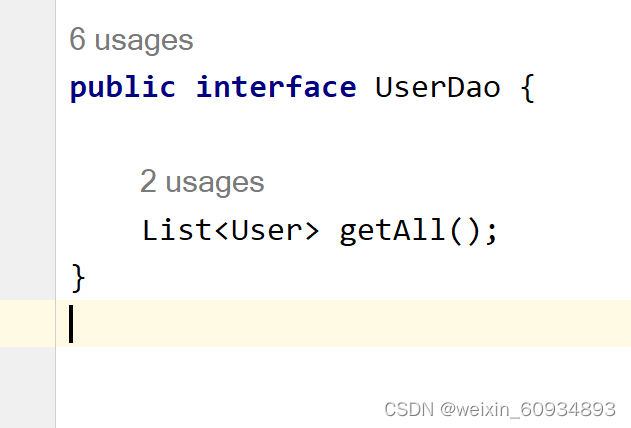
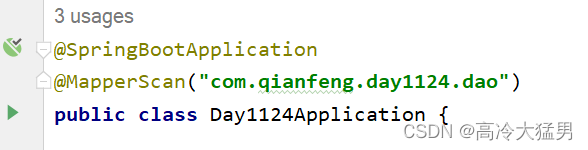
2. 在启动类中添加直接,扫描Mapper接口所在的包
3. 准备映射文件

- "1.0" encoding="UTF-8" ?>
- mapper
- PUBLIC "-//mybatis.org//DTD Mapper 3.0//EN"
- "http://mybatis.org/dtd/mybatis-3-mapper.dtd">
- <mapper namespace="com.qianfeng.day1124.dao.UserDao">
- <select id="getAll" resultType="User">
- select * from user
- select>
- mapper>
4. yml文件
- server:
- port: 8080
- mybatis:
- mapper-locations: classpath:mappers/*.xml
- # 配置别名扫描的包
- type-aliases-package: com.qianfeng.day1124.entity
- spring:
- datasource:
- driver-class-name: com.mysql.cj.jdbc.Driver
- url: jdbc:mysql:///crm?serverTimezone=Asia/Shanghai
- username: root
- password: 123456

测试启动类测试


注解方式整合Mybatis
注解方式在编写配置简单,简单SQL推荐使用
创建的Mapper接口

添加Mybatis注解
针对增删改查:@Insert,@Delete,@Update,@Select
还是需要在启动类中添加@MapperScan注解


添加配置
- // yml文件
- logging:
- level:
- com.qf.firstspringboot.mapper: DEBUG
application.yml
- server:
- port: 8080
- mybatis:
- mapper-locations: classpath:mappers/*.xml
- type-aliases-package: com.qianfeng.day1124.entity
- spring:
- datasource:
- driver-class-name: com.mysql.cj.jdbc.Driver
- url: jdbc:mysql:///crm?serverTimezone=Asia/Shanghai
- username: root
- password: 123456
- type: com.alibaba.druid.pool.DruidDataSource
- thymeleaf:
- mode: HTML #thymeleaf 的模板模型
- cache: false #不适用缓存
- encoding: UTF-8 #编码
- prefix: classpath:/templates/ #前缀
- suffix: .html #后面
- logging:
- level:
- com.qianfeng.day1124.dao: debug


-
相关阅读:
Mysql三种日志(binlog,redolog,undolog)的作用和区别
springboot+nodejs+vue+elementui教师下乡支教岗位申请系统java项目源码
【GNN】【ICML2019】Position-aware GraphNeural Networks
【毕业设计】基于深度学习的人脸专注度检测计算系统 - opencv python cnn
Kafka 架构
干货:Easy系列各视频平台云台控制功能的使用注意事项汇总
安装sklearn包错误解决以及 scikit-learn简介
【C指针详解】初阶篇
HelloWorld显示Go语言交叉编译的强大20230926
echart在折线显示横纵(横纵线沿着折线展示)
- 原文地址:https://blog.csdn.net/weixin_60934893/article/details/128059859

- 最新文章
-
沪漂五周年了:我越来越迷茫了
Agentic Skill Routing 实战:别再把所有 Skill 塞进 AI Agent 上下文
MySQL-Seconds_behind_master的精度误差
[MAF预定义ChatClient中间件-03]CachingChatClient——利用缓存省钱省时间
AI的至暗历史:从万众期待到被政府撤资,AI的两次死亡徘徊
Agent OS :五种驯服不确定性的范式
PortSwigger SQL注入LAB11
数据库即时编译JIT
[Begin]AI Learn Data Day 0
深度学习进阶(二十七)现代 LLM 的核心架构设计其二:SwiGLU