-
【App自动化测试】(十三)以雪球财经app为例的移动端自动化测试练习
前言:
本文为在霍格沃兹测试开发学社中学习到的一些技术写出来分享给大家,希望有志同道合的小伙伴可以一起交流技术,一起进步~ 😘1. 产品分析
-
被测应用:雪球 App
-
雪球 App 介绍
- 雪球 app 是一款免费版,非常实用的股票平台,提供热点资讯内容和实时行情,提供了证券交流交易,公募、理财服务
- 雪球 app 功能包括搜索股票,查看行情,交易,浏览热门文章,发帖,登录,注册,等功能
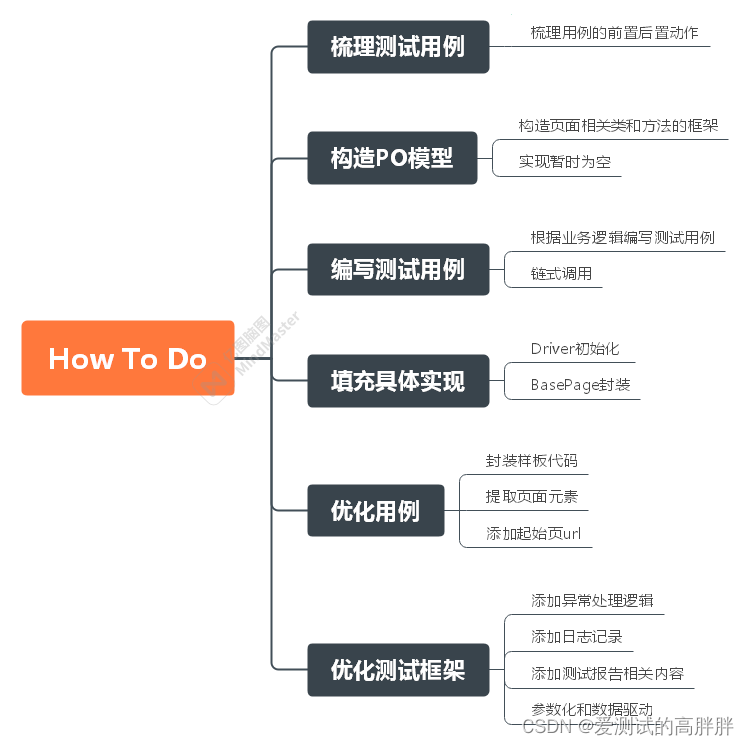
2. 实战练习思路
3. 用例设计
搜索场景:
- 打开【雪球】应用首页
- 点击搜索框,进入搜索页面
- 向搜索输入框中输入【alibaba】
- 点击搜索结果中的【阿里巴巴】
- 切换到 tab 的【股票】
- 找到 股票【阿里巴巴】的股票价格 price
- 判断 price 在 110 上下 10%浮动
4.构造PO模型,编写测试用例
4.1 模型框架
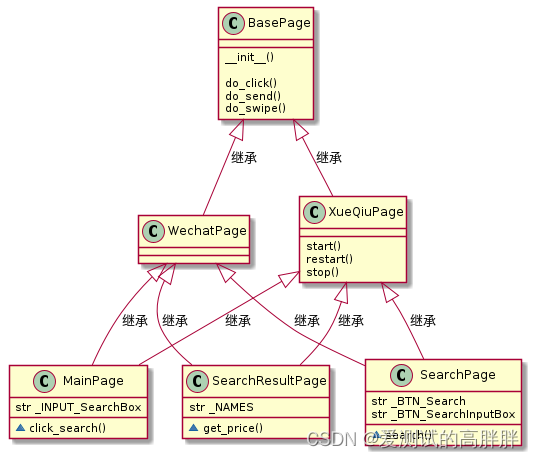
PO模型分为三层:
- 具体业务层
- 公共业务层
- 和业务无关的公共方法层
4.2 目录结构
base/ base_page.py #基类 xueqiu_app.py # app启动相关 page/ main_page.py #PO-主页 search_page.py #PO-搜索页 search_result_page.py #PO-搜索结果也 cases/ test_xueqiu.py- 1
- 2
- 3
- 4
- 5
- 6
- 7
- 8
- 9
- 10
4.3 搭建框架
先把框架搭好,写好测试用例,填充业务逻辑,保证用例可以正常跑通。
- base
-
base_page.py(实现暂时为空)
-
xueqiu_app.py
from appium import webdriver from appiumpo.page.main_page import MainPage class XueQiuApp: """ 放置雪球APP相关的操作:start 启动;restart 重启;stop 停止""" def start(self): desired_caps = { } desired_caps['platformName'] = 'Android' desired_caps['platformVersion'] = '6.0' desired_caps['deviceName'] = '127.0.0.1:7555' desired_caps['appPackage'] = 'com.xueqiu.android' desired_caps['appActivity'] = '.view.WelcomeActivityAlias' desired_caps['noReset'] = 'true' self.driver = webdriver.Remote('http://127.0.0.1:4723/wd/hub', desired_caps) self.driver.implicitly_wait(10) return self def restart(self): pass def stop(self): pass def goto_main(self): #完成切换到到PO的功能 return MainPage(self.driver)- 1
- 2
- 3
- 4
- 5
- 6
- 7
- 8
- 9
- 10
- 11
- 12
- 13
- 14
- 15
- 16
- 17
- 18
- 19
- 20
- 21
- 22
- 23
- 24
- 25
- 26
- 27
- page
- main_page.py
from appium.webdriver.common.appiumby import AppiumBy from appium.webdriver.webdriver import WebDriver from appiumpo.page.search_page import SearchPage class MainPage: def __init__(self,driver:WebDriver): self.driver=driver def click_search(self): #点击搜索框 self.driver.find_element(AppiumBy.ID,"com.xueqiu.android:id/tv_search").click() return SearchPage(self.driver)- 1
- 2
- 3
- 4
- 5
- 6
- 7
- 8
- 9
- 10
- 11
- 12
- search_page.py
from appium.webdriver.common.appiumby import AppiumBy from appium.webdriver.webdriver import WebDriver from appiumpo.page.search_result_page import SearchResultPage class SearchPage: def __init__(self, driver:WebDriver): self.driver = driver def input_searchcontent(self,searchkeys): # 输入搜索内容 self.driver.find_element(AppiumBy.ID,"com.xueqiu.android:id/search_input_text").send_keys(searchkeys) return self def click_searchresult(self,text): self.driver.find_element(AppiumBy.XPATH, f"//*[@text='{ text}']").click() return SearchResultPage(self.driver)- 1
- 2
- 3
- 4
- 5
- 6
- 7
- 8
- 9
- 10
- 11
- 12
- 13
- 14
- 15
- 16
- 17
- search_result_page.py
from appium.webdriver.common.appiumby import AppiumBy from appium.webdriver.webdriver import WebDriver class SearchResultPage: def __init__(self, driver: WebDriver): self.driver = driver def goto_stock_tab(self): #点击股票 self.driver.find_element(AppiumBy.XPATH,"//*[@text='股票']").click() return self def get_price(self): #找到对应股票的价格,返回股票价格 current_price=self.driver.find_element(AppiumBy.XPATH,"//*[@text='BABA']/../../..//*[@resource-id='com.xueqiu.android:id/current_price']").text return float(current_price)- 1
- 2
- 3
- 4
- 5
- 6
- 7
- 8
- 9
- 10
- 11
- 12
- 13
- 14
- 15
- 16
- cases
- test_xueqiu.py
#使用harmcrest 要导入全部内容,要不然有一些函数会报错 from hamcrest import * from appiumpo.base.xueqiu_app import XueQiuApp class TestXueQiu: def setup(self):- 1
- 2
- 3
- 4
- 5
- 6
- 7
-
-
相关阅读:
java多线程-单例模式与多线程
特斯拉Dojo超算:AI训练平台的自动驾驶与通用人工智能之关键
Web3行业人才需求激增,加密初创企业的薪资究竟如何?
Android11 framework Handler
视频编解码 — 带宽预测
Vue.js 中的异步组件是什么?
四. Redis 事务、锁机制秒杀
【软件建模与设计】-02-UML图
【LWE问题简介】
spring5
- 原文地址:https://blog.csdn.net/gjj920318/article/details/127997217

- 最新文章
-
【FHE】我们如何实现同态加密推理(八):SiLU 的密文化——两条路径,和一个 8 字节的开关
SQLcl 中 c/old/new 替换变量为何失效?先定位再替换
不让模型写作文,直接从它脑子里读答案:Jev 决策在 .NET 的两条路线
Halo插件:支持GitHub的图床附件策略
电视投屏界的“一股清流”!SimpleTVCast 6.0.0-beta 抢先体验:无需TV端App,界面大换血!✨
华三VXLAN集中式网关实战指南:Spine多活网关 + 双活接入(M-LAG)
软件更好写之后口碑会更重要
大 O、大 Omega、大 Theta 的区别,O(n) 复杂度是什么意思
Java标签跳转:一个鲜为人知但却很实用的小技巧
多智能体系统论文速读