-
小学生python游戏编程arcade----excel调用
小学生python游戏编程arcade----excel调用
前言
接上篇文章继续解绍arcade游戏编程的基本知识。游戏基本界面弄好,英语单词录入excel后调用问题,基本涉及到单词及语义的读取,随机打乱,显示问题,游戏中公共函数的调用及效果。
小学生python游戏编程arcade----excel调用
1、excel文件
1.1 excel表头

1.2 excel文件
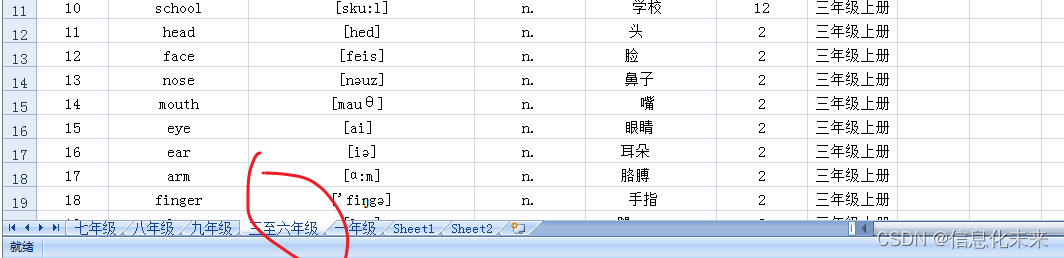
1.3 文件读取函数
def get_data(filename, sheetnum): # dir_case = 'F:\\code\\csdn\\cese_excel\\' + filename + '.xlsx' dir_case = filename data = xlrd.open_workbook(dir_case) table = data.sheets()[sheetnum] nor = table.nrows nol = table.ncols dict = {} for i in range(1, nor): for j in range(nol): title = table.cell_value(0, j) value = table.cell_value(i, j) dict[title] = value yield dict- 1
- 2
- 3
- 4
- 5
- 6
- 7
- 8
- 9
- 10
- 11
- 12
- 13
- 14
- 15
- 16
- 17
1.4 打开excel文件读取数据,每行一个字典,再总存为序列
def run_select_school2(filename, sheet_index=0, table_header_row=0): # 打开excel文件读取数据,每行一个字典,再总存为序列 data = xlrd.open_workbook(filename) table = data.sheet_by_index(sheet_index) nrows = table.nrows nclos = table.ncols # 获取表头行的信息,为一个字典 header_row_data = table.row_values(table_header_row) # 将每行的信息放入一个字典,再将字典放入一个列表中 list = [] for rownum in range(1, nrows): rowdata = table.row_values(rownum) # 如果rowdata有值, if rowdata: dict = {} for j in range(0, len(header_row_data)): dict[header_row_data[j]] = rowdata[j] list.append(dict) return list- 1
- 2
- 3
- 4
- 5
- 6
- 7
- 8
- 9
- 10
- 11
- 12
- 13
- 14
- 15
- 16
- 17
- 18
- 19
- 20
1.5 打开excel文件读取数据,取两列存为字典
def getwordzw(filename, sheet_index=0, danyuan=1,nianji='三年级上册'): # 打开excel文件读取数据,取两列存为字典 data = xlrd.open_workbook(filename) table = data.sheet_by_index(sheet_index) nrows = table.nrows # nclos = table.ncols # 将每行的信息放入一个字典,再将字典放入一个列表中 dict = {} for rownum in range(1, nrows): # print(int(table.cell_value(rownum, 5))) if table.cell_value(rownum, 5)== danyuan and table.cell_value(rownum, 6)==nianji: # print('true') dict[table.cell_value(rownum, 1).replace('\u200e', '')] = table.cell_value(rownum, 4).replace('\u200e', '') return dict- 1
- 2
- 3
- 4
- 5
- 6
- 7
- 8
- 9
- 10
- 11
- 12
- 13
- 14
- 15
1.6 游戏中提取单词
def setup_word(self, dy=1, year='三年级上册'): self.word_dict = getwordzw(u'english.xls', sheet_index=3, danyuan=dy, nianji=year) self.word_keys = list(self.word_dict.keys()) print(self.word_dict) print(self.word_keys)- 1
- 2
- 3
- 4
- 5
1.7 公共函数整体代码
# 公共函数 import random import xlrd def get_data(filename, sheetnum): # dir_case = 'F:\\code\\csdn\\cese_excel\\' + filename + '.xlsx' dir_case = filename data = xlrd.open_workbook(dir_case) table = data.sheets()[sheetnum] nor = table.nrows nol = table.ncols dict = {} for i in range(1, nor): for j in range(nol): title = table.cell_value(0, j) value = table.cell_value(i, j) dict[title] = value yield dict def run_select_school2(filename, sheet_index=0, table_header_row=0): # 打开excel文件读取数据,每行一个字典,再总存为序列 data = xlrd.open_workbook(filename) table = data.sheet_by_index(sheet_index) nrows = table.nrows nclos = table.ncols # 获取表头行的信息,为一个字典 header_row_data = table.row_values(table_header_row) # 将每行的信息放入一个字典,再将字典放入一个列表中 list = [] for rownum in range(1, nrows): rowdata = table.row_values(rownum) # 如果rowdata有值, if rowdata: dict = {} for j in range(0, len(header_row_data)): dict[header_row_data[j]] = rowdata[j] list.append(dict) return list def getwordzw(filename, sheet_index=0, danyuan=1,nianji='三年级上册'): # 打开excel文件读取数据,取两列存为字典 data = xlrd.open_workbook(filename) table = data.sheet_by_index(sheet_index) nrows = table.nrows # nclos = table.ncols # 将每行的信息放入一个字典,再将字典放入一个列表中 dict = {} for rownum in range(1, nrows): # print(int(table.cell_value(rownum, 5))) if table.cell_value(rownum, 5)== danyuan and table.cell_value(rownum, 6)==nianji: # print('true') dict[table.cell_value(rownum, 1).replace('\u200e', '')] = table.cell_value(rownum, 4).replace('\u200e', '') # print(int(table.cell_value(rownum, 5))) # print(danyuan) # print(table.cell_value(rownum, 1),table.cell_value(rownum, 5)) # if int(table.cell_value(rownum, 5))==1: #(table.cell_value(rownum, 3) != '短语') and # dict[table.cell_value(rownum, 1).replace('\u200e','')] = table.cell_value(rownum, 4).replace('\u200e','') return dict if __name__ == '__main__': wordarr = getwordzw(u'english.xls', sheet_index=3, danyuan=1,nianji='三年级上册') print(len(wordarr)) print(wordarr) # print(wordarr[1]) sizi = random.sample(wordarr.keys(), 5) # dd = wordarr[sizi[2]] print(sizi)- 1
- 2
- 3
- 4
- 5
- 6
- 7
- 8
- 9
- 10
- 11
- 12
- 13
- 14
- 15
- 16
- 17
- 18
- 19
- 20
- 21
- 22
- 23
- 24
- 25
- 26
- 27
- 28
- 29
- 30
- 31
- 32
- 33
- 34
- 35
- 36
- 37
- 38
- 39
- 40
- 41
- 42
- 43
- 44
- 45
- 46
- 47
- 48
- 49
- 50
- 51
- 52
- 53
- 54
- 55
- 56
- 57
- 58
- 59
- 60
- 61
- 62
- 63
- 64
- 65
- 66
- 67
- 68
- 69
- 70
- 71
- 72
游戏效果

源码获取
可关注博主后,私聊博主免费获取
需要技术指导,育娃新思考,企业软件合作等更多服务请联系博主今天是以此模板持续更新此育儿专栏的第 31/50次。
可以关注我,点赞我、评论我、收藏我啦。 -
相关阅读:
corn表达式
python 编写登录界面
源码级深度理解 Java SPI
html, css写一个loading
树——二叉查找树 - 有删除动作
深入了解 ReadDirectoryChangesW 并应用其监控文件目录
JMeter基础
Zookeeper中leader选举原理分析
《大数据面试通关》(第十四讲)——10 大业务场景 500 个离线实时指标
查看进程信息(ps、top) + 操作后台进程(jobs、bg、fg)
- 原文地址:https://blog.csdn.net/fqfq123456/article/details/128012803
- 最新文章
-
沪漂五周年了:我越来越迷茫了
Agentic Skill Routing 实战:别再把所有 Skill 塞进 AI Agent 上下文
MySQL-Seconds_behind_master的精度误差
[MAF预定义ChatClient中间件-03]CachingChatClient——利用缓存省钱省时间
AI的至暗历史:从万众期待到被政府撤资,AI的两次死亡徘徊
Agent OS :五种驯服不确定性的范式
PortSwigger SQL注入LAB11
数据库即时编译JIT
[Begin]AI Learn Data Day 0
深度学习进阶(二十七)现代 LLM 的核心架构设计其二:SwiGLU