-
Linux环境下安装并使用使用Git命令实现文件上传
⭐️前面的话⭐️
本篇文章将介绍在Linux环境下安装Git并使用Git实现代码上传到gitee,上传操作的核心就是三把斧,一是add,二是commit,三是push,此外还会简单介绍一下
.gitignore配置文件的作用。📒博客主页:未见花闻的博客主页
🎉欢迎关注🔎点赞👍收藏⭐️留言📝
📌本文由未见花闻原创,CSDN首发!
📆首发时间:🌴2022年11月23日🌴
✉️坚持和努力一定能换来诗与远方!
💭推荐书籍:📚《鸟哥的Linux私房菜》
💬参考在线编程网站:🌐牛客网🌐力扣🌐acwing
博主的码云gitee,平常博主写的程序代码都在里面。
博主的github,平常博主写的程序代码都在里面。
🍭作者水平很有限,如果发现错误,一定要及时告知作者哦!感谢感谢!

1.创建gitee仓库
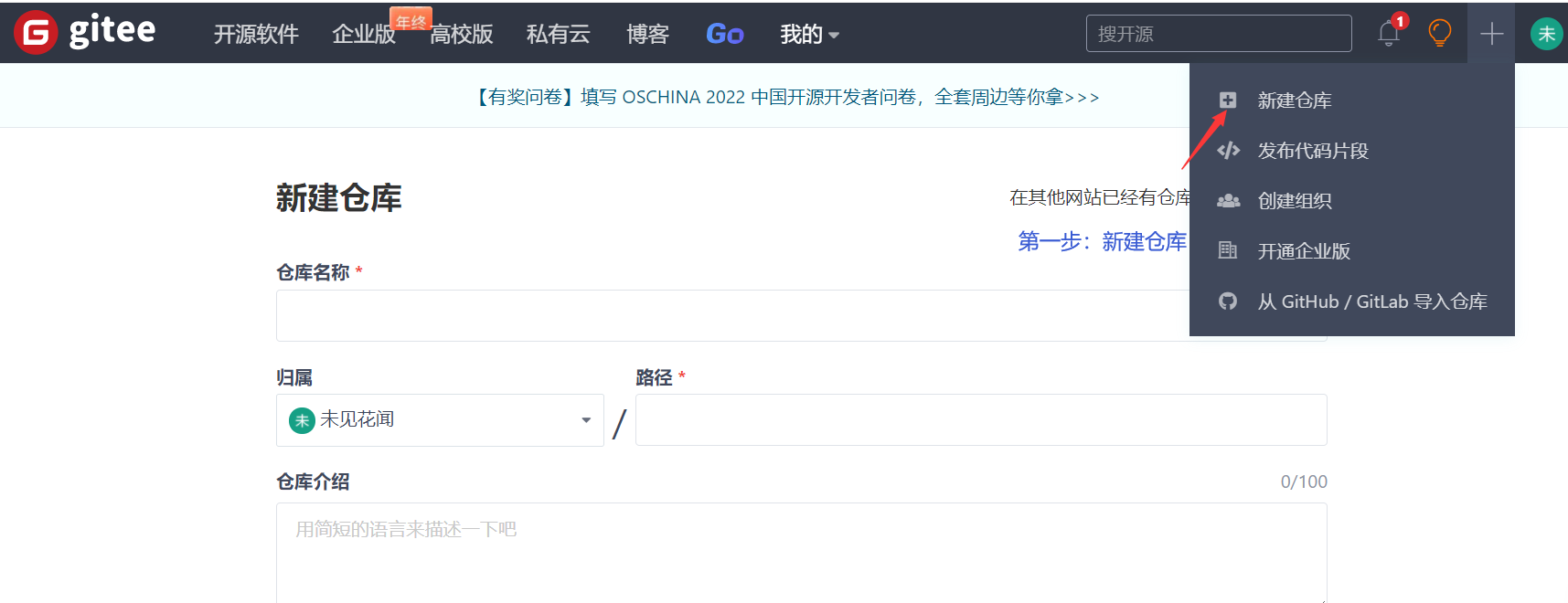
第一步,登录gitee,按照如下步骤新建仓库。


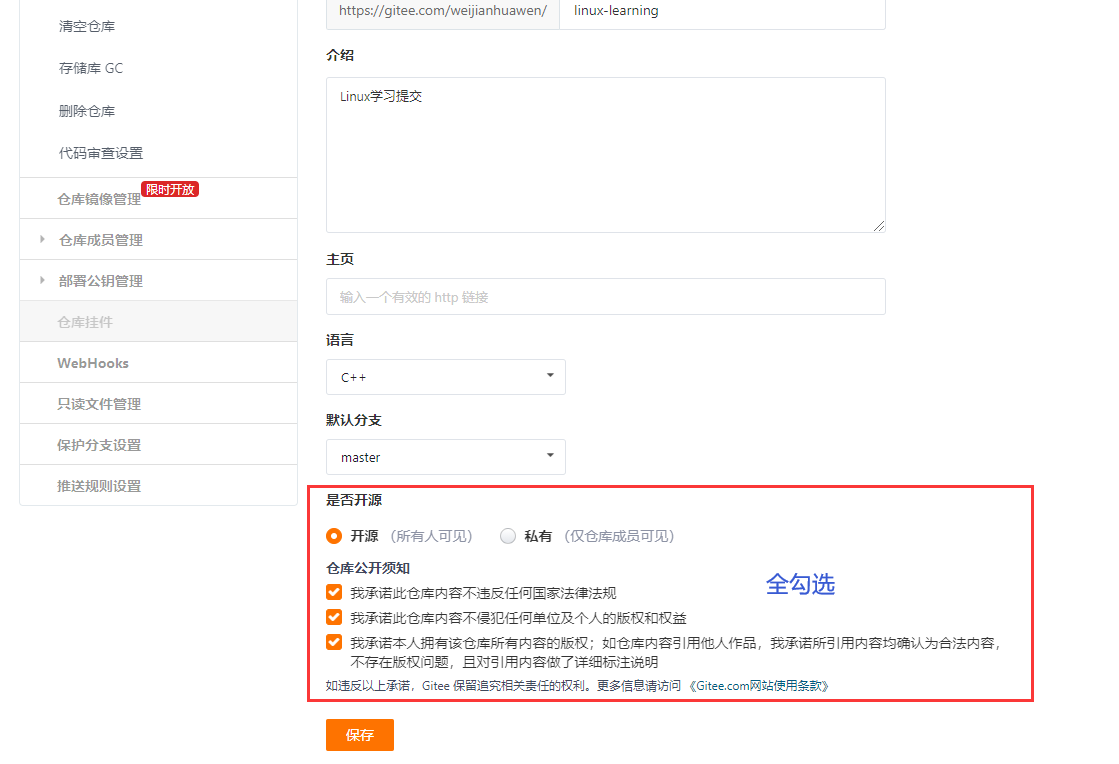
第二步,点击个人头像,找到设置点击,找到仓库空间信息选项,点击进去。

第三步,设置刚刚创建好的仓库,将权限改为开源。

2.Linux下配置Git与上传
2.1为Linux安装git
首先需要检查你的Linux环境下是否有安装git,可以使用下面命令来判断:
git --version- 1
[wjhw@VM-4-15-centos linux_learning]$ git --version git version 1.8.3.1- 1
- 2
如果有显示版本号就表示安装好了,否则需要安装,安装Git命令如下:
yum install git- 1
2.2初始化仓库(git clone)
在Linux下创建或者找一个目录,然后对这个目录初始化,将这个目录变为本地仓库,最简单的方法就是直接将在gitee创建好仓库中的文件直接克隆到本地,可以使用
git clone 克隆项目地址命令实现。这个地址就是你刚刚创建好的仓库的地址:

我的克隆项目地址就是:https://gitee.com/weijianhuawen/linux-learning.git将gitee上的项目拷贝到linux,创建一个目录,然后找到需要拷贝项目的地址,最后在linux环境下输入命令:
git clone 地址- 1
[wjhw@VM-4-15-centos ~]$ mkdir linux_learning [wjhw@VM-4-15-centos ~]$ cd ./linux_learning [wjhw@VM-4-15-centos linux_learning]$ git clone https://gitee.com/weijianhuawen/linux-learning.git Cloning into 'linux-learning'... remote: Enumerating objects: 9, done. remote: Counting objects: 100% (9/9), done. remote: Compressing objects: 100% (9/9), done. remote: Total 9 (delta 0), reused 0 (delta 0), pack-reused 0 Unpacking objects: 100% (9/9), done.- 1
- 2
- 3
- 4
- 5
- 6
- 7
- 8
- 9
这样就能够获取线上仓库也就是gitee上的文件,也包括相关的配置文件,这样就很方便在本地创建了一个仓库。
2.3获取仓库文件状态(git status)
进入相关的目录,查看隐藏的文件可以看到
.gitee,.gitignore等文件,这些文件就是gitee的配置相关文件。[wjhw@VM-4-15-centos linux-learning]$ ll -a total 40 drwxrwxr-x 4 wjhw wjhw 4096 Nov 23 00:26 . drwxrwxr-x 3 wjhw wjhw 4096 Nov 23 00:26 .. drwxrwxr-x 8 wjhw wjhw 4096 Nov 23 00:26 .git drwxrwxr-x 2 wjhw wjhw 4096 Nov 23 00:26 .gitee -rw-rw-r-- 1 wjhw wjhw 350 Nov 23 00:26 .gitignore -rw-rw-r-- 1 wjhw wjhw 11357 Nov 23 00:26 LICENSE -rw-rw-r-- 1 wjhw wjhw 828 Nov 23 00:26 README.en.md -rw-rw-r-- 1 wjhw wjhw 917 Nov 23 00:26 README.md- 1
- 2
- 3
- 4
- 5
- 6
- 7
- 8
- 9
- 10
获取仓库的状态,就是查看仓库具体文件在仓库的状态,命令如下:
git status [wjhw@VM-4-15-centos linux_learning]$ git status fatal: Not a git repository (or any of the parent directories): .git //表示没有仓库 [wjhw@VM-4-15-centos linux-learning]$ git status # On branch master nothing to commit, working directory clean //没有提交- 1
- 2
- 3
- 4
- 5
- 6
- 7
2.4git上传一把斧:add
接下来我们随便写一些文件或者代码,写在当前配置好gitee的目录下,或者拷贝一些文件也可以。
那我就随便写一个程序,比如hello world程序:
[wjhw@VM-4-15-centos linux-learning]$ touch hello.c [wjhw@VM-4-15-centos linux-learning]$ vim hello.c [wjhw@VM-4-15-centos linux-learning]$ ll total 24 -rw-rw-r-- 1 wjhw wjhw 73 Nov 23 14:31 hello.c -rw-rw-r-- 1 wjhw wjhw 11357 Nov 23 00:26 LICENSE -rw-rw-r-- 1 wjhw wjhw 828 Nov 23 00:26 README.en.md -rw-rw-r-- 1 wjhw wjhw 917 Nov 23 00:26 README.md [wjhw@VM-4-15-centos linux-learning]$ gcc hello.c -o hello [wjhw@VM-4-15-centos linux-learning]$ ll total 36 -rwxrwxr-x 1 wjhw wjhw 8360 Nov 23 14:32 hello -rw-rw-r-- 1 wjhw wjhw 73 Nov 23 14:31 hello.c -rw-rw-r-- 1 wjhw wjhw 11357 Nov 23 00:26 LICENSE -rw-rw-r-- 1 wjhw wjhw 828 Nov 23 00:26 README.en.md -rw-rw-r-- 1 wjhw wjhw 917 Nov 23 00:26 README.md [wjhw@VM-4-15-centos linux-learning]$ cat hello.c #includeint main() { printf("hello linux!\n"); return 0; } [wjhw@VM-4-15-centos linux-learning]$ ./hello hello linux! - 1
- 2
- 3
- 4
- 5
- 6
- 7
- 8
- 9
- 10
- 11
- 12
- 13
- 14
- 15
- 16
- 17
- 18
- 19
- 20
- 21
- 22
- 23
- 24
- 25
- 26
下面我们就可以开始提交代码了,总的来说就是三部曲,Add,Commit和Push。
进行add操作,将代码添加,待提交。
git add 文件名(.表示当前目录下全部文件)- 1
[wjhw@VM-4-15-centos linux-learning]$ git add . [wjhw@VM-4-15-centos linux-learning]$ git status # On branch master # Changes to be committed: # (use "git reset HEAD..." to unstage) # # new file: hello # new file: hello.c #- 1
- 2
- 3
- 4
- 5
- 6
- 7
- 8
- 9
2.5git上传二把斧:commit
进行commit操作,将代码提交到本地仓库,注意一定要写提交时的日志,因为万一程序出现bug了,可以根据提交代码所写的日志来排查。
git commit -m "日志"- 1
如果出现以下结果,你需要配置一下全局用户邮箱和用户名:
[wjhw@VM-4-15-centos linux-learning]$ git commit -m "hell0 linux 代码" *** Please tell me who you are. Run git config --global user.email "you@example.com" git config --global user.name "Your Name" to set your account's default identity. Omit --global to set the identity only in this repository. fatal: empty ident name (for <wjhw@VM-4-15-centos.(none)>) not allowed- 1
- 2
- 3
- 4
- 5
- 6
- 7
- 8
- 9
- 10
- 11
- 12
- 13
配置命令如下:
git config --global user.email "你的邮箱" git config --global user.name "你的用户名"- 1
- 2
设置好后就可以正常提交了。
示例:
[wjhw@VM-4-15-centos linux-learning]$ git config --global user.email "weijianhuawen@163.com" [wjhw@VM-4-15-centos linux-learning]$ git config --global user.name "未见花闻" [wjhw@VM-4-15-centos linux-learning]$ git commit -m "hell0 linux 代码" [master d6a1fc9] hell0 linux 代码 2 files changed, 7 insertions(+) create mode 100755 hello create mode 100644 hello.c [wjhw@VM-4-15-centos linux-learning]$ git status # On branch master # Your branch is ahead of 'origin/master' by 1 commit. # (use "git push" to publish your local commits) # nothing to commit, working directory clean- 1
- 2
- 3
- 4
- 5
- 6
- 7
- 8
- 9
- 10
- 11
- 12
- 13
为什么一定要认真写提交日志呢,因为当你工作时,遇到bug了,可以查询到每个人的提交信息,此时可以通过
git log查询到提交日志,大部分公司都会要求提交时必须认真写好日志,如果发现你没有写,那么很可能责任就在于你。[wjhw@VM-4-15-centos linux-learning]$ git log commit d6a1fc99c1004a501ddaf545ed07c55caa3bbf86 Author: 未见花闻 <weijianhuawen@163.com> Date: Wed Nov 23 14:48:01 2022 +0800 hell0 linux 代码 commit 0e629a4ae2ce48f2e0c2b8dba5b5db634a85dce7 Author: 未见花闻 <weijianhuawen@163.com> Date: Tue Nov 22 16:19:52 2022 +0000 Initial commit- 1
- 2
- 3
- 4
- 5
- 6
- 7
- 8
- 9
- 10
- 11
- 12
2.6git上传三把斧:push
进行push操作将代码上传提交到远程仓库
git push -u origin master # 第一次push需要验证密码- 1
- 2
[wjhw@VM-4-15-centos linux-learning]$ git push -u origin master Username for 'https://gitee.com': weijianhuawen Password for 'https://weijianhuawen@gitee.com': Counting objects: 5, done. Delta compression using up to 2 threads. Compressing objects: 100% (4/4), done. Writing objects: 100% (4/4), 2.65 KiB | 0 bytes/s, done. Total 4 (delta 1), reused 0 (delta 0) remote: Powered by GITEE.COM [GNK-6.4] To https://gitee.com/weijianhuawen/linux-learning.git 0e629a4..d6a1fc9 master -> master Branch master set up to track remote branch master from origin.- 1
- 2
- 3
- 4
- 5
- 6
- 7
- 8
- 9
- 10
- 11
- 12
此时,代码就上传成功了!

2.7有关.gitignore文件的作用
它是一个配置文件,我们来打开它看一看:
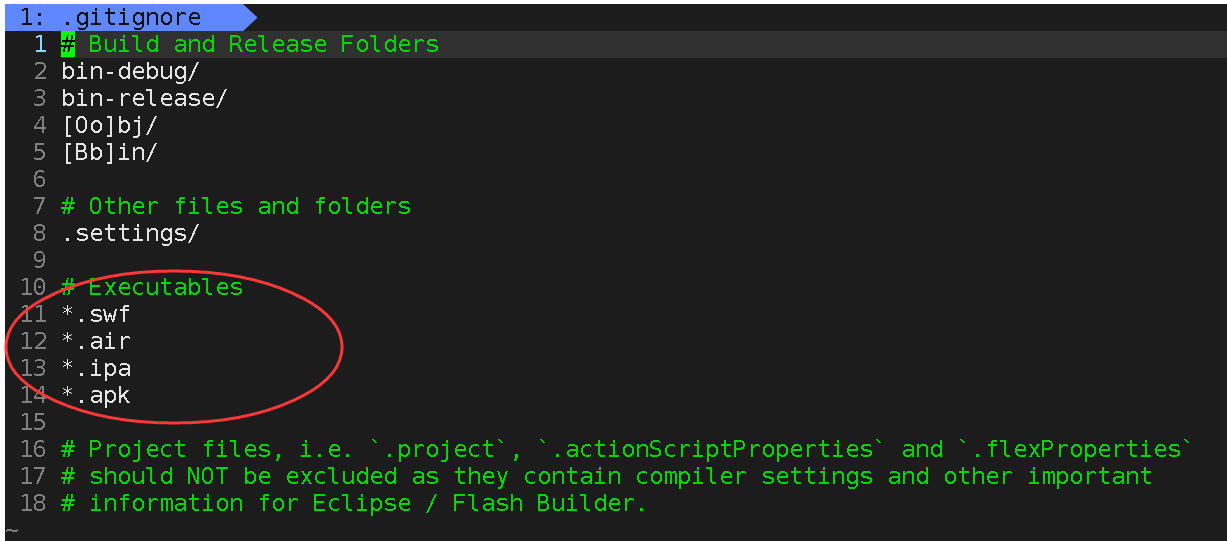
.gitignore 是一个隐藏文件,就跟这个文件的字面意思一样,它指明了在用 git 上传文件的时候需要忽略哪些文件。如果我们想要上传一个文件夹里的许多文件,但是另一些文件,比如一些配置文件,不想上传,这时我们只需要将这些文件名在 .gitignore 中指出,在使用 git add . 时就会忽略 .gitignore 里指出的文件,这样就可以用 git add . 方便地一次性上传我们想上传的文件。
就是在该配置文件下出现的文件,在add操作时都会忽略,这样可以实现文件的筛选,对于不想上传的文件,在配置文件中配置一下就可以使用
git add .命令直接上传。这个很明显我们能够看到有一部分都是后缀名,并且前面还有一个
*,这个*是一个通配符,*.后缀名·它表示以当前配置文件中后缀结尾的文件都不会被提交到远程仓库,也就是被上传到gitee上。除了
*以外还有/等其他字符,其含义分别为:- 空行或是以#开头的行即注释行将被忽略;
- 以斜杠 “/” 结尾表示目录;
- 以星号 “*” 通配多个字符;
- 以问号 “?” 通配单个字符
- 以方括号 “[]” 包含单个字符的匹配列表;
- 以叹号 “!” 表示不忽略(跟踪)匹配到的文件或目录;
可以在前面添加斜杠 “/” 来避免递归,下面的例子中可以很明白的看出来与下一条的区别。
配置文件示例
忽略 .a 文件
*.a- 1
但否定忽略 lib.a, 尽管已经在前面忽略了 .a 文件
!lib.a- 1
仅在当前目录下忽略 TODO 文件, 但不包括子目录下的 subdir/TODO
/TODO- 1
忽略 build/ 文件夹下的所有文件
build/- 1
忽略 doc/notes.txt, 不包括 doc/server/arch.txt
doc/*.txt- 1
忽略所有的 .pdf 文件 在 doc/ directory 下的
doc/**/*.pdf- 1
我们来简单的演示一下,我在配置文件中添加一个后缀
abc,然后我们在本地仓库(当前目录下)创建一批文件,提交到gitee,看看文件是否会被上传。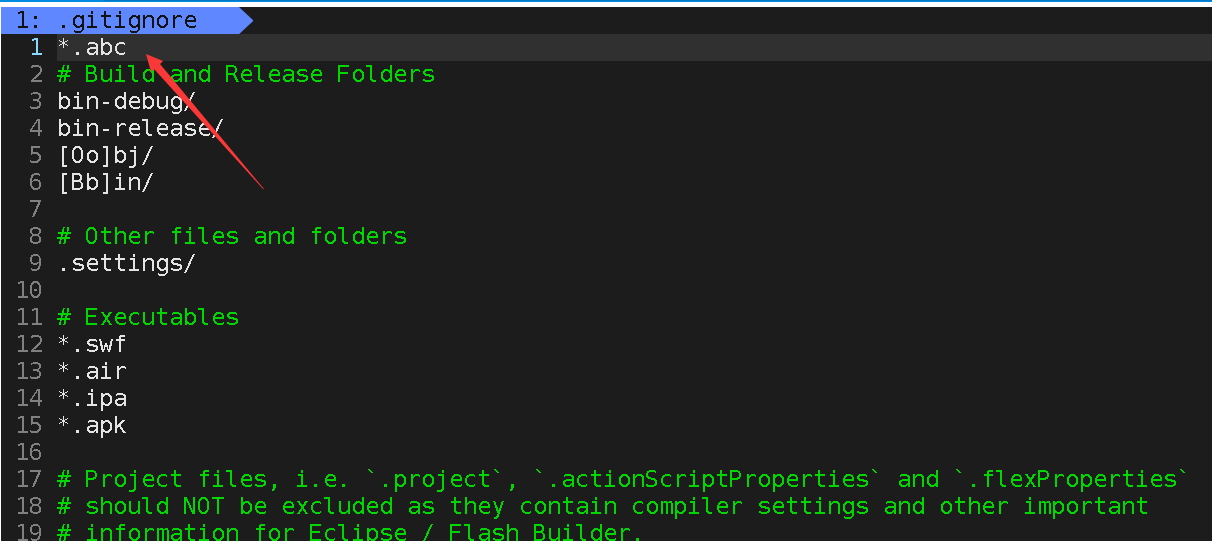
[wjhw@VM-4-15-centos linux-learning]$ touch file.abc file.c file.cpp file.java file.py [wjhw@VM-4-15-centos linux-learning]$ ll total 36 -rw-rw-r-- 1 wjhw wjhw 0 Nov 23 16:37 file.abc -rw-rw-r-- 1 wjhw wjhw 0 Nov 23 16:37 file.c -rw-rw-r-- 1 wjhw wjhw 0 Nov 23 16:37 file.cpp -rw-rw-r-- 1 wjhw wjhw 0 Nov 23 16:37 file.java -rw-rw-r-- 1 wjhw wjhw 0 Nov 23 16:37 file.py -rwxrwxr-x 1 wjhw wjhw 8360 Nov 23 14:32 hello -rw-rw-r-- 1 wjhw wjhw 75 Nov 23 14:32 hello.c -rw-rw-r-- 1 wjhw wjhw 11357 Nov 23 00:26 LICENSE -rw-rw-r-- 1 wjhw wjhw 828 Nov 23 00:26 README.en.md -rw-rw-r-- 1 wjhw wjhw 917 Nov 23 00:26 README.md- 1
- 2
- 3
- 4
- 5
- 6
- 7
- 8
- 9
- 10
- 11
- 12
- 13
上传到远程仓库:
[wjhw@VM-4-15-centos linux-learning]$ git add . [wjhw@VM-4-15-centos linux-learning]$ git commit -m "ignore test" [master 41ec2d9] ignore test 5 files changed, 1 insertion(+) create mode 100644 file.c create mode 100644 file.cpp create mode 100644 file.java create mode 100644 file.py [wjhw@VM-4-15-centos linux-learning]$ git push -u origin master Username for 'https://gitee.com': weijianhuawen Password for 'https://weijianhuawen@gitee.com': Counting objects: 6, done. Delta compression using up to 2 threads. Compressing objects: 100% (3/3), done. Writing objects: 100% (4/4), 530 bytes | 0 bytes/s, done. Total 4 (delta 1), reused 0 (delta 0) remote: Powered by GITEE.COM [GNK-6.4] To https://gitee.com/weijianhuawen/linux-learning.git d6a1fc9..41ec2d9 master -> master Branch master set up to track remote branch master from origin.- 1
- 2
- 3
- 4
- 5
- 6
- 7
- 8
- 9
- 10
- 11
- 12
- 13
- 14
- 15
- 16
- 17
- 18
- 19
- 20
我们来看看远程仓库的情况,发现没有
.abc结尾的文件。
觉得文章写得不错的老铁们,点赞评论关注走一波!谢谢啦! 
-
相关阅读:
C# Socket通信从入门到精通(4)——多个异步TCP客户端C#代码实现
解决 80% 的工作场景?GitHub 爆赞的 Java 高并发与集合框架,太赞了
Java使用lamda表达式简化代码
Python结合文件名称将多个文件复制到不同路径下
规范 Git 提交说明
机器学习 | 过拟合&欠拟合
Javascript中的对象(Object)类型
Redis分布式锁的正确使用姿势
[软件工程] CAP理论和BASE理论
到底有几个鸿蒙OS? 谈谈我眼里的鸿蒙操作系统
- 原文地址:https://blog.csdn.net/m0_59139260/article/details/127992558

- 最新文章
-
【FHE】我们如何实现同态加密推理(八):SiLU 的密文化——两条路径,和一个 8 字节的开关
SQLcl 中 c/old/new 替换变量为何失效?先定位再替换
不让模型写作文,直接从它脑子里读答案:Jev 决策在 .NET 的两条路线
Halo插件:支持GitHub的图床附件策略
电视投屏界的“一股清流”!SimpleTVCast 6.0.0-beta 抢先体验:无需TV端App,界面大换血!✨
华三VXLAN集中式网关实战指南:Spine多活网关 + 双活接入(M-LAG)
软件更好写之后口碑会更重要
大 O、大 Omega、大 Theta 的区别,O(n) 复杂度是什么意思
Java标签跳转:一个鲜为人知但却很实用的小技巧
多智能体系统论文速读