-
Springboot集成ItextPdf
目录
一、概述
因公司前段时间需要自定义面单,在原有的pdf上追加内容和编辑内容,水印,页码等需求,当时采用了itext5实现,因而最近闲下来总结一下。
Apache iText 是一个开源 Java 库,支持 PDF 文档的开发和转换。其目前遵从AGPL开源协议,AGPL 可以说是最严格的 GPL 了,并且Itext有很多product开始收费,但所需的功能基本上开源的API都能满足。

当前使用版本:5.5.11
二、Itext API
1.PDF文档生成
构建步骤:
创建文档对象、初始化PdfWriter、打开文档、填充内容、关闭文档。
- /**
- * 创建pdf
- */
- public static void createPdf() throws Exception{
- // 1-创建文本对象 Document
- Document document = new Document(PageSize.A4, 500, 150, 50, 50);
- FileOutputStream out=new FileOutputStream("./doc/1.pdf");
- // 2-初始化 pdf输出对象 PdfWriter
- PdfWriter.getInstance(document, out);
- // 3-打开 Document
- document.open();
- // 4-往 Document 添加内容
- document.add(new Paragraph("test! PDF!!!"));
- // 5-关闭 Document
- document.close();
- }

2.PDF内部结构

分为四层,第一层和第四层由低级操作来进行操作,第二层、第三层由高级对象操作
层对象: PdfContentByte:包含用户定位的文本和页面的图形内容的对象。
第一层操作只能使用PdfWriter.DirectContent操作,第四层使用DirectContentUnder操作。
第二层和第三层的PdfContentByte是由IText内部操作,没有提供api接口。
4、 操作:
⑴ PdfWriter 对象:写入PDF文档
第 1 层操作:PdfWriter. getDirectContent(),
第 2 层操作:getDirectContentUnder()。
⑵ PdfStamper 对象:将额外内容应用于PDF文档的页面。
第 1 层操作: PdfStamper. getUnderContent(1),-可以加页数
第 2 层操作: PdfStamper .getOverContent(1)。
5、作用:添加水印、背景、添加内容到绝对位置、合并PDF
3.常用对象
一、文档对象
Document、Rectangle、PageSize
1、 Document — 文档对象
构造方法: 有参构造、无参构造
无参构造:
Document() :默认是A4大小,做左右上下外边距分别是36.

有参构造:
Document(Rectangle pageSize, float marginLeft, float marginRight, float marginTop,
float marginBottom)
marginLeft:左外边距 marginRight:右外边距
marginTop:上外边距 marginBottom:下外边距PDF文档对象跟html页面相似。

属性
Document document =new Document(); // 默认页面大小是A4
Document document =new Document(PageSize.A4); // 指定页面大小为A4
Document document =new Document(PageSize.A4,50,50,30,20); // 指定页面大小为A4,且自定义页边距(marginLeft、marginRight、marginTop、marginBottom)
其中页面大小PageSize也可自定义大小,例:new Document(new Rectangle(400, 500));// 作者
document.addAuthor("作者");
// 创建日期
document.addCreationDate();
// 创建关键字
document.addKeywords("测试");
// 创建生产商,自动使用iText
document.addProducer();
// 创建程序
document.addCreator("创建人");
// 标题
document.addTitle("标题");
// 主题
document.addSubject("主题");//页边空白
document.setMargins(10, 20, 30, 40);方法
//PDF添加内容
document.add(new Paragraph("PDF添加内容"));
//添加Page
document.newPage();
//控制是否显示空白页
writer.setPageEmpty(true);
//监听器
document.addDocListener();
//添加js脚本
document.setJavaScript_onLoad();//横向打印
document = new Document(PageSize.A4.rotate());
document = new Document(tRectangle.rotate());
2、PdfWriter-文档解析器
PdfWriter writer = PdfWriter.getInstance(document, new FileOutputStream("./doc/11.pdf"));
//面框大小。允许的名称有:“crop”、“trim”、“art”和“bleach”。
writer.setBoxSize("crop",PageSize.A6);
writer.setPageEmpty(true);
//设置裁剪框大小
writer.setCropBoxSize(PageSize.A8);
// 设置密码为:"123" 需要根绝itext版本添加加密算法依赖:http://mvnrepository.com/artifact/com.itextpdf/itextpdf/
writer.setEncryption("密码".getBytes(), "123".getBytes(),PdfWriter.ALLOW_SCREENREADERS,PdfWriter.STANDARD_ENCRYPTION_128);
//PDF版本
writer.setPdfVersion(PdfWriter.PDF_VERSION_1_2);2、 Rectangle— 页面对象
构造方法:
Rectangle(final float llx, final float lly, final float urx, final float ury)
Rectangle(PageSize.A4)
Rectangle(float urx, float ury)
//rotation旋转比例
Rectangle(float urx, float ury, int rotation)
Rectangle(Rectangle rect)四个参数:
前面两个参数代表第一个点的 xy 坐标,后面两个参数代表第二个点的 xy 坐标值,Itext 将以这两个点作为对角点来创建一个矩形。
方法:
//旋转比例
tRectangle.setRotation();
//背景
tRectangle.setBackgroundColor();
//边框
tRectangle.setBorder();
//边框背景
tRectangle.setBorderColor();
//边框宽度
tRectangle.setBorderWidth();
tRectangle.setTop();
tRectangle.setLeft();
tRectangle.setRight();
tRectangle.setBottom();- public static void getRectangle() throws Exception {
- // 1-创建一个pdf文档,document
- Document document = new Document();// 默认PageSize.A4, 36, 36, 36, 36
- // 2-Rectangle(pdf页面)创建Document
- // 一般是四个参数表示:左下角的坐标和右上角的坐标
- Rectangle tRectangle = PageSize.A4;// PageSize封装了大量常用的Rectangle数据
- tRectangle = new Rectangle(800, 600);// 长宽
- tRectangle = new Rectangle(0, 0, 800, 600);// 等于上面
- //其他页面属性:不能和PageSize封装的静态一起使用
- tRectangle.setBackgroundColor(BaseColor.BLACK);// 背景色
- tRectangle.setBorder(1220);// 边框
- tRectangle.setBorderColor(BaseColor.BLUE);
- tRectangle.setBorderWidth(244.2f);
- document = new Document(tRectangle);
- // 解析器
- PdfWriter.getInstance(document, new FileOutputStream("./doc/3.pdf"));
- document.open();
- document.newPage();
- document.add(new Paragraph("New page"));
- document.close();
- }

二、操作对象
PdfWriter、PdfStamper、PdfReader、PdfCopy
三、内容对象

1.字体对象
1)BaseFont-确认支持中文
com.itextpdf itext-asian 5.2.0
2)Font-字体的设置,如颜色,字体,大小等
方式一:使用Windows系统字体(TrueType)
BaseFont baseFont = BaseFont.createFont("C:/Windows/Fonts/SIMYOU.TTF", BaseFont.IDENTITY_H,
BaseFont.NOT_EMBEDDED);
方式二:使用资源字体(ClassPath)
BaseFont baseFont = BaseFont.createFont("/SIMYOU.TTF", BaseFont.IDENTITY_H, BaseFont.NOT_EMBEDDED);
方式三:使用iTextAsian.jar中的字体
BaseFont baseFont = BaseFont.createFont("STSong-Light", "UniGB-UCS2-H", BaseFont.NOT_EMBEDDED);Font font = new Font(baseFont);
// 设置字体大小
font.setSize(13);
// 设置字体颜色
font.setColor(new BaseColor(255, 0, 0));
// 设置类型,为正常
font.setStyle(Font.NORMAL);
// 设置类型,加粗
font.setStyle(Font.BOLD);
// 设置类型,倾斜
font.setStyle(Font.ITALIC);
// 设置类型,下划线
font.setStyle(Font.UNDERLINE);
// 设置类型,可组合,倾斜+删除线
font.setStyle(Font.ITALIC | Font.STRIKETHRU);- public static Font getChineseFont() {
- BaseFont bfChinese;
- Font fontChinese = null;
- try {
- //支持中文
- bfChinese = BaseFont.createFont("STSong-Light", "UniGB-UCS2-H", BaseFont.NOT_EMBEDDED);
- fontChinese = new Font(bfChinese, 12, Font.NORMAL, BaseColor.BLUE);
- } catch (DocumentException e) {
- e.printStackTrace();
- } catch (IOException e) {
- e.printStackTrace();
- }
- return fontChinese;
- }
2.Element - 元素
内容对象基本都实现这个接口。如Chunk、 Phrase、 Paragraph
一般用于内容居中定位。
ALIGN_LEFT, ALIGN_CENTER、 ALIGN_RIGHT, ALIGN_JUSTIFIED 。
如设置居中对齐:setAlignment(Element.ALIGN_CENTER)
3.Chunk - 块对象
能被添加到文档的文本的最小单位,块可以用于构建其他基础元素如短句、段落、锚点等,块是一个有确定字体的字符串,要添加块到文档中时,其他所有布局变量均要被定义。它有字体、大小、颜色、粗体,背景色、下划线,删除线等属性。
Chunk.NEWLINE-换行,
setUnderline(0.2f, -2f)- 下划线
setTextRise(6)-上浮- public static void testChunk() throws Exception {
- // 1-创建一个pdf文档,document
- Document document = new Document();// 默认PageSize.A4, 36, 36, 36, 36
- // 解析器
- PdfWriter.getInstance(document, new FileOutputStream("./doc/4.pdf"));
- document.open();
- document.newPage();
- String[] contries = new String[] {"美国", "英甲", "中国", "朝鲜", "日本"};
- for (int index = 1; index <= contries.length; index++) {
- String contry = contries[index - 1];
- Chunk chunk = new Chunk(contry, getChineseFont());
- //字间隔
- // chunk.setWordSpacing(10f);
- //行间距
- // chunk.setLineHeight(20f);
- document.add(chunk);
- //块之间设置间隔
- document.add(new Chunk(" "));
- Font font = FontFactory.getFont("STSong-Light", "UniGB-UCS2-H", 6, Font.BOLD, BaseColor.WHITE);
- Chunk id = new Chunk(index + "", font);
- // 设置块的背景色
- id.setBackground(BaseColor.BLACK, 1f, 0.5f, 1f, 1.5f);
- // 设置上标,其中参数表示,离开基线的距离,如果设置负数就表示设置下标
- id.setTextRise(6);
- document.add(id);
- //块之间设置间隔
- document.add(new Chunk(" "));
- // 换行 需要设置行间距 不然上移 覆盖
- // document.add(Chunk.NEWLINE);
- }
- document.close();
- }
3.Phrase - 短语对象
短句(Phrase)是一系列以特定间距(两行之间的距离)作为参数的块,一个短句有一个主字体,但短句中的一些块具有不同于主字体的字体,你有更多的选择去创建短句。简单来说,就是由多个同一行间距块组成。
默认情况下,行间距是1.5倍字体大小,可以不用设置行间距,就比较好的显示文档。
add(Element)-添加方法
add(Chunk.NEWLINE)-内部换行
setLeading(14f)-行间距- public static void testPhrase() throws Exception {
- // 1-创建一个pdf文档,document
- Document document = new Document();// 默认PageSize.A4, 36, 36, 36, 36
- // 解析器
- PdfWriter.getInstance(document, new FileOutputStream("./doc/5.pdf"));
- document.open();
- document.newPage();
- String[] contries = new String[] {"美国", "英甲", "中国", "朝鲜", "日本"};
- Font BOLD_UNDERLINED = FontFactory.getFont("STSong-Light", "UniGB-UCS2-H", 12, Font.BOLD | Font.UNDERLINE);
- Font NORMAL = FontFactory.getFont("STSong-Light", "UniGB-UCS2-H", 12);
- for (int index = 1; index <= contries.length; index++) {
- String contry = contries[index - 1];
- Phrase director = new Phrase();
- director.add(new Chunk(contry, BOLD_UNDERLINED));
- director.add(new Chunk(",", BOLD_UNDERLINED));
- director.add(new Chunk(" ", NORMAL));
- director.add(new Chunk(contry, NORMAL));
- //设置行间距
- director.setLeading(66f);
- document.add(director);
- //内部换行
- document.add(Chunk.NEWLINE);
- }
- document.close();
- }
4.Paragraph
段落是一系列块和(或)短句。同短句一样,段落有确定的间距。用户还可以指定缩排;在边和(或)右边保留一定空白,段落可以左对齐、右对齐和居中对齐。添加到文档中的每一个段落将自动另起一行。
说明:一个段落有一个且仅有一个间距,如果你添加了一个不同字体的短句或块,原来的间距仍然有效,你可以通过setLeading来改变间距,但是段落中所有内容将使用新的中的间距。
add(Element)-添加;
setLeading(20f)-行间距,一个Paragraph只有一个行间距;
setIndentationLeft()-左缩进,setIndentationRight-右缩进,
setFirstLineIndent-首行缩进;
setSpacingBefore-设置上空白,setSpacingAfter(10f)-设置段落下空;
setAlignment(Element.ALIGN_CENTER)-居中对齐;//直线
Paragraph p1 =new Paragraph();
p1.add(new Chunk(new LineSeparator()));
doc.add(p1);//点线
Paragraph p2 =new Paragraph();
p2.add(new Chunk(new DottedLineSeparator()));//下滑线
LineSeparator UNDERLINE = new LineSeparator(1, 100, null, Element.ALIGN_CENTER, -2);
Paragraph p3 = new Paragraph("NNNNNNNNNNN");
p3.add(UNDERLINE);
document.add(p3);- public static void testParagraph() throws Exception {
- // 1-创建一个pdf文档,document
- Document document = new Document();// 默认PageSize.A4, 36, 36, 36, 36
- // 解析器
- PdfWriter.getInstance(document, new FileOutputStream("./doc/6.pdf"));
- document.open();
- document.newPage();
- String[] contries = new String[] {"美国", "英甲", "中国", "朝鲜", "日本"};
- Font BOLD_UNDERLINED = FontFactory.getFont("STSong-Light", "UniGB-UCS2-H", 12, Font.BOLD | Font.UNDERLINE);
- Font NORMAL = FontFactory.getFont("STSong-Light", "UniGB-UCS2-H", 12);
- for (int index = 1; index <= contries.length; index++) {
- String contry = contries[index - 1];
- Paragraph p = new Paragraph();
- p.add(new Chunk("年代: ", BOLD_UNDERLINED));
- p.add(new Phrase("标题: ", NORMAL));
- p.add(new Phrase(contry, NORMAL));
- // 设置行间距
- p.setLeading(20f);
- document.add(p);
- // 内部换行
- document.add(Chunk.NEWLINE);
- }
- Paragraph paragraph = new Paragraph("这是一个缩进演示:段落是一系列块和(或)短句。同短句一样,段落有确定的间距。用户还可以指定缩排;"
- + "在边和(或)右边保留一定空白,段落可以左对齐、右对齐和居中对齐。添加到文档中的每一个段落将自动另起一行。说明:一个段落有一个且仅有一个间距,"
- + "如果你添加了一个不同字体的短句或块,原来的间距仍然有效,你可以通过SetLeading来改变间距,但是段落中所有内容将使用新的中的间距。更改分割符 通常," +
- "当文本不能放在一行时,文本将被分割成不同的部分,iText首先会查找分割符,如果没有找到,文本将在行尾被截断。有一些预定的分割符如“ ”空格和“-”连字符," +
- "但是你可以使用setSplitCharacter方法来覆盖这些默认值。",
- NORMAL);
- // 默认情况下,文本的对齐方式为左对齐
- // paragraph.setAlignment(Element.ALIGN_JUSTIFIED);
- // 首行缩进(FirstLineIndent),左边缩进(indentationLeft),右边缩进(IndentationRight)
- paragraph.setFirstLineIndent(10f);
- paragraph.setIndentationLeft(10f);
- paragraph.setIndentationLeft(12f);
- document.add(paragraph);
- document.close();
- }
5、列表(List)
列表就是一个有顺序的段落对象集合。
- public static void testList() throws Exception {
- // 1-创建一个pdf文档,document
- Document document = new Document();// 默认PageSize.A4, 36, 36, 36, 36
- // 解析器
- PdfWriter.getInstance(document, new FileOutputStream("./doc/7.pdf"));
- document.open();
- document.newPage();
- String[] contries = new String[] {"美国", "英甲", "中国", "朝鲜", "日本"};
- Font NORMAL = FontFactory.getFont("STSong-Light", "UniGB-UCS2-H", 12);
- document.add(new Chunk("默认列表演示1:", NORMAL));
- document.add(Chunk.NEWLINE);
- List list = new com.itextpdf.text.List();
- for (int index = 1; index <= contries.length; index++) {
- String contry = contries[index - 1];
- list.add(new ListItem(contry, NORMAL));
- }
- document.add(list);
- document.add(Chunk.NEWLINE);
- document.add(new Chunk("不显示数字演示2:", NORMAL));
- document.add(Chunk.NEWLINE);
- // 编号
- list = new List(false);
- for (int index = 1; index <= contries.length; index++) {
- String contry = contries[index - 1];
- list.add(new ListItem(contry, NORMAL));
- }
- document.add(list);
- document.add(Chunk.NEWLINE);
- document.add(new Chunk("使用#作为列表符号3:", NORMAL));
- document.add(Chunk.NEWLINE);
- list = new List();
- // 设置编号
- list.setListSymbol("#");
- for (int index = 1; index <= contries.length; index++) {
- String contry = contries[index - 1];
- list.add(new ListItem(contry, NORMAL));
- }
- document.add(list);
- // 换行
- document.add(Chunk.NEWLINE);
- document.add(new Chunk("显示数字演示4:", NORMAL));
- document.add(Chunk.NEWLINE);
- list = new List(true);
- for (int index = 1; index <= contries.length; index++) {
- String contry = contries[index - 1];
- list.add(new ListItem(contry, NORMAL));
- }
- document.add(list);
- document.add(Chunk.NEWLINE);
- document.add(new Chunk("罗马数字列表演示5:", NORMAL));
- document.add(Chunk.NEWLINE);
- List list1 = new RomanList();
- for (int index = 1; index <= contries.length; index++) {
- String contry = contries[index - 1];
- list1.add(new ListItem(contry, NORMAL));
- }
- document.add(list1);
- document.add(Chunk.NEWLINE);
- document.add(new Chunk("希腊字母列表演示6:", NORMAL));
- document.add(Chunk.NEWLINE);
- List list2 = new GreekList();
- for (int index = 1; index <= contries.length; index++) {
- String contry = contries[index - 1];
- list2.add(new ListItem(contry, NORMAL));
- }
- document.add(list2);
- document.add(Chunk.NEWLINE);
- document.add(new Chunk("ZapfDingbatsNumberList演示7:", NORMAL));
- document.add(Chunk.NEWLINE);
- List list3 = new ZapfDingbatsNumberList(10);
- for (int index = 1; index <= contries.length; index++) {
- String contry = contries[index - 1];
- list3.add(new ListItem(contry, NORMAL));
- }
- document.add(list3);
- document.add(Chunk.NEWLINE);
- document.add(new Chunk("ZapfDingbatsList演示8:", NORMAL));
- document.add(Chunk.NEWLINE);
- List list4 = new ZapfDingbatsList(43, 30);
- for (int index = 1; index <= contries.length; index++) {
- String contry = contries[index - 1];
- list4.add(new ListItem(contry, NORMAL));
- }
- document.add(list4);
- document.add(Chunk.NEWLINE);
- document.add(new Chunk("列表嵌套演示9:", NORMAL));
- document.add(Chunk.NEWLINE);
- List rootList = new List(List.UNORDERED);
- rootList.add(new ListItem("Item 1"));
- // 子列表
- List sublist = new List(true, false, 30);
- sublist.setListSymbol(new Chunk("", FontFactory.getFont(FontFactory.HELVETICA, 6)));
- sublist.add("A");
- sublist.add("B");
- rootList.add(sublist);
- rootList.add(new ListItem("Item 2"));
- // 子列表
- sublist = new List(true, false, 30);
- sublist.setListSymbol(new Chunk("", FontFactory.getFont(FontFactory.HELVETICA, 6)));
- sublist.add("C");
- sublist.add("D");
- rootList.add(sublist);
- document.add(rootList);
- document.close();
- }
6.Image - 图像,抽象类 继承了Rectangle。
Image img = Image.getInstance("./doc/a.png");
setAlignment(Image.LEFT)-对齐方式
setBorder(Image.BOX)-边框
setBorderWidth(10)-边框宽度
setBorderColor(BaseColor.WHITE)-边框颜色,
scaleToFit(1000, 72)-大小
setRotation(-20);//旋转 弧度
setRotationDegrees(-30);// 旋转 角度
scalePercent(50);//依照比例缩放
setAbsolutePosition()-绝对位置- public static void testImage() throws Exception {
- // 1-创建一个pdf文档,document
- Document document = new Document();// 默认PageSize.A4, 36, 36, 36, 36
- // 解析器
- PdfWriter.getInstance(document, new FileOutputStream("./doc/9.pdf"));
- document.open();
- document.newPage();
- // 图片Image对象
- Image img = Image.getInstance("./doc/a.jpeg");
- img.setAlignment(Image.LEFT);
- img.setBorder(Image.BOX);
- img.setBorderWidth(10);
- img.setBorderColor(BaseColor.WHITE);
- img.scaleToFit(800, 72);// 大小
- img.setRotation(-20);//旋转 弧度
- img.setRotationDegrees(-30);// 旋转 角度
- img.scalePercent(30);//依照比例缩放
- document.add(img);
- document.close();
- }
7、Anchor(锚点、超链接)
//超链接
Anchor anchor =new Anchor("this is anchor");//定位 点击后,跳到topline的位置
Anchor gotop =new Anchor("go top");
gotop.setReference("#us");- public static void testAnchor() throws Exception {
- // 1-创建一个pdf文档,document
- Document document = new Document();// 默认PageSize.A4, 36, 36, 36, 36
- // 解析器
- PdfWriter.getInstance(document, new FileOutputStream("./doc/10.pdf"));
- document.open();
- document.newPage();
- // Anchor超链接和锚点对象: internal and external links
- Paragraph country = new Paragraph();
- Anchor dest = new Anchor("我是锚点,也是超链接", getChineseFont());
- dest.setName("CN"); // 设置锚点的名字
- dest.setReference("http://www.baidu.com");// 连接
- country.add(dest);
- country.add(String.format(": %d sites", 10000));
- document.add(country);
- document.close();
- }
8、 Chapter、Section(大纲)
- public static void testChapterAndSection() throws Exception {
- // 1-创建一个pdf文档,document
- Document document = new Document();// 默认PageSize.A4, 36, 36, 36, 36
- // 解析器
- PdfWriter.getInstance(document, new FileOutputStream("./doc/11.pdf"));
- document.open();
- Paragraph title = new Paragraph("一级标题", getChineseFont());
- Chapter chapter = new Chapter(title, 1);
- Paragraph title2 = new Paragraph("二级标题-1", getChineseFont());
- Section section = chapter.addSection(title2);
- section.setBookmarkTitle("sectionName");// 左边目录显示的名字,不写就默认名
- section.setIndentation(30);
- section.setIndentationLeft(5);
- section.setBookmarkOpen(false);
- section.setNumberStyle(Section.NUMBERSTYLE_DOTTED_WITHOUT_FINAL_DOT);
- Section section2 = chapter.addSection(new Paragraph("二级标题-2", getChineseFont()));
- section2.setIndentation(30);
- section2.setIndentationLeft(5);
- section2.setBookmarkOpen(false);
- section2.setNumberStyle(Section.NUMBERSTYLE_DOTTED_WITHOUT_FINAL_DOT);
- Section subsection = section.addSection(new Paragraph("三级标题-1", getChineseFont()));
- subsection.setIndentationLeft(10);
- // subsection.setNumberDepth(1);
- subsection.setNumberStyle(Section.NUMBERSTYLE_DOTTED);
- Section subsection2 = section2.addSection(new Paragraph("三级标题-2", getChineseFont()));
- subsection2.setIndentationLeft(10);
- subsection2.setNumberStyle(Section.NUMBERSTYLE_DOTTED);
- document.add(chapter);
- document.close();
- }
9、PdfOutline - 目录 / 书签 更每一页相关
PdfOutline(PdfOutline parent, PdfAction action, String title, boolean open)
parent:根目录
PdfWriter writer = PdfWriter.getInstance(document, new FileOutputStream("./doc/11.pdf"));
PdfContentByte cb = writer.getDirectContent();//获取外部根目录
PdfOutline root = cb.getRootOutline();PdfAction:pdf点击事件,title:标题,open:是否打开
- public static void testPdfOutline() throws Exception {
- // 1-创建一个pdf文档,document
- Document document = new Document();// 默认PageSize.A4, 36, 36, 36, 36
- // 解析器
- PdfWriter writer = PdfWriter.getInstance(document, new FileOutputStream("./doc/11.pdf"));
- document.open();
- document.add(new Chunk("Chapter 1").setLocalDestination("1"));
- document.newPage();
- document.add(new Chunk("Chapter 2").setLocalDestination("2"));
- document.add(new Paragraph(new Chunk("Sub 2.1").setLocalDestination("2.1")));
- document.add(new Paragraph(new Chunk("Sub 2.2").setLocalDestination("2.2")));
- document.newPage();
- document.add(new Chunk("Chapter 3").setLocalDestination("3"));
- //内容对象
- PdfContentByte cb = writer.getDirectContent();
- //获取外部根目录
- PdfOutline root = cb.getRootOutline();
- //一级目录
- new PdfOutline(root, PdfAction.gotoLocalPage("1", false), "Chapter 1");
- //一级目录
- PdfOutline oline2 = new PdfOutline(root, PdfAction.gotoLocalPage("2", false), "Chapter 2");
- //是否打开
- oline2.setOpen(false);
- //添加二级子目录
- new PdfOutline(oline2, PdfAction.gotoLocalPage("2.1", false), "Sub 2.1");
- new PdfOutline(oline2, PdfAction.gotoLocalPage("2.2", false), "Sub 2.2");
- //添加三级目录
- new PdfOutline(root, PdfAction.gotoLocalPage("3", false), "Chapter 3");
- document.close();
- }
10、Header, Footer
- public static void testHeadFooter() throws Exception{
- Document doc = new Document();
- PdfWriter writer = PdfWriter.getInstance(doc, new FileOutputStream("./doc/12.pdf"));
- writer.setPageEvent(new PdfPageEventHelper() {
- public void onEndPage(PdfWriter writer, Document document) {
- PdfContentByte cb = writer.getDirectContent();
- cb.saveState();
- cb.beginText();
- BaseFont bf = null;
- try {
- bf = BaseFont.createFont("STSong-Light", "UniGB-UCS2-H", BaseFont.NOT_EMBEDDED);
- } catch (Exception e) {
- e.printStackTrace();
- }
- cb.setFontAndSize(bf, 10);
- float x = document.top(-20);
- //左
- cb.showTextAligned(PdfContentByte.ALIGN_LEFT,"顶部-左",document.left(), x, 0);
- //中
- cb.showTextAligned(PdfContentByte.ALIGN_CENTER,writer.getPageNumber()+ " page",(document.right() + document.left())/2,x, 0);
- //右
- cb.showTextAligned(PdfContentByte.ALIGN_RIGHT,"顶部-右",document.right(), x, 0);
- //Footer
- float y = document.bottom(-20);
- //左
- cb.showTextAligned(PdfContentByte.ALIGN_LEFT,"底部-左",document.left(), y, 0);
- //中
- cb.showTextAligned(PdfContentByte.ALIGN_CENTER,writer.getPageNumber()+" page",(document.right() + document.left())/2, y, 0);
- //右
- cb.showTextAligned(PdfContentByte.ALIGN_RIGHT,"底部-右",document.right(), y, 0);
- cb.endText();
- cb.restoreState();
- }
- });
- doc.open();
- doc.add(new Paragraph("1 page"));
- doc.close();
- }
四、表格对象
PdfPTable、PdfPCell
1、构造方法:
//列数
PdfPTable datatable = new PdfPTable(6);
//每个单元格宽度
PdfPTable datatable = new PdfPTable(new float[]{1,2,3})
//表格嵌套
PdfPTable rootTable=new PdfPTable(new PdfPTable(6));
PdfPCell cell= new PdfPCell(new Paragraph(“表格”, 中文支持)
//默认单元格
PdfPCell cell1=new PdfPCell();
//单元格放入table
PdfPCell cell2=new PdfPCell(table,new PdfPCell())
//单元格放入图片
PdfPCell cell3=new PdfPCell(Image image);2、结构:
PdfPTable[PdfPTable[PdfPCell[Paragraph]]]
PdfPTable[PdfPTable[PdfPCell[PdfPTable,PdfPCell]]]3、方法:
PdfPTable:
//设置表格上面空白行
setSpacingBefore(15f);
//设置表格下面空白行
setSpacingAfter(40f);
//第一行作为标题. 定义为标题的行应该保留在新页面上.
setHeaderRows(1);
// 设置列的宽度 百分比
setWidths(cellsWidth);
//表格的总宽度
setTotalWidth(300f);
// 表格的宽度百分比
setWidthPercentage(100);
//得到默认单元格
getDefaultCell()
添加单元格
addCell()//写入绝对位置
pdfPTable.writeSelectedRows(0,-1, 0, -1, 100, 200, tContent);
PdfPCell:
//背景色
setBackgroundColor(BaseColor.CYAN)
//最小高度
2)setMinimumHeight(30f)
//固定高度。表格的高度通过单元格高度完成
setFixedHeight(40f)
//无边框
setBorder(Rectangle.NO_BORDER)
//无边框。不设,默认是有边框的
setBorderWidth(0)
setBorderWidthBottom(Rectangle.NO_BORDER);
setBorderWidthRight(Rectangle.NO_BORDER);
setBorderWidthTop(Rectangle.NO_BORDER);
setBorderWidthLeft(Rectangle.NO_BORDER);
//边框颜色
setBorderColor(new BaseColor(255, 0, 0))
//水平居中
setHorizontalAlignment(Element.ALIGN_CENTER)
//垂直居中。设置单元格内容的显示
setVerticalAlignment(Element.ALIGN_MIDDLE)
//跨2行
setRowspan(2)
//跨2列
setColspan(2)- public static void insertTableAndPdfPCell() throws Exception {
- Document document = new Document(PageSize.A4, 50, 50, 50, 50);
- // 使用PDFWriter进行写文件操作
- PdfWriter writer = PdfWriter.getInstance(document, new FileOutputStream("./doc/13.pdf"));
- document.open();
- // 中文字体
- Font fontChinese = getChineseFont();
- Paragraph titlle=new Paragraph("测试表格",fontChinese);
- //中间
- titlle.setAlignment(Element.ALIGN_CENTER);
- document.add(titlle);
- PdfPTable pTable=new PdfPTable(2);
- PdfPCell pdfPCell=new PdfPCell(new Paragraph("编号:"+"111111111",fontChinese));
- pdfPCell.setBorder(Rectangle.NO_BORDER);
- pTable.addCell(pdfPCell);
- pdfPCell=new PdfPCell(new Paragraph("名称"+"aaaa",fontChinese));
- pdfPCell.setBorder(Rectangle.NO_BORDER);
- pTable.addCell(pdfPCell);
- float[] widths={1f,1f}; //设置列的宽度 百分比
- pTable.setWidths(widths);
- pTable.setSpacingBefore(15f);
- document.add(pTable);
- //设置表头
- String[] tableHeader=new String[6];
- String[] tableCont=new String[6];
- int colNumber = 6;
- for (int i = 0; i < 6; i++) {
- tableHeader[i]="表头"+(i+1);
- tableCont[i]="内容"+(i+1);
- }
- // 创建有6列的表格 可以设置重复表头
- PdfPTable datatable = new PdfPTable(colNumber);
- //设置表格上面空白行
- datatable.setSpacingBefore(15f);
- //每个单元格宽度
- // PdfPTable datatable = new PdfPTable(new float[]{1, 1, 1, 1, 1, 1})
- //第一行作为标题. 定义为标题的行应该保留在新页面上.
- datatable.setHeaderRows(1);
- // 定义表格的宽度
- int[] cellsWidth = {1, 1, 1, 1, 1, 1};
- // 设置列的宽度 百分比
- datatable.setWidths(cellsWidth);
- //表格的总宽度
- // datatable.setTotalWidth(300f);
- // 表格的宽度百分比
- datatable.setWidthPercentage(100);
- // 单元格的间隔
- datatable.getDefaultCell().setPadding(2);
- // 边框宽度
- datatable.getDefaultCell().setBorderWidth(2);
- // 设置表格的底色
- datatable.getDefaultCell().setBackgroundColor(BaseColor.GREEN);
- datatable.getDefaultCell().setHorizontalAlignment(Element.ALIGN_CENTER);
- // 添加表头元素
- for (int i = 0; i < colNumber; i++) {
- datatable.addCell(new Paragraph(tableHeader[i], fontChinese));
- }
- // 添加表格的内容
- for (int i = 0; i < colNumber; i++) {
- datatable.addCell(new Paragraph(tableCont[i], fontChinese));
- }
- // 空白表格
- for (int i = 0; i < colNumber; i++) {
- PdfPCell cell = new PdfPCell(new Paragraph(""));
- // 单元格高度
- cell.setFixedHeight(20);
- datatable.addCell(cell);
- }
- // 设置表格下面空白行
- datatable.setSpacingAfter(40f);
- // 把表格加入文档
- document.add(datatable);
- // 跨行跨列表格
- PdfPTable table = new PdfPTable(3);
- // 3列表格
- PdfPCell cell; // 单元格
- cell = new PdfPCell(new Phrase("跨三列", getChineseFont()));
- // 跨3列
- cell.setColspan(3);
- table.addCell(cell);
- cell = new PdfPCell(new Phrase("跨二行", getChineseFont()));
- // 跨2行
- cell.setRowspan(2);
- table.addCell(cell);
- table.addCell(new PdfPCell(new Phrase("第一行,第一列", getChineseFont())));
- table.addCell(new PdfPCell(new Phrase("第一行,第二列", getChineseFont())));
- table.addCell(new PdfPCell(new Phrase("第二行,第一列", getChineseFont())));
- table.addCell(new PdfPCell(new Phrase("第二行,第二列", getChineseFont())));
- document.add(table);
- // 表格的嵌套 4列
- PdfPTable tableFather = new PdfPTable(4);
- //设置表格上面空白行
- tableFather.setSpacingBefore(20f);
- // 1行2列
- PdfPTable nested1 = new PdfPTable(2);
- //设置无边框
- nested1.getDefaultCell().setBorderWidthBottom(Rectangle.NO_BORDER);
- nested1.getDefaultCell().setBorderWidthRight(Rectangle.NO_BORDER);
- nested1.getDefaultCell().setBorderWidthTop(Rectangle.NO_BORDER);
- nested1.getDefaultCell().setBorderWidthLeft(Rectangle.NO_BORDER);
- nested1.addCell("1.1");
- nested1.getDefaultCell().setBorderWidthLeft(1);
- nested1.addCell("1.2");
- // 2行1列
- PdfPTable nested2 = new PdfPTable(1);
- nested2.getDefaultCell().setBorderWidthBottom(Rectangle.NO_BORDER);
- nested2.getDefaultCell().setBorderWidthRight(Rectangle.NO_BORDER);
- nested2.getDefaultCell().setBorderWidthTop(Rectangle.NO_BORDER);
- nested2.getDefaultCell().setBorderWidthLeft(Rectangle.NO_BORDER);
- nested2.addCell("2.1");
- nested2.getDefaultCell().setBorderWidthTop(1);
- nested2.addCell("2.2");
- // 将表格插入到指定位置
- for (int i = 0; i < 12; i++) {
- switch (i){
- case 1:
- tableFather.addCell(nested1);
- break;
- case 6:
- tableFather.addCell(nested2);
- break;
- default:
- tableFather.addCell("cell " + i);
- break;
- }
- }
- // 设置表格下面空白行
- tableFather.setSpacingAfter(40f);
- // 把表格加入文档
- document.add(tableFather);
- //表格嵌套
- PdfPTable rootTable=new PdfPTable(tableFather);
- document.add(rootTable);
- PdfPTable pdfPTable=new PdfPTable(1);
- pdfPTable.setTotalWidth(300f);
- //得到层
- PdfContentByte tContent = writer.getDirectContent();
- PdfPCell pdfPCell1=new PdfPCell(new Paragraph("编号:"+"fsddd",fontChinese));
- pdfPTable.addCell(pdfPCell1);
- //写入绝对位置
- pdfPTable.writeSelectedRows(0,-1, 0, -1, 100, 200, tContent);
- pTable.setSpacingBefore(15f);
- document.add(pdfPTable);
- document.close();
- }
四、常用案例
PDF分为四层,第一层和第四层由低级操作来进行操作,第二层、第三层由高级对象操作(从下往上)
操作对象:PdfWriter、PdfStamper
PdfWriter writer = PdfWriter.getInstance(document, out);
//在内容下方
PdfContentByte under = writer.getDirectContentUnder();
//在内容上方
under = writer.getDirectContent();PdfStamper stamp = new PdfStamper(reader, out);
//在内容下方添加
PdfContentByte under = stamp.getUnderContent(1);// 拿到层,页数
//在内容上方添加
PdfContentByte over = stamp.getOverContent(1);// 拿到层一、水印
1.PdfWriter
- public static void testShuiyin() throws Exception {
- FileOutputStream out = new FileOutputStream("./doc/13.pdf");
- Document document = new Document(PageSize.A4);
- PdfWriter writer = PdfWriter.getInstance(document, out);
- JLabel label = new JLabel();
- int textH = 0;
- int textW = 0;
- int interval = -5;
- String waterMarkName="测试水印"; //需要添加的水印文字
- label.setText(waterMarkName);
- FontMetrics metrics = label.getFontMetrics(label.getFont());
- textH = metrics.getHeight(); //字符串的高, 只和字体有关
- textW = metrics.stringWidth(label.getText()); //字符串的宽
- float opacity=0.1f;//水印字体透明度
- int fontsize=12; //水印字体大小
- int angle=30; //水印倾斜角度(0-360)
- int heightRatio=2; //数值越大每页竖向水印越少
- int widthRatio=2; //数值越大每页横向水印越少
- // 设置水印透明度
- PdfGState gs = new PdfGState();
- //这里是透明度设置
- gs.setFillOpacity(opacity);
- //这里是条纹不透明度
- gs.setStrokeOpacity(0.1f);
- document.open();
- // 在内容下方
- PdfContentByte under = writer.getDirectContentUnder();
- // 在内容上方
- // under = writer.getDirectContent();
- under.beginText();
- under.setGState(gs);
- BaseFont bf = BaseFont.createFont("STSong-Light", "UniGB-UCS2-H", BaseFont.EMBEDDED);
- under.setFontAndSize(bf, fontsize);
- Rectangle rectangle = document.getPageSize();
- // under.setTextMatrix(30, 30);
- // 水印文字成45度角倾斜
- for (int height = interval + textH; height < rectangle.getHeight()*2; height = height + textH * heightRatio) {
- for (int width = interval + textW; width < rectangle.getWidth()*1.5 + textW; width = width + textW * widthRatio) {
- // rotation:倾斜角度
- under.showTextAligned(Element.ALIGN_LEFT, waterMarkName, width - textW, height - textH, angle);
- }
- }
- under.endText();
- document.add(new Paragraph("测试",getChineseFont()));
- document.close();
- }

2.PdfStamper
- public static void testShuiyin1() throws Exception {
- FileOutputStream out = new FileOutputStream("./doc/14.pdf");
- // 读取器
- PdfReader reader = new PdfReader("./doc/12.pdf");
- // 解析器与输出
- PdfStamper stamp = new PdfStamper(reader, out);
- // 图片水印
- Image img = Image.getInstance("./doc/aaa.jpg");
- img.setAbsolutePosition(100, 100);// 位置
- // 在内容下方添加
- PdfContentByte under = stamp.getOverContent(1);// 拿到层,页数
- under.addImage(img);
- // 文字水印
- // 在内容上方添加
- PdfContentByte over = stamp.getOverContent(1);// 拿到层
- over.beginText();
- BaseFont bf = BaseFont.createFont("STSong-Light", "UniGB-UCS2-H", BaseFont.NOT_EMBEDDED);
- over.setFontAndSize(bf, 18);
- over.setTextMatrix(30, 30);
- over.showTextAligned(Element.ALIGN_LEFT, "文字水印", 230, 430, 45);
- over.endText();
- // 背景图
- Image img2 = Image.getInstance("./doc/a.jpeg");
- //水印与背景的区别:背景只需要把绝对置为从 文档左下角开始。即设置setAbsolutePosition(0, 0)
- img2.setAbsolutePosition(0, 0);
- PdfContentByte under2 = stamp.getUnderContent(1);
- under2.addImage(img2);
- // 关闭
- stamp.close();
- reader.close();
- }
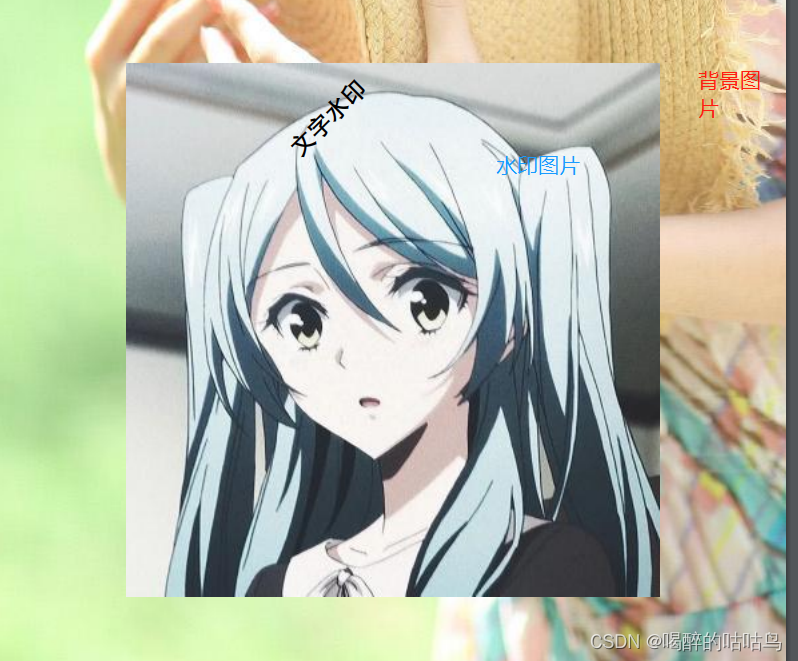
3.监听器
- /**
- * 添加水印
- * @author ShaoMin
- * @throws IOException
- *
- */
- public static void testShuiyin2() throws Exception {
- FileOutputStream out = new FileOutputStream("./doc/15.pdf");
- Document doc = new Document();
- PdfWriter writer = PdfWriter.getInstance(doc, out);
- doc.open();
- writer.setPageEvent(new PdfPageHelper());
- doc.newPage();
- doc.add(new Chunk("aaa"));
- doc.close();
- }
- class PdfPageHelper extends PdfPageEventHelper {
- @Override
- public void onOpenDocument(PdfWriter writer, Document document) {
- super.onOpenDocument(writer, document);
- writer.getDirectContent().createTemplate(30, 16);
- }
- @Override
- public void onStartPage(PdfWriter writer, Document document) {
- // 获取当前页码,以便我们可以自定义每个页面的标题。
- super.onStartPage(writer, document);
- }
- @Override
- public void onEndPage(PdfWriter writer, Document document) {
- BaseFont bf = null;
- try {
- bf = BaseFont.createFont("STSong-Light", "UniGB-UCS2-H", BaseFont.NOT_EMBEDDED);
- } catch (Exception e) {
- e.printStackTrace();
- }
- extracted(writer, document, bf);
- addWaterMark(writer, bf);
- }
- private void extracted(PdfWriter writer, Document document, BaseFont bf) {
- PdfContentByte cb = writer.getDirectContent();
- cb.saveState();
- cb.beginText();
- cb.setFontAndSize(bf, 10);
- float x = document.top(-20);
- // 左
- cb.showTextAligned(PdfContentByte.ALIGN_LEFT, "顶部-左", document.left(), x, 0);
- // 中
- cb.showTextAligned(PdfContentByte.ALIGN_CENTER, writer.getPageNumber() + " page", (document.right() + document.left()) / 2, x, 0);
- // 右
- cb.showTextAligned(PdfContentByte.ALIGN_RIGHT, "顶部-右", document.right(), x, 0);
- // Footer
- float y = document.bottom(-20);
- // 左
- cb.showTextAligned(PdfContentByte.ALIGN_LEFT, "底部-左", document.left(), y, 0);
- // 中
- cb.showTextAligned(PdfContentByte.ALIGN_CENTER, writer.getPageNumber() + " page", (document.right() + document.left()) / 2, y, 0);
- // 右
- cb.showTextAligned(PdfContentByte.ALIGN_RIGHT, "底部-右", document.right(), y, 0);
- cb.endText();
- cb.restoreState();
- }
- /**
- * 添加水印
- * @param writer
- * @param bf
- */
- private void addWaterMark(PdfWriter writer, BaseFont bf) {
- for (int i = 1; i < 7; i++) {
- for (int j = 1; j < 10; j++) {
- PdfContentByte cb = writer.getDirectContent();
- cb.saveState();
- cb.beginText();
- cb.setColorFill(BaseColor.GRAY);
- PdfGState gs = new PdfGState();
- gs.setFillOpacity(0.1f);
- cb.setGState(gs);
- cb.setFontAndSize(bf, 12);
- cb.showTextAligned(Element.ALIGN_MIDDLE, "添加水印", 75 * i, 80 * j, 30);
- cb.endText();
- cb.restoreState();
- }
- }
- }
- }

三、页眉页脚
第一种方式:现有的PDF追加页眉页码
- public static void insertHeadAndFoot2() throws Exception {
- FileOutputStream out = new FileOutputStream("./doc/17.pdf");
- Document doc = new Document(PageSize.A4);
- ByteArrayOutputStream outputStream=new ByteArrayOutputStream();
- PdfWriter.getInstance(doc, outputStream);
- doc.open();
- doc.add(new Paragraph("1 page"));
- doc.newPage();
- doc.add(new Paragraph("2 page"));
- doc.close();
- BaseFont bf = null;
- try {
- bf = BaseFont.createFont("STSong-Light", "UniGB-UCS2-H", BaseFont.NOT_EMBEDDED);
- } catch (Exception e) {
- e.printStackTrace();
- }
- //读取现存在的pdf文件 追加页码
- PdfReader reader = new PdfReader(outputStream.toByteArray());
- int numberOfPages = reader.getNumberOfPages();
- PdfStamper stamp = new PdfStamper(reader, out);
- for (int i = 1; i <= numberOfPages; i++) {
- PdfContentByte cb = stamp.getOverContent(i);// 页数
- cb.beginText();
- cb.setFontAndSize(bf, 10);
- cb.showTextAligned(PdfContentByte.ALIGN_CENTER, "- " + (i) + " -", (doc.right() + doc.left()) / 2, doc.bottom(-20), 0);
- cb.endText();
- }
- stamp.close();
- reader.close();
- }

第二种方式: 监听器 - PdfPageEvent. 如果无法确定总页数,可以该监听器重写onEndPage方法。
writer.setPageEvent() 方法要放在 document.open() 方法之前,这样才能确定总数
- public static void insertHeadAndFoot() throws Exception {
- FileOutputStream out = new FileOutputStream("./doc/16.pdf");
- Document doc = new Document();
- PdfWriter writer = PdfWriter.getInstance(doc, out);
- // 内部类,处理器
- writer.setPageEvent(new PdfPageEventHelper() {
- // 模板
- public PdfTemplate total;
- private BaseFont bf = null;
- private Font basefont = null;
- {
- try {
- bf = BaseFont.createFont("STSong-Light", "UniGB-UCS2-H", BaseFont.NOT_EMBEDDED);
- basefont = new Font(bf, 12, Font.NORMAL);
- } catch (Exception e) {
- e.printStackTrace();
- }
- }
- /**
- * 文档打开时创建模板
- */
- public void onOpenDocument(PdfWriter writer, Document document) {
- total = writer.getDirectContent().createTemplate(50, 50);// 共 页 的矩形的长宽高
- }
- @Override
- public void onEndPage(PdfWriter writer, Document document) {
- PdfContentByte cb = writer.getDirectContent();
- // 写入页眉
- ColumnText.showTextAligned(cb, Element.ALIGN_LEFT, new Phrase("页眉", basefont), document.left(), document.top() + 20, 0);
- //写入页码
- int pageS = writer.getPageNumber();
- String foot1 = "第 " + pageS + " 页 /共";
- float len = bf.getWidthPoint(foot1, 12);
- Phrase footer = new Phrase(foot1, basefont);
- ColumnText.showTextAligned(cb, Element.ALIGN_CENTER, footer,(document.rightMargin() + document.right() + document.leftMargin() - document.left() - len) / 2.0F + 20F, document.bottom() - 20, 0);
- cb.addTemplate(total, (document.rightMargin() + document.right() + document.leftMargin() - document.left()) / 2.0F + 20F, document.bottom() - 20);
- }
- /**
- * 关闭文档时,替换模板,完成整个页眉页脚组件
- */
- public void onCloseDocument(PdfWriter writer, Document document) {
- // 关闭文档的时候,将模板替换成实际的 Y 值,至此,page x of y 制作完毕,完美兼容各种文档size。
- total.beginText();
- total.setFontAndSize(bf, 12);// 生成的模版的字体、颜色
- String foot2 = " " + (writer.getPageNumber()) + " 页";
- total.showText(foot2);// 模版显示的内容
- total.endText();
- total.closePath();
- }
- });
- doc.open();
- doc.add(new Paragraph("1 page"));
- doc.newPage();
- doc.add(new Paragraph("2 page"));
- doc.close();
- }

四、合并多个PDF
1、涉及的核心类:PdfReader,PdfWriter、PdfCopy(PdfWriter的子类)
2、实现:2次循环
1)第一层循环:PDF合并的文件个数,有几个PDF需要合并。
2)第二层循环:一个PDF文件的页数,一个PDF有几页。将其存放在新的PDF上。
1)使用PdfCopy
- public static boolean mergePdfFiles(String[] files, String newfile) {
- boolean retValue = false;
- Document document = null;
- try {
- document = new Document();
- PdfCopy copy = new PdfCopy(document, new FileOutputStream(newfile));
- document.open();
- for (int i = 0; i < files.length; i++) {// 几个pdf文件循环
- PdfReader reader = new PdfReader(files[i]);
- int n = reader.getNumberOfPages();
- for (int j = 1; j <= n; j++) {// 一个文件有多少页循环
- document.newPage();
- // 从reader读取原始pdf每一页的数据追加进新的pdf中
- PdfImportedPage page = copy.getImportedPage(reader, j);
- copy.addPage(page);
- }
- }
- retValue = true;
- } catch (Exception e) {
- e.printStackTrace();
- } finally {
- document.close();
- }
- return retValue;
- }
2)使用PdfWriter实现PDF合并
- public static void mergePdf(String[] files, String savepath) throws Exception {
- Document document = new Document();
- PdfWriter writer = PdfWriter.getInstance(document, new FileOutputStream(savepath));
- document.open();
- PdfContentByte cb = writer.getDirectContent();// 得到层
- for (int i = 0; i < files.length; i++) {
- PdfReader reader = new PdfReader(files[i]);
- int n = reader.getNumberOfPages();
- for (int j = 1; j <= n; j++) {
- document.newPage();
- PdfImportedPage page = writer.getImportedPage(reader, j);
- // 使用writer需要使用pdf的层,然后后添加
- // 可以 放大 缩小
- cb.addTemplate(page, 0, 0);
- // 扩大比例
- // cb.addTemplate(page, 0.6f, 0, 0, 0.6f, 0, page.getHeight() + 10);
- // cb.addTemplate(page, 1.0f, 0, 0, 1.0f, 0, page.getHeight() + 10);
- }
- }
- document.close();
- }
五、表单PDF
- package com.lean.itextpdf;
- import java.io.FileOutputStream;
- import java.text.SimpleDateFormat;
- import java.util.Date;
- import com.itextpdf.text.*;
- import com.itextpdf.text.pdf.BaseFont;
- import com.itextpdf.text.pdf.PdfPCell;
- import com.itextpdf.text.pdf.PdfPTable;
- import com.itextpdf.text.pdf.PdfWriter;
- public class PdfExampleDemo {
- public static void main(String[] args) {
- Document document = new Document(PageSize.A4, 10, 10, 36, 36);
- try {
- PdfWriter.getInstance(document, new FileOutputStream("./doc/12.pdf"));
- document.open();
- BaseFont bfChines = BaseFont.createFont("STSongStd-Light", "UniGB-UCS2-H", BaseFont.NOT_EMBEDDED);
- Font FontChinese = new Font(bfChines, 18, Font.BOLD);
- Font FontData = new Font(bfChines, 12, Font.UNDEFINED);
- Font FontTable = new Font(bfChines, 10, Font.NORMAL);
- Font FontTableHeader = new Font(bfChines, 8, Font.BOLD);
- Paragraph titlle = new Paragraph("项目成本单", FontChinese);
- titlle.setAlignment(Element.ALIGN_CENTER);
- document.add(titlle);
- PdfPTable tableHeader = new PdfPTable(2);
- PdfPCell cell = new PdfPCell(new Paragraph("项目编号: " + "0333333333", FontData));
- cell.setBorder(Rectangle.NO_BORDER);
- tableHeader.addCell(cell);
- cell = new PdfPCell(new Paragraph("项目名称: " + "xxxxx开发项目", FontData));
- cell.setBorder(Rectangle.NO_BORDER);
- tableHeader.addCell(cell);
- cell = new PdfPCell(new Paragraph("项目例属: " + "xxxxx", FontData));
- cell.setBorder(Rectangle.NO_BORDER);
- tableHeader.addCell(cell);
- cell = new PdfPCell(new Paragraph("负责人: " + "xxxxx", FontData));
- cell.setBorder(Rectangle.NO_BORDER);
- tableHeader.addCell(cell);
- cell = new PdfPCell(new Paragraph("时间: " + new SimpleDateFormat("yyyy-MM-dd").format(new Date()), FontData));
- cell.setBorder(Rectangle.NO_BORDER);
- // 设置表上边的距离
- tableHeader.setSpacingBefore(30f);
- tableHeader.addCell(cell);
- float[] widths = {0.5f, 0.5f}; // 设置列的宽度 百分比
- tableHeader.setWidths(widths);
- tableHeader.setSpacingBefore(15f);
- document.add(tableHeader);
- PdfPTable table = new PdfPTable(7);
- cell = new PdfPCell(new Paragraph("编号", FontTableHeader));
- cell.setHorizontalAlignment(Element.ALIGN_CENTER);// 剧中显示
- table.addCell(cell);
- cell = new PdfPCell(new Paragraph("名称", FontTableHeader));
- cell.setHorizontalAlignment(Element.ALIGN_CENTER);// 剧中显示
- table.addCell(cell);
- cell = new PdfPCell(new Paragraph("数量", FontTableHeader));
- cell.setHorizontalAlignment(Element.ALIGN_CENTER);// 剧中显示
- table.addCell(cell);
- cell = new PdfPCell(new Paragraph("单位", FontTableHeader));
- cell.setHorizontalAlignment(Element.ALIGN_CENTER);// 剧中显示
- table.addCell(cell);
- cell = new PdfPCell(new Paragraph("单价(元)", FontTableHeader));
- cell.setHorizontalAlignment(Element.ALIGN_CENTER);// 剧中显示
- table.addCell(cell);
- cell = new PdfPCell(new Paragraph("折扣(%)", FontTableHeader));
- cell.setHorizontalAlignment(Element.ALIGN_CENTER);// 剧中显示
- table.addCell(cell);
- cell = new PdfPCell(new Paragraph("公式", FontTableHeader));
- cell.setHorizontalAlignment(Element.ALIGN_CENTER);// 剧中显示
- table.addCell(cell);
- // 固定高度
- cell.setFixedHeight(20f);
- for (int i = 0; i < 40; i++) {
- cell = new PdfPCell(new Paragraph((i + 1) + "", FontTable));
- cell.setHorizontalAlignment(Element.ALIGN_CENTER);// 水平居中
- cell.setVerticalAlignment(Element.ALIGN_MIDDLE); // 垂直居中
- table.addCell(cell);
- cell = new PdfPCell(new Paragraph("JAVA", FontTable));
- cell.setHorizontalAlignment(Element.ALIGN_CENTER);// 水平居中
- cell.setVerticalAlignment(Element.ALIGN_MIDDLE); // 垂直居中
- table.addCell(cell);
- cell = new PdfPCell(new Paragraph("1", FontTable));
- cell.setHorizontalAlignment(Element.ALIGN_CENTER);// 水平居中
- cell.setVerticalAlignment(Element.ALIGN_MIDDLE); // 垂直居中
- table.addCell(cell);
- cell = new PdfPCell(new Paragraph("部", FontTable));
- cell.setHorizontalAlignment(Element.ALIGN_CENTER);// 水平居中
- cell.setVerticalAlignment(Element.ALIGN_MIDDLE); // 垂直居中
- table.addCell(cell);
- cell = new PdfPCell(new Paragraph("5000", FontTable));
- cell.setHorizontalAlignment(Element.ALIGN_CENTER);// 水平居中
- cell.setVerticalAlignment(Element.ALIGN_MIDDLE); // 垂直居中
- table.addCell(cell);
- cell = new PdfPCell(new Paragraph("80%", FontTable));
- cell.setHorizontalAlignment(Element.ALIGN_CENTER);// 水平居中
- cell.setVerticalAlignment(Element.ALIGN_MIDDLE); // 垂直居中
- table.addCell(cell);
- cell = new PdfPCell(new Paragraph("xxxx", FontTable));
- cell.setHorizontalAlignment(Element.ALIGN_CENTER);// 水平居中
- cell.setVerticalAlignment(Element.ALIGN_MIDDLE); // 垂直居中
- table.addCell(cell);
- // 每页设置表头
- table.setHeaderRows(1);
- }
- float[] width = {0.2f, 0.2f, 0.1f, 0.1f, 0.1f, 0.1f, 0.2f};
- table.setWidths(width);
- table.setSpacingBefore(15f);
- document.add(table);
- PdfPTable tableBottom = new PdfPTable(2);
- cell = new PdfPCell(new Paragraph("负责人:xxxx", FontData));
- cell.setBorder(Rectangle.NO_BORDER);
- tableBottom.addCell(cell);
- cell = new PdfPCell(new Paragraph("编号:xxxx", FontData));
- cell.setBorder(Rectangle.NO_BORDER);
- tableBottom.addCell(cell);
- cell = new PdfPCell(new Paragraph("最近修改人:xxxx", FontData));
- cell.setBorder(Rectangle.NO_BORDER);
- tableBottom.addCell(cell);
- cell = new PdfPCell(new Paragraph("业务归属人:xxxx", FontData));
- cell.setBorder(Rectangle.NO_BORDER);
- cell.setColspan(2);
- tableBottom.addCell(cell);
- cell = new PdfPCell(new Paragraph("备注:开发进度", FontData));
- cell.setBorder(Rectangle.NO_BORDER);
- cell.setColspan(2);
- tableBottom.addCell(cell);
- tableBottom.setSpacingBefore(15f);
- document.add(tableBottom);
- document.close();
- } catch (Exception e) {
- e.printStackTrace();
- }
- }
- }

- package com.lean.itextpdf.example;
- import com.itextpdf.text.*;
- import com.itextpdf.text.pdf.*;
- import lombok.Builder;
- import lombok.Data;
- import java.io.FileOutputStream;
- import java.io.IOException;
- import java.util.ArrayList;
- import java.util.List;
- public class PdfTest {
- public static void main(String[] args) throws Exception {
- Document document = new Document(PageSize.A4);
- PdfWriter pdfWriter = PdfWriter.getInstance(document, new FileOutputStream("./doc/test.pdf"));
- //
- pdfWriter.setPageEvent(new MyHeaderFooterPageEventHelper("左上标题", "右上标题", "左下标题", "测试水印"));
- document.open();
- document.addAuthor("作责");
- document.addCreationDate();
- document.addTitle("标题");
- document.addKeywords("关键字");
- document.addCreator("创建人");
- // Title
- document.add(createTitle("Java PDF生成"));
- // Chapter 1
- document.add(createChapter("1. 知识准备",22));
- document.add(createChapter("1.1 什么是TEXT",18));
- document.add(createParagraph(
- "Apache iText 是一个开源 Java 库,支持 PDF 文档的开发和转换。其目前遵从AGPL开源协议,AGPL 可以说是最严格的 GPL 了,并且Itext有很多product开始收费,但所需的功能基本上开源的API都能满足。"));
- document.add(createChapter("1.2 Apache iText中基础概念",18));
- document.add(createParagraph("基本上开源的API"));
- // Chapter 2
- document.add(createChapter("2. 实现案例",22));
- document.add(createChapter("2.1 用户列表示例",18));
- document.add(createParagraph("以导出用户列表为例"));
- // 表格
- List
userList = new ArrayList<>(); - for (int i = 0; i < 5; i++) {
- userList.add(User.builder().id(Long.parseLong(i + "")).userName("姓名" + i).email("邮箱" + i).phoneNumber(123456L)
- .description("hello world" + i).build());
- }
- PdfPTable table = new PdfPTable(new float[] {20, 40, 50, 40, 40});
- table.setTotalWidth(500);
- table.setLockedWidth(true);
- table.setHorizontalAlignment(Element.ALIGN_CENTER);
- table.getDefaultCell().setBorder(1);
- for (int i = 0; i < userList.size(); i++) {
- table.addCell(createCell(userList.get(i).getId() + ""));
- table.addCell(createCell(userList.get(i).getUserName()));
- table.addCell(createCell(userList.get(i).getEmail()));
- table.addCell(createCell(userList.get(i).getPhoneNumber() + ""));
- table.addCell(createCell(userList.get(i).getDescription()));
- }
- document.add(table);
- document.add(createChapter("2.2 图片导出示例",18));
- document.add(createParagraph("以导出图片为例"));
- // 图片
- Image image = Image.getInstance("./doc/aaa.jpg");
- image.setAlignment(Element.ALIGN_CENTER);
- image.scalePercent(60); // 缩放
- document.add(image);
- // close
- document.close();
- }
- /**
- * 标题
- * @param content
- * @return
- * @throws IOException
- * @throws DocumentException
- */
- public static Paragraph createTitle(String content) throws IOException, DocumentException {
- Font font = new Font(getBaseFont(), 24, Font.BOLD);
- Paragraph paragraph = new Paragraph(content, font);
- paragraph.setAlignment(Element.ALIGN_CENTER);
- return paragraph;
- }
- /**
- * @param content
- * @return
- * @throws IOException
- * @throws DocumentException
- */
- public static Paragraph createChapter(String content,int fontSize) throws IOException, DocumentException {
- Font font = new Font(getBaseFont(), fontSize, Font.BOLD);
- Paragraph paragraph = new Paragraph(content, font);
- paragraph.setAlignment(Element.ALIGN_LEFT);
- return paragraph;
- }
- /**
- * 段落
- * @param content
- * @return
- * @throws IOException
- * @throws DocumentException
- */
- public static Paragraph createParagraph(String content) throws IOException, DocumentException {
- Font font = new Font(getBaseFont(), 12, Font.NORMAL);
- Paragraph paragraph = new Paragraph(content, font);
- paragraph.setAlignment(Element.ALIGN_LEFT);
- paragraph.setIndentationLeft(12); //设置左缩进
- paragraph.setIndentationRight(12); //设置右缩进
- paragraph.setFirstLineIndent(24); //设置首行缩进
- paragraph.setLeading(20f); //行间距
- paragraph.setSpacingBefore(5f); //设置段落上空白
- paragraph.setSpacingAfter(10f); //设置段落下空白
- return paragraph;
- }
- /**
- * 单元格
- * @param content
- * @return
- * @throws IOException
- * @throws DocumentException
- */
- public static PdfPCell createCell(String content) throws IOException, DocumentException {
- PdfPCell cell = new PdfPCell();
- cell.setVerticalAlignment(Element.ALIGN_MIDDLE);
- cell.setHorizontalAlignment(Element.ALIGN_CENTER);
- Font font = new Font(getBaseFont(), 12, Font.NORMAL);
- cell.setPhrase(new Phrase(content, font));
- return cell;
- }
- /**
- * 字体
- * @return
- * @throws IOException
- * @throws DocumentException
- */
- public static BaseFont getBaseFont() throws IOException, DocumentException {
- return BaseFont.createFont("STSong-Light", "UniGB-UCS2-H", BaseFont.NOT_EMBEDDED);
- }
- }
- @Data
- @Builder
- class User {
- private Long id;
- private String userName;
- private String email;
- private Long phoneNumber;
- private String description;
- }
- class MyHeaderFooterPageEventHelper extends PdfPageEventHelper {
- private String headLeftTitle;
- private String headRightTitle;
- private String footerLeft;
- private String waterMark;
- // 模板
- public PdfTemplate total;
- public BaseFont bf = null;
- private Font basefont = null;
- {
- try {
- bf = BaseFont.createFont("STSong-Light", "UniGB-UCS2-H", BaseFont.NOT_EMBEDDED);
- basefont = new Font(bf, 12, Font.NORMAL);
- } catch (Exception e) {
- e.printStackTrace();
- }
- }
- public MyHeaderFooterPageEventHelper(String headLeftTitle, String headRightTitle, String footerLeft, String waterMark) {
- this.headLeftTitle = headLeftTitle;
- this.headRightTitle = headRightTitle;
- this.footerLeft = footerLeft;
- this.waterMark = waterMark;
- }
- /**
- * 文档打开时创建模板
- */
- public void onOpenDocument(PdfWriter writer, Document document) {
- total = writer.getDirectContent().createTemplate(50, 50);// 共 页 的矩形的长宽高
- }
- // 一页加载完成触发,写入页眉和页脚
- @Override
- public void onEndPage(PdfWriter writer, Document document) {
- // page header and footer
- addPageHeaderAndFooter(writer, document, bf);
- // watermark
- if (waterMark != null) {
- addWaterMark(writer, document, bf);
- }
- }
- private void addPageHeaderAndFooter(PdfWriter writer, Document document, BaseFont bf) {
- PdfContentByte cb = writer.getDirectContent();
- cb.saveState();
- cb.beginText();
- cb.setColorFill(BaseColor.GRAY);
- cb.setFontAndSize(bf, 10);
- // header
- float x = document.top(-10);
- cb.showTextAligned(PdfContentByte.ALIGN_LEFT, headLeftTitle, document.left(), x, 0);
- cb.showTextAligned(PdfContentByte.ALIGN_RIGHT, headRightTitle, document.right(), x, 0);
- // footer
- float y = document.bottom(-10);
- cb.showTextAligned(PdfContentByte.ALIGN_LEFT, footerLeft, document.left(), y, 0);
- cb.showTextAligned(PdfContentByte.ALIGN_CENTER, String.format("- %d /", writer.getPageNumber()), (document.right() + document.left()) / 2, y, 0);
- cb.endText();
- cb.restoreState();
- cb.addTemplate(total, (document.rightMargin() + document.right() + document.leftMargin() - document.left()) / 2.0F + 10F, document.bottom() - 10);
- }
- private void addWaterMark(PdfWriter writer, Document document, BaseFont bf) {
- for (int i = 1; i < 7; i++) {
- for (int j = 1; j < 10; j++) {
- PdfContentByte cb = writer.getDirectContent();
- cb.saveState();
- cb.beginText();
- cb.setColorFill(BaseColor.GRAY);
- PdfGState gs = new PdfGState();
- gs.setFillOpacity(0.1f);
- cb.setGState(gs);
- cb.setFontAndSize(bf, 12);
- cb.showTextAligned(Element.ALIGN_MIDDLE, waterMark, 75 * i, 80 * j, 30);
- cb.endText();
- cb.restoreState();
- }
- }
- }
- // 全部完成后,将总页数的pdf模版写到指定位置
- @Override
- public void onCloseDocument(PdfWriter writer, Document document) {
- basefont.setColor(BaseColor.GRAY);
- basefont.setSize(10);
- Paragraph paragraph = new Paragraph((writer.getPageNumber()) + " -", basefont);
- ColumnText.showTextAligned(total, Element.ALIGN_LEFT, paragraph, 0, 0, 0);
- }
- }
六、模板PDF
一、html模板
com.itextpdf.tool xmlworker 5.5.11 org.freemarker freemarker 2.3.31 org.xhtmlrenderer flying-saucer-pdf 9.1.6
模板:freemarker.html
- "en">
- "UTF-8"/>
Title - "color pos">"color: #4787ed">你好,${name}
"${imgUrl}" width="600px"/>
"div-head">"font-size: 24px;">HTML模板生成PDF文件111"margin-bottom: 18px">"margin: 0;padding: 0;display: inherit;float: left">"font-size: 15px" >级别:123456"margin: 0;padding: 0;display: inherit;float: right;">"font-size: 15px" >编号:123456"margin-top: 12px">
"9">2013年度图书销售统计 "2">图书分类 "2">一季度 "2">二季度 "2">三季度 "2">四季度 销售量 销售额 销售量 销售额 销售量 销售额 销售量 销售额 小说 23521 ?599,940.00 18423 ?44,841.00 32125 ?829,870.00 25100 ?586,564.00 文艺 7643 ?180,423.00 8010 ?192,420.00 10289 ?321,717.00 9012 ?266,134.00 励志/成功 13328 ?428,371.00 15021 ?592,987.00 13496 ?471,620.00 10130 ?386,845.00 童书 20328 ?358,891.00 24030 ?392,713.00 27444 ?461,770.00 18027 ?328,451.00 小说 23521 ?599,940.00 18423 ?44,841.00 32125 ?829,870.00 25100 ?586,564.00 文艺 7643 ?180,423.00 8010 ?192,420.00 10289 ?321,717.00 9012 ?266,134.00 励志/成功 13328 ?428,371.00 15021 ?592,987.00 13496 ?471,620.00 10130 ?386,845.00 童书 20328 ?358,891.00 24030 ?392,713.00 27444 ?461,770.00 18027 ?328,451.00 小说 23521 ?599,940.00 18423 ?44,841.00 32125 ?829,870.00 25100 ?586,564.00 文艺 7643 ?180,423.00 8010 ?192,420.00 10289 ?321,717.00 9012 ?266,134.00 励志/成功 13328 ?428,371.00 15021 ?592,987.00 13496 ?471,620.00 10130 ?386,845.00 童书 20328 ?358,891.00 24030 ?392,713.00 27444 ?461,770.00 18027 ?328,451.00 小说 23521 ?599,940.00 18423 ?44,841.00 32125 ?829,870.00 25100 ?586,564.00 文艺 7643 ?180,423.00 8010 ?192,420.00 10289 ?321,717.00 9012 ?266,134.00 励志/成功 13328 ?428,371.00 15021 ?592,987.00 13496 ?471,620.00 10130 ?386,845.00 童书 20328 ?358,891.00 24030 ?392,713.00 27444 ?461,770.00 18027 ?328,451.00 小说 23521 ?599,940.00 18423 ?44,841.00 32125 ?829,870.00 25100 ?586,564.00 文艺 7643 ?180,423.00 8010 ?192,420.00 10289 ?321,717.00 9012 ?266,134.00 励志/成功 13328 ?428,371.00 15021 ?592,987.00 13496 ?471,620.00 10130 ?386,845.00 童书 20328 ?358,891.00 24030 ?392,713.00 27444 ?461,770.00 18027 ?328,451.00 小说 23521 ?599,940.00 18423 ?44,841.00 32125 ?829,870.00 25100 ?586,564.00 文艺 7643 ?180,423.00 8010 ?192,420.00 10289 ?321,717.00 9012 ?266,134.00 励志/成功 13328 ?428,371.00 15021 ?592,987.00 13496 ?471,620.00 10130 ?386,845.00 童书 20328 ?358,891.00 24030 ?392,713.00 27444 ?461,770.00 18027 ?328,451.00
- package com.lean.itextpdf.html;
- import com.itextpdf.text.*;
- import com.itextpdf.text.pdf.*;
- import com.itextpdf.tool.xml.XMLWorkerFontProvider;
- import com.itextpdf.tool.xml.XMLWorkerHelper;
- import freemarker.template.Configuration;
- import freemarker.template.Template;
- import org.apache.commons.codec.binary.Base64;
- import sun.misc.BASE64Encoder;
- import java.io.*;
- import java.nio.charset.Charset;
- import java.util.HashMap;
- import java.util.Map;
- /**
- * html 模板 生成pdf
- */
- public class HtmlToPdfTest {
- /**
- * html渲染为pdf
- *
- * @param data 变量
- * @param htmlTmp 模板文件名
- * @param pdftemp pdf导出路径
- * @return
- */
- public static void freeMarkerRender(Map
- // 获取模板,并设置编码方式
- Configuration freemarkerCfg = new Configuration(Configuration.DEFAULT_INCOMPATIBLE_IMPROVEMENTS);
- //文件夹目录位置
- freemarkerCfg.setDirectoryForTemplateLoading(new File("./doc"));
- Template template = freemarkerCfg.getTemplate(htmlTmp,"UTF-8");
- StringWriter out = new StringWriter();
- // 合并模板跟数据
- template.process(data, out);
- // htmlData 模板字符流
- String htmlData = out.toString();
- // 设置文档格式,数字边距
- Document document = new Document(PageSize.A4);
- PdfWriter writer = PdfWriter.getInstance(document, new FileOutputStream(pdftemp));
- // 添加页码
- writer.setPageEvent(new PdfReportM1HeaderFooter());
- // 打开文档
- document.open();
- // HTML 转成pdf
- XMLWorkerHelper.getInstance().parseXHtml(writer, document, new ByteArrayInputStream(htmlData.getBytes()), Charset.forName("UTF-8"),
- new MyFontsProvider(12));
- // 关闭文档
- document.close();
- }
- /**
- * @param file
- * @return
- */
- public static String fileToBase64Str(File file) {
- byte[] data = null;
- InputStream inputStream = null;
- if (file != null) {
- try {
- inputStream = new FileInputStream(file);
- data = new byte[inputStream.available()];
- inputStream.read(data);
- } catch (Exception e) {
- e.printStackTrace();
- } finally {
- try {
- inputStream.close();
- } catch (IOException e) {
- e.printStackTrace();
- }
- }
- BASE64Encoder encoder = new BASE64Encoder();
- return Base64.encodeBase64String(data);
- }
- return null;
- }
- public static void main(String[] args) throws Exception {
- Map
- data.put("name",123);
- data.put("imgUrl","https://ccdn.goodq.top/caches/4a7b7daf436f3e5cb2e29433375ccd5d/aHR0cHM6Ly81NTlhNDQ3YzczMmVlLnQ3My5xaWZlaXllLmNvbS9xZnktY29udGVudC91cGxvYWRzLzIwMTQvMDYvYjU5YzY3YmYxOTZhNDc1ODE5MWU0MmY3NjY3MGNlYmEuanBn.jpg");
- freeMarkerRender(data, "freemarker.html", "./doc/ad.pdf");
- }
- }
- class MyFontsProvider extends XMLWorkerFontProvider {
- private int fontSize;
- public MyFontsProvider() {
- this.fontSize = 0;
- }
- public MyFontsProvider(int fontSize) {
- this.fontSize = fontSize;
- }
- @Override
- public Font getFont(final String fontname, final String encoding, final boolean embedded, final float size, final int style, final BaseColor color) {
- BaseFont bf = null;
- try {
- bf = BaseFont.createFont("STSong-Light", "UniGB-UCS2-H", BaseFont.NOT_EMBEDDED);
- } catch (DocumentException e) {
- e.printStackTrace();
- } catch (IOException e) {
- e.printStackTrace();
- }
- Font font = null;
- if (fontSize != 0) {
- font = new Font(bf, fontSize, style, color);
- } else {
- font = new Font(bf, size, style, color);
- }
- font.setColor(color);
- return font;
- }
- public int getFontSize() {
- return fontSize;
- }
- public void setFontSize(int fontSize) {
- this.fontSize = fontSize;
- }
- }
- class PdfReportM1HeaderFooter extends PdfPageEventHelper {
- /**
- * 页眉
- */
- public String header = "页眉";
- /**
- * 文档字体大小,页脚页眉最好和文本大小一致
- */
- public int presentFontSize = 12;
- // 模板
- public PdfTemplate total;
- private BaseFont bf = null;
- public PdfReportM1HeaderFooter() {
- }
- /**
- * 文档打开时创建模板
- */
- public void onOpenDocument(PdfWriter writer, Document document) {
- total = writer.getDirectContent().createTemplate(50, 50);// 共 页 的矩形的长宽高
- }
- /**
- * 关闭每页的时候,写入页眉,写入'第几页共'这几个字。
- *
- * @see com.itextpdf.text.pdf.PdfPageEventHelper#onEndPage(com.itextpdf.text.pdf.PdfWriter, com.itextpdf.text.Document)
- */
- public void onEndPage(PdfWriter writer, Document document) {
- Font fontDetail = null;
- try {
- bf = BaseFont.createFont("STSong-Light", "UniGB-UCS2-H", false);
- fontDetail = new Font(bf, presentFontSize, Font.NORMAL);
- } catch (DocumentException e) {
- e.printStackTrace();
- } catch (IOException e) {
- e.printStackTrace();
- }
- // 1.写入页眉
- ColumnText.showTextAligned(writer.getDirectContent(), Element.ALIGN_LEFT, new Phrase(header, fontDetail), document.left(), document.top() + 20, 0);
- // 2.写入前半部分的 第 X页/共
- int pageS = writer.getPageNumber();
- String foot1 = "第 " + pageS + " 页 /共";
- Phrase footer = new Phrase(foot1, fontDetail);
- // 3.计算前半部分的foot1的长度,后面好定位最后一部分的'Y页'这俩字的x轴坐标,字体长度也要计算进去 = len
- float len = bf.getWidthPoint(foot1, presentFontSize);
- // 4.拿到当前的PdfContentByte
- PdfContentByte cb = writer.getDirectContent();
- // 5.写入页脚
- ColumnText.showTextAligned(cb, Element.ALIGN_CENTER, footer,(document.rightMargin() + document.right() + document.leftMargin() - document.left() - len) / 2.0F + 20F, document.bottom() - 20, 0);
- cb.addTemplate(total, (document.rightMargin() + document.right() + document.leftMargin() - document.left()) / 2.0F + 20F, document.bottom() - 20);
- }
- /**
- * 关闭文档时,替换模板,完成整个页眉页脚组件
- */
- public void onCloseDocument(PdfWriter writer, Document document) {
- // 关闭文档的时候,将模板替换成实际的 Y 值,至此,page x of y 制作完毕,完美兼容各种文档size。
- total.beginText();
- total.setFontAndSize(bf, presentFontSize);// 生成的模版的字体、颜色
- String foot2 = " " + (writer.getPageNumber()) + " 页";
- total.showText(foot2);// 模版显示的内容
- total.endText();
- total.closePath();
- }
- }

二、使用工具构建PDF模板
工具:
Adobe Acrobat DC 工具 - 免费
链接: https://pan.baidu.com/s/1c7C2ZLmDXfAWWmpoPevD1w?pwd=ivn8 提取码: ivn8
迅捷PDF编辑器 - 收费
如下是迅捷PDF编辑:

- package com.lean.itextpdf.fremarker;
- import java.io.BufferedOutputStream;
- import java.io.ByteArrayOutputStream;
- import java.io.FileOutputStream;
- import java.io.IOException;
- import java.lang.reflect.Field;
- import java.util.*;
- import java.util.List;
- import java.util.stream.Collectors;
- import java.util.stream.Stream;
- import lombok.Data;
- import org.springframework.util.CollectionUtils;
- import com.itextpdf.text.*;
- import com.itextpdf.text.pdf.*;
- import org.springframework.util.StringUtils;
- /**
- * @ClassName: PdfUtils
- * @Description:
- * @Author: zhanghongwei
- * @Date: 2022/5/17 14:11
- */
- public class PdfUtils {
- public static void main(String[] args) {
- try {
- PdfDataModel pdfDataModel = new PdfDataModel();
- pdfDataModel.setText1("511300T15163");//条形码
- pdfDataModel.setText2("xxxxx业务员自费账户");//送检单位
- pdfDataModel.setText3("xxxx");//姓名
- pdfDataModel.setText4("男");//性别
- pdfDataModel.setText14("27");//年龄
- pdfDataModel.setText5("xxxxxxxxxxxxxxxxxxxx");//身份证号
- pdfDataModel.setText6("送检医师");//送检医师
- pdfDataModel.setText7("病 员 号");//病 员 号
- pdfDataModel.setText8("科 别");//科 别
- pdfDataModel.setText9("xxxxxxxxx");//病人电话
- pdfDataModel.setText10("咽拭子");//标本类型
- pdfDataModel.setText11("肉眼未见异常");//标本性状
- pdfDataModel.setText12("2022-04-27 17:35 ");//采样时间
- pdfDataModel.setText13("2022-04-27 17:35 ");
- pdfDataModel.setText15("xxx xxx Ao xxx Laboratory Results Report");//英文主题
- pdfDataModel.setText22("xxxxxxxxxx检验实验室检验报告单");//汉语主题
- pdfDataModel.setText23("此结果仅为2019-nCoV新型冠状病毒核酸定性筛查; \n" +
- "本检测结果所使用的检测方法为实时荧光RT-PCR技术,最低检测限: 500 拷贝/mL\n" +
- ",检测新型冠状病毒(2019-nCoV)的ORF1ab和编码核衣壳蛋白基因N。");//建议与解释:
- pdfDataModel.setText16("xxxxx");//备 注
- pdfDataModel.setText17("LABxxxxxxxx");//院方条形码
- pdfDataModel.setText18("www.xxxxx.com");//网站地址:
- pdfDataModel.setText19("xxxxxxxxxxxxxxxxxxxxxxxxxx");//地址:
- pdfDataModel.setText20("xxxxxxxxxx/xxxxxxxxx(转602)");//客服电话:
- pdfDataModel.setText21(" 2022-11-2301:58");//报告日期
- //图片
- PdfDataImgaModel pdfDataImgaModel = new PdfDataImgaModel();
- pdfDataImgaModel.setImage1("doc/1.png");//左上角图片
- pdfDataImgaModel.setImage2("doc/2.jpeg");//专用章图片
- pdfDataImgaModel.setImage3("doc/3.png");//右下角图片
- pdfDataImgaModel.setImage5("doc/4.png");//检验者
- pdfDataImgaModel.setImage6("doc/5.png");//审核者
- pdfDataImgaModel.setImage7("doc/6.png");//批准人
- pdfDataImgaModel.setImage4("doc/7.png");//条形码图片
- List
testItemsModels = new ArrayList<>(); - for (int i = 0; i < 10; i++) {
- TestItemsModel testItemsModel = new TestItemsModel();
- testItemsModel.setTitle("新型冠状病毒核酸检测(10合1)(2019-nCoV)" + i);
- testItemsModel.setResult("阴性");
- testItemsModel.setTag("阴性");
- testItemsModel.setUnit("单位");
- testItemsModels.add(testItemsModel);
- }
- ByteArrayOutputStream outputStream = getPdfUrl(testItemsModels, pdfDataModel, pdfDataImgaModel);
- FileOutputStream fos = new FileOutputStream("./doc/re.pdf");
- BufferedOutputStream bos = new BufferedOutputStream(fos);
- bos.write(outputStream.toByteArray());
- } catch (Exception e) {
- e.printStackTrace();
- }
- }
- /**
- * 检测报告
- * @param testItemsModels
- * @param pdfDataModel
- * @param pdfDataImgaModel
- * @return
- */
- public static ByteArrayOutputStream getPdfUrl(List
testItemsModels, PdfDataModel pdfDataModel, PdfDataImgaModel pdfDataImgaModel) { - ByteArrayOutputStream byteArrayOutputStream = new ByteArrayOutputStream();
- try {
- BaseFont chinese = BaseFont.createFont("STSongStd-Light", "UniGB-UCS2-H", BaseFont.NOT_EMBEDDED);
- ByteArrayOutputStream outputStream = generateTempPDF("./doc/pdf_template.pdf", chinese, pdfDataModel, pdfDataImgaModel);
- List
pdfReaderList = new ArrayList<>(); - if (!CollectionUtils.isEmpty(testItemsModels)) {
- byte[] bytes = outputStream.toByteArray();
- List
- for (List
itemsModels : splitList) { - //填充数据
- PdfReader pdfReader = new PdfReader(filleTestItemsData(chinese, itemsModels, bytes).toByteArray());
- pdfReaderList.add(pdfReader);
- }
- } else {
- PdfReader pdfReader = new PdfReader(outputStream.toByteArray());
- pdfReaderList.add(pdfReader);
- }
- mergePdfFiles(pdfReaderList, byteArrayOutputStream);
- } catch (Exception e) {
- e.printStackTrace();
- }
- return byteArrayOutputStream;
- }
- /**
- * 填充检测数据
- *
- * @param chinese
- * @param testItemsModels
- * @param bytes
- * @throws IOException
- * @throws DocumentException
- */
- private static ByteArrayOutputStream filleTestItemsData(BaseFont chinese, List
testItemsModels, byte[] bytes) throws IOException, DocumentException { - ByteArrayOutputStream byteArrayOutputStream = new ByteArrayOutputStream();
- PdfReader reader = new PdfReader(bytes);
- Rectangle rectangle = reader.getPageSize(1);
- Document doc = new Document(rectangle, 50, 50, 50, 50);
- PdfWriter writer = PdfWriter.getInstance(doc, byteArrayOutputStream);
- doc.open();
- doc.newPage();
- PdfContentByte cb = writer.getDirectContent();
- PdfImportedPage page = writer.getImportedPage(reader, 1);
- cb.addTemplate(page, 0, 0);
- //首页追加信息
- PdfContentByte directContent = writer.getDirectContent();
- directContent.beginText();
- directContent.setFontAndSize(chinese, 10);
- directContent.setColorFill(BaseColor.BLACK);
- for (int i = 1; i <= testItemsModels.size() - 1; i++) {
- TestItemsModel testItemsModel = testItemsModels.get(i - 1);
- directContent.showTextAligned(Element.ALIGN_LEFT, testItemsModel.getTitle(), 20, 630 - (i * 20), 0);
- directContent.showTextAligned(Element.ALIGN_LEFT, testItemsModel.getResult(), 280, 630 - (i * 20), 0);
- directContent.showTextAligned(Element.ALIGN_LEFT, testItemsModel.getTag(), 380, 630 - (i * 20), 0);
- directContent.showTextAligned(Element.ALIGN_LEFT, testItemsModel.getUnit(), 520, 630 - (i * 20), 0);
- }
- directContent.endText();
- doc.close();
- return byteArrayOutputStream;
- }
- public static ByteArrayOutputStream generateTempPDF(String fileName, BaseFont chinese, PdfDataModel pdfDataModel, PdfDataImgaModel pdfDataImgaModel) {
- PdfReader reader = null;
- PdfStamper ps = null;
- ByteArrayOutputStream bos = null;
- try {
- reader = new PdfReader(fileName);
- bos = new ByteArrayOutputStream();
- ps = new PdfStamper(reader, bos);
- //填充文字
- AcroFields fields = ps.getAcroFields();
- fillData(fields, beanToMap(pdfDataModel), chinese);//渲染
- //填充图片
- Map
- // 处理图片
- for (String key : imageMap.keySet()) {
- String value = imageMap.get(key);
- String imgpath = value;
- if (!org.springframework.util.StringUtils.isEmpty(imgpath)) {
- int pageNo = fields.getFieldPositions(key).get(0).page;
- Rectangle signRect = fields.getFieldPositions(key).get(0).position;
- float x = signRect.getLeft();
- float y = signRect.getBottom();
- // 根据路径读取图片
- Image image = Image.getInstance(imgpath);
- // 获取图片页面
- PdfContentByte under = ps.getOverContent(pageNo);
- // 图片大小自适应
- image.scaleToFit(signRect.getWidth(), signRect.getHeight());
- // 设置图片位置,以为我们以左下角为起始点,所以这里x、y加上偏移量,偏移量为计算的居中量
- image.setAbsolutePosition(x + (signRect.getWidth() - image.getScaledWidth()) / 2, y + (signRect.getHeight() - image.getScaledHeight()) / 2);
- // 添加图片
- under.addImage(image);
- }
- }
- //必须要调用这个,否则文档不会生成的
- ps.setFormFlattening(true);
- if (ps != null) {
- ps.close();
- }
- } catch (Exception e) {
- e.printStackTrace();
- } finally {
- try {
- if (bos != null) {
- bos.close();
- }
- if (reader != null) {
- reader.close();
- }
- } catch (IOException e) {
- e.printStackTrace();
- }
- }
- return bos;
- }
- /**
- * PDF文件合并
- *
- * @param pdfReaderList
- * @author
- */
- public static boolean mergePdfFiles(List
pdfReaderList, ByteArrayOutputStream outputStream) { - boolean retValue = false;
- Document document = null;
- try {
- document = new Document();
- PdfCopy copy = new PdfCopy(document, outputStream);
- document.open();
- for (PdfReader reader : pdfReaderList) {
- int n = reader.getNumberOfPages();
- for (int j = 1; j <= n; j++) {// 一个文件有多少页循环
- document.newPage();
- PdfImportedPage page = copy.getImportedPage(reader, j);
- copy.addPage(page);
- }
- }
- retValue = true;
- } catch (Exception e) {
- e.printStackTrace();
- } finally {
- document.close();
- }
- return retValue;
- }
- /**
- * 填充模板中的数据
- */
- public static void fillData(AcroFields fields, Map
- try {
- // 默认字体
- float fontSize = 10.0f;
- for (String key : data.keySet()) {
- String value = data.get(key);
- if (!StringUtils.isEmpty(value)) {
- // 文本框宽度
- Rectangle position = fields.getFieldPositions(key).get(0).position;
- float textBoxWidth = position.getWidth();
- // 文本框高度
- float textBoxHeight = position.getHeight();
- float ascent = chinese.getFontDescriptor(chinese.ASCENT, fontSize);
- // baseFont渲染后的文字宽度
- float textWidth = chinese.getWidthPoint(value, fontSize);
- // 文本框高度只够写一行,并且文字宽度大于文本框宽度,则缩小字体
- if (textBoxHeight < ascent * 1.6) {
- while (textWidth > textBoxWidth) {
- fontSize--;
- textWidth = chinese.getWidthPoint(value, fontSize);
- }
- }
- fields.setFieldProperty(key, "textsize", 10.0f, null);
- if (key.equalsIgnoreCase("Text15")) {
- fields.setFieldProperty(key, "textsize", 13.0f, null);
- }
- if(!key.equalsIgnoreCase("Text15")
- || !key.equalsIgnoreCase("Text22")
- || !key.equalsIgnoreCase("Text18")
- || !key.equalsIgnoreCase("Text19")
- || !key.equalsIgnoreCase("Text20") ){
- fields.setFieldProperty(key, "textfont", chinese, null);
- }
- // 为字段赋值,注意字段名称是区分大小写的
- fields.setField(key, value);
- }
- }
- } catch (Exception e) {
- e.printStackTrace();
- }
- }
- public static
List list, int splitSize) { - //判断集合是否为空
- if (CollectionUtils.isEmpty(list)) {
- return Collections.emptyList();
- }
- //计算分割后的大小
- int maxSize = (list.size() + splitSize - 1) / splitSize;
- //开始分割
- return Stream.iterate(0, n -> n + 1)
- .limit(maxSize)
- .parallel()
- .map(a -> list.parallelStream().skip(a * splitSize).limit(splitSize).collect(Collectors.toList()))
- .filter(b -> !b.isEmpty())
- .collect(Collectors.toList());
- }
- /**
- * 对象转Map
- *
- * @param object
- * @return
- * @throws IllegalAccessException
- */
- public static Map beanToMap(Object object) {
- Map
- try {
- Field[] fields = object.getClass().getDeclaredFields();
- for (Field field : fields) {
- field.setAccessible(true);
- map.put(field.getName(), field.get(object));
- }
- } catch (IllegalAccessException e) {
- e.printStackTrace();
- }
- return map;
- }
- }
- @Data
- class PdfDataImgaModel {
- private String Image1 = null;//左上角图片
- private String Image2 = null; //专用章图片
- private String Image3 = null; //右下角图片
- private String Image5 = null; //检验者
- private String Image6 = null; //审核者
- private String Image7 = null;//批准人
- private String Image4 = null; //条形码图片
- }
- @Data
- class PdfDataModel {
- private String Text1 = null; //条形码
- private String Text2 = null; //送检单位
- private String Text3 = null; //姓名
- private String Text4 = null; //性别
- private String Text14 = null;//年龄
- private String Text5 = null; //身份证号
- private String Text6 = null; //送检医师
- private String Text7 = null; //病 员 号
- private String Text8 = null; //科 别
- private String Text9 = null; //病人电话
- private String Text10 = null; //标本类型
- private String Text11 = null;//标本性状
- private String Text12 = null; //采样时间
- private String Text13 = null; //接收时间
- private String Text15 = null; //英文主题
- private String Text22 = null; //汉语主题
- private String Text23 = null; //建议与解释:
- private String Text16 = null; //备 注
- private String Text17 = null; //院方条形码
- private String Text18 = null; //网站地址:
- private String Text19 = null;//地址:
- private String Text20 = null; //客服电话
- private String Text21 = null; //报告日期
- }
- @Data
- class TestItemsModel {
- //检测项目
- private String title;
- //结果
- private String result;
- //提示参考范围
- private String tag;
- //单位
- private String unit;
- }
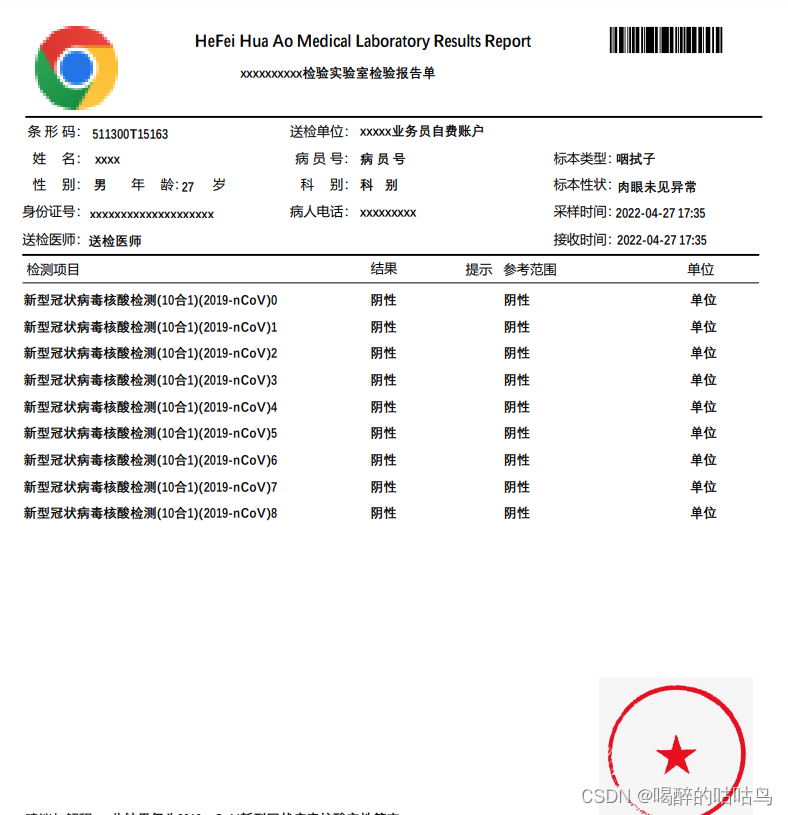
7、HTML转PDF
com.itextpdf.tool xmlworker 5.5.11
- /**
- * html 转成pdf
- * @param src
- * @param target
- * @throws IOException
- * @throws DocumentException
- */
- public static void htmlToPdf(String src, String target) throws IOException, DocumentException {
- Document document = new Document(PageSize.B5, 20, 20, 30, 20);
- PdfWriter writer = PdfWriter.getInstance(document, new FileOutputStream(target));
- document.open();
- XMLWorkerHelper.getInstance().parseXHtml(writer, document, new FileInputStream(src), null, Charset.forName("UTF-8"), new XMLWorkerFontProvider() {
- @Override
- public Font getFont(final String fontname, final String encoding, final boolean embedded, final float size, final int style,
- final BaseColor color) {
- BaseFont bf = null;
- try {
- bf = BaseFont.createFont("STSong-Light", "UniGB-UCS2-H", BaseFont.NOT_EMBEDDED);
- } catch (DocumentException e) {
- e.printStackTrace();
- } catch (IOException e) {
- e.printStackTrace();
- }
- Font font = new Font(bf, 6, style, color);
- font.setColor(color);
- return font;
- }
- });
- document.close();
- }
8、删除页码
思路:读取pdf文档,然后页码,然后输出到新的PDF
- public static void deletePage() throws Exception {
- FileOutputStream out = new FileOutputStream("./doc/a2.pdf");
- // 删除的方法在于读取,然后选择页数,然后在输出到另一个pdf
- PdfReader reader = new PdfReader("./doc/a1.pdf");// 读取pdf
- reader.selectPages("1,3");// 选择页数
- PdfStamper stamp = new PdfStamper(reader, out);// 输出
- stamp.close();
- reader.close();
- }
九、读取PDF内容
org.apache.pdfbox pdfbox 2.0.25
- /**
- * 读取PDF 内容
- * @return
- * @throws Exception
- */
- public static String testPdfContent() throws Exception{
- PDDocument document = PDDocument.load(new FileInputStream("doc/99.pdf"));
- document.getClass();
- //使用PDFTextStripper 工具
- PDFTextStripper tStripper = new PDFTextStripper();
- //设置文本排序,有规则输出
- tStripper.setSortByPosition(true);
- //获取所有文字信息
- String info = tStripper.getText(document);
- return info;
- }
十、删除pdf内容
- public static void deletePdfContent(String srcUrl, String outputPdfFile) throws Exception {
- PdfReader reader = new PdfReader(srcUrl);
- Document doc = new Document(reader.getPageSize(1));
- PdfWriter writer = PdfWriter.getInstance(doc, new FileOutputStream(outputPdfFile));
- doc.open();
- doc.newPage();
- PdfContentByte cb = writer.getDirectContent();
- PdfImportedPage page = writer.getImportedPage(reader, 1);
- cb.addTemplate(page, 0, 0);
- //??底的覆盖层
- cb.saveState();
- cb.setColorFill(BaseColor.WHITE);
- cb.rectangle(0f, 0f, doc.getPageSize().getWidth(), doc.bottom(85));
- cb.fill();
- cb.restoreState();
- doc.close();
- }


十一、一张A4打印多个面单
- public static void mergePdf(java.util.List
orginPdfList, String outputPdfFile) throws Exception { - Document doc = new Document(PageSize.A4);
- PdfWriter writer = PdfWriter.getInstance(doc, new FileOutputStream(outputPdfFile));
- writer.setPageEvent(new PdfPageEventHelper(){
- @Override
- public void onStartPage(PdfWriter writer, Document document) {
- PdfContentByte cb = writer.getDirectContent();
- cb.saveState();
- cb.beginText();
- BaseFont bf = null;
- try {
- bf = BaseFont.createFont("STSong-Light", "UniGB-UCS2-H", BaseFont.NOT_EMBEDDED);
- } catch (Exception e) {
- e.printStackTrace();
- }
- cb.setFontAndSize(bf, 10);
- float y = document.bottom(-20);
- cb.showTextAligned(PdfContentByte.ALIGN_CENTER, "-"+writer.getPageNumber()+"-", (document.right() + document.left()) / 2, y, 0);
- cb.endText();
- cb.restoreState();
- }
- });
- doc.open();
- float height = 0f;
- for (int i = 0; i < orginPdfList.size(); i++) {
- PdfReader reader = new PdfReader(orginPdfList.get(i));
- PdfContentByte cb = writer.getDirectContent();
- PdfImportedPage page = writer.getImportedPage(reader, 1);
- height = page.getHeight();
- if (i == 0) {
- //设置 比例 放大或者缩小 以及防止位置
- cb.addTemplate(page, 0.95, 0, 0, 0.95, 0, height);
- }
- if (i == 1) {
- cb.addTemplate(page, 0.95, 0, 0, 0.95, 300, height);
- }
- if (i == 2) {
- cb.addTemplate(page, 0.95, 0, 0, 0.95, 0, height - 410);
- }
- if (i == 3) {
- cb.addTemplate(page, 0.95, 0, 0, 0.95, 300, height - 410);
- }
- }
- doc.close();
- }

-
相关阅读:
APP自动化测试-8.移动端混合应用自动化测试
前端项目-尚品会-来自b站尚硅谷视频
ImmunoChemistry艾美捷自噬试验,红色解决方案
智能电网中需求响应研究(Matlab代码实现)
用无感知的方式为你的数据加上一层缓存
淘宝/天猫按图搜索淘宝商品(拍立淘) API 返回值说明
线性代数学习笔记6-4:行列式的应用(用伴随矩阵求逆矩阵、克莱姆法则解方程、行列式求面积/体积)
基于 Python 的简单域名反查 IP 脚本
杨辉三角形的代码
92 [递归实现指数型枚举](https://www.acwing.com/problem/content/94/)
- 原文地址:https://blog.csdn.net/weixin_43549578/article/details/124093460
 https://www.cnblogs.com/LifelongLearning/archive/2011/03/30/2000072.html
- 最新文章
-
沪漂五周年了:我越来越迷茫了
Agentic Skill Routing 实战:别再把所有 Skill 塞进 AI Agent 上下文
MySQL-Seconds_behind_master的精度误差
[MAF预定义ChatClient中间件-03]CachingChatClient——利用缓存省钱省时间
AI的至暗历史:从万众期待到被政府撤资,AI的两次死亡徘徊
Agent OS :五种驯服不确定性的范式
PortSwigger SQL注入LAB11
数据库即时编译JIT
[Begin]AI Learn Data Day 0
深度学习进阶(二十七)现代 LLM 的核心架构设计其二:SwiGLU