-
Qt-FFmpeg开发-视频播放(3)
Qt-FFmpeg开发-视频播放【软解码 + OpenGL显示RGB图像】
1、概述
- 最近研究了一下FFmpeg开发,功能实在是太强大了,网上ffmpeg3、4的文章还是很多的,但是学习嘛,最新的还是不能放过,就选了一个最新的ffmpeg n5.1.2版本,和3、4版本api变化还是挺大的;
- 在这个Demo里主要使用Qt + FFmpeg开发一个简单的视频播放器,这里使用的是软解码;
- 同时为了尽可能的简单,这里没有进行音频解码和播放,只是单独的进行视频解码播放;
- 在之前的文章中使用了QPainter进行绘制显示,这里为了降低CPU占用率,改为使用了OpenGL进行显示,但是这里是将FFmpeg解码后的YUV420P图像转换位RGB图像后再使用OpenGL显示,只修改了显示部分代码,解码部分和之前一样。
开发环境说明
-
系统:Windows10、Ubuntu20.04
-
Qt版本:V5.12.5
-
编译器:MSVC2017-64、GCC/G++64
-
FFmpeg版本:n5.1.2 (注意:如果版本不对可能程序无法运行)
2、实现效果
- 使用ffmpeg音视频库【软解码】实现的视频播放器;
- 支持打开本地视频文件(如mp4、mov、avi等)、网络视频流(rtsp、rtmp、http等);
- 支持视频匀速播放;
- 采用【OpenGL显示RGB】图像,支持自适应窗口缩放,支持使用QOpenGLWidget、QOpenGLWindow显示;
- 视频播放支持实时开始/关闭、暂停/继续播放;
- 视频解码、线程控制、显示各部分功能分离,低耦合度。
- 采用最新的5.1.2版本ffmpeg库进行开发,超详细注释信息,将所有踩过的坑、解决办法、注意事项都得很写清楚。

- 下图中使用OpenGL显示RGB图像CPU占用率是使用QPainter显示的一半,由于我使用的是非常老的笔记本的集显测试,所以GPU占用率比较高。

3、FFmpeg软解码流程
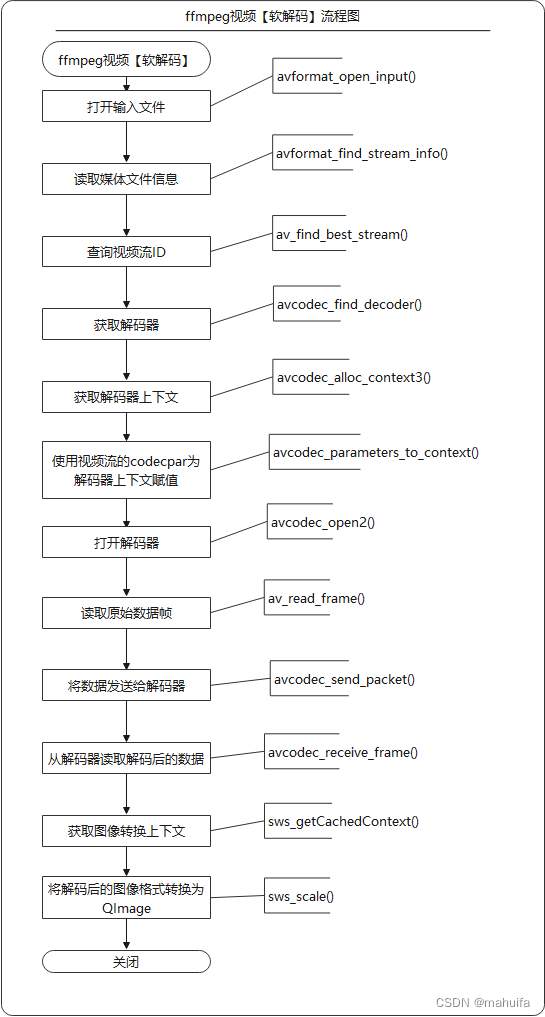
4、主要代码
- 啥也不说了,直接上代码,一切有注释
4.1 解码代码
-
videodecode.h文件
/****************************************************************************** * @文件名 videodecode.h * @功能 视频解码类,在这个类中调用ffmpeg打开视频进行解码 * * @开发者 mhf * @邮箱 1603291350@qq.com * @时间 2022/09/15 * @备注 *****************************************************************************/ #ifndef VIDEODECODE_H #define VIDEODECODE_H #include#include struct AVFormatContext; struct AVCodecContext; struct AVRational; struct AVPacket; struct AVFrame; struct SwsContext; struct AVBufferRef; class QImage; class VideoDecode { public: VideoDecode(); ~VideoDecode(); bool open(const QString& url = QString()); // 打开媒体文件,或者流媒体rtmp、strp、http QImage read(); // 读取视频图像 void close(); // 关闭 bool isEnd(); // 是否读取完成 const qint64& pts(); // 获取当前帧显示时间 private: void initFFmpeg(); // 初始化ffmpeg库(整个程序中只需加载一次) void showError(int err); // 显示ffmpeg执行错误时的错误信息 qreal rationalToDouble(AVRational* rational); // 将AVRational转换为double void clear(); // 清空读取缓冲 void free(); // 释放 private: AVFormatContext* m_formatContext = nullptr; // 解封装上下文 AVCodecContext* m_codecContext = nullptr; // 解码器上下文 SwsContext* m_swsContext = nullptr; // 图像转换上下文 AVPacket* m_packet = nullptr; // 数据包 AVFrame* m_frame = nullptr; // 解码后的视频帧 int m_videoIndex = 0; // 视频流索引 qint64 m_totalTime = 0; // 视频总时长 qint64 m_totalFrames = 0; // 视频总帧数 qint64 m_obtainFrames = 0; // 视频当前获取到的帧数 qint64 m_pts = 0; // 图像帧的显示时间 qreal m_frameRate = 0; // 视频帧率 QSize m_size; // 视频分辨率大小 char* m_error = nullptr; // 保存异常信息 bool m_end = false; // 视频读取完成 uchar* m_buffer = nullptr; // YUV图像需要转换位RGBA图像,这里保存转换后的图形数据 }; #endif // VIDEODECODE_H - 1
- 2
- 3
- 4
- 5
- 6
- 7
- 8
- 9
- 10
- 11
- 12
- 13
- 14
- 15
- 16
- 17
- 18
- 19
- 20
- 21
- 22
- 23
- 24
- 25
- 26
- 27
- 28
- 29
- 30
- 31
- 32
- 33
- 34
- 35
- 36
- 37
- 38
- 39
- 40
- 41
- 42
- 43
- 44
- 45
- 46
- 47
- 48
- 49
- 50
- 51
- 52
- 53
- 54
- 55
- 56
- 57
- 58
- 59
- 60
- 61
- 62
-
videodecode.cpp文件
#include "videodecode.h" #include#include #include #include extern "C" { // 用C规则编译指定的代码 #include "libavcodec/avcodec.h" #include "libavformat/avformat.h" #include "libavutil/avutil.h" #include "libswscale/swscale.h" #include "libavutil/imgutils.h" } #define ERROR_LEN 1024 // 异常信息数组长度 #define PRINT_LOG 1 VideoDecode::VideoDecode() { // initFFmpeg(); // 5.1.2版本不需要调用了 m_error = new char[ERROR_LEN]; } VideoDecode::~VideoDecode() { close(); } /** * @brief 初始化ffmpeg库(整个程序中只需加载一次) * 旧版本的ffmpeg需要注册各种文件格式、解复用器、对网络库进行全局初始化。 * 在新版本的ffmpeg中纷纷弃用了,不需要注册了 */ void VideoDecode::initFFmpeg() { static bool isFirst = true; static QMutex mutex; QMutexLocker locker(&mutex); if(isFirst) { // av_register_all(); // 已经从源码中删除 /** * 初始化网络库,用于打开网络流媒体,此函数仅用于解决旧GnuTLS或OpenSSL库的线程安全问题。 * 一旦删除对旧GnuTLS和OpenSSL库的支持,此函数将被弃用,并且此函数不再有任何用途。 */ avformat_network_init(); isFirst = false; } } /** * @brief 打开媒体文件,或者流媒体,例如rtmp、strp、http * @param url 视频地址 * @return true:成功 false:失败 */ bool VideoDecode::open(const QString &url) { if(url.isNull()) return false; AVDictionary* dict = nullptr; av_dict_set(&dict, "rtsp_transport", "tcp", 0); // 设置rtsp流使用tcp打开,如果打开失败错误信息为【Error number -135 occurred】可以切换(UDP、tcp、udp_multicast、http),比如vlc推流就需要使用udp打开 av_dict_set(&dict, "max_delay", "3", 0); // 设置最大复用或解复用延迟(以微秒为单位)。当通过【UDP】 接收数据时,解复用器尝试重新排序接收到的数据包(因为它们可能无序到达,或者数据包可能完全丢失)。这可以通过将最大解复用延迟设置为零(通过max_delayAVFormatContext 字段)来禁用。 av_dict_set(&dict, "timeout", "1000000", 0); // 以微秒为单位设置套接字 TCP I/O 超时,如果等待时间过短,也可能会还没连接就返回了。 // 打开输入流并返回解封装上下文 int ret = avformat_open_input(&m_formatContext, // 返回解封装上下文 url.toStdString().data(), // 打开视频地址 nullptr, // 如果非null,此参数强制使用特定的输入格式。自动选择解封装器(文件格式) &dict); // 参数设置 // 释放参数字典 if(dict) { av_dict_free(&dict); } // 打开视频失败 if(ret < 0) { showError(ret); free(); return false; } // 读取媒体文件的数据包以获取流信息。 ret = avformat_find_stream_info(m_formatContext, nullptr); if(ret < 0) { showError(ret); free(); return false; } m_totalTime = m_formatContext->duration / (AV_TIME_BASE / 1000); // 计算视频总时长(毫秒) #if PRINT_LOG qDebug() << QString("视频总时长:%1 ms,[%2]").arg(m_totalTime).arg(QTime::fromMSecsSinceStartOfDay(int(m_totalTime)).toString("HH:mm:ss zzz")); #endif // 通过AVMediaType枚举查询视频流ID(也可以通过遍历查找),最后一个参数无用 m_videoIndex = av_find_best_stream(m_formatContext, AVMEDIA_TYPE_VIDEO, -1, -1, nullptr, 0); if(m_videoIndex < 0) { showError(m_videoIndex); free(); return false; } AVStream* videoStream = m_formatContext->streams[m_videoIndex]; // 通过查询到的索引获取视频流 // 获取视频图像分辨率(AVStream中的AVCodecContext在新版本中弃用,改为使用AVCodecParameters) m_size.setWidth(videoStream->codecpar->width); m_size.setHeight(videoStream->codecpar->height); m_frameRate = rationalToDouble(&videoStream->avg_frame_rate); // 视频帧率 // 通过解码器ID获取视频解码器(新版本返回值必须使用const) const AVCodec* codec = avcodec_find_decoder(videoStream->codecpar->codec_id); m_totalFrames = videoStream->nb_frames; #if PRINT_LOG qDebug() << QString("分辨率:[w:%1,h:%2] 帧率:%3 总帧数:%4 解码器:%5") .arg(m_size.width()).arg(m_size.height()).arg(m_frameRate).arg(m_totalFrames).arg(codec->name); #endif // 分配AVCodecContext并将其字段设置为默认值。 m_codecContext = avcodec_alloc_context3(codec); if(!m_codecContext) { #if PRINT_LOG qWarning() << "创建视频解码器上下文失败!"; #endif free(); return false; } // 使用视频流的codecpar为解码器上下文赋值 ret = avcodec_parameters_to_context(m_codecContext, videoStream->codecpar); if(ret < 0) { showError(ret); free(); return false; } m_codecContext->flags2 |= AV_CODEC_FLAG2_FAST; // 允许不符合规范的加速技巧。 m_codecContext->thread_count = 8; // 使用8线程解码 // 初始化解码器上下文,如果之前avcodec_alloc_context3传入了解码器,这里设置NULL就可以 ret = avcodec_open2(m_codecContext, nullptr, nullptr); if(ret < 0) { showError(ret); free(); return false; } // 分配AVPacket并将其字段设置为默认值。 m_packet = av_packet_alloc(); if(!m_packet) { #if PRINT_LOG qWarning() << "av_packet_alloc() Error!"; #endif free(); return false; } // 分配AVFrame并将其字段设置为默认值。 m_frame = av_frame_alloc(); if(!m_frame) { #if PRINT_LOG qWarning() << "av_frame_alloc() Error!"; #endif free(); return false; } // 分配图像空间 int size = av_image_get_buffer_size(AV_PIX_FMT_RGBA, m_size.width(), m_size.height(), 4); /** * 【注意:】这里可以多分配一些,否则如果只是安装size分配,大部分视频图像数据拷贝没有问题, * 但是少部分视频图像在使用sws_scale()拷贝时会超出数组长度,在使用使用msvc debug模式时delete[] m_buffer会报错(HEAP CORRUPTION DETECTED: after Normal block(#32215) at 0x000001AC442830370.CRT delected that the application wrote to memory after end of heap buffer) * 特别是这个视频流http://vfx.mtime.cn/Video/2019/02/04/mp4/190204084208765161.mp4 */ m_buffer = new uchar[size + 1000]; // 这里多分配1000个字节就基本不会出现拷贝超出的情况了,反正不缺这点内存 // m_image = new QImage(m_buffer, m_size.width(), m_size.height(), QImage::Format_RGBA8888); // 这种方式分配内存大部分情况下也可以,但是因为存在拷贝超出数组的情况,delete时也会报错 m_end = false; return true; } /** * @brief * @return */ QImage VideoDecode::read() { // 如果没有打开则返回 if(!m_formatContext) { return QImage(); } // 读取下一帧数据 int readRet = av_read_frame(m_formatContext, m_packet); if(readRet < 0) { avcodec_send_packet(m_codecContext, m_packet); // 读取完成后向解码器中传如空AVPacket,否则无法读取出最后几帧 } else { if(m_packet->stream_index == m_videoIndex) // 如果是图像数据则进行解码 { // 计算当前帧时间(毫秒) #if 1 // 方法一:适用于所有场景,但是存在一定误差 m_packet->pts = qRound64(m_packet->pts * (1000 * rationalToDouble(&m_formatContext->streams[m_videoIndex]->time_base))); m_packet->dts = qRound64(m_packet->dts * (1000 * rationalToDouble(&m_formatContext->streams[m_videoIndex]->time_base))); #else // 方法二:适用于播放本地视频文件,计算每一帧时间较准,但是由于网络视频流无法获取总帧数,所以无法适用 m_obtainFrames++; m_packet->pts = qRound64(m_obtainFrames * (qreal(m_totalTime) / m_totalFrames)); #endif // 将读取到的原始数据包传入解码器 int ret = avcodec_send_packet(m_codecContext, m_packet); if(ret < 0) { showError(ret); } } } av_packet_unref(m_packet); // 释放数据包,引用计数-1,为0时释放空间 int ret = avcodec_receive_frame(m_codecContext, m_frame); if(ret < 0) { av_frame_unref(m_frame); if(readRet < 0) { m_end = true; // 当无法读取到AVPacket并且解码器中也没有数据时表示读取完成 } return QImage(); } m_pts = m_frame->pts; // 为什么图像转换上下文要放在这里初始化呢,是因为m_frame->format,如果使用硬件解码,解码出来的图像格式和m_codecContext->pix_fmt的图像格式不一样,就会导致无法转换为QImage if(!m_swsContext) { // 获取缓存的图像转换上下文。首先校验参数是否一致,如果校验不通过就释放资源;然后判断上下文是否存在,如果存在直接复用,如不存在进行分配、初始化操作 m_swsContext = sws_getCachedContext(m_swsContext, m_frame->width, // 输入图像的宽度 m_frame->height, // 输入图像的高度 (AVPixelFormat)m_frame->format, // 输入图像的像素格式 m_size.width(), // 输出图像的宽度 m_size.height(), // 输出图像的高度 AV_PIX_FMT_RGBA, // 输出图像的像素格式 SWS_BILINEAR, // 选择缩放算法(只有当输入输出图像大小不同时有效),一般选择SWS_FAST_BILINEAR nullptr, // 输入图像的滤波器信息, 若不需要传NULL nullptr, // 输出图像的滤波器信息, 若不需要传NULL nullptr); // 特定缩放算法需要的参数(?),默认为NULL if(!m_swsContext) { #if PRINT_LOG qWarning() << "sws_getCachedContext() Error!"; #endif free(); return QImage(); } } // AVFrame转QImage uchar* data[] = {m_buffer}; int lines[4]; av_image_fill_linesizes(lines, AV_PIX_FMT_RGBA, m_frame->width); // 使用像素格式pix_fmt和宽度填充图像的平面线条大小。 ret = sws_scale(m_swsContext, // 缩放上下文 m_frame->data, // 原图像数组 m_frame->linesize, // 包含源图像每个平面步幅的数组 0, // 开始位置 m_frame->height, // 行数 data, // 目标图像数组 lines); // 包含目标图像每个平面的步幅的数组 QImage image(m_buffer, m_frame->width, m_frame->height, QImage::Format_RGBA8888); av_frame_unref(m_frame); return image; } /** * @brief 关闭视频播放并释放内存 */ void VideoDecode::close() { clear(); free(); m_totalTime = 0; m_videoIndex = 0; m_totalFrames = 0; m_obtainFrames = 0; m_pts = 0; m_frameRate = 0; m_size = QSize(0, 0); } /** * @brief 视频是否读取完成 * @return */ bool VideoDecode::isEnd() { return m_end; } /** * @brief 返回当前帧图像播放时间 * @return */ const qint64 &VideoDecode::pts() { return m_pts; } /** * @brief 显示ffmpeg函数调用异常信息 * @param err */ void VideoDecode::showError(int err) { #if PRINT_LOG memset(m_error, 0, ERROR_LEN); // 将数组置零 av_strerror(err, m_error, ERROR_LEN); qWarning() << "DecodeVideo Error:" << m_error; #else Q_UNUSED(err) #endif } /** * @brief 将AVRational转换为double,用于计算帧率 * @param rational * @return */ qreal VideoDecode::rationalToDouble(AVRational* rational) { qreal frameRate = (rational->den == 0) ? 0 : (qreal(rational->num) / rational->den); return frameRate; } /** * @brief 清空读取缓冲 */ void VideoDecode::clear() { // 因为avformat_flush不会刷新AVIOContext (s->pb)。如果有必要,在调用此函数之前调用avio_flush(s->pb)。 if(m_formatContext && m_formatContext->pb) { avio_flush(m_formatContext->pb); } if(m_formatContext) { avformat_flush(m_formatContext); // 清理读取缓冲 } } void VideoDecode::free() { // 释放上下文swsContext。 if(m_swsContext) { sws_freeContext(m_swsContext); m_swsContext = nullptr; // sws_freeContext不会把上下文置NULL } // 释放编解码器上下文和与之相关的所有内容,并将NULL写入提供的指针 if(m_codecContext) { avcodec_free_context(&m_codecContext); } // 关闭并失败m_formatContext,并将指针置为null if(m_formatContext) { avformat_close_input(&m_formatContext); } if(m_packet) { av_packet_free(&m_packet); } if(m_frame) { av_frame_free(&m_frame); } if(m_buffer) { delete [] m_buffer; m_buffer = nullptr; } } - 1
- 2
- 3
- 4
- 5
- 6
- 7
- 8
- 9
- 10
- 11
- 12
- 13
- 14
- 15
- 16
- 17
- 18
- 19
- 20
- 21
- 22
- 23
- 24
- 25
- 26
- 27
- 28
- 29
- 30
- 31
- 32
- 33
- 34
- 35
- 36
- 37
- 38
- 39
- 40
- 41
- 42
- 43
- 44
- 45
- 46
- 47
- 48
- 49
- 50
- 51
- 52
- 53
- 54
- 55
- 56
- 57
- 58
- 59
- 60
- 61
- 62
- 63
- 64
- 65
- 66
- 67
- 68
- 69
- 70
- 71
- 72
- 73
- 74
- 75
- 76
- 77
- 78
- 79
- 80
- 81
- 82
- 83
- 84
- 85
- 86
- 87
- 88
- 89
- 90
- 91
- 92
- 93
- 94
- 95
- 96
- 97
- 98
- 99
- 100
- 101
- 102
- 103
- 104
- 105
- 106
- 107
- 108
- 109
- 110
- 111
- 112
- 113
- 114
- 115
- 116
- 117
- 118
- 119
- 120
- 121
- 122
- 123
- 124
- 125
- 126
- 127
- 128
- 129
- 130
- 131
- 132
- 133
- 134
- 135
- 136
- 137
- 138
- 139
- 140
- 141
- 142
- 143
- 144
- 145
- 146
- 147
- 148
- 149
- 150
- 151
- 152
- 153
- 154
- 155
- 156
- 157
- 158
- 159
- 160
- 161
- 162
- 163
- 164
- 165
- 166
- 167
- 168
- 169
- 170
- 171
- 172
- 173
- 174
- 175
- 176
- 177
- 178
- 179
- 180
- 181
- 182
- 183
- 184
- 185
- 186
- 187
- 188
- 189
- 190
- 191
- 192
- 193
- 194
- 195
- 196
- 197
- 198
- 199
- 200
- 201
- 202
- 203
- 204
- 205
- 206
- 207
- 208
- 209
- 210
- 211
- 212
- 213
- 214
- 215
- 216
- 217
- 218
- 219
- 220
- 221
- 222
- 223
- 224
- 225
- 226
- 227
- 228
- 229
- 230
- 231
- 232
- 233
- 234
- 235
- 236
- 237
- 238
- 239
- 240
- 241
- 242
- 243
- 244
- 245
- 246
- 247
- 248
- 249
- 250
- 251
- 252
- 253
- 254
- 255
- 256
- 257
- 258
- 259
- 260
- 261
- 262
- 263
- 264
- 265
- 266
- 267
- 268
- 269
- 270
- 271
- 272
- 273
- 274
- 275
- 276
- 277
- 278
- 279
- 280
- 281
- 282
- 283
- 284
- 285
- 286
- 287
- 288
- 289
- 290
- 291
- 292
- 293
- 294
- 295
- 296
- 297
- 298
- 299
- 300
- 301
- 302
- 303
- 304
- 305
- 306
- 307
- 308
- 309
- 310
- 311
- 312
- 313
- 314
- 315
- 316
- 317
- 318
- 319
- 320
- 321
- 322
- 323
- 324
- 325
- 326
- 327
- 328
- 329
- 330
- 331
- 332
- 333
- 334
- 335
- 336
- 337
- 338
- 339
- 340
- 341
- 342
- 343
- 344
- 345
- 346
- 347
- 348
- 349
- 350
- 351
- 352
- 353
- 354
- 355
- 356
- 357
- 358
- 359
- 360
- 361
- 362
- 363
- 364
- 365
- 366
- 367
- 368
- 369
- 370
- 371
- 372
- 373
- 374
- 375
- 376
- 377
- 378
- 379
- 380
- 381
- 382
- 383
- 384
- 385
- 386
- 387
- 388
- 389
- 390
- 391
- 392
- 393
4.2 OpenGL显示RGB图像代码
-
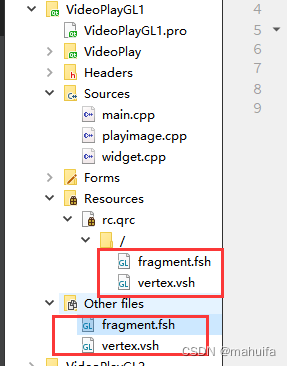
鼠标右键->Add New…
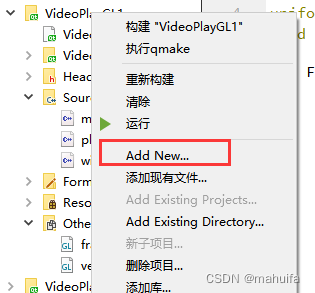
-
创建两个GLSL着色器文件
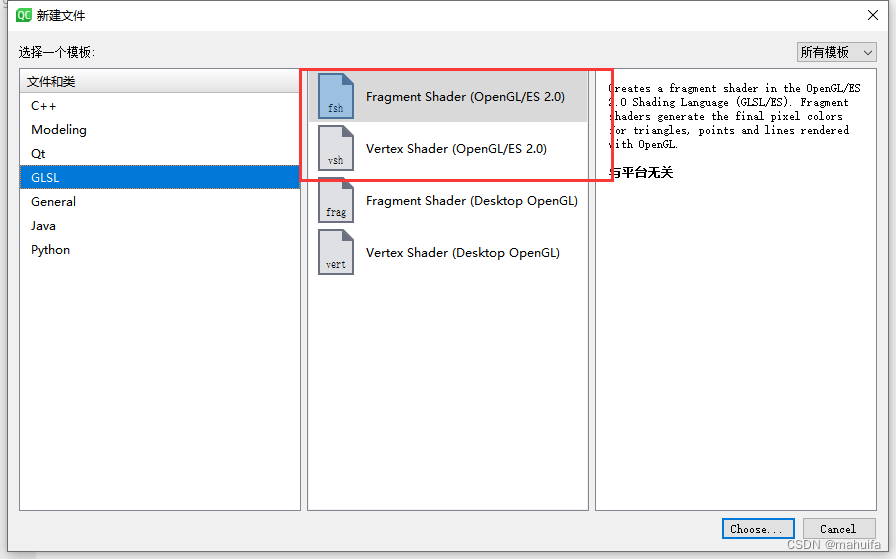
-
创建一个资源文件,将刚创建的两个GLSL文件添加进资源文件
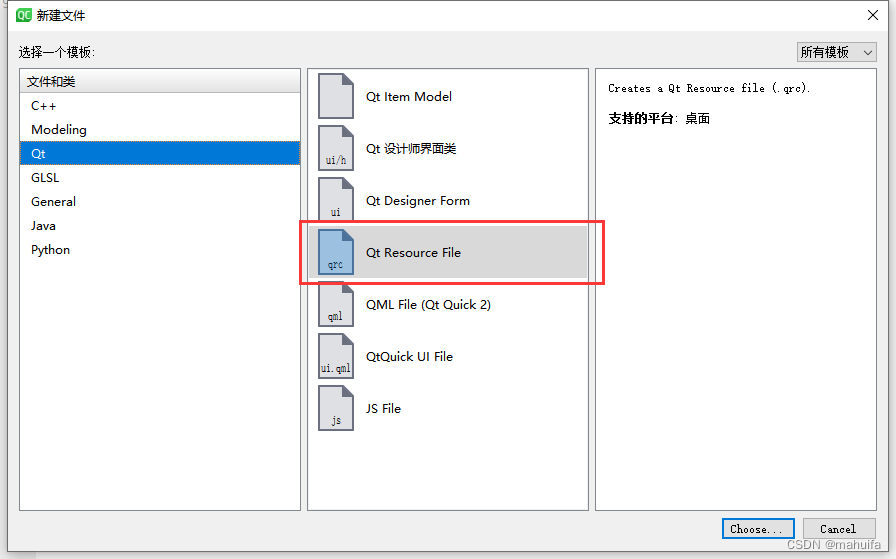
-
结果如下图所示
-
顶点着色器 vertex.vsh
#version 330 core layout (location = 0) in vec3 aPos; layout (location = 1) in vec2 aTexCord; out vec2 TexCord; // 纹理坐标 void main() { gl_Position = vec4(aPos, 1.0); TexCord = aTexCord; }- 1
- 2
- 3
- 4
- 5
- 6
- 7
- 8
- 9
-
片段着色器fragment.fsh
#version 330 core out vec4 FragColor; in vec2 TexCord; // 纹理坐标 uniform sampler2D texture; // 纹理采样器 void main() { FragColor = texture2D(texture, TexCord); // 采样纹理函数 }- 1
- 2
- 3
- 4
- 5
- 6
- 7
- 8
-
OpenGL显示RGB图像这里可以采用QOpenGLWidget或者QOpenGLWIndow进行显示
-
playimage.h
/****************************************************************************** * @文件名 playimage.h * @功能 使用OpenGL实现RGB图像的绘制,可通过USE_WINDOW宏切换使用QOpenGLWindow还是QOpenGLWidget * * @开发者 mhf * @邮箱 1603291350@qq.com * @时间 2022/10/14 * @备注 *****************************************************************************/ #ifndef PLAYIMAGE_H #define PLAYIMAGE_H #include#include #include #include #define USE_WINDOW 0 // 1:使用QOpenGLWindow显示, 0:使用QOpenGLWidget显示 #if USE_WINDOW #include class PlayImage : public QOpenGLWindow, public QOpenGLFunctions_3_3_Core #else #include class PlayImage : public QOpenGLWidget, public QOpenGLFunctions_3_3_Core #endif { Q_OBJECT public: #if USE_WINDOW explicit PlayImage(UpdateBehavior updateBehavior = NoPartialUpdate, QWindow *parent = nullptr); #else explicit PlayImage(QWidget* parent = nullptr, Qt::WindowFlags f = Qt::WindowFlags()); #endif ~PlayImage() override; void updateImage(const QImage& image); protected: void initializeGL() override; // 初始化gl void resizeGL(int w, int h) override; // 窗口尺寸变化 void paintGL() override; // 刷新显示 private: QOpenGLShaderProgram* m_program = nullptr; QOpenGLTexture* m_texture = nullptr; GLuint VBO = 0; // 顶点缓冲对象,负责将数据从内存放到缓存,一个VBO可以用于多个VAO GLuint VAO = 0; // 顶点数组对象,任何随后的顶点属性调用都会储存在这个VAO中,一个VAO可以有多个VBO GLuint EBO = 0; // 元素缓冲对象,它存储 OpenGL 用来决定要绘制哪些顶点的索引 QSize m_size; QSizeF m_zoomSize; QPointF m_pos; }; #endif // PLAYIMAGE_H - 1
- 2
- 3
- 4
- 5
- 6
- 7
- 8
- 9
- 10
- 11
- 12
- 13
- 14
- 15
- 16
- 17
- 18
- 19
- 20
- 21
- 22
- 23
- 24
- 25
- 26
- 27
- 28
- 29
- 30
- 31
- 32
- 33
- 34
- 35
- 36
- 37
- 38
- 39
- 40
- 41
- 42
- 43
- 44
- 45
- 46
- 47
- 48
- 49
- 50
- 51
- 52
- 53
- 54
- 55
- 56
- 57
- 58
-
playimage.cpp
#include "playimage.h" #if USE_WINDOW PlayImage::PlayImage(QOpenGLWindow::UpdateBehavior updateBehavior, QWindow *parent):QOpenGLWindow(updateBehavior, parent) { } #else PlayImage::PlayImage(QWidget *parent, Qt::WindowFlags f): QOpenGLWidget(parent, f) { } #endif PlayImage::~PlayImage() { if(!isValid()) return; // 如果控件和OpenGL资源(如上下文)已成功初始化,则返回true。 this->makeCurrent(); // 通过将相应的上下文设置为当前上下文并在该上下文中绑定帧缓冲区对象,为呈现此小部件的OpenGL内容做准备。 // 释放纹理 if(m_texture) { m_texture->destroy(); delete m_texture; } this->doneCurrent(); // 释放上下文 // 释放 glDeleteBuffers(1, &VBO); glDeleteBuffers(1, &EBO); glDeleteVertexArrays(1, &VAO); } /** * @brief 传入Qimage图片显示 * @param image */ void PlayImage::updateImage(const QImage& image) { if(image.isNull()) return; m_size = image.size(); if(!m_texture) { m_texture = new QOpenGLTexture(image.mirrored()); resizeGL(this->width(), this->height()); } else { m_texture->destroy(); m_texture->setData(image.mirrored()); } this->update(); } // 三个顶点坐标XYZ,VAO、VBO数据播放,范围时[-1 ~ 1]直接 static GLfloat vertices[] = { // 前三列点坐标,后两列为纹理坐标 1.0f, 1.0f, 0.0f, 1.0f, 1.0f, // 右上角 1.0f, -1.0f, 0.0f, 1.0f, 0.0f, // 右下 -1.0f, -1.0f, 0.0f, 0.0f, 0.0f, // 左下 -1.0f, 1.0f, 0.0f, 0.0f, 1.0f // 左上 }; static GLuint indices[] = { 0, 1, 3, 1, 2, 3 }; void PlayImage::initializeGL() { initializeOpenGLFunctions(); m_program = new QOpenGLShaderProgram(this); m_program->addShaderFromSourceFile(QOpenGLShader::Vertex, ":/vertex.vsh"); m_program->addShaderFromSourceFile(QOpenGLShader::Fragment, ":/fragment.fsh"); m_program->link(); // 返回属性名称在此着色器程序的参数列表中的位置。如果名称不是此着色器程序的有效属性,则返回-1。 GLuint posAttr = GLuint(m_program->attributeLocation("aPos")); GLuint texCord = GLuint(m_program->attributeLocation("aTexCord")); glGenVertexArrays(1, &VAO); glBindVertexArray(VAO); glGenBuffers(1, &VBO); glBindBuffer(GL_ARRAY_BUFFER, VBO); glGenBuffers(1, &EBO); // 创建一个EBO glBindBuffer(GL_ELEMENT_ARRAY_BUFFER, EBO); // 为当前绑定到的缓冲区对象创建一个新的数据存储target。任何预先存在的数据存储都将被删除。 glBufferData(GL_ARRAY_BUFFER, // 为VBO缓冲绑定顶点数据 sizeof (vertices), // 数组字节大小 vertices, // 需要绑定的数组 GL_STATIC_DRAW); // 指定数据存储的预期使用模式,GL_STATIC_DRAW: 数据几乎不会改变 glBufferData(GL_ELEMENT_ARRAY_BUFFER, sizeof(indices), indices, GL_STATIC_DRAW); // 将顶点索引数组传入EBO缓存 // 设置顶点坐标数据 glVertexAttribPointer(posAttr, // 指定要修改的通用顶点属性的索引 3, // 指定每个通用顶点属性的组件数(如vec3:3,vec4:4) GL_FLOAT, // 指定数组中每个组件的数据类型(数组中一行有几个数) GL_FALSE, // 指定在访问定点数据值时是否应规范化 ( GL_TRUE) 或直接转换为定点值 ( GL_FALSE),如果vertices里面单个数超过-1或者1可以选择GL_TRUE 5 * sizeof(GLfloat), // 指定连续通用顶点属性之间的字节偏移量。 nullptr); // 指定当前绑定到目标的缓冲区的数据存储中数组中第一个通用顶点属性的第一个组件的偏移量。初始值为0 (一个数组从第几个字节开始读) // 启用通用顶点属性数组 glEnableVertexAttribArray(posAttr); // 属性索引是从调用glGetAttribLocation接收的,或者传递给glBindAttribLocation。 // 设置纹理坐标数据 glVertexAttribPointer(texCord, 2, GL_FLOAT, GL_FALSE, 5 * sizeof(GLfloat), reinterpret_cast<const GLvoid *>(3 * sizeof (GLfloat))); // 指定当前绑定到目标的缓冲区的数据存储中数组中第一个通用顶点属性的第一个组件的偏移量。初始值为0 (一个数组从第几个字节开始读) // 启用通用顶点属性数组 glEnableVertexAttribArray(texCord); // 属性索引是从调用glGetAttribLocation接收的,或者传递给glBindAttribLocation。 // 释放 glBindBuffer(GL_ARRAY_BUFFER, 0); glBindVertexArray(0); // 设置为零以破坏现有的顶点数组对象绑定 glClearColor(0.0f, 0.0f, 0.0f, 1.0f); // 指定颜色缓冲区的清除值(背景色) } void PlayImage::resizeGL(int w, int h) { if(m_size.width() < 0 || m_size.height() < 0) return; // 计算需要显示图片的窗口大小,用于实现长宽等比自适应显示 if((double(w) / h) < (double(m_size.width()) / m_size.height())) { m_zoomSize.setWidth(w); m_zoomSize.setHeight(((double(w) / m_size.width()) * m_size.height())); // 这里不使用QRect,使用QRect第一次设置时有误差bug } else { m_zoomSize.setHeight(h); m_zoomSize.setWidth((double(h) / m_size.height()) * m_size.width()); } m_pos.setX(double(w - m_zoomSize.width()) / 2); m_pos.setY(double(h - m_zoomSize.height()) / 2); this->update(QRect(0, 0, w, h)); } void PlayImage::paintGL() { glClear(GL_COLOR_BUFFER_BIT); // 将窗口的位平面区域(背景)设置为先前由glClearColor、glClearDepth和选择的值 glViewport(m_pos.x(), m_pos.y(), m_zoomSize.width(), m_zoomSize.height()); // 设置视图大小实现图片自适应 m_program->bind(); // 绑定着色器 if(m_texture) { m_texture->bind(); } glBindVertexArray(VAO); // 绑定VAO glDrawElements(GL_TRIANGLES, // 绘制的图元类型 6, // 指定要渲染的元素数(点数) GL_UNSIGNED_INT, // 指定索引中值的类型(indices) nullptr); // 指定当前绑定到GL_ELEMENT_array_buffer目标的缓冲区的数据存储中数组中第一个索引的偏移量。 glBindVertexArray(0); if(m_texture) { m_texture->release(); } m_program->release(); }- 1
- 2
- 3
- 4
- 5
- 6
- 7
- 8
- 9
- 10
- 11
- 12
- 13
- 14
- 15
- 16
- 17
- 18
- 19
- 20
- 21
- 22
- 23
- 24
- 25
- 26
- 27
- 28
- 29
- 30
- 31
- 32
- 33
- 34
- 35
- 36
- 37
- 38
- 39
- 40
- 41
- 42
- 43
- 44
- 45
- 46
- 47
- 48
- 49
- 50
- 51
- 52
- 53
- 54
- 55
- 56
- 57
- 58
- 59
- 60
- 61
- 62
- 63
- 64
- 65
- 66
- 67
- 68
- 69
- 70
- 71
- 72
- 73
- 74
- 75
- 76
- 77
- 78
- 79
- 80
- 81
- 82
- 83
- 84
- 85
- 86
- 87
- 88
- 89
- 90
- 91
- 92
- 93
- 94
- 95
- 96
- 97
- 98
- 99
- 100
- 101
- 102
- 103
- 104
- 105
- 106
- 107
- 108
- 109
- 110
- 111
- 112
- 113
- 114
- 115
- 116
- 117
- 118
- 119
- 120
- 121
- 122
- 123
- 124
- 125
- 126
- 127
- 128
- 129
- 130
- 131
- 132
- 133
- 134
- 135
- 136
- 137
- 138
- 139
- 140
- 141
- 142
- 143
- 144
- 145
- 146
- 147
- 148
- 149
- 150
- 151
- 152
- 153
- 154
- 155
- 156
- 157
- 158
- 159
5、完整源代码
-
相关阅读:
RocketMQ(3)之事务消息
基于Spark的智能餐饮推荐系统报告(只含部分代码)
android 在后台任务栏隐藏应用程序
LeetCode-81. 搜索旋转排序数组 II-Java-medium
PyQt5快速开发与实战 4.3 QLabel and 4.4 文本框类控件
H5/CSS 笔试面试考题(101-110)
SpringBoot+MinIO(三)
TMGM外汇平台官网最全测评(2022年版)
电脑入门:路由器访问控制列表基础知识
解决k8s删除名称空间无法强制删除的问题
- 原文地址:https://blog.csdn.net/qq_43627907/article/details/127990422