-
小学生python游戏编程arcade----坦克大战3
小学生python游戏编程arcade----坦克大战3
前言
接以上多篇文章解绍arcade游戏编程的基本知识,回归主题,继续完善孩子的梦想,坦克大战,学习单词,搭建整体的框架,主要包括,游戏的开始界面,进行界面,结束界面,角色控制,子弹发射,地图加载,英语单词显示,提示,分数显示,爆炸显示及精灵,敌人自动寻路,开火,碰撞检测等,初具模型,慢慢加载完善。
整体解绍
1、坦克大战3–未完,只是功能初具
1.1 文件结构

1.2 类
界面类:guigl
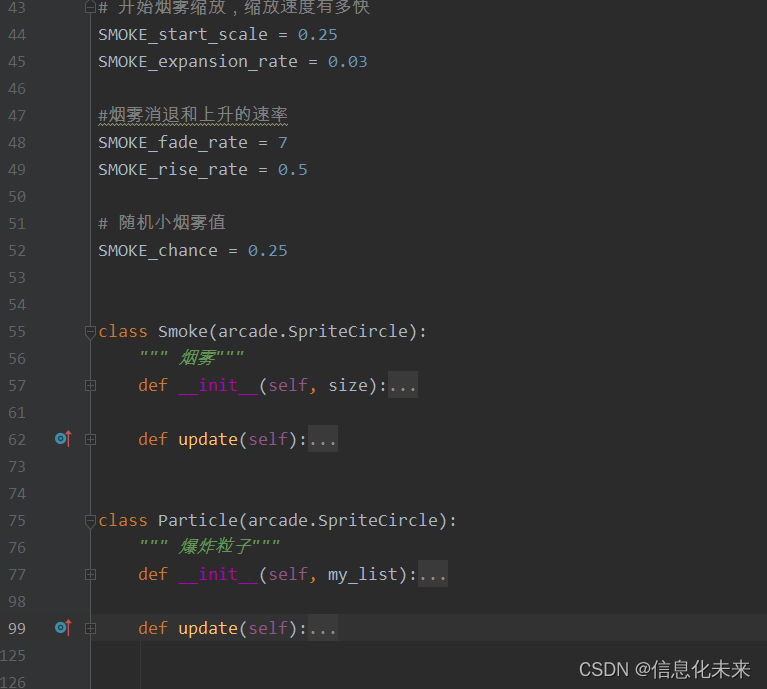
粒子类:particle
基本设置:seting_tank
角色类:tank1.3 角色类

1.4 粒子类
1.5 主程序框

1.6 main函数
注释处,为了调试方便,不显示开始界面,直接进行主程序
def main():
“”“主函数”“”
window = arcade.Window(SCREEN_width, SCREEN_height, SCREEN_title)
# menu_view = MainMenu()
menu_view = GameView()
window.show_view(menu_view)
arcade.run()1.7 效果图


1.8 代码实现
from arcadegame.guigl import * from arcadegame.particle import * from arcadegame.tank import * import os import random class GameView(arcade.View): def __init__(self): super().__init__() self.scene = None self.wanjia = None file_path = os.path.dirname(os.path.abspath(__file__)) os.chdir(file_path) arcade.set_background_color(arcade.csscolor.BLACK) self.physics_engine = None self.camera = None # 摄象机 self.gui_camera = None # 第二摄象机 self.score = 0 # 加载声音 self.collect_coin_sound = arcade.load_sound("sounds/coin2.wav") self.game_over = arcade.load_sound(":resources:sounds/gameover1.wav") self.shoot_sound = arcade.load_sound(":resources:sounds/hurt5.wav") self.hit_sound = arcade.load_sound(":resources:sounds/hit5.wav") self.hit_sound1 = arcade.load_sound(":resources:sounds/explosion1.wav") self.hit_sound2 = arcade.load_sound(":resources:sounds/explosion2.wav") self.hit_sound3 = arcade.load_sound(":resources:sounds/hit1.wav") self.hit_sound4 = arcade.load_sound(":resources:sounds/hit2.wav") # 设置地图 self.tile_map = None # 是否重新设置分数 self.reset_score = True # 地图的最右边 self.end_of_map = 0 self.top_of_map = 0 # 关卡级别 self.level = 1 self.tankdl = 0.1 self.ememy_name='scholl' self.words = '请不要打击你的朋友--' self.init_rect() self.frame_count=0 def setup_enemy(self): # pass self.scene.add_sprite_list_after(LAYER_tanks, 'wj') words={'book':'书','bag':'书包','english':'英语'} for x in words: tank = Enemy_tank("images/坦克2.png", 0.5, SCREEN_width*random.random(), SCREEN_height - 200) tank.word = x tank.hz = words[x] self.scene.add_sprite(LAYER_tanks,tank) def setup_player(self): # 添加角色. self.wanjia = Tank("images/坦克.png", 0.5, self.end_of_map, self.top_of_map) self.wanjia.center_x = PLAYER_start_x self.wanjia.center_y = PLAYER_start_y self.scene.add_sprite("wj", self.wanjia) self.scene.add_sprite_list_after("wj", LAYER_platforms) # 添加精灵列表,把玩家放在哪一层,前后层在此关健 self.scene.add_sprite("wj",self.wanjia) self.physics_engine = arcade.PhysicsEngineSimple( self.wanjia, walls=self.scene['建筑物']) def setup_map(self): # 初始化场景 map_name = f"地图\佛相广场.json" # jia{self.level}.json" # 层属性 layer_options = { LAYER_platforms: { "use_spatial_hash": True, }, LAYER_tree: { "use_spatial_hash": False, }, '建筑物': { "use_spatial_hash": True, }, # 'tizi': { # "use_spatial_hash": True, # }, # 'Enemies': { # "use_spatial_hash": True, # }, } # 读地图文件 self.tile_map = arcade.load_tilemap(map_name, TILE_Scaling, layer_options) # 使用我们的TileMap初始化场景,这将自动添加所有层,以正确的顺序在场景中显示为SpriteList。 self.scene = arcade.Scene.from_tilemap(self.tile_map) print(self.tile_map.width,self.tile_map.height) self.end_of_map = self.tile_map.width * self.tile_map.tile_height * TILE_Scaling self.top_of_map = self.tile_map.height * self.tile_map.tile_width * TILE_Scaling def setup(self): # 摄象机 self.camera = arcade.Camera(SCREEN_width, SCREEN_height) self.gui_camera = arcade.Camera(SCREEN_width, SCREEN_height) self.setup_map() if self.reset_score: self.score = 0 self.reset_score = True # 添加角色. self.setup_player() self.setup_enemy() # 增加子弹层 self.scene.add_sprite_list_after(LAYER_bullet, 'wj') # 增加爆炸粒子列表 self.scene.add_sprite_list_after(LAYER_explosions, 'wj') def on_show_view(self): self.setup() def on_key_press(self, key: int, modifiers: int): if not self.wanjia.respawning and key == arcade.key.SPACE and self.wanjia.bullets>0: bullet_sprite = BulletSprite(":resources:images/space_shooter/" "laserBlue01.png", 1) self.wanjia.bullets -= 1 bullet_sprite.guid = "子弹" bullet_speed = 13 bullet_sprite.change_y = \ math.cos(math.radians(self.wanjia.angle)) * bullet_speed bullet_sprite.change_x = \ -math.sin(math.radians(self.wanjia.angle)) \ * bullet_speed bullet_sprite.center_x = self.wanjia.center_x bullet_sprite.center_y = self.wanjia.center_y bullet_sprite.update() self.scene[LAYER_bullet].append(bullet_sprite) arcade.play_sound(self.shoot_sound, speed=random.random() * 3 + 0.5) if key == arcade.key.LEFT: self.wanjia.change_angle = 3 elif key == arcade.key.RIGHT: self.wanjia.change_angle = -3 elif key == arcade.key.UP: self.wanjia.thrust = self.tankdl elif key == arcade.key.DOWN: self.wanjia.thrust = -self.tankdl def on_key_release(self, key: int, modifiers: int): if key == arcade.key.LEFT: self.wanjia.change_angle = 0 elif key == arcade.key.RIGHT: self.wanjia.change_angle = 0 elif key == arcade.key.UP: self.wanjia.thrust = 0 elif key == arcade.key.DOWN: self.wanjia.thrust = 0 def init_rect(self): self.shapes = arcade.ShapeElementList() # color1 = (199, 237, 204) # # 参数:距形中心位置,宽,高,颜色,线宽 # rect = arcade.create_rectangle(SCREEN_width/2, SCREEN_height-60/2,SCREEN_width,60,color1) # self.shapes.append(rect) self.text_remind = arcade.Text( f"提醒: {self.words+self.ememy_name}", start_x=(SCREEN_width-len(self.words+self.ememy_name)*18)/2, start_y=SCREEN_height-30, color=arcade.csscolor.RED, font_size=18, ) def on_draw(self): self.clear() self.camera.use() # 摄象机 self.scene.draw() # 摄相机与scence的顺序不能放错,否则不会移动 for aa in self.scene[LAYER_tanks]: aa.draw_word(aa.left, aa.top + 20) # for enemy in self.scene[LAYER_enemies]: # arcade.draw_text(enemy.string, enemy.left, enemy.top+20, arcade.csscolor.RED, 30, ) self.gui_camera.use() # 在屏幕上绘制分数,用屏幕滚动 score_text = f"得分: {self.wanjia.top}地图高{self.top_of_map}" arcade.draw_text(score_text, 10, 500, arcade.csscolor.RED, 18, ) score_text = f"子弹数: {self.wanjia.bullets}" arcade.draw_text(score_text, 10, 400, arcade.csscolor.RED, 18, ) self.shapes.draw() self.text_remind.draw() # 摄相机随角色移动 def center_camera_to_player(self): """摄相机随角色移动""" screen_center_x = self.wanjia.center_x - (self.camera.viewport_width / 2) screen_center_y = self.wanjia.center_y - (self.camera.viewport_height / 2) # 防止相机出界 if screen_center_x < 0: screen_center_x = 0 if screen_center_y < 0: screen_center_y = 0 player_centered = screen_center_x, screen_center_y # print(player_centered) self.camera.move_to(player_centered) # 子弹碰撞检测 def collision_bullet(self): # 子弹的碰撞检测 for bullet in self.scene[LAYER_bullet]: # hit_list = arcade.check_for_collision_with_list(bullet, self.scene['建筑物']) hit_list = arcade.check_for_collision_with_lists( bullet, [ # self.scene[LAYER_enemies], # self.scene[LAYER_tree], self.scene['建筑物'], ], ) if hit_list: bullet.remove_from_sprite_lists() # for collision in hit_list: # if (self.scene[LAYER_enemies] in collision.sprite_lists): # # 磁撞的是敌人 根据子弹伤害及敌人生命值确定争分数及消失 # collision.health -= BULLET_shanghai # # if collision.health <= 0: # collision.remove_from_sprite_lists() # self.score += 100 # # # 声音 # arcade.play_sound(self.hit_sound) for cc in hit_list: print(cc) if (self.scene['建筑物'] in cc.sprite_lists): # 磁撞的是建筑物, 制造爆炸 for i in range(20): particle = Particle(self.scene[LAYER_explosions]) particle.position = cc.position # 粒子位置,也即敌人位置 self.scene[LAYER_explosions].append(particle) smoke = Smoke(30) smoke.position = cc.position # 烟雾位置 self.scene[LAYER_explosions].append(smoke) cc.remove_from_sprite_lists() # 爆炸声音 arcade.sound.play_sound(self.hit_sound) return # 如过子弹超过屏幕则删掉. if (bullet.right < 0) or (bullet.bottom > SCREEN_height) or ( bullet.left > (self.tile_map.width * self.tile_map.tile_width) * TILE_Scaling) : bullet.remove_from_sprite_lists() # 碰撞检测 def collision_all(self): self.collision_bullet() # 碰撞检测 # player_collision_list = arcade.check_for_collision_with_lists( # self.wanjia, # [ # # self.scene[LAYER_tree], # self.scene[LAYER_enemies], # ], # ) # 检测磁到的是硬币还是敌人 # for collision in player_collision_list: # if self.scene[LAYER_enemies] in collision.sprite_lists: # arcade.play_sound(self.game_over) # self.setup() # return # else: # # 算出这枚硬币值多少分 # if "Points" not in collision.properties: # print("警告,收集的硬币没有点数属性.") # else: # points = int(collision.properties["Points"]) # self.score += points # # # Remove the coin # collision.remove_from_sprite_lists() # arcade.play_sound(self.collect_coin_sound) # # 是否走到地图尽头 # if self.wanjia.center_x >= self.end_of_map: # # 关卡升级 # self.level += 1 # # 不需重新积分 # self.reset_score = False # # 加载下个场景 # self.setup() # 敌人更新 def update_ememy_tank(self): self.frame_count += 1 for enemy in self.scene[LAYER_tanks]: enemy.update() # 首先,计算与角色的角度。我们可以这样做只有当子弹发射时,但在这种情况下,我们会轮换 # 敌人每一帧都要面对玩家,所以我们会这样做 # 起始位置 start_x = enemy.center_x start_y = enemy.center_y # 目标位置 dest_x = self.wanjia.center_x dest_y = self.wanjia.center_y # 计算子弹行进的角度。 x_diff = dest_x - start_x y_diff = dest_y - start_y angle = math.atan2(y_diff, x_diff) # 设置敌人面向角色 enemy.angle = math.degrees(angle) - 90 # 每60帧发射一次 # to_player_leng= if (self.frame_count % 60 == 0): # 利用粒子制子弹 bullet = arcade.SpriteCircle(8, arcade.color.RED) bullet.center_x = start_x bullet.center_y = start_y # 设置子弹角度朝向角色 bullet.angle = math.degrees(angle) # 根据角度,计算子弹的变化change_x和change_y。速度是子弹行进的速度。 bullet.change_x = math.cos(angle) * 10 bullet.change_y = math.sin(angle) * 10 self.scene.add_sprite(LAYER_bullet,bullet) # self.bullet_list.append(bullet) self.scene[LAYER_tanks].update() def on_update(self, delta_time: float): self.physics_engine.update() # 运用引擎移动角色 self.collision_all() self.scene['wj'].update() self.scene[LAYER_bullet].update() self.scene[LAYER_explosions].update() # # 掉下或level达到最后一关时,游戏结束,或重新开始 # if self.wanjia.center_y < -100 or self.level == 3: # self.wanjia.center_x = PLAYER_start_x # self.wanjia.center_y = PLAYER_start_y # arcade.play_sound(self.game_over) # 更新动画 self.update_ememy_tank() self.center_camera_to_player() # 摄象机 class MainMenu(arcade.View): """Class that manages the 'menu' view.""" def on_show_view(self): """设置背景""" arcade.set_background_color(arcade.color.WHITE) self.g = GuiGL() # 初始化场景 self.background = arcade.Sprite("images/战场1.png", 1.3) self.background.center_x = SCREEN_width / 2 self.background.center_y = SCREEN_height / 2 # 设置背景色 arcade.set_background_color(arcade.color.DARK_BLUE_GRAY) # 事件方法2,自定义方法函数 self.g.start_button.on_click = self.on_click_start def on_draw(self): self.clear() self.background.draw() self.g.manager.draw() score_text = f"坦克大战" arcade.draw_text( score_text, SCREEN_width / 2-80, SCREEN_height / 2+220, arcade.csscolor.GOLD, 30, ) def on_click_start(self, event): print("自定义方法调用--开始:", event) game_view = GameView() self.window.show_view(game_view) class GameOverView(arcade.View): """结整界面""" def on_show_view(self): """设置背景""" arcade.set_background_color(arcade.color.BLACK) def on_draw(self): """Draw the game overview""" self.clear() arcade.draw_text( "游戏结束,点击重新开始", SCREEN_width / 2, SCREEN_height / 2, arcade.color.WHITE, 30, anchor_x="center", ) def on_mouse_press(self, _x, _y, _button, _modifiers): """Use a mouse press to advance to the 'game' view.""" game_view = GameView() self.window.show_view(game_view) def main(): """主函数""" window = arcade.Window(SCREEN_width, SCREEN_height, SCREEN_title) menu_view = MainMenu() # menu_view = GameView() window.show_view(menu_view) arcade.run() if __name__ == "__main__": main()- 1
- 2
- 3
- 4
- 5
- 6
- 7
- 8
- 9
- 10
- 11
- 12
- 13
- 14
- 15
- 16
- 17
- 18
- 19
- 20
- 21
- 22
- 23
- 24
- 25
- 26
- 27
- 28
- 29
- 30
- 31
- 32
- 33
- 34
- 35
- 36
- 37
- 38
- 39
- 40
- 41
- 42
- 43
- 44
- 45
- 46
- 47
- 48
- 49
- 50
- 51
- 52
- 53
- 54
- 55
- 56
- 57
- 58
- 59
- 60
- 61
- 62
- 63
- 64
- 65
- 66
- 67
- 68
- 69
- 70
- 71
- 72
- 73
- 74
- 75
- 76
- 77
- 78
- 79
- 80
- 81
- 82
- 83
- 84
- 85
- 86
- 87
- 88
- 89
- 90
- 91
- 92
- 93
- 94
- 95
- 96
- 97
- 98
- 99
- 100
- 101
- 102
- 103
- 104
- 105
- 106
- 107
- 108
- 109
- 110
- 111
- 112
- 113
- 114
- 115
- 116
- 117
- 118
- 119
- 120
- 121
- 122
- 123
- 124
- 125
- 126
- 127
- 128
- 129
- 130
- 131
- 132
- 133
- 134
- 135
- 136
- 137
- 138
- 139
- 140
- 141
- 142
- 143
- 144
- 145
- 146
- 147
- 148
- 149
- 150
- 151
- 152
- 153
- 154
- 155
- 156
- 157
- 158
- 159
- 160
- 161
- 162
- 163
- 164
- 165
- 166
- 167
- 168
- 169
- 170
- 171
- 172
- 173
- 174
- 175
- 176
- 177
- 178
- 179
- 180
- 181
- 182
- 183
- 184
- 185
- 186
- 187
- 188
- 189
- 190
- 191
- 192
- 193
- 194
- 195
- 196
- 197
- 198
- 199
- 200
- 201
- 202
- 203
- 204
- 205
- 206
- 207
- 208
- 209
- 210
- 211
- 212
- 213
- 214
- 215
- 216
- 217
- 218
- 219
- 220
- 221
- 222
- 223
- 224
- 225
- 226
- 227
- 228
- 229
- 230
- 231
- 232
- 233
- 234
- 235
- 236
- 237
- 238
- 239
- 240
- 241
- 242
- 243
- 244
- 245
- 246
- 247
- 248
- 249
- 250
- 251
- 252
- 253
- 254
- 255
- 256
- 257
- 258
- 259
- 260
- 261
- 262
- 263
- 264
- 265
- 266
- 267
- 268
- 269
- 270
- 271
- 272
- 273
- 274
- 275
- 276
- 277
- 278
- 279
- 280
- 281
- 282
- 283
- 284
- 285
- 286
- 287
- 288
- 289
- 290
- 291
- 292
- 293
- 294
- 295
- 296
- 297
- 298
- 299
- 300
- 301
- 302
- 303
- 304
- 305
- 306
- 307
- 308
- 309
- 310
- 311
- 312
- 313
- 314
- 315
- 316
- 317
- 318
- 319
- 320
- 321
- 322
- 323
- 324
- 325
- 326
- 327
- 328
- 329
- 330
- 331
- 332
- 333
- 334
- 335
- 336
- 337
- 338
- 339
- 340
- 341
- 342
- 343
- 344
- 345
- 346
- 347
- 348
- 349
- 350
- 351
- 352
- 353
- 354
- 355
- 356
- 357
- 358
- 359
- 360
- 361
- 362
- 363
- 364
- 365
- 366
- 367
- 368
- 369
- 370
- 371
- 372
- 373
- 374
- 375
- 376
- 377
- 378
- 379
- 380
- 381
- 382
- 383
- 384
- 385
- 386
- 387
- 388
- 389
- 390
- 391
- 392
- 393
- 394
- 395
- 396
- 397
- 398
- 399
- 400
- 401
- 402
- 403
- 404
- 405
- 406
- 407
- 408
- 409
- 410
- 411
- 412
- 413
- 414
- 415
- 416
- 417
- 418
- 419
- 420
- 421
- 422
- 423
- 424
- 425
- 426
- 427
- 428
- 429
- 430
- 431
- 432
- 433
- 434
- 435
- 436
- 437
- 438
- 439
- 440
- 441
- 442
- 443
- 444
- 445
- 446
- 447
- 448
- 449
源码获取
可关注博主后,私聊博主免费获取
需要技术指导,育娃新思考,企业软件合作等更多服务请联系博主今天是以此模板持续更新此育儿专栏的第 27/50次。
可以关注我,点赞我、评论我、收藏我啦。 -
相关阅读:
R语言ggplot2可视化:使用get_dim函数获取第一个图像的维度信息、使用set_dim函数设置第二个图像的维度、使得两个图像对齐
网安朝阳·西门子白帽黑客大赛 | 聚焦实战攻防竞赛 促进网安人才发展
C++日期和时间编程小结
HDLBits: 在线学习 SystemVerilog(十三)-Problem 72-79(卡诺图)
Redis+Nginx+ 设计模式 +Spring 全家桶 +Dubbo 阿里 P8 技术精选文档
【RabbitMQ】——整合SpringBoot
matlab中图像分割技术之一边缘检测
【附源码】计算机毕业设计JAVA家庭园艺服务平台
【C++项目】高并发内存池第五讲内存回收释放过程介绍
智能巡检软件怎么选?企业设备管理需要做什么?
- 原文地址:https://blog.csdn.net/fqfq123456/article/details/127960268