-
SharedPreferences存储
前言
听说SharedPreferences存储技术快过时了,不过如果是单纯的使用的话,不费什么时间成本。
本文的Demo摘录自《第一行代码》。
一.什么是SharedPreferences
SharedPreferences,一种通过使用键值对的方式来存储数据的技术。
二.关于SharedPreferences的相关操作
1.SharedPreferences的数据存储操作
首先,要想使用SharedPreferences存储数据,就要获取SharedPreferences对象,Android主要提供了两种方法。
1.1 Context类中的getSharedPreferences方法
此方法有两个参数,第一个参数用于指定SharedPreferences文件的名称,如果指定文件不存在就会创建一个;第二个参数用于指定操作模式,目前只有默认的Context.MODE_PRIVATE,它和直接传入0的效果是相同的???(使用Ctrl+B跟进可证实)

1.2 Activity类中的getPreferences()方法
此方法和getSharedPreferences差不多……
得到SharedPreferences对象之后,就开始向SharedPreferences文件中存储数据,主要分为3步实现。
(1)调用SharedPreferences对象的edit()方法获取一个SharedPreferences.Editor 对象
(2)向SharedPreferences.Editor 对象添加数据。
(3)调用apply()方法将添加的数据提交,从而完成数据存储操作。
- //通过getSharedPreferences获取SharedPreferences对象,第一个参数为生成的配置文件名, 第二参数为操作模式
- SharedPreferences sharedPreferences= getSharedPreferences("data", Context.MODE_PRIVATE);
- SharedPreferences.Editor editor=sharedPreferences.edit();//
- editor.putString("name","Tom");
- // editor.putInt("age",28);
- editor.putBoolean("married",false);
- editor.apply();
2.SharedPreferences的数据读取操作
读取是通过调用SharedPreferences对象的get方法得到,这些get方法接受两个参数,一个参数是键,传入相应的键会得到相应的值,那第二个参数是干嘛用的呢,它表示传入的键的找不到对应的值时会以默认值方法。
- SharedPreferences prefs= getSharedPreferences("data", Context.MODE_PRIVATE);
- String name=prefs.getString("name","");
- int age= prefs.getInt("age",10);
- Boolean married=prefs.getBoolean("married",false);
- Log.d("MainActivity","name is "+name);
- Log.d("MainActivity","age is "+age);
- Log.d("MainActivity","married is "+married);
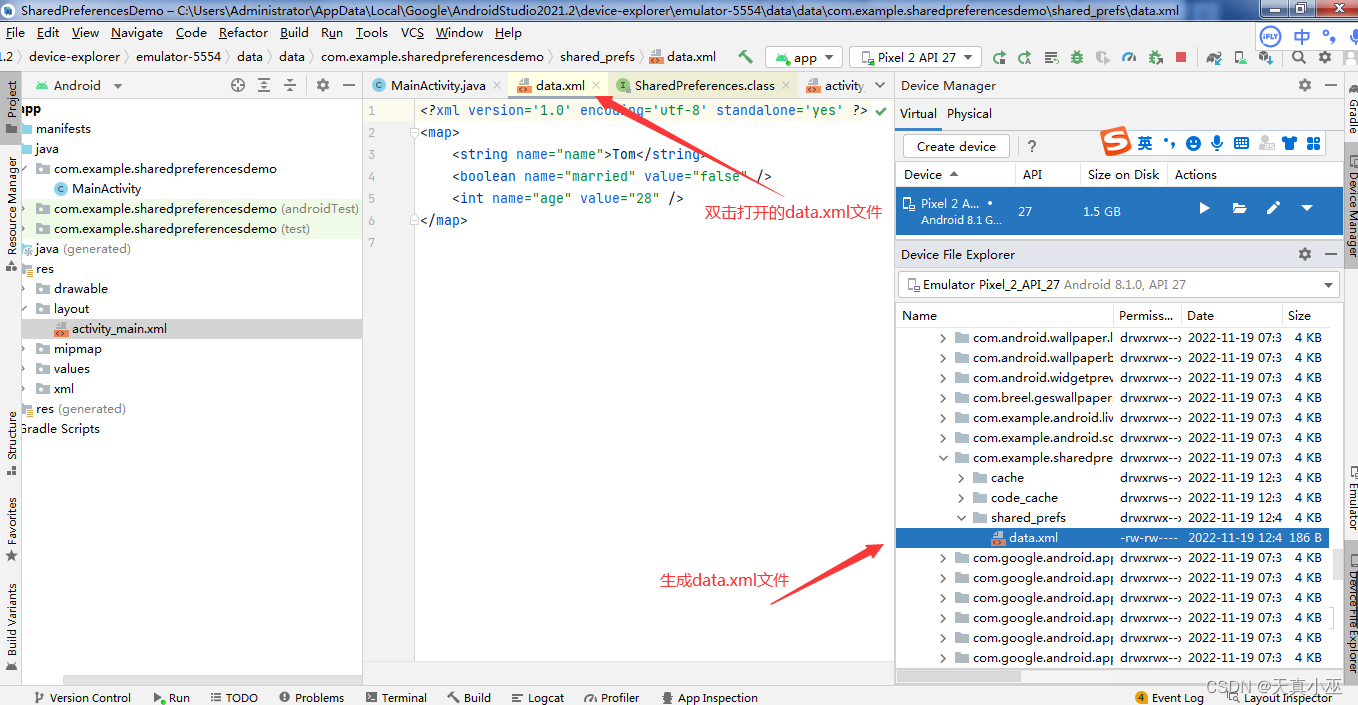

完整代码:
- "1.0" encoding="utf-8"?>
- <androidx.constraintlayout.widget.ConstraintLayout xmlns:android="http://schemas.android.com/apk/res/android"
- xmlns:app="http://schemas.android.com/apk/res-auto"
- xmlns:tools="http://schemas.android.com/tools"
- android:layout_width="match_parent"
- android:layout_height="match_parent"
- tools:context=".MainActivity">
- <Button
- android:id="@+id/saveButton"
- android:layout_width="wrap_content"
- android:layout_height="wrap_content"
- android:text="save data"
- app:layout_constraintBottom_toBottomOf="parent"
- app:layout_constraintEnd_toEndOf="parent"
- app:layout_constraintStart_toStartOf="parent"
- app:layout_constraintTop_toTopOf="parent" />
- <Button
- android:id="@+id/restoreButton"
- android:layout_width="wrap_content"
- android:layout_height="wrap_content"
- android:layout_marginBottom="236dp"
- android:text="restore data"
- app:layout_constraintBottom_toBottomOf="parent"
- app:layout_constraintEnd_toEndOf="parent"
- app:layout_constraintStart_toStartOf="parent" />
- androidx.constraintlayout.widget.ConstraintLayout>
- import androidx.appcompat.app.AppCompatActivity;
- import android.content.Context;
- import android.content.SharedPreferences;
- import android.os.Bundle;
- import android.util.Log;
- import android.view.View;
- import android.widget.Button;
- public class MainActivity extends AppCompatActivity {
- @Override
- protected void onCreate(Bundle savedInstanceState) {
- super.onCreate(savedInstanceState);
- setContentView(R.layout.activity_main);
- Button saveButton=findViewById(R.id.saveButton);
- Button restoreButton=findViewById(R.id.restoreButton);
- saveButton.setOnClickListener(new View.OnClickListener() {
- @Override
- public void onClick(View view) {
- //通过getSharedPreferences获取SharedPreferences对象
- SharedPreferences sharedPreferences= getSharedPreferences("data", Context.MODE_PRIVATE);
- SharedPreferences.Editor editor=sharedPreferences.edit();
- editor.putString("name","Tom");
- // editor.putInt("age",28);
- editor.putBoolean("married",false);
- editor.apply();
- }
- });
- restoreButton.setOnClickListener(new View.OnClickListener() {
- @Override
- public void onClick(View view) {
- SharedPreferences prefs= getSharedPreferences("data", Context.MODE_PRIVATE);
- String name=prefs.getString("name","");
- int age= prefs.getInt("age",10);
- Boolean married=prefs.getBoolean("married",false);
- Log.d("MainActivity","name is "+name);
- Log.d("MainActivity","age is "+age);
- Log.d("MainActivity","married is "+married);
- }
- });
- }
- }
总结
-
相关阅读:
springboot嵌入式数据库derby初探
Spring AOP理论 +代理模式详解
MySQL数据库、表的基本操作和常用数据类型
应用开发平台集成工作流系列之16——办理意见设计与实现
某全球领先的芯片供应商:优化数据跨网交换流程,提高安全管控能力
安装Java (JDK16)
Maven安装与配置完整教程
云原生时代数据库技术趋势与场景选型
基于Django的博客系统之用HayStack连接elasticsearch增加搜索功能(五)
【C++】类和对象(上)
- 原文地址:https://blog.csdn.net/qq_58259539/article/details/127906840
