-
Python画小仓鼠
肉嘟嘟的小动物很是可爱,本文介绍运用Python中的turtle库控制函数绘制小仓鼠。
一、效果展示
在介绍代码之前,先来看下本文的实现效果。可以参考Pinstaller(Python打包为exe文件)一文把Python文件转化成exe,发给未安装Python的他/她。
二、代码详解
Python绘制小仓鼠的原理是:应用turtle库绘制身体的不同部位。1 导入库
首先导入本文需要加载的库,如果你有些库还没有安装,导致运行代码时报错,可以在Anaconda Prompt中用pip方法安装。# -*- coding: UTF-8 -*- ''' 代码用途 :画小仓鼠 作者 :阿黎逸阳 博客 : https://blog.csdn.net/qq_32532663/article/details/106176609 ''' import os import pygame import turtle as t- 1
- 2
- 3
- 4
- 5
- 6
- 7
- 8
- 9
本文应用到的库较少,只应用了os、pygame和turtle三个库。
os库可以设置文件读取的位置。
pygame库是为了绘制过程更有趣,在绘图过程中添加了背景音乐。
turtle库是绘图库,相当于给你一支画笔,你可以在画布上用数学逻辑控制的代码完成绘图。
2 播放音乐
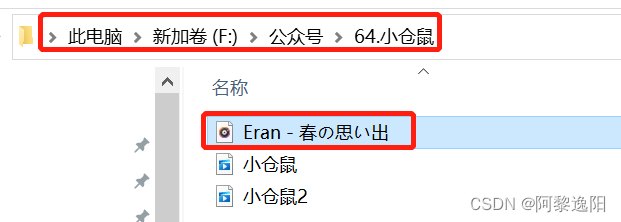
接着应用pygame库播放背景音乐,本文的音乐是《Eran - 春の思い出》。#播放音乐 print('播放音乐') pygame.mixer.init() pygame.mixer.music.load(r"F:\公众号\64.小仓鼠\Eran - 春の思い出.mp3") pygame.mixer.music.set_volume(0.5) pygame.mixer.music.play(1, 10)- 1
- 2
- 3
- 4
- 5
- 6
这一部分的代码和整体代码是剥离的,可以选泽在最开始放上该代码,也可以直接删除。如果选择播放音乐,需要在代码music.load函数中把你想放音乐的电脑本地存放地址填进去。有部分朋友对这一块有疑问,填充格式可参考如下图片:
3 定义画小仓鼠头的函数
然后设置画板的大小,并定义绘制小仓鼠头的函数。t.title('阿黎逸阳的代码公众号') t.speed(10) #t.screensize(1000, 800) t.setup(startx=0, starty = 0, width=800, height = 600) print('画右耳朵') #画右耳朵 t.penup() t.goto(100, 150) t.pendown() t.pensize(0.5) t.color('cornsilk') #t.color('cornsilk', 'cornsilk') t.begin_fill() t.setheading(40) t.circle(40, 20) t.circle(7, 180) t.right(22) t.circle(50, 12) print('画头') #画头 t.setheading(173) t.circle(200, 14) print('画左耳朵') #画左耳朵 t.setheading(120) t.circle(40, 20) t.circle(7, 180) t.right(22) t.circle(50, 12) print('画左脸') #画左脸 t.setheading(230) t.circle(200, 10) t.setheading(190) t.circle(20, 100) print('画脸上的波浪线') #画脸上的波浪线 t.setheading(60) t.circle(-30, 100) t.setheading(60) t.circle(-10, 130) t.setheading(70) t.circle(-10, 130) t.setheading(40) t.circle(-38, 100) t.setheading(56) t.circle(20, 130) t.setheading(110) t.circle(80, 22) t.end_fill()- 1
- 2
- 3
- 4
- 5
- 6
- 7
- 8
- 9
- 10
- 11
- 12
- 13
- 14
- 15
- 16
- 17
- 18
- 19
- 20
- 21
- 22
- 23
- 24
- 25
- 26
- 27
- 28
- 29
- 30
- 31
- 32
- 33
- 34
- 35
- 36
- 37
- 38
- 39
- 40
- 41
- 42
- 43
- 44
- 45
- 46
- 47
- 48
- 49
- 50
关键代码详解:
t.pensize(width):设置画笔的尺寸。
t.color(color):设置画笔的颜色。
t.penup():抬起画笔,一般用于另起一个地方绘图使用。
t.goto(x,y):画笔去到某个位置,参数为(x,y),对应去到的横坐标和纵坐标。
t.pendown():放下画笔,一般和penup组合使用。
t.left(degree):画笔向左转多少度,括号里表示度数。
t.right(degree):画笔向右转多少度,括号里表示度数。
t.circle(radius,extent,steps):radius指半径,若为正,半径在小乌龟左侧radius远的地方,若为负,半径在小乌龟右侧radius远的地方;extent指弧度;steps指阶数。
画外轮廓的关键是:通过调节circle函数中的半径和弧度来调节曲线的弧度,从而使得小仓鼠的轮廓比较流畅。
4 定义画左眼和右眼的函数
接着定义画左眼和右眼的函数。print('画左眼睛') #画左眼睛 t.penup() t.goto(30, 115) t.pendown() t.color('black') t.begin_fill() t.setheading(5) t.circle(-20, 40) t.setheading(60) t.circle(6, 205) t.end_fill() print('画右眼睛') #画右眼睛 t.penup() t.goto(90, 116) t.pendown() t.color('black') t.begin_fill() t.setheading(180) t.circle(20, 40) t.setheading(120) t.circle(-6, 205) t.end_fill()- 1
- 2
- 3
- 4
- 5
- 6
- 7
- 8
- 9
- 10
- 11
- 12
- 13
- 14
- 15
- 16
- 17
- 18
- 19
- 20
- 21
- 22
- 23
- 24
5 定义画嘴的函数
接着定义画嘴的函数。#画嘴巴 t.color('black', 'yellow') t.begin_fill() t.setheading(-20) t.circle(10, 60) t.setheading(290) t.circle(-30, 30) t.circle(-9, 180) t.left(20) t.circle(-50, 12) t.setheading(-22) t.circle(10, 60) t.end_fill()- 1
- 2
- 3
- 4
- 5
- 6
- 7
- 8
- 9
- 10
- 11
- 12
- 13
至此,在Python中实现小仓鼠的绘制逻辑已大致讲解完毕。快喊你喜欢挑战的朋友一起把缺失部分补充完整吧。
你可能感兴趣:
用Python绘制皮卡丘
用Python绘制词云图
用Python绘制520永恒心动
Python人脸识别—我的眼里只有你
Python画好看的星空图(唯美的背景)
【Python】情人节表白烟花(带声音和文字)
用Python中的py2neo库操作neo4j,搭建关联图谱
Python浪漫表白源码合集(爱心、玫瑰花、照片墙、星空下的告白) -
相关阅读:
【Linux信号专题】四、信号的捕捉
XuperChain共建守护者系列藏品震撼发行,最新合成玩法揭秘
「学习笔记」FHQ-treap
C#:轮询调度算法(附完整源码)
认识Sass
国产AI作画神器火了,更懂中文,竟然还能做周边!
基于JavaWeb的失物招领平台设计与实现
【华为机试真题 JAVA】水仙花数 Ⅰ-100
【Vue.js 3.0源码】AST 转换之节点内部转换
【软件基础】pycharm2021.3.2安装汉化和python3.10.1环境配置
- 原文地址:https://blog.csdn.net/qq_32532663/article/details/127950008

- 最新文章
-
【FHE】我们如何实现同态加密推理(八):SiLU 的密文化——两条路径,和一个 8 字节的开关
SQLcl 中 c/old/new 替换变量为何失效?先定位再替换
不让模型写作文,直接从它脑子里读答案:Jev 决策在 .NET 的两条路线
Halo插件:支持GitHub的图床附件策略
电视投屏界的“一股清流”!SimpleTVCast 6.0.0-beta 抢先体验:无需TV端App,界面大换血!✨
华三VXLAN集中式网关实战指南:Spine多活网关 + 双活接入(M-LAG)
软件更好写之后口碑会更重要
大 O、大 Omega、大 Theta 的区别,O(n) 复杂度是什么意思
Java标签跳转:一个鲜为人知但却很实用的小技巧
多智能体系统论文速读