-
Prometheus系列(一)安装
1 安装 Prometheus Server
官网:https://prometheus.io/
下载:https://prometheus.io/download/
手册:https://prometheus.io/docs/introduction/overview/
Prometheus 基于 Golang 编写,编译后的软件包,不依赖于任何的第三方依赖。只需要下载对应平台的二进制包,解压并且添加基本的配置即可正常启动 Prometheus Server。
1.1 下载安装包之后上传到服务器

1.2 解压安装包 prometheus-2.40.1.linux-amd64.tar.gz
[root@localserver /root/prometheus]# tar zxvf prometheus-2.40.1.linux-amd64.tar.gz [root@localserver /root/prometheus]# mv prometheus-2.40.1.linux-amd64 /usr/local/prometheus-2.40.1 [root@localserver /root/prometheus]# cd /usr/local/prometheus-2.40.1 [root@localserver /usr/local/prometheus-2.40.1]# ll total 215448 drwxr-xr-x. 2 1001 121 38 Nov 9 22:52 console_libraries drwxr-xr-x. 2 1001 121 173 Nov 9 22:52 consoles -rw-r--r--. 1 1001 121 11357 Nov 9 22:52 LICENSE -rw-r--r--. 1 1001 121 3773 Nov 9 22:52 NOTICE -rwxr-xr-x. 1 1001 121 114465160 Nov 9 22:34 prometheus -rw-r--r--. 1 1001 121 934 Nov 9 22:52 prometheus.yml -rwxr-xr-x. 1 1001 121 106127759 Nov 9 22:36 promtool- 1
- 2
- 3
- 4
- 5
- 6
- 7
- 8
- 9
- 10
- 11
- 12
- 13
- 14
1.3 修改配置文件 prometheus.yml
scrape_configs: - job_name: "prometheus" static_configs: - targets: ["localserver:9090"] - job_name: 'pushgateway' static_configs: - targets: ['localserver:9091'] labels: instance: pushgateway - job_name: 'node exporter' static_configs: - targets: ['localserver:9100', 'ubuntu18:9100']- 1
- 2
- 3
- 4
- 5
- 6
- 7
- 8
- 9
- 10
- 11
- 12
- 13
- 14
注:这里的 localserver 写为本地的 IP 也可以,或者使用 localhost 代替均可。
配置说明:
global 配置块:此片段指定的是 prometheus 的全局配置, 比如采集间隔,抓取超时时间等。
➢ scrape_interval:拉取数据的时间间隔,默认为 1 分钟默认继承 global 值。
scrape_timeout: 抓取超时时间,默认继承 global 值。
➢ evaluation_interval:规则验证(生成 alert)的时间间隔,默认为 1 分钟。
rule_files 配置块:此片段指定报警规则文件, prometheus 根据这些规则信息,会推送报警信息到alertmanager 中。
scrape_configs 配置块:配置采集目标相关, prometheus 监视的目标。Prometheus自身的运行信息可以通过 HTTP 访问,所以Prometheus 可以监控自己的运行数据。指定抓取配置,prometheus 的数据采集通过此片段配置。
➢ job_name:监控作业的名称。他的下一集是instance,也就是target
➢ static_configs:表示静态目标配置,就是固定从某个 target 拉取数据。一个 scrape_config 片段指定一组目标和参数, 目标就是实例,指定采集的端点, 参数描述如何采集这些实例, 主要参数如下
➢ targets : 指定监控的目标, 其实就是从哪儿拉取数据。
metric_path: 抓取路径, 默认是/metrics
*_sd_configs: 指定服务发现配置
Prometheus 会从 http://server:9090/metrics 上拉取数据。
Prometheus 是可以在运行时自动加载配置的。启动时需要添加:–web.enable-lifecycle
2 安装 node_exporter(可选)
简言之就是在每个node启动之后就通过了每个node的查询接口,promethus就能收集到了。
在 Prometheus 的架构设计中,Prometheus Server 主要负责数据的收集,存储并且对外提供数据查询支持,而实际的监控样本数据的收集则是由 Exporter 完成。
因此为了能够监控到某些东西,如主机的CPU 使用率,我们需要使用到 Exporter。Prometheus 周期性的从 Exporter 暴露的HTTP 服务地址(通常是/metrics)拉取监控样本数据。
Exporter 可以是一个相对开放的概念,其可以是一个独立运行的程序独立于监控目标以外,也可以是直接内置在监控目标中。只要能够向 Prometheus 提供标准格式的监控样本数据即可。
为了能够采集到主机的运行指标如CPU, 内存,磁盘等信息。我们可以使用Node Exporter。Node Exporter 同样采用 Golang 编写,并且不存在任何的第三方依赖,只需要下载,解压即可运行。可以从 https://prometheus.io/download/ 获取最新的 node exporter 版本的二进制包。
2.1 解压 node_exporter-1.4.0.linux-amd64.tar.gz
[root@localserver /root/prometheus]# tar xf node_exporter-1.4.0.linux-amd64.tar.gz [root@localserver /root/prometheus]# mv node_exporter-1.4.0.linux-amd64 /usr/local/node_exporter-1.4.0 [root@localserver /root/prometheus]# cd /usr/local/node_exporter-1.4.0 [root@localserver /usr/local/node_exporter-1.4.0]# ./node_exporter ## 直接使用 ./node_exporter 启动会在终端上有很多日志,所以我们可以使用 nohup 命令,用于在系统后台不挂断地运行命令,退出终端不会影响程序的运行。 ## 以下命令在后台执行 node_exporter 脚本,并重定向输入到当前目录下的 node_exporter.log 文件: [root@localserver /usr/local/node_exporter-1.4.0]# nohup ./node_exporter > node_exporter.log 2>&1 & ############################ 2>&1 解释: 将标准错误 2 重定向到标准输出 &1 ,标准输出 &1 再被重定向输入到 runoob.log 文件中。 0 – stdin (standard input,标准输入) 1 – stdout (standard output,标准输出) 2 – stderr (standard error,标准错误输出)- 1
- 2
- 3
- 4
- 5
- 6
- 7
- 8
- 9
- 10
- 11
- 12
- 13
- 14
- 15
- 16
- 17
此时,可以使用 ps -ef | grep node 命令确认node_exporter是否启动,或者使用 ss -tlnp 都可以;
启动之后,就可以在浏览器中输入:http://192.168.178.150:9100/metrics 进行访问了。如下图:

可见,当前 node exporter 获取到的当前主机的所有监控数据。
2.2 配置 node_exporter 的 service 文件
[root@localserver /root]# vim /usr/lib/systemd/system/node_exporter.service [root@localserver /root]# cat /usr/lib/systemd/system/node_exporter.service [Unit] Description=node_export Documentation=https://github.com/prometheus/node_exporter After=network.target [Service] Type=simple ExecStart= /usr/local/node_exporter-1.4.0/node_exporter Restart=on-failure [Install] WantedBy=multi-user.target [root@localserver /root]# systemctl restart node_exporter [root@localserver /root]# systemctl status node_exporter ● node_exporter.service - node_export Loaded: loaded (/usr/lib/systemd/system/node_exporter.service; disabled; vendor preset: disabled) Active: active (running) since Tue 2022-11-15 12:17:41 CST; 4s ago Docs: https://github.com/prometheus/node_exporter Main PID: 13013 (node_exporter) CGroup: /system.slice/node_exporter.service └─13013 /usr/local/node_exporter-1.4.0/node_exporter Nov 15 12:17:41 localserver node_exporter[13013]: ts=2022-11-15T04:17:41.886Z caller=node_exporter.go:115 level=info collector=thermal_zone Nov 15 12:17:41 localserver node_exporter[13013]: ts=2022-11-15T04:17:41.886Z caller=node_exporter.go:115 level=info collector=time Nov 15 12:17:41 localserver node_exporter[13013]: ts=2022-11-15T04:17:41.886Z caller=node_exporter.go:115 level=info collector=timex Nov 15 12:17:41 localserver node_exporter[13013]: ts=2022-11-15T04:17:41.886Z caller=node_exporter.go:115 level=info collector=udp_queues Nov 15 12:17:41 localserver node_exporter[13013]: ts=2022-11-15T04:17:41.886Z caller=node_exporter.go:115 level=info collector=uname Nov 15 12:17:41 localserver node_exporter[13013]: ts=2022-11-15T04:17:41.886Z caller=node_exporter.go:115 level=info collector=vmstat Nov 15 12:17:41 localserver node_exporter[13013]: ts=2022-11-15T04:17:41.886Z caller=node_exporter.go:115 level=info collector=xfs Nov 15 12:17:41 localserver node_exporter[13013]: ts=2022-11-15T04:17:41.886Z caller=node_exporter.go:115 level=info collector=zfs Nov 15 12:17:41 localserver node_exporter[13013]: ts=2022-11-15T04:17:41.886Z caller=node_exporter.go:199 level=info msg="Listening on" address=:9100 Nov 15 12:17:41 localserver node_exporter[13013]: ts=2022-11-15T04:17:41.886Z caller=tls_config.go:195 level=info msg="TLS is disabled." http2=false- 1
- 2
- 3
- 4
- 5
- 6
- 7
- 8
- 9
- 10
- 11
- 12
- 13
- 14
- 15
- 16
- 17
- 18
- 19
- 20
- 21
- 22
- 23
- 24
- 25
- 26
- 27
- 28
- 29
- 30
- 31
- 32
- 33
3 安装 Pushgateway(可选)
Prometheus 在正常情况下是采用拉模式从产生 metric 的作业或者 exporter(比如专门监控主机的NodeExporter)拉取监控数据。但是我们要监控的是 Flink on YARN 作业,想要让 Prometheus 自动发现作业的提交、结束以及自动拉取数据显然是比较困难的。
PushGateway 就是一个中转组件,通过配置Flink on YARN 作业将 metric 推到PushGateway,Prometheus 再从PushGateway 拉取就可以了。
[root@localserver /root/prometheus]# tar xf pushgateway-1.4.3.linux-amd64.tar.gz [root@localserver /root/prometheus]# mv pushgateway-1.4.3.linux-amd64 /usr/local/pushgateway-1.4.3 [root@localserver /root/prometheus]# cd /usr/local/pushgateway-1.4.3 [root@localserver /usr/local/pushgateway-1.4.3]# ll total 16868 -rw-r--r--. 1 3434 3434 11357 May 31 03:07 LICENSE -rw-r--r--. 1 3434 3434 487 May 31 03:07 NOTICE -rwxr-xr-x. 1 3434 3434 17255173 May 31 03:02 pushgateway- 1
- 2
- 3
- 4
- 5
- 6
- 7
- 8
4 安装Alertmanager(可选)
[root@localserver /root/prometheus]# tar xf alertmanager-0.24.0.linux-amd64.tar.gz [root@localserver /root/prometheus]# mv alertmanager-0.24.0.linux-amd64 /usr/local/alertmanager-0.24.0 [root@localserver /root/prometheus]# cd /usr/local/alertmanager-0.24.0 [root@localserver /usr/local/alertmanager-0.24.0]# ll total 55744 -rwxr-xr-x. 1 3434 3434 31988661 Mar 25 2022 alertmanager -rw-r--r--. 1 3434 3434 356 Mar 25 2022 alertmanager.yml -rwxr-xr-x. 1 3434 3434 25067944 Mar 25 2022 amtool -rw-r--r--. 1 3434 3434 11357 Mar 25 2022 LICENSE -rw-r--r--. 1 3434 3434 457 Mar 25 2022 NOTICE- 1
- 2
- 3
- 4
- 5
- 6
- 7
- 8
- 9
- 10
5 启动服务
[root@localserver /usr/local/prometheus-2.40.1]# nohup ./prometheus --config.file=prometheus.yml > ./prometheus.log 2>&1 & [root@localserver /usr/local/pushgateway-1.4.3]# nohup ./pushgateway --web.listen-address :9091 > ./pushgateway.log 2>&1 & [root@localserver /usr/local/alertmanager-0.24.0]# nohup ./alertmanager --config.file=/usr/local/prometheus-2.40.1/alertmanager.yml > ./alertmanager.log 2>&1 &- 1
- 2
- 3
- 4
- 5
启动之后在浏览器访问:http://192.168.178.150:9090/
点击:status - targets

Prometheus、node exporter、pushgateway 都是 up 状态,表示安装启动成功。
补充
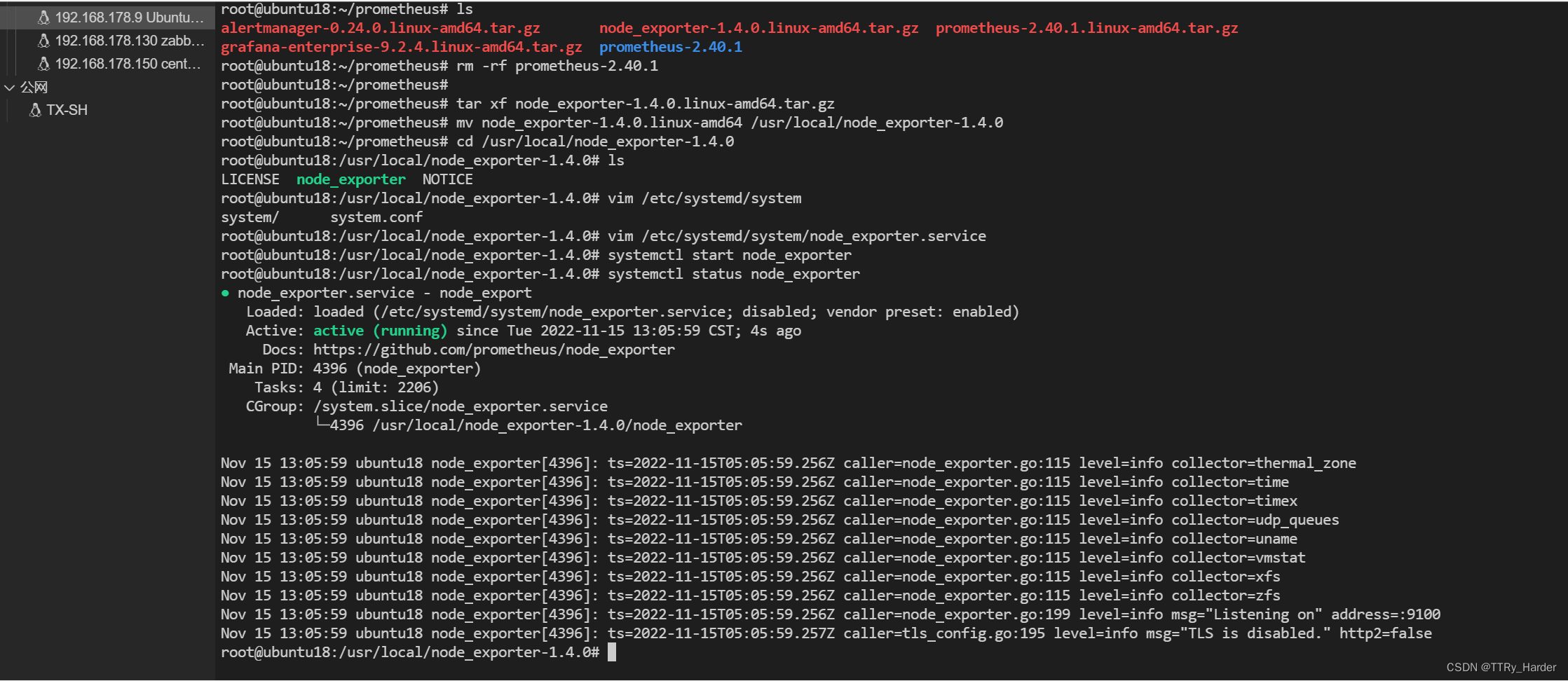
如果想要获取其它机器的上报信息,那么直接给这台下载 node_exporter 进行安装并启动即可;如下图:

-
相关阅读:
ASO优化之手游该如何获得巨量新增(中)
netstat –ano|findstr “port”命令
Python中的HTTP高手:如何玩转requests模块
Android 组件化
【剑指 Offer 67. 把字符串转换成整数】(有限状态机)
最常用的 9 个JavaScript 函数与示例
AIGC快速入门体验之虚拟对象
基于Windows Ubuntu子系统安装 TDengine
【servelt原理_10_servlet应用_转发请求】
怎么压缩PDF文件大小?不会操作的快看过来
- 原文地址:https://blog.csdn.net/weixin_44352521/article/details/127947313

- 最新文章
-
沪漂五周年了:我越来越迷茫了
Agentic Skill Routing 实战:别再把所有 Skill 塞进 AI Agent 上下文
MySQL-Seconds_behind_master的精度误差
[MAF预定义ChatClient中间件-03]CachingChatClient——利用缓存省钱省时间
AI的至暗历史:从万众期待到被政府撤资,AI的两次死亡徘徊
Agent OS :五种驯服不确定性的范式
PortSwigger SQL注入LAB11
数据库即时编译JIT
[Begin]AI Learn Data Day 0
深度学习进阶(二十七)现代 LLM 的核心架构设计其二:SwiGLU