-
STM32+ MAX30102通过指尖测量心率+血氧饱和度
一、前言
重要的事情放在最前面:max30102只适用于指尖手指测量,不适用与手腕手指测量,如需做成可穿戴样式选择传感器的小伙伴请pass掉他,因为他只有红光和红外2种光,不够充足的数据源去运算。
由于一些原因,本篇文章所有下载资源不收取任何积分,让你不花一分钱教你如何使用stm32驱动和使用max30102这个传感器,对大学生做毕设的很友好,如果帮助到你了,请在评论区说明有帮助,给与我能量继续为你们开源哦。
二、环境
stm32f1xx(我是用的是c8t6)
keil5
qt5.7
三、正文
简单的概括,从你有需求,到确认物料使用,到采购物料,到使用物料做成品,到调试使用中间会涉及很多环节,在文章开头就把最重要的说出来了,如果你想做穿戴在手腕上或贴在皮肤表面的,不适用这个传感器,他的原理是透过血管,采集图像,在经过算法分析,如果光无法透过血管,采集的数据特征不明显,那么准确率就没有了,实用性也就没有了,如果只是用在手指检测,那么可以继续往下看了。
在网上搜索有很多很多的模块再买,资料也是有很多,在b站和各种论坛使用这种传感器成功的也有很多,都是打着开源的口号,然后背地里收钱,网上还有很多付费花积分下载的资源,下载下来也是不能直接用的,是不好使的。
1.电路设计
首先附上我是用单片机的最小系统电路,这就很简单了,新手小白也能一下子就看懂

这里我把图片缩小,单击就能方大看了,就是stm32最小系统
然后是传感器电路图,我看网上很多模块都是使用到1.8V,在看了官方手册实际3.3V也可以为设备供电和使用了,原理图如下

这里我把IIC信号和中断信号用0402的排阻上拉,大家伙可以用封装稍微大一些的电阻
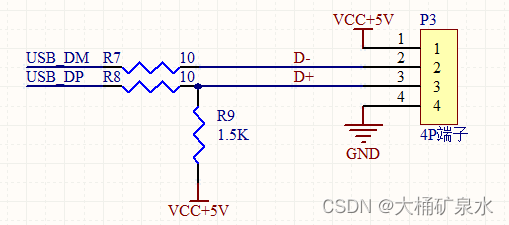
再有就是USB端子部分了,因为整体使用的是USB通信,通过USB连接电脑,软件端使用虚拟串口,与上位机通讯使用的是串口通讯方式,相当于省去了CH340芯片。
最后在某创白嫖一下四层板,在焊接元器件,洗板水刷个板,硬件就干干净净的出炉了


2.程序编写
硬件完毕,就是软件的活了,软件我也是一开始在网上找现成的程序,毕竟能省去很多的研究时间,经过一两天晚上的寻找,发现网上很多程序都是骗积分的,根本不能用,再有就是带了一大堆乱七八糟的外设驱动,程序结构也是乱七八糟,这个也不是抱怨什么,都可以理解,因为编程习惯是看入门是使用的谁家教程,就习惯谁家的程序结构,比如我特别使用某原子的库函数程序结构,有些人用的是某火的结构,有些人是某xx的结构,各有各的习惯,这里不多说,继续。
软件主要增加3个文件,分别是myiic.c max30102.c algorithm.c这三个程序分别是硬件iic引脚驱动程序,max30102时序逻辑驱动程序和对应采集数据算法程序,这三个文件基本把和自己设计的硬件引荐对应好,基本就没什么问题了,最主要的是main.c中程序,这里我在网上下载了10几个程序,没有一个在main函数里驱动部分写注释的,都是一模一样的,再有就是写的乱七八糟,没有任何说明的,我把main.c驱动部分写了中文注释,让你会清晰的静下心来了解程序是如何实现逻辑的(一开始我也是很懵圈,下载的里程连main调用部分都特别复杂,都不知道从哪里入手,也没有中文注释),以上三个程序在下面开源资源中。
这里把main.c的程序发出来,因为有很多小伙伴看了这里,根本就不需要下载我的资源,就可以在自己的程序上一下子调通了。
- #include "sys.h"
- #include "delay.h"
- #include "string.h"
- #include "usart.h"
- #include "led.h"
- #include "usb_lib.h"
- #include "hw_config.h"
- #include "usb_pwr.h"
- #include "timer.h"
- #include "stdlib.h"
- #include "ct1711.h"
- #include "max30102.h"
- #include "algorithm.h"
- #include "myiic.h"
- //串口数据包
- char senddate[16]={0x5A,0xA5,0,0,0,0,0,0,0,0,0,0,0x53,0x54,0x4F,0x50};//缓存容量5A A5 温度2字节(1000倍,高前低后) 心率曲线2字节(高前低后) 心率2字节(高前低后) 心率检测状态 血氧2字节(高前低后) 血氧检测状态 53 54 4F 50
- //max30102参数
- uint32_t aun_ir_buffer[500]; //IR LED sensor data 红外数据,用于计算血氧
- int32_t n_ir_buffer_length=500; //data length
- uint32_t aun_red_buffer[500]; //Red LED sensor data 红光数据,用于计算心率曲线以及计算心率
- int32_t n_sp02; //SPO2 value
- int8_t ch_spo2_valid; //indicator to show if the SP02 calculation is valid
- int32_t n_heart_rate; //heart rate value
- int8_t ch_hr_valid; //indicator to show if the heart rate calculation is valid
- #define MAX_BRIGHTNESS 255
- int main(void)
- {
- //USB通信变量
- u32 len;
- u8 usbstatus=0;
- //max30102变量
- uint32_t un_min, un_max, un_prev_data;
- int i,j;
- int32_t n_brightness;
- float f_temp;
- u8 temp[6];
- //初始化系统
- delay_init(); //延时函数初始化
- NVIC_PriorityGroupConfig(NVIC_PriorityGroup_2); //设置NVIC中断分组2:2位抢占优先级,2位响应优先级
- JTAG_Set(JTAG_SWD_DISABLE); //=====关闭JTAG接口
- JTAG_Set(SWD_ENABLE); //=====打开SWD接口 可以利用主板的SWD接口调试
- uart1_init(115200);
- LED_Init(); //初始化与LED连接的硬件接口
- TIM3_Int_Init(49,7199);//10Khz的计数频率,计数到50为5ms
- //max30102初始化
- max30102_init();
- //下面这些在主程序循环执行,在保证硬件没问题的情况下,无需在初始化中执行一次,反正也没有做什么保护和提示措施
- // un_min=0x3FFFF;
- // un_max=0;
- // n_ir_buffer_length=500; //缓冲区长度100存储5秒的运行在100sps的样本
- // //读取前500个样本,确定信号范围
- // for(i=0;i
- // while(MAX30102_INT==1); //等待直到中断引脚断言
- // max30102_FIFO_ReadBytes(REG_FIFO_DATA,temp);//读取传感器数据,赋值到temp中
- // aun_red_buffer[i] = (long)((long)((long)temp[0]&0x03)<<16) | (long)temp[1]<<8 | (long)temp[2]; // 将值合并得到实际数字
- // aun_ir_buffer[i] = (long)((long)((long)temp[3] & 0x03)<<16) |(long)temp[4]<<8 | (long)temp[5]; // 将值合并得到实际数字
- // if(un_min>aun_red_buffer[i])
- // un_min=aun_red_buffer[i];//更新计算最小值
- // if(un_max
- // un_max=aun_red_buffer[i];//更新计算最大值
- // }
- // //un_prev_data=aun_red_buffer[i];//获取数据最后一个数值,没有用,主程序中未马上使用被替换
- // //计算前500个样本(前5秒样本)后的心率和SpO2
- // maxim_heart_rate_and_oxygen_saturation(aun_ir_buffer, n_ir_buffer_length, aun_red_buffer, &n_sp02, &ch_spo2_valid, &n_heart_rate, &ch_hr_valid);
- //USB虚拟串口初始化
- delay_ms(500);
- USB_Port_Set(0); //USB先断开
- delay_ms(200);
- USB_Port_Set(1); //USB再次连接
- Set_USBClock();
- USB_Interrupts_Config();
- USB_Init();
- while(1)
- {
- /**************************USB虚拟串口部分*************************/
- //检测usb热插拔状态
- if(usbstatus!=bDeviceState){//USB连接状态发生了改变.
- usbstatus=bDeviceState;//记录新的状态
- // if(usbstatus==CONFIGURED)printf("USB连接成功\r\n");//提示USB连接成功
- // else printf("USB连接断开\r\n");//提示USB断开
- }
- //终端接收usb虚拟串口数据
- if(USB_USART_RX_STA&0x8000){
- len=USB_USART_RX_STA&0x3FFF;//得到此次接收到的数据长度
- USB_USART_RX_STA=0;
- // printf("您发送的消息长度为:%d,内容为:%s\r\n",len,USB_USART_RX_BUF);//提示USB接收数据长度
- if(USB_USART_RX_BUF[0]==0x5a&&USB_USART_RX_BUF[1]==0xa5&&USB_USART_RX_BUF[2]==0xff&&USB_USART_RX_BUF[3]==0x50&&len==4){//判断接收数据
- //no deal with...
- }
- memset(USB_USART_RX_BUF,0,sizeof(USB_USART_RX_BUF));//缓存清零
- }
- if(usbstatus==CONFIGURED){//判断USB已经连接
- //定时500ms进入一次
- if(led_flag>100){//5ms×100=500ms
- led_flag=0;
- //闪烁led代表工作状态正常
- LED0=!LED0;
- }
- //读取和计算max30102数据,总体用缓存的500组数据分析,实际每读取100组新数据分析一次
- i=0;
- un_min=0x3FFFF;
- un_max=0;
- //将前100组样本转储到内存中(实际没有),并将后400组样本移到顶部,将100-500缓存数据移位到0-400
- for(i=100;i<500;i++){
- aun_red_buffer[i-100]=aun_red_buffer[i];//将100-500缓存数据移位到0-400
- aun_ir_buffer[i-100]=aun_ir_buffer[i];//将100-500缓存数据移位到0-400
- //更新信号的最小值和最大值
- if(un_min>aun_red_buffer[i])//寻找移位后0-400中的最小值
- un_min=aun_red_buffer[i];
- if(un_max
- un_max=aun_red_buffer[i];
- }
- //在计算心率前取100组样本,取的数据放在400-500缓存数组中
- for(i=400;i<500;i++){
- un_prev_data=aun_red_buffer[i-1];//临时记录上一次读取数据
- while(MAX30102_INT==1);
- max30102_FIFO_ReadBytes(REG_FIFO_DATA,temp);//读取传感器数据,赋值到temp中
- aun_red_buffer[i] = (long)((long)((long)temp[0]&0x03)<<16) | (long)temp[1]<<8 | (long)temp[2]; //将值合并得到实际数字,数组400-500为新读取数据
- aun_ir_buffer[i] = (long)((long)((long)temp[3] & 0x03)<<16) |(long)temp[4]<<8 | (long)temp[5]; //将值合并得到实际数字,数组400-500为新读取数据
- if(aun_red_buffer[i]>un_prev_data){//用新获取的一个数值与上一个数值对比
- f_temp=aun_red_buffer[i]-un_prev_data;
- f_temp/=(un_max-un_min);
- f_temp*=MAX_BRIGHTNESS;//公式(心率曲线)=(新数值-旧数值)/(最大值-最小值)*255
- n_brightness-=(int)f_temp;
- if(n_brightness<0)
- n_brightness=0;
- }
- else{
- f_temp=un_prev_data-aun_red_buffer[i];
- f_temp/=(un_max-un_min);
- f_temp*=MAX_BRIGHTNESS;//公式(心率曲线)=(旧数值-新数值)/(最大值-最小值)*255
- n_brightness+=(int)f_temp;
- if(n_brightness>MAX_BRIGHTNESS)
- n_brightness=MAX_BRIGHTNESS;
- }
- //通过UART将样本和计算结果发送到终端程序
- //if(ch_hr_valid == 1 && ch_spo2_valid ==1 && n_heart_rate<200 && n_sp02<101){//使用上一次测量的结论作为检测正确性判断//ch_hr_valid == 1 && n_heart_rate<120
- // usb_printf("HR=%i, ", n_heart_rate);
- // usb_printf("HRvalid=%i, ", ch_hr_valid);
- // usb_printf("SpO2=%i, ", n_sp02);
- // usb_printf("SPO2Valid=%i\r\n", ch_spo2_valid);
- senddate[2]=CT1711_hex>>8;//温度搞8位
- senddate[3]=CT1711_hex;//温度低8位
- senddate[4]=n_brightness>>8;//心率曲线高8位
- senddate[5]=n_brightness;//心率曲线8位
- senddate[6]=n_heart_rate>>8;//心率高8位
- senddate[7]=n_heart_rate;//心率8位
- senddate[8]=ch_hr_valid;//心率监测状态
- senddate[9]=n_sp02>>8;//血氧搞8位
- senddate[10]=n_sp02;//血氧低8位
- senddate[11]=ch_spo2_valid;//血氧监测状态
- for(j=0;j<16;j++){//发送测试完毕标志,提示校验
- USB_USART_SendData(senddate[j]);//以字节方式,发送给USB
- }
- //}
- }
- maxim_heart_rate_and_oxygen_saturation(aun_ir_buffer, n_ir_buffer_length, aun_red_buffer, &n_sp02, &ch_spo2_valid, &n_heart_rate, &ch_hr_valid);//传入500个心率和血氧数据计算传感器检测结论,反馈心率和血氧测试结果
- }
- else{//USB未连接
- //定时50ms进入一次
- if(led_flag>10){//5ms×10=50ms
- led_flag=0;
- LED0=!LED0;
- }
- }
- }
- }
在程序中放了大量的注释,从函数定义,到初始化,到循环中,这里包含了USB初始化,大家有使用的保留即可,不使用的while中就看if(usbstatus==CONFIGURED)这个条件里的程序即可。
主程序大概的流程就是每次采集100次数据,然后放在缓存数组的400-500地址位置,然后每次从500个全部缓存的数据中通过maxim_heart_rate_and_oxygen_saturation函数进行算法分析,计算出当前的心率、血氧饱和度,以及对应状态。
在硬件中可以看见我把RD和IRD引脚也连接到了单片机上,正常情况下这两个引脚不配置,默认悬空也可以使用,当然也可以配置红光和红外更强一些,因为max30102芯片9和10引脚是红光和红外的电源正极,这两个对应就是电源负极,我将电源的正连接3.3,这里配置之后红光会直接被拉到0V,就会导致我在设置低电平时,红光特别刺眼,功耗也会大大增加
//#define RD PBout(3) // 红光
//#define IRD PBout(4) // 红外在程序中也说明了对外的串口通讯协议,按照协议简单编写了一个上位机测试程序,只管的看一下曲线波形,在手指放上去之后他大概是这样的


其中紫色的是心率曲线,红色的是心率数值,血氧计算也是比较平稳的,基本保持95-100左右
但是放在手腕上,效果就完全不行, 虽然偶尔也能测出波形,但是心率和血氧就是乱了,就算使用算法磨平曲线二次分析计算,检测的波形也是无法保持的,只要稍微一动,测试曲线立马就没有了


以上是在手腕上测试的几个数据,和在手指下测量完全不能对比
软件也附在资源中了,以上硬件和软件就解决了,接下来还差什么呢,当然是结构设计了。
3.结构设计
这里本意是穿戴在手腕上,虽然比不上很多产品,又小、又精致、又实用、又准确,但是!我们这个自主可控,可以自己任意升级,自己想增加什么功能就增加什么功能,上位机或者手机APP想做什么样就做什么样,这个是买现成产品比不了的,毕竟,谁叫看这篇帖子到这的都是顶级动手小行家,都是未来的顶尖设计师工程师呢,我们的生命在于敢于折腾。
结构上采用金属磁吸表链的方式,设计的外壳当然就要有手表链的孔啦,这里结构也是使用的ABS材料,在强度上也是有保障的。整体分为上壳可下盖两个部分,将电路板嵌入在上壳中,在下盖拧螺丝固定。


上图即为上壳正面与反面,有4个3.5mm孔,嵌入铜花母

上图即为下盖,中间位置为裸漏出传感器与手指连接部分
整体结构设计相对简单,毕竟是准备使用3D打印的外壳,精度和材料没法像手机及只能手表那么复杂和高精尖。

最后出的结构有粉色和黑色两种,我还是比较喜欢粉色的一些,嘁哩喀喳开始组装


最后在将USB线缆连接到电脑,打开qt编写的上位机软件。
4.上位机设计
上位机程序就相对简单很多了,把算法部分都放在了下位机软件中去处理,上位机制作串口数据解析以及 曲线刷新显示,
头文件如下,可以看出内容很少,程序中还是使用了3个曲线独立,实际一个就够了,代码还能缩减1/3
mainwindow.h
- class MainWindow : public QMainWindow
- {
- Q_OBJECT
- public:
- explicit MainWindow(QWidget *parent = 0);
- ~MainWindow();
- private slots:
- void timeisout();
- void open_serialport(bool reset,QString comstr);
- void serialRead();//串口回调函数
- void comBatAnalyze(QByteArray &allData);//处理串口得到的数据
- //控制菜单槽函数
- void start_clicked();//开始采集
- void fw_data();//复位数据
- void setcan();
- void theback();//退出
- //曲线
- void QCustomPlot_Init(QCustomPlot *CustomPlot, char mode);
- void QCustomPlot_Updata1(QCustomPlot *CustomPlot);
- void QCustomPlot_Updata2(QCustomPlot *CustomPlot);
- void QCustomPlot_Updata3(QCustomPlot *CustomPlot);
- void updatedata(uint mode);
- double maxValue(QVector<double> list);//最大值
- double minValue(QVector<double> list);//最小值
- double averageValue(QVector<double> list);//平均值
- private:
- Ui::MainWindow *ui;
- QTimer *timeres;
- QSerialPort *serial;//串口句柄
- ulong m_allnum;//记录数据长度
- uint x_num1,x_num2,x_num3;//接收数据次数
- // QVector
AIxx; - QVector<double> y_history[4];//全部数据
- QVector<double> x_vec_p1,x_p1,x_vec_p1_2;
- QVector<double> x_vec_p2,x_p2;
- QVector<double> x_vec_p3,x_p3;
- double m_cursor_1[9];//曲线数值
- };
主程序mainwindow.cpp
- #include "mainwindow.h"
- #include "ui_mainwindow.h"
- QString COMS;
- MainWindow::MainWindow(QWidget *parent) :
- QMainWindow(parent),
- ui(new Ui::MainWindow)
- {
- ui->setupUi(this);
- // this->setWindowFlags(Qt::FramelessWindowHint);
- this->setWindowModality(Qt::ApplicationModal);
- //读取数据库历史串口配置
- COMS="COM13";
- open_serialport(0,COMS);//初始化串口
- ///初始化定时器
- QTimer *timebaty=new QTimer;
- timebaty->start(1000);//1s更新频率
- connect(timebaty,SIGNAL(timeout()),this,SLOT(timeisout()));//定时器1
- ///菜单栏绑定槽
- connect(ui->action_L,SIGNAL(triggered()),this,SLOT(start_clicked()));//开始采集
- connect(ui->action_R,SIGNAL(triggered()),this,SLOT(fw_data()));//复位数据
- connect(ui->action_set,SIGNAL(triggered()),this,SLOT(setcan()));
- connect(ui->action_back,SIGNAL(triggered()),this,SLOT(theback()));//退出程序
- connect(ui->pushButton,QPushButton::clicked,[=](){setcan();});
- ///初始化曲线
- // AIxx.clear();//清除x数据
- y_history[0].clear();//清除y数据
- y_history[1].clear();//清除y数据
- y_history[2].clear();//清除y数据
- y_history[3].clear();//清除y数据
- QCustomPlot_Init(ui->customplot1,1);
- QCustomPlot_Init(ui->customplot2,2);
- QCustomPlot_Init(ui->customplot3,3);
- ///复位数据
- fw_data();
- }
- MainWindow::~MainWindow()
- {
- delete ui;
- }
- void MainWindow::timeisout()
- {
- //刷新系统时间和系统运行时间
- ui->label_runtime->setText(QDateTime::currentDateTime().toString(QString::fromUtf8("yyyy年MM月dd日 HH:mm:ss")));
- //计算通讯速率
- static uint32_t number=0;
- if(m_allnumelse number=m_allnum-number;ui->label_speed->setText(QString::number(number/1024)+"KByte/s RX:"+QString::number(m_allnum));number=m_allnum;}///串口配置start///初始化/复位串口void MainWindow::open_serialport(bool reset,QString comstr){if(reset){serial->clear();//先关闭之前的串口serial->close();}serial = new QSerialPort(comstr);serial->open(QIODevice::ReadWrite);//读写打开serial->setBaudRate(921600); //波特率QSerialPort::Baud9600serial->setDataBits(QSerialPort::Data8); //数据位serial->setParity(QSerialPort::NoParity); //无奇偶校验serial->setStopBits(QSerialPort::OneStop); //无停止位serial->setFlowControl(QSerialPort::NoFlowControl); //无控制connect(serial,SIGNAL(readyRead()),this,SLOT(serialRead()));//连接串口读取函数}//串口回调函数void MainWindow::serialRead(){static QByteArray allData;while (!serial->atEnd()){allData += serial->readAll().toHex();comBatAnalyze(allData);//处理串口得到的数据}}//处理串口得到的数据5AA5 0000 0000 00 0000 00 53544F50void MainWindow::comBatAnalyze(QByteArray &allData){QByteArray dataTemp;bool ok;int len=0;int start;int move;dataTemp=allData.toUpper();while((len=dataTemp.count())>=16*2){//最少长度为13+数据0move=2;start=dataTemp.indexOf("5AA5",0);//搜索字符,返回搜索到的起始位置if(start>=0){len=len-start;//将5AA5做为开头,长度随之变化dataTemp=dataTemp.right(len);//从右侧裁剪len长度数据保存if(len>=16*2){if(dataTemp.mid(0,4)=="5AA5"&&dataTemp.mid(24,8)=="53544F50"){// QByteArray aaa=QByteArray::fromHex(dataTemp);// uint16_t temp=((aaa[2]<<24)&0xFF000000)+((aaa[3]<<16)&0x00FF0000)+((aaa[4]<<8)&0x0000FF00)+(aaa[5]&0x000000FF);uint16_t temp=(unsigned int)dataTemp.mid(2*2,4).toInt(&ok,16);uint16_t HRplot=(unsigned int)dataTemp.mid(4*2,4).toInt(&ok,16);uint16_t HR=(unsigned int)dataTemp.mid(6*2,4).toInt(&ok,16);uint8_t HRvalid=(unsigned char)dataTemp.mid(8*2,2).toInt(&ok,16);uint16_t SpO2=(unsigned int)dataTemp.mid(9*2,4).toInt(&ok,16);uint8_t SPO2Valid=(unsigned char)dataTemp.mid(11*2,2).toInt(&ok,16);qDebug()<<(double)temp/1000<//if(HRvalid==1&&SPO2Valid==1){y_history[0].append(HRplot);y_history[1].append(HR);y_history[2].append(SpO2);y_history[3].append((double)temp/1000);//更新曲线QCustomPlot_Updata1(ui->customplot1);QCustomPlot_Updata2(ui->customplot2);QCustomPlot_Updata3(ui->customplot3);//更新数值updatedata(1);updatedata(2);updatedata(3);//}m_allnum+=len;move=16*2;//剪掉当前使用完毕的数据}dataTemp=dataTemp.right(len-move);//剪掉当前使用完毕的数据}else{break;}}else{dataTemp.clear();//若没有需求的数据,则清除整个数据内容,重新接收判断break;}}allData=dataTemp;}///串口配置end////菜单栏回调函数///开始采集y_history[0],y_history[1],y_history[2]void MainWindow::start_clicked(){open_serialport(1,COMS);//初始化串口qDebug()<<"11";}//复位数据void MainWindow::fw_data(){//开始采集前清空数据m_allnum=0;//清空长度y_history[0].clear();//清除y数据y_history[1].clear();//清除y数据y_history[2].clear();//清除y数据y_history[3].clear();//清除y数据x_num1=0;//接收刷新曲线数据次数x_num2=0;//接收刷新曲线数据次数x_num3=0;//接收刷新曲线数据次数//清空曲线显示x_vec_p1.clear();x_p1.clear();x_vec_p2.clear();x_p2.clear();x_vec_p3.clear();x_p3.clear();QCustomPlot_Updata1(ui->customplot1);QCustomPlot_Updata2(ui->customplot2);QCustomPlot_Updata3(ui->customplot3);updatedata(0);}//设置界面void MainWindow::setcan(){}//退出程序void MainWindow::theback(){this->close();}///菜单栏回调函数end/曲线配置void MainWindow::QCustomPlot_Init(QCustomPlot *CustomPlot,char mode){//添加曲线CustomPlot->addGraph(CustomPlot->xAxis,CustomPlot->yAxis);//以左侧y轴为准if(mode==1)CustomPlot->addGraph(CustomPlot->xAxis,CustomPlot->yAxis2);//以右侧y轴为准QPen graphPen0;graphPen0.setColor(QColor(150,40,120));//设置曲线颜色QPen graphPen1;graphPen1.setColor(QColor(220,40,0));//设置曲线颜色// graphPen0.setWidthF(4);//曲线粗度if(mode==1)CustomPlot->yAxis2->setVisible(true);//显示y轴2CustomPlot->graph(0)->setPen(graphPen0);//使用画笔绘制曲线if(mode==1)CustomPlot->graph(1)->setPen(graphPen1);//使用画笔绘制曲线CustomPlot->graph(0)->setName(QString(""));if(mode==1)CustomPlot->graph(1)->setName(QString(""));//设置横坐标显示倍数QSharedPointer
pITicker(new QCPAxisTickerPi()) ;//QCPAxisTickerPi设置Pi刻度标签CustomPlot->xAxis->setTicker(pITicker);pITicker->setPiSymbol("");//设置数值后面π替换为*pITicker->setFractionStyle(QCPAxisTickerPi::fsFloatingPoint);//设置小数部分显示float型pITicker->setPiValue(1);//设置*表示的值 原代表π=3.14,先换为m_multiple//50ms传输一包,这里1秒就是20包,1/20=0.05//设置坐标标题// QString groupname[3]={"心率","血氧","体温"};// QString plotname=QString(groupname[mode-1]);// CustomPlot->xAxis->setLabel(QString::fromUtf8("时间(s)"));// CustomPlot->yAxis->setLabel(QString::fromUtf8("plotname"));//设置坐标轴范围CustomPlot->xAxis->setRange(0,1000);//设置x轴范围CustomPlot->yAxis->setRange(-5,5);//设置y轴范围if(mode==1)CustomPlot->yAxis2->setRange(0,200);//设置y轴范围//设置网格虚线// CustomPlot->xAxis->grid()->setVisible(false);// CustomPlot->yAxis->grid()->setVisible(false);//设置风格颜色QLinearGradient plotGradient;plotGradient.setStart(0, 0);plotGradient.setFinalStop(0, 350);plotGradient.setColorAt(0, QColor(220, 220, 220));//80, 80, 80plotGradient.setColorAt(1, QColor(120, 120, 120));//50, 50, 50CustomPlot->setBackground(plotGradient); // 设置背景颜色QLinearGradient axisRectGradient;axisRectGradient.setStart(0, 0);axisRectGradient.setFinalStop(0, 350);axisRectGradient.setColorAt(0, QColor(220, 220, 220));//80, 80, 80axisRectGradient.setColorAt(1, QColor(120, 120, 120));//30, 30, 30CustomPlot->axisRect()->setBackground(axisRectGradient); // 设置QCPAxisRect背景颜色CustomPlot->xAxis->setBasePen(QPen(Qt::black,2));//设置x轴坐标轴颜色CustomPlot->yAxis->setBasePen(QPen(Qt::black,2));//设置y轴坐标轴颜色//blackif(mode==1)CustomPlot->yAxis2->setBasePen(QPen(Qt::black,2));//设置y轴坐标轴颜色//blackCustomPlot->xAxis->setTickPen(QPen(Qt::black, 2)); // 轴刻度线的画笔CustomPlot->yAxis->setTickPen(QPen(Qt::black,2));//blackif(mode==1)CustomPlot->yAxis2->setTickPen(QPen(Qt::black,2));//blackCustomPlot->xAxis->setSubTickPen(QPen(Qt::black, 2)); // 轴子刻度线的画笔CustomPlot->yAxis->setSubTickPen(QPen(Qt::black,2));//blackif(mode==1)CustomPlot->yAxis2->setSubTickPen(QPen(Qt::black,2));//blackCustomPlot->xAxis->setTickLabelColor(Qt::black);//设置x轴坐标颜色CustomPlot->yAxis->setTickLabelColor(Qt::black);//设置y轴坐标颜色if(mode==1)CustomPlot->yAxis2->setTickLabelColor(Qt::black);//设置y轴坐标颜色CustomPlot->xAxis->setLabelColor(Qt::black);//设置x轴名称颜色CustomPlot->yAxis->setLabelColor(Qt::black);//设置y轴名称颜色if(mode==1)CustomPlot->yAxis2->setLabelColor(Qt::black);//设置y轴名称颜色//设置曲线名称显示CustomPlot->legend->setBrush(QColor(0, 0, 0, 0));//设置图例提示背景色(曲线名称背景色)CustomPlot->legend->setVisible(false);//设置曲线名称不可见CustomPlot->legend->setTextColor(Qt::black);//blackCustomPlot->replot();//重绘制}//刷新曲线1void MainWindow::QCustomPlot_Updata1(QCustomPlot *CustomPlot){// static QVectorx_vec_p,x_p; //存放数据的容器 在h文件中声明,这里声明再次进入界面崩溃,不知道为什么 uint x_number=x_num1;double y_value1=y_history[0].last();double y_value2=y_history[1].last();if(x_number<1000){//这时容器里面还没1000个点 所有一直向里面存x_vec_p1.append(y_value1);//新值数x_vec_p1_2.append(y_value2);//新值数x_p1.append(x_number);CustomPlot->xAxis->setRange(0,1000);//设置范围正好 能显示当前点}else{//容器数据现在是正好1000个 把第一个出栈 把第1001个入栈 正好还是1000个数据x_vec_p1.removeFirst();x_vec_p1_2.removeFirst();x_p1.removeFirst();//入栈x_vec_p1.append(y_value1);//新值数x_vec_p1_2.append(y_value2);//新值数x_p1.append(x_number);CustomPlot->xAxis->setRange(x_p1.at(0),x_p1.at(x_p1.size()-1));}//设置坐标轴范围CustomPlot->yAxis->setRange(0,255);//设置y轴范围CustomPlot->yAxis2->setRange(0,200);//设置y轴范围CustomPlot->graph(0)->setData(x_p1,x_vec_p1);//设置数据CustomPlot->graph(1)->setData(x_p1,x_vec_p1_2);//设置数据// CustomPlot->yAxis->rescale(true);//设置Y轴坐标系 自动缩放以正常显示所有的数据// CustomPlot->graph(0)->rescaleAxes(true);//根据图像最高点最低点自动缩放坐标轴// CustomPlot->yAxis2->rescale(true);//设置Y轴坐标系 自动缩放以正常显示所有的数据// CustomPlot->graph(1)->rescaleAxes(true);//根据图像最高点最低点自动缩放坐标轴CustomPlot->replot();//重绘制x_num1++;}//刷新曲线2void MainWindow::QCustomPlot_Updata2(QCustomPlot *CustomPlot){// static QVectorx_vec_p,x_p; //存放数据的容器 在h文件中声明,这里声明再次进入界面崩溃,不知道为什么 uint x_number=x_num2;double y_value=y_history[2].last();if(x_number<1000){//这时容器里面还没1000个点 所有一直向里面存x_vec_p2.append(y_value);//新值数x_p2.append(x_number);CustomPlot->xAxis->setRange(0,1000);//设置范围正好 能显示当前点}else{//容器数据现在是正好1000个 把第一个出栈 把第1001个入栈 正好还是1000个数据x_vec_p2.removeFirst();x_p2.removeFirst();//入栈x_vec_p2.append(y_value);//新值数x_p2.append(x_number);CustomPlot->xAxis->setRange(x_p2.at(0),x_p2.at(x_p2.size()-1));}//设置坐标轴范围CustomPlot->yAxis->setRange(0,150);//设置y轴范围CustomPlot->graph(0)->setData(x_p2,x_vec_p2);//设置数据// CustomPlot->yAxis->rescale(true);//设置Y轴坐标系 自动缩放以正常显示所有的数据// CustomPlot->graph(0)->rescaleAxes(true);//根据图像最高点最低点自动缩放坐标轴CustomPlot->replot();//重绘制x_num2++;}//刷新曲线3void MainWindow::QCustomPlot_Updata3(QCustomPlot *CustomPlot){// static QVectorx_vec_p,x_p; //存放数据的容器 在h文件中声明,这里声明再次进入界面崩溃,不知道为什么 uint x_number=x_num3;double y_value=y_history[3].last();if(x_number<1000){//这时容器里面还没1000个点 所有一直向里面存x_vec_p3.append(y_value);//新值数x_p3.append(x_number);CustomPlot->xAxis->setRange(0,1000);//设置范围正好 能显示当前点}else{//容器数据现在是正好1000个 把第一个出栈 把第1001个入栈 正好还是1000个数据x_vec_p3.removeFirst();x_p3.removeFirst();//入栈x_vec_p3.append(y_value);//新值数x_p3.append(x_number);CustomPlot->xAxis->setRange(x_p3.at(0),x_p3.at(x_p3.size()-1));}//设置坐标轴范围CustomPlot->yAxis->setRange(minValue(x_vec_p3)-2,maxValue(x_vec_p3)+2);//设置y轴范围,最低温度-2,最高温度+2CustomPlot->graph(0)->setData(x_p3,x_vec_p3);//设置数据// CustomPlot->yAxis->rescale(true);//设置Y轴坐标系 自动缩放以正常显示所有的数据// CustomPlot->graph(0)->rescaleAxes(true);//根据图像最高点最低点自动缩放坐标轴CustomPlot->replot();//重绘制x_num3++;}//初始化曲线数据1.2.3void MainWindow::updatedata(uint mode){//计算曲线需求值QVector<double> shortdata1;shortdata1.clear();for(int i=0;i<(y_history[1].size());i++)shortdata1.append(y_history[1].at(i));QVector<double> shortdata2;shortdata2.clear();for(int i=0;i<(y_history[2].size());i++)shortdata2.append(y_history[2].at(i));QVector<double> shortdata3;shortdata3.clear();for(int i=0;i<(y_history[3].size());i++)shortdata3.append(y_history[3].at(i));m_cursor_1[0]=minValue(shortdata1);m_cursor_1[1]=maxValue(shortdata1);m_cursor_1[2]=averageValue(shortdata1);m_cursor_1[3]=minValue(shortdata2);m_cursor_1[4]=maxValue(shortdata2);m_cursor_1[5]=averageValue(shortdata2);m_cursor_1[6]=minValue(shortdata3);m_cursor_1[7]=maxValue(shortdata3);m_cursor_1[8]=averageValue(shortdata3);QString groupunit[9]={"次/分","次/分","次/分","%","%","%","℃","℃","℃"};QLabel *group1[9]={ui->label_show1,ui->label_show2,ui->label_show3,ui->label_show4,ui->label_show5,ui->label_show6,ui->label_show7,ui->label_show8,ui->label_show9};for(int i=0;i<9;i++)group1[i]->setText(QString::number(m_cursor_1[i])+groupunit[i]);ui->label_shuoming1->setText(QString::number(y_history[1].last()));ui->label_shuoming2->setText(QString::number(y_history[2].last()));ui->label_shuoming3->setText(QString::number(y_history[3].last()));}//求最大值double MainWindow::maxValue(QVector<double> list){if(list.count() == 0) return 0;double max=list.at(0);foreach(double each,list){if(max>each){max = max;}else{max = each;}}return max;}//求最小值double MainWindow::minValue(QVector<double> list){if(list.count() == 0) return 0;double min = list.at(0);foreach(double each,list){if(minmin = min;}else{min = each;}}return min;}//求平均值double MainWindow::averageValue(QVector<double> list){if(list.count() == 0) return 0;uint count=list.count();double num=0;for(int i=0;inum+=list.at(i);}return num/count;}实物演示视频https://live.csdn.net/v/255669
所有资源下载链接https://download.csdn.net/download/qq_37603131/87090708
四、结语
本文中涉及注意事项:
1.焊接传感器时不要把传感器表面搞坏,建议试用焊台,先焊接传感器,在焊接其他元器件
2.硬件和下位机程序与上位机程序仅供参考,不需要的地方自行删除改动
3.此传感器不适用于医疗,仅适用于监测和论文
4.如有升级需求请看资源说明
- 相关阅读:
实战:如何将Oracle单实例数据库转换成Oracle RAC数据库
sanic框架解决多进程共享缓存问题
人机融合有助于解决P-NP问题的理解与解决
go演示GRPC的用法
clickhouse的安装和配置
centos使用root用户登录
Linux删除空目录/非空目录和文件
乌龟代码 java
vue3+vite 学习 创建项目
Shell编程三剑客之sed
- 原文地址:https://blog.csdn.net/qq_37603131/article/details/127943666
- 最新文章
-
沪漂五周年了:我越来越迷茫了
Agentic Skill Routing 实战:别再把所有 Skill 塞进 AI Agent 上下文
MySQL-Seconds_behind_master的精度误差
[MAF预定义ChatClient中间件-03]CachingChatClient——利用缓存省钱省时间
AI的至暗历史:从万众期待到被政府撤资,AI的两次死亡徘徊
Agent OS :五种驯服不确定性的范式
PortSwigger SQL注入LAB11
数据库即时编译JIT
[Begin]AI Learn Data Day 0
深度学习进阶(二十七)现代 LLM 的核心架构设计其二:SwiGLU
