-
Qt翻译(本地化)坑总结
官方文档 Internationalization with Qt
贴一个比较好的总结 Qt中,软件多语言国际化翻译的方法与步骤
坑1:无法生成ts文件
实测在VS2013+QT 5.9上,点击Create New Translation File无法生成ts文件

提示ExitCode 1

注:在VS2015+Qt5.12上就没有问题注:在新电脑上可以生成了(win11,应该跟系统没关?),但无法lupdate和lrelease
因此只能通过qt cmd的方式生成,首先在VS中生成.pro文件,然后在.pro最后添加ts文件
TRANSLATIONS += xxxxx_zh.ts\ xxxxx_en.ts- 1
- 2
运行qt cmd,输入
lupdate pro文件路径

此处会警报,解决办法见 Qt cmd警告 WARNING: Project ERROR: Cannot run compiler ‘cl‘ 解决办法WARNING: Project ERROR: Cannot run compiler 'cl'. Output: =================== =================== Maybe you forgot to setup the environment?- 1
- 2
- 3
- 4
生成.ts文件,把ts文件拖进VS就会自动用Linguist打开
Info: creating stash file C:\Qt\Qt5.9.7\5.9.7\msvc2013_64\.qmake.stash Updating 'xxxxxx/xxxxx_zh.ts'... Found 16 source text(s) (16 new and 0 already existing) Updating 'xxxxxx/xxxxx_en.ts'... Found 16 source text(s) (16 new and 0 already existing)- 1
- 2
- 3
- 4
- 5
VS里的lrelease也不能用了,把上面cmd指令里的
lupdate改为lrelease运行即可

生成.qm文件Info: creating stash file C:\Qt\Qt5.9.7\5.9.7\msvc2013_64\.qmake.stash Updating 'xxxxxx/xxxxx_zh.qm'... Generated 2 translation(s) (0 finished and 2 unfinished) Ignored 14 untranslated source text(s) Updating 'xxxxxx/xxxxx_en.qm'... Generated 0 translation(s) (0 finished and 0 unfinished) Ignored 16 untranslated source text(s)- 1
- 2
- 3
- 4
- 5
- 6
- 7
上面显示
unfinished是因为在Linguist中没有确认,此时ts文件中会显示

上面的过程可以简化为三个批处理文件:
run_qt_cmd.bat打开qt cmd窗口,cmd_lupdate.bat生成.ts文件,cmd_lrelease.bat生成.qm文件,以下给出批处理文件:
(以QT5.9+MSVC2013 X64为例)
run_qt_cmd.batC:\Windows\System32\cmd.exe /A /Q /K C:\Qt\Qt5.9.7\5.9.7\msvc2013_64\bin\qtenv2.bat- 1
这一串命令可以通过cmd快捷方式获得
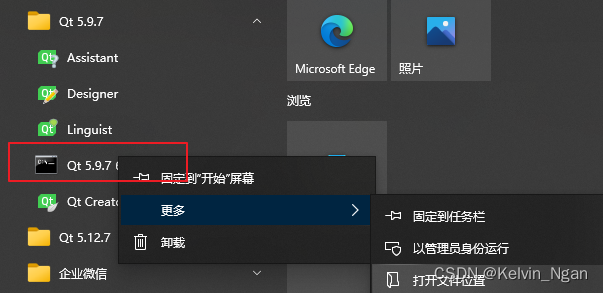
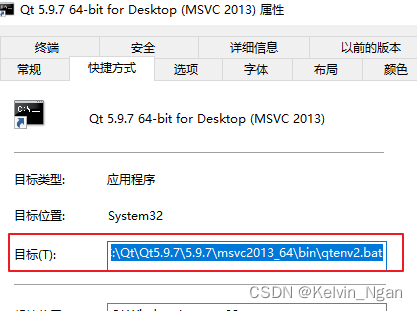
cmd_lupdate.bat
set path=C:\Program Files (x86)\Microsoft Visual Studio 12.0\VC\bin;C:\Program Files (x86)\Microsoft Visual Studio 12.0\VC\bin\x86_amd64;%path% lupdate pro文件路径- 1
- 2
cmd_lrelease.bat
set path=C:\Program Files (x86)\Microsoft Visual Studio 12.0\VC\bin;C:\Program Files (x86)\Microsoft Visual Studio 12.0\VC\bin\x86_amd64;%path% lrelease pro文件路径- 1
- 2
使用方法:首先运行run_qt_cmd.bat打开cmd窗口,需要生成ts文件时将cmd_lupdate.bat拖进cmd;需要生成qm文件时将cmd_lrelease.bat拖进cmd
坑2:ts文件的中文乱码
用Linguist打开ts文件,里面的中文显示乱码。

ts文件本质就是一个xml,
,Qt Creator默认编码UTF8,VS则是GB2312,如果源代码里面存在中文的字面量字符串(Literal String),如tr("中文字符串"),lupdate会自动将中文字符串转为UTF8从而导致乱码
查看官方文档QObject::tr[static] QString QObject::tr(const char *sourceText, const char *disambiguation = Q_NULLPTR, int n = -1)
Returns a translated version of sourceText, optionally based on a disambiguation string and value of n for strings containing plurals; otherwise returns QString::fromUtf8(sourceText) if no appropriate translated string is available.QObject::tr会按照UTF8读取文本
所以,源代码中待翻译的文本(用tr包含的字符串),使用拉丁字母表示,可以是文本对应的英文的大概意思,甚至是中文拼音,只要方便翻译人员在Linguist中对照即可
注:.ui文件里的中文没问题,即qt designer里面的中文,因为它本身是按照UTF-8保存的
坑3:不能直接翻译全局变量、静态变量、符号常量字符串
因为全局变量、静态变量初始化发生在QTranslator::installTranslator之前,Qt无法替换(翻译)这些变量。而通过QT_TR_NOOP宏可以标识出静态生存期变量,让Qt可以晚一些再翻译这些变量,称为
delayed translation,见官方文档QT_TR_NOOP的说明:QT_TR_NOOP(sourceText)
Marks the UTF-8 encoded string literal sourceText for delayed translation in the current context (class).
The macro tells lupdate to collect the string, and expands to sourceText itself.官方的示例:
QString FriendlyConversation::greeting(int type) { static const char *greeting_strings[] = { QT_TR_NOOP("Hello"), QT_TR_NOOP("Goodbye") }; return tr(greeting_strings[type]); }- 1
- 2
- 3
- 4
- 5
- 6
- 7
- 8
注意它明确提到
in the current context (class),例子中的静态字符串位于FriendlyConversation类作用域中,显然FriendlyConversation要不是QObject对象,要不是经过声明了Q_DECLARE_TR_FUNCTIONS宏,翻译动作始终需要由
QCoreApplication::translate来完成。Q_DECLARE_TR_FUNCTIONS的宏定义如下:#define Q_DECLARE_TR_FUNCTIONS(context) \ public: \ static inline QString tr(const char *sourceText, const char *disambiguation = Q_NULLPTR, int n = -1) \ { return QCoreApplication::translate(#context, sourceText, disambiguation, n); } \ QT_DECLARE_DEPRECATED_TR_FUNCTIONS(context) \ private:- 1
- 2
- 3
- 4
- 5
- 6
对于常量字符串、符号常量字符串,它们甚至在编译时就被编译器替换好了,就更不可能经QCoreApplication::translate翻译了。像下面的做法都是徒劳:
#define DEFINE_MESSAGE_ QT_TR_NOOP("Failed to 1") const char *kConstMessage = QT_TR_NOOP("Failed to 2"); static const char *kStaticConstMessage = QT_TR_NOOP("Failed to 3"); ... QMessageBox::critical(nullptr, tr("Error"), tr(DEFINE_MESSAGE_); QMessageBox::critical(nullptr, tr("Error"), tr(kConstMessage); QMessageBox::critical(nullptr, tr("Error"), tr(kStaticConstMessage); ...- 1
- 2
- 3
- 4
- 5
- 6
- 7
- 8
一种替代方案是通过一个类封装全局变量,并将类声明
Q_DECLARE_TR_FUNCTIONS宏或者继承QObject//GlobalMessageWarpper.h class GlobalMessageWarpper { Q_DECLARE_TR_FUNCTIONS(GlobalMessageWarpper) public: static QString message() { return tr(kMessage); } static const char* kMessage; }; //GlobalMessageWarpper.cpp const char* GlobalMessageWarpper::kMessage = QT_TR_NOOP("Failed to ..."); //main.cpp ... QMessageBox::critical(nullptr, tr("Error"), GlobalMessageWarpper::message()); ...- 1
- 2
- 3
- 4
- 5
- 6
- 7
- 8
- 9
- 10
- 11
- 12
- 13
- 14
-
相关阅读:
nginx配置文件 location语法
哪个牌子的儿童护眼灯好?分享315护眼灯合格名单的护眼台灯
vue beforeEach 路由拦截 cookie 登录管理 jsonwebtoken 表单提交校验 sessionStorage localStorage
西工大 ASLP 实验室在 WeNet 中开源基于 CPPN 的神经网络热词增强语音识别方案
联邦学习模型分类
自动化测试面试经历
Python 在问答频道中刷题积累到的小技巧(七)
C/C++---------------LeetCode第LCR. 024.反转链表
计算机毕业设计 | springboot养老院管理系统 老人社区管理(附源码)
vulnhub靶场之EVILBOX: ONE
- 原文地址:https://blog.csdn.net/Kelvin_Yan/article/details/127935306
- 最新文章
-
沪漂五周年了:我越来越迷茫了
Agentic Skill Routing 实战:别再把所有 Skill 塞进 AI Agent 上下文
MySQL-Seconds_behind_master的精度误差
[MAF预定义ChatClient中间件-03]CachingChatClient——利用缓存省钱省时间
AI的至暗历史:从万众期待到被政府撤资,AI的两次死亡徘徊
Agent OS :五种驯服不确定性的范式
PortSwigger SQL注入LAB11
数据库即时编译JIT
[Begin]AI Learn Data Day 0
深度学习进阶(二十七)现代 LLM 的核心架构设计其二:SwiGLU