-
nodejs学习week01
说明:学习nodejs之气那应该掌握html,css,JavaScript等前端基础技术
目录
前言:从今天开始我们一起来学习nodejs相关知识。
一、什么是nodejs
nodejs 是一个基于Chrome V8引擎的JavaScript运行环境
二、nodejs的内部模块
1.fs文件系统模块
readFile('文件路径绝/相对',‘字符集’,function(读取错误,读取成功{})):读取文件内容

writeFile(‘路径’,‘内容’,function(err){})

e.g:学上成绩转换
- const fs = require('fs')
- //读取文件
- //可以提供相对路径,也可以提供绝对路径(node会运行当下路径进行拼接)
- fs.readFile('./files/成绩.txt','utf8',function(err,dataStr){
- //判断是否能读取成功
- if(err){
- return console.log("读取失败"+err.message)
- }
- //将原数组按照空格分开
- const arrOld = dataStr.split(' ')
- console.log(arrOld)
- console.log('读取成功'+dataStr)
- //用:替换=并且加入到新数组中
- const arrNew = []
- arrOld.forEach(item => {
- arrNew.push(item.replace('=',': '))
- });
- console.log(arrNew)
- //向数组中新增空格换行符号
- const newStr = arrNew.join('\r\n')
- console.log(newStr)
- })

2.path路径模块


3.http服务器模块
创建基本的服务器
- const http = require('http')
- const serever = http.createServer()
- //为服务器实例绑定request事件
- serever.on('request',function(req,res){
- console.log('Someone visit our web server')
- })
- //启动服务器监听(启动服务器)
- serever.listen(8080,function(){
- console.log('server running at http://127.0.0.1:8080')
- })
req请求
- //req请求对象
- //req:访问与客户端有关的数据和属性
- //req.url:客户端请求的URL地址
- //req.method:客户端的method请求类型
- const http = require('http')
- const server = http.createServer()
- //req请求对象
- server.on('request',req=>{
- const url = req.url
- const method = req.method
- //输出
- const str = `Your request url is ${url}, and reqyest method is ${method}` //反引号
- console.log(str)
- })
- server.listen(8080,()=>{
- console.log('server running at http://127.0.0.1:8080')
- })
res响应:
- const http = require('http')
- const server = http.createServer()
- //req请求对象
- server.on('request',(req,res)=>{
- const url = req.url
- const method = req.method
- //输出
- const str = `Your request url is ${url}, and reqyest method is ${method}` //反引号
- console.log(str)
- //调用res.end方法向客户端响应一些数据
- res.end(str)
- })
- server.listen(8080,()=>{
- console.log('server running at http://127.0.0.1:8080')
- })
三、module.exports对象
向外暴露模块中的属性和方法(相当于私有的被公开)
自定义模块:
- console.log('加载了用户自定义模块')
- //向module.exports对象上挂载username属性
- module.exports.username = 'zz'
- //向module》exports上挂在
- module.exports.sayHello = function(){
- console.log("hello")
- }
- module.exports = {
- nickname:'小黑',
- sayHi(){
- console.log('hi')
- }
- }
test
- //加载用户模块通过路径
- const a = require('./11.加载用户自定义模块')
- console.log(a)

四、时间格式化
1.使用JavaScript的方法
dateformat.js
- //定义格式化时间的方法
- function dateFormat(dtStr){
- const dt = new Date(dtStr)
- //年
- const y = dt.getFullYear()
- //月
- const m = padZero(dt.getMonth()+1)
- //日
- const d = padZero(dt.getDay())
- //时
- const hh = padZero(dt.getHours())
- //分
- const mm = padZero(dt.getMinutes())
- //秒
- const ss = padZero(dt.getMilliseconds())
- return `${y}-${m}-${d} ${hh}:${mm}:${ss}`
- //`YYYY-MM-DD HH:mm:ss`
- }
- //添加补0函数
- function padZero(n){
- return n>9?n:'0'+n
- }
- //向外暴露供外界使用
- module.exports = {
- dateFormat
- }
test
- //导入自定义格式化时间模块
- const time = require('./17.dateformat')
- //调用方法进行时间的格式化
- const dt = new Date()
- //输出
- const newDt = time.dateFormat(dt)
- console.log(newDt)
2.使用moment对时间进行格式化
- //1.导入moment包
- const moment = require('moment')
- const dt = moment().format('YYYY-MM-DD HH:mm:ss')
- console.log(dt)

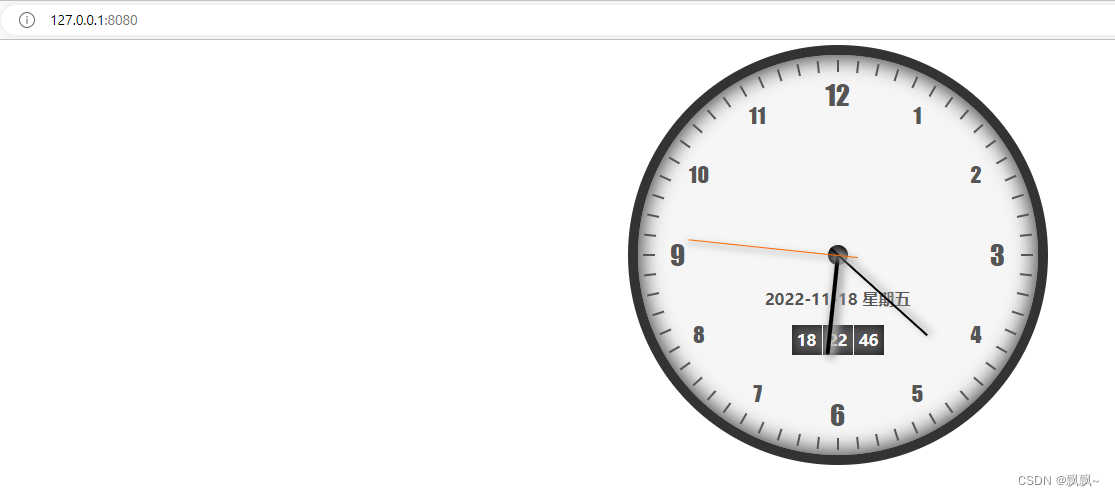
五、案例 实现clock时钟的web服务器
文件目录:


clock.html
- html>
- <html>
- <head>
- <meta charset="UTF-8">
- <link rel='stylesheet' href='./clock.css' />
- <title>时钟title>
- head>
- <body>
- <div class="clock" id="clock">
- <div class="origin">div>
- <div class="clock-line hour-line" id="hour-line">div>
- <div class="clock-line minute-line" id="minute-line">div>
- <div class="clock-line second-line" id="second-line">div>
- <div class="date-info" id="date-info">div>
- <div class="time-info" >
- <div class="time" id="hour-time">div>
- <div class="time" id="minute-time">div>
- <div class="time" id="second-time">div>
- div>
- div>
- <script type='text/javascript' src='./clock.js'>script>
- body>
- html>
clock.css
- *{
- margin:0;
- padding:0;
- }
- /* 外面的大盒子 */
- .clock{
- width:400px;
- height:400px;
- border:10px solid #333;
- box-shadow: 0px 0px 20px 3px #444 inset;
- border-radius:50%;
- position:relative;
- margin:5px auto;
- z-index:10;
- background-color:#f6f6f6;
- }
- /* 时钟数字 */
- .clock-num{
- width:40px;
- height:40px;
- font-size:22px;
- text-align:center;
- line-height:40px;
- position:absolute;
- z-index:8;
- color:#555;
- font-family:fantasy, 'Trebuchet MS';
- }
- .em_num{
- font-size:28px;
- }
- /* 指针 */
- .clock-line{
- position:absolute;
- z-index:20;
- }
- .hour-line{width:100px;
- height:4px;
- top:198px;
- left:200px;
- background-color:#000;
- border-radius:2px;
- transform-origin:0 50%;
- box-shadow:1px -3px 8px 3px #aaa;
- }
- .minute-line{
- width:130px;
- height:2px;
- top:199px;
- left:190px;
- background-color:#000;
- transform-origin:7.692% 50%;
- box-shadow:1px -3px 8px 1px #aaa;
- }
- .second-line{
- width:170px;
- height:1px;
- top:199.5px;
- left:180px;
- background-color:#f60;
- transform-origin:11.765% 50%;
- box-shadow:1px -3px 7px 1px #bbb;
- }
- /* 原点 */
- .origin{
- width:20px;
- height:20px;
- border-radius:10px;
- background-color:#000;
- position:absolute;
- top:190px;
- left:190px;
- z-index:14;
- }
- /* 日期 时间 */
- .date-info{
- width:160px;
- height:28px;
- line-height:28px;
- text-align:center;
- position:absolute;
- top:230px;
- left:120px;
- z-index:11;
- color:#555;
- font-weight:bold;
- font-family:'微软雅黑';
- }
- .time-info{
- width:92px;
- height:30px;
- line-height:30px;
- text-align:center;
- position:absolute;
- top:270px;
- left:154px;
- z-index:11;
- background-color:#555;
- padding:0;
- box-shadow:0px 0px 9px 2px #222 inset;
- }
- .time{
- width:30px;
- height:30px;
- text-align:center;
- float:left;
- color:#fff;
- font-weight:bold;
- }
- #minute-time{
- border-left:1px solid #fff;
- border-right:1px solid #fff;
- }
- /* 刻度 */
- .clock-scale{
- width:195px;
- height:2px;
- transform-origin:0% 50%;
- z-index:7;
- position:absolute;
- top:199px;
- left:200px;
- }
- .scale-show{
- width:12px;
- height:2px;
- background-color:#555;
- float:left;
- }
- .scale-hidden{
- width:183px;
- height:2px;
- float:left;
- }
clock.js
- (function(){//自己调用自己
- //页面加载完成时运行,将实参传给下面的函数
- window.onload=initNumXY(200, 160, 40,40);
- //获取指针的时分秒
- var hour_line = document.getElementById("hour-line");
- var minute_line = document.getElementById("minute-line");
- var second_line = document.getElementById("second-line");
- var date_info = document.getElementById("date-info");
- var week_day = [
- '星期日', '星期一', '星期二', '星期三', '星期四', '星期五', '星期六'
- ];
- //获取时间的时分秒
- var hour_time = document.getElementById("hour-time");
- var minute_time = document.getElementById("minute-time");
- var second_time = document.getElementById("second-time");
- //在底部调用函数
- function setTime(){
- var this_day = new Date();
- //如果时间大于12小时,就减去12小时
- var hour = (this_day.getHours() >= 12) ?
- (this_day.getHours() - 12) : this_day.getHours();
- var minute = this_day.getMinutes();
- var second = this_day.getSeconds();
- //定义小时转的角度
- var hour_rotate = (hour*30-90) + (Math.floor(minute / 12) * 6);
- //获取4位数的年份
- var year = this_day.getFullYear();
- //获取月份,如果小于10,要加0
- var month = ((this_day.getMonth() + 1) < 10 ) ?
- "0"+(this_day.getMonth() + 1) : (this_day.getMonth() + 1);
- //获取天数,小于10 加上0
- var date = (this_day.getDate() < 10 ) ?
- "0"+this_day.getDate() : this_day.getDate();
- //获取星期
- var day = this_day.getDay();
- //获取要转的度数
- hour_line.style.transform = 'rotate(' + hour_rotate + 'deg)';
- minute_line.style.transform = 'rotate(' + (minute*6 - 90) + 'deg)';
- second_line.style.transform = 'rotate(' + (second*6 - 90)+'deg)';
- //写入年月日
- date_info.innerHTML =
- year + "-" + month + "-" + date + " " + week_day[day];
- //在框框内写入时分秒
- hour_time.innerHTML = (this_day.getHours() < 10) ?
- "0" + this_day.getHours() : this_day.getHours();
- minute_time.innerHTML = (this_day.getMinutes() < 10) ?
- "0" + this_day.getMinutes() : this_day.getMinutes();
- second_time.innerHTML = (this_day.getSeconds() < 10) ?
- "0" + this_day.getSeconds():this_day.getSeconds();
- }
- //1秒执行一次
- setInterval(setTime, 1000);
- //让1至12个数按函数排这个位置
- function initNumXY(R, r, w, h){
- //数组里面装对象,每个元素对应每个数字的位置
- var numXY = [
- {
- "left" : R + 0.5 * r - 0.5 * w,
- "top" : R - 0.5 * r * 1.73205 - 0.5 * h
- },
- {
- "left" : R + 0.5 * r * 1.73205 - 0.5 * w,
- "top" : R - 0.5 * r - 0.5 * h
- },
- {
- "left" : R + r - 0.5 * w,
- "top" : R - 0.5 * h
- },
- {
- "left" : R + 0.5 * r * 1.73205 - 0.5 * w,
- "top" : R + 0.5 * r - 0.5 * h
- },
- {
- "left" : R + 0.5 * r - 0.5 * w,
- "top" : R + 0.5 * r * 1.732 - 0.5 * h
- },
- {
- "left" : R - 0.5 * w,
- "top" : R + r - 0.5 * h
- },
- {
- "left" : R - 0.5 * r - 0.5 * w,
- "top" : R + 0.5 * r * 1.732 - 0.5 * h
- },
- {
- "left" : R - 0.5 * r * 1.73205 - 0.5 * w,
- "top" : R + 0.5 * r - 0.5 * h
- },
- {
- "left" : R - r - 0.5 * w,
- "top" : R - 0.5 * h
- },
- {
- "left" : R - 0.5 * r * 1.73205 - 0.5 * w,
- "top" : R - 0.5 * r - 0.5 * h
- },
- {
- "left" : R - 0.5 * r - 0.5 * w,
- "top": R - 0.5 * r * 1.73205 - 0.5 * h
- },
- {
- "left" : R - 0.5 * w,
- "top" : R - r - 0.5 * h
- }
- ];
- //获取大盒子
- var clock = document.getElementById("clock");
- //for循环,规定值小于12,
- for(var i = 1; i <= 12; i++){
- //如果除以3能除完,就在div盒子里面写入,并且有两个样式
- if(i%3 == 0) {
- clock.innerHTML += ""+i+"";
- } else {
- clock.innerHTML += "" + i + "";
- }
- }
- //获取时钟数字的class类名
- var clock_num = document.getElementsByClassName("clock-num");
- //时钟数的位置
- for(var i = 0; i < clock_num.length; i++) {
- clock_num[i].style.left = numXY[i].left + 'px';
- clock_num[i].style.top = numXY[i].top + 'px';
- }
- //在div盒子里面写入刻度
- for(var i = 0; i < 60; i++) {
- clock.innerHTML += "" +"" +"" +"";
- }
- var scale = document.getElementsByClassName("clock-scale");
- //将刻度分散布在整个钟表上
- for(var i = 0; i < scale.length; i++) {
- scale[i].style.transform="rotate(" + (i * 6 - 90) + "deg)";
- }
- }
- })();
nodejs代码
- //1.导入node模块
- //导入http模块
- const http = require('http')
- //导入fs文件系统模块
- const fs = require('fs')
- //导入path路径处理模块
- const path = require('path')
- //2.创建web服务器
- //创建服务器实例化对象
- const server = http.createServer()
- //监听服务器的request事件
- server.on('request',(req,res)=>{
- //获取客户端请求的url地址
- const url = req.url
- //把获取的url地址映射成具体文件的存放路径
- //const fpath = path.join(__dirname,url)
- //优化路径
- //定义空白的路径
- let fpath = ''
- if(url === '/'){
- fpath = path.join(__dirname,'./clock/clock.html')
- }else{
- fpath = path.join(__dirname,'/clock',url)
- }
- //根据映射过来的文件路径读取文件
- fs.readFile(fpath,'utf8',(err,dataStr)=>{
- //读取文件失败,向客户端响应错误信息
- if(err){return res.end('404 NOT FOUND')}
- //读取文件成功,将读取成功的内容响应给客户端
- res.end(dataStr)
- })
- })
- //启动服务器
- server.listen(8080,()=>{
- console.log('server running at http://127.0.0.1:8080')
- })
实现效果:

-
相关阅读:
软件测试--selenium安装使用
在 Python 中使用 Selenium 从下拉菜单中选择选项
C语言-基础
树大总结(王道+红皮书)
PostgreSQL查询表操作
学习响应式布局
联合投稿其乐融融 抖音共创助你大显身手
美国Embarcadero公司正式发布2023 RAD Studio Delphi C++ Builder 12 Athens
端子排延时中间继电器DZS-822/DC110V
python3 获取 进程id 线程id
- 原文地址:https://blog.csdn.net/m0_46420244/article/details/127926117
