-
【GridMask】《GridMask Data Augmentation》

arXiv-2020
1 Background and Motivation
数据增广方法可以有效的缓解模型的过拟合
现有的数据增广方法可以大致分成如下3类
- spatial transformation(random scale, crop, flip and random rotation)
- color distortion( brightness, hue)
- information dropping(random erasing, cutout,HaS)
好的 information dropping 数据增广方法要 achieve reasonable balance between deletion and reserving of regional information on the images
删太多,把数据变成了噪声
删太少,目标没啥变化,失去了增广的意义

本文,作者提出GridMask,deletes uniformly distributed areas and finally forms a grid shape,在多个任务的公开数据集上效果均有提升

2 Related Work
- spatial transformation(random scale, crop, flip and random rotation)
- color distortion( brightness, hue)
- information dropping(random erasing, cutout,HaS)
3 Advantages / Contributions
提出 GridMask structured data augmentation 方法,在公开的分类、目标检测、分割的benchmark 上比 baseline 好
4 GridMask

作用形式
x ~ = x × M \widetilde{x}= x \times M x =x×M其中 x ∈ R H × W × C x \in \mathbb{R}^{H \times W \times C} x∈RH×W×C 为 输入图像, x ~ ∈ R H × W × C \widetilde{x} \in \mathbb{R}^{H \times W \times C} x ∈RH×W×C 为增广后的图像, M ∈ { 0 , 1 } H × W M \in \{0,1\}^{H \times W} M∈{0,1}H×W 为 binary mask that stores pixels to be removed,0 的话表示挡住,1 的话表示保留
形成 M M M 的话有 4 个超参数 ( r , d , δ x , δ y ) (r, d, \delta_x, \delta_y) (r,d,δx,δy)

1)Choice of r r rr r r is the ratio of the shorter gray edge in a unit,determines the keep ratio of an input image,值介于 0~1 之间
the keep ratio k k k of a given mask M M M as
k = s u m ( M ) H × W k = \frac{sum(M)}{H \times W} k=H×Wsum(M)
r r r 和 k k k 的关系是
k = 1 − ( 1 − r ) 2 = 2 r − r 2 k = 1-(1-r)^2 = 2r-r^2 k=1−(1−r)2=2r−r2
r r r 的值小于1, r r r 和 k k k 正相关
k k k 越大,灰色区域越多,遮挡越少
k k k 越小,黑色区域越多,遮挡越多2)Choice of d d d
d d d is the length of one unit
一个 unit 内(橙色虚线框),灰色区域的长度为 l = r × d l = r \times d l=r×d
d = r a n d o m ( d m i n , d m a x ) d = random(d_{min}, d_{max}) d=random(dmin,dmax)

这么画歧义更合适3)Choice of δ x \delta_x δx and δ y \delta_y δy
δ x \delta_x δx and δ y \delta_y δy are the distances between the first intact unit and boundary of the image. can shift the mask
δ x ( δ y ) = r a n d o m ( 0 , d − 1 ) \delta_x(\delta_y) = random(0, d-1) δx(δy)=random(0,d−1)
4)Statistics of Unsuccessful Cases
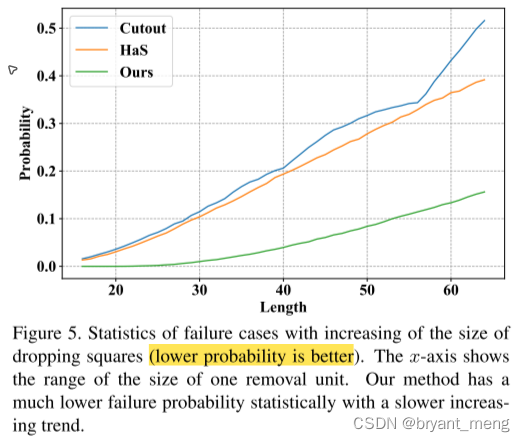
99 percent of an object is removed or reserved, we call it a failure caseGridMask has lower chance to yield failure cases than Cutout and HaS
5)The Scheme to Use GridMask
increase the probability of GridMask linearly with the training epochs until an upper bound P is achieved.
中间的概率用 p p p 表示,后续实验中有涉及到
5 Experiments
Datasets
- ImageNet
- COCO
- Cityscapes
5.1 Image Classification
1)ImageNet

比 Cutout 和 HaS 更好,It is because we handle the aforementioned failure cases betterBenefit to CNN

focus on large important regions2)CIFAR10

Combined with AutoAugment, we achieve SOTA result on these models.3)Ablation Study
(1)Hyperparameter r r r

r 越大,mask 1 越多,遮挡的越少,说明数据比较复杂
r 越小,mask 1 越少,遮挡的越多,说明数据比较简单
we should keep more information on complex datasets to avoid under-fitting, and delete more on simple datasets to reduce over-fitting
(2)Hyperparameter d d d

the diversity of d can increase robustness of the network
(3)Variations of GridMask
reversed GridMask:keep what we drop in GridMask, and drop what we keep in GridMask

效果不错,也印证了 GridMask 有很好的 balance between deletion and reservingrandom GridMask:drop a block in every unit with a certain probability of p u p_u pu.

p u p_u pu 越大,越贴近原始 GridMask
效果不行
5.2 Object Detection on COCO Dataset

不加 GridMask,training epochs 越多,过拟合越严重,加了以后,训练久一点, 精度还有上升空间5.3 Semantic Segmentation on Cityscapes

5.4 Expand Grid as Regularization
联合 GridMask 和 Mixup,ImageNet 上 SOTA

6 Conclusion(own)
代码实现,考虑了旋转增广,所以 mask 生成的时候是在以原图对角线为边长的情况下生成的,最后取原图区域
https://github.com/dvlab-research/GridMask/blob/master/imagenet_grid/utils/grid.py
import torch import numpy as np import math import PIL.Image as Image import torchvision.transforms as T import matplotlib.pyplot as plt class Grid(object): def __init__(self, d1=96, d2=224, rotate=1, ratio=0.5, mode=1, prob=1.): self.d1 = d1 self.d2 = d2 self.rotate = rotate self.ratio = ratio # r self.mode = mode # reversed? self.st_prob = self.prob = prob # p def set_prob(self, epoch, max_epoch): self.prob = self.st_prob * min(1, epoch / max_epoch) def forward(self, img): if np.random.rand() > self.prob: return img h = img.size(1) w = img.size(2) # 1.5 * h, 1.5 * w works fine with the squared images # But with rectangular input, the mask might not be able to recover back to the input image shape # A square mask with edge length equal to the diagnoal of the input image # will be able to cover all the image spot after the rotation. This is also the minimum square. hh = math.ceil((math.sqrt(h * h + w * w))) d = np.random.randint(self.d1, self.d2) # d = self.d # maybe use ceil? but i guess no big difference self.l = math.ceil(d * self.ratio) mask = np.ones((hh, hh), np.float32) st_h = np.random.randint(d) # delta y st_w = np.random.randint(d) # delta x for i in range(-1, hh // d + 1): s = d * i + st_h t = s + self.l s = max(min(s, hh), 0) t = max(min(t, hh), 0) mask[s:t, :] *= 0 for i in range(-1, hh // d + 1): s = d * i + st_w t = s + self.l s = max(min(s, hh), 0) t = max(min(t, hh), 0) mask[:, s:t] *= 0 r = np.random.randint(self.rotate) mask = Image.fromarray(np.uint8(mask)) mask = mask.rotate(r) mask = np.asarray(mask) mask = mask[(hh - h) // 2:(hh - h) // 2 + h, (hh - w) // 2:(hh - w) // 2 + w] # 这里结合原理图方便看懂一些 mask = torch.from_numpy(mask).float().cuda() if self.mode == 1: mask = 1 - mask mask = mask.expand_as(img) img = img.cuda() * mask return img if __name__ == "__main__": image = Image.open("2.jpg").convert("RGB") tr = T.Compose([ T.Resize((224,224)), T.ToTensor() ]) x = tr(image) gridmask_image = Grid(d1=64, d2=96).forward(x) print(gridmask_image.shape) # print(gridmask_image.shape()) fig, axs = plt.subplots(1,2) to_plot = lambda x: x.permute(1,2,0).cpu().numpy() axs[0].imshow(to_plot(x)) axs[1].imshow(to_plot(gridmask_image)) plt.show()- 1
- 2
- 3
- 4
- 5
- 6
- 7
- 8
- 9
- 10
- 11
- 12
- 13
- 14
- 15
- 16
- 17
- 18
- 19
- 20
- 21
- 22
- 23
- 24
- 25
- 26
- 27
- 28
- 29
- 30
- 31
- 32
- 33
- 34
- 35
- 36
- 37
- 38
- 39
- 40
- 41
- 42
- 43
- 44
- 45
- 46
- 47
- 48
- 49
- 50
- 51
- 52
- 53
- 54
- 55
- 56
- 57
- 58
- 59
- 60
- 61
- 62
- 63
- 64
- 65
- 66
- 67
- 68
- 69
- 70
- 71
- 72
- 73
- 74
- 75
- 76
- 77
- 78
- 79
- 80
- 81
- 82
- 83

-
相关阅读:
PMP考试通关宝典-敏捷专题
Google浏览器插件推荐
[强网杯 2022]factor有感
【学习笔记】《The Linux Command Line》第一部分 1 - 11 章(shell、进程、重定向、命令等)
如何知道代码跑得多慢?
在线智慧礼佛供品程序开发
4. Go的流程控制
MIT6.830-lab4-SimpleDB Transactions(数据库的事务LockManager、事务操作、死锁处理)
ISP代理是什么?跨境账号养号为什么要选择它?
爬虫_爬虫守则,反爬,反反爬和爬虫开发流程
- 原文地址:https://blog.csdn.net/bryant_meng/article/details/127892959


- 最新文章
-
沪漂五周年了:我越来越迷茫了
Agentic Skill Routing 实战:别再把所有 Skill 塞进 AI Agent 上下文
MySQL-Seconds_behind_master的精度误差
[MAF预定义ChatClient中间件-03]CachingChatClient——利用缓存省钱省时间
AI的至暗历史:从万众期待到被政府撤资,AI的两次死亡徘徊
Agent OS :五种驯服不确定性的范式
PortSwigger SQL注入LAB11
数据库即时编译JIT
[Begin]AI Learn Data Day 0
深度学习进阶(二十七)现代 LLM 的核心架构设计其二:SwiGLU