-
Java线程安全与对象头结构信息
Java内置锁是一个互斥锁,这就意味着最多只有一个线程能够获得该锁,当线程B尝试去获得线程A持有的内置锁时,线程B必须等待或者阻塞,直到线程A释放这个锁,如果线程A不释放这个锁,那么线程B将永远等待下去。线程进入同步代码块或方法时会自动获得该锁,在退出同步代码块或方法时会释放该锁。获得内置锁的唯一途径就是进入这个锁保护的同步代码块或方法。

一 线程安全问题
1.1 什么是线程安全问题?
白话:当多个线程启动,对进程中同一资源进行操作时,可能会发生线程安全问题。
专业术语:当多个线程并发访问某个Java对象(Object)时,无论系统如何调度这些线程,也无论这些线程将如何交替操作,这个对象都能表现出一致的、正确的行为,那么对这个对象的操作是线程安全的。

1.2 自增运算真的线程安全吗?
案例
package class02; /** * @description: * @author: shu * @createDate: 2022/11/3 19:55 * @version: 1.0 */ public class NotSafePlus { public Integer num=0; public Integer getNum() { return num; } public void setNum() { this.num ++; } }- 1
- 2
- 3
- 4
- 5
- 6
- 7
- 8
- 9
- 10
- 11
- 12
- 13
- 14
- 15
- 16
- 17
- 18
- 19
- 20
package class02; /** * @description: * @author: shu * @createDate: 2022/11/3 19:57 * @version: 1.0 */ import java.util.concurrent.CountDownLatch; public class PlusTest { static final int MAX_TREAD = 10; static final int MAX_TURN = 1000; public static void main(String[] args) throws InterruptedException { //倒数闩,需要倒数MAX_TREAD次 CountDownLatch latch = new CountDownLatch(MAX_TREAD); NotSafePlus counter = new NotSafePlus(); Runnable runnable = () -> { for (int i = 0; i < MAX_TURN; i++) { counter.setNum(); } // 倒数闩减少一次 latch.countDown(); }; for (int i = 0; i < MAX_TREAD; i++) { new Thread(runnable).start(); } latch.await(); // 等待倒数闩的次数减少到0,所有的线程执行完成 System.out.println("理论结果:" + MAX_TURN * MAX_TREAD); System.out.println("实际结果:" + counter.getNum()); System.out.println("差距是:" + (MAX_TURN * MAX_TREAD - counter.getNum())); } }- 1
- 2
- 3
- 4
- 5
- 6
- 7
- 8
- 9
- 10
- 11
- 12
- 13
- 14
- 15
- 16
- 17
- 18
- 19
- 20
- 21
- 22
- 23
- 24
- 25
- 26
- 27
- 28
- 29
- 30
- 31
- 32
- 33
- 34
- 35
- 36
- 37
- 38

我们可以看出实际上在多线程环境中他并不是线程安全的,为啥?原因
- 实际上,一个自增运算符是一个复合操作,至少包括三个JVM指令:内存取值寄,存器增加1和,存值到内存。
- 这三个指令在JVM内部是独立进行的,中间完全可能会出现多个线程并发进行。
JVM 字节码原因分析参考:https://blog.csdn.net/m0_49102380/article/details/123497368
改变
package class02; /** * @description: * @author: shu * @createDate: 2022/11/3 19:55 * @version: 1.0 */ public class NotSafePlus { public Integer num=0; public Integer getNum() { return num; } public synchronized void setNum() { this.num ++; } }- 1
- 2
- 3
- 4
- 5
- 6
- 7
- 8
- 9
- 10
- 11
- 12
- 13
- 14
- 15
- 16
- 17
- 18
- 19
- 20
- 21

- 临界区资源表示一种可以被多个线程使用的公共资源或共享数据,但是每一次只能有一个线程使用它。
- 一旦临界区资源被占用,想使用该资源的其他线程则必须等待。
- 我们可以使用synchronized关键字同步代码块,对临界区代码段进行排他性保护,对此保证线程安全。
1.3 Synchronized锁表现三种形势?
- 在Java中,线程同步使用最多的方法是使用synchronized关键字。每个Java对象都隐含有一把锁,这里称为Java内置锁(或者对象锁、隐式锁)。使用synchronized(syncObject)调用相当于获取syncObject的内置锁,所以可以使用内置锁对临界区代码段进行排他性保护。
- 由于每一个Java对象都有一把监视锁,因此任何Java对象都能作为synchronized的同步锁。
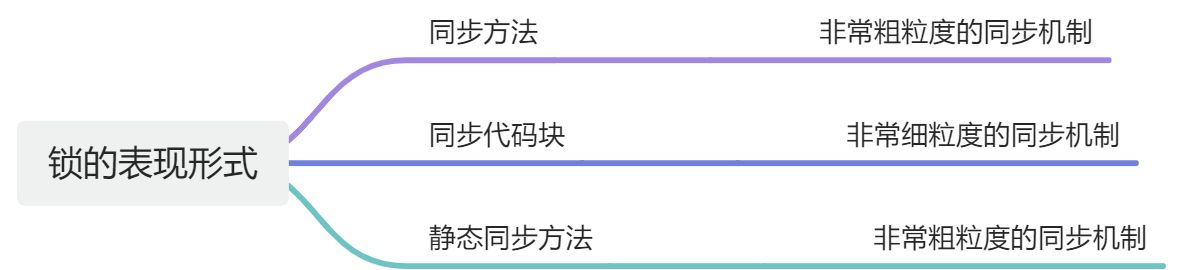
- 对象锁:synchronized(this)以及非static的synchronized方法。锁的是这个对象。
- 类锁:synchronized(类名.class)和static 的synchronized方法。锁的是那个写了synchronized关键字的方法或者代码块。(static方法可以直接类名.方法名()调用,无法使用this,所以它锁的不是this,而是类的Class对象)
1.3.1 synchronized同步方法
package class02.Synchronized; /** * @description: synchronized * @author: shu * @createDate: 2022/11/9 14:18 * @version: 1.0 */ public class SynchronizedMethod{ public static void main(String[] args) { SynchronizedMethod t=new SynchronizedMethod(); new Thread(new Runnable() { @Override public void run() { t.test("线程1"); } }).start(); SynchronizedMethod t1=new SynchronizedMethod(); new Thread(new Runnable() { @Override public void run() { t1.test("线程2"); } }).start(); } /** * synchronized 同步方法,对于普通方法,锁的拥有者是当前实例,不同实例并不互相影响 * @param name */ public synchronized void test(String name){ System.out.println(name+"正在运行ing"); try { Thread.sleep(2000); }catch (Exception e){ } System.out.println(name+"运行结束end"); } }- 1
- 2
- 3
- 4
- 5
- 6
- 7
- 8
- 9
- 10
- 11
- 12
- 13
- 14
- 15
- 16
- 17
- 18
- 19
- 20
- 21
- 22
- 23
- 24
- 25
- 26
- 27
- 28
- 29
- 30
- 31
- 32
- 33
- 34
- 35
- 36
- 37
- 38
- 39
- 40
- 41
- 42
- 43
- 44
- 45
- 46
- 47
- 48

我们可以从结果可以看出,线程没有阻塞运行,因此对于普通方法,如果是不同的对象实例锁是不起作用的1.3.2 synchronized同步代码块
package class02.Synchronized; /** * @description: 同步代码块 * @author: shu * @createDate: 2022/11/9 14:28 * @version: 1.0 */ public class SynchronizedCode { public static void main(String[] args) { SynchronizedCode t=new SynchronizedCode(); new Thread(new Runnable() { @Override public void run() { t.test("线程1"); } }).start(); SynchronizedCode t1=new SynchronizedCode(); new Thread(new Runnable() { @Override public void run() { t1.test("线程2"); } }).start(); } /** * synchronized 同步代码块 * @param name */ public synchronized void test(String name){ Object o=new Object(); synchronized(o.getClass()) { System.out.println(name + "正在运行"); try { Thread.sleep(2000); } catch (Exception e) { } System.out.println(name + "运行结束"); } } }- 1
- 2
- 3
- 4
- 5
- 6
- 7
- 8
- 9
- 10
- 11
- 12
- 13
- 14
- 15
- 16
- 17
- 18
- 19
- 20
- 21
- 22
- 23
- 24
- 25
- 26
- 27
- 28
- 29
- 30
- 31
- 32
- 33
- 34
- 35
- 36
- 37
- 38
- 39
- 40
- 41
- 42
- 43
- 44
- 45
- 46
- 47
- 48
- 49

我们看出,线程阻塞运行,依次获取锁对象1.3.3 synchronized静态方法
package class02.Synchronized; /** * @description: 静态同步代码 * @author: shu * @createDate: 2022/11/9 14:34 * @version: 1.0 */ public class SynchronizedStaticMethods { public static void main(String[] args) { new Thread(new Runnable() { @Override public void run() { SynchronizedStaticMethods.test("线程1"); } }).start(); new Thread(new Runnable() { @Override public void run() { SynchronizedStaticMethods.test("线程2"); } }).start(); } /** * synchronized 对于静态同步方法,锁的是当前类的Class对象。 * @param name */ public static synchronized void test(String name){ System.out.println(name+"正在运行"); try { Thread.sleep(2000); }catch (Exception e){ } System.out.println(name+"运行结束"); } }- 1
- 2
- 3
- 4
- 5
- 6
- 7
- 8
- 9
- 10
- 11
- 12
- 13
- 14
- 15
- 16
- 17
- 18
- 19
- 20
- 21
- 22
- 23
- 24
- 25
- 26
- 27
- 28
- 29
- 30
- 31
- 32
- 33
- 34
- 35
- 36
- 37
- 38
- 39
- 40
- 41
- 42
- 43
- 44
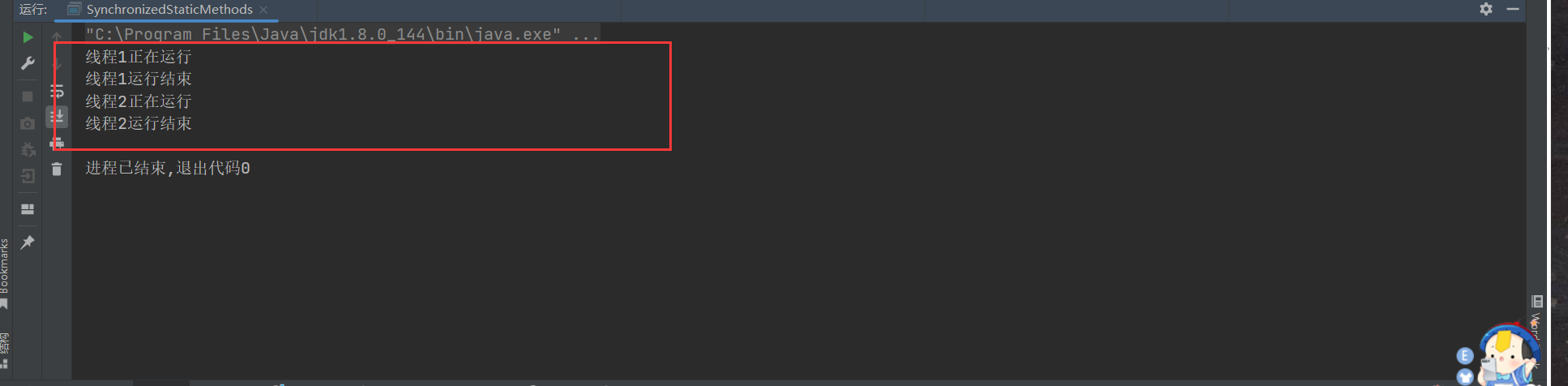
我们可以看出,当前线程也是阻塞运行的1.3.4 总结
synchronized方法和synchronized同步块有什么区别呢?
- synchronized方法是一种粗粒度的并发控制,某一时刻只能有一个线程执行该synchronized方法。
- synchronized代码块是一种细粒度的并发控制,处于synchronized块之外的其他代码是可以被多个线程并发访问的。
public class TwoPlus{ private int sum1 = 0; private int sum2 = 0; private Integer sum1Lock = new Integer(1); // 同步锁一 private Integer sum2Lock = new Integer(2); // 同步锁二 public void plus(int val1, int val2){ //同步块1 synchronized(this.sum1Lock){ this.sum1 += val1; } //同步块2 synchronized(this.sum2Lock){ this.sum2 += val2; } } }- 1
- 2
- 3
- 4
- 5
- 6
- 7
- 8
- 9
- 10
- 11
- 12
- 13
- 14
- 15
- 16
- 17
- 18
二 Java对象结构与内置锁
2.1 Java对象结构
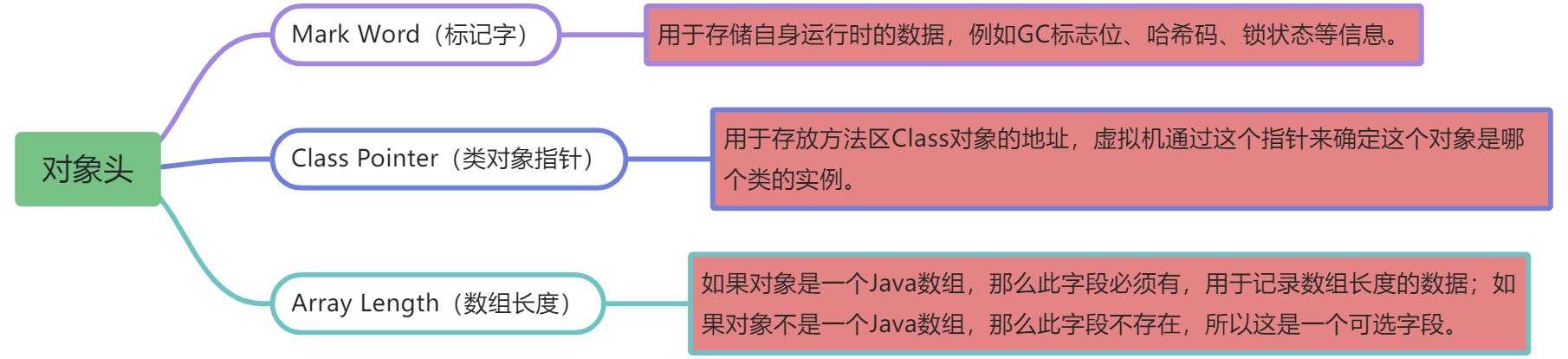
Java对象(Object实例)结构包括三部分:对象头、对象体和对齐字节

2.2.1 对象头
说明
- Mark Word(标记字)字段主要用来表示对象的线程锁状态,另外还可以用来配合GC存放该对象的hashCode。
- Class Pointer(类对象指针)字段是一个指向方法区中Class信息的指针,意味着该对象可随时知道自己是哪个Class的实例。
- Array Length(数组长度)字段占用32位(在32位JVM中)字节,这是可选的,只有当本对象是一个数组对象时才会有这个部分。
2.2.2 对象体
对象体包含对象的实例变量(成员变量),用于成员属性值,包括父类的成员属性值。这部分内存按4字节对齐。
说明
- 对象体用于保存对象属性值,是对象的主体部分,占用的内存空间大小取决于对象的属性数量和类型。
2.2.3 对齐字节
- 对齐字节也叫作填充对齐,其作用是用来保证Java对象所占内存字节数为8的倍数HotSpot VM的内存管理要求对象起始地址必须是8字节的整数倍。
- 对象头本身是8的倍数,当对象的实例变量数据不是8的倍数时,便需要填充数据来保证8字节的对齐。
说明
- 对齐字节并不是必然存在的,也没有特别的含义,它仅仅起着占位符的作用。当对象实例数据部分没有对齐(8字节的整数倍)时,就需要通过对齐填充来补全。
2.2.4 注意点
- Mark Word、Class Pointer、Array Length等字段的长度都与JVM的位数有关。
- Mark Word的长度为JVM的一个Word(字)大小,也就是说32位JVM的Mark Word为32位,64位JVM的Mark Word为64位。
- Class Pointer(类对象指针)字段的长度也为JVM的一个Word(字)大小,即32位JVM的Mark Word为32位,64位JVM的Mark Word为64位。
- 对于对象指针而言,如果JVM中的对象数量过多,使用64位的指针将浪费大量内存,通过简单统计,64位JVM将会比32位JVM多耗费50%的内存。
- 为了节约内存可以使用选项+UseCompressedOops开启指针压缩。UseCompressedOops中的Oop为Ordinary object pointer(普通对象指针)的缩写。
手动开启Oop对象指针压缩
java -XX:+UseCompressedOops mainclass- 1
手动关闭Oop对象指针压缩
java -XX:-UseCompressedOops mainclass- 1
- Array Length字段的长度也随着JVM架构的不同而不同:在32位JVM上,长度为32位;在64位JVM上,长度为64位。64位JVM如果开启了Oop对象的指针压缩,Array Length字段的长度也将由64位压缩至32位。
2.2 Mark Word 详细介绍
Java内置锁涉及很多重要信息,这些都存放在对象结构中,并且存放于对象头的Mark Word字段中。
32 位Mark Word结构

64 位Mark Word结构

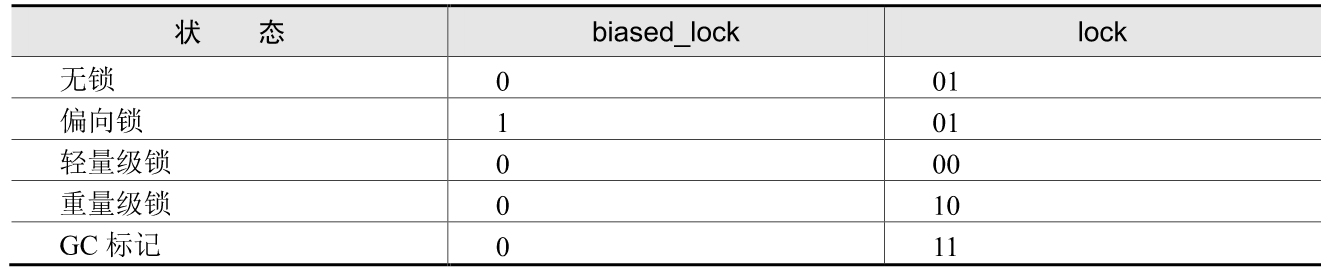
lock:锁状态标志位
lock:锁状态标记位,占两个二进制位,由于希望用尽可能少的二进制位表示尽可能多的信息,因此设置了lock标记。该标记的值不同,整个Mark Word表示的含义就不同。
biased_lock:对象是否启用偏向锁标记
biased_lock:对象是否启用偏向锁标记,只占1个二进制位。为1时表示对象启用偏向锁,为0时表示对象没有偏向锁。
组合
age : Java对象分代年龄
age:4位的Java对象分代年龄。在GC中,对象在Survivor区复制一次,年龄就增加1。当对象达到设定的阈值时,将会晋升到老年代。默认情况下,并行GC的年龄阈值为15,并发GC的年龄阈值为6。由于age只有4位,因此最大值为15,这就是-XX:MaxTenuringThreshold选项最大值为15的原因。
identity_hashcode:对象标识HashCode(哈希码)
identity_hashcode:31位的对象标识HashCode(哈希码)采用延迟加载技术,当调用Object.hashCode()方法或者System.identityHashCode()方法计算对象的HashCode后,其结果将被写到该对象头中。当对象被锁定时,该值会移动到Monitor(监视器)中。
thread:54位的线程ID值为持有偏向锁的线程ID
epoch:偏向时间戳。
ptr_to_lock_record:占62位,在轻量级锁的状态下指向栈帧中锁记录的指针。
ptr_to_heavyweight_monitor:占62位,在重量级锁的状态下指向对象监视器的指针。
2.3 JOL工具查看对象的布局
- 依赖包
<dependency> <groupId>org.openjdk.jolgroupId> <artifactId>jol-coreartifactId> <version>0.11version> dependency>- 1
- 2
- 3
- 4
- 5
- 6
- 工具类
package com.shu; import java.io.*; /** * byte数组工具类实现byte[]与文件之间的相互转换 */ public class ByteUtil { /** * 字节数据转字符串专用集合 */ private static final char[] HEX_CHAR = {'0', '1', '2', '3', '4', '5', '6', '7', '8', '9', 'a', 'b', 'c', 'd', 'e', 'f'}; /** * 字节数据转十六进制字符串 * * @param data 输入数据 * @return 十六进制内容 */ public static String byteArrayToString(byte[] data) { StringBuilder stringBuilder = new StringBuilder(); for (int i = 0; i < data.length; i++) { // 取出字节的高四位 作为索引得到相应的十六进制标识符 注意无符号右移 stringBuilder.append(HEX_CHAR[(data[i] & 0xf0) >>> 4]); // 取出字节的低四位 作为索引得到相应的十六进制标识符 stringBuilder.append(HEX_CHAR[(data[i] & 0x0f)]); if (i < data.length - 1) { stringBuilder.append(' '); } } return stringBuilder.toString(); } /** * byte转换hex函数 * * @param byteArray * @return */ public static String byteToHex(byte[] byteArray) { StringBuffer strBuff = new StringBuffer(); for (int i = 0; i < byteArray.length; i++) { if (Integer.toHexString(0xFF & byteArray[i]).length() == 1) { strBuff.append("0").append( Integer.toHexString(0xFF & byteArray[i])); } else { strBuff.append(Integer.toHexString(0xFF & byteArray[i])); } strBuff.append(" "); } return strBuff.toString(); } /** * 以字节为单位读取文件,常用于读二进制文件,如图片、声音、影像等文件。 */ public static byte[] readFileByBytes(String fileName) { File file = new File(fileName); InputStream in = null; byte[] txt = new byte[(int) file.length()]; try { // 一次读一个字节 in = new FileInputStream(file); int tempByte; int i = 0; while ((tempByte = in.read()) != -1) { txt[i] = (byte) tempByte; i++; } in.close(); return txt; } catch (IOException e) { e.printStackTrace(); return txt; } } /** * 获得指定文件的byte数组 */ public static byte[] getBytes(String filePath) { byte[] buffer = null; try { File file = new File(filePath); FileInputStream fis = new FileInputStream(file); ByteArrayOutputStream bos = new ByteArrayOutputStream(1000); byte[] b = new byte[1000]; int n; while ((n = fis.read(b)) != -1) { bos.write(b, 0, n); } fis.close(); bos.close(); buffer = bos.toByteArray(); } catch (FileNotFoundException e) { e.printStackTrace(); } catch (IOException e) { e.printStackTrace(); } return buffer; } /** * 根据byte数组,生成文件 */ public static void saveFile(byte[] bfile, String filePath) { BufferedOutputStream bos = null; FileOutputStream fos = null; File file = null; try { File dir = new File(filePath); //判断文件目录是否存在 if (!dir.exists() && dir.isDirectory()) { dir.mkdirs(); } file = new File(filePath); fos = new FileOutputStream(file); bos = new BufferedOutputStream(fos); bos.write(bfile); } catch (Exception e) { e.printStackTrace(); } finally { if (bos != null) { try { bos.close(); } catch (IOException e1) { e1.printStackTrace(); } } if (fos != null) { try { fos.close(); } catch (IOException e1) { e1.printStackTrace(); } } } } public static final int UNICODE_LEN = 2; /** * int转换为小端byte[](高位放在高地址中) * * @param iValue * @return */ public static byte[] int2Bytes_LE(int iValue) { byte[] rst = new byte[4]; // 先写int的最后一个字节 rst[0] = (byte) (iValue & 0xFF); // int 倒数第二个字节 rst[1] = (byte) ((iValue & 0xFF00) >> 8); // int 倒数第三个字节 rst[2] = (byte) ((iValue & 0xFF0000) >> 16); // int 第一个字节 rst[3] = (byte) ((iValue & 0xFF000000) >> 24); return rst; } /** * long转成字节 * * @param num * @return */ public static byte[] long2bytes(long num) { byte[] b = new byte[8]; for (int i = 0; i < 8; i++) { b[i] = (byte) (num >>> (56 - (i * 8))); } return b; } /** * bytes2bytes 大端转小端 * * @param input * @return */ public static byte[] bytes2bytes_LE(byte[] input) { int len = input.length; byte[] b = new byte[len]; for (int i = 0; i < len; i++) { b[i] = input[len - 1 - i]; } return b; } /** * long转成字节 小端 * * @param num * @return */ public static byte[] long2bytes_LE(long num) { byte[] b = long2bytes(num); return bytes2bytes_LE(b); } /** * 转成long * * @param b 字节 * @return */ public static long bytes2long(byte[] b) { long temp = 0; long res = 0; for (int i = 0; i < 8; i++) { res <<= 8; temp = b[i] & 0xff; res |= temp; } return res; } public static int bytes2int(byte[] bytes) { int num = bytes[0] & 0xFF; num |= ((bytes[1] << 8) & 0xFF00); num |= ((bytes[2] << 16) & 0xFF0000); num |= ((bytes[3] << 24) & 0xFF000000); return num; } /** * 转换String为byte[] * * @param str * @return */ public static byte[] string2Bytes_LE(String str) { if (str == null) { return null; } char[] chars = str.toCharArray(); byte[] rst = chars2Bytes_LE(chars); return rst; } /** * 转换字符数组为定长byte[] * * @param chars 字符数组 * @return 若指定的定长不足返回null, 否则返回byte数组 */ public static byte[] chars2Bytes_LE(char[] chars) { if (chars == null) return null; int iCharCount = chars.length; byte[] rst = new byte[iCharCount * UNICODE_LEN]; int i = 0; for (i = 0; i < iCharCount; i++) { rst[i * 2] = (byte) (chars[i] & 0xFF); rst[i * 2 + 1] = (byte) ((chars[i] & 0xFF00) >> 8); } return rst; } /** * 转换byte数组为int(小端) * * @return * @note 数组长度至少为4,按小端方式转换,即传入的bytes是小端的,按这个规律组织成int */ public static int bytes2Int_LE(byte[] bytes) { if (bytes.length < 4) return -1; int iRst = (bytes[0] & 0xFF); iRst |= (bytes[1] & 0xFF) << 8; iRst |= (bytes[2] & 0xFF) << 16; iRst |= (bytes[3] & 0xFF) << 24; return iRst; } /** * 转换byte数组为int(大端) * * @return * @note 数组长度至少为4,按小端方式转换,即传入的bytes是大端的,按这个规律组织成int */ public static int bytes2Int_BE(byte[] bytes) { if (bytes.length < 4) return -1; int iRst = (bytes[0] << 24) & 0xFF; iRst |= (bytes[1] << 16) & 0xFF; iRst |= (bytes[2] << 8) & 0xFF; iRst |= bytes[3] & 0xFF; return iRst; } /** * 转换byte数组为Char(小端) * * @return * @note 数组长度至少为2,按小端方式转换 */ public static char Bytes2Char_LE(byte[] bytes) { if (bytes.length < 2) return (char) -1; int iRst = (bytes[0] & 0xFF); iRst |= (bytes[1] & 0xFF) << 8; return (char) iRst; } /** * 转换byte数组为char(大端) * * @return * @note 数组长度至少为2,按小端方式转换 */ public static char Bytes2Char_BE(byte[] bytes) { if (bytes.length < 2) return (char) -1; int iRst = (bytes[0] << 8) & 0xFF; iRst |= bytes[1] & 0xFF; return (char) iRst; } public static String byte2BinaryString(byte nByte) { StringBuilder nStr = new StringBuilder(); for (int i = 7; i >= 0; i--) { int j = (int) nByte & (int) (Math.pow(2, (double) i)); if (j > 0) { nStr.append("1"); } else { nStr.append("0"); } } return nStr.toString(); } }- 1
- 2
- 3
- 4
- 5
- 6
- 7
- 8
- 9
- 10
- 11
- 12
- 13
- 14
- 15
- 16
- 17
- 18
- 19
- 20
- 21
- 22
- 23
- 24
- 25
- 26
- 27
- 28
- 29
- 30
- 31
- 32
- 33
- 34
- 35
- 36
- 37
- 38
- 39
- 40
- 41
- 42
- 43
- 44
- 45
- 46
- 47
- 48
- 49
- 50
- 51
- 52
- 53
- 54
- 55
- 56
- 57
- 58
- 59
- 60
- 61
- 62
- 63
- 64
- 65
- 66
- 67
- 68
- 69
- 70
- 71
- 72
- 73
- 74
- 75
- 76
- 77
- 78
- 79
- 80
- 81
- 82
- 83
- 84
- 85
- 86
- 87
- 88
- 89
- 90
- 91
- 92
- 93
- 94
- 95
- 96
- 97
- 98
- 99
- 100
- 101
- 102
- 103
- 104
- 105
- 106
- 107
- 108
- 109
- 110
- 111
- 112
- 113
- 114
- 115
- 116
- 117
- 118
- 119
- 120
- 121
- 122
- 123
- 124
- 125
- 126
- 127
- 128
- 129
- 130
- 131
- 132
- 133
- 134
- 135
- 136
- 137
- 138
- 139
- 140
- 141
- 142
- 143
- 144
- 145
- 146
- 147
- 148
- 149
- 150
- 151
- 152
- 153
- 154
- 155
- 156
- 157
- 158
- 159
- 160
- 161
- 162
- 163
- 164
- 165
- 166
- 167
- 168
- 169
- 170
- 171
- 172
- 173
- 174
- 175
- 176
- 177
- 178
- 179
- 180
- 181
- 182
- 183
- 184
- 185
- 186
- 187
- 188
- 189
- 190
- 191
- 192
- 193
- 194
- 195
- 196
- 197
- 198
- 199
- 200
- 201
- 202
- 203
- 204
- 205
- 206
- 207
- 208
- 209
- 210
- 211
- 212
- 213
- 214
- 215
- 216
- 217
- 218
- 219
- 220
- 221
- 222
- 223
- 224
- 225
- 226
- 227
- 228
- 229
- 230
- 231
- 232
- 233
- 234
- 235
- 236
- 237
- 238
- 239
- 240
- 241
- 242
- 243
- 244
- 245
- 246
- 247
- 248
- 249
- 250
- 251
- 252
- 253
- 254
- 255
- 256
- 257
- 258
- 259
- 260
- 261
- 262
- 263
- 264
- 265
- 266
- 267
- 268
- 269
- 270
- 271
- 272
- 273
- 274
- 275
- 276
- 277
- 278
- 279
- 280
- 281
- 282
- 283
- 284
- 285
- 286
- 287
- 288
- 289
- 290
- 291
- 292
- 293
- 294
- 295
- 296
- 297
- 298
- 299
- 300
- 301
- 302
- 303
- 304
- 305
- 306
- 307
- 308
- 309
- 310
- 311
- 312
- 313
- 314
- 315
- 316
- 317
- 318
- 319
- 320
- 321
- 322
- 323
- 324
- 325
- 326
- 327
- 328
- 329
- 330
- 331
- 332
- 333
- 334
- 335
- 336
- 337
- 338
- 339
- 340
- 341
- 342
- 343
- 344
- 345
- 346
- 347
- 348
- 349
- 350
- 对象编写
package com.shu; /** * @description: * @author: shu * @createDate: 2022/11/10 9:31 * @version: 1.0 */ import org.openjdk.jol.info.ClassLayout; public class ObjectLock { private Long amount = 0L; //整型字段占用4字节 public void increase() { synchronized (this) { amount++; } } /** * 输出十六进制、小端模式的hashCode */ public String hexHash() { //对象的原始 hashCode,Java默认为大端模式 int hashCode = this.hashCode(); //转成小端模式的字节数组 byte[] hashCode_LE = ByteUtil.int2Bytes_LE(hashCode); //转成十六进制形式的字符串 return ByteUtil.byteToHex(hashCode_LE); } /** * 输出二进制、小端模式的hashCode */ public String binaryHash() { //对象的原始 hashCode,Java默认为大端模式 int hashCode = this.hashCode(); //转成小端模式的字节数组 byte[] hashCode_LE = ByteUtil.int2Bytes_LE(hashCode); StringBuffer buffer=new StringBuffer(); for (byte b:hashCode_LE) { //转成二进制形式的字符串 buffer.append( ByteUtil.byte2BinaryString(b)); buffer.append(" "); } return buffer.toString(); } /** * 输出十六进制、小端模式的ThreadId */ public String hexThreadId() { //当前线程的 threadID,Java默认为大端模式 long threadID = Thread.currentThread().getId(); //转成小端模式的字节数组 byte[] threadID_LE = ByteUtil.long2bytes_LE(threadID); //转成十六进制形式的字符串 return ByteUtil.byteToHex(threadID_LE); } /** * 输出二进制、小端模式的ThreadId */ public String binaryThreadId() { //当前线程的 threadID,Java默认为大端模式 long threadID = Thread.currentThread().getId(); //转成小端模式的字节数组 byte[] threadID_LE = ByteUtil.long2bytes_LE(threadID); StringBuffer buffer=new StringBuffer(); for (byte b:threadID_LE) { //转成二进制形式的字符串 buffer.append( ByteUtil.byte2BinaryString(b)); buffer.append(" "); } return buffer.toString(); } public void printSelf() { // 输出十六进制、小端模式的hashCode System.out.println("lock hexHash= " + hexHash()); // 输出二进制、小端模式的hashCode System.out.println("lock binaryHash= " + binaryHash()); //通过JOL工具获取this的对象布局 String printable = ClassLayout.parseInstance(this).toPrintable(); //输出对象布局 System.out.println("lock = " + printable); } // 省略其他 }- 1
- 2
- 3
- 4
- 5
- 6
- 7
- 8
- 9
- 10
- 11
- 12
- 13
- 14
- 15
- 16
- 17
- 18
- 19
- 20
- 21
- 22
- 23
- 24
- 25
- 26
- 27
- 28
- 29
- 30
- 31
- 32
- 33
- 34
- 35
- 36
- 37
- 38
- 39
- 40
- 41
- 42
- 43
- 44
- 45
- 46
- 47
- 48
- 49
- 50
- 51
- 52
- 53
- 54
- 55
- 56
- 57
- 58
- 59
- 60
- 61
- 62
- 63
- 64
- 65
- 66
- 67
- 68
- 69
- 70
- 71
- 72
- 73
- 74
- 75
- 76
- 77
- 78
- 79
- 80
- 81
- 82
- 83
- 84
- 85
- 86
- 87
- 88
- 89
- 90
- 91
- 92
- 93
- 94
- 95
- 96
- 97
- 98
- 99
- 100
- 101
- 102
- 103
- 104
- 105
- 106
- 107
- 108
- 109
- 110
- 测试
package com.shu; import org.openjdk.jol.vm.VM; /** * @description: * @author: shu * @createDate: 2022/11/10 9:43 * @version: 1.0 */ public class InnerLockTest { public static void main(String[] args) { System.out.println(VM.current().details()); ObjectLock objectLock=new ObjectLock(); System.out.println("object status"); objectLock.printSelf(); } }- 1
- 2
- 3
- 4
- 5
- 6
- 7
- 8
- 9
- 10
- 11
- 12
- 13
- 14
- 15
- 16
- 17
- 18
- 19
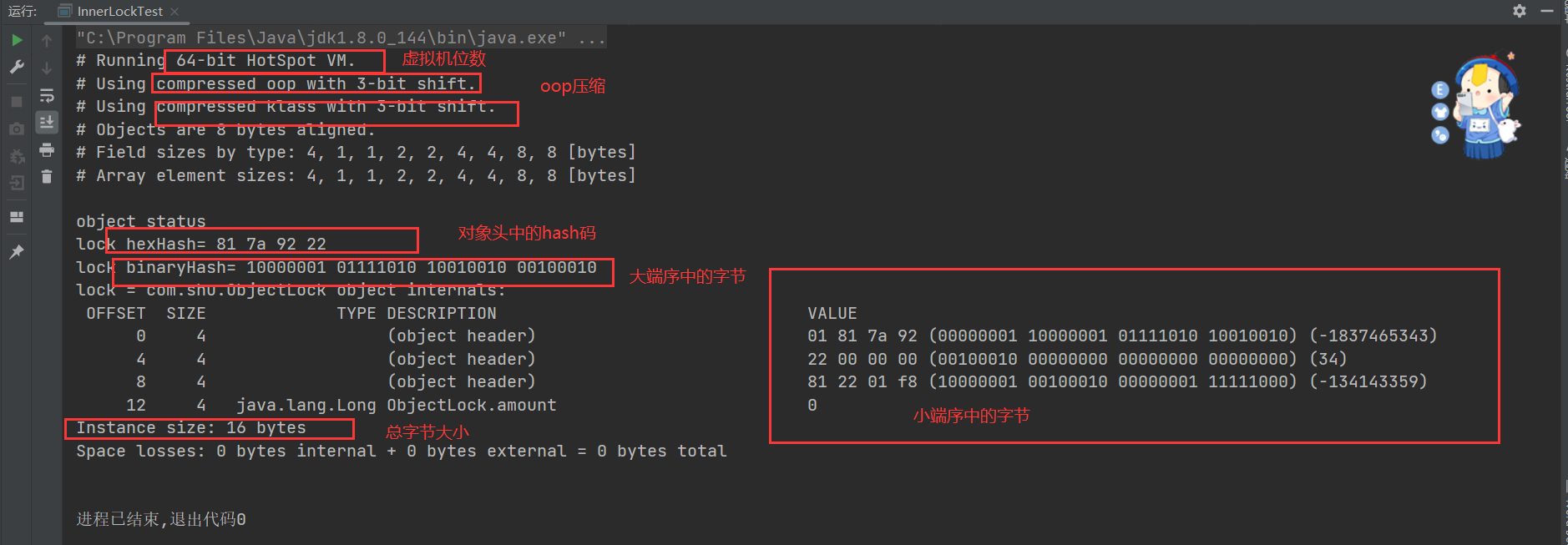

- 当前JVM的运行环境为64位虚拟机。
- 运行结果中输出了ObjectLock的对象布局,所输出的ObjectLock对象为16字节,其中对象头(Object Header)占12字节,剩下的4字节由amount属性(字段)占用。
- 由于16字节为8字节的倍数,因此没有对齐填充字节(JVM规定对象头部分必须是8字节的倍数,否则需要对齐填充)。
- 对象一旦生成了哈希码,它就无法进入偏向锁状态。也就是说,只要一个对象已经计算过哈希码,它就无法进入偏向锁状态。
- 当一个对象当前正处于偏向锁状态,并且需要计算其哈希码的话,它的偏向锁会被撤销,并且锁会膨胀为重量级锁。
补充
大端序:大端模式是指数据的高字节保存在内存的低地址中,而数据的低字节保存在内存的高地址中。大端存放模式有点类似于把数据当作字符串顺序处理:地址由小向大增加,而数据从高位往低位放。
小端序:小端模式是指数据的高字节保存在内存的高地址中,而数据的低字节保存在内存的低地址中,这种存储模式将地址的高低和数据位权有效地结合起来,高地址部分权值高,低地址部分权值低,此模式和日常的数字计算在方向上是一致的。 -
相关阅读:
串行协议——USB驱动[基础]
微服务笔记
理解C#里面的集合有哪些?怎么用,什么是安全集合?
Java基础:方法
亚远景科技-ASPICE评估师等级、ASPICE评估师培训和ASPICE评估项目等级简介
数据通信网络基础
TopK问题详解
11 【Express服务端渲染】
JavaScript内置对象 - Array数组(三)- 自定义ArrayList
python+pytest接口自动化(6)-请求参数格式的确定
- 原文地址:https://blog.csdn.net/weixin_44451022/article/details/127880276

- 最新文章
-
沪漂五周年了:我越来越迷茫了
Agentic Skill Routing 实战:别再把所有 Skill 塞进 AI Agent 上下文
MySQL-Seconds_behind_master的精度误差
[MAF预定义ChatClient中间件-03]CachingChatClient——利用缓存省钱省时间
AI的至暗历史:从万众期待到被政府撤资,AI的两次死亡徘徊
Agent OS :五种驯服不确定性的范式
PortSwigger SQL注入LAB11
数据库即时编译JIT
[Begin]AI Learn Data Day 0
深度学习进阶(二十七)现代 LLM 的核心架构设计其二:SwiGLU