-
HTML常用标签的使用
HTML常用标签的使用
文章目录
1.排版标签
1.1 标题标签(h)
代码形式:h系列标签
<h1>一级标题h1> <h2>二级标题h2> <h3>三级标题h3> <h4>四级标题h4> <h5>五级标题h5> <h6>六级标题h6>- 1
- 2
- 3
- 4
- 5
- 6
语义:1~6级标签,重要程度依次递减
特点:
- 文字都加粗
- 文字由h1~h6文字逐渐变小
- 独占一行

1.2 段落标签(p)
代码形式:
<p>我是一段文字p>- 1
语义:段落
特点:
- 段落之间存在间隙
- 独占一行

补充:当我们段落写的文字太多了,可以在VSCode的查看选项中选择自动换行,这样就可以让文字显示在一个界面里,而不至于拖动滑轮去查看文字内容
1.3 换行标签(br)
代码形式:
...一段文字<br>...一段文字- 1
语义:换行
特点:
- 单标签
- 让文字强制换行
DOCTYPE html> <html lang="en"> <head> <meta charset="UTF-8"> <meta http-equiv="X-UA-Compatible" content="IE=edge"> <meta name="viewport" content="width=device-width, initial-scale=1.0"> <title>Documenttitle> head> <body> <h1>一级标题h1> <h2>二级标题h2> <p>我是第一段<br>文字p> <p>我是第二段文字p> body> html>- 1
- 2
- 3
- 4
- 5
- 6
- 7
- 8
- 9
- 10
- 11
- 12
- 13
- 14
- 15
- 16

1.4 水平线标签(hr)
代码形式:
<hr>- 1
语义:主题的分割转换
特点:
- 单标签
- 在页面中显示一条水平线
DOCTYPE html> <html lang="en"> <head> <meta charset="UTF-8"> <meta http-equiv="X-UA-Compatible" content="IE=edge"> <meta name="viewport" content="width=device-width, initial-scale=1.0"> <title>Documenttitle> head> <body> <h1>一级标题h1> <h2>二级标题h2> <hr> <p>我是第一段<br>文字p> <p>我是第二段文字p> body> html>- 1
- 2
- 3
- 4
- 5
- 6
- 7
- 8
- 9
- 10
- 11
- 12
- 13
- 14
- 15
- 16
- 17

2.文本格式化标签(strong、ins、em、del)
标签分类:
以前的标签:
标签 说明 b 加粗 u 下划线 i 倾斜 s 删除线 现在的标签:推荐使用新标记,表示的强调语义更强烈!
标签 说明 strong 加粗 ins 下划线 em 倾斜 del 删除线 语义:突出重要性的强调语境
DOCTYPE html> <html lang="en"> <head> <meta charset="UTF-8"> <meta http-equiv="X-UA-Compatible" content="IE=edge"> <meta name="viewport" content="width=device-width, initial-scale=1.0"> <title>Documenttitle> head> <body> <b>b标签加粗b><br> <strong>strong标签加粗strong><br> <u>u标签下划线u><br> <ins>ins标签下划线ins><br> <i>i标签倾斜i><br> <em>em标签倾斜em><br> <s>s标签删除线s><br> <del>del标签删除线del><br> body> html>- 1
- 2
- 3
- 4
- 5
- 6
- 7
- 8
- 9
- 10
- 11
- 12
- 13
- 14
- 15
- 16
- 17
- 18
- 19

3.媒体标签
3.1 图片标签(img、src、alt、width、height)
代码形式:
<img src=" " alt=" " title=" " width="" height=" ">- 1
- 2
- 3
- 4
- 5
- 6
特点:
- 单标签
- img标签需要显示对应的效果,需要借助标签的属性进行设置
- 这里的属性是指
标签属性,比如img中的:src、alt叫属性名," "中的叫属性值
DOCTYPE html> <html lang="en"> <head> <meta charset="UTF-8"> <meta http-equiv="X-UA-Compatible" content="IE=edge"> <meta name="viewport" content="width=device-width, initial-scale=1.0"> <title>Documenttitle> head> <body> <img src="宣传.jpg" alt="没有显示世界地球日图片" title="这是悬停文本title标签"> <img src="宣.jpg" alt="没有显示世界地球日图片"> body> html>- 1
- 2
- 3
- 4
- 5
- 6
- 7
- 8
- 9
- 10
- 11
- 12
- 13

属性的特点:
- 标签的属性写在开始标签内部
- 标签上可以同时存在多个属性
- 属性之间以空格分开
- 标签名与属性之间必须以空格隔开
- 属性之间没有顺序之分
3.2 路径标签
路径可以分为:绝对路径、相对路径
- 绝对路径:指目录下的绝对位置,通常从盘符开始的路径。如:C:\data\images\1.png
- 相对路径:从当前文件开始出发找目标文件的过程。如:\images\1.png
相对路径写法:
或者
3.3 音频标签(audio、controls、autoplay、loop)
代码:
<audio src="./music.mp3" controls>audio>- 1

DOCTYPE html> <html lang="en"> <head> <meta charset="UTF-8"> <meta http-equiv="X-UA-Compatible" content="IE=edge"> <meta name="viewport" content="width=device-width, initial-scale=1.0"> <title>Documenttitle> head> <body> <audio src="/.music.mp3" controls autoplay loop>audio> body> html>- 1
- 2
- 3
- 4
- 5
- 6
- 7
- 8
- 9
- 10
- 11
- 12

音频标签目前支持三种格式:MP3、Wav、0gg
3.4 视频标签(video)

视频标签目前支持三种格式:MP4、WebM、Ogg
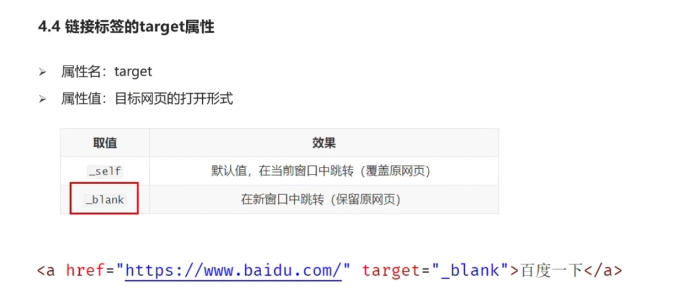
4.链接标签(a、href、_ blank、_ self)
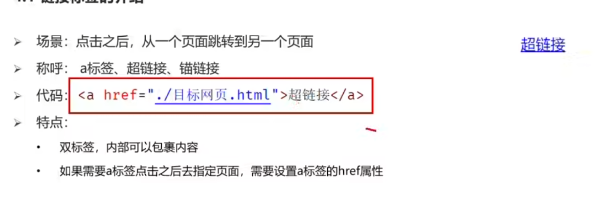
注:a标签叫超链接标签,href是跳转属性,给地址的
DOCTYPE html> <html lang="en"> <head> <meta charset="UTF-8"> <meta http-equiv="X-UA-Compatible" content="IE=edge"> <meta name="viewport" content="width=device-width, initial-scale=1.0"> <title>Documenttitle> head> <body> <a href="https://www.baidu.com" target="_self">跳转到百度a> <a href="./地址/1.png" target="_blank">跳转本地1.png图片a> body> html>- 1
- 2
- 3
- 4
- 5
- 6
- 7
- 8
- 9
- 10
- 11
- 12
- 13
- 14
5.列表标签
5.1 无序列表(ul)

- ul标签定义一个无序列表
- li标签就是列表中每一行里的内容
DOCTYPE html> <html lang="en"> <head> <meta charset="UTF-8"> <meta http-equiv="X-UA-Compatible" content="IE=edge"> <meta name="viewport" content="width=device-width, initial-scale=1.0"> <title>Documenttitle> head> <body> <ul> <li>榴莲li> <li>香蕉li> <li>苹果li> <li>哈密瓜li> <li>火龙果li> ul> body> html>- 1
- 2
- 3
- 4
- 5
- 6
- 7
- 8
- 9
- 10
- 11
- 12
- 13
- 14
- 15
- 16
- 17
- 18

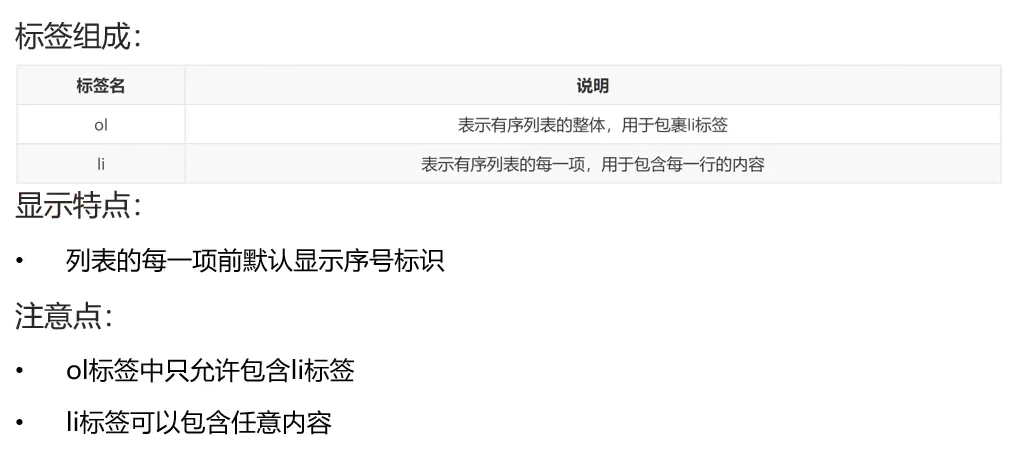
5.2 有序列表(ol)
DOCTYPE html> <html lang="en"> <head> <meta charset="UTF-8"> <meta http-equiv="X-UA-Compatible" content="IE=edge"> <meta name="viewport" content="width=device-width, initial-scale=1.0"> <title>Documenttitle> head> <body> <ol> <li>小姐姐:100分li> <li>小帅哥:80分li> <li>小可爱:60分li> ol> body> html>- 1
- 2
- 3
- 4
- 5
- 6
- 7
- 8
- 9
- 10
- 11
- 12
- 13
- 14
- 15
- 16

5.3 自定义列表(dl)

DOCTYPE html> <html lang="en"> <head> <meta charset="UTF-8"> <meta http-equiv="X-UA-Compatible" content="IE=edge"> <meta name="viewport" content="width=device-width, initial-scale=1.0"> <title>Documenttitle> head> <body> <dl> <dt>帮助中心dt> <dd>账户管理dd> <dd>购物指南dd> dl> body> html>- 1
- 2
- 3
- 4
- 5
- 6
- 7
- 8
- 9
- 10
- 11
- 12
- 13
- 14
- 15
- 16

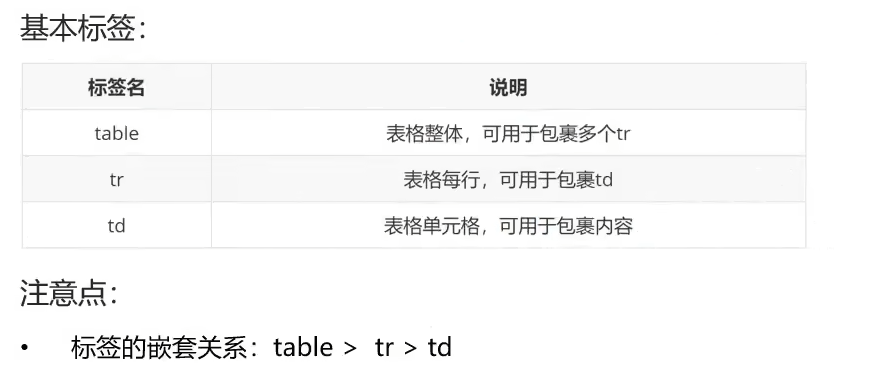
6.表格标签
6.1 表格的基本使用(table、tr、td、border、caption、th)
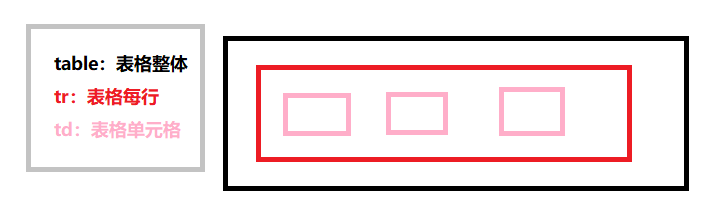

DOCTYPE html> <html lang="en"> <head> <meta charset="UTF-8"> <meta http-equiv="X-UA-Compatible" content="IE=edge"> <meta name="viewport" content="width=device-width, initial-scale=1.0"> <title>Documenttitle> head> <body> <table border="1" width="" height=""> <tr> <td>姓名td> <td>成绩td> <td>评语td> tr> <tr> <td>小哥哥td> <td>100分td> <td>孩砸,真棒啊td> tr> <tr> <td>郭德纲td> <td>150分td> <td>没有郭德纲相声早黄了没有了郭德纲,相声更黄了td> tr> table> body> html>- 1
- 2
- 3
- 4
- 5
- 6
- 7
- 8
- 9
- 10
- 11
- 12
- 13
- 14
- 15
- 16
- 17
- 18
- 19
- 20
- 21
- 22
- 23
- 24
- 25
- 26
- 27
- 28
- 29
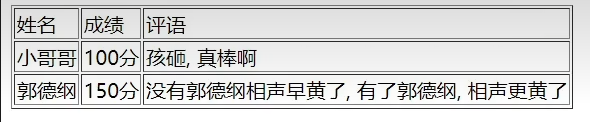
6.2 表格标题和表头单元格标签(caption、th)
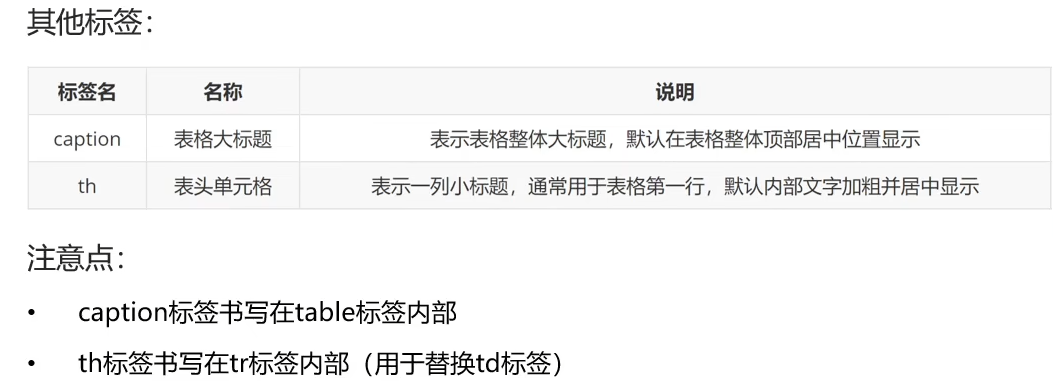
DOCTYPE html> <html lang="en"> <head> <meta charset="UTF-8"> <meta http-equiv="X-UA-Compatible" content="IE=edge"> <meta name="viewport" content="width=device-width, initial-scale=1.0"> <title>Documenttitle> head> <body> <table border="1" width="" height="" > <caption><strong>学生成绩单strong>caption> <tr> <th>姓名th> <th>成绩th> <th>评语th> tr> <tr> <td>张三td> <td>100分td> <td>真棒,第一名td> tr> <tr> <td>李四td> <td>90分td> <td>真棒,第二名td> tr> <tr> <td>总结td> <td>郎才女貌td> <td>真棒,相亲成功td> tr> table> body> html>- 1
- 2
- 3
- 4
- 5
- 6
- 7
- 8
- 9
- 10
- 11
- 12
- 13
- 14
- 15
- 16
- 17
- 18
- 19
- 20
- 21
- 22
- 23
- 24
- 25
- 26
- 27
- 28
- 29
- 30
- 31
- 32
- 33
- 34

6.3 表格的结构标签(thead、tbody、tfoot)
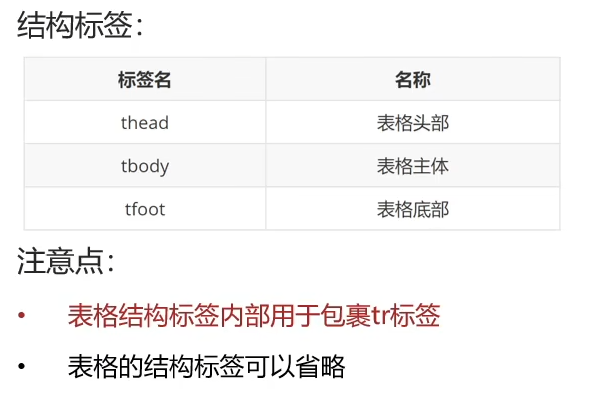

DOCTYPE html> <html lang="en"> <head> <meta charset="UTF-8"> <meta http-equiv="X-UA-Compatible" content="IE=edge"> <meta name="viewport" content="width=device-width, initial-scale=1.0"> <title>Documenttitle> head> <body> <table border="1" width="" height="" > <caption><strong>学生成绩单strong>caption> <thead> <tr> <th>姓名th> <th>成绩th> <th>评语th> tr> thead> <tbody> <tr> <td>张三td> <td>100分td> <td>真棒,第一名td> tr> tbody> <tfoot> <tr> <td>李四td> <td>90分td> <td>真棒,第二名td> tr> tfoot> <tr> <td>总结td> <td>郎才女貌td> <td>真棒,相亲成功td> tr> table> body> html>- 1
- 2
- 3
- 4
- 5
- 6
- 7
- 8
- 9
- 10
- 11
- 12
- 13
- 14
- 15
- 16
- 17
- 18
- 19
- 20
- 21
- 22
- 23
- 24
- 25
- 26
- 27
- 28
- 29
- 30
- 31
- 32
- 33
- 34
- 35
- 36
- 37
- 38
- 39
- 40
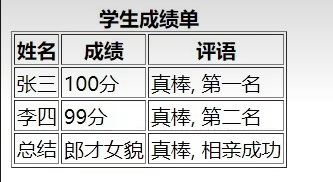
我们来看这三个标签与上面三个标签效果没什么区别,但是浏览器看到这三个标签则处理效率高
6.4 合并单元格(rowspan、colspan)
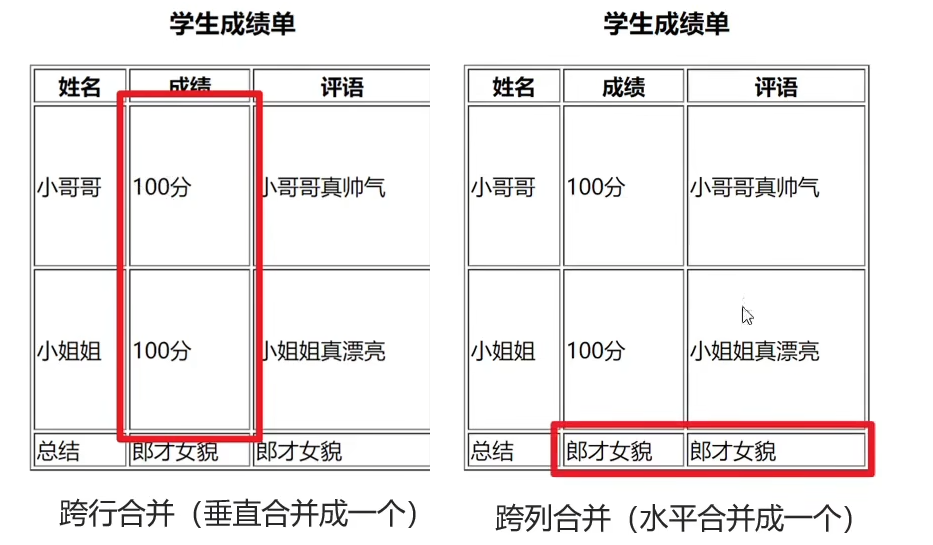
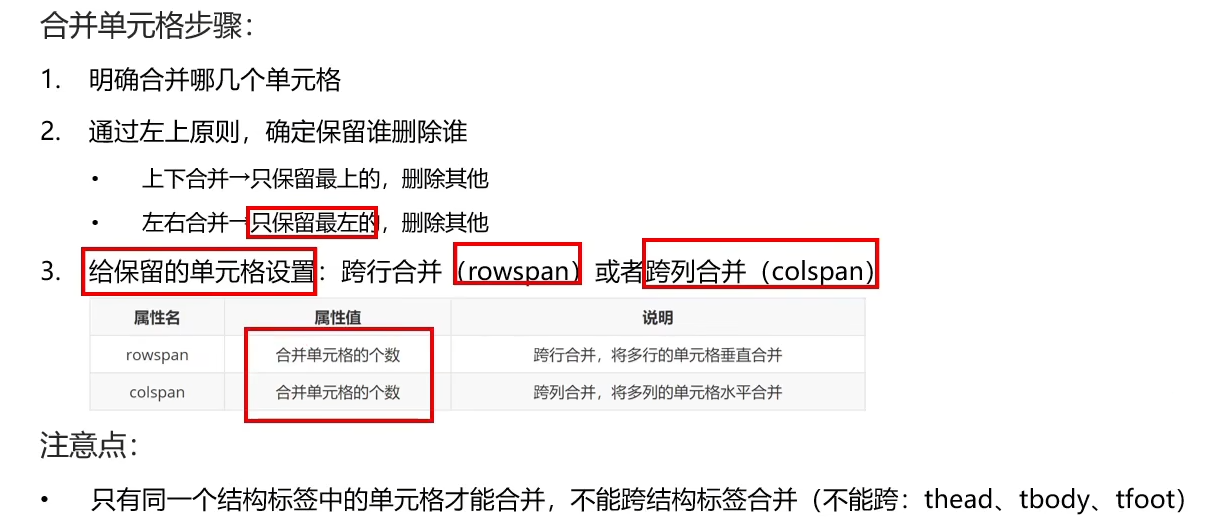
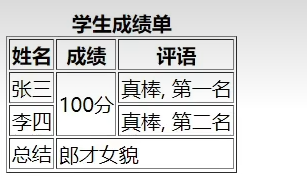
DOCTYPE html> <html lang="en"> <head> <meta charset="UTF-8"> <meta http-equiv="X-UA-Compatible" content="IE=edge"> <meta name="viewport" content="width=device-width, initial-scale=1.0"> <title>Documenttitle> head> <body> <table border="1" width="" height="" > <caption><strong>学生成绩单strong>caption> <thead> <tr> <th>姓名th> <th>成绩th> <th>评语th> tr> thead> <tbody> <tr> <td>张三td> <td rowspan="2">100分td> <td>真棒,第一名td> tr> tbody> <tfoot> <tr> <td>李四td> <td>真棒,第二名td> tr> tfoot> <tr> <td>总结td> <td>郎才女貌td> tr> table> body> html>- 1
- 2
- 3
- 4
- 5
- 6
- 7
- 8
- 9
- 10
- 11
- 12
- 13
- 14
- 15
- 16
- 17
- 18
- 19
- 20
- 21
- 22
- 23
- 24
- 25
- 26
- 27
- 28
- 29
- 30
- 31
- 32
- 33
- 34
- 35
- 36
- 37
- 38
7.表单标签
7.1 input基本标签(text、password、radio、checkbox、file)

DOCTYPE html> <html lang="en"> <head> <meta charset="UTF-8"> <meta http-equiv="X-UA-Compatible" content="IE=edge"> <meta name="viewport" content="width=device-width, initial-scale=1.0"> <title>Documenttitle> head> <body> 文本框:<input type="text"> <br> <br> 密码框:<input type="password"> <br> <br> 单选框:<input type="radio"> <br> <br> 多选框:<input type="checkbox"> <br> <br> 上传文件:<input type="file"> body> html>- 1
- 2
- 3
- 4
- 5
- 6
- 7
- 8
- 9
- 10
- 11
- 12
- 13
- 14
- 15
- 16
- 17
- 18
- 19
- 20
- 21
- 22
- 23
- 24
- 25
- 26
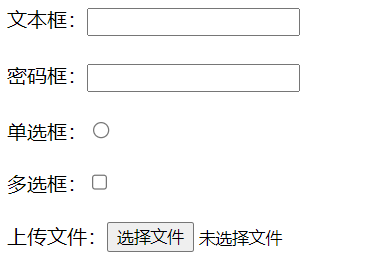
7.2 input文本框占位符(placeholder)
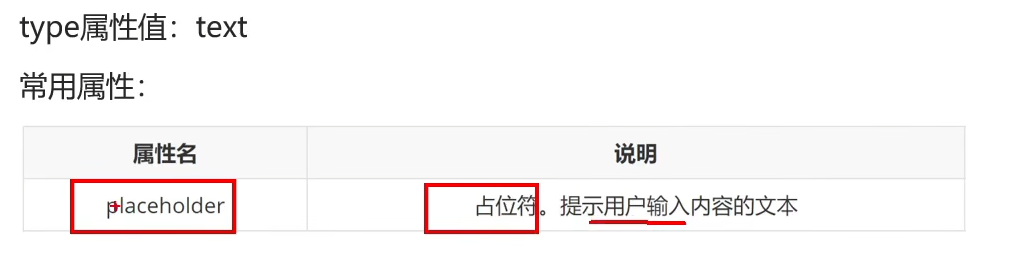
DOCTYPE html> <html lang="en"> <head> <meta charset="UTF-8"> <meta http-equiv="X-UA-Compatible" content="IE=edge"> <meta name="viewport" content="width=device-width, initial-scale=1.0"> <title>Documenttitle> head> <body> 文本框:<input type="text" placeholder="这是placeholder占位符"> body> html>- 1
- 2
- 3
- 4
- 5
- 6
- 7
- 8
- 9
- 10
- 11
- 12
- 13

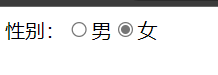
7.3 input单选功能和默认选择(radio、name、checked)
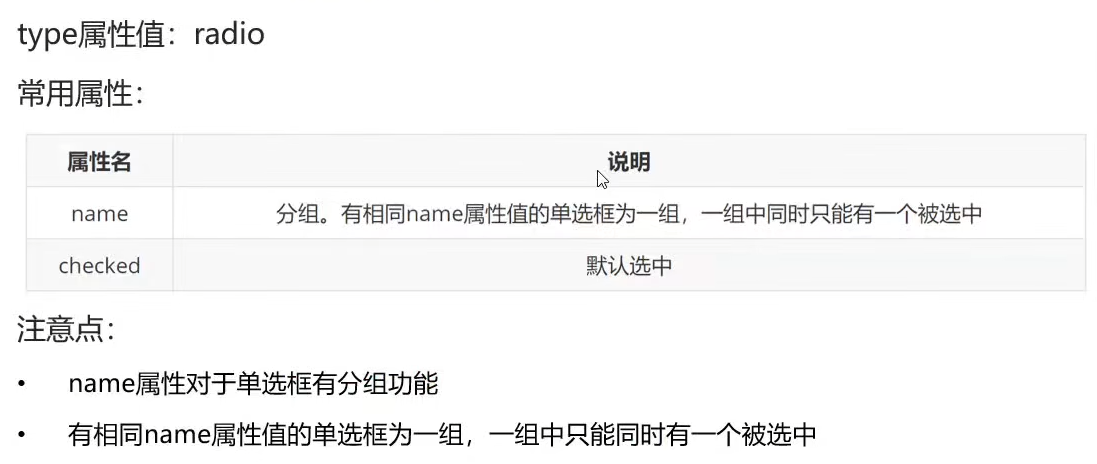
DOCTYPE html> <html lang="en"> <head> <meta charset="UTF-8"> <meta http-equiv="X-UA-Compatible" content="IE=edge"> <meta name="viewport" content="width=device-width, initial-scale=1.0"> <title>Documenttitle> head> <body> 性别:<input type="radio" name="sex">男<input type="radio" name="sex" checked>女 body> html>- 1
- 2
- 3
- 4
- 5
- 6
- 7
- 8
- 9
- 10
- 11
- 12
- 13
7.4 input上传多个文件(file、multiple)

DOCTYPE html> <html lang="en"> <head> <meta charset="UTF-8"> <meta http-equiv="X-UA-Compatible" content="IE=edge"> <meta name="viewport" content="width=device-width, initial-scale=1.0"> <title>Documenttitle> head> <body> 上传多个文件:<input type="file" multiple> body> html>- 1
- 2
- 3
- 4
- 5
- 6
- 7
- 8
- 9
- 10
- 11
- 12

7.5 input按钮(submit、reset、button)

DOCTYPE html> <html lang="en"> <head> <meta charset="UTF-8"> <meta http-equiv="X-UA-Compatible" content="IE=edge"> <meta name="viewport" content="width=device-width, initial-scale=1.0"> <title>Documenttitle> head> <body> 用户名:<input type="text"> <br> 密码:<input type="password"> <br> <input type="submit"> <input type="reset"> body> html>- 1
- 2
- 3
- 4
- 5
- 6
- 7
- 8
- 9
- 10
- 11
- 12
- 13
- 14
- 15
- 16
- 17
- 18

7.6 button按钮

DOCTYPE html> <html lang="en"> <head> <meta charset="UTF-8"> <meta http-equiv="X-UA-Compatible" content="IE=edge"> <meta name="viewport" content="width=device-width, initial-scale=1.0"> <title>Documenttitle> head> <body> <button>我是按钮button> <button type="submit">提交按钮button> <button type="reset">重置按钮button> <button type="button">普通按钮,没有任何功能button> body> html>- 1
- 2
- 3
- 4
- 5
- 6
- 7
- 8
- 9
- 10
- 11
- 12
- 13
- 14
- 15

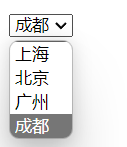
7.7 select下拉菜单标签

DOCTYPE html> <html lang="en"> <head> <meta charset="UTF-8"> <meta http-equiv="X-UA-Compatible" content="IE=edge"> <meta name="viewport" content="width=device-width, initial-scale=1.0"> <title>Documenttitle> head> <body> <select> <option>上海option> <option>北京option> <option>广州option> <option selected>成都option> select> body> html>- 1
- 2
- 3
- 4
- 5
- 6
- 7
- 8
- 9
- 10
- 11
- 12
- 13
- 14
- 15
- 16
- 17
7.8 表单文本域
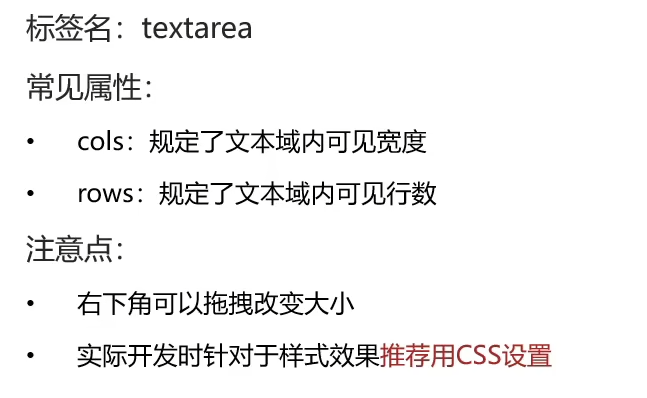
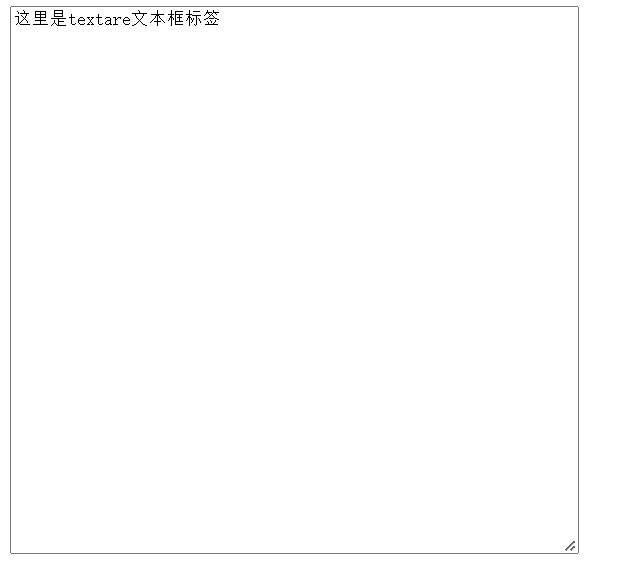
DOCTYPE html> <html lang="en"> <head> <meta charset="UTF-8"> <meta http-equiv="X-UA-Compatible" content="IE=edge"> <meta name="viewport" content="width=device-width, initial-scale=1.0"> <title>Documenttitle> head> <body> <textarea cols="60" rows="30">这里是textare文本框标签textarea> body> html>- 1
- 2
- 3
- 4
- 5
- 6
- 7
- 8
- 9
- 10
- 11
- 12
7.9 lable标签

DOCTYPE html> <html lang="en"> <head> <meta charset="UTF-8"> <meta http-equiv="X-UA-Compatible" content="IE=edge"> <meta name="viewport" content="width=device-width, initial-scale=1.0"> <title>Documenttitle> head> <body> 性别: <input type="radio" name="sex" id="man"> <label for="man">男label> <label><input type="radio" name="sex">女label> body> html>- 1
- 2
- 3
- 4
- 5
- 6
- 7
- 8
- 9
- 10
- 11
- 12
- 13
- 14

8.语义化标签(div、span)

DOCTYPE html> <html lang="en"> <head> <meta charset="UTF-8"> <meta http-equiv="X-UA-Compatible" content="IE=edge"> <meta name="viewport" content="width=device-width, initial-scale=1.0"> <title>Documenttitle> head> <body> 普通文字 <div>这是div标签div> <div>这是div标签div> <span>这是sapn标签span> <span>这是sapn标签span> body> html>- 1
- 2
- 3
- 4
- 5
- 6
- 7
- 8
- 9
- 10
- 11
- 12
- 13
- 14
- 15
- 16

拓展:HTML5的标签,用来做手机端的页面

9.字符实体标签

就记空格就行,忘记了直接
10.综合案例
10.1 优秀学生信息表格
DOCTYPE html> <html lang="en"> <head> <meta charset="UTF-8"> <meta http-equiv="X-UA-Compatible" content="IE=edge"> <meta name="viewport" content="width=device-width, initial-scale=1.0"> <title>Documenttitle> head> <body> <table border="1" width="500" height="300"> <tr> <th>年纪th> <th>姓名th> <th>学号th> <th>班级th> tr> <tr> <td rowspan="2">高三td> <td>张三td> <td>110td> <td>三年二班td> tr> <tr> <td>赵四td> <td>120td> <td>三年三班td> tr> <tr> <td>评语td> <td colspan>你们很优秀td> tr> table> body> html>- 1
- 2
- 3
- 4
- 5
- 6
- 7
- 8
- 9
- 10
- 11
- 12
- 13
- 14
- 15
- 16
- 17
- 18
- 19
- 20
- 21
- 22
- 23
- 24
- 25
- 26
- 27
- 28
- 29
- 30
- 31
- 32
- 33
- 34

10.2 恋爱信息表单
DOCTYPE html> <html lang="en"> <head> <meta charset="UTF-8"> <meta http-equiv="X-UA-Compatible" content="IE=edge"> <meta name="viewport" content="width=device-width, initial-scale=1.0"> <title>Documenttitle> head> <body> <h1>青春不常在,抓紧谈恋爱h1> <hr> <form action=""> 昵称:<input type="text" placeholder="请输入昵称"> <br> 性别: <label><input type="radio" name="sex" checked>男label> <label><input type="radio" name="sex">女label> <br> 所在城市: <select> <option>北京option> <option selected>上海option> <option>深圳option> <option>广州option> select> <br> 婚姻状况: <label><input type="radio" name="婚姻" checked>未婚label> <label><input type="radio" name="婚姻">已婚label> <label><input type="radio" name="婚姻">保密label> <br> 喜欢的类型: <label><input type="checkbox">可爱label> <label><input type="checkbox">性感label> <label><input type="checkbox">御姐label> <label><input type="checkbox">萝莉label> <label><input type="checkbox">小鲜肉label> <label><input type="checkbox">大叔label> <br> 个人介绍: <br> <textarea name="" id="" cols="60" rows="10">textarea> <h3>我承诺h3> <ul> <li>年满18岁,单身li> <li>抱着严肃的态度li> <li>真诚寻址另一半li> ul> <input type="checkbox">我同意所有条款 <br> <input type="submit" value="免费注册"> <button type="reset">重置button> form> body> html>- 1
- 2
- 3
- 4
- 5
- 6
- 7
- 8
- 9
- 10
- 11
- 12
- 13
- 14
- 15
- 16
- 17
- 18
- 19
- 20
- 21
- 22
- 23
- 24
- 25
- 26
- 27
- 28
- 29
- 30
- 31
- 32
- 33
- 34
- 35
- 36
- 37
- 38
- 39
- 40
- 41
- 42
- 43
- 44
- 45
- 46
- 47
- 48
- 49
- 50
- 51
- 52
- 53
- 54
- 55

-
相关阅读:
Java 208 道面试题:Java 基础模块答案
体验 ABP 的功能和服务
【无标题】
有blob列的表大小查询
【C++漂流记】C++对象模型和this指针
电力电缆故障技术与解决
Springboot之邮件发送(内附源码)
python求一个数的因子找出10000之内的所有完数
springboot180基于spring boot的医院挂号就诊系统
4.16每日一题(交换二次积分的积分次序:画域——重新定项)
- 原文地址:https://blog.csdn.net/qq_29678157/article/details/127876088

- 最新文章
-
沪漂五周年了:我越来越迷茫了
Agentic Skill Routing 实战:别再把所有 Skill 塞进 AI Agent 上下文
MySQL-Seconds_behind_master的精度误差
[MAF预定义ChatClient中间件-03]CachingChatClient——利用缓存省钱省时间
AI的至暗历史:从万众期待到被政府撤资,AI的两次死亡徘徊
Agent OS :五种驯服不确定性的范式
PortSwigger SQL注入LAB11
数据库即时编译JIT
[Begin]AI Learn Data Day 0
深度学习进阶(二十七)现代 LLM 的核心架构设计其二:SwiGLU