-
Mybatis+Mapper完成对数据库的增删改查
目录
配置mybatis核心配置文件(mybatis-config.xml)
使用Mybatis+Mapper,完成对数据库数据库的增删改查(CRUD)
准备环境
创建模块
第一步:点击Project Structure

第二步:选择Maven——> next

第三步:设置模块名称

第四步:补全项目结构

导入相关依赖坐标
第四步:在pom.xml导入一些需要的坐标依赖
- "1.0" encoding="UTF-8"?>
- <project xmlns="http://maven.apache.org/POM/4.0.0"
- xmlns:xsi="http://www.w3.org/2001/XMLSchema-instance"
- xsi:schemaLocation="http://maven.apache.org/POM/4.0.0 http://maven.apache.org/xsd/maven-4.0.0.xsd">
- <modelVersion>4.0.0modelVersion>
- <groupId>org.examplegroupId>
- <artifactId>database-CRUDartifactId>
- <version>1.0-SNAPSHOTversion>
- <properties>
- <maven.compiler.source>8maven.compiler.source>
- <maven.compiler.target>8maven.compiler.target>
- properties>
- <dependencies>
- <dependency>
- <groupId>org.mybatisgroupId>
- <artifactId>mybatisartifactId>
- <version>3.5.5version>
- dependency>
- <dependency>
- <groupId>mysqlgroupId>
- <artifactId>mysql-connector-javaartifactId>
- <version>5.1.46version>
- dependency>
- <dependency>
- <groupId>junitgroupId>
- <artifactId>junitartifactId>
- <version>4.13version>
- <scope>testscope>
- dependency>
- <dependency>
- <groupId>org.slf4jgroupId>
- <artifactId>slf4j-apiartifactId>
- <version>1.7.20version>
- dependency>
- <dependency>
- <groupId>ch.qos.logbackgroupId>
- <artifactId>logback-classicartifactId>
- <version>1.2.3version>
- dependency>
- <dependency>
- <groupId>ch.qos.logbackgroupId>
- <artifactId>logback-coreartifactId>
- <version>1.2.3version>
- dependency>
- dependencies>
- project>
准备数据库表
- create table tb_brand
- (
- id int auto_increment
- primary key,
- brand_name varchar(20) null,
- company_name varchar(20) null,
- -- 排序
- ordered int null,
- -- 描述信息
- description varchar(100) null,
- -- 状态
- status int null
- );
- INSERT INTO tb_brand (brand_name, company_name, ordered, description, status)
- VALUES ('三只松鼠', '三只松鼠股份有限公司', 5, '好吃不上火', 0),
- ('华为', '华为科技有限公司', 100, '华为致力于把数字世界带入每个人、每个家庭、每个组织,构建万物互联的智能世界', 1),
- ('小米', '小米科技有限公司', 50, 'are you ok', 1)
准备实体类(POJO)
- package com.clear.pojo;
- public class Brand {
- // id 主键
- private Integer id;
- // 商品名称
- private String brandName;
- // 企业名称
- private String companyName;
- // 排序字段
- private Integer ordered;
- // 描述信息
- private String description;
- // 状态:0 禁用 1 启用
- private Integer status;
- public Integer getId() {
- return id;
- }
- public void setId(Integer id) {
- this.id = id;
- }
- public String getBrandName() {
- return brandName;
- }
- public void setBrandName(String brandName) {
- this.brandName = brandName;
- }
- public String getCompanyName() {
- return companyName;
- }
- public void setCompanyName(String companyName) {
- this.companyName = companyName;
- }
- public Integer getOrdered() {
- return ordered;
- }
- public void setOrdered(Integer ordered) {
- this.ordered = ordered;
- }
- public String getDescription() {
- return description;
- }
- public void setDescription(String description) {
- this.description = description;
- }
- public Integer getStatus() {
- return status;
- }
- public void setStatus(Integer status) {
- this.status = status;
- }
- @Override
- public String toString() {
- return "Brand{" +
- "id=" + id +
- ", brandName='" + brandName + '\'' +
- ", companyName='" + companyName + '\'' +
- ", ordered=" + ordered +
- ", description='" + description + '\'' +
- ", status=" + status +
- '}';
- }
- }
导入测试用例

安装MybatisX插件
MybatisX是一款基于IDEA的快速开发插件,为效率而生。
主要功能有:
XML 和 接口方法 之间的快速跳转(alt + 鼠标左键)
根据接口方法生成statement(即SQL映射文件中的sql语句)
安装:
File——> settings——> Plugins——> 搜索MybatisX ——> Insatll——> 重启IDEA即可
配置mybatis核心配置文件(mybatis-config.xml)


mybatis核心配置文件 mybatis-config.xml 如下:
- "1.0" encoding="UTF-8" ?>
- configuration
- PUBLIC "-//mybatis.org//DTD Config 3.0//EN"
- "http://mybatis.org/dtd/mybatis-3-config.dtd">
- <configuration>
- <typeAliases>
- <package name="com.clear.pojo"/>
- typeAliases>
- <environments default="development">
- <environment id="development">
- <transactionManager type="JDBC"/>
- <dataSource type="POOLED">
- <property name="driver" value="com.mysql.jdbc.Driver"/>
- <property name="url" value="jdbc:mysql://localhost:3306/mybatis?useSSL=false&
- useServerPrepStmts=true"/>
- <property name="username" value="root"/>
- <property name="password" value="123456"/>
- dataSource>
- environment>
- environments>
- <mappers>
- <package name="com.clear.mapper"/>
- mappers>
- configuration>
配置SQL映射文件
配置SQL映射文件,操作哪张数据库表,表名就为:
数据库表+Mapper(BrandMapper.xml)

SQL映射文件 BrandMapper.xml 如下
- "1.0" encoding="UTF-8" ?>
- mapper
- PUBLIC "-//mybatis.org//DTD Mapper 3.0//EN"
- "http://mybatis.org/dtd/mybatis-3-mapper.dtd">
- <mapper namespace="com.clear.mapper.BrandMapper">
- mapper>
导入logback配置文件
在resources下导入logback.xml
- "1.0" encoding="UTF-8"?>
- <configuration>
- <appender name="Console" class="ch.qos.logback.core.ConsoleAppender">
- <encoder>
- <pattern>[%level] %cyan([%thread]) %boldGreen(%logger{15}) - %msg %npattern>
- encoder>
- appender>
- <logger name="com.clear" level="DEBUG" additivity="false">
- <appender-ref ref="Console"/>
- logger>
- <root level="DEBUG">
- <appender-ref ref="Console"/>
- root>
- configuration>
查询
查询所有数据

1、编写接口方法
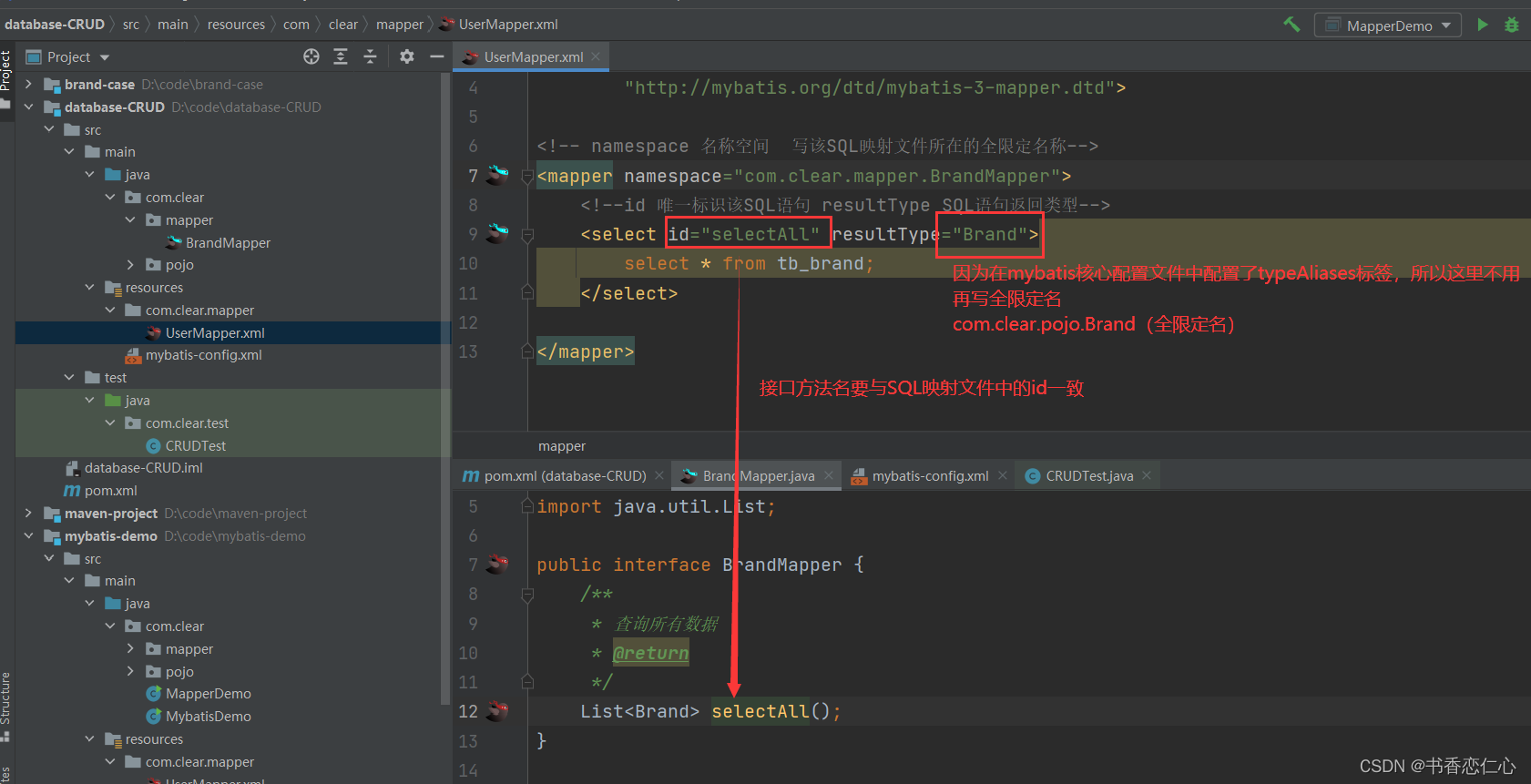
在com/clear/mapper中建立接口(接口名与SQL映射文件一致),且SQL映射文件与接口要在同一目录下


如下图:SQL映射文件与接口编译后的字节码文件在同一目录

2、在SQL映射文件中定义好SQL语句
3、执行方法、测试
代码如下:
- package com.clear.test;
- import com.clear.mapper.BrandMapper;
- import com.clear.pojo.Brand;
- import org.apache.ibatis.io.Resources;
- import org.apache.ibatis.session.SqlSession;
- import org.apache.ibatis.session.SqlSessionFactory;
- import org.apache.ibatis.session.SqlSessionFactoryBuilder;
- import org.junit.Test;
- import java.io.IOException;
- import java.io.InputStream;
- import java.util.List;
- public class CRUDTest {
- @Test
- public void testSelectAll() throws IOException {
- // 1、加载核心配置文件,获取SqlSessionFactory对象
- String resource = "mybatis-config.xml";
- InputStream inputStream = Resources.getResourceAsStream(resource);
- SqlSessionFactory sqlSessionFactory = new SqlSessionFactoryBuilder().build(inputStream);
- // 2、获取SqlSession对象
- SqlSession sqlSession = sqlSessionFactory.openSession();
- // 3、获取Mapper接口的代理对象
- BrandMapper brandMapper = sqlSession.getMapper(BrandMapper.class);
- // 4、执行方法
- List
brands = brandMapper.selectAll(); - System.out.println(brands);
- // 5、释放资源
- sqlSession.close();
- }
- }

但是我们发现有些数据保存的是null,这是由于数据库表中字段名与 POJO实体类中属性名不一样造成的,因为这样就不会自动封装了
可以通过修改SQL映射文件解决
起别名
方法一:起别名:对不一样的字段名起别名,让别名与实体类中属性名一致
缺点:这种方法不够灵活,每次查询都要起别名

SQL片段
方法二:使用SQL片段
缺点:显然这种方法不灵活,当查询不同字段时需要定义很多SQL片段

resultMap
方法三:resultMap:1、定义
标签 2、在
优点:这种方法使用灵活

总结:
实体类与数据库表字段名不一致,不能自动封装
1)起别名:在sql语句中,对不一样的字段名起别名,别名与实体类属性名一样
2)定义
片段,提高复用性 3)resultMap:定义
完成不一致的属性名与字段名的映射
查看详情
通过传入主键值id,查询商品详情

1、编写接口方法
在BrandMapper接口中编写方法

2、在SQL映射文件中编写SQL语句

3、测试方法如下:
- @Test
- public void selectByIdTest() throws IOException{
- Integer id = 1; // 模拟的数据
- // 1、获取SqlSessionFactory对象
- String resource = "mybatis-config.xml";
- InputStream inputStream = Resources.getResourceAsStream(resource);
- SqlSessionFactory sqlSessionFactory = new SqlSessionFactoryBuilder().build(inputStream);
- // 2、获取sqlSession对象
- SqlSession sqlSession = sqlSessionFactory.openSession();
- // 3、获取Mapper接口代理对象
- BrandMapper brandMapper = sqlSession.getMapper(BrandMapper.class);
- // 4、执行方法
- Brand brand = brandMapper.selectById(id);
- System.out.println(brand);
- sqlSession.close();
- }
测试结果如下

总结:
参数占位符
#{} 会将其替换为?,为了防止SQL注入
${} 拼SQL,会存在SQL注入问题
使用时机:
作为参数传递时:#{}
表名或字段名不固定的情况下:${}
参数类型:parameterTpye:可以省略
特殊字符处理:
1、转义字符 (ep: <)
2、CDATA区
内容 ]]>
多条件查询

多条件查询 —— 散装参数(需要使用@Param)
1、编写接口方法
在BrandMapper接口中编写方法

2、编写SQL语句
在SQL映射文件中编写SQL语句

3、执行方法、测试
- @Test
- public void testSelectByCondition() throws IOException {
- // 接收参数
- int status = 1;
- String companyName = "华为";
- String brandName = "华为";
- // 处理参数
- companyName = "%" + companyName + "%";
- brandName = "%" + brandName + "%";
- // 1、获取SqlSessionFactory对象
- String resource = "mybatis-config.xml";
- InputStream inputStream = Resources.getResourceAsStream(resource);
- SqlSessionFactory sqlSessionFactory = new SqlSessionFactoryBuilder().build(inputStream);
- // 2、获取SqlSession对象
- SqlSession sqlSession = sqlSessionFactory.openSession();
- // 3、获取Mapper接口代理对象
- BrandMapper brandMapper = sqlSession.getMapper(BrandMapper.class);
- List
brands = brandMapper.selectByCondition(status,companyName,brandName); - System.out.println(brands);
- sqlSession.close();
- }

多条件查询——对象参数
1、编写Mappe接口方法

2、编写SQL映射文件
在SQL映射文件中编写SQL语句

3、执行方法、测试

多条件查询——使用Map集合
1、编写Mapper接口方法

2、编写SQL映射文件
在SQL映射文件中编写SQL语句

3、执行方法

总结
参数接收:
1、散装参数:如果方法中有多个参数,需要使用@Param("SQL参数占位符")
2、对象参数:对象的属性要和SQL语句参数占位符名称一致
3、map集合:只需要保证SQL语句中参数占位符和map集合中键的名称对应即可
动态查询
多条件动态查询

1、编写Mapper接口方法

2、编写SQL映射文件

3、执行方法

单条件动态查询

1、编写Mapper接口方法

2、编写SQL映射文件
在SQL映射文件中编写SQL语句
因为是单条件查询,所以需要使用
标签 相当于switch 

3、执行方法、测试
- /**
- * 单条件动态查询
- * @throws IOException
- */
- @Test
- public void testSelectByConditionSingle() throws IOException {
- // 接收参数
- int status = 1;
- String companyName = "华为";
- String brandName = "华为";
- // 处理参数
- companyName = "%" + companyName + "%";
- brandName = "%" + brandName + "%";
- // 封装对象
- Brand brand = new Brand();
- //brand.setStatus(status);
- //brand.setCompanyName(companyName);
- //brand.setBrandName(brandName);
- // 1、获取SqlSessionFactory对象
- String resource = "mybatis-config.xml";
- InputStream inputStream = Resources.getResourceAsStream(resource);
- SqlSessionFactory sqlSessionFactory = new SqlSessionFactoryBuilder().build(inputStream);
- // 2、获取SqlSession对象
- SqlSession sqlSession = sqlSessionFactory.openSession();
- // 3、获取Mapper接口代理对象
- BrandMapper brandMapper = sqlSession.getMapper(BrandMapper.class);
- List
brands = brandMapper.selectByConditionSingle(brand); - System.out.println(brands);
- sqlSession.close();
- }
添加
添加数据

1、编写Mapper接口方法

2、编写SQL映射文件
在SQL映射文件中编写SQL语句

3、执行方法、测试
- @Test
- public void testAddBrand() throws IOException{
- // 获取数据
- String brandName="菠萝手机";
- String companyName="菠萝手机总经销商";
- int ordered=10086;
- String description="这不是一般的手机,这是王维诗里的手机";
- int status = 1;
- // 封装数据
- Brand brand = new Brand();
- brand.setBrandName(brandName);
- brand.setCompanyName(companyName);
- brand.setOrdered(ordered);
- brand.setDescription(description);
- brand.setStatus(status);
- // 1、加载核心配置文件,获取SqlSessionFactory对象
- String resource = "mybatis-config.xml";
- InputStream inputStream = Resources.getResourceAsStream(resource);
- SqlSessionFactory sqlSessionFactory = new SqlSessionFactoryBuilder().build(inputStream);
- //2、获取SqlSession对象
- SqlSession sqlSession = sqlSessionFactory.openSession(true); // 开启自动提交事务
- // 3、获取Mapper接口代理对象
- BrandMapper brandMapper = sqlSession.getMapper(BrandMapper.class);
- brandMapper.addBrand(brand);
- sqlSession.close();
- }
- }

添加后返回主键
如果需要在添加后返回主键,著需要在SQL映射文件中的SQL语句添加以下属性即可
< useGeneratedKeys="true" keyProperty="id">其余操作与上述添加数据操作一致

修改
修改全部字段

1、编写Mapper接口方法

2、编写SQL映射文件
在SQL映射文件中编写SQL语句
3、执行方法、测试
- @Test
- public void testUpdateBrand() throws IOException{
- // 获取数据
- String brandName="波导手机";
- String companyName="波导手机总经销商";
- int ordered=86;
- String description="干翻华为";
- int status = 1;
- int id = 5;
- // 封装数据
- Brand brand = new Brand();
- brand.setBrandName(brandName);
- brand.setCompanyName(companyName);
- brand.setOrdered(ordered);
- brand.setDescription(description);
- brand.setStatus(status);
- brand.setId(id);
- // 1、加载核心配置文件,获取SqlSessionFactory对象
- String resource = "mybatis-config.xml";
- InputStream inputStream = Resources.getResourceAsStream(resource);
- SqlSessionFactory sqlSessionFactory = new SqlSessionFactoryBuilder().build(inputStream);
- //2、获取SqlSession对象
- SqlSession sqlSession = sqlSessionFactory.openSession(true); // 开启自动提交事务
- // 3、获取Mapper接口代理对象
- BrandMapper brandMapper = sqlSession.getMapper(BrandMapper.class);
- int count = brandMapper.updateBrand(brand); // 影响的行数
- System.out.println(count);
- sqlSession.close();
- }
修改动态字段
有时候,只想修改表中个别字段,就不需要传入所有字段的数据

1、编写Mapper接口方法

2、编写SQL映射文件

3、执行方法、测试
- @Test
- public void testUpdateBrand2() throws IOException{
- // 获取数据
- String brandName="苹果手机";
- String companyName="苹果手机总经销商";
- int ordered=186;
- String description="干翻华为";
- int status = 1;
- int id = 6;
- // 封装数据
- Brand brand = new Brand();
- brand.setBrandName(brandName);
- brand.setCompanyName(companyName);
- //brand.setOrdered(ordered);
- brand.setDescription(description);
- brand.setStatus(status);
- brand.setId(id);
- // 1、加载核心配置文件,获取SqlSessionFactory对象
- String resource = "mybatis-config.xml";
- InputStream inputStream = Resources.getResourceAsStream(resource);
- SqlSessionFactory sqlSessionFactory = new SqlSessionFactoryBuilder().build(inputStream);
- //2、获取SqlSession对象
- SqlSession sqlSession = sqlSessionFactory.openSession(true); // 开启自动提交事务
- // 3、获取Mapper接口代理对象
- BrandMapper brandMapper = sqlSession.getMapper(BrandMapper.class);
- int count = brandMapper.updateBrand2(brand); // 影响的行数
- System.out.println(count);
- sqlSession.close();
- }

删除
删除数据库表一条记录

1、编写Mapper接口方法

2、编写SQL映射文件

3、执行方法、测试
- @Test
- public void testDeleteById() throws IOException{
- // 接收数据
- int id = 6;
- // 1、加载核心配置文件,获取SqlSessionFactory对象
- String resource = "mybatis-config.xml";
- InputStream inputStream = Resources.getResourceAsStream(resource);
- SqlSessionFactory sqlSessionFactory = new SqlSessionFactoryBuilder().build(inputStream);
- //2、获取SqlSession对象
- SqlSession sqlSession = sqlSessionFactory.openSession(true); // 开启自动提交事务
- // 3、获取Mapper接口代理对象
- BrandMapper brandMapper = sqlSession.getMapper(BrandMapper.class);
- brandMapper.deleteById(id);
- sqlSession.close();
- }

批量删除
批量删除时,只需要传入需要删除的数据的id值,便可删除

1、编写Mapper接口方法

2、编写SQL映射文件
mybatis默认会将数组参数,封装成map集合
默认 array=数组

可以使用@Param注解改变map集合的默认key名称,如下图

优化后的sql语句如下:

3、执行方法、测试
- @Test
- public void testDeleteByIds() throws IOException{
- // 接收数据
- int[] ids = {4,5};
- // 1、加载核心配置文件,获取SqlSessionFactory对象
- String resource = "mybatis-config.xml";
- InputStream inputStream = Resources.getResourceAsStream(resource);
- SqlSessionFactory sqlSessionFactory = new SqlSessionFactoryBuilder().build(inputStream);
- //2、获取SqlSession对象
- SqlSession sqlSession = sqlSessionFactory.openSession(true); // 开启自动提交事务
- // 3、获取Mapper接口代理对象
- BrandMapper brandMapper = sqlSession.getMapper(BrandMapper.class);
- brandMapper.deleteByIds(ids);
- sqlSession.close();
- }

Mybatis参数传递
Mybaits接口方法中可以接收各种各样的参数,mybatis底层对于这些参数进行不同的封装处理

单个参数
Mybatis提供了ParamNameResolver类进行参数封装
POJO类型
直接使用,属性名与sql语句参数占位符一致即可
Map集合
直接使用,键名key与sql语句参数占位符一致即可
Collecion
封装为map集合
map.put("arg0",collection集合)
map.put("collection",collection集合)
List
封装为map集合
Array
封装为map集合
map.put("arg0",数组)
map.put("array",数组)
其他类型
直接使用
多个参数
多个参数:封装为map集合,可以使用@Param注解替换map集合中默认的arg键名
map.put("arg0",参数值1)
map.put("param1",参数值1)
map.put("param2",参数值2)
map.put("arg1",参数值2)
使用注解完成增删改查
对于简单的SQL语句使用注解
对于复杂的SQL语句使用SQL映射文件
mybatis官方也是这么说的

例子:使用注解来查询数据

总结
mybatis完成操作需要如下几步:
编写接口方法——>编写SQL——>执行方法
实体类与数据库表字段名不一致,不能自动封装
1)起别名:在sql语句中,对不一样的字段名起别名,别名与实体类属性名一样
2)定义
片段,提高复用性 3)resultMap:定义
完成不一致的属性名与字段名的映射 总结:
参数占位符
#{} 会将其替换为?,为了防止SQL注入
${} 拼SQL,会存在SQL注入问题
使用时机:
作为参数传递时:#{}
表名或字段名不固定的情况下,需要动态设置时:${}
参数类型:parameterTpye:可以省略
特殊字符处理:
1、转义字符 (ep: <)
2、CDATA区
内容 ]]>
总结
参数接收:
1、散装参数:如果方法中有多个参数,需要使用@Param("SQL参数占位符")
2、对象参数:对象的属性要和SQL语句参数占位符名称一致
3、map集合:只需要保证SQL语句中参数占位符和map集合中键的名称对应即可
动态SQL
动态SQL是mybatis的强大特性之一。

if:用于判断是否有值,使用test属性进行条件判断
存在的问题:第一个条件不需要逻辑运算符

解决方案:
使用恒等式 (ep 1 = 1)

标签代替where关键字 
mybatis默认会将数组参数,封装成map集合
默认 array=数组
可以使用@Param注解改变map集合的默认key名称
-
相关阅读:
CCC数字钥匙设计【BLE】--URSK管理
SpringCloud Gateway用法详解
Kafka Stream 学习笔记-4 window and state store
GreenPlum数据库日常维护
Grafana 开源了一款 eBPF 采集器 Beyla
我与C++的爱恋:模板初阶和STL库
Codeforces Round 901 (Div. 2)
Python的计算性能优化
【web-攻击用户】(9.7.1)本地隐私攻击:持久性cookie、缓存Web内容、浏览历史记录、Flash本地共享对象……
java计算机毕业设计玩转保定旅游系统源程序+mysql+系统+lw文档+远程调试
- 原文地址:https://blog.csdn.net/weixin_56058578/article/details/127806477
