-
NetCDF数据在ArcMap中的使用
NetCDF又称科学数据集,可以存储温度、湿度、风速、风向等多个维度的文件格式。本次气象数据来源于地理遥感生态网平台。
下面我们来介绍如何在ArcMap中使用NetCDF。
在ArcMap中显示NetCDF数据
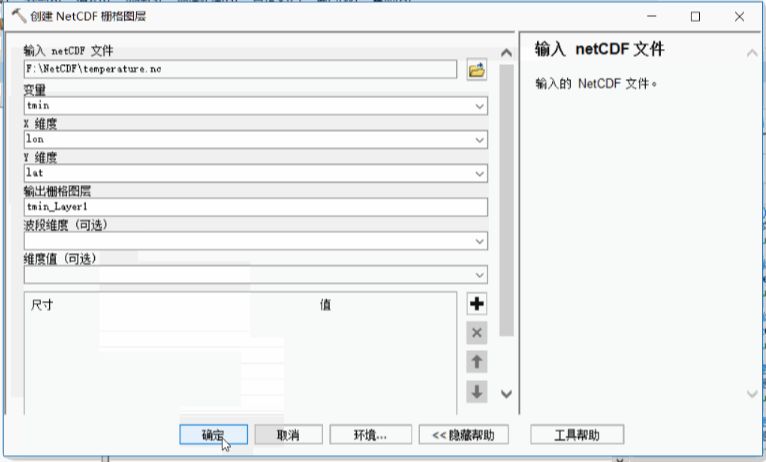
ArcMap不能直接读取NetCDF数据,需要使用GP工具Make NetCDF Raster Layer(创建NetCDF栅格图层),将NetCDF生成栅格图层。
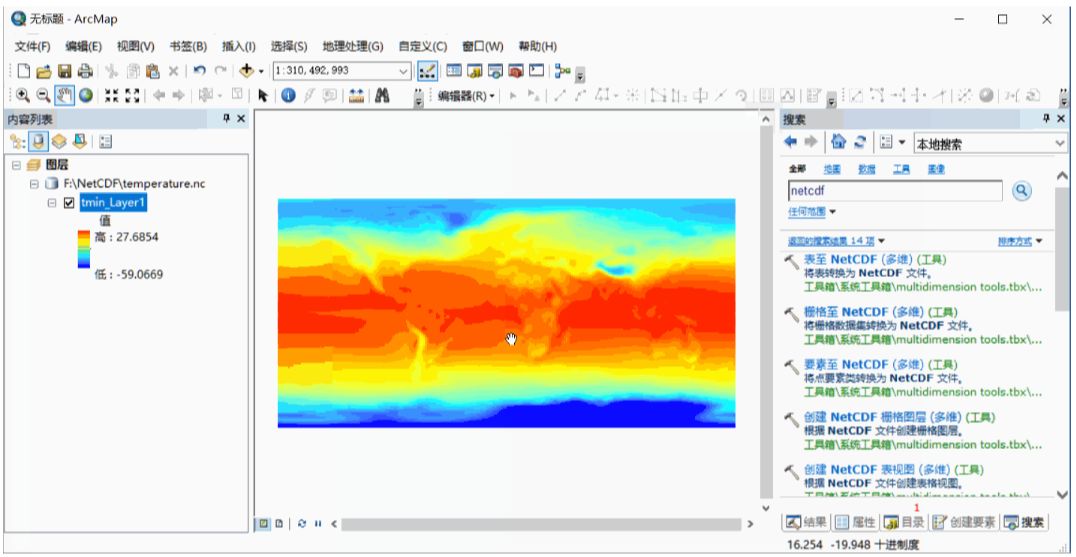
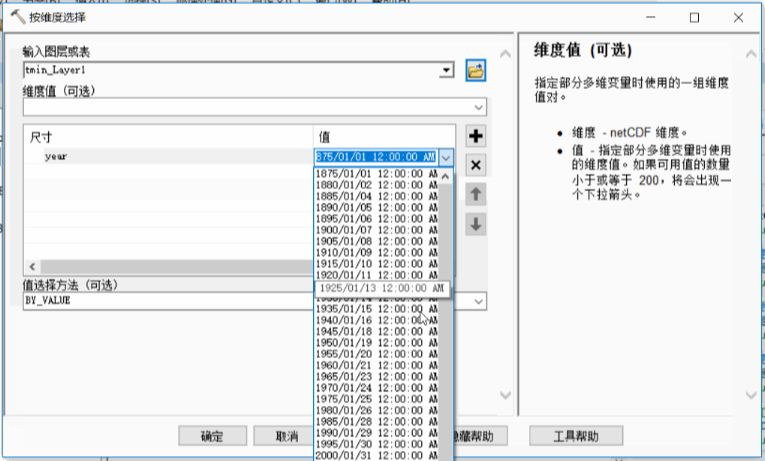
显示特定年份的温度图层
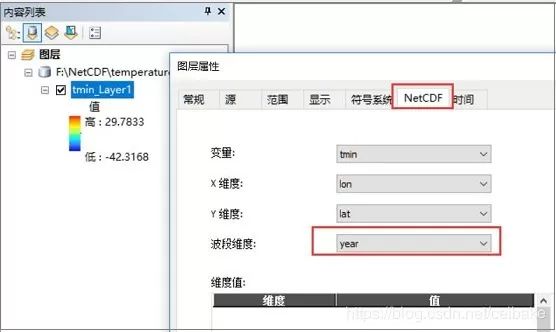
方式一:直接在图层属性中设置。

方式二:使用GP工具Select by Dimention(按维度选择)。
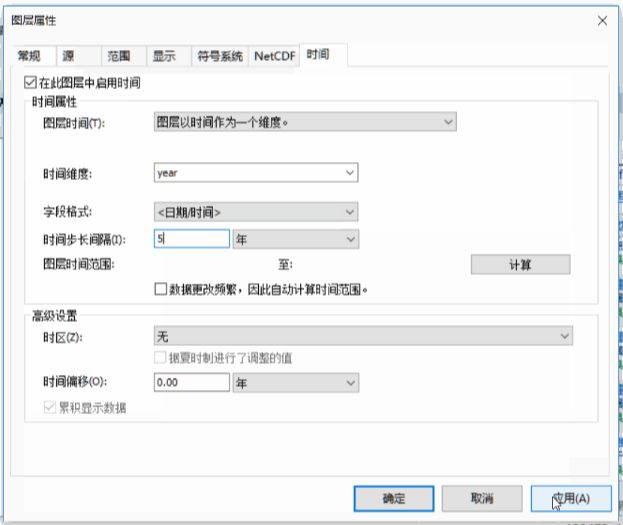
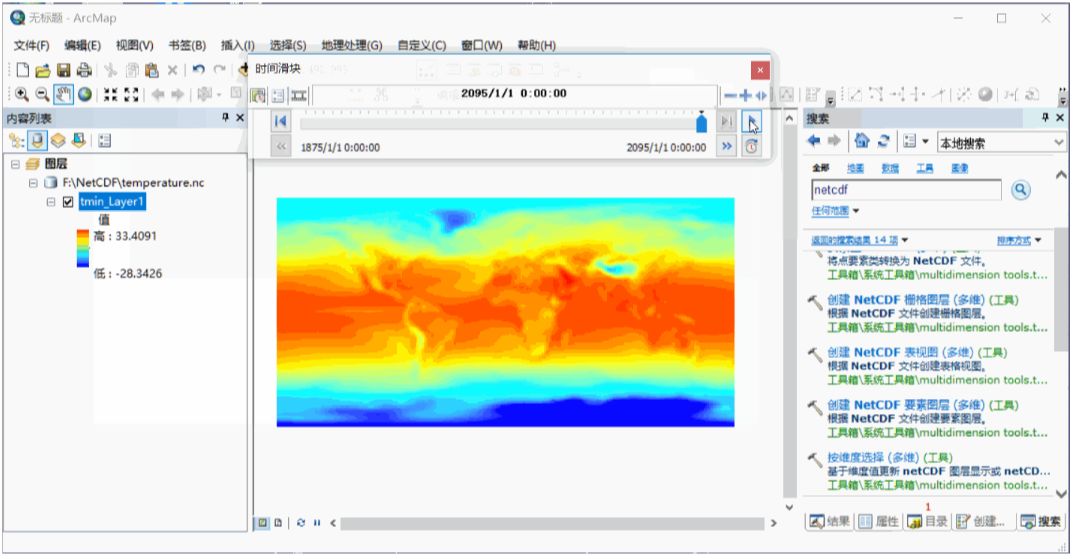
按照时间动态展示数据
首先对图层启用时间。
然后打开时间滑块。

按照年份,导出NetCDF的每幅栅格
1、设置NetCDF图层的波段维度为Year。
2、点击原文中的链接,下载NetCDF_time_slice_to_Raster.zip,解压后,添加到目录窗口中,然后运行工具。

生成结果是以Band_命名的。我们可以稍微改下代码,以年份命名。脚本如下:
# ---------------------------------------------------------------------
# export_netCDF_slice.py
# Created on: 2011-06-02 10:18:49.00000
# Description: This scipt will create a TIFF raster from a NetCDF layer, and
# save each band of that TIFF as a seperate TIF raster (for each time slcie in a netcdf file)
# ---------------------------------------------------------------------
# Import modules
import arcpy, os
#Inputs
Input_NetCDF_layer = arcpy.GetParameterAsText(0)
Output_Folder = arcpy.GetParameterAsText(1)
Input_Name = Input_NetCDF_layer
Output_Raster = Output_Folder + os.sep + "NetCDF_Raster.tif"
#Copy the NetCDF layer as a TIF file.
arcpy.CopyRaster_management(Input_Name, Output_Raster)
arcpy.AddMessage(Output_Raster + " " + "created from NetCDF layer")
#Reading number of band information from saved TIF
bandcount = arcpy.GetRasterProperties_management (Output_Raster, "BANDCOUNT")
resultValue = bandcount.getOutput(0)
count = 1
# Year
yearN = 1875
arcpy.AddMessage("Exporting individual bands from" + Output_Raster)
#Loop through the bands and copy bands as a seperate TIF file.
while count <= int(resultValue):
Input_Raster_Name = Output_Raster + os.sep+ "Band_" + str(count)
Output_Band = Output_Folder + os.sep + str(yearN) +".tif"
arcpy.CopyRaster_management(Input_Raster_Name, Output_Band)
arcpy.AddMessage("Band_" + str(count) +".tif" + " " "exported" + " " + "successfully")
yearN +=5
count +=1
# The following will delete the TIFF file that was created by CopyRaster tool.
arcpy.Delete_management(Output_Raster,"#")
arcpy.AddMessage("Tool Executed Successfully")
-
相关阅读:
npm:发布/迭代个人开发包到世界仓库
js动态获取当前时间并显示星期数
设计模式日常学习(七)
高并发时为什么推荐ReentrantLock而不是synchronized
新基建助力智能化道路交通领域的转型发展
Vue UI 组件库(移动端常用 UI 组件库,PC 端常用 UI 组件库,Element UI基本使用,Element UI按需引入)
Retrofit java.security.cert.CertPathValidatorException:
微信服务商模式支付APIV3完整Demo,可直接使用,适用于(H5、JSAPI、H5、App、小程序)
springboot+canal+mysql+redis缓存双写一致性
如何使用Python实现发送邮件功能
- 原文地址:https://blog.csdn.net/m0_66892427/article/details/127826159