-
MYSQL中ORDER BY(排序查询)
0 写在前面
有时候需要找一些特殊的字段,例如数学成绩。
一位老师要求找出成绩从好到差来进行上课点名,这样怎么办呢。
只需要用排序即可
ORDER BY。1 格式
[NOT] ORDER BY 字段1[ASC/DESC], 字段2[[ASC/DESC] ] ……ASC表示升序,DESC表示降序如果不写,默认为升序
2 SQL 准备
SET NAMES utf8mb4; SET FOREIGN_KEY_CHECKS = 0; -- ---------------------------- -- Table structure for math_scores -- ---------------------------- DROP TABLE IF EXISTS `math_scores`; CREATE TABLE `math_scores` ( `id` int NOT NULL COMMENT '主键', `name` varchar(64) CHARACTER SET utf8mb4 COLLATE utf8mb4_0900_ai_ci NULL DEFAULT NULL COMMENT '姓名', `scores` int NULL DEFAULT NULL COMMENT '成绩', PRIMARY KEY (`id`) USING BTREE ) ENGINE = InnoDB CHARACTER SET = armscii8 COLLATE = armscii8_general_ci ROW_FORMAT = Dynamic; -- ---------------------------- -- Records of math_scores -- ---------------------------- INSERT INTO `math_scores` VALUES (1, '艾比', 95); INSERT INTO `math_scores` VALUES (2, '贝尔德', 100); INSERT INTO `math_scores` VALUES (3, '凯迪', 60); INSERT INTO `math_scores` VALUES (4, '黛莉亚', 98); INSERT INTO `math_scores` VALUES (5, '伊尔利', 70); INSERT INTO `math_scores` VALUES (6, '法比奥拉', 60); INSERT INTO `math_scores` VALUES (7, '盖坦', 96); INSERT INTO `math_scores` VALUES (8, '哈克姆', 66); INSERT INTO `math_scores` VALUES (9, '伊恩', 31); INSERT INTO `math_scores` VALUES (10, '杰克', 88); INSERT INTO `math_scores` VALUES (11, '卡德', 28); INSERT INTO `math_scores` VALUES (12, '拉斐特', 5); INSERT INTO `math_scores` VALUES (13, '玛德琳', 79); INSERT INTO `math_scores` VALUES (14, '奈西亚', 87); INSERT INTO `math_scores` VALUES (15, '奥巴马', 63); INSERT INTO `math_scores` VALUES (16, '巴塞尔', 100); INSERT INTO `math_scores` VALUES (17, '卡特', 79); INSERT INTO `math_scores` VALUES (18, '拉德克力夫', 58); INSERT INTO `math_scores` VALUES (19, '萨布丽娜', 21); INSERT INTO `math_scores` VALUES (20, '泰博', 90); SET FOREIGN_KEY_CHECKS = 1;- 1
- 2
- 3
- 4
- 5
- 6
- 7
- 8
- 9
- 10
- 11
- 12
- 13
- 14
- 15
- 16
- 17
- 18
- 19
- 20
- 21
- 22
- 23
- 24
- 25
- 26
- 27
- 28
- 29
- 30
- 31
- 32
- 33
- 34
- 35
- 36
- 37
- 38
- 39
- 40

3 举例说明
3.1 单个字段:[NOT] 字段 ORDER BY
此功能是将规定字段升序排序。
查询数学成绩,以升序排列:
sql:
SELECT * FROM `math_scores` ORDER BY scores- 1
- 2
- 3
- 4
- 5
- 6
结果:

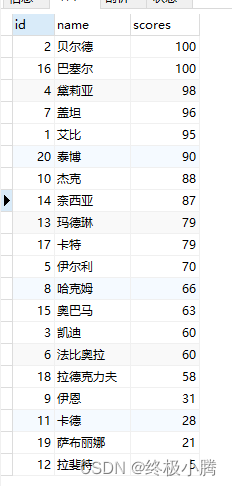
降序:
sql:
SELECT * FROM `math_scores` ORDER BY scores DESC- 1
- 2
- 3
- 4
- 5
- 6
结果:
3.2 多个字段:[NOT] 字段 1,ORDER BY 字段 2
可以看到如果有相同成绩的人,那么我们还可以加另一个字段进行限定
例如,成绩升序,但是相同成绩的人id降序。
sql:
SELECT * FROM `math_scores` ORDER BY scores ASC, id DESC- 1
- 2
- 3
- 4
- 5
- 6
结果:

可以看到完美运行。还有,不仅可以有两个字段,可以有n个。
4 写在末尾
本文只写了ORDER BY 的基础用法,可以合理使用一下,加油干。
如果有什么好的建议,或者本文有什么错误,可以留言评论区,大家共同学习。
-
相关阅读:
基于Apache Hudi构建分析型数据湖
lab1-4 PE结构
Serverless云上作战阵型 | 通过云函数使用云数据库快速突破音障
数据结构--七大排序算法(更新ing)
使用原子子表创建可重用的子组件
kubelet源码 删除pod(三)
服务器的初始化
【源码分析】Java中的lambda表达式会生成内部类吗?是如何生成的?
企业应用超融合架构的设计实例及超融合应用场景分析
1-前端基本知识-CSS
- 原文地址:https://blog.csdn.net/weixin_45909221/article/details/127814524
