-
【微信小程序】vertical属性、文章列表

🏆今日学习目标:vertical属性、文章列表
😃创作者:颜颜yan_
✨个人主页:颜颜yan_的个人主页
⏰预计时间:25分钟
🎉专栏系列:我的第一个微信小程序
前言
哈喽大家好,本期是微信小程序专栏第八期,本期的主要内容是以vertical属性为例了解Boolean值的一个小“陷阱”、文章列表的制作。
注意:每期内容是连载呢,建议大家可以看看往期内容,更好理解噢~
vertical属性——Boolean值的"陷阱"
这个属性可以指明swiper组件面板指示点的排布方向是水平还是垂直。
将
vertical="true"加入到swiper的属性中,保存后会发现swiper组件的面板指示点由原来的水平排布更改为垂直排布,出现在组件的右侧。
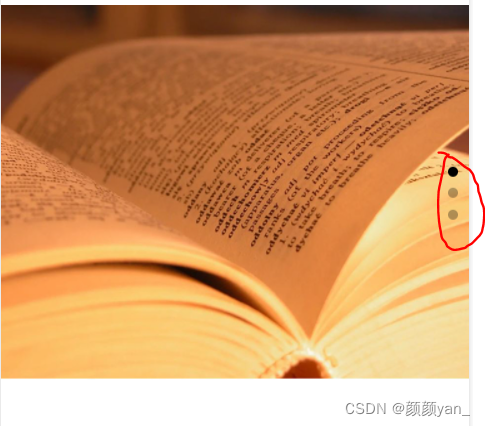
如下,我们会发现,将vertical的属性改为
false或者任何字符串,都会让指示面板呈垂直分布。


只有当
vertical=""的时候,才呈水平分布。

可以发现,即使将vertical的值设置为false,指示面板依然是垂直分布。但`这里的false并不是Boolean类型,而是一个字符串,所以在JavaScript里面会认为这是一个true。所以,设置vertical属性为"aaa"、“bbb”、" "(中间有一个空格),效果是一样的,vertical属性被认为设置了true。如果想让面板指示点水平排列,有以下几种方法:
- 不加入vertical属性。
- vertical=“”
- vertical=“{{false}}”
(数据绑定,这种写法让{{false}}里面的false被认为是一个Boolean类型的变量,而不是一个字符串,从而实现false即是假,true即是真的效果。)
注意:所有组件的Boolean类型属性都有这样的Boolean陷阱,比如上期用到的indicator-dots和autoplay也存在这个问题。
文章列表
效果图


文章列表包括日期、发布时间、文章标题、图片、收藏、浏览、评论几个部分。
wxml
思路:
- 添加一个大的view组件放内容。然后添加两个小的组件,即post-author-date和post-like,一个表示日期部分,一个表示收藏、浏览、评价部分。
- 在日期部分添加image和text组件,分别为logo和日期。
- 添加文章的内容,也就是标题、图片和简介。
- 在收藏部分添加image和text组件,也就是添加相应的图标和数字。
- 多添加几个组件,就可以形成文章列表啦~
<view> <swiper indicator-dots="true" autoplay="true" interval="3000" vertical="{{false}}" circular="true"> <swiper-item> <image src="/images/post/post-1@text.jpg">image> swiper-item> <swiper-item> <image src="/images/post/post-2@text.jpg">image> swiper-item> <swiper-item> <image src="/images/post/post-3@text.jpg">image> swiper-item> swiper> <view class="post-container"> <view class="post-author-date"> <image src="/images/avatar/avatar-5.png">image> <text>Nov 9 2022text> view> <text class="post-title">那个不为人知的故事text> <image class="post-image" src="/images/post/unknow-story.jpg" mode="aspectFit">image> <text class="post-content">超人气作者Twentine(无量渡口)经典之作,直击心底深处的柔软。 这是杨昭和陈铭生的故事,这是卧底缉毒警察的故事。 你始终不曾离去,你永远在我心底。text> <view class="post-like"> <image src="/images/icon/wx_app_collect.png">image> <text>10wtext> <image src="/images/icon/wx_app_view.png">image> <text>1wtext> <image src="/images/icon/wx_app_message.png">image> <text>999text> view> view> <view class="post-container"> <view class="post-author-date"> <image src="/images/avatar/avatar-2.png">image> <text>Nov 10 2022text> view> <text class="post-title">边城text> <image class="post-image" src="/images/post/biancheng.jpg" mode="aspectFit">image> <text class="post-content">沈从文代表作之一,重现湘西世界的诗意与纯净,书写人情美、人事美、人性美text> <view class="post-like"> <image src="/images/icon/wx_app_collect.png">image> <text>1wtext> <image src="/images/icon/wx_app_view.png">image> <text>9999text> <image src="/images/icon/wx_app_message.png">image> <text>90text> view> view> <view class="post-container"> <view class="post-author-date"> <image src="/images/avatar/avatar-3.png">image> <text>Nov 11 2022text> view> <text class="post-title">活着text> <image class="post-image" src="/images/post/alive.jpg" mode="aspectFit">image> <text class="post-content">《活着》讲述了人如何去承受巨大的苦难;讲述了眼泪的宽广和丰富;讲述了绝望的不存在;讲述了人是为了活着本身而活着的,而不是为了活着之外的任何事物而活着。text> <view class="post-like"> <image src="/images/icon/wx_app_collect.png">image> <text>1234text> <image src="/images/icon/wx_app_view.png">image> <text>5678text> <image src="/images/icon/wx_app_message.png">image> <text>999text> view> view> <view class="post-container"> <view class="post-author-date"> <image src="/images/avatar/avatar-4.png">image> <text>Nov 12 2022text> view> <text class="post-title">哈利波特百科全书text> <image class="post-image" src="/images/post/harry.jpg" mode="aspectFit">image> <text class="post-content">手里没有哈利波特百科全书 ,怎么能称得上真正的哈迷!涵盖哈利·波特全系列内容,配全新精美素描插图、哈利波特魔法世界历史年表。text> <view class="post-like"> <image src="/images/icon/wx_app_collect.png">image> <text>1234text> <image src="/images/icon/wx_app_view.png">image> <text>5678text> <image src="/images/icon/wx_app_message.png">image> <text>999text> view> view> <view class="post-container"> <view class="post-author-date"> <image src="/images/avatar/avatar-5.png">image> <text>Nov 13 2022text> view> <text class="post-title">三体:全三册 刘慈欣代表作text> <image class="post-image" src="/images/post/santi.jpg" mode="aspectFit">image> <text class="post-content">《三体》第73届世界科幻雨果奖获奖作品,银河奖特别奖,《三体3》轨迹奖长篇科幻小说!2017年世界雨果奖提名作品。 text> <view class="post-like"> <image src="/images/icon/wx_app_collect.png">image> <text>1234text> <image src="/images/icon/wx_app_view.png">image> <text>5678text> <image src="/images/icon/wx_app_message.png">image> <text>999text> view> view> view>- 1
- 2
- 3
- 4
- 5
- 6
- 7
- 8
- 9
- 10
- 11
- 12
- 13
- 14
- 15
- 16
- 17
- 18
- 19
- 20
- 21
- 22
- 23
- 24
- 25
- 26
- 27
- 28
- 29
- 30
- 31
- 32
- 33
- 34
- 35
- 36
- 37
- 38
- 39
- 40
- 41
- 42
- 43
- 44
- 45
- 46
- 47
- 48
- 49
- 50
- 51
- 52
- 53
- 54
- 55
- 56
- 57
- 58
- 59
- 60
- 61
- 62
- 63
- 64
- 65
- 66
- 67
- 68
- 69
- 70
- 71
- 72
- 73
- 74
- 75
- 76
- 77
- 78
- 79
- 80
- 81
- 82
- 83
- 84
- 85
- 86
- 87
- 88
- 89
- 90
- 91
- 92
- 93
- 94
- 95
- 96
- 97
- 98
- 99
- 100
- 101
- 102
- 103
- 104
- 105
- 106
- 107
- 108
- 109
- 110
- 111
- 112
- 113
- 114
- 115
wxss
思路:
- 设置是wiper组件和swiper组件里面图片的宽高。
- 设置整个文章列表,主轴设置为自上而下,调整间距,设置上下边框的颜色。
- 设置文章和日期的样式,flex布局,主轴从左向右,让日期位于图片的右边。
- 设置文章简介、文章标题、文章图片的样式。
- 设置收藏、浏览、关注的样式。
/* 设置swiper组件的宽高 */ swiper{ width: 100%; height: 500rpx; } /* 设置swiper组件里面图片的宽高 */ swiper image{ width: 100%; height: 500rpx; } /* 设置整个文章列表 */ .post-container{ /* 设置主轴,垂直方向,自上而下 */ flex-direction: column; display: flex; margin: 20rpx 0 40rpx; background-color: #fff; /* 设置上下边框 */ border-bottom: 1px solid #ededed; border-top: 1px solid #ededed; padding-bottom: 5px; } /* 文章日期和图片,让日期位于图片的右边 */ .post-author-date{ margin: 10rpx 0 20rpx 10rpx; display: flex; /* 主轴水平,从左到右 */ flex-direction: row; align-items: center; } .post-author-date image{ width:60rpx; height: 60rpx; } .post-author-date text{ /* 增加日期与小图片的间距 */ margin-left: 20px; font-size: 26rpx; } /* 文章图片 */ .post-image{ width: 100%; height: 350rpx; margin-bottom: 15px; } /* 文章标题 */ .post-title{ font-size: 16px; /* 文字加粗 */ font-weight: 600; color: #333; margin-bottom: 10px; margin-left: 10px; } /* 文章简介 */ .post-content{ color: #666666; font-size: 26rpx; margin-bottom: 20rpx; margin-left: 20rpx; /* 文字间距 */ letter-spacing: 2rpx; align-items: center; } .post-like{ display: flex; flex-direction: row; font-size: 13px; line-height: 16px; margin-left: 10px; align-items: center; } .post-like image{ height: 16px; width: 16px; margin-right: 5px; } .post-like text{ margin-left: 5px; margin-right: 15px; }- 1
- 2
- 3
- 4
- 5
- 6
- 7
- 8
- 9
- 10
- 11
- 12
- 13
- 14
- 15
- 16
- 17
- 18
- 19
- 20
- 21
- 22
- 23
- 24
- 25
- 26
- 27
- 28
- 29
- 30
- 31
- 32
- 33
- 34
- 35
- 36
- 37
- 38
- 39
- 40
- 41
- 42
- 43
- 44
- 45
- 46
- 47
- 48
- 49
- 50
- 51
- 52
- 53
- 54
- 55
- 56
- 57
- 58
- 59
- 60
- 61
- 62
- 63
- 64
- 65
- 66
- 67
- 68
- 69
- 70
- 71
- 72
- 73
- 74
- 75
- 76
- 77
- 78
- 79
- 80
- 81
- 82
总结
以上就是今天的学习内容啦~
如果有兴趣的话可以订阅专栏,持续更新呢~
咱们下期再见~

-
相关阅读:
操作系统内存换出---15
7 | 计算每个键对应的平均值,并按降序排序
宝塔手把手教学-Linux面板安装LNMP & worldpress个人博客
博客系统(升级(Spring))(四)(完)基本功能(阅读,修改,添加,删除文章)(附带项目)
SpringCloud(十)——ElasticSearch简单了解(三)数据聚合和自动补全
git记录
Windows下安装MySQL8详细教程
Mongodb介绍和安装(含安装包)
白杨SEO:SEO转型系列之十一,传统SEO从业人员如何转行社群运营/营销?
【k8s管理--两种方式安装prometheus】
- 原文地址:https://blog.csdn.net/m0_55394328/article/details/127762552
