-
如何利用python将xmind转为Excel?
1.环境准备
需要先安装xmindparser模块,安装方法较为简单,直接运行pip命令即可。
pip install xmindparser- 1
2.源数据构造及流程解析
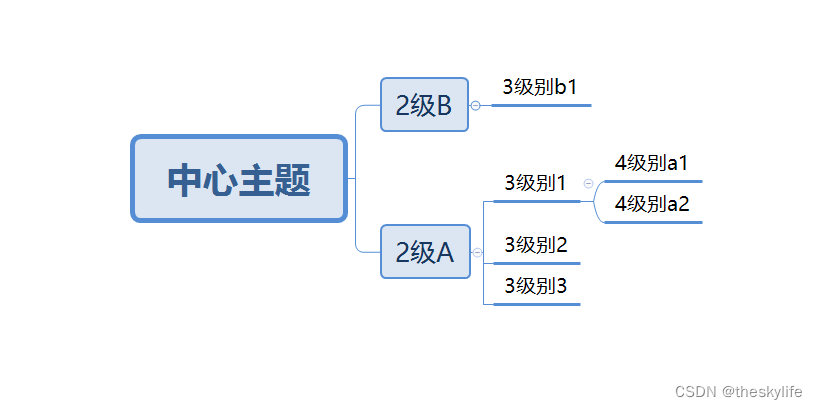
2.1 准备xmind文件
构建好xmind文件后,将其命名为test.xmind,其图像如下:
2.2 解析xmind文件
利用xmindparser对2.1中的xmind文件进行解析,解析后效果如下:

解析代码如下:from xmindparser import xmind_to_dict x_flie = r'Test.xmind' json_data= xmind_to_dict(x_flie)- 1
- 2
- 3
2.3 对解析后的数据进行处理
由于解析后的数据不符合写出的要求,故需要对这部分数据进行处理。由于本人喜欢用pandas进行数据处理,故在此构建dataframe进行输出。
2.3.1 处理1——提取数据
对2.2中解析后的数据进行处理,按照层次进行组合,得到效果如下的数据:

实现代码如下:# 可以设想为一个树结构,利用递归函数,获取由根至各叶子节点的路径。 def xm_parse(dic, pre_data=[]): """输入一个由xmindparser,转换而来的字典形式的数据,将之转换成列表""" title_list = [] topic_list = [] try: topics = dic.get("topics") title = dic.get("title") # 将前缀追加 title_list.append(title) title_list = pre_data + title_list # 如果到达末尾,就返回 if topics is None and title: yield title, title_list # print(title,title_list) return # 如果是列表,就暂存起来(若每个对象为标准的列表,即 topics= topic_list,则可以跳过该步骤) elif isinstance(topics, list) and title: for topic in topics: topic_list.append(topic) except AttributeError as e: print("异常结束") return # 若列表不为空,则需要递归寻找 if topic_list: for topic in topic_list: yield from xm_parse(topic,title_list)- 1
- 2
- 3
- 4
- 5
- 6
- 7
- 8
- 9
- 10
- 11
- 12
- 13
- 14
- 15
- 16
- 17
- 18
- 19
- 20
- 21
- 22
- 23
- 24
- 25
- 26
- 27
2.3.2 处理2——填充数据
经2.3.1的过程处理后的数据,并不能直接作为参数直接转换为DataFrame,需要将数据处理成以下形式:
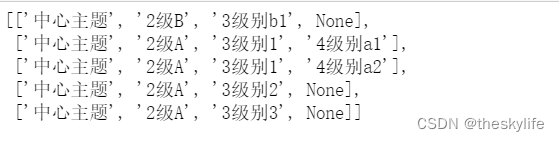
实现代码如下:temp=[] max_cols=0 #提取数据,并找出最大深度(列数) for i,j in xm_parse(json_data[0]['topic']): temp.append(j) max_cols= max_cols if max_cols > len(j) else len(j) #对缺失数据采用补全 for i in range(len(temp)): temp[i] = temp[i] + (max_cols - len(temp[i])) * [None]- 1
- 2
- 3
- 4
- 5
- 6
- 7
- 8
- 9
2.3.3 处理3——转换成DataFrame
转换后,效果如下:

实现代码如下:
result=pd.DataFrame.from_records(temp,columns=["标题-{}".format(i+1) for i in range(max_cols)])- 1
3.完整代码
from xmindparser import xmind_to_dict import pandas as pd # 可以设想为一个树结构,利用递归函数,获取由根至各叶子节点的路径。 def xm_parse(dic, pre_data=[]): """输入一个由xmindparser,转换而来的字典形式的数据,将之转换成列表""" title_list = [] topic_list = [] try: topics = dic.get("topics") title = dic.get("title") # 将前缀追加 title_list.append(title) title_list = pre_data + title_list # 如果到达末尾,就返回 if topics is None and title: yield title, title_list # print(title,title_list) return # 如果是列表,就暂存起来(若每个对象为标准的列表,即 topics= topic_list,则可以跳过该步骤) elif isinstance(topics, list) and title: for topic in topics: topic_list.append(topic) except AttributeError as e: print("异常结束") return if topic_list: for topic in topic_list: yield from xm_parse(topic,title_list) def main(): x_flie=r"Test.xmind" out_file=r"xmind转换后.xlsx" temp=[] max_cols=0 json_data= xmind_to_dict(x_flie) #提取数据,并找出最大深度(列数) for i,j in xm_parse(json_data[0]['topic']): temp.append(j) max_cols= max_cols if max_cols > len(j) else len(j) #对缺失数据采用补全 for i in range(len(temp)): temp[i] = temp[i] + (max_cols - len(temp[i])) * [None] result=pd.DataFrame.from_records(temp,columns=["标题-{}".format(i+1) for i in range(max_cols)]) result.to_excel(out_file,index=False,encoding='utf-8-sig') if __name__ == '__main__': main()- 1
- 2
- 3
- 4
- 5
- 6
- 7
- 8
- 9
- 10
- 11
- 12
- 13
- 14
- 15
- 16
- 17
- 18
- 19
- 20
- 21
- 22
- 23
- 24
- 25
- 26
- 27
- 28
- 29
- 30
- 31
- 32
- 33
- 34
- 35
- 36
- 37
- 38
- 39
- 40
- 41
- 42
- 43
- 44
- 45
- 46
- 47
- 48
- 49
-
相关阅读:
leetcode:190. 颠倒二进制位
用SSH工具XShell连接谷歌云 root用户或普通用户
Winform DataGridView 跳转到指定数据行
自定义MVC增删改查
webpack5 PWA解决Web App 项目网络离线情况没法访问情况
链表题(4)
Day30 接口测试requests
深度学习7 Transformer系列实例分割Mask2Former
RK3588-EDGE Ubuntu文件系统制作配置及问题处理
FPGA Base Xilinx跨时钟域宏XPM_CDC
- 原文地址:https://blog.csdn.net/qq_41780234/article/details/126153444
