-
HTML人物介绍、个人设计web前端大作业、贝聿铭人物介绍(带报告3000字)
🎉精彩专栏推荐👇🏻👇🏻👇🏻
✍️ 作者简介: 一个热爱把逻辑思维转变为代码的技术博主
💂 作者主页: 【主页——🚀获取更多优质源码】
🎓 web前端期末大作业: 【📚毕设项目精品实战案例 (1000套) 】
🧡 程序员有趣的告白方式:【💌HTML七夕情人节表白网页制作 (110套) 】
🌎超炫酷的Echarts大屏可视化源码:【🔰 echarts大屏展示大数据平台可视化(150套) 】
🎁 免费且实用的WEB前端学习指南: 【📂web前端零基础到高级学习视频教程 120G干货分享】
🥇 关于作者: 历任研发工程师,技术组长,教学总监;曾于2016年、2020年两度荣获CSDN年度十大博客之星。 十载寒冰,难凉热血;多年过去,历经变迁,物是人非。 然而,对于技术的探索和追求从未停歇。 💪坚持原创,热衷分享,初心未改,继往开来!
一、👨🎓网站题目
🧑个人网页设计、🙋♂️个人简历制作、👨💼简单静态HTML个人网页作品、👨🏭个人介绍网站模板 、等网站的设计与制作。
二、✍️网站描述
⭐个人网页设计网站模板采用DIV CSS布局制作,网页作品有多个页面,如 :个人介绍(文字页面)、我的作品(图片列表)、个人技能(图文页面)、在线留言(表单页面)CSS样式方面网页整体采用左右布局结构,制作了网页背景图片,导航区域每个导航背景色不同,导航背景色与页面背景呼应。
🏅 一套A+的网页应该包含 (具体可根据个人要求而定)
- 页面分为页头、菜单导航栏(最好可下拉)、中间内容板块、页脚四大部分。
- 所有页面相互超链接,可到三级页面,有5-10个页面组成。
- 页面样式风格统一布局显示正常,不错乱,使用Div+Css技术。
- 菜单美观、醒目,二级菜单可正常弹出与跳转。
- 要有JS特效,如定时切换和手动切换图片轮播。
- 页面中有多媒体元素,如gif、视频、音乐,表单技术的使用。。
- 页面清爽、美观、大方,不雷同。 。
- 不仅要能够把用户要求的内容呈现出来,还要满足布局良好、界面美观、配色优雅、表现形式多样等要求。
三、📚网站介绍
📔网站布局方面:计划采用目前主流的、能兼容各大主流浏览器、显示效果稳定的浮动网页布局结构。
📓网站程序方面:计划采用最新的网页编程语言HTML5+CSS3+JS程序语言完成网站的功能设计。并确保网站代码兼容目前市面上所有的主流浏览器,已达到打开后就能即时看到网站的效果。
📘网站素材方面:计划收集各大平台好看的图片素材,并精挑细选适合网页风格的图片,然后使用PS做出适合网页尺寸的图片。
📒网站文件方面:网站系统文件种类包含:html网页结构文件、css网页样式文件、js网页特效文件、images网页图片文件;
📙网页编辑方面:网页作品代码简单,可使用任意HTML编辑软件(如:
Dreamweaver、HBuilder、Vscode 、Sublime 、Webstorm、Text 、Notepad++等任意html编辑软件进行运行及修改编辑等操作)。
其中:
(1)📜html文件包含:其中index.html是首页、其他html为二级页面;
(2)📑 css文件包含:css全部页面样式,文字滚动, 图片放大等;
(3)📄 js文件包含:js实现动态轮播特效, 表单提交, 点击事件等等(个别网页中运用到js代码)。
四、🌐网站演示


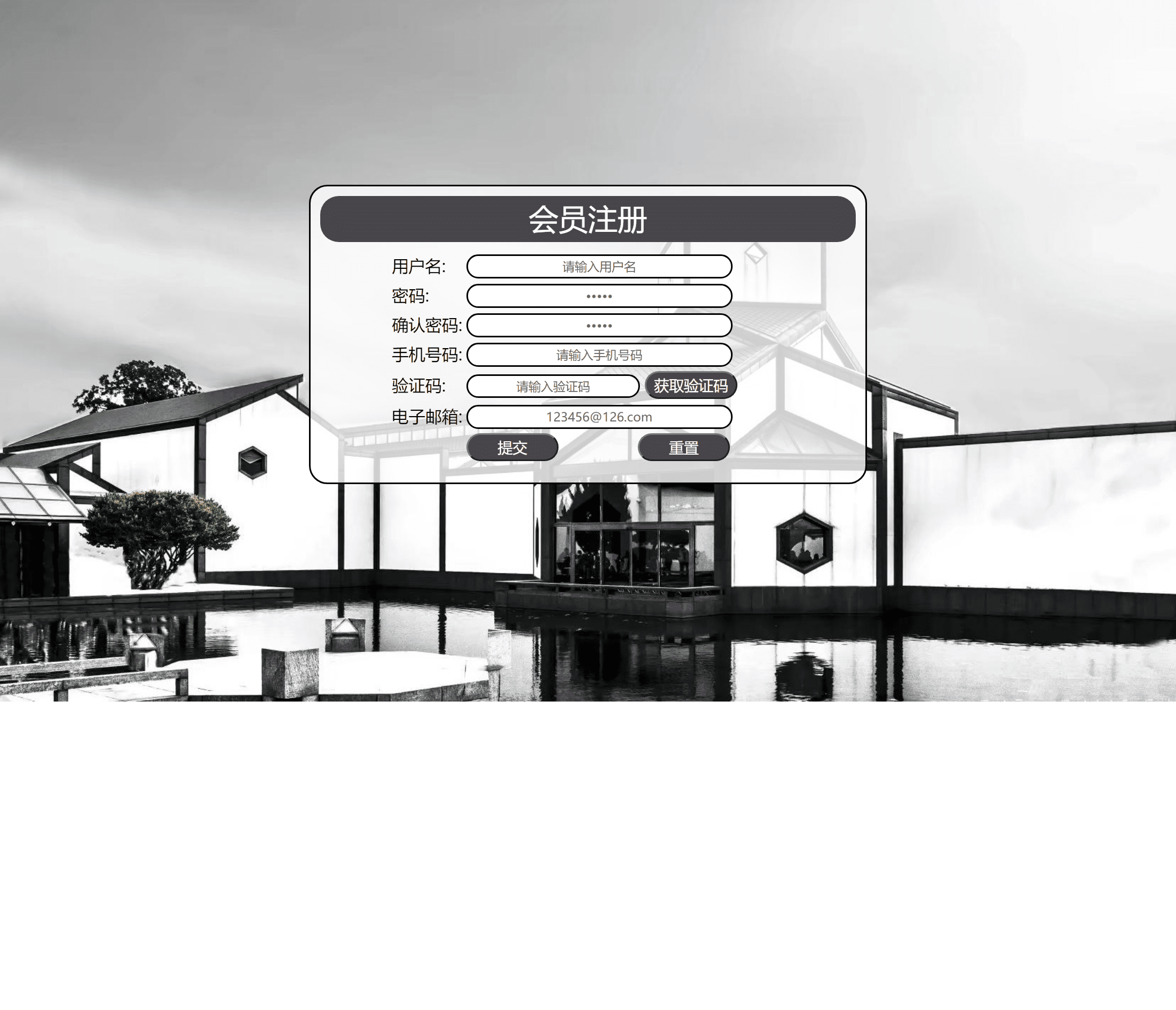


五、🔧 网站代码
🧱HTML结构代码
doctype html> <html> <head> <meta charset="utf-8"> <title>贝聿铭title> <link rel="stylesheet" type="text/css" href="css/css.css"> head> <body> <header id="head"> <div class="con"> <div class="left"> <div class="lle"><img src="pictures/lu/lu7.jpg" width="60px" height="60px"/>div> <span id="word1">贝聿铭span> <span id="word2"> 一生用建筑征服世界span> div> <div class="right"><a href="register.html" target="new">┋注册┋a>div> div> header> <nav> <div class="nav_in"> <div class="navbox"><a href="index.html" target="new">首 页a>div> <div class="navbox"><a href="shengping.html" target="new">人物生平a>div> <div class="navbox"> <div class="dropdown"> <a href="works.html"><button class="dropbtn">主要作品button>a> <div class="dropdown-content"> <a href="works.html">•卢浮宫金字塔a> <a href="works.html">•北京香山饭店a> <a href="works.html">•香港中银大厦a> <a href="works.html">•苏州博物馆a> li> <li> li> <li>li> <li> div> div> div> <div class="navbox"><a href="shipin.html" target="new">人物视频a>div> <div class="navbox"><a href="fengcai.html" target="new">个人风采a>div> div> nav> <div class="benner"> <div class="left1"> <div class="tr"><img src="pictures/renxiang/ren12.png" height="200px" width="200px">div> <p>贝聿铭br>(Ieoh Ming Pei)br>1917年4月26日-2019年5月16日br>美籍华人建筑师br>美国艺术与科学院院士br>中国工程院外籍院士br>土木专家p> div> <div class="right1"> <img src="pictures/lun/lun11.gif" /> div> div> <div class="content"> <div class="conone"> <div class="childone1"> <p class="pb">人物简介p> <p> <ul class="ps"> <li> <b>中文名:b>贝聿铭li> <li> <b>外文名:b>Ieoh Ming Peili> <li> <b>国 籍:b>美国li> <li> <b>祖 籍:b>江苏苏州li> <li> <b>出生地:b>广东广州 li> <li> <b>出生日期:b>1917年4月26日li> <li> <b>逝世日期:b>2019年5月16日 li> <li> <b>毕业院校:b>哈佛大学 li> <li> <b>职 业:b>建筑设计师 li> <li> <b>代表作品:b>卢浮宫金字塔、东海大学路思义等li> <li> <b>主要成就:b>:1979年获得美国建筑学会金奖<br/> 1981年获得法国建筑学金奖<br/> 1983年获得普利兹克奖li> ul> div> <a href="register.html" target="new"> <div class="childone2"> 点此注册 div> a> div> <div class="contwo"> <div class="childtwo1"> <p class="pb">个人风采<a href="fengcai.html" target="new"><span class="spa">→由此进入span>a>p> <div><img src="pictures/renxiang/lu10.jpg" width="300" />div> div> <div class="childtwo2"> <p class="pb">人物视频<a href="shipin.html" target="new"><span class="spa">→由此进入span>a>p> <div><img src="pictures/renxiang/lu11.jpg" width="300" />div> div> div> <div class="conthree"> <div class="childthree1"> <p class="pb">主要作品<a href="works.html" target="new"><span class="spa">→由此进入span>a>p> <p> <ul class="ps"> <li>•卢浮宫金字塔li> <li> •北京香山饭店li> <li>•香港中银大厦li> <li>•苏州博物馆li> ul> p> div> <div class="childthree2"> <p class="pb">人物生平<a href="shengping.html" target="new"><span class="spa">→由此进入span>a>p> <p> <ul class="ps"> <li>•1917--1946 <br/>1917年4月26日,贝聿铭出生于广州,为苏州望族之后。li> <li> •1948--1963 <br/> 1948年,贝聿铭以优异的成绩从麻省理工大学毕业并任哈佛大学建筑系助理教授,从波士顿剑桥小镇(Cambridge)搬到大城市纽约。li> <li>•1964--1979<br/> 1964年,为纪念已故美国总统约翰·肯尼迪,贝聿铭在波士顿港口设计了约翰·肯尼迪图书馆。li> <li>•1980--2019<br/>1980年,法国总统密特朗邀请贝聿铭翻修卢浮宫,后贝聿铭从事务所退休,退休后他在世界各地做了许多博物馆设计。 li> ul> p> div> div> div> <footer> <div class="foot"> <a href="#head"><span>Topspan>a> <p>Copyright©2021 闫莆亚 beiyuming.com 版权所有p> div> footer> body> html>- 1
- 2
- 3
- 4
- 5
- 6
- 7
- 8
- 9
- 10
- 11
- 12
- 13
- 14
- 15
- 16
- 17
- 18
- 19
- 20
- 21
- 22
- 23
- 24
- 25
- 26
- 27
- 28
- 29
- 30
- 31
- 32
- 33
- 34
- 35
- 36
- 37
- 38
- 39
- 40
- 41
- 42
- 43
- 44
- 45
- 46
- 47
- 48
- 49
- 50
- 51
- 52
- 53
- 54
- 55
- 56
- 57
- 58
- 59
- 60
- 61
- 62
- 63
- 64
- 65
- 66
- 67
- 68
- 69
- 70
- 71
- 72
- 73
- 74
- 75
- 76
- 77
- 78
- 79
- 80
- 81
- 82
- 83
- 84
- 85
- 86
- 87
- 88
- 89
- 90
- 91
- 92
- 93
- 94
- 95
- 96
- 97
- 98
- 99
- 100
- 101
- 102
- 103
- 104
- 105
- 106
- 107
- 108
- 109
- 110
- 111
- 112
- 113
- 114
- 115
- 116
- 117
- 118
- 119
- 120
- 121
- 122
- 123
- 124
- 125
- 126
- 127
- 128
- 129
- 130
- 131
- 132
- 133
- 134
💒CSS样式代码
@charset "utf-8"; /* CSS Document */ body, ul, li, ol, dl, dd, dt, p, h1, h2, h3, h4, h5, h6, form, img {margin:0;padding:0;border:0;list-style: none;} body{font-family:"微软雅黑",Arial, Helvetica, sans-serif; font-size:14px;} a{color:#000;text-decoration: none;} @font-face{ font-family:word2; src:url(../word2.ttf); } /*head begin*/ header{ width:100%; height: 90px; background: #0a2536;} header .con{ width:1100px; margin:0 auto;} header .con .left{ float: left; height:46px; line-height: 46px; margin-right:50px; color: #fff; font-size:24px;} .lle{ width: 60px; height: 60px; float: left; margin-top:10px; margin-right:20px;} header .con .left .lle img{ border-radius:50%;} header .con .right{ float: right; height:46px; line-height: 4; margin-left:50px; color: #fff; font-family:"微软雅黑"; font-size:20px;} header .con .right a{color:#fff;} #word1{ font-family:"华文隶书"; font-size:60px; line-height:1.5;} #word2{ font-family:word2; font-size:30px; line-height:1.5;} /*head end*/ /*nav begin*/ nav{ width:100%; height:55px; position:absolute; background:#C1C1C1; z-index:10;} nav .nav_in{ width:1100px; margin:0 auto; padding-left:500px;} .navbox{ float:left; margin-right:50px; font-size: 18px; height:55px; line-height: 55px;} .dropbtn { background-color:#C1C1C1; color: #000; padding: 16px; border: none; cursor: pointer; height:55px; font-size:18px;} .dropdown-content { display: none; position: absolute; background-color: #f9f9f9; min-width: 100px; box-shadow: 0px 8px 16px 0px rgba(0,0,0,0.2);} .dropdown-content a { color: black; padding: 12px 16px; text-decoration: none; display: block;} .dropdown-content a:hover {background-color: #f1f1f1} .dropdown:hover .dropdown-content { display: block;} .dropdown:hover .dropbtn { background-color:#94ABCD;} /*nav end*/ /*foot begin*/ footer{ width:100%; height:100px; margin-top:100px; background: #0a2536; color:#fff; text-align: center;} footer .foot{ width:1200px; height:100px; margin:0 auto; position: relative;} footer span{ width:58px; height:32px; line-height: 43px; text-align: center; color:#fff; position: absolute; top:-31px; left:600px; margin-left:-29px; background: url(../images/sanjiao.png);} footer p{ line-height: 127px;} /*foot end*/- 1
- 2
- 3
- 4
- 5
- 6
- 7
- 8
- 9
- 10
- 11
- 12
- 13
- 14
- 15
- 16
- 17
- 18
- 19
- 20
- 21
- 22
- 23
- 24
- 25
- 26
- 27
- 28
- 29
- 30
- 31
- 32
- 33
- 34
- 35
- 36
- 37
- 38
- 39
- 40
- 41
- 42
- 43
- 44
- 45
- 46
- 47
- 48
- 49
- 50
- 51
- 52
- 53
- 54
- 55
- 56
- 57
- 58
- 59
- 60
- 61
- 62
- 63
- 64
- 65
- 66
- 67
- 68
- 69
- 70
- 71
- 72
- 73
- 74
- 75
- 76
- 77
- 78
- 79
- 80
- 81
- 82
- 83
- 84
- 85
- 86
- 87
- 88
- 89
- 90
- 91
- 92
- 93
- 94
- 95
- 96
- 97
- 98
- 99
- 100
- 101
- 102
- 103
- 104
- 105
- 106
- 107
- 108
- 109
- 110
- 111
- 112
- 113
- 114
- 115
- 116
- 117
- 118
- 119
- 120
- 121
- 122
- 123
六、🥇 如何让学习不再盲目
很多刚入门编程的小白学习了基础语法,却不知道语法的用途,不知道如何加深映像,不知道如何提升自己,这个时候每天刷自主刷一些题就非常重要(百炼成神),可以去牛客网上的编程初学者入门训练。该专题为编程入门级别,适合刚学完语法的小白练习,题目涉及编程基础语法,基本结构等,每道题带有练习模式和考试模式,可还原考试模式进行模拟,也可通过练习模式进行练习 。
七、🎁更多干货
1.如果我的博客对你有帮助、如果你喜欢我的博客内容,
请 “👍点赞” “✍️评论” “💙收藏”一键三连哦!2.
💗【👇🏻👇🏻👇🏻关注我| 获取更多源码 | 优质文章】带您学习各种前端插件、3D炫酷效果、图片展示、文字效果、以及整站模板 、大学生毕业HTML模板 、期末大作业模板 、等! 「在这里有好多 前端 开发者,一起探讨 前端 Node 知识,互相学习」!3.
以上内容技术相关问题💌欢迎一起交流学习👇🏻👇🏻👇🏻🔥

-
相关阅读:
CSS滚动条详解(::-webkit-scrollbar )
阿里巴巴关键字搜索商品API接口(item_search-按关键字搜索商品接口),阿里巴巴搜索API接口
javax.net.ssl.SSLException: Unrecognized SSL message, plaintext connection
js 代理事件理解及应用场景
【单片机毕业设计】【mcuclub-hj-014】基于单片机的工地降尘的设计
JavaScript 从入门到熟悉
draggable实现拖拽、禁止拖拽、拖拽后元素重新排序到指定位置
【优雅至极】利用VSCode进行远程Linux服务器、容器开发,达到ide开发项目的效果
Python 集成 Nacos 配置中心
马来西亚《星报》:在WTO MC12 孙宇晨仍在坚持数字经济梦想
- 原文地址:https://blog.csdn.net/p305114466/article/details/127781382