-
5.1、nio-Bytebuffer内存结构
一、为什么需要缓冲区
因为文件读写、网络通讯等数据都是以流的形式一点点到目的地的,所以需要一个缓冲区承接流.
二、缓冲区定义(Buffer)
缓冲区(Buffer)就是在内存中预留指定大小的存储空间用来对输入/输出(I/O)的数据作临时存储,这部分预留的内存空间就叫做缓冲区.
三、使用缓冲区的好处
- 减少实际的物理读写次数
- 缓冲区在创建时就被分配内存,这块内存区域一直被重用,可以减少动态分配和回收内存的次数
举个简单的例子,比如A地有1w块砖要搬到B地,由于没有工具(缓冲区),我们一次只能搬一本,那么就要搬1w次(实际读写次数),如果A,B两地距离很远的话(IO性能消耗),那么性能消耗将会很大,但是要是此时我们有辆大卡车(缓冲区),一次可运5000本,那么2次就够了,相比之前,性能肯定是大大提高了。
一般在实际过程中,我们一般是先将文件读入内存,再从内存写出到别的地方,这样在输入输出过程中我们都可以用缓存来提升IO性能。所以,buffer在IO中很重要。在旧I/O类库中(相对java.nio包)中的BufferedInputStream、BufferedOutputStream、BufferedReader和BufferedWriter在其实现中都运用了缓冲区。java.nio包公开了Buffer API,使得Java程序可以直接控制和运用缓冲区。
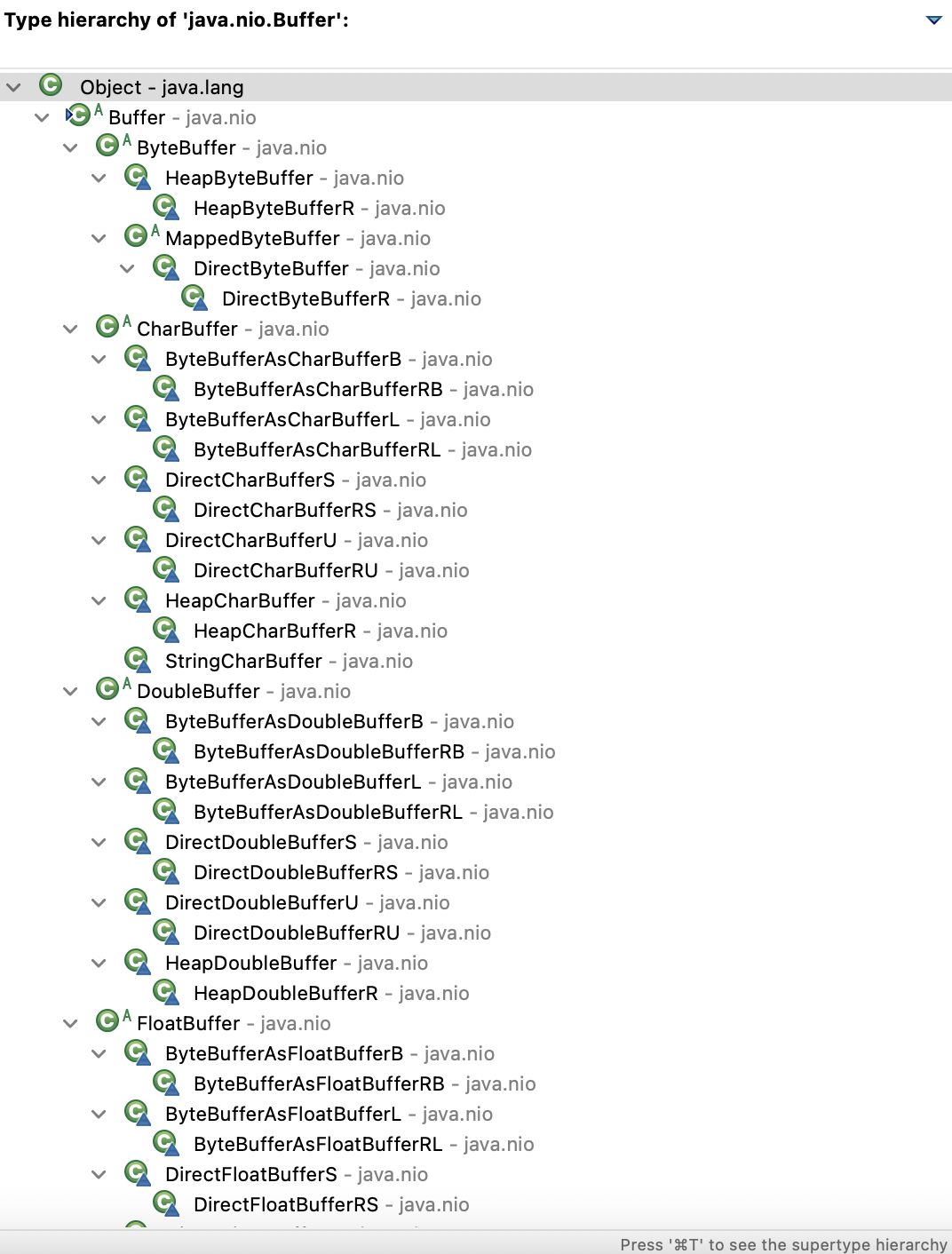
在Java NIO中,缓冲区的作用也是用来临时存储数据,可以理解为是I/O操作中数据的中转站。缓冲区直接为通道(Channel)服务,写入数据到通道或从通道读取数据,这样的操利用缓冲区数据来传递就可以达到对数据高效处理的目的。在NIO中主要有八种缓冲区类(其中MappedByteBuffer是专门用于内存映射的一种ByteBuffer):
四、缓冲区属性Fields
所有缓冲区都有4个属性:capacity、limit、position、mark,并遵循:mark <= position <= limit <= capacity,下表格是对着4个属性的解释:
属性 描述 capacity 这个Buffer最多能放多少数据。capacity一般在buffer被创建的时候指定。 limit 在Buffer上进行的读写操作都不能越过这个下标。当写数据到buffer中时,limit一般和capacity相等,当读数据时,limit代表buffer中有效数据的长度 position 读/写操作的当前下标。当使用buffer的相对位置进行读/写操作时,读/写会从这个下标进行,并在操作完成后,buffer会更新下标的值。 mark 一个临时存放的位置下标。调用mark()会将mark设为当前的position的值,以后调用reset()会将position属性设置为mark的值。mark的值总是小于等于position的值,如果将position的值设的比mark小,当前的mark值会被抛弃掉. mark满足条件: 0 <= mark <= position <= limit <= capacity 五、缓冲区方法Methods
1、实例化
java.nio.Buffer类是一个抽象类,不能被实例化。Buffer类的直接子类,如ByteBuffer等也是抽象类,所以也不能被实例化。ByteBuffer类提供了4个静态工厂方法来获得ByteBuffer的实例.属性 描述 allocate(int capacity) 从堆空间中分配一个容量大小为capacity的byte数组作为缓冲区的byte数据存储器 allocateDirect(int capacity) 不使用JVM堆栈,通过操作系统来创建内存块用作缓冲区,它与当前操作系统能够更好的耦合,因此能进一步提高I/O操作速度.但是分配直接缓冲区的系统开销很大,因此只有在缓冲区较大并长期存在,或者需要经常重用时,才使用这种缓冲区 wrap(byte[] array) 这个缓冲区的数据会存放在byte数组中,bytes数组或buff缓冲区任何一方中数据的改动都会影响另一方。其实ByteBuffer底层本来就有一个bytes数组负责来保存buffer缓冲区中的数据,通过allocate方法系统会帮你构造一个byte数组 wrap(byte[] array,int offset, int length) 在上一个方法的基础上可以指定偏移量和长度,这个offset也就是包装后byteBuffer的position,而length呢就是limit-position的大小,从而我们可以得到limit的位置为length+position(offset) 我写了这几个方法的测试方法,大家可以运行起来更容易理解
public static void main(String args[]) throws FileNotFoundException { System.out.println("----------Test allocate--------"); System.out.println("before alocate:" + Runtime.getRuntime().freeMemory()); // 如果分配的内存过小,调用Runtime.getRuntime().freeMemory()大小不会变化? ByteBuffer buffer = ByteBuffer.allocate(102400); // 分配内存后 byte[] arr = new byte[999999]; buffer.wrap(arr); System.out.println("buffer = " + buffer); System.out.println("after alocate:" + Runtime.getRuntime().freeMemory()); // 这部分直接用的系统内存,所以对JVM的内存没有影响 ByteBuffer directBuffer = ByteBuffer.allocateDirect(102400); System.out.println("directBuffer = " + directBuffer); System.out.println("after direct alocate:" + Runtime.getRuntime().freeMemory()); System.out.println("----------Test wrap--------"); byte[] bytes = new byte[32]; buffer = ByteBuffer.wrap(bytes); System.out.println(buffer); buffer = ByteBuffer.wrap(bytes, 10, 10); System.out.println(buffer); }- 1
- 2
- 3
- 4
- 5
- 6
- 7
- 8
- 9
- 10
- 11
- 12
- 13
- 14
- 15
- 16
- 17
- 18
- 19
- 20
- 21
- 22
- 23
- 24
- 25
- 26
- 27
- 28
- 29
- 30
2、另外一些常用的方法
Buffer clear()
//用途: 把position设为0,把limit设为capacity,一般在把数据写入Buffer前调用 public final Buffer clear() { position = 0; //设置为0 limit = capacity; //极限和容量相同 mark = -1; //取消标记 return this; }- 1
- 2
- 3
- 4
- 5
- 6
- 7
Buffer flip()
//用途: 把limit设为当前position,把position设为0,一般在从Buffer读出数据前调用 public final Buffer flip() { limit = position; position = 0; mark = -1; return this; }- 1
- 2
- 3
- 4
- 5
- 6
- 7
Buffer rewind()
//用途: 把position设为0,limit不变,一般在把数据重写入Buffer前调用 public final Buffer rewind() { position = 0; mark = -1; return this; }- 1
- 2
- 3
- 4
- 5
- 6
以下为一些测试方法:
public static void main(String args[]){ System.out.println("--------Test reset----------"); buffer.clear(); buffer.position(5); buffer.mark(); buffer.position(10); System.out.println("before reset:" + buffer); buffer.reset(); System.out.println("after reset:" + buffer); System.out.println("--------Test rewind--------"); buffer.clear(); buffer.position(10); buffer.limit(15); System.out.println("before rewind:" + buffer); buffer.rewind(); System.out.println("before rewind:" + buffer); System.out.println("--------Test compact--------"); buffer.clear(); buffer.put("abcd".getBytes()); System.out.println("before compact:" + buffer); System.out.println(new String(buffer.array())); buffer.flip(); System.out.println("after flip:" + buffer); System.out.println((char) buffer.get()); System.out.println((char) buffer.get()); System.out.println((char) buffer.get()); System.out.println("after three gets:" + buffer); System.out.println("\t" + new String(buffer.array())); buffer.compact(); System.out.println("after compact:" + buffer); System.out.println("\t" + new String(buffer.array())); System.out.println("------Test get-------------"); buffer = ByteBuffer.allocate(32); buffer.put((byte) 'a').put((byte) 'b').put((byte) 'c').put((byte) 'd') .put((byte) 'e').put((byte) 'f'); System.out.println("before flip()" + buffer); // 转换为读取模式 buffer.flip(); System.out.println("before get():" + buffer); System.out.println((char) buffer.get()); System.out.println("after get():" + buffer); // get(index)不影响position的值 System.out.println((char) buffer.get(2)); System.out.println("after get(index):" + buffer); byte[] dst = new byte[10]; buffer.get(dst, 0, 2); System.out.println("after get(dst, 0, 2):" + buffer); System.out.println("\t dst:" + new String(dst)); System.out.println("buffer now is:" + buffer); System.out.println("\t" + new String(buffer.array())); System.out.println("--------Test put-------"); ByteBuffer bb = ByteBuffer.allocate(32); System.out.println("before put(byte):" + bb); System.out.println("after put(byte):" + bb.put((byte) 'z')); System.out.println("\t" + bb.put(2, (byte) 'c')); // put(2,(byte) 'c')不改变position的位置 System.out.println("after put(2,(byte) 'c'):" + bb); System.out.println("\t" + new String(bb.array())); // 这里的buffer是 abcdef[pos=3 lim=6 cap=32] bb.put(buffer); System.out.println("after put(buffer):" + bb); System.out.println("\t" + new String(bb.array())); }- 1
- 2
- 3
- 4
- 5
- 6
- 7
- 8
- 9
- 10
- 11
- 12
- 13
- 14
- 15
- 16
- 17
- 18
- 19
- 20
- 21
- 22
- 23
- 24
- 25
- 26
- 27
- 28
- 29
- 30
- 31
- 32
- 33
- 34
- 35
- 36
- 37
- 38
- 39
- 40
- 41
- 42
- 43
- 44
- 45
- 46
- 47
- 48
- 49
- 50
- 51
- 52
- 53
- 54
- 55
- 56
- 57
- 58
- 59
- 60
- 61
- 62
- 63
- 64
- 65
- 66
- 67
六、Buffer类继承结构
七、Bytebuffer缺点
1、不能动态扩容,容易导致数组越界、内存浪费
2、使用复杂使用大量的clear、flip、rewind操作 -
相关阅读:
Plato Farm全新玩法,套利ePLATO稳获超高收益
【VyOS-开源篇-3】- container for vyos 搭建 Halo 博客-vyos-开源篇
命令行中引导用户指定选择文档
不会俄语可以去俄罗斯吗
redis实战-redis实现分布式锁&redisson快速入门
【大数据】-- dataworks 创建odps 的 hudi 外表
ProTable 本地保存列设置
c++day2---9.7
OpenDataV低代码平台新增组件流程
京东二面:高并发设计,都有哪些技术方案?
- 原文地址:https://blog.csdn.net/god8816/article/details/127774609
