-
【Unity】U3D TD游戏制作实例(四)建造防御塔:防御塔生成器、一个int代表多选框,圆上任意点位的坐标计算、制作防御塔预制件
本章内容介绍
由于目前预想的运行环境是PC端,但后续也可能移植到手机端,且有可能提供玩家自定义关卡的功能,所以将防御塔建造点设置为固定位置模式。也就是当鼠标停留在可建造防御塔的位置时显示一个建造区域,当鼠标点击这个区域时弹出建造防御塔的UI菜单。如下图:


演示效果如下:Unity制作炮台防守游戏(2)建造炮台
制作生成器
用PS做一张图,将图的四个角涂上白线,中间部分做成半透明状。

然后在场景中创建一个 Cube ,调整形状。将 Cube 的阴影关闭,再给 Cube 创建一个材质。如下图:

将图片导入项目中,如下设置材质。

后续通过代码调整图片的透明度来实现防御塔生成器的显示与隐藏。


生成器Hierarchy

创建一个空节点,再给节点下放一个 Generator。Generator 节点上挂一个 DefenseGenerator 脚本。
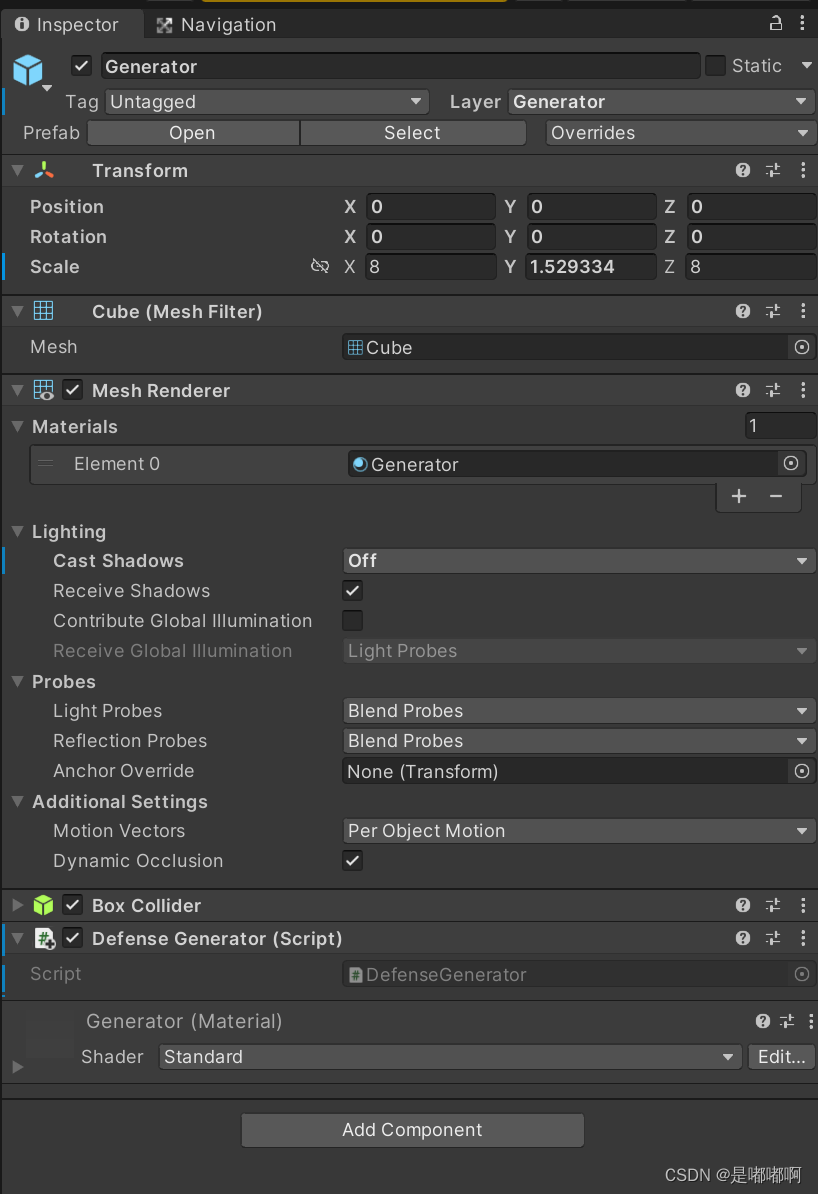
DefenseGenerator 代码如下:
using System.Collections; using System.Collections.Generic; using UnityEngine; public class DefenseGenerator : MonoBehaviour { [HideInInspector] public GameObject Defense; void Start() { } ////// 鼠标指向生成器事件 /// public void OnRayGenerator() { } /// /// 选中生成器事件 /// public void OnSelectGenerator() { Camera.main.WorldToScreenPoint(transform.position); Debug.Log("============" + Camera.main.WorldToScreenPoint(transform.position)); } /// /// 建造防御塔 /// public void BuildDefense() { } /// /// 销毁防御塔 /// public void DestroyDefense() { } /// /// 升级防御塔 /// public void UpgradeDefense() { } } - 1
- 2
- 3
- 4
- 5
- 6
- 7
- 8
- 9
- 10
- 11
- 12
- 13
- 14
- 15
- 16
- 17
- 18
- 19
- 20
- 21
- 22
- 23
- 24
- 25
- 26
- 27
- 28
- 29
- 30
- 31
- 32
- 33
- 34
- 35
- 36
- 37
- 38
- 39
- 40
- 41
- 42
- 43
- 44
- 45
- 46
- 47
- 48
- 49
- 50
- 51
- 52
- 53
- 54
- 55
- 56
- 57
高亮显示生成器
给 GameScript 添加一个脚本(DefenseManager),并做如下设置:

DefenseManager 代码如下:
using Excel; using System; using System.Collections.Generic; using TDGameDemo.GameDefense; using TDGameDemo.GameLevel; using UnityEngine; using UnityEngine.UI; public class DefenseManager : MonoBehaviour { ////// 检测射线 /// private Ray ray; /// /// 射线击中点 /// private RaycastHit hit; /// /// 屏幕外的一个点 /// public Transform OutScreenPosition; /// /// 生成器UI /// public GameObject GeneratorUICanvas; /// /// 当前生成器位置 /// private Transform currGeneratorPosition; /// /// 当前指针指向的生成器 /// private GameObject currPointerGenerator; /// /// 当前选中的生成器 /// private GameObject currSelectedGenerator; /// /// 生成点 ***************TODO**************** /// public Transform _generatePoint; /// /// 创建菜单面板 /// public GameObject CreatePanel; private bool isBtnClick; private Dictionary<int, List<DefenseConfig>> _defenseConfigs; private List<Transform> _createBtnList; private void Start() { currGeneratorPosition = OutScreenPosition; _createBtnList = new List<Transform>(); InitConfig(); InitCreatePanel(7); } /// /// 初始化创建菜单面板 /// /// 当前关卡可以创建的防御塔类型合成码。例如:14代表2(炮塔)+4(毒液塔)+8(冰锥塔)。 public void InitCreatePanel(int defenseTypeCode) { foreach (Transform createBtn in CreatePanel.transform) { createBtn.transform.GetComponent<Image>().enabled = false; } for (int i = 0; i < Enum.GetValues(typeof(DefenseType)).Length; i++) { if (((defenseTypeCode >> i) & 1) == 1) { Transform createBtn = CreatePanel.transform.Find(Enum.GetName(typeof(DefenseType), (int)Mathf.Pow(2, i))); createBtn.GetComponent<Image>().enabled = true; createBtn.GetComponent<ETCButton>().onDown.AddListener(() => { OnCreateButtonDown(createBtn.name); }); _createBtnList.Add(createBtn); } } // 根据防御塔数量决定按钮的旋转角度 for (int i = 0; i < _createBtnList.Count; i++) { // 计算旋转角度 float angle = 360 / _createBtnList.Count * i + 90; // 使用公式算出按钮坐标 //x = centerX + radius * cos(angle * 3.14 / 180) //y = centerY + radius * sin(angle * 3.14 / 180) _createBtnList[i].position = new Vector3(100 * Mathf.Cos(angle * Mathf.PI / 180), 100 * Mathf.Sin(angle * Mathf.PI / 180), 0); } } public void OnCreateButtonDown(string btnName) { currGeneratorPosition = OutScreenPosition; isBtnClick = true; GameObject defensePrefab = Resources.Load<GameObject>(Level.DEFENSE_PREFAB_PREFIX + "Prefab_Defense_" + btnName + "_1"); GameObject o = Instantiate(defensePrefab, currSelectedGenerator.transform.parent.position, Quaternion.identity, currSelectedGenerator.transform.parent); //o.GetComponent ()._enemyGeneratePoint = _generatePoint; } private void LateUpdate() { if (!isBtnClick) { // 判断鼠标有没有悬停在GeneratorUI上 ray = Camera.main.ScreenPointToRay(Input.mousePosition); bool isCollider = Physics.Raycast(ray, out hit, 1000, LayerMask.GetMask("Generator")); if (isCollider) { GameObject generator = hit.collider.gameObject; if (currPointerGenerator == null) { currPointerGenerator = generator; } else { // 如果当前鼠标停留的生成器与之前不同 if (currPointerGenerator != generator) { currPointerGenerator.GetComponent<Renderer>().material.SetColor("_Color", Color.clear); currPointerGenerator = generator; } } currPointerGenerator.GetComponent<Renderer>().material.SetColor("_Color", new Color(0.1610479f, 0.5566038f, 0, 1)); // 处理点击事件 if (Input.GetMouseButtonDown(0)) { SelectGenerator(currPointerGenerator); } } else { if (currPointerGenerator != null) { currPointerGenerator.GetComponent<Renderer>().material.SetColor("_Color", Color.clear); } else { //currGeneratorPosition = OutScreenPosition; } // 处理点击事件 if (Input.GetMouseButtonDown(0)) { currSelectedGenerator = null; } } if (currSelectedGenerator == null) { GeneratorUICanvas.transform.position = Camera.main.WorldToScreenPoint(OutScreenPosition.position); } else { GeneratorUICanvas.transform.position = Camera.main.WorldToScreenPoint(currGeneratorPosition.position); } } isBtnClick = false; } ////// 选择生成器 /// /// 被选中的生成器 private void SelectGenerator(GameObject selectedGenerator) { currSelectedGenerator = selectedGenerator; currGeneratorPosition = currSelectedGenerator.transform; 判断是否已经有炮台存在 //if (currGeneratorPosition.GetComponent ().Defense == null) //{ // // 建造炮台 // //Debug.Log("建造炮台"); // currGeneratorPosition.GetComponent().OnSelectGenerator(); //} //else //{ // // 升级炮台 // //Debug.Log(isCollider); //} } }- 1
- 2
- 3
- 4
- 5
- 6
- 7
- 8
- 9
- 10
- 11
- 12
- 13
- 14
- 15
- 16
- 17
- 18
- 19
- 20
- 21
- 22
- 23
- 24
- 25
- 26
- 27
- 28
- 29
- 30
- 31
- 32
- 33
- 34
- 35
- 36
- 37
- 38
- 39
- 40
- 41
- 42
- 43
- 44
- 45
- 46
- 47
- 48
- 49
- 50
- 51
- 52
- 53
- 54
- 55
- 56
- 57
- 58
- 59
- 60
- 61
- 62
- 63
- 64
- 65
- 66
- 67
- 68
- 69
- 70
- 71
- 72
- 73
- 74
- 75
- 76
- 77
- 78
- 79
- 80
- 81
- 82
- 83
- 84
- 85
- 86
- 87
- 88
- 89
- 90
- 91
- 92
- 93
- 94
- 95
- 96
- 97
- 98
- 99
- 100
- 101
- 102
- 103
- 104
- 105
- 106
- 107
- 108
- 109
- 110
- 111
- 112
- 113
- 114
- 115
- 116
- 117
- 118
- 119
- 120
- 121
- 122
- 123
- 124
- 125
- 126
- 127
- 128
- 129
- 130
- 131
- 132
- 133
- 134
- 135
- 136
- 137
- 138
- 139
- 140
- 141
- 142
- 143
- 144
- 145
- 146
- 147
- 148
- 149
- 150
- 151
- 152
- 153
- 154
- 155
- 156
- 157
- 158
- 159
- 160
- 161
- 162
- 163
- 164
- 165
- 166
- 167
- 168
- 169
- 170
- 171
- 172
- 173
- 174
- 175
- 176
- 177
- 178
- 179
- 180
- 181
- 182
- 183
- 184
- 185
- 186
- 187
- 188
- 189
- 190
- 191
- 192
- 193
- 194
- 195
- 196
- 197
- 198
- 199
- 200
代码中 LateUpdate 方法使用射线判断鼠标是否指向了生成器,并实现了生成器的显隐与选择功能。

制作箭塔菜单
在 UI 画布下创建一个菜单UI(GeneratorUICanvas)和一个肯定不会出现在屏幕内的空物体(OutScreenPosition)。在菜单UI中建立几个按钮(我使用的是EasyTouch里面提供的 ETCButton)。

替换按钮图片:

将创建菜单对齐到选中的生成器
在 LateUpdate 方法中调用了 SelectGenerator 方法,该方法用于将菜单对齐到选中的生成器。

动态生成按钮
为了增加游戏可玩性,可以给每个关卡单独配置允许建造哪些防御塔。为了简化配置项,我们将炮塔的 code 设置为2的n次方,这样就可以用一个数字表示多个防御塔了。
防御塔 code 按照下图配置:

如果我本关需要使用箭塔(1)、炮塔(2)、多重箭塔(64)、电塔(256),我们只需要在关卡配置文件中指定一个数字 323 (1 + 2 + 64 + 256)即可。
在程序中解析这个配置时只需要判断 code向右位移n位后再按位与1后得到的值 是否等于 1即可,其中code代表我们刚才设置的 323 。伪代码:
if (((code >> i) & 1) == 1)- 1
真实代码:下图第127行。

上述代码需要提供一个枚举:
public enum DefenseType { SingleArrow = 1, Cannon = 2, Poison = 4, Ice = 8 }- 1
- 2
- 3
- 4
- 5
- 6
- 7
- 8
遍历枚举,根据上面的判断条件判断出那些按钮需要显示,并将这些按钮放到一个列表(_createBtnList)中,方便后续对按钮进行统一处理。
动态计算按钮坐标
由于按钮的数量是可变的,所以我将按钮的位置设计成围绕着生成器旋转排列。当按钮数量为 3 时,就每隔 120° 放一个按钮,当按钮数量为 4 时,就隔 90° 。
计算圆上某个点的坐标公式为:
x = centerX + radius * cos(angle * 3.14 / 180)
y = centerY + radius * sin(angle * 3.14 / 180)实际代码:

通过遍历上一节生成的 _createBtnList ,计算每个按钮的旋转角度,再根据角度计算出按钮的坐标。最后再给这个角度增加90°,让起始坐标从 3 点钟方向变为 12 点钟方向。
制作预制件
先准备好要用的模型,将模型放到某一个生成器下,调整好大小,最后做成预制件。

将这些预制件放到 Resources 目录下,通过代码动态加载。

最终运行效果

更多内容请查看总目录【Unity】Unity学习笔记目录整理
-
相关阅读:
运行.sln 32/64位程序,启动不了,无法显示界面
Redis 的内存淘汰策略和过期删除策略,你别再搞混了!
PCB铺铜连接方式
聊一聊如何整合Microsoft.Extensions.DependencyInjection和Castle.Core(二)
动态SQL(if、where、trim、choose when otherwise、foreach、sql标签等)
密码学入门——环游密码世界
Docker安装Mysql
Golang实现小型CMS内容管理功能(一):Gin框架搭配Gorm实现增删查改功能
创建大量栅格文件并分别写入像元数据:C++ GDAL代码实现
【Axure教程】将figma导入Axure
- 原文地址:https://blog.csdn.net/xiaoyaoACi/article/details/127060262
