-
【Vue + Koa 前后端分离项目实战4】使用开源框架==>快速搭建后台管理系统 -- part4 后端实现【增删改查】功能
如果你和你想做的事情不在同一个频道,你就会浪费许多精力。等你有机会做你想做的事情时,你可能已经没有力气或时间了。
完整章节回顾
【Vue + Koa 前后端分离项目实战3】使用开源框架==>快速搭建后台管理系统 -- part3 权限控制+行为日志_小白Rachel的博客-CSDN博客
【Vue + Koa 前后端分离项目实战2】使用开源框架==>快速搭建后台管理系统 -- part2 后端新增期刊功能实现_小白Rachel的博客-CSDN博客_koa 开源项目
【Vue + Koa 前后端分离项目实战】使用开源框架==>快速搭建后台管理系统 -- part1 项目搭建_小白Rachel的博客-CSDN博客_vue+koa
后端分层架构的模式和框架中的文件说明 :
分层结构 说明 对应文件夹 对应文件 Model层 实体类层 主要用于定义与数据库对象应的属性
models movies.js music.js sentence.js Dao层 持久层 访问数据库,向数据库发送sql语句,完成数据的增删改查任务
dao movies.js music.js sentence.js Service层 业务逻辑层,完成功能的设计
service contents.js Controller层 控制层,控制请求和响应,负责前后端交互 接口控制具体的业务流程
Validators
api
content.js
content.js
本章节主要完成后端的逻辑实现,并借助接口测试postman工具测试 ,暂无涉及到前端内容。
目录
一、基础工作
1.修改配置项文件
- // config/secure.js
- 'use strict';
- module.exports = {
- db: {
- database: 'lin-cms',
- host: 'localhost',
- dialect: 'mysql',
- port: 3306,
- username: 'root',
- password: '123456',
- logging: false,
- timezone: '+08:00',
- dialectOptions: { // 添加配置 修改日期格式
- dateStrings: true,
- typeCast: true
- }
- },
- secret:
- '\x88W\xf09\x91\x07\x98\x89\x87\x96\xa0A\xc68\xf9\xecJJU\x17\xc5V\xbe\x8b\xef\xd7\xd8\xd3\xe6\x95*4'
- };
2.定义模型层数据
- // models/movie.js
- import { Sequelize, Model } from 'sequelize';
- import sequelize from '../libs/db';
- import { config } from 'lin-mizar';
- class Movie extends Model {
- }
- Movie.init (
- {
- id: {
- type: Sequelize.INTEGER,
- primaryKey: true,
- autoIncrement: true
- },
- image: {
- type: Sequelize.STRING(64)
- },
- content: {
- type: Sequelize.STRING(300),
- allowNull: true
- },
- pubdate: {
- type: Sequelize.INTEGER,
- allowNull: true
- },
- fav_nums: {
- type: Sequelize.INTEGER,
- defaultValue: 0
- },
- title: {
- type: Sequelize.STRING(50)
- },
- type: {
- type: Sequelize.INTEGER
- },
- status: {
- type: Sequelize.INTEGER
- }
- },
- {
- // 定义表名
- tableName: 'movie',
- // 定义模型名
- modelName: 'movie',
- // 删除
- paranoid: true,
- // 自动写入时间
- timestamps: true,
- // 重命名时间字段
- createdAt: 'created_at',
- updatedAt: 'updated_at',
- deletedAt: 'deleted_at',
- sequelize
- }
- )
- export { Movie as MovieModel }
music音乐,包含url
- // models/music.js
- import { Sequelize, Model } from 'sequelize';
- import sequelize from '../libs/db';
- import { config } from 'lin-mizar';
- class Music extends Model {
- }
- Music.init (
- {
- id: {
- type: Sequelize.INTEGER,
- primaryKey: true,
- autoIncrement: true
- },
- image: {
- type: Sequelize.STRING(64)
- },
- content: {
- type: Sequelize.STRING(300),
- allowNull: true
- },
- url: {
- type: Sequelize.STRING(100),
- allowNull: true
- },
- pubdate: {
- type: Sequelize.INTEGER,
- allowNull: true
- },
- fav_nums: {
- type: Sequelize.INTEGER,
- defaultValue: 0
- },
- title: {
- type: Sequelize.STRING(50)
- },
- type: {
- type: Sequelize.INTEGER
- },
- status: {
- type: Sequelize.INTEGER
- }
- },
- {
- // 定义表名
- tableName: 'music',
- // 定义模型名
- modelName: 'music',
- // 删除
- paranoid: true,
- underscored: true,
- // 自动写入时间
- timestamps: true,
- // 重命名时间字段
- createdAt: 'created_at',
- updatedAt: 'updated_at',
- deletedAt: 'deleted_at',
- sequelize
- }
- )
- export { Music as MusicModel }
sentence句子
- // models/sentence.js
- import { Sequelize, Model } from 'sequelize';
- import sequelize from '../libs/db';
- import { config } from 'lin-mizar';
- class Sentence extends Model {
- }
- Sentence.init (
- {
- id: {
- type: Sequelize.INTEGER,
- primaryKey: true,
- autoIncrement: true
- },
- image: {
- type: Sequelize.STRING(64)
- },
- content: {
- type: Sequelize.STRING(300),
- allowNull: true
- },
- pubdate: {
- type: Sequelize.INTEGER,
- allowNull: true
- },
- fav_nums: {
- type: Sequelize.INTEGER,
- defaultValue: 0
- },
- title: {
- type: Sequelize.STRING(50)
- },
- type: {
- type: Sequelize.INTEGER
- },
- status: {
- type: Sequelize.INTEGER
- }
- },
- {
- // 定义表名
- tableName: 'sentence',
- // 定义模型名
- modelName: 'sentence',
- // 删除
- paranoid: true,
- underscored: true,
- // 自动写入时间
- timestamps: true,
- // 重命名时间字段
- createdAt: 'created_at',
- updatedAt: 'updated_at',
- deletedAt: 'deleted_at',
- sequelize,
- }
- )
- export { Sentence as SentenceModel }
3.测试工具的使用
项目添加权限之后,使用postman需要添加权限token
具体方法:运行(npm run serve)前端项目工程(lin-cms-vue),后打开http://localhost:8080/ 登录查看token信息,并复制到postman中

二、期刊列表查询
最终数据包含三张表的数据,即:从三张表中查询返回合并结果数据。
1.在dao层定义查询方法
使用框架已有的findAll()方法,完成dao文件夹下的movie.js music.js sentence.js文件
- // dao/movie.js文件
- import { MovieModel } from '../models/movie';
- import { NotFound } from 'lin-mizar';
- // 在Dao层中调用模型层
- class Movie {
- static async getMovieList () {
- return await MovieModel.findAll()
- }
- }
- export { Movie as MovieDao }
- // dao/music.js文件
- import { MusicModel } from '../models/music';
- import { NotFound } from 'lin-mizar';
- // 在Dao层中调用模型层
- class Music {
- // 查询音乐列表
- static async getMusicList () {
- return await MusicModel.findAll()
- }
- }
- export { Music as MusicDao }
- // dao/sentence.js文件
- import { SentenceModel } from '../models/sentence';
- import { NotFound } from 'lin-mizar';
- class Sentence {
- static async getSentenceList () {
- return await SentenceModel.findAll()
- }
- }
- export { Sentence as SentenceDao }
2.在service层合并查询数据
新建getContentList 查询列表数据方法
- // service/content.js文件
- import { MovieDao } from '../dao/movie';
- import { MusicDao } from '../dao/music';
- import { SentenceDao } from '../dao/sentence';
- import { NotFound } from 'lin-mizar';
- class Content {
- static async getContentList (v) {
- const movieList = await MovieDao.getMovieList() // 电影列表数据
- const musicList = await MusicDao.getMusicList() // 音乐列表数据
- const sentenceList = await SentenceDao.getSentenceList() // 句子列表数据
- let res = [] // 整合三个资源的数据
- res.push.apply(res, movieList)
- res.push.apply(res, musicList)
- res.push.apply(res, sentenceList)
- res.sort((a, b) => b.created_at.localeCompare(a.created_at)) // 按照创建时间排序
- return res
- }
- }
- export { Content as ContentService };
3.在接口层调用接口
- // api/v1/content.js
- contentApi.get("/", async (ctx) => {
- const contentList = await ContentService.getContentList();
- ctx.json(contentList);
- });
- module.exports = { contentApi };
4.使用postman接口测试工具测试
http://localhost:5000/v1/content

三、新增期刊内容
第二篇文章已经详细讲过新增期刊的逻辑了,这里简单梳理。
【Vue + Koa 前后端分离项目实战】使用开源框架==>快速搭建后台管理系统 -- part2 后端新增期刊功能实现_小白Rachel的博客-CSDN博客_koa 开源项目
1.添加自定义参数校验器
需要检验的内容有:所有描述信息不为空、id为数字、url合法、日期格式正确等
- class AddContentValidator extends LinValidator {
- constructor () {
- super();
- this.image = [
- new Rule('isNotEmpty', '内容封面不能为空')
- ]
- this.type = [
- new Rule('isNotEmpty', '内容类型不能为空'),
- new Rule('isInt', '内容类型id必须是数字')
- ]
- this.title = [
- new Rule('isNotEmpty', '内容标题不能为空')
- ]
- this.content = [
- new Rule('isNotEmpty', '内容介绍不能为空')
- ]
- this.url = [
- new Rule('isOptional'),
- new Rule('isURL', '内容外链必须是合法url地址')
- ]
- this.pubdate = [
- new Rule('isNotEmpty', '发布日期不能为空'),
- new Rule('isISO8601', '发布日期格式不正确')
- ]
- this.status = [
- new Rule('isNotEmpty', '内容有效状态未指定'),
- new Rule('isInt', '内容有效状态标识不正确')
- ]
- }
- }
2.在dao层添加新增方法
- // dao/movie.js
- static async addMovice (v) {
- return await MovieModel.create(v)
- }
- // dao/music.js
- static async addMusic (v) {
- return await MusicModel.create(v)
- }
- // dao/sentence.js
- static async addSentence (v) {
- return await SentenceModel.create(v)
- }
3.service层实现新增逻辑
- // service/content.js
- static async addContent (v) {
- // 根据不同种类判断数据
- switch (v['type']) {
- case 100:
- // 电影
- delete v['url']
- await MovieDao.addMovice(v);
- break;
- case 200:
- // 音乐
- await MusicDao.addMusic(v);
- break;
- case 300:
- // 句子
- delete v['url']
- await SentenceDao.addSentence(v);
- break;
- default:
- throw new NotFound({ msg: '内容类型不存在' });
- }
- }
4.接口层调用实现
- // api/v1/content.js
- contentApi.linPost(
- "addContent", // 函数唯一标识
- "/",
- {
- permission: "添加期刊内容", // 权限名称
- module: "内容管理", // 权限所属模块
- mount: true,
- },
- groupRequired, // 权限级别
- logger("{user.username}新增了期刊内容"),
- async (ctx) => {
- // 1.参数校验
- const v = await new AddContentValidator().validate(ctx);
- // 2.执行业务逻辑
- // 3.插入数据库-封装在service层
- await ContentService.addContent(v.get("body"));
- // 4.返回成功
- ctx.success({
- msg: "期刊内容新增成功",
- });
- }
- );
四、编辑期刊内容
1.添加自定义参数校验器
编辑时id不能为空,其余属性和【新增编辑器】相同,直接继承复用即可
- // validators/content.js
- class EditContentValidator extends AddContentValidator {
- // 对于id验证
- constructor () {
- super();
- this.id = [
- new Rule('isNotEmpty', '期刊id不能为空'),
- new Rule('isInt', '期刊id必须是数字且大于0', {min: 1 })
- ]
- }
- }
- export { AddContentValidator, EditContentValidator}
2.在dao层定义编辑方法
editMovie方法接收两个参数:id params
findBuPK(id) 根据id调用模型的查询方法。返回对象信息
update() 调用模型的更新方法用于更新数据
- // dao/movie.js文件
- static async editMovie (id, params) {
- const movie = await MovieModel.findByPk(id) // 根据id查询数据对象
- if (!movie) {
- throw new NotFound()
- }
- return await movie.update({ ...params }) // 修改相应字段数据
- }
- // dao/music.js文件
- static async editMusic (id, params) {
- const music = await MusicModel.findByPk(id)
- if (!music) {
- throw new NotFound()
- }
- return await music.update({ ...params })
- }
- // dao/sentence.js文件
- static async editSentence (id, v) {
- const sentence = await SentenceModel.findByPk(id)
- if (!sentence) {
- throw new NotFound()
- }
- return await sentence.update({ ...v })
- }
3.在service层中处理数据
根据数据类型type(100,200,300) 三种类型,使用switch语句,实现三种类型的区分。分别调用dao层的编辑方法。对于电影、句子没有url字段,需要删除。如果类型不对应时抛出异常。
- // service/content.js
- static async editContent (id, params) {
- switch (params['type']) {
- case 100:
- delete params['url']
- await MovieDao.editMovie(id, params)
- break;
- case 200:
- await MusicDao.editMusic(id, params)
- break;
- case 300:
- delete params['url']
- await SentenceDao.editSentence(id, params)
- break;
- default:
- throw new NotFound({ msg: '内容类型不存在' })
- }
- }
4.在接口层编写接口
使用put方法。上篇文章已讲过【权限问题】和【新增】的接口逻辑详解,不再赘述
- // api/v1/content.js
- contentApi.linPut(
- "editContent",
- "/:id",
- {
- permission: "编辑期刊内容", // 权限
- module: "内容管理",
- mount: true,
- },
- groupRequired, // 权限级别
- logger("{user.username}编辑了期刊内容"),
- async (ctx) => {
- // 1.参数校验
- const v = await new EditContentValidator().validate(ctx);
- // 2.取值
- const id = v.get("path.id");
- const params = v.get("body");
- // 3.编辑期刊逻辑
- await ContentService.editContent(id, params);
- // 4.返回成功提示
- ctx.success({
- msg: "期刊内容编辑成功",
- });
- }
- );
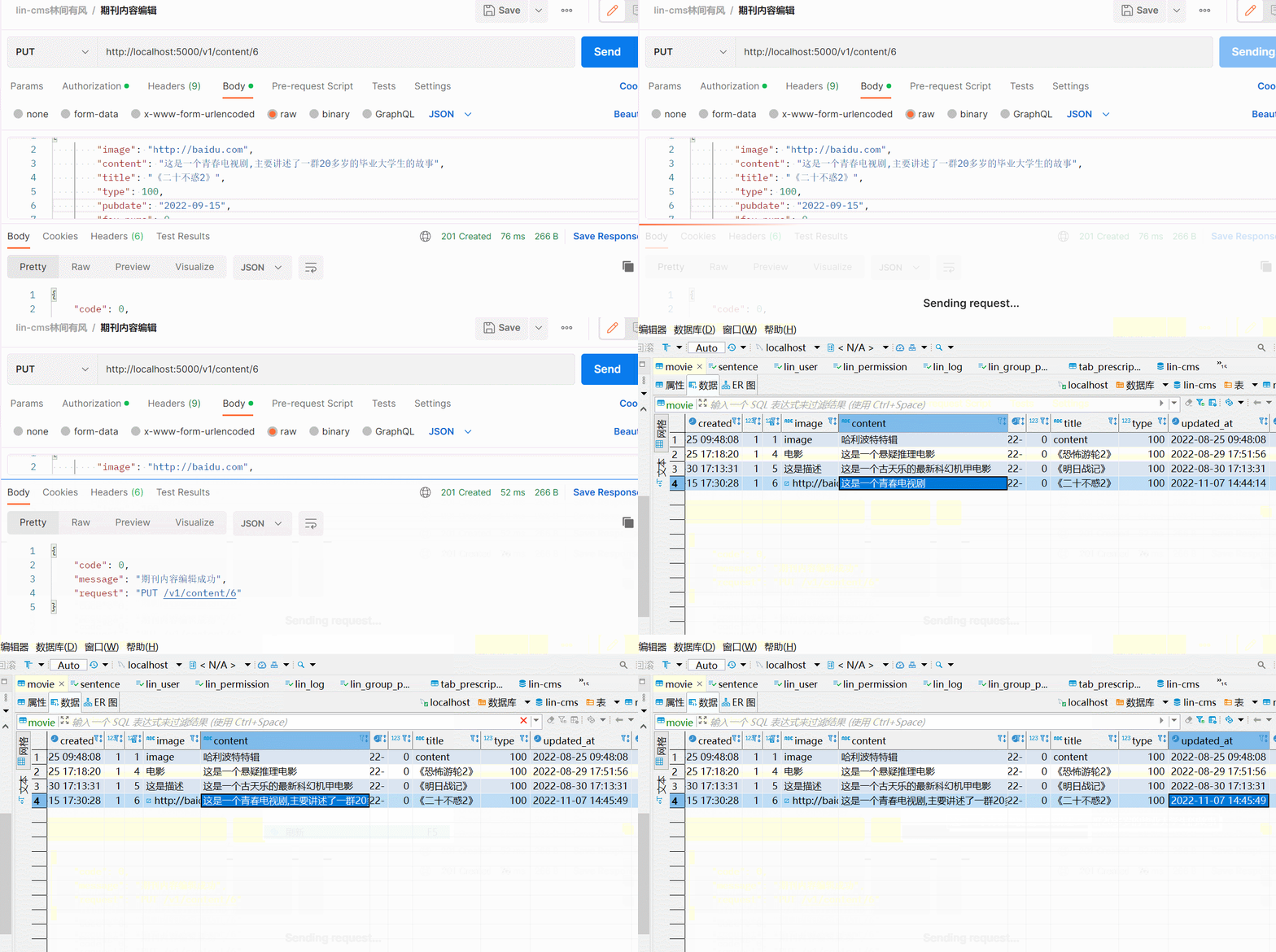
5.使用postman测试接口
修改类型type=100 id=6的数据。

五、删除期刊内容
1.定义删除校验器
需要校验id和type字段,保证能够唯一定义到数据。
- class DeleteContentValidator extends LinValidator {
- constructor () {
- super();
- this.id = [
- new Rule('isNotEmpty', '期刊id不能为空'),
- new Rule('isInt', '期刊id必须是数字且大于0', { min: 1 })
- ]
- this.type = [
- new Rule('isNotEmpty', '期刊类型不能为空'),
- new Rule('isInt', '期刊类型必须是数字')
- ]
- }
- }
- export { AddContentValidator, EditContentValidator, DeleteContentValidator }
2.在dao层定义删除方法
调用模型中的查询方法,按照id查询,并删除对应数据。
- // dao/movie.js
- static async deleteMovieById (id) {
- return MovieModel.destroy({
- where: { id }
- })
- }
- // dao/music.js
- static async deleteMusicById (id) {
- return MusicModel.destroy({
- where: { id }
- })
- }
- // dao/sentence.js
- static async deleteSentenceById (id) {
- return SentenceModel.destroy({
- where: { id }
- })
- }
3.在service层定义删除逻辑
使用switch语句,分类删除数据
- // service/content.js
- static async deleteContent (id, type) {
- switch (type) {
- case 100:
- await MovieDao.deleteMovieById(id)
- break;
- case 200:
- await MusicDao.deleteMusicById(id)
- break;
- case 300:
- await SentenceDao.deleteSentenceById(id)
- break;
- default:
- throw new NotFound({ msg: '内容类型不存在' })
- }
- }
4.在接口层调用删除数据
定义delete方法,传递参数为id
- contentApi.linDelete(
- "deleteContent",
- "/:id",
- {
- permission: "删除期刊内容", // 权限
- module: "内容管理",
- mount: true,
- },
- groupRequired, // 权限级别
- logger("{user.username}删除了期刊内容"),
- async (ctx) => {
- const v = await new DeleteContentValidator().validate(ctx);
- const id = v.get("path.id");
- const type = v.get("query.type");
- await ContentService.deleteContent(id, type);
- ctx.success({
- msg: "期刊删除成功",
- });
- }
- );
5.使用测试工具测试
http://localhost:5000/v1/content/1?type=100

至此,期刊模块的增删查改功能全部完成。
-
相关阅读:
微信小程序自动化发布
vue中什么是$nextTick?
尚品汇 - 项目个人笔记总汇(更新中...)
【每日一题】445. 两数相加 II
libc.so.6: version `GLIBC_2.25‘ not found
计算/存储虚拟化高级特性
2022年0704-Com.Java.Basis 第十四课 《File类 +IO流》简称字节的Ctrl+A Ctrl+C Ctrl+V
SNMP协议——网络管理概述
pycharm remote host显示nothing to show
宝塔Linux面板 软件商店中安装不了任何php版本的解决方法
- 原文地址:https://blog.csdn.net/Sabrina_cc/article/details/126876522
