-
【生日快乐】SpringBoot SpringBoot 基础篇(第一篇) 第4章 SpringBoot 综合案例 4.5 查询客户
SpringBoot
【千锋教育java教程SpringBoot2全套,springboot快速入门到项目实战视频教程】
SpringBoot 基础篇(第一篇)
第4章 SpringBoot 综合案例
4.5 查询客户
4.5.1 查询客户接口设计

请求地址:http://localhost/customer
-
请求方式:GET
-
请求参数
参数名 参数说明 备注 Customer 客户视图对象 封装客户前台展示信息 -
响应数据
参数名 参数说明 备注 DataGridView 数据对象 前台展示数据对象
4.5.2 查询后台代码实现
【1】封装layui数据表格的数据对象DataGridView
package com.dingjiaxiong.vo; /** * ClassName: DataGridView * date: 2022/10/14 21:09 * 前台做数据展示 * @author DingJiaxiong */ public class DataGridView { /* * 封装数据表格的数据对象 * */ private Integer code = 0; private String msg = ""; private Long count; private Object data; public DataGridView() { } public DataGridView(Object data) { super(); this.data = data; } public DataGridView(Long count, Object data) { super(); this.count = count; this.data = data; } public Integer getCode() { return code; } public void setCode(Integer code) { this.code = code; } public String getMsg() { return msg; } public void setMsg(String msg) { this.msg = msg; } public Long getCount() { return count; } public void setCount(Long count) { this.count = count; } public Object getData() { return data; } public void setData(Object data) { this.data = data; } }- 1
- 2
- 3
- 4
- 5
- 6
- 7
- 8
- 9
- 10
- 11
- 12
- 13
- 14
- 15
- 16
- 17
- 18
- 19
- 20
- 21
- 22
- 23
- 24
- 25
- 26
- 27
- 28
- 29
- 30
- 31
- 32
- 33
- 34
- 35
- 36
- 37
- 38
- 39
- 40
- 41
- 42
- 43
- 44
- 45
- 46
- 47
- 48
- 49
- 50
- 51
- 52
- 53
- 54
- 55
- 56
- 57
- 58
- 59
- 60
- 61
- 62
- 63
- 64
- 65
- 66
说实话,没看明白这代码的意义
【2】封装客户实体对象Customer
package com.dingjiaxiong.domain; import com.fasterxml.jackson.annotation.JsonFormat; import java.util.Date; /** * ClassName: Customer * date: 2022/10/14 21:12 * 客户实体 * * @author DingJiaxiong */ public class Customer { //身份证 private String identity; //客户名称 private String custname; //性别 private Integer sex; //地址 private String address; //电话 private String phone; //职业 private String career; //创建时间 @JsonFormat(pattern = "yyyy-MM-dd HH:mm:ss", timezone = "GMT+8") private Date createtime; public String getIdentity() { return identity; } public void setIdentity(String identity) { //this.identity = identity; this.identity = identity == null ? null : identity.trim(); } public String getCustname() { return custname; } public void setCustname(String custname) { //this.custname = custname; this.custname = custname == null ? null : custname.trim(); } public Integer getSex() { return sex; } public void setSex(Integer sex) { this.sex = sex; } public String getAddress() { return address; } public void setAddress(String address) { //this.address = address; this.address = address == null ? null : address.trim(); } public String getPhone() { return phone; } public void setPhone(String phone) { // this.phone = phone; this.phone = phone == null ? null : phone.trim(); } public String getCareer() { return career; } public void setCareer(String career) { // this.career = career; this.career = career == null ? null : career.trim(); } public Date getCreatetime() { return createtime; } public void setCreatetime(Date createtime) { this.createtime = createtime; } @Override public String toString() { return "Customer{" + "identity='" + identity + '\'' + ", custname='" + custname + '\'' + ", sex=" + sex + ", address='" + address + '\'' + ", phone='" + phone + '\'' + ", career='" + career + '\'' + ", createtime=" + createtime + '}'; } }- 1
- 2
- 3
- 4
- 5
- 6
- 7
- 8
- 9
- 10
- 11
- 12
- 13
- 14
- 15
- 16
- 17
- 18
- 19
- 20
- 21
- 22
- 23
- 24
- 25
- 26
- 27
- 28
- 29
- 30
- 31
- 32
- 33
- 34
- 35
- 36
- 37
- 38
- 39
- 40
- 41
- 42
- 43
- 44
- 45
- 46
- 47
- 48
- 49
- 50
- 51
- 52
- 53
- 54
- 55
- 56
- 57
- 58
- 59
- 60
- 61
- 62
- 63
- 64
- 65
- 66
- 67
- 68
- 69
- 70
- 71
- 72
- 73
- 74
- 75
- 76
- 77
- 78
- 79
- 80
- 81
- 82
- 83
- 84
- 85
- 86
- 87
- 88
- 89
- 90
- 91
- 92
- 93
- 94
- 95
- 96
- 97
- 98
- 99
- 100
- 101
- 102
- 103
- 104
- 105
- 106
- 107
【3】封装客户视图对象CustomerVo
package com.dingjiaxiong.vo; import com.dingjiaxiong.domain.Customer; /** * ClassName: CustomerVo * date: 2022/10/14 21:14 * 客户的视图对象 * @author DingJiaxiong */ public class CustomerVo extends Customer { /** * 分页参数 */ private Integer page; //当前页 private Integer limit; //每页展示多少条 public Integer getPage() { return page; } public void setPage(Integer page) { this.page = page; } public Integer getLimit() { return limit; } public void setLimit(Integer limit) { this.limit = limit; } }- 1
- 2
- 3
- 4
- 5
- 6
- 7
- 8
- 9
- 10
- 11
- 12
- 13
- 14
- 15
- 16
- 17
- 18
- 19
- 20
- 21
- 22
- 23
- 24
- 25
- 26
- 27
- 28
- 29
- 30
- 31
- 32
- 33
- 34
- 35
- 36
【5】CustomerMapper接⼝
package com.dingjiaxiong.mapper; import com.dingjiaxiong.domain.Customer; import java.util.List; /** * ClassName: CustomerMapper * date: 2022/10/14 21:17 * * @author DingJiaxiong */ @Mapper public interface CustomerMapper { /* * 查询 * */ List<Customer> queryAllCustomer(Customer customer); }- 1
- 2
- 3
- 4
- 5
- 6
- 7
- 8
- 9
- 10
- 11
- 12
- 13
- 14
- 15
- 16
- 17
- 18
- 19
- 20
- 21
- 22
【6】CustomerMapper.xml
DOCTYPE mapper PUBLIC "-//mybatis.org//DTD Mapper 3.0//EN" "http://mybatis.org/dtd/mybatis-3-mapper.dtd"> <mapper namespace="com.dingjiaxiong.mapper.CustomerMapper"> <resultMap id="BaseResultMap" type="com.dingjiaxiong.domain.Customer"> <id column="identity" jdbcType="VARCHAR" property="identity"/> <result column="custname" jdbcType="VARCHAR" property="custname"/> <result column="sex" jdbcType="INTEGER" property="sex"/> <result column="address" jdbcType="VARCHAR" property="address"/> <result column="phone" jdbcType="VARCHAR" property="phone"/> <result column="career" jdbcType="VARCHAR" property="career"/> <result column="createtime" jdbcType="TIMESTAMP" property="createtime"/> resultMap> <sql id="Base_Column_List"> identity, custname, sex, address, phone, career, createtime sql> <select id="queryAllCustomer" resultMap="BaseResultMap"> select <include refid="Base_Column_List"/> from t_customer <where> <if test="identity!=null and identity!=''"> and identity like concat("%",#{identity},"%") if> <if test="custname!=null and custname!=''"> and custname like concat("%",#{custname},"%") if> <if test="phone!=null and phone!=''"> and phone like concat("%",#{phone},"%") if> <if test="career!=null and career!=''"> and career like concat("%",#{career},"%") if> <if test="address!=null and address!=''"> and address like concat("%",#{address},"%") if> <if test="sex!=null"> and sex=#{sex} if> where> order by createtime desc select> mapper>- 1
- 2
- 3
- 4
- 5
- 6
- 7
- 8
- 9
- 10
- 11
- 12
- 13
- 14
- 15
- 16
- 17
- 18
- 19
- 20
- 21
- 22
- 23
- 24
- 25
- 26
- 27
- 28
- 29
- 30
- 31
- 32
- 33
- 34
- 35
- 36
- 37
- 38
- 39
- 40
- 41
- 42
- 43
- 44
- 45
【7】CustomerService接口
package com.dingjiaxiong.service; import com.dingjiaxiong.vo.CustomerVo; import com.dingjiaxiong.vo.DataGridView; /** * ClassName: CustomerService * date: 2022/10/14 21:15 * * @author DingJiaxiong */ public interface CustomerService { /* * 查询所有客户 * */ public DataGridView queryAllCustomer(CustomerVo customerVo); }- 1
- 2
- 3
- 4
- 5
- 6
- 7
- 8
- 9
- 10
- 11
- 12
- 13
- 14
- 15
- 16
- 17
- 18
- 19
- 20
【8】CustomerServiceImpl 实现类
这里快速添加一个分页依赖
<dependency> <groupId>com.github.pagehelpergroupId> <artifactId>pagehelper-spring-boot-starterartifactId> <version>1.3.1version> dependency>- 1
- 2
- 3
- 4
- 5

package com.dingjiaxiong.service.impl; import com.dingjiaxiong.domain.Customer; import com.dingjiaxiong.mapper.CustomerMapper; import com.dingjiaxiong.service.CustomerService; import com.dingjiaxiong.vo.CustomerVo; import com.dingjiaxiong.vo.DataGridView; import com.github.pagehelper.Page; import com.github.pagehelper.PageHelper; import org.springframework.beans.factory.annotation.Autowired; import org.springframework.stereotype.Service; import java.util.List; /** * ClassName: CustomerServiceImpl * date: 2022/10/14 21:25 * * @author DingJiaxiong */ @Service public class CustomerServiceImpl implements CustomerService { @Autowired private CustomerMapper customerMapper; @Override public DataGridView queryAllCustomer(CustomerVo customerVo) { Page<Object> page = PageHelper.startPage(customerVo.getPage(), customerVo.getLimit()); List<Customer> data = this.customerMapper.queryAllCustomer(customerVo); return new DataGridView(page.getTotal(), data); } }- 1
- 2
- 3
- 4
- 5
- 6
- 7
- 8
- 9
- 10
- 11
- 12
- 13
- 14
- 15
- 16
- 17
- 18
- 19
- 20
- 21
- 22
- 23
- 24
- 25
- 26
- 27
- 28
- 29
- 30
- 31
- 32
- 33
- 34
- 35
- 36
【9】编写控制器
package com.dingjiaxiong.controller; import com.dingjiaxiong.service.CustomerService; import com.dingjiaxiong.vo.CustomerVo; import com.dingjiaxiong.vo.DataGridView; import org.springframework.beans.factory.annotation.Autowired; import org.springframework.web.bind.annotation.GetMapping; import org.springframework.web.bind.annotation.RequestBody; import org.springframework.web.bind.annotation.RequestMapping; import org.springframework.web.bind.annotation.RestController; /** * ClassName: CustomerController * date: 2022/10/14 21:30 * * @author DingJiaxiong */ @RestController @RequestMapping("/customer") public class CustomerController { @Autowired private CustomerService customerService; /* * 查询客户信息 * */ @GetMapping public DataGridView loadAllCustomer(@RequestBody CustomerVo customerVo){ return customerService.queryAllCustomer(customerVo); } }- 1
- 2
- 3
- 4
- 5
- 6
- 7
- 8
- 9
- 10
- 11
- 12
- 13
- 14
- 15
- 16
- 17
- 18
- 19
- 20
- 21
- 22
- 23
- 24
- 25
- 26
- 27
- 28
- 29
- 30
- 31
- 32
- 33
- 34
给启动类加上扫描

启动服务器
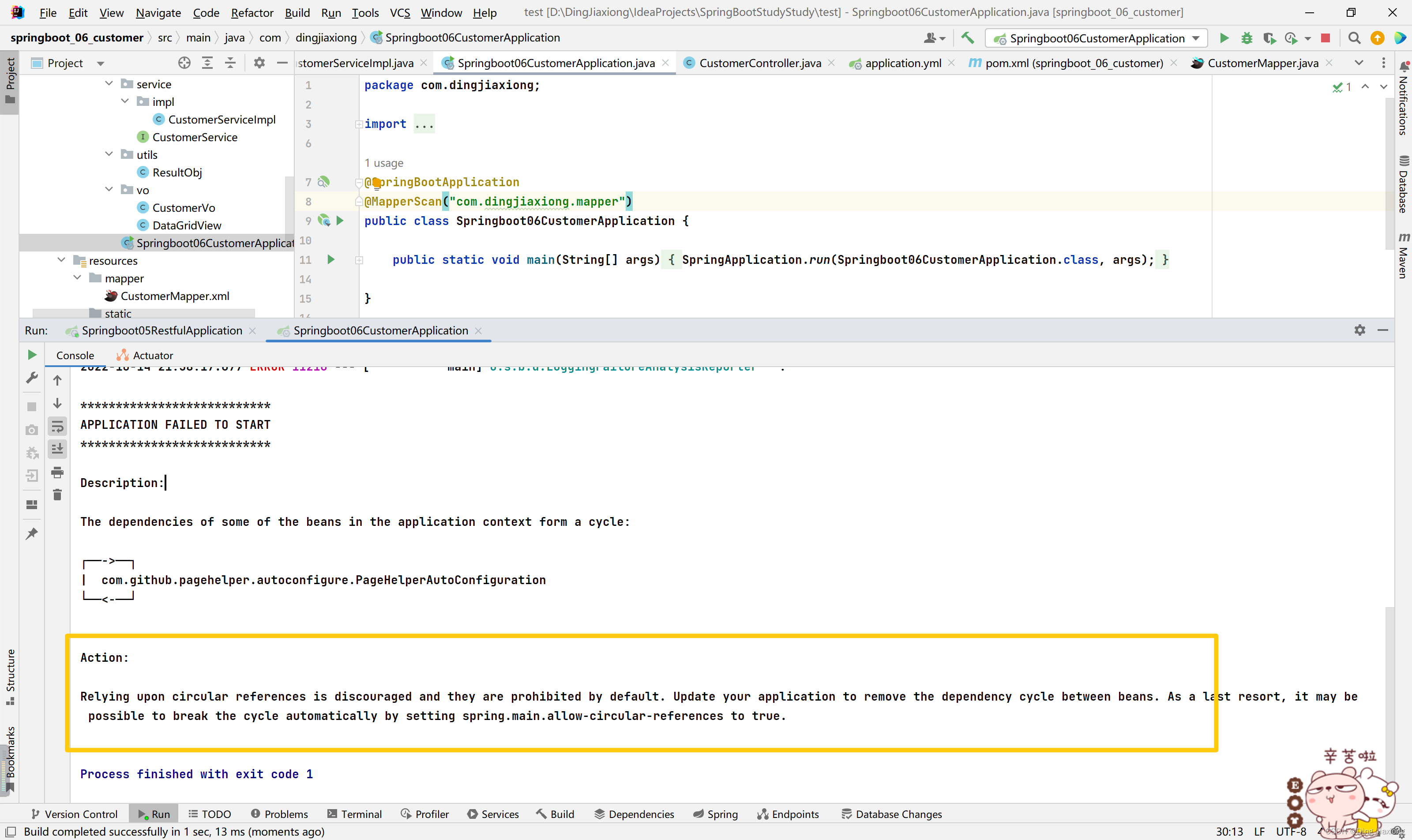
报了一个循环依赖的错误
【解决】
在application.yml 中配置
main: allow-circular-references: true- 1
- 2

OK。
再次启动

OK,启动成功。
测试一下接口:

-
-
相关阅读:
C++QT实现TCP通信
DLMS/COSEM中的信息安全:安全密钥(中)续2
Gartner权威报告解读:探究应用可观测性的发展
python 之 矩阵相关操作
SQL处理JSON格式数据(一篇)
QT+OSG/osgEarth编译之二十八:cairo+Qt编译(一套代码、一套框架,跨平台编译,版本:cairo-1.16.0)
为互连智能合约Connected Contracts使用Axelar SDK
帐号授权重新定义软件使用与管理
防止员工私自拷贝公司资料
MySQL性能调优
- 原文地址:https://blog.csdn.net/weixin_44226181/article/details/127699416
