-
elasticserach
文章目录
1 elasticsearch简介
- 什么是elasticsearch?
- 一个开源的
分布式搜索引擎,可以用来实现搜索、日志统计、分析、系统监控等功能 - 什么是elastic stack(ELK)?
- 是以elasticsearch为核心的技术栈,包括beats、Logstash、Kibana、elasticsearch
- 什么是Lucene?
- 是Apache的开源搜索引擎类库,提供了搜索引擎的核心API,核心技术是
倒排索引
1.1 正向索引和倒排索引
什么是文档和词条?
- 文档:每一条数据就是一个文档
- 词条:对文档中的内容分词,得到的词语就是词条
什么是正向索引? - 基于
文档id创建索引。查询词条时必须先找到文档,而后判断是否包含词条
什么是倒排索引? - 对文档内容分词,对
词条创建索引,并记录词条所在文档的id信息。查询时先根据词条查询到文档id,而后根据文档id获取到文档。
1.2 文档
elasticsearch是面向文档储存的,文档数据会被序列化为json格式后储存在elasticsearch中。
1.3 索引和映射
- 索引:相同类型的
文档的集合 - 映射:索引中文档的
字段约束信息,类似表的结构约束
1.4 elasticsearch与mysql概念对比

- Mysql:擅长事务类型操作,可以确保数据的安全和一致性
- Elasticsearch:擅长海量数据的搜索、分析、计算
之间是互补关系!
2 部署单点es和kibana
2.1 创建网络
因为还需要部署kibana容器,因此需要让es和kibana容器互联。先创建一个网路
dockerhub地址:https://hub.docker.com/_/elasticsearchdocker network create es-net- 1
2.2 拉取镜像
docker pull elasticsearch:7.12.1 docker pull kibana:7.12.1- 1
- 2
这里如果拉取失败,可以尝试重启docker- kibana提供了很方便的工具,方便编写es中的DSL语句,来操作es
也可以直接加载镜像
elasticsearch.tar:https://download.csdn.net/download/weixin_43684214/86881986
kibana.tar:
docker load -i elasticsearch.tar docker load -i kibana.tar- 1
- 2
2.3 运行
2.3.1 单个容器运行
- es运行
docker run -d --name elasticsearch # 容器名 -e "ES_JAVA_OPTS=-Xms512m -Xmx512m" #内存配置 -e "discovery.type=single-node" # 单机启动 -v es-data:/usr/share/elasticsearch/data # 数据存储目录 -v es-plugins:/usr/share/elasticsearch/plugins # 插件目录 --privileged --net es-net # 加入创建的网络 -p 9200:9200 # 用户访问的端口 -p 9300:9300 # 容器互联访问的端口 elasticsearch:7.12.1- 1
- 2
- 3
- 4
- 5
- 6
- 7
- 8
- 9
- 10
- 11
- kibana运行
docker run -d --name kibana -e ELASTICSEARCH_HOSTS=http://elasticsearch:9200 #同一个网络可以使用容器名代替IP --network=es-net #加入创建的网络 -p 5601:5601 kibana:7.12.1 # tag要和es一致- 1
- 2
- 3
- 4
- 5
- 6
2.3.2 docker-compose一件运行
version : '3' #networks: # es: services: elasticsearch: container_name: elasticsearch image: elasticsearch:7.12.1 ports: - 9200:9200 - 9300:9300 volumes: - ./es-data:/usr/share/elasticsearch/data - ./es-plugins:/usr/share/elasticsearch/plugins environment: ES_JAVA_OPTS: -Xms512m -Xmx512m discovery.type: single-node privileged: true # networks: # - "es" kinana: container_name: kinana image: kibana:7.12.1 ports: - 5601:5601 # networks: # - "es" environment: ELASTICSEARCH_HOSTS: http://elasticsearch:9200 # volumes: # - ./kibana.yml:/usr/share/kibana/config/kibana.yml- 1
- 2
- 3
- 4
- 5
- 6
- 7
- 8
- 9
- 10
- 11
- 12
- 13
- 14
- 15
- 16
- 17
- 18
- 19
- 20
- 21
- 22
- 23
- 24
- 25
- 26
- 27
- 28
- 29
- 30
2.4 访问
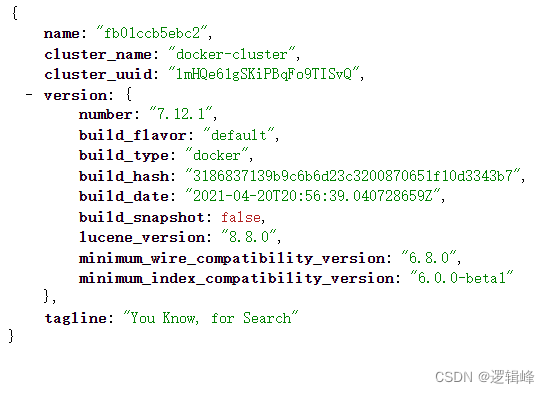
- http://localhost:9200/
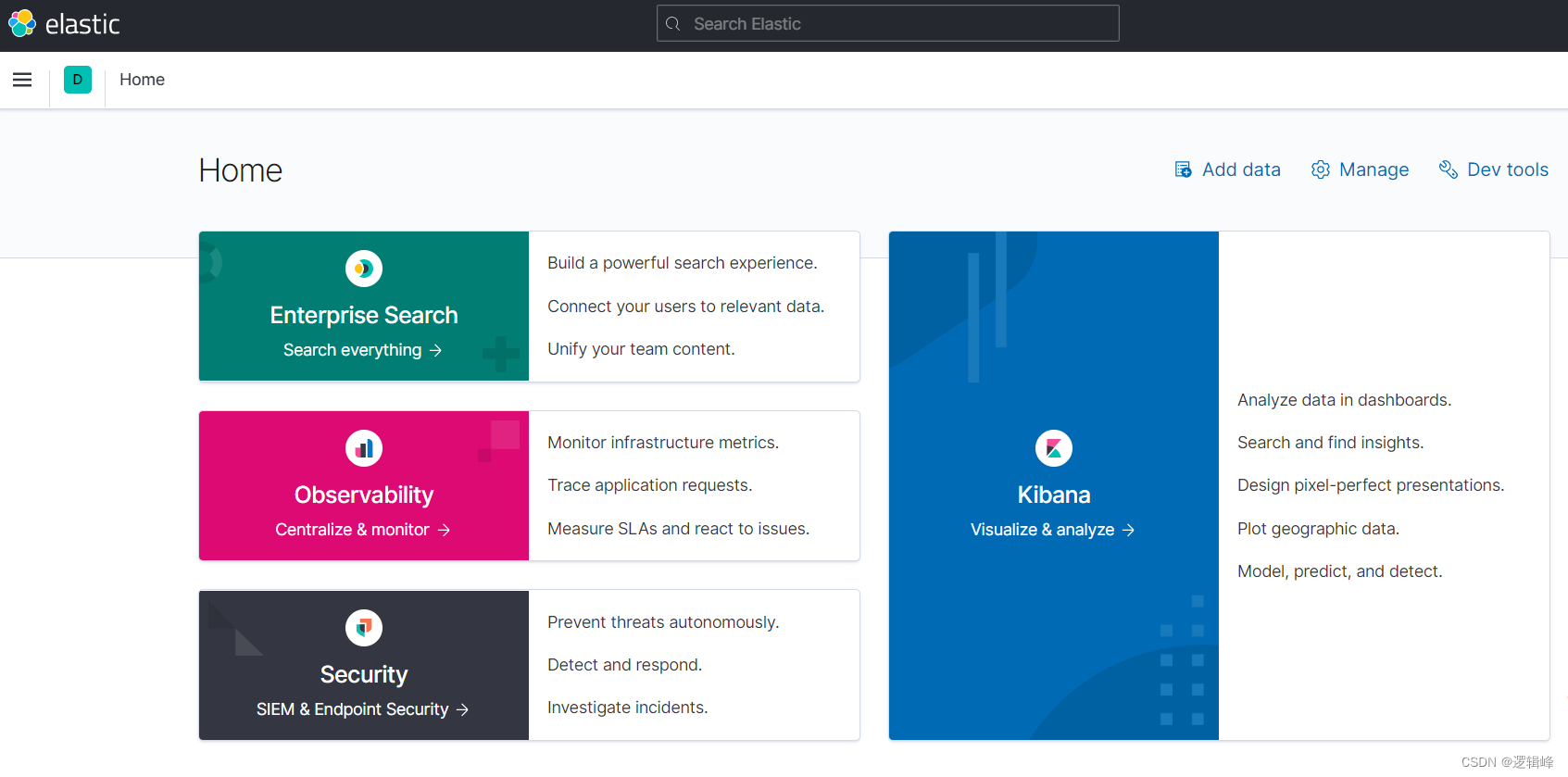
- http://localhost:5601/app/home#/
2.5 模拟访问

3 分词器
3.1安装ik插件
# 进入容器内部 docker exec -it elasticsearch /bin/bash # 在线下载并安装 ./bin/elasticsearch-plugin install https://github.com/medcl/elasticsearch-analysis-ik/releases/download/v7.12.1/elasticsearch-analysis-ik-7.12.1.zip # 退出 exit #重启容器 docker restart elasticsearch- 1
- 2
- 3
- 4
- 5
- 6
- 7
- 8
- 9
- 10
- 11
3.2 测试
IK分词器包含两种模式:
ik_smart: 最少切分

ik_max_word:最细切分

3.3 ik分词器的拓展和停用
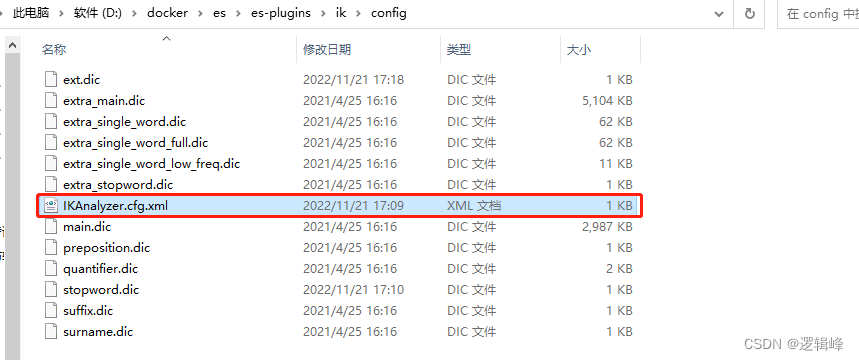
- 在挂载的es插件目录招到IKAnalyzer.cfg.xml配置文件,如下:
- 配置内容如下
DOCTYPE properties SYSTEM "http://java.sun.com/dtd/properties.dtd"> <properties> <comment>IK Analyzer 扩展配置comment> <entry key="ext_dict">ext.dicentry> <entry key="ext_stopwords">stopword.dicentry> properties>- 1
- 2
- 3
- 4
- 5
- 6
- 7
- 8
- 9
- 10
- 11
- 12
- 13
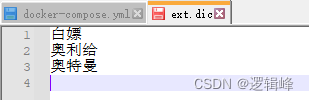
- ext.dic(新定义的词汇)
- stopword.dic(排除的词汇)

4 索引库操作
4.1 mapping映射属性
mapping是对索引库中文档的约束,
常见的mapping属性包括:type:字段数据类型,常见的简单类型有:
----字符串:text(可分词的文本)、keyword(是一个整体,不能拆分,精确值,例如:品牌、国家、IP地址)
----数值:long、integer、short、byte、double、float
----布尔:boolean
----日期:date
----对象:object
—经度:geo_point
注意:es中没有数组,都可以有多个值。index:是否创建索引,默认为true(创建倒排索引,参与搜索)、false(不创建倒排索引,不参与搜索)。analyzer:使用哪种分词器properties:该字段的子字段
4.2 索引库的创建
类似mysql的表
# 新建 PUT /mytable { "mappings": { "properties": { "info": { "type": "text", "analyzer": "ik_smart" }, "email": { "type": "keyword", "index": false }, "name": { "type": "object", "properties": { "firstName": { "type": "keyword" }, "lastName": { "type": "keyword" } } } } } }- 1
- 2
- 3
- 4
- 5
- 6
- 7
- 8
- 9
- 10
- 11
- 12
- 13
- 14
- 15
- 16
- 17
- 18
- 19
- 20
- 21
- 22
- 23
- 24
- 25
- 26
- 27
4.3 索引库的CRUD
- 查看索引库语法:
GET /索引库名- 1
- 删除索引库的语法:
DELETE /索引库名- 1
- 修改索引库
索引库和mapping一旦创建无法修改,但是可以添加新的字段,语法如下:
PUT /索引库名/_mapping { "properties": { "新字段名": { "type": "integer" } } }- 1
- 2
- 3
- 4
- 5
- 6
- 7
- 8
举例如下:
# 查询 GET /mytable # 修改 PUT /mytable/_mapping { "properties":{ "age": { "type": "integer" } } } # 删除 DELETE /mytable- 1
- 2
- 3
- 4
- 5
- 6
- 7
- 8
- 9
- 10
- 11
- 12
- 13
- 14
- 15
- 16
5 文档操作
5.1 新增文档
POST /索引库名/_doc/文档id { "info": "奥特曼来自M78星云", "email": "302976975@qq.com", "name": { "firstName": "迪", "lastName": "迦" } }- 1
- 2
- 3
- 4
- 5
- 6
- 7
- 8
- 9
举个例子:
# 插入文档 POST /mytable/_doc/1 { "info": "奥特曼来自M78星云", "email": "302976975@qq.com", "name": { "firstName": "迪", "lastName": "迦" } }- 1
- 2
- 3
- 4
- 5
- 6
- 7
- 8
- 9
- 10
5.2 查询文档
GET /索引库名/_doc/文档id- 1
举个例子:
GET /mytable/_doc/1- 1
5.3 删除文档
DELETE /索引库名/_doc/文档id- 1
举个例子:
DELETE /mytable/_doc/1- 1
5.4 修改文档
- 方法一:全量修改,会删除旧文档,添加新文档,如果id不存在则新增
PUT /索引库名/_doc/文档id { "info": "奥特曼来自M78星云", "email": "302976975@qq.com", "name": { "firstName": "迪", "lastName": "迦" } }- 1
- 2
- 3
- 4
- 5
- 6
- 7
- 8
- 9
举个例子:
# 全量修改文档 PUT /mytable/_doc/1 { "info": "奥特曼来自M78星云", "email": "302976975@qq.com", "name": { "firstName": "赛", "lastName": "罗" } }- 1
- 2
- 3
- 4
- 5
- 6
- 7
- 8
- 9
- 10
- 方法二:增量修改,修改指定字段值
POST /索引库名/_update/文档id { "doc": { "info": "赛罗奥特曼来自M78星云" } }- 1
- 2
- 3
- 4
- 5
- 6
举个例子:
# 增量修改 POST /mytable/_update/1 { "doc": { "info": "赛罗奥特曼来自M78星云" } }- 1
- 2
- 3
- 4
- 5
- 6
- 7
6 JavaRestClient实现索引库操作
6.1 创建索引库DSL语句
- 新建患者索引库
- 字段拷贝可以使用copy_to属性将当前字段拷贝到指定字段。
PUT /patient { "mappings": { "properties": { "patientId": { "type": "keyword", "copy_to": "all" }, "barCode": { "type": "keyword", "copy_to": "all" }, "barCodeImage": { "type": "keyword", "index": false }, "patientName": { "type": "text", "analyzer": "ik_max_word", "copy_to": "all" }, "patientAge": { "type": "integer", "copy_to": "all" }, "patientSex": { "type": "keyword", "copy_to": "all" }, "hospitalNum": { "type": "keyword", "copy_to": "all" }, "opcNum": { "type": "keyword", "copy_to": "all" }, "abo": { "type": "keyword" }, "rh": { "type": "keyword" }, "irregular": { "type": "keyword" }, "reportPath": { "type": "keyword", "index": false }, "reportStatus": { "type": "keyword" }, "createTime": { "type": "date", "copy_to": "all" }, "updateTime": { "type": "date", "index": false }, "deleteTime": { "type": "date" }, "remark": { "type": "text", "analyzer": "ik_max_word", "copy_to": "all" }, "all": { "type": "text", "analyzer": "ik_max_word" } } } }- 1
- 2
- 3
- 4
- 5
- 6
- 7
- 8
- 9
- 10
- 11
- 12
- 13
- 14
- 15
- 16
- 17
- 18
- 19
- 20
- 21
- 22
- 23
- 24
- 25
- 26
- 27
- 28
- 29
- 30
- 31
- 32
- 33
- 34
- 35
- 36
- 37
- 38
- 39
- 40
- 41
- 42
- 43
- 44
- 45
- 46
- 47
- 48
- 49
- 50
- 51
- 52
- 53
- 54
- 55
- 56
- 57
- 58
- 59
- 60
- 61
- 62
- 63
- 64
- 65
- 66
- 67
- 68
- 69
- 70
- 71
- 72
- 73
- 74
- 75
- 76
6.2 引入RestClient依赖
注意:版本要一致!!!<dependency> <groupId>org.elasticsearch.clientgroupId> <artifactId>elasticsearch-rest-high-level-clientartifactId> <version>7.12.1version> dependency>- 1
- 2
- 3
- 4
- 5
6.3 初始化RestHighLevelClient
import org.apache.http.HttpHost; import org.elasticsearch.client.RestClient; import org.elasticsearch.client.RestHighLevelClient; import org.junit.jupiter.api.AfterEach; import org.junit.jupiter.api.BeforeEach; import org.junit.jupiter.api.Test; import java.io.IOException; public class EsTest { private RestHighLevelClient client; @Test public void test(){ System.out.println(client); } @BeforeEach public void testBefor(){ this.client = new RestHighLevelClient( RestClient.builder( //可以是多个 HttpHost.create("http://127.0.0.1:9200") ) ); } @AfterEach public void testAfter() throws IOException { this.client.close(); } }- 1
- 2
- 3
- 4
- 5
- 6
- 7
- 8
- 9
- 10
- 11
- 12
- 13
- 14
- 15
- 16
- 17
- 18
- 19
- 20
- 21
- 22
- 23
- 24
- 25
- 26
- 27
- 28
- 29
- 30
- 31
- 32
6.4 通过RestClient创建索引库
@Test public void createPatientIndex() throws IOException { // 1 创建Request对象,命名索引库名称 CreateIndexRequest request = new CreateIndexRequest("patient"); // 2 请求参数,内容是DSL语句的json字符串,类型json request.source(MAPPING_TEMPLATE, XContentType.JSON); // 3 发起请求 client.indices().create(request, RequestOptions.DEFAULT); }- 1
- 2
- 3
- 4
- 5
- 6
- 7
- 8
- 9
6.5 RestClient删除索引库
@Test public void deletePatientIndex() throws IOException { // 1 创建Request对象,命名索引库名称 DeleteIndexRequest request = new DeleteIndexRequest("patient"); // 2 发起请求 client.indices().delete(request, RequestOptions.DEFAULT); }- 1
- 2
- 3
- 4
- 5
- 6
- 7
6.6 RestClient判断索引库是否存在
@Test public void existsPatientIndex() throws IOException { // 1 创建Request对象,命名索引库名称 GetIndexRequest request = new GetIndexRequest("patient"); // 2 发起请求 boolean exists = client.indices().exists(request, RequestOptions.DEFAULT); System.out.println(exists); }- 1
- 2
- 3
- 4
- 5
- 6
- 7
- 8
7 RestClient操作文档
7.1 新增文档
@Test public void addDoc() throws IOException { FangzhouUser fangzhouUser = fangzhouUserMapper.selectFangzhouUserByPatientId(1l); // 1 准备Request对象 IndexRequest indexRequest = new IndexRequest("patient").id(fangzhouUser.getPatientId().toString()); // 2 准备json文档 indexRequest.source(JSON.toJSONString(fangzhouUser),XContentType.JSON); // 3 发起请求 client.index(indexRequest,RequestOptions.DEFAULT); }- 1
- 2
- 3
- 4
- 5
- 6
- 7
- 8
- 9
- 10
- 11
7.2 查询文档
@Test public void testSelectDoc() throws IOException { // 1.准备Request GetRequest request = new GetRequest("patient", "1"); // 2.发送请求,得到相应 GetResponse response = client.get(request, RequestOptions.DEFAULT); // 3.解析相应结果 String jsonstr = response.getSourceAsString(); FangzhouUser fangzhouUser = JSON.parseObject(jsonstr, FangzhouUser.class); System.out.println(fangzhouUser); }- 1
- 2
- 3
- 4
- 5
- 6
- 7
- 8
- 9
- 10
- 11
7.3 修改文档
- 全局修改,先删除后新增
- 局部修改
@Test public void testUpdateDoc() throws IOException { UpdateRequest request = new UpdateRequest("patient", "1"); request.doc( "patientName","胡云峰", "patientSex","女" ); client.update(request,RequestOptions.DEFAULT); }- 1
- 2
- 3
- 4
- 5
- 6
- 7
- 8
- 9
7.4 删除文档
@Test public void testDeleteDoc() throws IOException { DeleteRequest request = new DeleteRequest("patient", "1"); client.delete(request,RequestOptions.DEFAULT); }- 1
- 2
- 3
- 4
- 5
7.5 批量导入文档
@Test public void testBulkDoc() throws IOException { List<FangzhouUser> userList = fangzhouUserMapper.selectFangzhouUserList(new FangzhouUser()); BulkRequest bulkRequest = new BulkRequest(); for (FangzhouUser user : userList) { bulkRequest.add(new IndexRequest("patient").id(user.getPatientId().toString()).source(JSON.toJSONString(user),XContentType.JSON)); } client.bulk(bulkRequest,RequestOptions.DEFAULT); }- 1
- 2
- 3
- 4
- 5
- 6
- 7
- 8
- 9
-
相关阅读:
【图像处理 】001 Android 中 Bitmap 压缩的几种方法浅析
5000+ 字解读 | 产品经理:如何做好元器件选型?
Spring Boot + Docker实战
STM8的C语言编程(3)+――+GPIO输出和输入
idea菜单栏任务栏放缩比例修改
jetson安装opencv2
(续)SSM整合之spring笔记(AOP 动态代理)(P094—P098)
latex Longtable使用指南-字体调节,与table不同
LabVIEW使用通道线在并行代码段之间传递数据
Session会话追踪的实现机制
- 原文地址:https://blog.csdn.net/weixin_43684214/article/details/127653889
- 最新文章
-
沪漂五周年了:我越来越迷茫了
Agentic Skill Routing 实战:别再把所有 Skill 塞进 AI Agent 上下文
MySQL-Seconds_behind_master的精度误差
[MAF预定义ChatClient中间件-03]CachingChatClient——利用缓存省钱省时间
AI的至暗历史:从万众期待到被政府撤资,AI的两次死亡徘徊
Agent OS :五种驯服不确定性的范式
PortSwigger SQL注入LAB11
数据库即时编译JIT
[Begin]AI Learn Data Day 0
深度学习进阶(二十七)现代 LLM 的核心架构设计其二:SwiGLU