-
vue_day3
1 表单控制
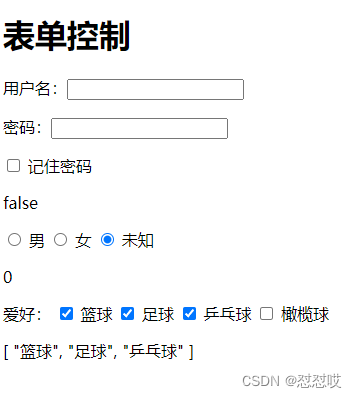
input:checkbox(单选,多选),radio(单选)
DOCTYPE html> <html lang="en"> <head> <meta charset="UTF-8"> <title>Titletitle> <script src="./js/vue.js">script> head> <body> <div id="app"> <h1>表单控制h1> <p>用户名:<input type="text" v-model="name">p> <p>密码:<input type="text" v-model="password">p> <p><input type="checkbox" v-model="isRemember"> 记住密码p> {{isRemember}} <p> <input type="radio" v-model="gender" value="1"> 男 <input type="radio" v-model="gender" value="2"> 女 <input type="radio" v-model="gender" value="0"> 未知 p> {{gender}} <p> 爱好: <input type="checkbox" value="篮球" v-model="hobby"> 篮球 <input type="checkbox" value="足球" v-model="hobby"> 足球 <input type="checkbox" value="乒乓球" v-model="hobby"> 乒乓球 <input type="checkbox" value="橄榄球" v-model="hobby"> 橄榄球 p> {{hobby}} div> body> <script> new Vue({ el: '#app', data: { name: '', password: '', isRemember: false, // checkbox单选,使用布尔类型 gender: '', // radio单选,使用字符串 hobby: [], // checkbox 多选使用数组 }, }) script> html>- 1
- 2
- 3
- 4
- 5
- 6
- 7
- 8
- 9
- 10
- 11
- 12
- 13
- 14
- 15
- 16
- 17
- 18
- 19
- 20
- 21
- 22
- 23
- 24
- 25
- 26
- 27
- 28
- 29
- 30
- 31
- 32
- 33
- 34
- 35
- 36
- 37
- 38
- 39
- 40
- 41
- 42
- 43
- 44
- 45
- 46
2 购物车案例
python中只有基于迭代的循环,没有基于索引的循环
#js,java,go中有基于迭代和索引的两种
补充:js中for 循环
1 for(i=0;i
3 for (i of checkGroup) # es6中 循环
4 数组内置方法.forEach()
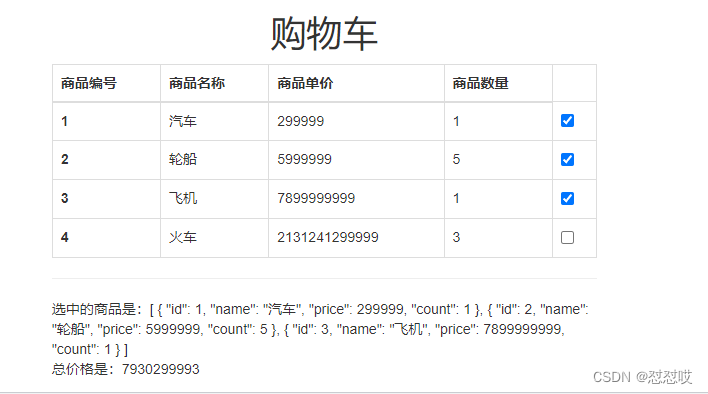
5 jquery $.each 循环DOCTYPE html> <html lang="en"> <head> <meta charset="UTF-8"> <title>Titletitle> <script src="./js/vue.js">script> <link rel="stylesheet" href="https://stackpath.bootstrapcdn.com/bootstrap/3.4.1/css/bootstrap.min.css"> head> <body> <div id="app"> <div class="container-fluid"> <h1 class="text-center">购物车h1> <div class="row"> <div class="col-md-6 col-md-offset-3"> <table class="table table-bordered"> <thead> <tr> <th>商品编号th> <th>商品名称th> <th>商品单价th> <th>商品数量th> tr> thead> <tbody> <tr v-for="good in goodList"> <th >{{good.id}}th> <td>{{good.name}}td> <td>{{good.price}}td> <td>{{good.count}}td> <td><input type="checkbox" v-model="checkGroup" :value="good">td> tr> tbody> table> <hr> 选中的商品是:{{checkGroup}} <br> 总价格是:{{getPrice()}} div> div> div> div> body> <script> new Vue({ el: '#app', data: { goodList:[ {id:1,name:'汽车',price:299999,count:1}, {id:2,name:'轮船',price:5999999,count:5}, {id:3,name:'飞机',price:7899999999,count:1}, {id:4,name:'火车',price:2131241299999,count:3} ], checkGroup:[], }, methods: { getPrice() { // for (i in goodList) // {console.log(goodList[i]) var total = 0 for (item of this.checkGroup) { total += item.price * item.count } return total } } }) var goodList=[ {id:1,name:'汽车',price:299999,count:1}, {id:2,name:'轮船',price:5999999,count:5}, {id:3,name:'飞机',price:7899999999,count:1}, {id:4,name:'火车',price:2131241299999,count:3} ] // 1 方式一:js的基于索引的循环 // for (var i = 0; i< goodList.length; i++) { // console.log(goodList[i]) // } // 2 方式二:基于迭代的循环 // for (i in goodList){ // console.log(goodList[i]) // } // 3 方式三:of 循环,基于迭代的 // for (i of goodList){ // console.log(i) // } // 4 方式四:数组的循环方法 // goodList.forEach(item => { // console.log('---', item) // }) // 5 jquery:引入 // $.each(goodList, (i, v) => { // console.log(v) // }) script> html>- 1
- 2
- 3
- 4
- 5
- 6
- 7
- 8
- 9
- 10
- 11
- 12
- 13
- 14
- 15
- 16
- 17
- 18
- 19
- 20
- 21
- 22
- 23
- 24
- 25
- 26
- 27
- 28
- 29
- 30
- 31
- 32
- 33
- 34
- 35
- 36
- 37
- 38
- 39
- 40
- 41
- 42
- 43
- 44
- 45
- 46
- 47
- 48
- 49
- 50
- 51
- 52
- 53
- 54
- 55
- 56
- 57
- 58
- 59
- 60
- 61
- 62
- 63
- 64
- 65
- 66
- 67
- 68
- 69
- 70
- 71
- 72
- 73
- 74
- 75
- 76
- 77
- 78
- 79
- 80
- 81
- 82
- 83
- 84
- 85
- 86
- 87
- 88
- 89
- 90
- 91
- 92
- 93
- 94
- 95
- 96
- 97
- 98
- 99
- 100
- 101
- 102
- 103
- 104
2.1 购物车全选或者全不选
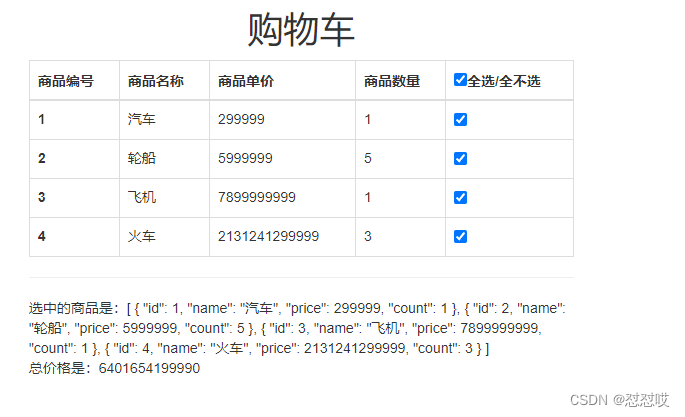
DOCTYPE html> <html lang="en"> <head> <meta charset="UTF-8"> <title>Titletitle> <script src="./js/vue.js">script> <link rel="stylesheet" href="https://stackpath.bootstrapcdn.com/bootstrap/3.4.1/css/bootstrap.min.css"> head> <body> <div id="app"> <div class="container-fluid"> <h1 class="text-center">购物车h1> <div class="row"> <div class="col-md-6 col-md-offset-3"> <table class="table table-bordered"> <thead> <tr> <th>商品编号th> <th>商品名称th> <th>商品单价th> <th>商品数量th> <th><input type="checkbox" v-model="checkGroup" :value="good" @change="handleChange">全选/全不选th> tr> thead> <tbody> <tr v-for="good in goodList"> <th >{{good.id}}th> <td>{{good.name}}td> <td>{{good.price}}td> <td>{{good.count}} td> <td><input type="checkbox" v-model="checkGroup" :value="good" @change=" handleCheckOne">td> tr> tbody> table> <hr> 选中的商品是:{{checkGroup}} <br> 总价格是:{{getPrice()}} div> div> div> div> body> <script> new Vue({ el: '#app', data: { goodList:[ {id:1,name:'汽车',price:299999,count:1}, {id:2,name:'轮船',price:5999999,count:5}, {id:3,name:'飞机',price:7899999999,count:1}, {id:4,name:'火车',price:2131241299999,count:3} ], checkGroup:[], checkAll: true, }, methods: { getPrice() { // for (i in goodList) // {console.log(goodList[i]) var total = 0 for (item of this.checkGroup) { total += item.price * item.count } return total }, handleChange() { if (this.checkAll) { this.checkGroup = this.goodList } else { this.checkGroup = [] } }, handleCheckOne() { // 如果checkGroup的长度等于goodList的长度,说明全选了,checkAll就应该变为true,否则就是false // if (this.checkGroup.length == this.goodList.length) { // this.checkAll = true // } else { // this.checkAll = false // } // 变短 this.checkAll = this.checkGroup.length == this.goodList.length } } }) script> html>- 1
- 2
- 3
- 4
- 5
- 6
- 7
- 8
- 9
- 10
- 11
- 12
- 13
- 14
- 15
- 16
- 17
- 18
- 19
- 20
- 21
- 22
- 23
- 24
- 25
- 26
- 27
- 28
- 29
- 30
- 31
- 32
- 33
- 34
- 35
- 36
- 37
- 38
- 39
- 40
- 41
- 42
- 43
- 44
- 45
- 46
- 47
- 48
- 49
- 50
- 51
- 52
- 53
- 54
- 55
- 56
- 57
- 58
- 59
- 60
- 61
- 62
- 63
- 64
- 65
- 66
- 67
- 68
- 69
- 70
- 71
- 72
- 73
- 74
- 75
- 76
- 77
- 78
- 79
- 80
- 81
- 82
- 83
- 84
- 85
- 86
- 87
- 88
- 89
- 90
- 91
- 92
- 93
- 94
- 95
- 96
2.2购物车的加减
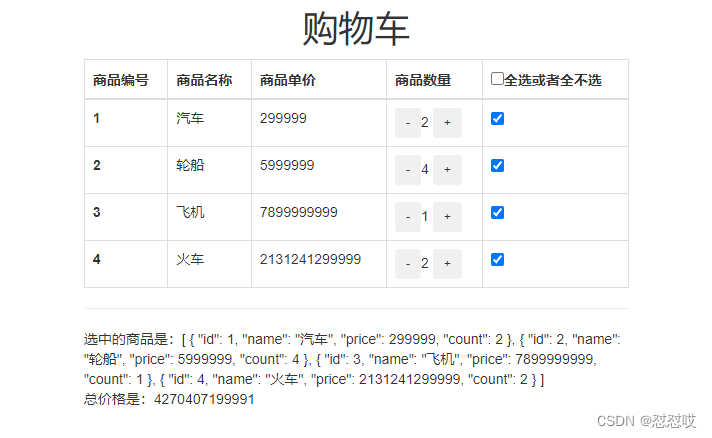
DOCTYPE html> <html lang="en"> <head> <meta charset="UTF-8"> <title>Titletitle> <script src="./js/vue.js">script> <link rel="stylesheet" href="https://stackpath.bootstrapcdn.com/bootstrap/3.4.1/css/bootstrap.min.css"> head> <body> <div id="app"> <div class="container-fluid"> <h1 class="text-center">购物车h1> <div class="row"> <div class="col-md-6 col-md-offset-3"> <table class="table table-bordered"> <thead> <tr> <th>商品编号th> <th>商品名称th> <th>商品单价th> <th>商品数量th> <th><input type="checkbox" v-model="checkGroup" :value="good" @change="handleChange">全选或者全不选th> tr> thead> <tbody> <tr v-for="good in goodList"> <th >{{good.id}}th> <td>{{good.name}}td> <td>{{good.price}}td> <td><button class="btn link btn-sm" @click="handleDown(good)">-button>{{good.count}} <button class="btn link btn-sm" @click="good.count++">+button>td> <td><input type="checkbox" v-model="checkGroup" :value="good" @change=" handleCheckOne">td> tr> tbody> table> <hr> 选中的商品是:{{checkGroup}} <br> 总价格是:{{getPrice()}} div> div> div> div> body> <script> new Vue({ el: '#app', data: { goodList:[ {id:1,name:'汽车',price:299999,count:1}, {id:2,name:'轮船',price:5999999,count:5}, {id:3,name:'飞机',price:7899999999,count:1}, {id:4,name:'火车',price:2131241299999,count:3} ], checkGroup:[], checkAll: false, }, methods: { getPrice() { // for (i in goodList) // {console.log(goodList[i]) var total = 0 for (item of this.checkGroup) { total += item.price * item.count } return total }, handleChange() { if (this.checkAll) { this.checkGroup = this.goodList } else { this.checkGroup = [] } }, handleCheckOne() { // 如果checkGroup的长度等于goodList的长度,说明全选了,checkAll就应该变为true,否则就是false // if (this.checkGroup.length == this.goodList.length) { // this.checkAll = true // } else { // this.checkAll = false // } // 变短 this.checkAll = this.checkGroup.length == this.goodList.length }, handleDown(good){ if (good.count>1) { good.count-- } else{ alert('数量不能低于零') } } } }) script> html>- 1
- 2
- 3
- 4
- 5
- 6
- 7
- 8
- 9
- 10
- 11
- 12
- 13
- 14
- 15
- 16
- 17
- 18
- 19
- 20
- 21
- 22
- 23
- 24
- 25
- 26
- 27
- 28
- 29
- 30
- 31
- 32
- 33
- 34
- 35
- 36
- 37
- 38
- 39
- 40
- 41
- 42
- 43
- 44
- 45
- 46
- 47
- 48
- 49
- 50
- 51
- 52
- 53
- 54
- 55
- 56
- 57
- 58
- 59
- 60
- 61
- 62
- 63
- 64
- 65
- 66
- 67
- 68
- 69
- 70
- 71
- 72
- 73
- 74
- 75
- 76
- 77
- 78
- 79
- 80
- 81
- 82
- 83
- 84
- 85
- 86
- 87
- 88
- 89
- 90
- 91
- 92
- 93
- 94
- 95
- 96
- 97
- 98
- 99
- 100
- 101
- 102
- 103
- 104
- 105
3 v-model进阶(了解)
lazy:等待input框的数据绑定时区焦点之后再变化
number:数字开头,只保留数字,后面的字母不保留;字母开头,都保留
trim:去除首位的空格DOCTYPE html> <html lang="en"> <head> <meta charset="UTF-8"> <title>Titletitle> <script src="./js/vue.js">script> head> <body> <div id="app"> <h1>v-model进阶h1> <input type="text" v-model.lazy="name1"> ---->{{name1}} <br> <input type="text" v-model.number="name2"> ---->{{name2}} <br> <input type="text" v-model.trim="name3"> ---->{{name3}} div> body> <script> new Vue({ el: '#app', data: { name1: '', name2: '', name3: '', }, }) script> html>- 1
- 2
- 3
- 4
- 5
- 6
- 7
- 8
- 9
- 10
- 11
- 12
- 13
- 14
- 15
- 16
- 17
- 18
- 19
- 20
- 21
- 22
- 23
- 24
- 25
- 26
- 27
- 28
- 29
- 30
- 31
- 32
- 33
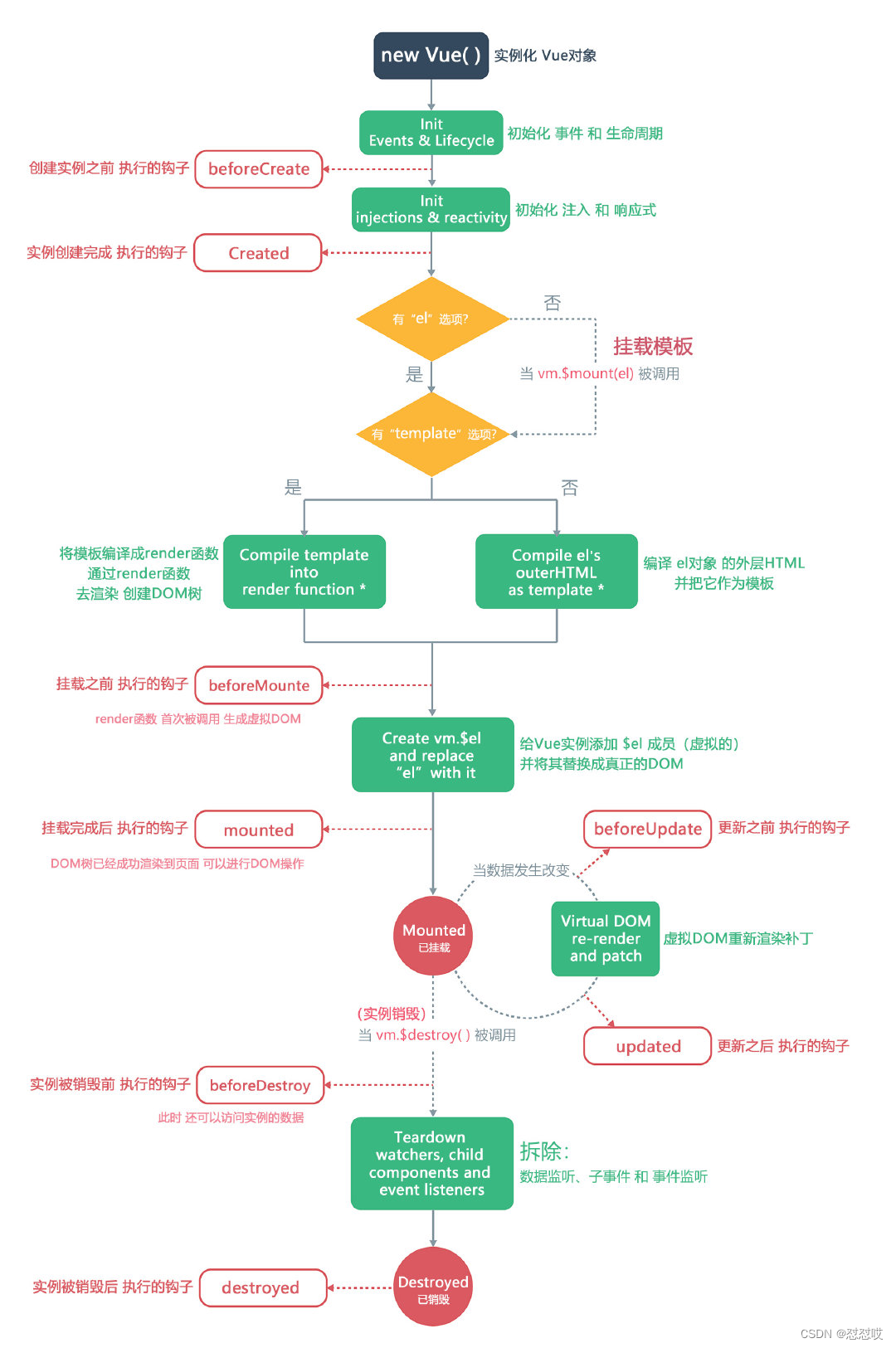
4 vue生命周期
-
var vm=new Vue实例()
- 1 实例创建,数据放到实例中
- 2 挂在模板:el—》div
- 3 改页面,改变量,都会相互影响 update
- 4销毁实例
-
4个过程,对应八个函数,依次执行(到某个过程就会执行某个函数)
-
beforeCreate 创建Vue实例之前调用,data,el都没有
-
created 创建Vue实例成功后调用(可以在此处发送异步请求后端数据),data有了,el没有的
-
beforeMount 渲染DOM之前调用 ,data有了,el没有
-
mounted 渲染DOM之后调用
-
beforeUpdate 重新渲染之前调用(数据更新等操作时,控制DOM重新渲染)
-
updated 重新渲染完成之后调用
-
beforeDestroy 销毁之前调用
-
destroyed 销毁之后调用
-
-
钩子函数(hook) AOP的体现:面向切面编程–》装饰器实现aop
-
vm实例:看不到它销毁 组件vc
-
组件:组件化开发
-
8 学习生命周期重点掌握的
-1 组件向后端发送请求,获取数据,应该放在 created 写,此时data已经有数据了
-2 destroyed做一些资源清理性的工作 -
小案例:组件创建,开启定时器,不停的打印hello,在destroyed中对定时器进行销毁
-补充:js 定时任务和延时任务延时任务
setTimeout(()=>{
console.log(‘3s后执行我’)
},3000)
#定时任务
setInterval(()=>{
console.log(‘hello’)
},3000) -
什么场景下用定时任务?
1 实时跟后端交互 基于http+定时任务 (websocket协议:服务端主动推送消息,手机app的消息推送)
2 秒杀场景:先提交秒杀请求,每隔3s,查询是否秒到
4.1 vue的声明周期
DOCTYPE html> <html lang="en"> <head> <meta charset="UTF-8"> <title>Titletitle> <script src="./js/vue.js">script> head> <body> <div id="app"> <h1>vue声明周期h1> <button @click="handleShow">点我组件显示和消失button> <hr> <child v-if="show">child> <hr> div> body> <script> // 定义一个全局组件 Vue.component('child', { template: `{{ title }}`, data() { return { title: '好看的首页', t:'' } }, methods: { handleClick() { // alert('前进') this.title = 'lqz' } }, beforeCreate() { console.log('beforeCreate') console.log(this.$data) console.log(this.$el) }, created() { console.log('created') console.log(this.$data) console.log(this.$el) // 开启定时器,每隔3s,打印hello this.t=setInterval(()=>{ console.log('hello') },3000) }, beforeMount() { console.log('beforeMount') console.log(this.$data) console.log(this.$el) }, mounted() { console.log('mounted') console.log(this.$data) console.log(this.$el) }, beforeUpdate() { console.log('beforeUpdate') }, updated() { console.log('updated') }, beforeDestroy() { console.log('当前状态:beforeDestroy') }, destroyed() { console.log('当前状态:destroyed') // 销毁定时器 clearInterval(this.t) this.t=null }, }) var vm = new Vue({ el: '#app', data: { show: true }, methods: { handleShow() { this.show = !this.show } } }) script> html>- 1
- 2
- 3
- 4
- 5
- 6
- 7
- 8
- 9
- 10
- 11
- 12
- 13
- 14
- 15
- 16
- 17
- 18
- 19
- 20
- 21
- 22
- 23
- 24
- 25
- 26
- 27
- 28
- 29
- 30
- 31
- 32
- 33
- 34
- 35
- 36
- 37
- 38
- 39
- 40
- 41
- 42
- 43
- 44
- 45
- 46
- 47
- 48
- 49
- 50
- 51
- 52
- 53
- 54
- 55
- 56
- 57
- 58
- 59
- 60
- 61
- 62
- 63
- 64
- 65
- 66
- 67
- 68
- 69
- 70
- 71
- 72
- 73
- 74
- 75
- 76
- 77
- 78
- 79
- 80
- 81
- 82
- 83
- 84
- 85
- 86
- 87
- 88
- 89
- 90
- 91
- 92
- 93
- 94
- 95
- 96
- 97
- 98
4.2 后端交互(定时任务和延时任务)
DOCTYPE html> <html lang="en"> <head> <meta charset="UTF-8"> <title>Titletitle> <script src="./js/vue.js">script> head> <body> <div id="app"> <h1>vue声明周期h1> <button @click="handleShow">点我组件显示和消失button> <hr> <child v-if="show">child> <hr> div> body> <script> // 定义一个全局组件 Vue.component('child', { template: `{{ title }}`, data() { return { title: '好看的首页', t:'' } }, methods: { handleClick() { // alert('前进') this.title = 'lqz' } }, beforeCreate() { console.log('beforeCreate') console.log(this.$data) console.log(this.$el) }, created() { console.log('created') console.log(this.$data) console.log(this.$el) // 开启定时器,每隔3s,打印hello this.t=setInterval(()=>{ console.log('hello') },3000) }, beforeMount() { console.log('beforeMount') console.log(this.$data) console.log(this.$el) }, mounted() { console.log('mounted') console.log(this.$data) console.log(this.$el) }, beforeUpdate() { console.log('beforeUpdate') }, updated() { console.log('updated') }, beforeDestroy() { console.log('当前状态:beforeDestroy') }, destroyed() { console.log('当前状态:destroyed') // 销毁定时器 clearInterval(this.t) this.t=null }, }) var vm = new Vue({ el: '#app', data: { show: true }, methods: { handleShow() { this.show = !this.show } } }) script> html>- 1
- 2
- 3
- 4
- 5
- 6
- 7
- 8
- 9
- 10
- 11
- 12
- 13
- 14
- 15
- 16
- 17
- 18
- 19
- 20
- 21
- 22
- 23
- 24
- 25
- 26
- 27
- 28
- 29
- 30
- 31
- 32
- 33
- 34
- 35
- 36
- 37
- 38
- 39
- 40
- 41
- 42
- 43
- 44
- 45
- 46
- 47
- 48
- 49
- 50
- 51
- 52
- 53
- 54
- 55
- 56
- 57
- 58
- 59
- 60
- 61
- 62
- 63
- 64
- 65
- 66
- 67
- 68
- 69
- 70
- 71
- 72
- 73
- 74
- 75
- 76
- 77
- 78
- 79
- 80
- 81
- 82
- 83
- 84
- 85
- 86
- 87
- 88
- 89
- 90
- 91
- 92
- 93
- 94
- 95
- 96
- 97
- 98
5 与后端交互ajax
DOCTYPE html> <html lang="en"> <head> <meta charset="UTF-8"> <title>Titletitle> <script src="./js/vue.js">script> <script src="https://unpkg.com/axios/dist/axios.min.js">script> <script src="http://libs.baidu.com/jquery/2.0.0/jquery.min.js">script> head> <body> <div id="app"> <h1>jquery的ajax与后端交互h1> {name}}--> {age}}--> <h1>js原生的fetch与后端交互h1> {name}}--> {age}}--> <h1>axios与后端交互h1> <button @click="handleLoad3">点击加载数据button> <br> <p>名字是:{{name}}p> <p>年龄是:{{age}}p> <hr> div> body> <script> var vm = new Vue({ el: '#app', data: { name: '', age: 0 }, methods: { handleLoad1() { $.ajax({ url: "http://127.0.0.1:5000/", type: 'get', success: data => { console.log(typeof data) data = JSON.parse(data) // data 是字符串类型,需要转成对象类型 console.log(typeof data) this.name = data.name this.age = data.age } }) }, handleLoad2() { // 用的很少 fetch('http://127.0.0.1:5000/').then(res => res.json()).then(res => { console.log(res) console.log(typeof res) this.name = res.name this.age = res.age }) }, handleLoad3() { // 用的很少 axios.get('http://127.0.0.1:5000/').then(res => { console.log(res.data) // 后端真正的数据在res.data中 this.name = res.data.name this.age = res.data.age }) }, } }) script> html>- 1
- 2
- 3
- 4
- 5
- 6
- 7
- 8
- 9
- 10
- 11
- 12
- 13
- 14
- 15
- 16
- 17
- 18
- 19
- 20
- 21
- 22
- 23
- 24
- 25
- 26
- 27
- 28
- 29
- 30
- 31
- 32
- 33
- 34
- 35
- 36
- 37
- 38
- 39
- 40
- 41
- 42
- 43
- 44
- 45
- 46
- 47
- 48
- 49
- 50
- 51
- 52
- 53
- 54
- 55
- 56
- 57
- 58
- 59
- 60
- 61
- 62
- 63
- 64
- 65
- 66
- 67
- 68
- 69
- 70
- 71
- 72
- 73
- 74
- 75
- 76
- 77
- 78
- 79
- 80
- 81
- 82
- 83
- 84
-
相关阅读:
15:00面试,15:08就出来了,问的问题有点变态。。。
【C++】右值引用
第二部分—C语言提高篇_11. 预处理
怎样录屏没有外界杂音?3个十分好用的方法,码住收藏!
Allure精通指南(02)Mac和Windows系统环境配置
JAVA毕业设计HTML5果蔬经营平台计算机源码+lw文档+系统+调试部署+数据库
微信APP支付V3版本签名 && APP下单/订单查询接口Python版实现
答网友提问 - SAP Business Technology Platform(BTP) 的计费模式
大数据之Hadoop集群搭建(4个节点)
Spring boot 随笔 1 DatasourceInitializer
- 原文地址:https://blog.csdn.net/m0_72611192/article/details/127634628

- 最新文章
-
【FHE】我们如何实现同态加密推理(八):SiLU 的密文化——两条路径,和一个 8 字节的开关
SQLcl 中 c/old/new 替换变量为何失效?先定位再替换
不让模型写作文,直接从它脑子里读答案:Jev 决策在 .NET 的两条路线
Halo插件:支持GitHub的图床附件策略
电视投屏界的“一股清流”!SimpleTVCast 6.0.0-beta 抢先体验:无需TV端App,界面大换血!✨
华三VXLAN集中式网关实战指南:Spine多活网关 + 双活接入(M-LAG)
软件更好写之后口碑会更重要
大 O、大 Omega、大 Theta 的区别,O(n) 复杂度是什么意思
Java标签跳转:一个鲜为人知但却很实用的小技巧
多智能体系统论文速读