-
【Mybatis源码】源码分析
【Mybatis源码】源码分析
- (一)Mybatis重要组件
- (二)如何深度自定义Mybatis
- (三)源码分析简略篇
- (四)Debug分析Mybatis源码过程
- 【1】准备配置文件和测试demo
- 【2】Mybatis获取数据源【获取sqlSessionFactory对象】
- 【3】Mybatis获取sql【XML文件配置MappedStatement注册过程】
- 【4】Mybatis操作数据库(连接数据库、执行sql、返回结果)
- (1)openSession方法【创建执行器,返回SqlSession对象】
- (2)selectOne或者其他sql方法
- (1)selectList方法【获取第一条数据】
- (1)getMappedStatement获取全局信息【获取标签里的sql】
- (2)wrapCollection方法【判断参数是什么类型的】
- (3)执行器Executor执行query方法
- (4)MappedStatement的getBoundSql方法【#{id}换成?】
- (5)createCacheKey方法(创建缓存)
- (6)执行器的query方法【查询数据库】
- (1)MappedStatement的getCache方法(获取缓存)
- (2)delegate.query方法【缓存查询,装饰器模式】
- (3)handleLocallyCacheOutputParameters方法【查询缓存】
- (4)queryFromDatabase方法【查询数据库】
- (5)doQuery方法(实际执行sql查询的方法,StatementHandler)
- (6)prepareStatement方法【预处理,Statement对象创建,拿到Connection】
- (7)handler.query方法【拿到PrepareStatement】
- (8)handleResultSets方法(拿到ResultSet)
- (9)ResultSetWrapper方法
- (10)handleResultSet方法
- (3)总结
- 【5】流程总结
- (五)Mybatis补充知识
(一)Mybatis重要组件
【1】四大核心组件
Mybatis四大组件构成mybatis的整个生命周期;

(1)SqlSessionFactoryBuilder
作为Mybatis的核心组件之一,它直接翻译为中文是SQL会话工厂建造者,也有人管它叫作MyBatis的构造器。
SqlSessionFactoryBuilder,实际上是用来创建SqlSessionFactory实例的,它可以通过配置文档来创建 SqlSessionFactory,所以说它是构造器也不为过。
(2)SqlSessionFactory
直接翻译为SQL会话工厂,它是一个接口,用于创建SqlSession的实例。简单来讲,SqlSessionFactory是MyBatis的关键对象,它是个单个数据库映射关系经过编译后的内存镜像。
SqlSessionFactoryBuilder可以从XML配置文件或一个预先定制的Configuration的实例构建出SqlSessionFactory的实例。每一个MyBatis的应用程序都以一个SqlSessionFactory对象的实例为核心.同时SqlSessionFactory也是线程安全的,SqlSessionFactory一旦被创建,应该在应用执行期间都存在。
(3)SqlSession
SQL会话,它也是一个接口,这才是MyBatis最核心的对象,也是最重要的Mybatis核心组件。前面的两个组件不过是用来得到它的前提,SQL会话中包含了30个方法,包括执行SQL语句、提交、回滚事务以及获取映射器实例等。
(4)SQL Mapper
SQL映射器,它是MyBatis改名之后新开发出来的组件,由一个 Java 接口和 XML 文件(或注解)构成,如果想要使用SQL映射器,就必须遵循它所提出的一系列规范,这一点我们将在第四关中讲解。它主要通过调用Java接口中的方法来执行与其捆绑的SQL语句,并返回结果。
【2】SqlSession四大对象
sqlSession四大对象,描述SQL执行的流程;

Exeutor发起sql执行任务
1、先调用statementHandler中的prepare()进行SQL的编译
2、然后调用statementHandler中的parameterize()设置参数
2.1、这里其实真正设置参数的是ParameterHandler中的setparameters()方法,该方法与typeHandler进行参数类型的转换
3、然后执行query/update方法,这里使用ResultSetHandler进行结果的组装工作
3.1、这里ResultSetHandler又与typeHandler、ObjectFactory配合工作共同完成结果的组装工作
statementHandler【3】映射器三大组成部分
映射器组成部门,描述最底层SQL执行的细节;

其实mybatis中一条SQL和它相关的配置信息由三部分组成(1)MappedStatement:sql的ID、缓存信息、resultType、ParameterType、resultMap等信息
(2)Sqlsource:是MappedStatement的一个属性,是一个接口,主要提供BoundSql
(3)BoudSql:是建立SQL和参数的地方,有三个主要属性,ParameterMappings、ParameterObject和sql,这个对象比较重要,我们通常使用插件就是对它进行拦截;【4】主要类和接口的介绍
(1)顶层类/接口
Configuration:MyBatis所有的配置信息都保存在Configuration对象之中,配置文件中的大部分配置都会存储到该类中;应用作用域
SqlSession:作为MyBatis工作的主要顶层API,表示和数据库交互时的会话,完成必要的增删改查功能;线程作用域
MappedStatement:MappedStatement维护一条
Executor:MyBatis执行器,是MyBatis 调度的核心,负责SQL语句的生成和查询缓存的维护;默认为SimpleExecutor,实际使用的是ReuseExecutor和CacheExecutor
StatementHandler:封装了JDBC Statement操作,负责对JDBC statement的操作,如设置参数等;实现有SimpleStatementHandler、PreparedStatementHandler、CallableStatementHandler,实现类中持有ParameterHandler和ResultSetHandler
ParameterHandler:负责对用户传递的参数转换成JDBC Statement所对应的数据类型
ResultSetHandler:负责将JDBC返回的ResultSet结果集对象转换成List类型的集合,默认实现为DefaultResultSetHandler,持有ParameterHandler对象
TypeHandler:负责java数据类型和jdbc数据类型(也可以说是数据表列类型)之间的映射和转换
SqlSource:负责根据用户传递的parameterObject,动态地生成SQL语句,将信息封装到BoundSql对象中,并返回
BoundSql:动态生成的SQL语句以及相应的参数信息(2)SQLSession相关
DefaultSqlSession:SqlSession的默认实现类,通过DefaultSqlSessionFactory生成
SqlSessionTemplate:spring代理SqlSession,实际调用的是DefaultSqlSession
SqlSessionFactory:SqlSession的工厂类接口,主要实现为DefaultSqlSessionFactory,该类生成DefaultSqlSession
SqlSessionFactoryBean:SqlSessionFactory的工厂Bean,用于生成DefaultSqlSessionFactory;应用作用域
SqlSessionFactoryBuilder:SqlSessionFactoryBean借助SqlSessionFactoryBuilder传入全局配置Configuration创建DefaultSqlSessionFactory;方法作用域(3)启动/注册相关
MapperScan:通过使用@MapperScan可以指定要扫描的Mapper类的包的路径;使用Mybatis和spring集成常用2种方式,一种是xml配置,另一种就是注解
MapperScannerRegistrar:mapper文件扫描注册类,配合注解@MapperScan一起使用
ClassPathMapperScanner:mapper对象扫描生成类,MapperScannerRegistrar通过该类生成实际的mapper对象;该原理类似于spring-cloud-openfeign的路径扫描实现原理
MapperScannerConfigurer:mapper文件扫描配置,配合xml方式一起使用
TypeHandlerRegistry:注册和管理jdbc数据类型映射
TypeAliasRegistry:类型别名注册器,用于管理mapper.xml中类型与别名之间的映射关系(4)解析/构建相关
XMLConfigBuilder:SqlSessionFactoryBean中configLocation指定配置文件(一般为mybatis-config.xml)的构建解析类,作用为解析类型别名(typeAliases)、注入插件(Interceptor)、解析类型处理器(TypeHandler)等
XMLMapperBuilder:mapper文件的解析与构建,其中方法bindMapperForNamespace是借助MapperRegistry来实现MapperProxy与namespace(DAO接口)的绑定
Node:mapper文件中的节点
SqlNode:TextSqlNode-动态结点,需要替换占位符、StaticTextSqlNode-静态结点,不需要替换
XMLStatementBuilder:mapper文件节点(XNode)的解析与构建,借助MapperBuilderAssistant生成MappedStatement
MapperBuilderAssistant:mapper构造器助手,通过MappedStatement的构造器Builder构造MappedStatement对象,并存入Configuration的Map
SqlSourceBuilder:生成SqlSource
XMLScriptBuilder:生成SqlSource(5)Mapper相关
MapperProxy:mapper接口的代理实现,实际方法由MapperMethod实现
MapperMethod:mapper接口中方法的代理实现
MapperProxyFactory:MapperProxy的工厂类,每个mapper对应一个MapperProxyFactory,通过JDK动态代理方式生成MapperProxy
MapperFactoryBean:启动时通过MapperRegistry生成/获取MapperProxy
MapperRegistry:mapper文件注册类,负责MapperProxyFactory的注册管理以及通过MapperProxyFactory获取mapper的代理实现MapperProxy
MapperAnnotationBuilder:(6)其它
Reflector:反射类,获取和保存Class对象的所有GET/SET方法及参数类型,用于生成结果对象的属性注入
ReflectorFactory:Reflector的工厂类接口,获取和保存Class类对应的Reflector对象,实现类为DefaultReflectorFactory
MetaClass:class元信息,持有Reflector及ReflectorFactory
ObjectWrapper:接口,对象包装类;BeanWrapper:bean对象的包装类;MapWrapper:map对象包装类
ObjectFactory:对象工厂,默认实现为DefaultObjectFactory
ResultHandler:保存结果集
MetaObject:保存一个结果对象
ResultContext:保存结果对象的一个属性
StaticSqlSource:静态SqlSource
DynamicSqlSource:动态SqlSource
RawSqlSource:原始SqlSource,内含StaticSqlSource或DynamicSqlSource
Transaction:事务对象
TransactionFactory:事务工厂类
Interceptor:插件接口
InterceptorChain:插件注册类
StatementType:标记操作SQL的对象,STATEMENT-直接操作sql,不进行预编译;PREPARED-预处理,参数,进行预编译,获取数据,默认;CALLABLE-执行存储过程
ParameterMapping:保存用户传入参数的对象,用于参数传递及生成动态sql时获取参数值【5】为什么使用Mybatis?原始JDBC是怎么实现的?
(1)JDBC实现查询的demo
MyBatis解决了传统JDBC操作数据库的繁琐问题,减少了代码的冗余、可维护性和可阅读性。实现了对于JDBC传统操作数据库返回结果的映射封装。
public class JDBCDemo { private static final String MYSQL_URL = "jdbc:mysql://localhost:3306/test_demo?useUnicode=true&characterEncoding=UTF-8"; private static final String MYSQL_USER = "root"; private static final String MYSQL_PWD = "111111"; public static void main(String[] args) throws ClassNotFoundException, SQLException { //加载mysql驱动,mysql8.0版本以上使用com.mysql.cj.jdbc.Driver驱动 Class.forName("com.mysql.jdbc.Driver"); //获取数据库连接<1> Connection connection = DriverManager.getConnection(MYSQL_URL, MYSQL_USER, MYSQL_PWD ); //sql预编译查询<2> PreparedStatement preparedStatement = connection .prepareStatement("select * from websites where name =? "); preparedStatement.setString(1,"淘宝"); System.out.println(preparedStatement.toString()); //结果输出<3> ResultSet resultSet = preparedStatement.executeQuery(); while (resultSet.next()){ System.out.printf("id = %d, name= %s,", resultSet.getInt("id"), resultSet.getString("name")); } resultSet.close(); preparedStatement.close(); connection.close(); } }- 1
- 2
- 3
- 4
- 5
- 6
- 7
- 8
- 9
- 10
- 11
- 12
- 13
- 14
- 15
- 16
- 17
- 18
- 19
- 20
- 21
- 22
- 23
- 24
- 25
- 26
- 27
- 28
- 29
(1)我们通过url、name、password来连接数据库,得到Connection
(2)构建PreparedStatement进行SQL编译解析
(3)获取SQL执行结果(2)为何使用PreparedStatement来操作数据库?
上面的代码部分我们使用了PreparedStatement进行操作,当然我们也知道除了这个之外我们还有一个Statement,但是为何我们会选择PreparedStatement而抛弃使用Statement呢?
这里我们会直接脱口而出,防止SQL注入。那在深层次,你知道这是如何防止的么?我们以 select * from websites where name =? 为例来进行说明:
(1)Statement是使用SQl拼接的方式组装SQL,也就是说Statement只负责把传进来的SQL字符串整体传递给数据库进行编译并运行,那么假设我们传进来的参数是1 or true 来替换?,那么我们会把数据库的所有内容都返回
(2)要想了解PreparedStatement预编译过程,我们的先了解JDBC是如何与MySQL服务进行交互的:- SQL语句仅仅是普通的文本语言,数据库引擎无法识别,所以需要编译再来执行
- Statement执行过程是:提交SQL语言 -> 数据库引擎编译可执行代码 -> 执行SQL代码
- PreparedStatement执行过程: 将不是完整的SQL语言(带有?参数的)提交给数据库编译放回执行代码句柄,之后在句柄中添加相应的参数(注意传入参数都是字符串,不会编译成SQL关键字),之后直接调用execute()方法就行。
(3)PreparedStatement采用预编译手段,也可以提高重复SQL的执行效率问题,可节约重复编译的时间
(3)JDBC和Mybatis的区别
在写MyBatis的时候,新增了dao, mapper.xml, entity, mybatis-config.xml等很多东西,工作量反而增大了。但是dao, mapper.xml, entity都是可以根据插件mybatis-generator生成的,我们也不用一一去创建,而且我们没有涉及到原生JDBC中加载驱动,创建连接,处理结果集,关闭连接等等这些操作,这些都是MyBatis帮我们做了,我们只用关心提供的查询接口和sql编写即可。
如果使用原生的JDBC进行数据库操作,我们需要关心如何加载驱动,如何获取连接关闭连接,如何获取结果集等等与业务无关的地方,而MyBatis通过“映射”这个核心概念将sql和java接口关联起来,我们调用java接口就相当于可以直接执行sql,并且将结果映射为java pojo对象,这也是我们开头说的“映射”,“面向对象的”的原因了。
(二)如何深度自定义Mybatis
【1】准备工作
(1)核心配置文件
DOCTYPE configuration PUBLIC "-//mybatis.org//DTD Config 3.0//EN" "http://mybatis.org/dtd/mybatis-3-config.dtd"> <configuration> <environments default="development"> <environment id="development"> <transactionManager type="JDBC"/> <dataSource type="POOLED"> <property name="driver" value="com.mysql.jdbc.Driver"/> <property name="url" value="jdbc:mysql:///db6?useSSL=false"/> <property name="username" value="root"/> <property name="password" value="root"/> dataSource> environment> environments> <mappers> <package name="cn.itcast.mapper"/> mappers> configuration>- 1
- 2
- 3
- 4
- 5
- 6
- 7
- 8
- 9
- 10
- 11
- 12
- 13
- 14
- 15
- 16
- 17
- 18
- 19
- 20
- 21
- 22
- 23
(2)结果的实体类以及在mapper接口上编写需要执行的sql语句
public class User { private Integer uid; private String username; private String password; private String nickname; }- 1
- 2
- 3
- 4
- 5
- 6
package cn.itcast.mapper; import cn.itcast.pojo.User; import org.apache.ibatis.annotations.Select; import java.util.List; public interface UserMapper { @Select("select * from users") List<User> findAll(); }- 1
- 2
- 3
- 4
- 5
- 6
- 7
- 8
- 9
- 10
(3)Mybatis的api来帮助我们完成sql语句的执行以及结果集的封装
我们通过Resources的getResourceAsStream告诉了mybatis我们编写的核心配置文件的位置, mybatis就可以找到我们数据库的连接信息, 也同时找到我们编写的sql语句的地方, 然后可以将其解析按照某种规则存放起来, 我们通过调用接口代理的方式执行方法时, 可以找到对应方法上的sql语句然后执行将结果封装返回给我们
//1.关联主配置文件 InputStream in = Resources.getResourceAsStream("mybatis-config.xml"); //2.解析配置文件 SqlSessionFactoryBuilder builder = new SqlSessionFactoryBuilder(); SqlSessionFactory sqlSessionFactory = builder.build(in); //3.创建会话对象 SqlSession sqlSession = sqlSessionFactory.openSession(); //4.可以采用接口代理的方式 UserMapper mapper = sqlSession.getMapper(UserMapper.class); List<User> all = mapper.findAll(); System.out.println(all); //5.释放资源 sqlSession.close();- 1
- 2
- 3
- 4
- 5
- 6
- 7
- 8
- 9
- 10
- 11
- 12
- 13
【2】编写核心类SqlSessionFacotryBuild进行解析配置文件
(1)SqlSessionFacotryBuild代码
(1)首先我们需要用户编写配置文件, 然后通过我们自己的Resources来告诉我们配置文件所在位置
package com.itheima.ibatis.configuration; import java.io.InputStream; public class Resources { public static InputStream getResourceAsStream(String path) { return ClassLoader.getSystemClassLoader().getResourceAsStream(path); } }- 1
- 2
- 3
- 4
- 5
- 6
- 7
- 8
- 9
- 10
(2)然后需要定义SqlSessionFacotryBuild来对配置文件进行解析分发
package com.itheima.ibatis.configuration; import com.itheima.ibatis.core.session.SqlSessionFactory; import com.itheima.ibatis.core.session.impl.DefaultSqlSessionFactory; import org.dom4j.Document; import org.dom4j.DocumentException; import org.dom4j.Element; import org.dom4j.Node; import org.dom4j.io.SAXReader; import javax.sql.DataSource; import java.io.File; import java.io.InputStream; import java.lang.reflect.Method; import java.util.List; import java.util.Properties; public class SqlSessionFactoryBuilder { private Configuration configuration = new Configuration(); public SqlSessionFactory build(InputStream in) { SAXReader saxReader = new SAXReader(); Document document = null; try { document = saxReader.read(in); } catch (DocumentException e) { e.printStackTrace(); } Element rootElement = document.getRootElement(); parseEnvironment(rootElement.element("environments")); parseMapper(rootElement.element("mappers")); return new DefaultSqlSessionFactory(configuration); } private void parseMapper(Element mapper) { String pack = mapper.element("package").attributeValue("name"); String directory = pack.replace(".", "/"); String path = ClassLoader.getSystemClassLoader().getResource("").getPath(); File mapperDir = new File(path, directory); if (!mapperDir.exists()) { throw new RuntimeException("找不到mapper映射"); } findMapper(mapperDir, pack); // System.out.println(configuration.getSql()); } private void findMapper(File mapperDir, String base) { File[] files = mapperDir.listFiles(); if (files != null) { for (File file : files) { if (file.isFile()) { if (file.getName().endsWith(".class")) { String name = file.getName(); name = name.substring(0, name.lastIndexOf(".")); String className = base + "." + name; initMapper(className); } } else { findMapper(file, base + "." + file.getName()); } } } } private void initMapper(String className) { try { Class<?> clazz = Class.forName(className); Method[] methods = clazz.getMethods(); for (Method method : methods) { if(method.getAnnotations().length>0){ Mapper mapper = ParseMapper.parse(method); this.configuration.getMappers().put(className + "." + method.getName(), mapper); } } } catch (Exception e) { e.printStackTrace(); } } private void parseEnvironment(Element environments) { String defEnv = environments.attributeValue("default"); Node node = environments.selectSingleNode("//environment[@id='" + defEnv + "']"); List<Element> list = node.selectNodes("//property"); Properties properties = new Properties(); for (Element element : list) { String name = element.attributeValue("name"); String value = element.attributeValue("value"); properties.put(name, value); } DataSource dataSource = new DefaultDataSource().getDataSource(properties); configuration.setDataSource(dataSource); } }- 1
- 2
- 3
- 4
- 5
- 6
- 7
- 8
- 9
- 10
- 11
- 12
- 13
- 14
- 15
- 16
- 17
- 18
- 19
- 20
- 21
- 22
- 23
- 24
- 25
- 26
- 27
- 28
- 29
- 30
- 31
- 32
- 33
- 34
- 35
- 36
- 37
- 38
- 39
- 40
- 41
- 42
- 43
- 44
- 45
- 46
- 47
- 48
- 49
- 50
- 51
- 52
- 53
- 54
- 55
- 56
- 57
- 58
- 59
- 60
- 61
- 62
- 63
- 64
- 65
- 66
- 67
- 68
- 69
- 70
- 71
- 72
- 73
- 74
- 75
- 76
- 77
- 78
- 79
- 80
- 81
- 82
- 83
- 84
- 85
- 86
- 87
- 88
- 89
- 90
- 91
- 92
- 93
- 94
- 95
(2)深度分析解析SqlSessionFacotryBuild干的核心工作
(1)build(InputStream in) 方法做的工作
(1)借助Dom4j的来解析了xml文件, 将environments解析工作分发给了parseEnvironment(Element environments)
(2)将mappers的解析工作分发给了parseMapper(Element mapper)
(2)parseEnvironment(Element environments)方法做的工作
(1)主要解析了连接数据库的参数们, 并且创建了数据库连接池
自定义连接池非本章节的重点,所以这里内部本质采用的Druid连接池来做了简化package com.itheima.ibatis.configuration; import com.alibaba.druid.pool.DruidDataSourceFactory; import javax.sql.DataSource; import java.util.Properties; public class DefaultDataSource { public DataSource getDataSource(Properties properties) { try { return DruidDataSourceFactory.createDataSource(properties); } catch (Exception e) { e.printStackTrace(); } return null; } }- 1
- 2
- 3
- 4
- 5
- 6
- 7
- 8
- 9
- 10
- 11
- 12
- 13
- 14
- 15
- 16
- 17
- 18
(2)将解析好的连接池放入configuration对象中,mappers成员变量先别纠结下一章节会讲解
package com.itheima.ibatis.configuration; import lombok.Data; import javax.sql.DataSource; import java.util.HashMap; import java.util.Map; @Data public class Configuration { private Map<String, Mapper> mappers = new HashMap<>(); private DataSource dataSource; }- 1
- 2
- 3
- 4
- 5
- 6
- 7
- 8
- 9
- 10
- 11
- 12
- 13
(3)详细图解如下图

(3)parseMapper(Element mapper) 方法做的工作
(1)解析出用户配置的package找到sql语句所在接口的文件夹, 交给initMapper来处理
在这里插入图片描述
 (2)递归找到这个包下所有的.class文件,并且获取到接口的全类名, 然后交给initMapper来处理
(3)initMapper通过反射获取类中的每一个方法,将方法交给一个专门解析方法上的注解的工具类ParseMapper的parse方法处理,处理完后将其放到configuration中的mappers的集合中
 (4)ParseMapper的parse方法做的工作, 这是解析配置的核心地方
package com.itheima.ibatis.configuration; import java.lang.annotation.Annotation; import java.lang.reflect.InvocationTargetException; import java.lang.reflect.Method; import java.lang.reflect.ParameterizedType; import java.lang.reflect.Type; import java.util.ArrayList; import java.util.List; import java.util.regex.Matcher; import java.util.regex.Pattern; public class ParseMapper { public static Mapper parse(Method method) throws NoSuchMethodException, InvocationTargetException, IllegalAccessException { Annotation[] annotations = method.getAnnotations(); Object value = annotations[0].getClass().getMethod("value").invoke(annotations[0]); Mapper mapper = new Mapper(); Class<?> resultType = method.getReturnType(); String val = (String) value; Pattern pattern = Pattern.compile("\\#\\{\\s*\\w+\\s*\\}"); Matcher matcher = pattern.matcher(val); List<String> paramNames = new ArrayList<>(); while (matcher.find()) { String group = matcher.group(); String fieldName = group.substring(2, group.length() - 1).trim(); paramNames.add(fieldName); } String sql = val.replaceAll("\\#\\{\\s*\\w+\\s*\\}", "?"); mapper.setSql(sql); mapper.setParameterNames(paramNames); mapper.setSql(sql); if (resultType == List.class) { mapper.setSelectList(true); Type genericReturnType = method.getGenericReturnType(); ParameterizedType parameterizedType = (ParameterizedType) genericReturnType; Type actualTypeArgument = parameterizedType.getActualTypeArguments()[0]; mapper.setResultType(actualTypeArgument.getTypeName()); mapper.setType("SELECT"); } else if (resultType == Integer.class || resultType == int.class) { mapper.setType("UPDATE"); } else { mapper.setType("SELECT"); mapper.setResultType(resultType.getName()); } return mapper; } }- 1
- 2
- 3
- 4
- 5
- 6
- 7
- 8
- 9
- 10
- 11
- 12
- 13
- 14
- 15
- 16
- 17
- 18
- 19
- 20
- 21
- 22
- 23
- 24
- 25
- 26
- 27
- 28
- 29
- 30
- 31
- 32
- 33
- 34
- 35
- 36
- 37
- 38
- 39
- 40
- 41
- 42
- 43
- 44
- 45
- 46
- 47
- 48
- 49
首先拿到方法上的注解,得到用户填入的sql语句

然后处理sql语句#{参数}的这些数据, 然后将参数的顺序保存起来, 用来后期设置参数的数据做准备, 一个方法对应一个Mapper对象
 然后再根据结果类型, 判断是什么类型相关的操作,方便后期执行对应的sql语句
【3】编写核心类SqlSessionFacotry
(1)SqlSessionFacotry代码
经过SqlSessionFacotryBuilder的努力, 我们成功的将配置文件中核心的信息解析出来并放入了configuration对象中了, 然后我们此时将解析好的configuration传入到SqlSessionFacotry中
 SqlSessionFactory的实现类如下:
public class DefaultSqlSessionFactory implements SqlSessionFactory { private final Configuration configuration; private TransactionManagement defaultTransactionManagement; public DefaultSqlSessionFactory(Configuration configuration) { this.configuration =configuration; defaultTransactionManagement = new DefaultTransactionManagement(configuration.getDataSource()); } @Override public SqlSession openSession() { return new DefaultSqlSession(configuration,defaultTransactionManagement,false); } }- 1
- 2
- 3
- 4
- 5
- 6
- 7
- 8
- 9
- 10
- 11
- 12
- 13
(2)添加事务管理器代码
事务管理是一个小的功能, 里面希望使用ThreadLocal集合来保证一个用户拿到的链接是同一个
 事务管理的代码如下:
public class DefaultTransactionManagement implements TransactionManagement { private ThreadLocal<Connection> threadLocal = new ThreadLocal<>(); private DataSource dataSource; public DefaultTransactionManagement(DataSource dataSource) { this.dataSource = dataSource; } public Connection getConnection() { Connection connection = threadLocal.get(); if (connection == null) { try { connection = dataSource.getConnection(); } catch (SQLException e) { e.printStackTrace(); } threadLocal.set(connection); } return connection; } @Override public void commit() { Connection connection = threadLocal.get(); if (connection != null ) { try { connection.commit(); } catch (Exception e) { e.printStackTrace(); } } } @Override public void rollback() { Connection connection = threadLocal.get(); if (connection != null) { try { connection.rollback(); } catch (SQLException e) { e.printStackTrace(); } } } public void close() { Connection connection = threadLocal.get(); if (connection != null) { try { connection.close(); threadLocal.remove(); } catch (SQLException e) { e.printStackTrace(); } } } @Override public void begin() { Connection connection = threadLocal.get(); if (connection != null) { try { connection.setAutoCommit(false); } catch (SQLException e) { e.printStackTrace(); } } } }- 1
- 2
- 3
- 4
- 5
- 6
- 7
- 8
- 9
- 10
- 11
- 12
- 13
- 14
- 15
- 16
- 17
- 18
- 19
- 20
- 21
- 22
- 23
- 24
- 25
- 26
- 27
- 28
- 29
- 30
- 31
- 32
- 33
- 34
- 35
- 36
- 37
- 38
- 39
- 40
- 41
- 42
- 43
- 44
- 45
- 46
- 47
- 48
- 49
- 50
- 51
- 52
- 53
- 54
- 55
- 56
- 57
- 58
- 59
- 60
- 61
- 62
- 63
- 64
- 65
- 66
- 67
- 68
- 69
- 70
- 71
(3)深度分析解析SqlSessionFacotry干的核心工作
(1)SqlSession openSession() 方法做的工作
可以看的出来我们在这个方法创建了DefaultSqlSession对象,并传入封装好的configuration,默认的事务管理器
默认通过openSession事务是开启的等等相关的参数

【4】编写核心类SqlSession
(1)SqlSession代码
其实有SqlSession的接口,我们使用的实现类是DefaultSession, 这里记录了解析的配置对象configuration
默认事务管理器对象transactionManagement, 默认事务开启的状态tx标记
package com.itheima.ibatis.core.session.impl; import com.itheima.ibatis.configuration.Configuration; import com.itheima.ibatis.configuration.Mapper; import com.itheima.ibatis.core.BaseExecutor; import com.itheima.ibatis.core.annotation.Param; import com.itheima.ibatis.core.session.SqlSession; import com.itheima.ibatis.core.transaction.TransactionManagement; import java.lang.reflect.*; import java.util.HashMap; import java.util.List; import java.util.Map; public class DefaultSqlSession implements SqlSession { private final Configuration configuration; private final boolean tx; private TransactionManagement transactionManagement; public DefaultSqlSession(Configuration configuration, TransactionManagement transactionManagement, boolean tx) { this.configuration = configuration; this.transactionManagement = transactionManagement; this.tx = tx; } public void close() { transactionManagement.close(); } @Override public void commit() { transactionManagement.commit(); } @Override public void rollback() { transactionManagement.rollback(); } @Override public <T> List<T> selectList(String sqlId) { return selectList(sqlId, null); } @Override public <T> List<T> selectList(String sqlId, Object param) { List<Object> list = new BaseExecutor(transactionManagement, tx).queryList(getMapper(sqlId), param); return (List<T>) list; } @Override public <T> T selectOne(String sqlId) { return selectOne(sqlId, null); } @Override public <T> T selectOne(String sqlId, Object param) { return new BaseExecutor(transactionManagement, tx).query(getMapper(sqlId), param); } @Override public int delete(String sqlId) { return update0(sqlId, null); } @Override public int delete(String sqlId, Object param) { return update0(sqlId, param); } @Override public int update(String sqlId) { return update0(sqlId, null); } @Override public int update(String sqlId, Object param) { return update0(sqlId, param); } @Override public int insert(String sqlId) { return update0(sqlId, null); } @Override public int insert(String sqlId, Object param) { return update0(sqlId, param); } @Override public <T> T getMapper(Class<T> clazz) { Object o = Proxy.newProxyInstance( clazz.getClassLoader(), new Class[]{clazz}, new InvocationHandler() { @Override public Object invoke(Object proxy, Method method, Object[] args) throws Throwable { String sqlId = clazz.getName() + "." + method.getName(); Mapper mapper = configuration.getMappers().get(sqlId); String type = mapper.getType(); Object findParam = null; if (args != null) { if (args.length == 1) { Object param = args[0]; boolean isArray = param.getClass().isArray(); if (!isArray) { findParam = param; } } else { Map<String, Object> map = new HashMap<>(); Parameter[] parameters = method.getParameters(); for (int i = 0; i < parameters.length; i++) { Param param = parameters[i].getAnnotation(Param.class); String key = "arg"+i; if(param !=null){ key = param.value(); } map.put(key, args[i]); } findParam = map; } } if (type.equals("SELECT")) { boolean selectList = mapper.isSelectList(); if (selectList) return selectList(sqlId, findParam); else return selectOne(sqlId, findParam); } else { return update0(sqlId, findParam); } } }); return (T) o; } private int update0(String sqlId, Object param) { return new BaseExecutor(transactionManagement, tx).update(getMapper(sqlId), param); } public Mapper getMapper(String sqlId) { Mapper mapper = configuration.getMappers().get(sqlId); if (mapper == null) { throw new RuntimeException("没有找到sql映射,请检查"); } return mapper; } }- 1
- 2
- 3
- 4
- 5
- 6
- 7
- 8
- 9
- 10
- 11
- 12
- 13
- 14
- 15
- 16
- 17
- 18
- 19
- 20
- 21
- 22
- 23
- 24
- 25
- 26
- 27
- 28
- 29
- 30
- 31
- 32
- 33
- 34
- 35
- 36
- 37
- 38
- 39
- 40
- 41
- 42
- 43
- 44
- 45
- 46
- 47
- 48
- 49
- 50
- 51
- 52
- 53
- 54
- 55
- 56
- 57
- 58
- 59
- 60
- 61
- 62
- 63
- 64
- 65
- 66
- 67
- 68
- 69
- 70
- 71
- 72
- 73
- 74
- 75
- 76
- 77
- 78
- 79
- 80
- 81
- 82
- 83
- 84
- 85
- 86
- 87
- 88
- 89
- 90
- 91
- 92
- 93
- 94
- 95
- 96
- 97
- 98
- 99
- 100
- 101
- 102
- 103
- 104
- 105
- 106
- 107
- 108
- 109
- 110
- 111
- 112
- 113
- 114
- 115
- 116
- 117
- 118
- 119
- 120
- 121
- 122
- 123
- 124
- 125
- 126
- 127
- 128
- 129
- 130
- 131
- 132
- 133
- 134
- 135
- 136
- 137
- 138
- 139
- 140
- 141
- 142
- 143
- 144
- 145
(2)深度分析解析SqlSession干的核心工作
(1)selectOne & selectList做的工作
主要是分发了下功能, 执行sql语句避免不了有参数和无参数的, 都让调用有参数的方便管理
 在执行前, 考虑还有一种情况, 用户不是通过接口代理的方式来执行以上方法, 这样手动输入sqlId容易造成错误
这里做一个健壮性判断
 BaseExecutor中的query以及queryList做的核心工作
首先这两个方法的特点都是查询, 其步骤基本类似, 所以这里可以合并一起转调query0功能
 这里需要对参数进行设定, 还根据最后isOne的参数决定返回值是否是单个
 参数设置这里比较复杂我们通过图解的方式来解释, (注: 参数是List集合类型的和数组类型的没有做!!!)
 对结果的封装主要用到内省技术和数据库元数据等等知识点

(2)update&delete&insert做的工作
 BaseExecutor中的update做的核心工作
还是和query&queryList一样需要设置参数, 不管是增删改其本质其结果都是一致

(3)getMapper代理模式开发的原理
主要使用的动态代理的技术创建接口的实现类, 内部主要整合了sqlId和参数, 省去用户自己拼sqlId拼错的风险
也同时解决用户手动合参数的麻烦, 但是最终工作的还是selectOne,selectList以及update0这些方法


(三)源码分析简略篇
【1】Mybatis的基本执行流程
(1)在resources目录下建立一个mybatis-config.xml配置文件
<?xml version="1.0" encoding="UTF-8"?> <!DOCTYPE configuration PUBLIC "-//mybatis.org//DTD Config 3.0//EN" "http://mybatis.org/dtd/mybatis-3-config.dtd"> <configuration> <settings> <setting name="cacheEnabled" value="false"/> <setting name="useGeneratedKeys" value="true"/> <setting name="defaultExecutorType" value="REUSE"/> </settings> <environments default="development"> <environment id="development"> <transactionManager type="JDBC"/> <dataSource type="POOLED"> <property name="driver" value="com.mysql.cj.jdbc.Driver"/> <property name="url" value="jdbc:mysql://localhost:3306/test"/> <property name="username" value="root"/> <property name="password" value="root"/> </dataSource> </environment> </environments> <mappers> <mapper resource="mapper/UserMapper.xml"/> </mappers> </configuration>- 1
- 2
- 3
- 4
- 5
- 6
- 7
- 8
- 9
- 10
- 11
- 12
- 13
- 14
- 15
- 16
- 17
- 18
- 19
- 20
- 21
- 22
- 23
- 24
(2)准备UserMapper.xml文件
<?xml version="1.0" encoding="UTF-8" ?> <!DOCTYPE mapper PUBLIC "-//mybatis.org//DTD Mapper 3.0//EN" "http://mybatis.org/dtd/mybatis-3-mapper.dtd" > <mapper namespace="com.yangfan.neo.dao.mapper.UserMapper"> <resultMap id="BaseResultMap" type="com.yangfan.neo.dao.entity.User"> <id column="id" property="id"/> <result column="user_name" property="userName"/> <result column="pass_word" property="passWord"/> </resultMap> <sql id="Base_Column_List"> id, user_name, pass_word, </sql> <select id="selectById" resultMap="BaseResultMap"> select id,user_name,pass_word FROM user where id = #{id} </select> </mapper>- 1
- 2
- 3
- 4
- 5
- 6
- 7
- 8
- 9
- 10
- 11
- 12
- 13
- 14
- 15
- 16
- 17
(3)使用SqlSessionFactoryBuilder.build构建Mybatis会话工厂SqlSessionFactory
public class MybatisUtil { private final static SqlSessionFactory sqlsessionFactory; static { String resource = "mybatis-config.xml"; Reader reader = null; try { reader = Resources.getResourceAsReader(resource); } catch (IOException e) { e.printStackTrace(); } sqlsessionFactory = new SqlSessionFactoryBuilder().build(reader); } public static SqlSessionFactory getSqlsessionFactory(){ return sqlsessionFactory; } }- 1
- 2
- 3
- 4
- 5
- 6
- 7
- 8
- 9
- 10
- 11
- 12
- 13
- 14
- 15
- 16
- 17
- 18
(4)创建一个SqlSession会话,使用上一步的SqlSessionFactory开启一个SqlSession
SqlSession sqlSession = sqlSessionFactory.openSession();- 1
(5)从sqlSession中获取我们要执行的Mapper文件
UserMapper mapper = sqlSession.getMapper(UserMapper.class);- 1
然后就可以通过这个Mapper执行CURD语法了
(6)执行流程图

【2】Mybatis源码分析
思考三个问题
1-我们在调用mapper接口时是如何把方法和xml文件绑定起来的?
2-调用mapper方法具体是如何执行sql?
3-执行sql语句后应该是个resultset结合,那么怎样转换成接口对应的pojo实体?(1)Mapper的接口和xml标签的绑定
(1)XMLMapperBuilder 的 bindMapperForNamespace 方法
private void bindMapperForNamespace() { String namespace = builderAssistant.getCurrentNamespace(); if (namespace != null) { Class<?> boundType = null; try { boundType = Resources.classForName(namespace); } catch (ClassNotFoundException e) { // ignore, bound type is not required } if (boundType != null && !configuration.hasMapper(boundType)) { // Spring may not know the real resource name so we set a flag // to prevent loading again this resource from the mapper interface // look at MapperAnnotationBuilder#loadXmlResource configuration.addLoadedResource("namespace:" + namespace); configuration.addMapper(boundType); } } }- 1
- 2
- 3
- 4
- 5
- 6
- 7
- 8
- 9
- 10
- 11
- 12
- 13
- 14
- 15
- 16
- 17
- 18
(2)Mapper 接口的方法名与 XML 文件中的 sql、select、insert、update、delete 标签的 id 参数值进行绑定,源码体现在两个部分
1-生成id和MappedStatement对象注册到configuration
XMLMapperBuilder configurationElement 方法中,XMLMapperBuilder sqlElement 方法中//sql标签 sqlElement(context.evalNodes("/mapper/sql")); //select、insert、update、delete标签 buildStatementFromContext(context.evalNodes("select|insert|update|delete"));- 1
- 2
- 3
- 4
String id = context.getStringAttribute("id"); id = builderAssistant.applyCurrentNamespace(id, false); if (databaseIdMatchesCurrent(id, databaseId, requiredDatabaseId)) { sqlFragments.put(id, context); }- 1
- 2
- 3
- 4
- 5
在XMLStatementBuilder parseStatementNode 方法中获取标签的id
//获取 Mapper xml 中标签 id String id = context.getStringAttribute("id"); builderAssistant.addMappedStatement(id, sqlSource, statementType, sqlCommandType, fetchSize, timeout, parameterMap, parameterTypeClass, resultMap, resultTypeClass, resultSetTypeEnum, flushCache, useCache, resultOrdered, keyGenerator, keyProperty, keyColumn, databaseId, langDriver, resultSets);- 1
- 2
- 3
- 4
- 5
- 6
MapperBuilderAssistant addMappedStatement 方法中,最后把 MappedStatement 注册到 configuration 对象中。
configuration.addMappedStatement(statement);- 1
上面的过程其实就是将xml文件的标签进行解析,然后封装成一个MapperedStatement;而mapper的执行核心是用了jdk的动态代理,扫描mapper文件时有个MapperRegistry的过程,其核心就是将接口封装成MapperProxyFactory的一个属性然后在添加到knownMappers中。
(2)MapperProxyFactory注册
public <T> void addMapper(Class<T> type) { if (type.isInterface()) { if (hasMapper(type)) { throw new BindingException("Type " + type + " is already known to the MapperRegistry."); } boolean loadCompleted = false; try { knownMappers.put(type, new MapperProxyFactory<>(type)); MapperAnnotationBuilder parser = new MapperAnnotationBuilder(config, type); parser.parse(); loadCompleted = true; } finally { if (!loadCompleted) { knownMappers.remove(type); } } } }- 1
- 2
- 3
- 4
- 5
- 6
- 7
- 8
- 9
- 10
- 11
- 12
- 13
- 14
- 15
- 16
- 17
- 18
上面是Mapper的添加过程,我们在调用某个mapper如前面讲到的UserMapper,其实拿到的是我们定义的接口动态代理后的结果,下面我们看我们获取某个mapper时具体是怎样执行的流程?
(3)获取Mapper实例
第一步根据类型从knowMappers中获取一个MapperProxyFactory
public <T> T getMapper(Class<T> type, SqlSession sqlSession) { final MapperProxyFactory<T> mapperProxyFactory = (MapperProxyFactory<T>) knownMappers.get(type); //1 if (mapperProxyFactory == null) { throw new BindingException("Type " + type + " is not known to the MapperRegistry."); } try { return mapperProxyFactory.newInstance(sqlSession); //2 } catch (Exception e) { throw new BindingException("Error getting mapper instance. Cause: " + e, e); } }- 1
- 2
- 3
- 4
- 5
- 6
- 7
- 8
- 9
- 10
- 11
第二步调用MapperProxyFactory.newInstance,里面具体的操作是根据MapperProxyFactory中的接口创建了一个MapperProxy对象,而MapperProxy又实现了InvocationHandler接口,从而再通过Proxy.newProxyInstance创建一个动态代理对象返回给调用方,这就是所谓的动态代理的过程。
(T) Proxy.newProxyInstance(mapperInterface.getClassLoader(), new Class[] { mapperInterface }, mapperProxy)- 1
public T newInstance(SqlSession sqlSession) { final MapperProxy<T> mapperProxy = new MapperProxy<>(sqlSession, mapperInterface, methodCache); return newInstance(mapperProxy); }- 1
- 2
- 3
- 4
- 5
了解了mapper动态代理的过程,就不难发现,当我们掉用mapper接口的方法时就会调用MapperProxy的invoke方法
@Override public Object invoke(Object proxy, Method method, Object[] args) throws Throwable { try { if (Object.class.equals(method.getDeclaringClass())) { return method.invoke(this, args); } else { return cachedInvoker(method).invoke(proxy, method, args, sqlSession); } } catch (Throwable t) { throw ExceptionUtil.unwrapThrowable(t); } }- 1
- 2
- 3
- 4
- 5
- 6
- 7
- 8
- 9
- 10
- 11
- 12
根据 Mapper 接口方法查到并调用对应的 MappedStatement,完成绑定
new PlainMethodInvoker(new MapperMethod(mapperInterface, method, sqlSession.getConfiguration()));- 1
MapperMethod 对象的 SqlCommand 中的 name 属性根据解析设置为对应的 MappedStatement 的 id
public MapperMethod(Class<?> mapperInterface, Method method, Configuration config) { //创建SqlCommand对象,该对象包含一些和sql相关的信息 this.command = new SqlCommand(config, mapperInterface, method); //创建MethodSignature对象,由类名可知,该对象包含了被拦截方法的一些信息 this.method = new MethodSignature(config, mapperInterface, method); }- 1
- 2
- 3
- 4
- 5
- 6
在SqlCommand中保存了一些和SQL相关信息,首先会解析MappedStatement
MappedStatement ms = resolveMappedStatement(mapperInterface, methodName, declaringClass, configuration);- 1
- 2
public SqlCommand(Configuration configuration, Class<?> mapperInterface, Method method) { final String methodName = method.getName(); final Class<?> declaringClass = method.getDeclaringClass(); //核心代码,解析MappedStatement MappedStatement ms = resolveMappedStatement(mapperInterface, methodName, declaringClass, configuration); if (ms == null) { if (method.getAnnotation(Flush.class) != null) { name = null; type = SqlCommandType.FLUSH; } else { throw new BindingException("Invalid bound statement (not found): " + mapperInterface.getName() + "." + methodName); } } else { name = ms.getId(); type = ms.getSqlCommandType(); if (type == SqlCommandType.UNKNOWN) { throw new BindingException("Unknown execution method for: " + name); } } }- 1
- 2
- 3
- 4
- 5
- 6
- 7
- 8
- 9
- 10
- 11
- 12
- 13
- 14
- 15
- 16
- 17
- 18
- 19
- 20
- 21
- 22
根据标签属性执行insert|update|query|delete方法
public Object execute(SqlSession sqlSession, Object[] args) { Object result; //根据 SQL 类型执行相应的数据库操作 switch (command.getType()) { case INSERT: { // 对用户传入的参数进行转换 Object param = method.convertArgsToSqlCommandParam(args); result = rowCountResult(sqlSession.insert(command.getName(), param)); break; } case UPDATE: { Object param = method.convertArgsToSqlCommandParam(args); result = rowCountResult(sqlSession.update(command.getName(), param)); break; } case DELETE: { Object param = method.convertArgsToSqlCommandParam(args); result = rowCountResult(sqlSession.delete(command.getName(), param)); break; } case SELECT: // 根据目标方法的返回类型进行相应的查询操作 if (method.returnsVoid() && method.hasResultHandler()) { // 如果方法返回值为 void,但参数列表中包含 ResultHandler,表明 // 使用者想通过 ResultHandler 的方式获取查询结果,而非通过返回值 // 获取结果 executeWithResultHandler(sqlSession, args); result = null; } else if (method.returnsMany()) { // 执行查询操作,并返回多个结果 result = executeForMany(sqlSession, args); } else if (method.returnsMap()) { // 执行查询操作,并将结果封装在 Map 中返回 result = executeForMap(sqlSession, args); } else if (method.returnsCursor()) { // 执行查询操作,并返回一个 Cursor 对象 result = executeForCursor(sqlSession, args); } else { Object param = method.convertArgsToSqlCommandParam(args); // 执行查询操作,并返回一个结果 result = sqlSession.selectOne(command.getName(), param); if (method.returnsOptional() && (result == null || !method.getReturnType().equals(result.getClass()))) { result = Optional.ofNullable(result); } } break; case FLUSH: result = sqlSession.flushStatements(); break; default: throw new BindingException("Unknown execution method for: " + command.getName()); } // 如果方法的返回值为基本类型,而返回值却为 null,此种情况下应抛出异常 if (result == null && method.getReturnType().isPrimitive() && !method.returnsVoid()) { throw new BindingException("Mapper method '" + command.getName() + " attempted to return null from a method with a primitive return type (" + method.getReturnType() + ")."); } return result; }- 1
- 2
- 3
- 4
- 5
- 6
- 7
- 8
- 9
- 10
- 11
- 12
- 13
- 14
- 15
- 16
- 17
- 18
- 19
- 20
- 21
- 22
- 23
- 24
- 25
- 26
- 27
- 28
- 29
- 30
- 31
- 32
- 33
- 34
- 35
- 36
- 37
- 38
- 39
- 40
- 41
- 42
- 43
- 44
- 45
- 46
- 47
- 48
- 49
- 50
- 51
- 52
- 53
- 54
- 55
- 56
- 57
- 58
- 59
- 60
下面分析下convertArgsToSqlCommandParam,该方法中主要是为了映射查询方法的参数名称与参数值。
public Object getNamedParams(Object[] args) { final int paramCount = names.size(); if (args == null || paramCount == 0) { return null; } else if (!hasParamAnnotation && paramCount == 1) { Object value = args[names.firstKey()]; return wrapToMapIfCollection(value, useActualParamName ? names.get(0) : null); } else { final Map<String, Object> param = new ParamMap<>(); int i = 0; for (Map.Entry<Integer, String> entry : names.entrySet()) { // 添加 <参数名, 参数值> 键值对到 param 中 param.put(entry.getValue(), args[entry.getKey()]); // add generic param names (param1, param2, ...) final String genericParamName = GENERIC_NAME_PREFIX + (i + 1); // ensure not to overwrite parameter named with @Param // 检测 names 中是否包含 genericParamName,什么情况下会包含? // 答案如下: // 使用者显式将参数名称配置为 param1,即 @Param("param1") if (!names.containsValue(genericParamName)) { // 添加- 1
- 2
- 3
- 4
- 5
- 6
- 7
- 8
- 9
- 10
- 11
- 12
- 13
- 14
- 15
- 16
- 17
- 18
- 19
- 20
- 21
- 22
- 23
- 24
- 25
- 26
- 27
- 28
()
(四)Debug分析Mybatis源码过程
【1】准备配置文件和测试demo
(1)demo代码
(1)案例一
 (1)读取配置文件
(2)利用配置文件信息创建工厂
(3)工厂创建工厂的对象sqlSession
(4)执行连接和sql,并且返回结果也可以用下面这种方式
@Slf4j public class MyBatisBootStrap { public static void main(String[] args) { try { // 1. 读取配置 InputStream inputStream = Resources.getResourceAsStream("mybatis-config.xml"); // 2. 创建SqlSessionFactory工厂 SqlSessionFactory sqlSessionFactory = new SqlSessionFactoryBuilder().build(inputStream); // 3. 获取sqlSession SqlSession sqlSession = sqlSessionFactory.openSession(); // 4. 获取Mapper TTestUserMapper userMapper = sqlSession.getMapper(TTestUserMapper.class); // 5. 执行接口方法 TTestUser userInfo = userMapper.selectByPrimaryKey(16L); System.out.println("userInfo = " + JSONUtil.toJsonStr(userInfo)); // 6. 提交事物 sqlSession.commit(); // 7. 关闭资源 sqlSession.close(); inputStream.close(); } catch (Exception e){ log.error(e.getMessage(), e); } } }- 1
- 2
- 3
- 4
- 5
- 6
- 7
- 8
- 9
- 10
- 11
- 12
- 13
- 14
- 15
- 16
- 17
- 18
- 19
- 20
- 21
- 22
- 23
- 24
- 25
- 26

(2)配置文件config.xml
在标签中准备好全局配置信息,供框架获取使用

(3)sql配置文件mapper.xml

在执行代码中就在这里找到这个sql配置文件的

(4)变量文件jdbc.properties

【2】Mybatis获取数据源【获取sqlSessionFactory对象】


(1)SqlSessionFactoryBuilder.build方法【创建SqlSessionFactory工厂,需要Configuration对象的信息】
首先会通过这个SqlSessionFactoryBuilder 解析各个配置文件
(1)入口
在使用mybaits时,首先会创建一个SqlSessionFactory对象,该对象是由SqlSessionFactoryBuilder对象,调用该对象的build方法加载全局XML配置的流文件构建出一个SqlSessionFactory对象。

(2)build方法代码
此时我们已经得到了XMLConfigBuilder对象,再看SqlSessionFactoryBuilder的build方法,将XMLConfigBuilder实例对象parser调用parser()方法得到的Configuration实例对象config作为参数,调用SqlSessionFactory接口的实现类DefaultSqlSessionFactory构造出SqlSessionFactory对象。SqlSessionFactoryBuilder就是创建者,以Builder结尾我们很容易想到了Java设计模式中的建造者模式,一个对象的创建是由众多复杂对象组成的,建造者模式就是一个创建复杂对象的选择,它与工厂模式相比,建造者模式更加关注零件装配的顺序。
public SqlSessionFactory build(Reader reader) { return build(reader, null, null); } public SqlSessionFactory build(Reader reader, String environment, Properties properties) { try { XMLConfigBuilder parser = new XMLConfigBuilder(reader, environment, properties); return build(parser.parse()); } catch (Exception e) { throw ExceptionFactory.wrapException("Error building SqlSession.", e); } finally { ErrorContext.instance().reset(); try { reader.close(); } catch (IOException e) { // Intentionally ignore. Prefer previous error. } } }- 1
- 2
- 3
- 4
- 5
- 6
- 7
- 8
- 9
- 10
- 11
- 12
- 13
- 14
- 15
- 16
- 17
- 18
- 19
SqlSessionFactoryBuilder只有一堆重载的build方法,除了build(Configuration)方法,其他方法的参数都是输入流,最终由build(Configuration)方法生成SqlSessionFactory对象,在其中会生成一个XMLConfigBuilder对象。
在上一步通过【parser.parse()】获取Configuration对象后,会调用【return build(parser.parse())】调用build方法,创建一个DefaultSqlSessionFactory对象,DefaultSqlSessionFactory是SqlSessionFactory的一个默认实现,还有一个实现是SqlSessionManager。
public SqlSessionFactory build(Configuration config) { return new DefaultSqlSessionFactory(config); }- 1
- 2
- 3

(3)补充知识:SqlSessionFactory【工厂接口,提供openSession方法、getConfiguration方法】
我们在学习Java的设计模式时,会学到工厂模式,工厂模式又分为简单工厂模式,工厂方法模式,抽象工厂模式等等。工厂模式就是为了创建对象提供接口,并将创建对象的具体细节屏蔽起来,从而可以提高灵活性。public interface SqlSessionFactory { SqlSession openSession(); SqlSession openSession(boolean autoCommit); SqlSession openSession(Connection connection); SqlSession openSession(TransactionIsolationLevel level); SqlSession openSession(ExecutorType execType); SqlSession openSession(ExecutorType execType, boolean autoCommit); SqlSession openSession(ExecutorType execType, TransactionIsolationLevel level); SqlSession openSession(ExecutorType execType, Connection connection); Configuration getConfiguration(); }- 1
- 2
- 3
- 4
- 5
- 6
- 7
- 8
- 9
- 10
- 11
由此可知SqlSessionFactory工厂是为了创建一个对象而生的,其产出的对象就是SqlSession对象。SqlSession是MyBatis面向数据库的高级接口,其提供了执行查询sql,更新sql,提交事物,回滚事物,获取映射代理类等等方法。
(2)XMLConfigBuilder构造器方法【XMLConfigBuilder解析配置文件】
通过这个 XMLConfigBuilder 的一个构造器,将所有的xml配置文件和xml的mapper映射文件解析出来,然后封装在一个 configuration 的一个对象里面,最后会将这个 configuration 对象加入到这个SqlSessionFactory里面
public XMLConfigBuilder(Reader reader, String environment, Properties props) { this(new XPathParser(reader, true, props, new XMLMapperEntityResolver()), environment, props); } private XMLConfigBuilder(XPathParser parser, String environment, Properties props) { super(new Configuration()); //日志输出相关 ErrorContext.instance().resource("SQL Mapper Configuration"); this.configuration.setVariables(props); this.parsed = false; this.environment = environment; this.parser = parser; }- 1
- 2
- 3
- 4
- 5
- 6
- 7
- 8
- 9
- 10
- 11
- 12
- 13

(3)XMLConfigBuilder的parse方法【解析mybatis-config.xml中每个标签的内容,返回Configuration对象】
上一步XMLConfigBuilder构造器方法创建对象parser,然后调用parse方法

XMLConfigBuilder对象在调用parser()方法时,会读出所有所有配置文件,将配置文件解析后保存在Configuration对象中。Configuration是MyBatis中一个很重要的组件,包括插件,对象工厂,反射工厂,映射文件,类型解析器等等都存储在Configuration对象中。

(4)XMLConfigBuilder的evalNode方法
evalNode方法通过传一个String类型的参数,返回一个XNode对象结果

(5)XNode类
XNode对象是什么?XNode类对应了配置文件中一个元素节点的信息。
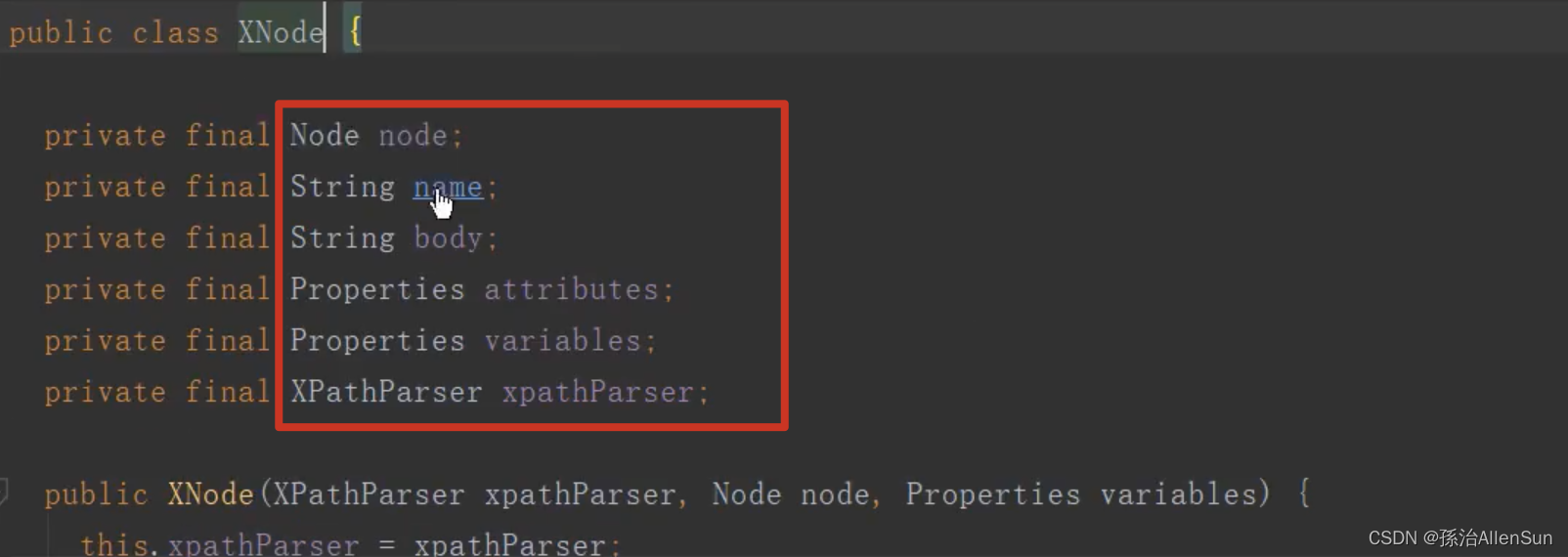
//org.w3c.dorn.Node对象
private final Node node;
//Node节点名称
private final String name;
//节点的内容
private final String body;
//节点属性集合
private final Properties attributes;
//配置文件中节点下定义的键位对
private final Properties variables;
//XPathParser对象,当前XNode对象由此XPathParser对象生成
private final XPathParser xpathParser;(5)parseConfiguration方法【解析XML文件各种标签】

(1)进入方法内部

(2)看看参数XNode root具体是什么信息
 可以看到root对象的信息就是从config.xml配置文件读取出来的内容,这些内容被evalNode装填在XNode类的字段里
(3)全局配置文件里有哪些标签

properties 属性
settings 设置
typeAliases 类型别名
typeHandlers 类型处理器
objectFactory 对象工厂
plugins 插件
environments 环境
databaseIdProvider 数据库厂商标识
mappers 映射器(4)举例,parseConfiguration里调用的propertiesElement方法【加载获取“jdbc.properties”数据源配置文件】

读取获得标签内包含的url和resource属性值,也就是标签设置的文件的路径 找到config.xml文件里的properties标签,找到的resource里的“jdbc.properties”数据源配置文件
 解析出来的数据放进全局类Properties里面
(5)举例,parseConfiguration里调用的environmentsElement方法

查看这里的XNode对象具体是什么信息?
注意这里的数据源信息已经有具体的值了!!!

读取获得标签包含的数据加载器,还有数据源信息

dataSourceElement方法
查看传的XNode context对象里的内容


resolveClass方法


resolveAlias方法
通过参数字符串找到key
typeAliases是一个Hashmap,key的内容就是“pooled”,通过get方法从typeAliases里取出key为“pooled”的value值,即PooledDataSourceFactory类
 所以最后resolveAlias方法返回的值就是PooledDataSourceFactory类,resolveClass再把PooledDataSourceFactory类返回给dataSourceElement方法。
有了DataSourceFactory类的对象后,调用setProperties方法把Properties类里解析出来的数据源信息设置到DataSourceFactory类的对象里,然后返回这个类的对象给environmentsElement方法
 这里就可以看到数据源信息已经映射到了

最后调用setEnvironment方法把事务工厂和数据源信息封装到全局Configuration类里


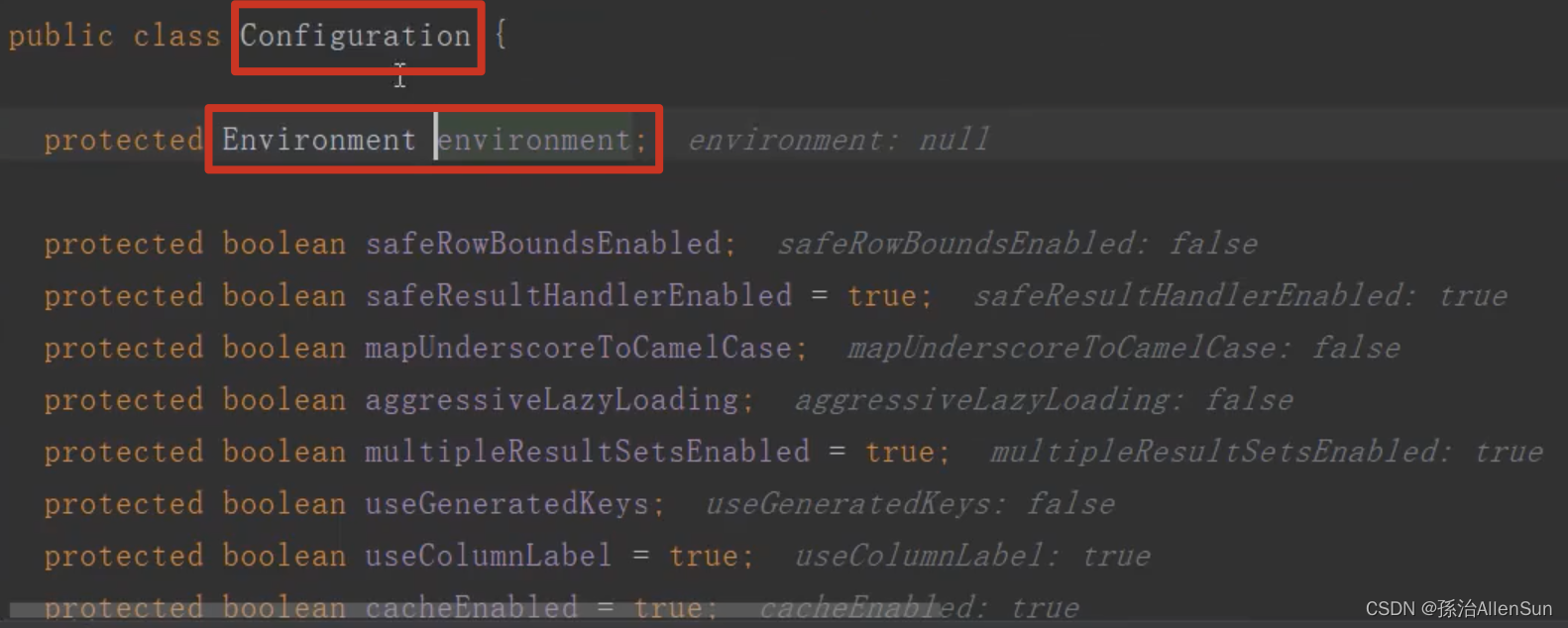
Environment类里的内容包含的字段

对应配置文件这里的全局配置类configuration和environment类

(6)总结

—》SqlSessionFactoryBuilder的build方法:返回一个DefaultSqlSessionFactory对象,DefaultSqlSessionFactory是SqlSessionFactory的一个默认实现。
---------》创建xml解析器XMLConfigBuilder对象parser,构造器方法里会创建Configuration对象
---------》parser.parse方法:解析mybatis-config.xml中每个标签的内容,装填到Configuration对象并返回
---------------》parser.evalNode方法:创建XNode节点类
---------------》parseConfiguration方法:以上面的XNode节点类做参数
------------------------》propertiesElement方法:找到config.xml文件里的properties标签,标签里的resource标签是“jdbc.properties”数据源配置文件的url,根据url找到配置文件里的数据(名称+密码+mysql驱动类),解析出来的数据源数据放进全局类Properties里面,Properties放到XNode类中
------------------------》environmentsElement方法:使用dataSourceElement方法获取XNode参数中的类Properties的数据源信息(名称+密码+mysql驱动类),最后调用setEnvironment方法把事务工厂和数据源信息封装到全局Configuration类里
---------》得到一个装填好配置信息的Configuration对象,里面包含config.xml配置文件里每个标签配置项的数据
—》build(Configuration)方法生成SqlSessionFactory对象DefaultSqlSessionFactory,DefaultSqlSessionFactory是SqlSessionFactory的一个默认实现。至此,完成读取config.xml的数据源信息,完成读取mapper.xml的sql配置信息,并且把这些配置信息放到Configuration对象里,然后使用Configuration创建SqlSessionFactory对象。【3】Mybatis获取sql【XML文件配置MappedStatement注册过程】

(1)sql所在的配置文件
mapper.xml

mapper.xml文件配置在config.xml的mappers的标签里面

(2)parseConfiguration里调用的mapperElement方法【加载获取“mapper.xml”sql配置文件】

(1)mapperElement方法【MappedStatement对象创建】
private void mapperElement(XNode parent) throws Exception { if (parent != null) { for (XNode child : parent.getChildren()) { //package引入,通过标签指定包名 if ("package".equals(child.getName())) { String mapperPackage = child.getStringAttribute("name"); configuration.addMappers(mapperPackage); } else { String resource = child.getStringAttribute("resource"); String url = child.getStringAttribute("url"); String mapperClass = child.getStringAttribute("class"); //resource引入,通过resource属性指定XML文件路径 if (resource != null && url == null && mapperClass == null) { ErrorContext.instance().resource(resource); try (InputStream inputStream = Resources.getResourceAsStream(resource)) { XMLMapperBuilder mapperParser = new XMLMapperBuilder(inputStream, configuration, resource, configuration.getSqlFragments()); mapperParser.parse(); } } else if (resource == null && url != null && mapperClass == null) { //url引入,通过url属性指定XML文件路径 ErrorContext.instance().resource(url); try (InputStream inputStream = Resources.getUrlAsStream(url)) { XMLMapperBuilder mapperParser = new XMLMapperBuilder(inputStream, configuration, url, configuration.getSqlFragments()); mapperParser.parse(); } } else if (resource == null && url == null && mapperClass != null) { //mapperClass引入,通过class属性指定接口的完全限定名 Class<?> mapperInterface = Resources.classForName(mapperClass); configuration.addMapper(mapperInterface); } else { throw new BuilderException("A mapper element may only specify a url, resource or class, but not more than one."); } } } } }- 1
- 2
- 3
- 4
- 5
- 6
- 7
- 8
- 9
- 10
- 11
- 12
- 13
- 14
- 15
- 16
- 17
- 18
- 19
- 20
- 21
- 22
- 23
- 24
- 25
- 26
- 27
- 28
- 29
- 30
- 31
- 32
- 33
- 34
- 35
- 36
查看参数XNode parent里的内容,可以看到结果就是mappers标签里的内容

(2)Mybatis加载mapper文件的4种方式
 其中package的优先级最高

(3)parse方法【】
Mapper SQL配置文件的解析需要借助XMLMapperBuilder对象,在mapperElement()方法中首先创建一个XMLMapperBuilder对象,然后调用XMLMapperBuilder的parse()方法来完成解析。

(1)方法代码
首先调用XPathParser的evalNode()获取根节点对应的XNode对象,接着调用configurationElement()方法对Mapper配置内容做进一步的解析。public void parse() { if (!configuration.isResourceLoaded(resource)) { // 调用XPathParser的evalNode()方法获取根节点对应的XNode对象 configurationElement(parser.evalNode("/mapper")); // 將资源路径添加到Configuration对象中 configuration.addLoadedResource(resource); bindMapperForNamespace(); } // 继续解析之前解析出现异常的ResultMap对象 parsePendingResultMaps(); // 继续解析之前解析出现异常的CacheRef对象 parsePendingCacheRefs(); // 继续解析之前解析出现异常- 1
- 2
- 3
- 4
- 5
- 6
- 7
- 8
- 9
- 10
- 11
- 12
- 13
- 14
- 15
(4)configurationElement方法【解析mapper.xml文件】
(1)方法代码
在configurationElement()方法中,在Mapper SQL配置文件的所有标签进行解析。这里我们重点关注
private void configurationElement(XNode context) { try { // 获取命名空间 String namespace = context.getStringAttribute("namespace"); if (namespace == null || namespace.isEmpty()) { throw new BuilderException("Mapper's namespace cannot be empty"); } //设置当前正在解析的Mapper配置的命名空间 builderAssistant.setCurrentNamespace(namespace); //解析标签,设置二级缓存 cacheRefElement(context.evalNode("cache-ref")); //解析标签,设置一级缓存 cacheElement(context.evalNode("cache")); //解析所有的标签,解析parameterMap parameterMapElement(context.evalNodes("/mapper/parameterMap")); //解析resultMap resultMapElements(context.evalNodes("/mapper/resultMap")); //解析所有的标签,解析sql片段 sqlElement(context.evalNodes("/mapper/sql")); //解析所有的- 1
- 2
- 3
- 4
- 5
- 6
- 7
- 8
- 9
- 10
- 11
- 12
- 13
- 14
- 15
- 16
- 17
- 18
- 19
- 20
- 21
- 22
- 23
- 24
- 25
(2)参数XNode context里的内容

(3)buildStatementFromContext方法【进一步解析mapper.xml文件,解析出具体的增删改查的sql语句】
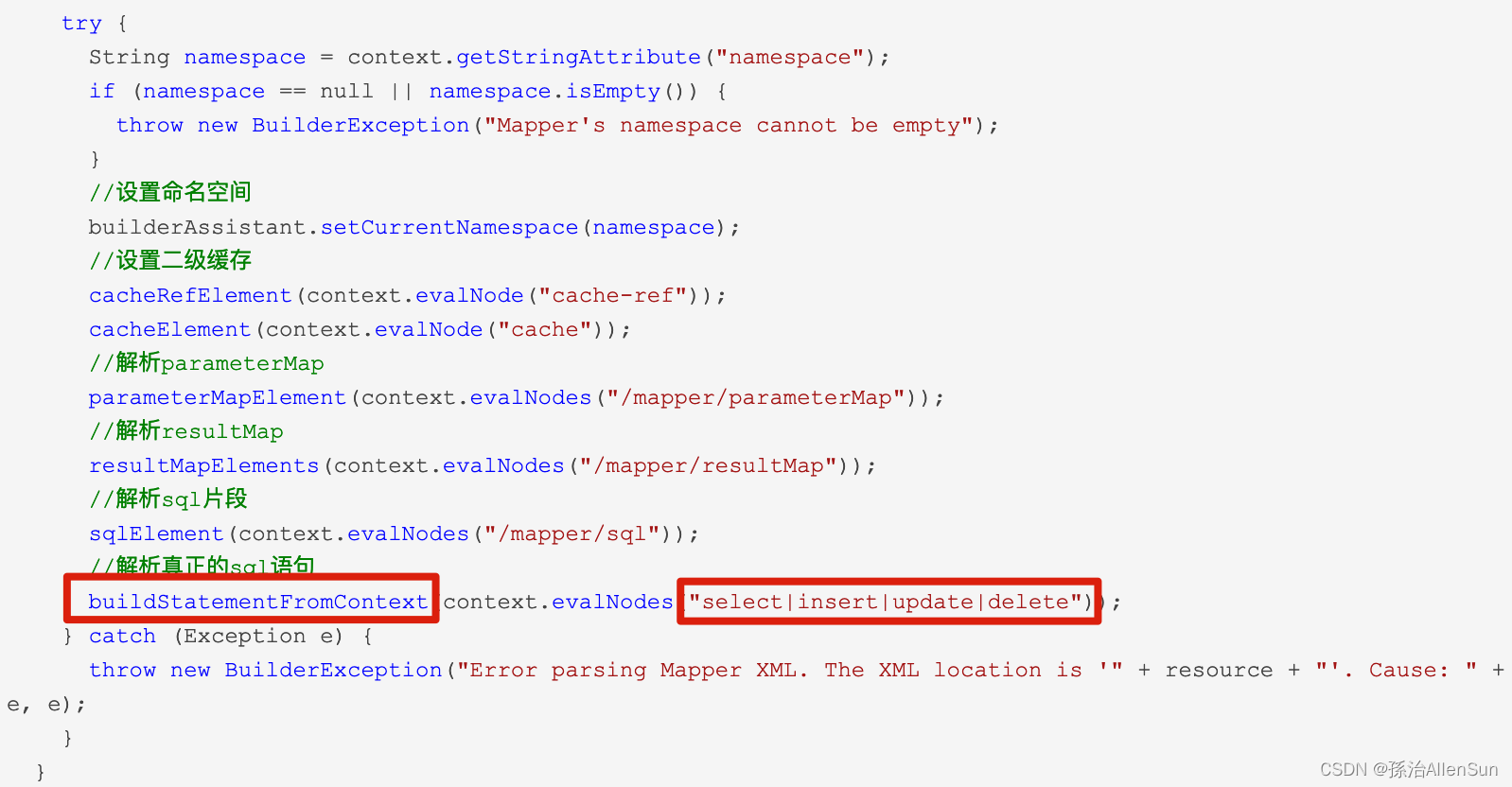 (1)方法代码
上面的代码中,private void buildStatementFromContext(List<XNode> list) { if (configuration.getDatabaseId() != null) { buildStatementFromContext(list, configuration.getDatabaseId()); } buildStatementFromContext(list, null); } private void buildStatementFromContext(List<XNode> list, String requiredDatabaseId) { for (XNode context : list) { // 通过XMLStatementBuilder对象,对- 1
- 2
- 3
- 4
- 5
- 6
- 7
- 8
- 9
- 10
- 11
- 12
- 13
- 14
- 15
- 16
- 17
- 18
- 19
- 20
(2)点进方法的内部,可以看到传的参数为list,然后对这个参数进行遍历处理,list参数里的内容,可以看到就是具体的sql

之所以这里用的是list,是因为我们在开发的过程中会有很多条的sql,那么多条数据就封装在对应的类中,然后使用list集合存放

(4)XMLStatementBuilder的parseStatementNode方法【解析select\update…标签里的配置类】

(1)方法内部public void parseStatementNode() { //获取id String id = context.getStringAttribute("id"); String databaseId = context.getStringAttribute("databaseId"); //验证databaseId是否匹配 if (!databaseIdMatchesCurrent(id, databaseId, this.requiredDatabaseId)) { return; } Integer fetchSize = context.getIntAttribute("fetchSize"); Integer timeout = context.getIntAttribute("timeout"); //已废弃 String parameterMap = context.getStringAttribute("parameterMap"); //参数类型;将会传入这条语句的参数类的完全限定名或别名。这个属性是可选的,因为 MyBatis 可以通过 TypeHandler 推断出具体传入语句的参数,默认值为 unset。 String parameterType = context.getStringAttribute("parameterType"); Class<?> parameterTypeClass = resolveClass(parameterType); //结果类型;外部 resultMap 的命名引用。 String resultMap = context.getStringAttribute("resultMap"); //结果类型;表示从这条语句中返回的期望类型的类的完全限定名或别名。注意如果是集合情形,那应该是集合可以包含的类型,而不能是集合本身。不能和resultMap同时使用。 String resultType = context.getStringAttribute("resultType"); String lang = context.getStringAttribute("lang"); LanguageDriver langDriver = getLanguageDriver(lang); Class<?> resultTypeClass = resolveClass(resultType); //结果集类型;FORWARD_ONLY,SCROLL_SENSITIVE 或 SCROLL_INSENSITIVE 中的一个,默认值为 unset (依赖驱动)。 String resultSetType = context.getStringAttribute("resultSetType"); //STATEMENT,PREPARED 或 CALLABLE 的一个。这会让 MyBatis 分别使用 Statement,PreparedStatement 或 CallableStatement,默认值:PREPARED。 StatementType statementType = StatementType.valueOf(context.getStringAttribute("statementType", StatementType.PREPARED.toString())); ResultSetType resultSetTypeEnum = resolveResultSetType(resultSetType); String nodeName = context.getNode().getNodeName(); //SQLCommand类型 SqlCommandType sqlCommandType = SqlCommandType.valueOf(nodeName.toUpperCase(Locale.ENGLISH)); boolean isSelect = sqlCommandType == SqlCommandType.SELECT; //flushCache;在执行语句时表示是否刷新缓存 boolean flushCache = context.getBooleanAttribute("flushCache", !isSelect); //是否对该语句进行二级缓存;默认值:对 select 元素为 true。 boolean useCache = context.getBooleanAttribute("useCache", isSelect); //根嵌套结果相关 boolean resultOrdered = context.getBooleanAttribute("resultOrdered", false); //引入SQL片段 // Include Fragments before parsing XMLIncludeTransformer includeParser = new XMLIncludeTransformer(configuration, builderAssistant); includeParser.applyIncludes(context.getNode()); // Parse selectKey after includes and remove them. //处理selectKey processSelectKeyNodes(id, parameterTypeClass, langDriver); // Parse the SQL (pre:and SqlSource sqlSource = langDriver.createSqlSource(configuration, context, parameterTypeClass); // String resultSets = context.getStringAttribute("resultSets"); String keyProperty = context.getStringAttribute("keyProperty"); String keyColumn = context.getStringAttribute("keyColumn"); //设置主键自增的方式 KeyGenerator keyGenerator; String keyStatementId = id + SelectKeyGenerator.SELECT_KEY_SUFFIX; keyStatementId = builderAssistant.applyCurrentNamespace(keyStatementId, true); if (configuration.hasKeyGenerator(keyStatementId)) { keyGenerator = configuration.getKeyGenerator(keyStatementId); } else { keyGenerator = context.getBooleanAttribute("useGeneratedKeys", configuration.isUseGeneratedKeys() && SqlCommandType.INSERT.equals(sqlCommandType)) ? Jdbc3KeyGenerator.INSTANCE : NoKeyGenerator.INSTANCE; } //通过buildAssistant将解析得到的参数设置构造成MappedStatement对象 builderAssistant.addMappedStatement(id, sqlSource, statementType, sqlCommandType, fetchSize, timeout, parameterMap, parameterTypeClass, resultMap, resultTypeClass, resultSetTypeEnum, flushCache, useCache, resultOrdered, keyGenerator, keyProperty, keyColumn, databaseId, langDriver, resultSets); }were parsed and removed) - 1
- 2
- 3
- 4
- 5
- 6
- 7
- 8
- 9
- 10
- 11
- 12
- 13
- 14
- 15
- 16
- 17
- 18
- 19
- 20
- 21
- 22
- 23
- 24
- 25
- 26
- 27
- 28
- 29
- 30
- 31
- 32
- 33
- 34
- 35
- 36
- 37
- 38
- 39
- 40
- 41
- 42
- 43
- 44
- 45
- 46
- 47
- 48
- 49
- 50
- 51
- 52
- 53
- 54
- 55
- 56
- 57
- 58
- 59
- 60
- 61
- 62
- 63
- 64
- 65
- 66
- 67
- 68
- 69
- 70
- 71
- 72
- 73
- 74
- 75
- 76
上面的代码比较长,我们理一下他做了哪些事情:
(1)获取
(2)將标签内容,替换为标签定义的SQL片段。
(3)通过LanguageDriver解析SQL内容,生成SqlSource对象。
(4)获取主键生成策略。
(5)所有解析工作完成之后,使用MapperBuilderAssistant对象的addMappedStatement()方法创建MappedStatement对象。创建完成后调用Configuration的addMappedStatement()方法将MappedStatement对象注册到Configuration的mappedStatements属性里面。以下是MapperBuilderAssistant对象的addMappedStatement()方法的代码实现。(2)参数context的内容
点进去方法内部看到,context就是我们解析出来的sql的语句

(3)方法内要解析的数据
可以看到这里需要提取很多的数据

这些参数的来源是哪里的,点开select标签可以看到有多的属性 配置项
 对应在mapper.xml里的语句就是在select标签里可以添加的配置,如下

(4)addMappedStatement方法【解析数据的存放】
先解析出来数据结果放进临时变量里面
 然后在addMappedStatement方法里面来处理这些临时变量

addMappedStatement内部封装了很多的方法public MappedStatement addMappedStatement( String id, SqlSource sqlSource, StatementType statementType, SqlCommandType sqlCommandType, Integer fetchSize, Integer timeout, String parameterMap, Class<?> parameterType, String resultMap, Class<?> resultType, ResultSetType resultSetType, boolean flushCache, boolean useCache, boolean resultOrdered, KeyGenerator keyGenerator, String keyProperty, String keyColumn, String databaseId, LanguageDriver lang, String resultSets) { if (unresolvedCacheRef) { throw new IncompleteElementException("Cache-ref not yet resolved"); } id = applyCurrentNamespace(id, false); boolean isSelect = sqlCommandType == SqlCommandType.SELECT; MappedStatement.Builder statementBuilder = new MappedStatement.Builder(configuration, id, sqlSource, sqlCommandType) .resource(resource) .fetchSize(fetchSize) .timeout(timeout) .statementType(statementType) .keyGenerator(keyGenerator) .keyProperty(keyProperty) .keyColumn(keyColumn) .databaseId(databaseId) .lang(lang) .resultOrdered(resultOrdered) .resultSets(resultSets) .resultMaps(getStatementResultMaps(resultMap, resultType, id)) .resultSetType(resultSetType) .flushCacheRequired(valueOrDefault(flushCache, !isSelect)) .useCache(valueOrDefault(useCache, isSelect)) .cache(currentCache); ParameterMap statementParameterMap = getStatementParameterMap(parameterMap, parameterType, id); if (statementParameterMap != null) { statementBuilder.parameterMap(statementParameterMap); } MappedStatement statement = statementBuilder.build(); configuration.addMappedStatement(statement); return statement; }- 1
- 2
- 3
- 4
- 5
- 6
- 7
- 8
- 9
- 10
- 11
- 12
- 13
- 14
- 15
- 16
- 17
- 18
- 19
- 20
- 21
- 22
- 23
- 24
- 25
- 26
- 27
- 28
- 29
- 30
- 31
- 32
- 33
- 34
- 35
- 36
- 37
- 38
- 39
- 40
- 41
- 42
- 43
- 44
- 45
- 46
- 47
- 48
- 49
- 50
- 51
- 52
- 53
- 54
- 55
- 56
构建者模式进行方法的封装(待补充)

方法的最后返回一个MappedStatement类的对象结果,并且调用addMappedStatement方法把这个结果的数据赋值到全局类Configuration里面去


(5)补充知识:Java注解配置MappedStatement注册过程
基于注解配置的注册过程,我们可以在MapperRegistry这个类中的addMapper()方法中找到入口,因为基于Java注解的配置的话,这些配置信息都写在相对应的Mapper接口里面。下面是addMapper()方法源码。public <T> void addMapper(Class<T> type) { if (type.isInterface()) { if (hasMapper(type)) { throw new BindingException("Type " + type + " is already known to the MapperRegistry."); } boolean loadCompleted = false; try { knownMappers.put(type, new MapperProxyFactory<T>(type)); // It's important that the type is added before the parser is run // otherwise the binding may automatically be attempted by the // mapper parser. If the type is already known, it won't try. MapperAnnotationBuilder parser = new MapperAnnotationBuilder(config, type); parser.parse(); loadCompleted = true; } finally { if (!loadCompleted) { knownMappers.remove(type); } } } }- 1
- 2
- 3
- 4
- 5
- 6
- 7
- 8
- 9
- 10
- 11
- 12
- 13
- 14
- 15
- 16
- 17
- 18
- 19
- 20
- 21
我们可以看到上面的代码中有一个MapperAnnotationBuilder 类,这个类里面有一个parse()方法,通过反射获取该Mapper接口的所有方法,然后进行遍历,再调用parseStatement()方法。
public void parse() { String resource = type.toString(); if (!configuration.isResourceLoaded(resource)) { loadXmlResource(); configuration.addLoadedResource(resource); assistant.setCurrentNamespace(type.getName()); parseCache(); parseCacheRef(); Method[] methods = type.getMethods(); for (Method method : methods) { try { // issue #237 if (!method.isBridge()) { parseStatement(method); } } catch (IncompleteElementException e) { configuration.addIncompleteMethod(new MethodResolver(this, method)); } } } parsePendingMethods(); }- 1
- 2
- 3
- 4
- 5
- 6
- 7
- 8
- 9
- 10
- 11
- 12
- 13
- 14
- 15
- 16
- 17
- 18
- 19
- 20
- 21
- 22
上述代码中的parseStatement()方法,他会对MapperAnnotationBuilde类的parse()方法传入的methed做判断,通过getSqlSourceFromAnnotations()方法判断该methed是否含有相应的@Select,@Update,@SelectProvider等注解,有的话会返回一个SqlSource对象,没有则返回空。在方法的最后使用MapperBuilderAssistant对象的addMappedStatement()方法创建MappedStatement对象。创建完成后调用Configuration的addMappedStatement()方法将MappedStatement对象注册到Configuration的mappedStatements属性里面。
void parseStatement(Method method) { Class<?> parameterTypeClass = getParameterType(method); LanguageDriver languageDriver = getLanguageDriver(method); SqlSource sqlSource = getSqlSourceFromAnnotations(method, parameterTypeClass, languageDriver); if (sqlSource != null) { Options options = method.getAnnotation(Options.class); final String mappedStatementId = type.getName() + "." + method.getName(); Integer fetchSize = null; Integer timeout = null; StatementType statementType = StatementType.PREPARED; ResultSetType resultSetType = ResultSetType.FORWARD_ONLY; SqlCommandType sqlCommandType = getSqlCommandType(method); boolean isSelect = sqlCommandType == SqlCommandType.SELECT; boolean flushCache = !isSelect; boolean useCache = isSelect; KeyGenerator keyGenerator; String keyProperty = null; String keyColumn = null; if (SqlCommandType.INSERT.equals(sqlCommandType) || SqlCommandType.UPDATE.equals(sqlCommandType)) { // first check for SelectKey annotation - that overrides everything else //如果是插入或者更新,获取主键生成策略。 SelectKey selectKey = method.getAnnotation(SelectKey.class); if (selectKey != null) { keyGenerator = handleSelectKeyAnnotation(selectKey, mappedStatementId, getParameterType(method), languageDriver); keyProperty = selectKey.keyProperty(); } else if (options == null) { keyGenerator = configuration.isUseGeneratedKeys() ? Jdbc3KeyGenerator.INSTANCE : NoKeyGenerator.INSTANCE; } else { keyGenerator = options.useGeneratedKeys() ? Jdbc3KeyGenerator.INSTANCE : NoKeyGenerator.INSTANCE; keyProperty = options.keyProperty(); keyColumn = options.keyColumn(); } } else { keyGenerator = NoKeyGenerator.INSTANCE; } //MappedStatement相关配置 if (options != null) { if (FlushCachePolicy.TRUE.equals(options.flushCache())) { flushCache = true; } else if (FlushCachePolicy.FALSE.equals(options.flushCache())) { flushCache = false; } useCache = options.useCache(); fetchSize = options.fetchSize() > -1 || options.fetchSize() == Integer.MIN_VALUE ? options.fetchSize() : null; //issue #348 timeout = options.timeout() > -1 ? options.timeout() : null; statementType = options.statementType(); resultSetType = options.resultSetType(); } String resultMapId = null; ResultMap resultMapAnnotation = method.getAnnotation(ResultMap.class); if (resultMapAnnotation != null) { String[] resultMaps = resultMapAnnotation.value(); StringBuilder sb = new StringBuilder(); for (String resultMap : resultMaps) { if (sb.length() > 0) { sb.append(","); } sb.append(resultMap); } resultMapId = sb.toString(); } else if (isSelect) { resultMapId = parseResultMap(method); } assistant.addMappedStatement( mappedStatementId, sqlSource, statementType, sqlCommandType, fetchSize, timeout, // ParameterMapID null, parameterTypeClass, resultMapId, getReturnType(method), resultSetType, flushCache, useCache, // TODO gcode issue #577 false, keyGenerator, keyProperty, keyColumn, // DatabaseID null, languageDriver, // ResultSets options != null ? nullOrEmpty(options.resultSets()) : null); } }- 1
- 2
- 3
- 4
- 5
- 6
- 7
- 8
- 9
- 10
- 11
- 12
- 13
- 14
- 15
- 16
- 17
- 18
- 19
- 20
- 21
- 22
- 23
- 24
- 25
- 26
- 27
- 28
- 29
- 30
- 31
- 32
- 33
- 34
- 35
- 36
- 37
- 38
- 39
- 40
- 41
- 42
- 43
- 44
- 45
- 46
- 47
- 48
- 49
- 50
- 51
- 52
- 53
- 54
- 55
- 56
- 57
- 58
- 59
- 60
- 61
- 62
- 63
- 64
- 65
- 66
- 67
- 68
- 69
- 70
- 71
- 72
- 73
- 74
- 75
- 76
- 77
- 78
- 79
- 80
- 81
- 82
- 83
- 84
- 85
- 86
- 87
- 88
- 89
- 90
- 91
- 92
- 93
(3)总结

------------------------》mapperElement方法:找到mapper.xml文件里的mapper标签,标签里的resource标签是“mapper.xml”sql配置文件的url
------------------------------》创建XMLMapperBuilder解析器对象,传入(文件流,url,Configuration对象)等参数,调用解析器方法parse
------------------------------------》evalNode()获取根节点对应的XNode对象,里面是mapper.xml文件的配置内容
------------------------------------》configurationElement方法:解析mapper.xml文件里的所有标签
-------------------------------------------》cacheRefElement(context.evalNode(“cache-ref”));解析标签,设置二级缓存
-------------------------------------------》cacheElement(context.evalNode(“cache”));解析标签,设置一级缓存
-------------------------------------------》parameterMapElement(context.evalNodes(“/mapper/parameterMap”));解析所有的标签,解析parameterMap,获取sql的参数信息
-------------------------------------------》 resultMapElements(context.evalNodes(“/mapper/resultMap”));解析resultMap,获取sql的结果集类型
-------------------------------------------》 sqlElement(context.evalNodes(“/mapper/sql”));解析所有的标签,解析sql片段,获取到所有sql
-------------------------------------------》buildStatementFromContext(context.evalNodes(“select|insert|update|delete”));解析所有的
-------------------------------------------------》parseStatementNode方法:获取
-------------------------------------------------------》addMappedStatement方法:addMappedStatement方法里有很多变量,对应sql标签里所有的属性值。使用MappedStatement对象的Builder方法,把这些所有数据封装到Configuration的mappedStatements属性里面。【4】Mybatis操作数据库(连接数据库、执行sql、返回结果)
(1)openSession方法【创建执行器,返回SqlSession对象】


返回的结果是一个SqlSession对象。sqlSession是操作数据库的高级接口,我们操作数据库都是通过这个接口操作的。主要会提供一些api接口,如增删改查,提交关闭,回滚等。这个sqlsession类如下public interface SqlSession extends Closeable { <T> T selectOne(String statement); <E> List<E> selectList(String statement); void select(); int update(String statement, Object parameter); int delete(String statement); void commit(); void rollback(); }- 1
- 2
- 3
- 4
- 5
- 6
- 7
- 8
- 9
openSession方法获取sqlSession有两种方式,一种是【openSessionFromDataSource方法】从数据源中获取,还有一种是【openSessionFromConnection方法】从连接中获取。
获取到的都是DefaultSqlSession对象,也就是sqlSession的默认实现。SqlSession实际是对数据库连接的一层包装,数据库连接是个珍贵的资源,如果频繁的创建销毁将会影响吞吐量,因此使用数据库连接池化技术就可以复用数据库连接了。因此openSessionFromDataSource会从数据库连接池中获取一个连接,然后包装成一个SqlSession对象。openSessionFromConnection则是直接包装已有的连接并返回SqlSession对象。
(1)openSessionFromDataSource方法【创建执行器Executor对象,封装信息到DefaultSqlSession对象并返回】
除了获取环境变量,事务工厂之外,还会创建一个 Executor 的执行器。并且使用DefaultSqlSession构造器把【Configuration+创建的执行器+autoCommit】都封装到DefaultSqlSession对象中并且返回。
openSessionFromDataSource 主要经历了以下几步:
- 从获取configuration中获取Environment对象,Environment包含了数据库配置
- 从Environment获取DataSource数据源
- 从DataSource数据源中获取Connection连接对象
- 从DataSource数据源中获取TransactionFactory事物工厂
- 从TransactionFactory中创建事物Transaction对象
- 创建Executor对象
- 包装configuration和Executor对象成DefaultSqlSession对象


(2)newExecutor方法【创建执行器,返回一个Executor对象】
主要是会创建三个Executor,分别是:SIMPLE,REUSE,BATCH。最后会去判断一下是否开启二级缓存,如果外面开启二级缓存,则会使用一个装饰者模式,对这个类进行一个类的一个包装
(1)方法代码
public Executor newExecutor(Transaction transaction, ExecutorType executorType) { //会得到一个默认值 executorType = executorType == null ? defaultExecutorType : executorType; executorType = executorType == null ? ExecutorType.SIMPLE : executorType; Executor executor; if (ExecutorType.BATCH == executorType) { executor = new BatchExecutor(this, transaction); } else if (ExecutorType.REUSE == executorType) { executor = new ReuseExecutor(this, transaction); } else { executor = new SimpleExecutor(this, transaction); } //默认是带缓存的 if (cacheEnabled) { executor = new CachingExecutor(executor); } //如果配置了插件,那么就会用插件进行封装一层 executor = (Executor) interceptorChain.pluginAll(executor); return executor; }- 1
- 2
- 3
- 4
- 5
- 6
- 7
- 8
- 9
- 10
- 11
- 12
- 13
- 14
- 15
- 16
- 17
- 18
- 19
- 20
- 21
(2)创建执行器【Executor 创建】
默认创建的是“简单执行器”

执行器有三种类型

Executor执行器具体实现类:
(1)simpleExecutor :默认的执行器,每执行一次update或select,都会创建这个预处理器prepareStatement
(2)reuseExecutor :会重用这个prepareStatement,通过这个缓存实现 。第一次执行一条sql,会将这条sql的Statement对象缓存在key-value结构的map缓存中。下一次执行,就可以从缓存中取出Statement对象,减少了重复编译的次数,从而提高了性能。每个SqlSession对象都有一个Executor对象,因此这个缓存是SqlSession级别的,当SqlSession销毁时,缓存也会销毁。
(3)batchExecutor :批量处理,如可以批量处理select,update。每次执行一条sql,不会立马发送到数据库,而是批量一次性发送sql。
(4)BaseExecutor :作为上面三种执行器的一级缓存。在sqlsession中,如果执行了相同的一条sql语句,那么就可以触发这个一级缓存
(5)CachingExecutor:作为上面三种执行器的二级缓存关于Executor更详细的信息查看:MyBatis原理系列(四)-手把手带你了解MyBatis的Executor执行器
(3)SimpleExecutor构造关系(Executor接口)
Executor 作为一个接口,包含更新,查询,事务等一系列方法。每个SqlSession对象都会有一个Executor对象,SqlSession接口里的操作抽象方法都会由Executor执行器执行。Executor接口有个抽象实现BaseExecutor类,其中定义了一些模板方法,由子类实现。public interface Executor { ResultHandler NO_RESULT_HANDLER = null; // 更新 int update(MappedStatement ms, Object parameter) throws SQLException; // 先查询缓存,在查询数据库 <E> List<E> query(MappedStatement ms, Object parameter, RowBounds rowBounds, ResultHandler resultHandler, CacheKey cacheKey, BoundSql boundSql) throws SQLException; // 查询 <E> List<E> query(MappedStatement ms, Object parameter, RowBounds rowBounds, ResultHandler resultHandler) throws SQLException; // 返回游标对象 <E> Cursor<E> queryCursor(MappedStatement ms, Object parameter, RowBounds rowBounds) throws SQLException; // 释放Statement List<BatchResult> flushStatements() throws SQLException; // 事务提交 void commit(boolean required) throws SQLException; // 事务回滚 void rollback(boolean required) throws SQLException; // 创建缓存的键值对 CacheKey createCacheKey(MappedStatement ms, Object parameterObject, RowBounds rowBounds, BoundSql boundSql); // 缓存是否存在 boolean isCached(MappedStatement ms, CacheKey key); // 清除一级缓存 void clearLocalCache(); void deferLoad(MappedStatement ms, MetaObject resultObject, String property, CacheKey key, Class<?> targetType); // 获取事务对象 Transaction getTransaction(); void close(boolean forceRollback); boolean isClosed(); void setExecutorWrapper(Executor executor); }- 1
- 2
- 3
- 4
- 5
- 6
- 7
- 8
- 9
- 10
- 11
- 12
- 13
- 14
- 15
- 16
- 17
- 18
- 19
- 20
- 21
- 22
- 23
- 24
- 25
- 26
- 27
- 28
- 29
Executor继承关系

BaseExecutor抽象类 采用模版方法的设计模式,定义了一些模版方法,即抽象方法。Executor接口的其它方法BaseExecutor都给出了默认实现,进行缓存管理和事务操作,从而降低了接口的实现的难度。(4)缓存是默认开启的【装饰者模式】
如果一级缓存开启(默认是开启的),还会用CachingExecutor来包装SimpleExecutor执行器,在这里用到了装饰者设计模式。

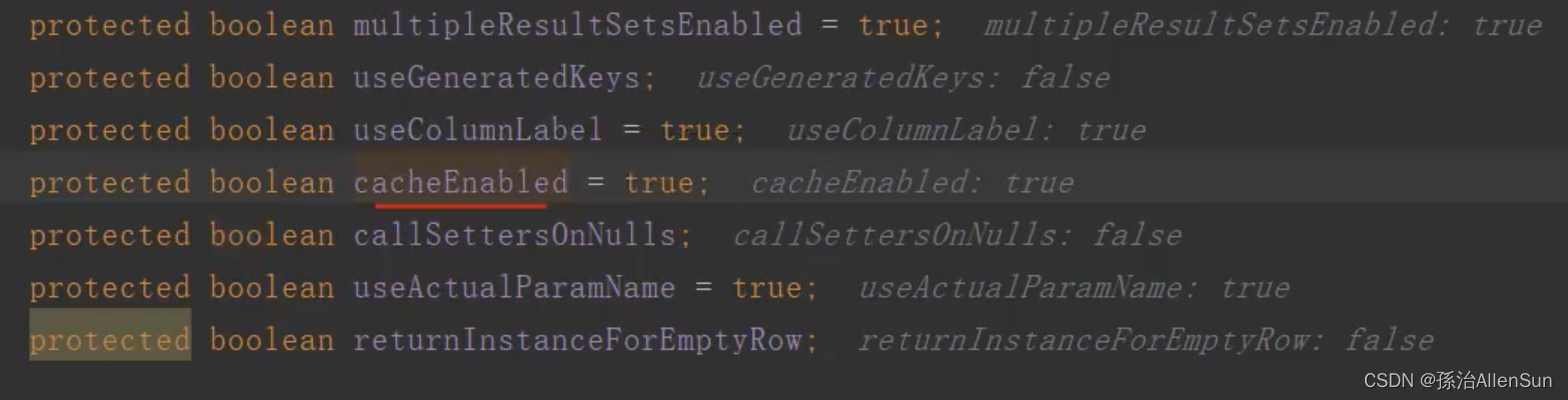
判断变量默认是TRUE,然后就会创建缓存执行器(3)DefaultSqlSession构造器方法
 (1)方法代码

(2)selectOne或者其他sql方法

SqlSession 获取成功后,我们就可以使用其中的方法了,比如直接使用SqlSession发送sql语句,或者通过mapper映射文件的方式来使用。这里使用第一种,直接使用SqlSession发送sql语句。
 Mybatis会在一开始加载的时候将每个标签中的sql语句包装成MappedStatement对象,并以类全路径名+方法名为key,MappedStatement为value缓存在内存中。在执行对应的方法时,就会根据这个唯一路径找到mapper.xml里这条sql语句并且执行返回结果。
(1)selectList方法【获取第一条数据】
其中参数statement就是statement的id,parameter就是参数。

RowBounds 对象是分页对象,主要拼接sql中的start、limit条件。并且可以看到两个重要步骤:
(1)getMappedStatement方法:从configuration的成员变量mappedStatements中获取MappedStatement对象。mappedStatements是Map
(2)Executor类里面的query方法:使用executor成员变量来执行查询并且指定结果处理器,并且返回结果。Executor也是mybatis的一个重要的组件。sql的执行都是由Executor对象来操作的。

(1)getMappedStatement获取全局信息【获取标签里的sql】
(2)wrapCollection方法【判断参数是什么类型的】

(3)执行器Executor执行query方法
@Override public <E> List<E> query(MappedStatement ms, Object parameterObject, RowBounds rowBounds, ResultHandler resultHandler) throws SQLException { //通过参数解析sql信息 BoundSql boundSql = ms.getBoundSql(parameterObject); //创建缓存的key CacheKey key = createCacheKey(ms, parameterObject, rowBounds, boundSql); return query(ms, parameterObject, rowBounds, resultHandler, key, boundSql); }- 1
- 2
- 3
- 4
- 5
- 6
- 7
- 8
(4)MappedStatement的getBoundSql方法【#{id}换成?】
BoundSql 中就是对解析后的sql描述,包括对动态标签的解析,并且将 #{} 解析为占位符 ? ,还包含参数的描述信息
 sql具有语法规范,原来我们在mapper.xml里面配置的sql直接在mysql里执行的话是不可以的,那么就需要通过语法引擎进行检查和改写

(1)MappedStatement 对象
我们在用MyBatis配置sql的时候,insert/update/delete/select等标签下面都会包含一段sql,MappedStatement就是对sql标签的信息描述。
// 一个select标签会对应一个MappedStatement对象 <select id="selectByPrimaryKey" parameterType="java.lang.Long" resultMap="BaseResultMap"> select <include refid="Base_Column_List" /> from t_test_user where id = #{id,jdbcType=BIGINT} select>- 1
- 2
- 3
- 4
- 5
- 6
- 7
MappedStatement 类的私有属性如下:
// mapper配置文件名,如:userMapper.xml private String resource; // 配置类 private Configuration configuration; // 命名空间+标签id 如com.example.demo.dao.TTestUserMapper.selectByPrimaryKey private String id; private Integer fetchSize; // 超时时间 private Integer timeout; // sql对象类型 STATEMENT, PREPARED, CALLABLE 三种之一 private StatementType statementType; // 结果集类型 private ResultSetType resultSetType; // sql语句 private SqlSource sqlSource; // 缓存 private Cache cache; // 参数映射关系 private ParameterMap parameterMap; // 结果映射关系,可以自定义多个ResultMap private List<ResultMap> resultMaps; private boolean flushCacheRequired; // 是否启用缓存 private boolean useCache; // 结果是否排序 private boolean resultOrdered; // sql语句类型,INSERT, UPDATE, DELETE, SELECT private SqlCommandType sqlCommandType; private KeyGenerator keyGenerator; private String[] keyProperties; private String[] keyColumns; private boolean hasNestedResultMaps; private String databaseId; private Log statementLog; private LanguageDriver lang; private String[] resultSets;- 1
- 2
- 3
- 4
- 5
- 6
- 7
- 8
- 9
- 10
- 11
- 12
- 13
- 14
- 15
- 16
- 17
- 18
- 19
- 20
- 21
- 22
- 23
- 24
- 25
- 26
- 27
- 28
- 29
- 30
- 31
- 32
- 33
- 34
- 35
- 36
- 37
其中最主要的方法还是getBoundSql方法,对动态sql进行解析,获取最终的sql语句。
(2)getBoundSql方法代码
获取BoundSql对象其实是从MappedStatement的成员变量sqlSource中获取的。而SqlSource作为一个接口,它只有一个作用就是获取BoundSql对象。
// MappedStatement 的 getBoundSql() 方法 public BoundSql getBoundSql(Object parameterObject) { // 获取BoundSql对象,BoundSql对象是对动态sql的解析 BoundSql boundSql = sqlSource.getBoundSql(parameterObject); // 获取参数映射 List<ParameterMapping> parameterMappings = boundSql.getParameterMappings(); if (parameterMappings == null || parameterMappings.isEmpty()) { boundSql = new BoundSql(configuration, boundSql.getSql(), parameterMap.getParameterMappings(), parameterObject); } // check for nested result maps in parameter mappings (issue #30) for (ParameterMapping pm : boundSql.getParameterMappings()) { String rmId = pm.getResultMapId(); if (rmId != null) { ResultMap rm = configuration.getResultMap(rmId); if (rm != null) { hasNestedResultMaps |= rm.hasNestedResultMaps(); } } } return boundSql; }- 1
- 2
- 3
- 4
- 5
- 6
- 7
- 8
- 9
- 10
- 11
- 12
- 13
- 14
- 15
- 16
- 17
- 18
- 19
- 20
- 21
- 22
(3)SqlSource 接口只有一个方法,就是获取BoundSql对象,SqlSource接口的设计满足单一职责原则。
SqlSource有五个实体类:ProviderSqlSource,DynamicSqlSource,RawSqlSource,StaticSqlSource,StaticSqlSource 其中比较常用的就是DynamicSqlSource,RawSqlSource和StaticSqlSource。如果sql中只包含#{}参数,不包含${}或者其它动态标签,那么创建SqlSource对象时则会创建RawSqlSource,否则创建DynamicSqlSource对象。
public class DynamicSqlSource implements SqlSource { private final Configuration configuration; private final SqlNode rootSqlNode; public DynamicSqlSource(Configuration configuration, SqlNode rootSqlNode) { this.configuration = configuration; this.rootSqlNode = rootSqlNode; } @Override public BoundSql getBoundSql(Object parameterObject) { // 优先解析${}标签 DynamicContext context = new DynamicContext(configuration, parameterObject); rootSqlNode.apply(context); // 创建sqlSource对象,并且解析#{}为? SqlSourceBuilder sqlSourceParser = new SqlSourceBuilder(configuration); Class<?> parameterType = parameterObject == null ? Object.class : parameterObject.getClass(); SqlSource sqlSource = sqlSourceParser.parse(context.getSql(), parameterType, context.getBindings()); BoundSql boundSql = sqlSource.getBoundSql(parameterObject); context.getBindings().forEach(boundSql::setAdditionalParameter); return boundSql; } }- 1
- 2
- 3
- 4
- 5
- 6
- 7
- 8
- 9
- 10
- 11
- 12
- 13
- 14
- 15
- 16
- 17
- 18
- 19
- 20
- 21
- 22
- 23
- 24
(4)sqlSourceParser.parse方法【解析的是#{}标签,实现如下会将#{}解析为?】
public SqlSource parse(String originalSql, Class<?> parameterType, Map<String, Object> additionalParameters) { ParameterMappingTokenHandler handler = new ParameterMappingTokenHandler(configuration, parameterType, additionalParameters); GenericTokenParser parser = new GenericTokenParser("#{", "}", handler); String sql; if (configuration.isShrinkWhitespacesInSql()) { sql = parser.parse(removeExtraWhitespaces(originalSql)); } else { sql = parser.parse(originalSql); } return new StaticSqlSource(configuration, sql, handler.getParameterMappings()); }- 1
- 2
- 3
- 4
- 5
- 6
- 7
- 8
- 9
- 10
- 11
(5)createCacheKey方法(创建缓存)

(1)方法代码public CacheKey createCacheKey(MappedStatement ms, Object parameterObject, RowBounds rowBounds, BoundSql boundSql) { if (closed) { throw new ExecutorException("Executor was closed."); } CacheKey cacheKey = new CacheKey(); cacheKey.update(ms.getId()); cacheKey.update(rowBounds.getOffset()); cacheKey.update(rowBounds.getLimit()); cacheKey.update(boundSql.getSql()); List<ParameterMapping> parameterMappings = boundSql.getParameterMappings(); TypeHandlerRegistry typeHandlerRegistry = ms.getConfiguration().getTypeHandlerRegistry(); // mimic DefaultParameterHandler logic for (ParameterMapping parameterMapping : parameterMappings) { if (parameterMapping.getMode() != ParameterMode.OUT) { Object value; String propertyName = parameterMapping.getProperty(); if (boundSql.hasAdditionalParameter(propertyName)) { value = boundSql.getAdditionalParameter(propertyName); } else if (parameterObject == null) { value = null; } else if (typeHandlerRegistry.hasTypeHandler(parameterObject.getClass())) { value = parameterObject; } else { MetaObject metaObject = configuration.newMetaObject(parameterObject); value = metaObject.getValue(propertyName); } cacheKey.update(value); } } if (configuration.getEnvironment() != null) { // issue #176 cacheKey.update(configuration.getEnvironment().getId()); } return cacheKey; }- 1
- 2
- 3
- 4
- 5
- 6
- 7
- 8
- 9
- 10
- 11
- 12
- 13
- 14
- 15
- 16
- 17
- 18
- 19
- 20
- 21
- 22
- 23
- 24
- 25
- 26
- 27
- 28
- 29
- 30
- 31
- 32
- 33
- 34
- 35
(2)缓存的流程

(3)创建CacheKey
通过分页,limit还有sql等4个条件来创建缓存key,有效的避免缓存key重复

(6)执行器的query方法【查询数据库】
首先会判断是否开启二级缓存,如果开启了二级缓存,那么他会先进入一个临时的事务缓存,如果在插入操作出现异常回滚,那么就不会进入下面的二级缓存的插入操作;没有异常的话,在提交的时候才会真正的保存在二级缓存。
(1)MappedStatement的getCache方法(获取缓存)
 方法代码
方法代码@Override public <E> List<E> query(MappedStatement ms, Object parameterObject, RowBounds rowBounds, ResultHandler resultHandler, CacheKey key, BoundSql boundSql) throws SQLException { //判断我们我们的mapper中是否开启了二级缓存Cache cache = ms.getCache(); if (cache != null) { //判断是否需要刷新缓存 flushCacheIfRequired(ms); if (ms.isUseCache() && resultHandler == null) { ensureNoOutParams(ms, boundSql); //首先会先加入一个事务的缓存 @SuppressWarnings("unchecked") List<E> list = (List<E>) tcm.getObject(cache, key); //二级缓存中没有获取到 if (list == null) { //通过查询数据库去查询 list = delegate.query(ms, parameterObject, rowBounds, resultHandler, key, boundSql); //加入到二级缓存中 tcm.putObject(cache, key, list); } return list; } } //没有整合二级缓存,直接去查询 return delegate.query(ms, parameterObject, rowBounds, resultHandler, key, boundSql); } - 1
- 2
- 3
- 4
- 5
- 6
- 7
- 8
- 9
- 10
- 11
- 12
- 13
- 14
- 15
- 16
- 17
- 18
- 19
- 20
- 21
- 22
- 23
- 24
- 25
先查的是二级缓存
如果缓存为null则直接跳过下面的部分
(2)delegate.query方法【缓存查询,装饰器模式】
最后交给SimpleExecutor执行器去执行

进入delegate.query方法。首先会从这个一级缓存里面获取数据,如果一级缓存数据为空,那么就从数据库中获取数据。

(3)handleLocallyCacheOutputParameters方法【查询缓存】
(4)queryFromDatabase方法【查询数据库】
从数据库查询的逻辑主要通过这个 queryFromDatabase 的方法实现。在将数据查完之后,会将数据加入到一级缓存里面。只要在这个sqlSession没有关闭,那么在这段时间的这条查询语句的结果是可以直接在这个一级缓存里面去拿。
private <E> List<E> queryFromDatabase(MappedStatement ms, Object parameter, RowBounds rowBounds, ResultHandler resultHandler, CacheKey key, BoundSql boundSql) throws SQLException { List<E> list; //把缓存key存入本地缓存 localCache.putObject(key, EXECUTION_PLACEHOLDER); try { //查询 list = doQuery(ms, parameter, rowBounds, resultHandler, boundSql); } finally { //删除过期缓存 localCache.removeObject(key); } //一级缓存中加入缓存(key和value) localCache.putObject(key, list); if (ms.getStatementType() == StatementType.CALLABLE) { localOutputParameterCache.putObject(key, parameter); } return list; }- 1
- 2
- 3
- 4
- 5
- 6
- 7
- 8
- 9
- 10
- 11
- 12
- 13
- 14
- 15
- 16
- 17
- 18

(5)doQuery方法(实际执行sql查询的方法,StatementHandler)
看这个SimpleExecutor里面的doQuery方法,里面主要会获取一个StatementHandler的一个对象,这个对象主要是用来获取connection连接,获取preStatement,参数映射,处理结果集等。
 (1)SimpleExecutor
SimpleExecutor 是默认的执行器,也是最简单的执行器。它实现了BaseExecutor定义的四个抽象方法,doUpdate,doQuery,doQueryCursor和doFlushStatements四个方法。
在这里以doUpdate为例,介绍下SimpleExecutor的操作步骤(1)创建StatementHandler
(2)创建Statement
(3)执行sql操作
(4)关闭Statement@Override public int doUpdate(MappedStatement ms, Object parameter) throws SQLException { Statement stmt = null; try { Configuration configuration = ms.getConfiguration(); // 1. 创建StatementHandler StatementHandler handler = configuration.newStatementHandler(this, ms, parameter, RowBounds.DEFAULT, null, null); // 2. 创建Statement stmt = prepareStatement(handler, ms.getStatementLog()); // 3. 执行sql操作 return handler.update(stmt); } finally { // 2. 关闭Statement closeStatement(stmt); } }- 1
- 2
- 3
- 4
- 5
- 6
- 7
- 8
- 9
- 10
- 11
- 12
- 13
- 14
- 15
- 16
创建StatementHandler对象实际由Configuration对象创建的,StatementHandler 是用来管理JDBC中的Statement对象,并进行和数据库的操作,StatementHandler接口有很多抽象法方法可供调用。
(2)newStatementHandler方法【创建StatementHandler对象】
会通过这个来StatementHandler进行参数映射和处理结果集

StatementHandler 对象从字面意义上来讲就是管理Statement对象的了。它有两个直接实现,一个是BaseStatementHandler,另一个是RoutingStatementHandler。然后BaseStatementHandler有三个实现分别是SimpleStatementHandler,PreparedStatementHandler,CallableStatementHandler,他们分别管理的就是上面讲到的Statement,PreparedStatement和CallableStatement对象了。继承关系如下图,是不是很像Executor的继承关系,BaseStatementHandler是使用了【适配器模式】,减少了实现接口的复杂性,RoutingStatementHandler则是包装了以上三种Handler,作为一个代理类进行操作。

StatementHandler 接口的方法如下:/** * @author Clinton Begin */ public interface StatementHandler { // 创建Statement对象 Statement prepare(Connection connection, Integer transactionTimeout) throws SQLException; // 对Sql中的占位符进行赋值 void parameterize(Statement statement) throws SQLException; // 添加到批处理操作中 void batch(Statement statement) throws SQLException; // 执行更新操作 int update(Statement statement) throws SQLException; // 执行查询操作并且返回结果 <E> List<E> query(Statement statement, ResultHandler resultHandler) throws SQLException; <E> Cursor<E> queryCursor(Statement statement) throws SQLException; // 获取BoundSql对象 BoundSql getBoundSql(); // 获取参数处理器 ParameterHandler getParameterHandler(); }- 1
- 2
- 3
- 4
- 5
- 6
- 7
- 8
- 9
- 10
- 11
- 12
- 13
- 14
- 15
- 16
- 17
- 18
- 19
- 20
- 21
- 22
- 23
- 24
- 25
- 26
(3)RoutingStatementHandler构造器创建对象
Configuration的newStatementHandler方法中,创建的是RoutingStatementHandler对象。我们知道RoutingStatementHandler实际是对三种StatementHandler的一种包装。继续点击去看,根据MappedStatement对象的类型,创建出具体的StatementHandler对象。如果MappedStatement没有指出具体的StatementType(),那么StatementType默认是PREPARED类型的。

// 实际的处理器,SimpleStatementHandler、PreparedStatementHandler、CallableStatementHandler三种处理器中的一种 private final StatementHandler delegate; public RoutingStatementHandler(Executor executor, MappedStatement ms, Object parameter, RowBounds rowBounds, ResultHandler resultHandler, BoundSql boundSql) { switch (ms.getStatementType()) { case STATEMENT: delegate = new SimpleStatementHandler(executor, ms, parameter, rowBounds, resultHandler, boundSql); break; case PREPARED: delegate = new PreparedStatementHandler(executor, ms, parameter, rowBounds, resultHandler, boundSql); break; case CALLABLE: delegate = new CallableStatementHandler(executor, ms, parameter, rowBounds, resultHandler, boundSql); break; default: throw new ExecutorException("Unknown statement type: " + ms.getStatementType()); } }- 1
- 2
- 3
- 4
- 5
- 6
- 7
- 8
- 9
- 10
- 11
- 12
- 13
- 14
- 15
- 16
- 17
- 18
- 19
- 20
接下来,我们看看默认调用的PreparedStatementHandler创建的过程,实际调用的是BaseStatementHandler的构造方法。
// PreparedStatementHandler的构造方法 public PreparedStatementHandler(Executor executor, MappedStatement mappedStatement, Object parameter, RowBounds rowBounds, ResultHandler resultHandler, BoundSql boundSql) { // 实际调用的是BaseStatementHandler的构造方法 super(executor, mappedStatement, parameter, rowBounds, resultHandler, boundSql); }- 1
- 2
- 3
- 4
- 5
至此,我们了解到了,其实三种StatementHandler都是用的BaseStatementHandler的构造方法创建的。
protected BaseStatementHandler(Executor executor, MappedStatement mappedStatement, Object parameterObject, RowBounds rowBounds, ResultHandler resultHandler, BoundSql boundSql) { this.configuration = mappedStatement.getConfiguration(); this.executor = executor; this.mappedStatement = mappedStatement; this.rowBounds = rowBounds; this.typeHandlerRegistry = configuration.getTypeHandlerRegistry(); this.objectFactory = configuration.getObjectFactory(); if (boundSql == null) { // issue #435, get the key before calculating the statement generateKeys(parameterObject); boundSql = mappedStatement.getBoundSql(parameterObject); } this.boundSql = boundSql; this.parameterHandler = configuration.newParameterHandler(mappedStatement, parameterObject, boundSql); this.resultSetHandler = configuration.newResultSetHandler(executor, mappedStatement, rowBounds, parameterHandler, resultHandler, boundSql); }- 1
- 2
- 3
- 4
- 5
- 6
- 7
- 8
- 9
- 10
- 11
- 12
- 13
- 14
- 15
- 16
- 17
- 18
- 19
(6)prepareStatement方法【预处理,Statement对象创建,拿到Connection】
上一步StatementHandler对象创建出来了,现在就可以创建Statement对象了。也是以SimpleExecutor执行器为例子。

SimpleExecutor 的 prepareStatement方法 中主要做了以下三步:(1)获取数据库连接
(2)创建Statement对象
(3)设置sql参数
// SimpleExecutor 的 prepareStatement方法 private Statement prepareStatement(StatementHandler handler, Log statementLog) throws SQLException { Statement stmt; // 1. 获取数据库连接 Connection connection = getConnection(statementLog); // 2. 创建Statement对象 stmt = handler.prepare(connection, transaction.getTimeout()); // 3. 设置sql参数 handler.parameterize(stmt); return stmt; }- 1
- 2
- 3
- 4
- 5
- 6
- 7
- 8
- 9
- 10
- 11
我们继续看看prepare()方法做了什么,这个方法BaseStatementHandler给出了默认实现,因此三个StatementHandler用的都是这个实现。主要做了以下工作:
(1)初始化Statement对象
(2)设置超时时间
(3)设置查询大小
(4)出现异常关闭Statement对象// BaseStatementHandler的prepare方法 @Override public Statement prepare(Connection connection, Integer transactionTimeout) throws SQLException { ErrorContext.instance().sql(boundSql.getSql()); Statement statement = null; try { // 1. 初始化Statement对象 statement = instantiateStatement(connection); // 2. 设置超时时间 setStatementTimeout(statement, transactionTimeout); // 3. 设置查询大小 setFetchSize(statement); return statement; } catch (SQLException e) { // 4. 关闭Statement对象 closeStatement(statement); throw e; } catch (Exception e) { closeStatement(statement); throw new ExecutorException("Error preparing statement. Cause: " + e, e); } }- 1
- 2
- 3
- 4
- 5
- 6
- 7
- 8
- 9
- 10
- 11
- 12
- 13
- 14
- 15
- 16
- 17
- 18
- 19
- 20
- 21
- 22
可以Statement对象的初始化操作是在instantiateStatement方法中进行的,我们继续看看instantiateStatement这个方法又做了什么操作。好的,在BaseStatementHandler中instantiateStatement方法被设计为抽象方法,由子类实现,这点也体现出了模板方法的设计模式。
// BaseStatementHandler的instantiateStatement方法 protected abstract Statement instantiateStatement(Connection connection) throws SQLException;- 1
- 2
现在以SimpleStatementHandler为例子,最终调用的还是connection.createStatement()方法,回到了最初的起点,也就是MyBatis对JDBC操作进行了包装。
@Override protected Statement instantiateStatement(Connection connection) throws SQLException { // 实际还是调用的connection.createStatement()方法 if (mappedStatement.getResultSetType() == ResultSetType.DEFAULT) { return connection.createStatement(); } else { return connection.createStatement(mappedStatement.getResultSetType().getValue(), ResultSet.CONCUR_READ_ONLY); } }- 1
- 2
- 3
- 4
- 5
- 6
- 7
- 8
- 9
获取到了Statement 对象,就可以快乐执行execute方法,向数据库发送sql语句执行了。
(7)handler.query方法【拿到PrepareStatement】
就是生成一个PreparedStatement进行一个预处理


(8)handleResultSets方法(拿到ResultSet)


(9)ResultSetWrapper方法
public class ResultSetWrapper { /** * ResultSet 对象 */ private final ResultSet resultSet; private final TypeHandlerRegistry typeHandlerRegistry; /** * 字段的名字的数组 */ private final List<String> columnNames = new ArrayList<>(); /** * 字段的 Java Type 的数组 */ private final List<String> classNames = new ArrayList<>(); /** * 字段的 JdbcType 的数组 */ private final List<JdbcType> jdbcTypes = new ArrayList<>(); private final Map<String, Map<Class<?>, TypeHandler<?>>> typeHandlerMap = new HashMap<>(); private final Map<String, List<String>> mappedColumnNamesMap = new HashMap<>(); private final Map<String, List<String>> unMappedColumnNamesMap = new HashMap<>(); public ResultSetWrapper(ResultSet rs, Configuration configuration) throws SQLException { super(); this.typeHandlerRegistry = configuration.getTypeHandlerRegistry(); this.resultSet = rs; // 遍历 ResultSetMetaData 的字段们,解析出 columnNames、jdbcTypes、classNames 属性 final ResultSetMetaData metaData = rs.getMetaData(); final int columnCount = metaData.getColumnCount(); for (int i = 1; i <= columnCount; i++) { columnNames.add(configuration.isUseColumnLabel() ? metaData.getColumnLabel(i) : metaData.getColumnName(i)); jdbcTypes.add(JdbcType.forCode(metaData.getColumnType(i))); classNames.add(metaData.getColumnClassName(i)); } } }- 1
- 2
- 3
- 4
- 5
- 6
- 7
- 8
- 9
- 10
- 11
- 12
- 13
- 14
- 15
- 16
- 17
- 18
- 19
- 20
- 21
- 22
- 23
- 24
- 25
- 26
- 27
- 28
- 29
- 30
- 31
- 32
- 33
- 34
- 35
- 36

最后看看这三个集合里面的结果
Java–sql–数据库,对应理解了OOM框架的含义:用于实现面向对象编程语言里不同类型系统的数据之间的转换
这些数据在不同的系统

(10)handleResultSet方法


此时这三个值都是空的


(3)总结

—》sqlSessionFactory.openSession:
---------》openSessionFromDataSource方法,使用参数Configuration对象,创建执行器Executor对象,封装信息到DefaultSqlSession对象并返回
---------------》获取全局信息:从获取configuration中获取Environment对象,Environment包含了数据库配置。从Environment获取DataSource数据源,从DataSource数据源中获取Connection连接对象,从DataSource数据源中获取TransactionFactory事务工厂,从TransactionFactory中创建事务Transaction对象
---------------》newExecutor方法:创建执行器,返回一个Executor对象。
---------------------》创建的Executor有三种类型:Batch批量执行器、Reuse复用执行器、Simple简单执行器(默认)。Executor 作为一个接口,包含更新,查询,事务等一系列方法。每个SqlSession对象都会有一个Executor对象,SqlSession接口里的操作抽象方法都会由Executor执行器执行。
---------------------》判断一级缓存是否开启,如果一级缓存开启(默认是开启的),还会用CachingExecutor来包装SimpleExecutor执行器,在这里用到了装饰者设计模式。最终返回一个创建好的执行器。
---------------》DefaultSqlSession构造器方法:把执行器Executor和Configuration对象封装到DefaultSqlSession对象里,DefaultSqlSession对象是SqlSession的默认实现。
—》sqlSessionFactory.openSession执行完毕返回一个SqlSession对象session,sqlSession是操作数据库的高级接口,我们操作数据库都是通过这个接口操作的。主要会提供一些api接口,如增删改查,提交关闭,回滚等。—》session.selectOne方法:Mybatis会在一开始加载的时候将每个标签中的sql语句解析后包装成MappedStatement对象,并以类全路径名+方法名为key,MappedStatement为value缓存在内存中。在执行对应的方法时,就会根据这个唯一路径找到mapper.xml里这条解析后的sql语句并且执行返回结果。所以selectOne参数里要传入那句sql的配置id,还有参数parameter,这样才能生成key值找到对应的value
---------------》selectList方法
---------------------》configuration.getMappedStatement方法:从configuration的成员变量mappedStatements中获取MappedStatement对象。mappedStatements是Map
---------------------》executor.query方法:使用executor成员变量来执行查询并且指定结果处理器,并且返回结果,返回结果为一个list集合
---------------------------》MappedStatement的getBoundSql:从MappedStatement的成员变量sqlSource中获取BoundSql,也就是从mapper.xml里解析过后的sql语句
---------------------------------》sqlSourceParser.parse方法:解析处理sql,会将#{}解析替换为?
---------------------------》createCacheKey方法:创建缓存
---------------------------------》创建CacheKey:通过分页,limit还有sql等4个条件来创建缓存key,有效的避免缓存key重复
---------------------------》query方法:查询数据库
---------------------------------》MappedStatement的getCache方法:先获取二级缓存。如果二级缓存不为null,会先到二级缓存中查询数据,如果查询结果是null,就调用delegate.query方法直接到数据库里查询,然后把查询结果加入到二级缓存里。最后返回查询结果list。如果二级缓存一开始就是null,那就直接调用delegate.query方法从数据库里查数据。
---------------------------------》delegate.query方法:首先会判断一级缓存的key值在一级缓存localCache的HashMap里有没有对应的value,如果value不是null,就调用handleLocallyCacheOutputParameters方法。如果一级缓存的value是null,再调用queryFromDatabase方法从数据库中获取数据。
---------------------------------------》queryFromDatabase方法:从数据库查询的逻辑主要通过这个 queryFromDatabase 的方法实现。在将数据查完之后,会将数据加入到一级缓存里面。只要在这个sqlSession没有关闭,那么在这段时间的这条查询语句的结果是可以直接在这个一级缓存里面去拿。queryFromDatabase里调用doQuery方法负责实际的sql查询
---------------------------------------------》SimpleExecutor的doQuery:里面主要会获取一个StatementHandler的一个对象,这个对象主要是用来获取connection连接,获取preStatement,参数映射,处理结果集等。
---------------------------------------------------》getConfiguration方法:获取Configuration类
---------------------------------------------------》configuration.newStatementHandler方法:创建StatementHandler的handler对象,StatementHandler 是用来管理JDBC中的Statement对象,并进行和数据库的操作,StatementHandler接口有很多抽象法方法可供调用,例如query/update等等。
---------------------------------------------------》prepareStatement(handler, ms.getStatementLog());:创建Statement。getConnection获取数据库连接。给sql设置参数。
---------------------------------------------------》handler.query方法:执行sql操作,生成一个PreparedStatement进行一个预处理
---------------------------------------------------------》handleResultSets方法调用getFirstResultSet方法查询到并返回查询结果
—》session.selectOne方法得到list结果【5】流程总结
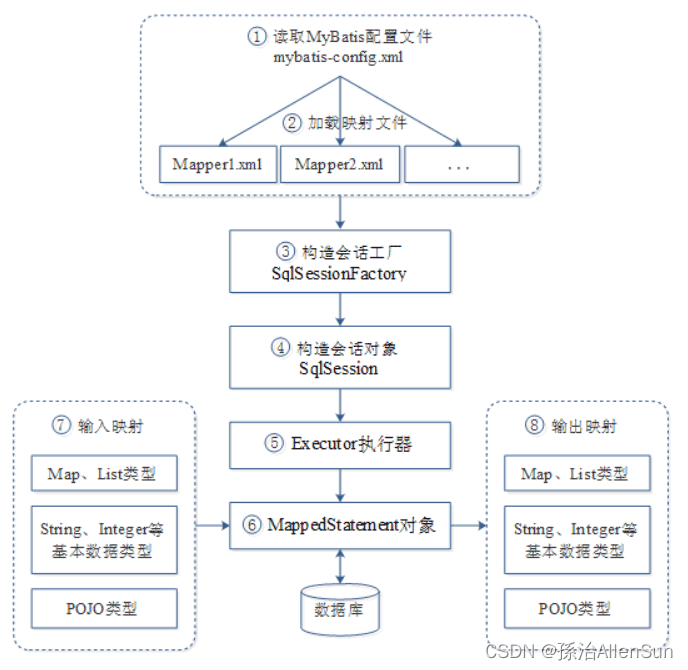
(1)读取MyBatis配置文件mybatis-config.xml。mybatis-config.xml作为MyBatis的全局配置文件,配置了MyBatis的运行环境等信息,其中主要内容是获取数据库连接。(2)加载映射文件Mapper.xml。Mapper.xml文件即SQL映射文件,该文件中配置了操作数据库的SQL语句,需要在mybatis-config.xml中加载才能执行。mybatis-config.xml可以加载多个配置文件,每个配置文件对应数据库中的一张表。
(3)构建会话工厂。通过MyBatis的环境等配置信息构建会话工厂SqlSessionFactory。
(4)创建SqlSession对象。由会话工厂创建SqlSession对象,该对象中包含了执行SQL的所有方法。
(5)MyBatis底层定义了一个Executor接口来操作数据库,它会根据SqlSession传递的参数动态的生成需要执行的SQL语句,同时负责查询缓存的维护。
(6)在Executor接口的执行方法中,包含一个MappedStatement类型的参数,该参数是对映射信息的封装,用来存储要映射的SQL语句的id、参数等。Mapper.xml文件中一个SQL对应一个MappedStatement对象,SQL的id即是MappedStatement的id。
(7)输入参数映射。在执行方法时,MappedStatement对象会对用户执行SQL语句的输入参数进行定义(可以定义为Map、List类型、基本类型和POJO类型),Executor执行器会通过MappedStatement对象在执行SQL前,将输入的Java对象映射到SQL语句中。这里对输入参数的映射过程就类似于JDBC编程中对preparedStatement对象设置参数的过程。
(8)输出结果映射。在数据库中执行完SQL语句后,MappedStatement对象会对SQL执行输出的结果进行定义(可以定义为Map和List类型、基本类型、POJO类型),Executor执行器会通过MappedStatement对象在执行SQL语句后,将输出结果映射至Java对象中。这种将输出结果映射到Java对象的过程就类似于JDBC编程中对结果的解析处理过程。


—》SqlSessionFactoryBuilder的build方法:返回一个DefaultSqlSessionFactory对象,DefaultSqlSessionFactory是SqlSessionFactory的一个默认实现。
---------》创建xml解析器XMLConfigBuilder对象parser,构造器方法里会创建Configuration对象
---------》parser.parse方法:解析mybatis-config.xml中每个标签的内容,装填到Configuration对象并返回
---------------》parser.evalNode方法:创建XNode节点类
---------------》parseConfiguration方法:以上面的XNode节点类做参数
------------------------》propertiesElement方法:找到config.xml文件里的properties标签,标签里的resource标签是“jdbc.properties”数据源配置文件的url,根据url找到配置文件里的数据(名称+密码+mysql驱动类),解析出来的数据源数据放进全局类Properties里面,Properties放到XNode类中
------------------------》environmentsElement方法:使用dataSourceElement方法获取XNode参数中的类Properties的数据源信息(名称+密码+mysql驱动类),最后调用setEnvironment方法把事务工厂和数据源信息封装到全局Configuration类里
-------------------------------获取执行sql分解线-------------------------------
------------------------》mapperElement方法:找到mapper.xml文件里的mapper标签,标签里的resource标签是“mapper.xml”sql配置文件的url
------------------------------》创建XMLMapperBuilder解析器对象,传入(文件流,url,Configuration对象)等参数,调用解析器方法parse
------------------------------------》evalNode()获取根节点对应的XNode对象,里面是mapper.xml文件的配置内容
------------------------------------》configurationElement方法:解析mapper.xml文件里的所有标签
-------------------------------------------》cacheRefElement(context.evalNode(“cache-ref”));解析标签,设置二级缓存
-------------------------------------------》cacheElement(context.evalNode(“cache”));解析标签,设置一级缓存
-------------------------------------------》parameterMapElement(context.evalNodes(“/mapper/parameterMap”));解析所有的标签,解析parameterMap,获取sql的参数信息
-------------------------------------------》 resultMapElements(context.evalNodes(“/mapper/resultMap”));解析resultMap,获取sql的结果集类型
-------------------------------------------》 sqlElement(context.evalNodes(“/mapper/sql”));解析所有的标签,解析sql片段,获取到所有sql
-------------------------------------------》buildStatementFromContext(context.evalNodes(“select|insert|update|delete”));解析所有的
-------------------------------------------------》parseStatementNode方法:获取
-------------------------------------------------------》addMappedStatement方法:addMappedStatement方法里有很多变量,对应sql标签里所有的属性值。使用MappedStatement对象的Builder方法,把这些所有数据封装到Configuration的mappedStatements属性里面。
-------------------------------获取执行sql分解线-------------------------------
---------》得到一个装填好配置信息的Configuration对象,里面包含config.xml配置文件里每个标签配置项的数据
—》build(Configuration)方法生成SqlSessionFactory对象DefaultSqlSessionFactory,DefaultSqlSessionFactory是SqlSessionFactory的一个默认实现。至此,完成读取config.xml的数据源信息,完成读取mapper.xml的sql配置信息,并且把这些配置信息放到Configuration对象里,然后使用Configuration创建SqlSessionFactory对象。—》sqlSessionFactory.openSession:
---------》openSessionFromDataSource方法,使用参数Configuration对象,创建执行器Executor对象,封装信息到DefaultSqlSession对象并返回
---------------》获取全局信息:从获取configuration中获取Environment对象,Environment包含了数据库配置。从Environment获取DataSource数据源,从DataSource数据源中获取Connection连接对象,从DataSource数据源中获取TransactionFactory事务工厂,从TransactionFactory中创建事务Transaction对象
---------------》newExecutor方法:创建执行器,返回一个Executor对象。
---------------------》创建的Executor有三种类型:Batch批量执行器、Reuse复用执行器、Simple简单执行器(默认)。Executor 作为一个接口,包含更新,查询,事务等一系列方法。每个SqlSession对象都会有一个Executor对象,SqlSession接口里的操作抽象方法都会由Executor执行器执行。
---------------------》判断一级缓存是否开启,如果一级缓存开启(默认是开启的),还会用CachingExecutor来包装SimpleExecutor执行器,在这里用到了装饰者设计模式。最终返回一个创建好的执行器。
---------------》DefaultSqlSession构造器方法:把执行器Executor和Configuration对象封装到DefaultSqlSession对象里,DefaultSqlSession对象是SqlSession的默认实现。
—》sqlSessionFactory.openSession执行完毕返回一个SqlSession对象session,sqlSession是操作数据库的高级接口,我们操作数据库都是通过这个接口操作的。主要会提供一些api接口,如增删改查,提交关闭,回滚等。—》session.selectOne方法:Mybatis会在一开始加载的时候将每个标签中的sql语句解析后包装成MappedStatement对象,并以类全路径名+方法名为key,MappedStatement为value缓存在内存中。在执行对应的方法时,就会根据这个唯一路径找到mapper.xml里这条解析后的sql语句并且执行返回结果。所以selectOne参数里要传入那句sql的配置id,还有参数parameter,这样才能生成key值找到对应的value
---------------》selectList方法
---------------------》configuration.getMappedStatement方法:从configuration的成员变量mappedStatements中获取MappedStatement对象。mappedStatements是Map
---------------------》executor.query方法:使用executor成员变量来执行查询并且指定结果处理器,并且返回结果,返回结果为一个list集合
---------------------------》MappedStatement的getBoundSql:从MappedStatement的成员变量sqlSource中获取BoundSql,也就是从mapper.xml里解析过后的sql语句
---------------------------------》sqlSourceParser.parse方法:解析处理sql,会将#{}解析替换为?
---------------------------》createCacheKey方法:创建缓存
---------------------------------》创建CacheKey:通过分页,limit还有sql等4个条件来创建缓存key,有效的避免缓存key重复
---------------------------》query方法:查询数据库
---------------------------------》MappedStatement的getCache方法:先获取二级缓存。如果二级缓存不为null,会先到二级缓存中查询数据,如果查询结果是null,就调用delegate.query方法直接到数据库里查询,然后把查询结果加入到二级缓存里。最后返回查询结果list。如果二级缓存一开始就是null,那就直接调用delegate.query方法从数据库里查数据。
---------------------------------》delegate.query方法:首先会判断一级缓存的key值在一级缓存localCache的HashMap里有没有对应的value,如果value不是null,就调用handleLocallyCacheOutputParameters方法。如果一级缓存的value是null,再调用queryFromDatabase方法从数据库中获取数据。
---------------------------------------》queryFromDatabase方法:从数据库查询的逻辑主要通过这个 queryFromDatabase 的方法实现。在将数据查完之后,会将数据加入到一级缓存里面。只要在这个sqlSession没有关闭,那么在这段时间的这条查询语句的结果是可以直接在这个一级缓存里面去拿。queryFromDatabase里调用doQuery方法负责实际的sql查询
---------------------------------------------》SimpleExecutor的doQuery:里面主要会获取一个StatementHandler的一个对象,这个对象主要是用来获取connection连接,获取preStatement,参数映射,处理结果集等。
---------------------------------------------------》getConfiguration方法:获取Configuration类
---------------------------------------------------》configuration.newStatementHandler方法:创建StatementHandler的handler对象,StatementHandler 是用来管理JDBC中的Statement对象,并进行和数据库的操作,StatementHandler接口有很多抽象法方法可供调用,例如query/update等等。
---------------------------------------------------》prepareStatement(handler, ms.getStatementLog());:创建Statement。getConnection获取数据库连接。给sql设置参数。
---------------------------------------------------》handler.query方法:执行sql操作,生成一个PreparedStatement进行一个预处理
---------------------------------------------------------》handleResultSets方法调用getFirstResultSet方法查询到并返回查询结果
—》session.selectOne方法得到list结果参考文章:
(1)MyBatis原理系列(一)-手把手带你阅读MyBatis源码(五)Mybatis补充知识
【1】Mybatis中用到的设计模式
日志模块:代理模式、适配器模式
数据源模块:代理模式、工厂模式
缓存模块:装饰器模式
初始化阶段:建造者模式
代理阶段:策略模式
数据读写阶段:模板模式
插件化开发:责任链模式(1)代理模式
(1)什么是代理模式?
代理模式学习文章:添加链接描述(2)代理方式获取Mapper -> getMapper()
 思考一个问题,通常的Mapper接口我们都没有实现的方法却可以使用,是为什么呢?答案很简单动态代理。
开始之前介绍一下MyBatis初始化时对接口的处理:MapperRegistry是Configuration中的一个属性,它内部维护一个HashMap用于存放mapper接口的工厂类,每个接口对应一个工厂类。mappers中可以
配置接口的包路径,或者某个具体的接口类。
当解析mappers标签时,它会判断解析到的是mapper配置文件时,会再将对应配置文件中的增删改查标签 封装成MappedStatement对象,存入mappedStatements中。(上文介绍了)当判断解析到接口时,会建此接口对应的MapperProxyFactory对象,存入HashMap中,key =接口的字节码对象,value =此接口对应的MapperProxyFactory对象。
下面去看一下getMapper方法的实现过程。
首先是DefaultSqlSession中的getMapper 可以看到调用的是Configuration中的getMapper

这里我们看到了mapperRegistry对象,这个也就是在初始化过程中将
Mapper的代理对象存储的位置。接着我们进到mapperRegistry.getMapper方法中:

mapperRegistry.newInstance方法

到这里我们也就能理解了,在初始化过程中,将配置文件中配置的mapper对应的接口创建一个代理对象存到Configuration对象的mapperRegistry对象中,将mapper的class全路径限定名称作为Key,将代理对象作为value存到一个mapper中。调用getMapper方法是直接根据Key就能获取代理对象了。(2)invoke方法执行
在动态代理返回了示例后,我们就可以直接调用mapper类中的方法了,但代理对象调用方法,执行是在MapperProxy中的invoke方法中。
 进入execute方法:

可以看到这里定义了很多操作的类型insert/select/update/delete,就拿select方法来说:


进入sqlSession.select方法,

发现最终还是有executor来执行query方法来执行操作,这个跟传统的方式就没有什么区别了。(2)工厂模式【简单工厂模式】
(1)什么是工厂模式?学习文章:https://www.runoob.com/design-pattern/factory-pattern.html
工厂模式就是提供一个工厂类,当有客户端需要调用的时候,只调用这个工厂类就可以得到自己想要的结果,从而无需关注某类的具体实现过程。(2)SqlSessionFactory
在Mybatis中运用工厂模式最典型的就是SqlSessionFactory。SqlSession是Mybatis中最最最核心的一个模块了。可以简单的理解,Mybatis中所有的sql都是通过SqlSession来最终执行的。可以执行jdbc的操作(增删改查)。SqlSessionFactory就是构建SqlSession对象的一个工厂类。工厂模式用一句话来说就是用来帮你创建对象的。SqlSessionFactory中有一个openSession(…)方法。
public interface SqlSessionFactory { SqlSession openSession(); SqlSession openSession(boolean autoCommit); SqlSession openSession(Connection connection); SqlSession openSession(TransactionIsolationLevel level); SqlSession openSession(ExecutorType execType); SqlSession openSession(ExecutorType execType, boolean autoCommit); SqlSession openSession(ExecutorType execType, TransactionIsolationLevel level); SqlSession openSession(ExecutorType execType, Connection connection); Configuration getConfiguration();- 1
- 2
- 3
- 4
- 5
- 6
- 7
- 8
- 9
- 10
- 11
- 12
- 13
- 14
- 15
- 16
- 17
- 18
- 19
- 20
可以看到有很多种创建SqlSession的方式。其中SqlSession openSession(ExecutorType execType);就是一个很典型的应用了工厂模式来达到目的的。
点进去这个SqlSession openSession(ExecutorType execType);到DefaultSqlSessionFactory类中,我们发现又调用了一个:
@Override public SqlSession openSession(ExecutorType execType) { return openSessionFromDataSource(execType, null, false); }- 1
- 2
- 3
- 4
- 5
继续点进去:
private SqlSession openSessionFromDataSource(ExecutorType execType, TransactionIsolationLevel level, boolean autoCommit) { Transaction tx = null; try { final Environment environment = configuration.getEnvironment(); final TransactionFactory transactionFactory = getTransactionFactoryFromEnvironment(environment); tx = transactionFactory.newTransaction(environment.getDataSource(), level, autoCommit); //Executor:SQL语句的执行器 final Executor executor = configuration.newExecutor(tx, execType); return new DefaultSqlSession(configuration, executor, autoCommit); } catch (Exception e) { closeTransaction(tx); // may have fetched a connection so lets call close() throw ExceptionFactory.wrapException("Error opening session. Cause: " + e, e); } finally { ErrorContext.instance().reset(); } }- 1
- 2
- 3
- 4
- 5
- 6
- 7
- 8
- 9
- 10
- 11
- 12
- 13
- 14
- 15
- 16
- 17
- 18
其中我们要讲的最核心的就是:“创建SQL语句的执行器”
//Executor:SQL语句的执行器 final Executor executor = configuration.newExecutor(tx, execType);- 1
- 2
可以看到,在创建Executor对象的时候,是根据不同的类型,创建不同的对象的。
public Executor newExecutor(Transaction transaction, ExecutorType executorType) { executorType = executorType == null ? defaultExecutorType : executorType; executorType = executorType == null ? ExecutorType.SIMPLE : executorType; Executor executor; if (ExecutorType.BATCH == executorType) { executor = new BatchExecutor(this, transaction); } else if (ExecutorType.REUSE == executorType) { executor = new ReuseExecutor(this, transaction); } else { executor = new SimpleExecutor(this, transaction); } if (cacheEnabled) { executor = new CachingExecutor(executor); } executor = (Executor) interceptorChain.pluginAll(executor); return executor; }- 1
- 2
- 3
- 4
- 5
- 6
- 7
- 8
- 9
- 10
- 11
- 12
- 13
- 14
- 15
- 16
- 17
- 18
(3)装饰器模式【executor、cache】
(1)什么是装饰器模式?学习文章:https://www.runoob.com/design-pattern/decorator-pattern.html
动态地给一个对象添加一些额外的职责。 就增加功能来说,装饰模式相比生成子类更为灵活。使用场景:
1-需要扩展一个类的功能,或给一个类增加附加功能。
2-需要动态地给一个对象增加功能,这些功能可以再动态地撤销。
3-需要为一批的兄弟类进行改装或加装功能,当然是首选装饰模式。一般在开发生产中,对于新需求的实现,我们一般会有两种方式来处理,一种是直接修改已有组件的代码,另一种是使用继承方式。第一种显然会破坏已有组件的稳定性。第二种,会导致大量子类的出现。装饰器模式可以动态的为对象添加功能,它是基于组合的方式来实现该功能的。组合优于继承。
装饰器模式也是需要一个原始需求抽象类或者接口,由它的子类或者实现类来完成它的实际功能,这是正常需求。当我们需要做扩展需求的时候,需要一个装饰抽象类(注意这里只有抽象类,没有接口)来继承该原始需求抽象类或者接口,目的是为了定义委托对象。再由该装饰抽象类的子类来完成扩展的需求。具体实例可以参考 设计模式整理
在mybatis的缓存模块中,它使用了装饰器模式的变体,将装饰抽象类直接放到了装饰实现类的内部,为了做一个比较,我们来看一下它的原始需求接口,基本实现类和它的装饰实现类
(2)BlockingCache
package org.apache.ibatis.cache; import java.util.concurrent.locks.ReadWriteLock; //原始需求接口 public interface Cache { //该缓存对象的id String getId(); //向缓存中添加数据,一般情况下,key是CacheKey,value是查询结果 void putObject(Object var1, Object var2); //根据指定的key,在缓存中查找对应的结果对象 Object getObject(Object var1); //删除key对应的缓存项 Object removeObject(Object var1); //清空缓存 void clear(); //缓存项的个数 int getSize(); //获取读写锁 ReadWriteLock getReadWriteLock(); }- 1
- 2
- 3
- 4
- 5
- 6
- 7
- 8
- 9
- 10
- 11
- 12
- 13
- 14
- 15
- 16
- 17
- 18
- 19
- 20
基本实现类PerpetualCache,我们可以看到它就是对一个HashMap的操作,实现了缓存的基本功能。
public class PerpetualCache implements Cache { //Cache对象的唯一标识 private final String id; //用以记录缓存项的Map对象 private Map<Object, Object> cache = new HashMap(); public PerpetualCache(String id) { this.id = id; } public String getId() { return this.id; } public int getSize() { return this.cache.size(); } public void putObject(Object key, Object value) { this.cache.put(key, value); } public Object getObject(Object key) { return this.cache.get(key); } public Object removeObject(Object key) { return this.cache.remove(key); } public void clear() { this.cache.clear(); } public ReadWriteLock getReadWriteLock() { return null; } public boolean equals(Object o) { if(this.getId() == null) { throw new CacheException("Cache instances require an ID."); } else if(this == o) { return true; } else if(!(o instanceof Cache)) { return false; } else { Cache otherCache = (Cache)o; return this.getId().equals(otherCache.getId()); } } public int hashCode() { if(this.getId() == null) { throw new CacheException("Cache instances require an ID."); } else { return this.getId().hashCode(); } } }- 1
- 2
- 3
- 4
- 5
- 6
- 7
- 8
- 9
- 10
- 11
- 12
- 13
- 14
- 15
- 16
- 17
- 18
- 19
- 20
- 21
- 22
- 23
- 24
- 25
- 26
- 27
- 28
- 29
- 30
- 31
- 32
- 33
- 34
- 35
- 36
- 37
- 38
- 39
- 40
- 41
- 42
- 43
- 44
- 45
- 46
- 47
- 48
- 49
- 50
- 51
- 52
- 53
- 54
- 55
- 56
- 57
- 58
- 59
它的装饰器实现类(以BlockingCache为例,实际上它有很多的装饰器实现类)
//阻塞版本的缓存装饰器 public class BlockingCache implements Cache { //阻塞超时时长 private long timeout; //所有的装饰器实现类所共有的底层缓存,所代表着装饰抽象类,虽然这里不是一个抽象类,而是一个接口 //相当于在装饰抽象类中使用委托机制是一个道理,这里委托的也是基本缓存实现类PerpetualCache private final Cache delegate; //每个key都有所对应的重入锁ReetrantLock对象 private final ConcurrentHashMap<Object, ReentrantLock> locks; public BlockingCache(Cache delegate) { this.delegate = delegate; this.locks = new ConcurrentHashMap(); } public String getId() { return this.delegate.getId(); } public int getSize() { return this.delegate.getSize(); } //此处进行了重入锁的释放,对委托类进行调用外,进行了增强 public void putObject(Object key, Object value) { try { this.delegate.putObject(key, value); } finally { this.releaseLock(key); } } //此处进行了锁操作和释放,具体可以看到后面的实现 public Object getObject(Object key) { this.acquireLock(key); Object value = this.delegate.getObject(key); if(value != null) { this.releaseLock(key); } return value; } public Object removeObject(Object key) { this.releaseLock(key); return null; } public void clear() { this.delegate.clear(); } public ReadWriteLock getReadWriteLock() { return null; } //由key来得到锁 private ReentrantLock getLockForKey(Object key) { //重入锁对象 ReentrantLock lock = new ReentrantLock(); //如果locks(ConcurrentHashMap)中存在key,则赶回value,如果不存在则将key,value写入locks中,并返回null ReentrantLock previous = (ReentrantLock)this.locks.putIfAbsent(key, lock); //如果key拿不到锁,则使用新的lock,如果能拿到则使用拿到的value return previous == null?lock:previous; } //获得锁 private void acquireLock(Object key) { //拿到重入锁 Lock lock = this.getLockForKey(key); //如果该锁是带超时时间的 if(this.timeout > 0L) { try { //在timeout时长后去拿取锁(注意这里不是锁多长时间),拿到返回true,拿不到返回false boolean acquired = lock.tryLock(this.timeout, TimeUnit.MILLISECONDS); //拿不到锁,抛出异常 if(!acquired) { throw new CacheException("Couldn't get a lock in " + this.timeout + " for the key " + key + " at the cache " + this.delegate.getId()); } } catch (InterruptedException var4) { throw new CacheException("Got interrupted while trying to acquire lock for key " + key, var4); } //如果该锁不带超时时间 } else { //直接锁定 lock.lock(); } } //释放锁 private void releaseLock(Object key) { //拿取锁 ReentrantLock lock = (ReentrantLock)this.locks.get(key); //判断拿到的锁是否是当前线程持有的 if(lock.isHeldByCurrentThread()) { //释放锁 lock.unlock(); } } public long getTimeout() { return this.timeout; } public void setTimeout(long timeout) { this.timeout = timeout; } }- 1
- 2
- 3
- 4
- 5
- 6
- 7
- 8
- 9
- 10
- 11
- 12
- 13
- 14
- 15
- 16
- 17
- 18
- 19
- 20
- 21
- 22
- 23
- 24
- 25
- 26
- 27
- 28
- 29
- 30
- 31
- 32
- 33
- 34
- 35
- 36
- 37
- 38
- 39
- 40
- 41
- 42
- 43
- 44
- 45
- 46
- 47
- 48
- 49
- 50
- 51
- 52
- 53
- 54
- 55
- 56
- 57
- 58
- 59
- 60
- 61
- 62
- 63
- 64
- 65
- 66
- 67
- 68
- 69
- 70
- 71
- 72
- 73
- 74
- 75
- 76
- 77
- 78
- 79
- 80
- 81
- 82
- 83
- 84
- 85
- 86
- 87
- 88
- 89
- 90
- 91
- 92
- 93
- 94
- 95
- 96
- 97
- 98
- 99
- 100
- 101
- 102
- 103
- 104
- 105
- 106
(3)缓存useNewCache


由上面的代码我们可以知道,分别对PerpetualCache做了BlockingCache ->SynchronizedCache ->LoggingCache -> SerializedCache ->ScheduledCache ->LruCache -> PerpetualCache装饰,我们来看看这些装饰类的功能:- BlockingCache: 使用ReentrantLock来防止高速缓存未命中时对数据库的大规模访问,它设置了对高速缓存键的锁定
- SynchronizedCache:同步Cache,实现比较简单,直接使用synchronized修饰方法。
- LoggingCache:日志功能,装饰类,用于记录缓存的命中率,如果开启了DEBUG模式,则会输出命中率日志。
- SerializedCache:序列化功能,将值序列化后存到缓存中。该功能用于缓存返回一份实例的Copy,用于保存线程安全。
- LruCache:采用了Lru算法的Cache实现,移除最近最少使用的Key/Value。
- ScheduledCache:设置定时刷新缓存。
- PerpetualCache:作为最基础的缓存类,底层实现比较简单,直接使用了HashMap。
可以发现,最终的操作都是委托给PerpetualCache来做的,其它的装饰器只是附带了一些格外的功能
(4)建造者模式
(1)什么是建造者模式?学习文章:https://www.runoob.com/design-pattern/builder-pattern.html
建造者模式(Builder Pattern)指的是将一个复杂的构建与其表示相分离,使得同样的构建过程可以创建不同的表示。它使用多个简单的对象一步一步构建成一个复杂的对象。这种类型的设计模式属于创建型模式,它提供了一种创建对象的最佳方式。建造者(Builder)模式的主要角色如下:
1-产品角色(Product):它是包含多个组成部件的复杂对象,由具体建造者来创建其各个零部件。
2-抽象建造者(Builder):它是一个包含创建产品各个子部件的抽象方法的接口,通常还包含一个返回复杂产品的方法 getResult()。
3-具体建造者(Concrete Builder):实现 Builder 接口,完成复杂产品的各个部件的具体创建方法。
4-指挥者(Director):它调用建造者对象中的部件构造与装配方法完成复杂对象的创建,在指挥者中不涉及具体产品的信息。

使用场景:
1-需要生成的对象具有复杂的内部结构,实例化对象时要屏蔽掉对象内部的细节,让上层代码与复杂对象的实例化过程解耦,可以使用建造者模式;简而言之,如果“遇到多个构造器参数时要考虑用构建器”
2-对象的实例化是依赖各个组件的产生以及装配顺序,关注的是一步一步地组装出目标对象,可以使用建造器模式与工厂模式的区别:

(2)mybatis的初始化build方法:SqlSessionFactoryBuilder

(1)Configuration : Mybatis 启动初始化的核心就是将所有 xml 配置文件信息加载到 Configuration 对象中,Configuration是单例的,生命周期是应用级的。
(2)XMLConfigBuilder: 主要负责解析mybatis-config.xml
(3)XMLMapperBuilder: 主要负责解析映射配置文件(各个Mapper.xml)
(4)XMLStatementBuilder: 主要负责解析映射配置文件中的SQL节点
(5)MapperBuilderAssistant:辅助XMLMapperBuilder解析mapper.xml文件,完善属性信息,并注册到configuration对象(单一职责原则)
(6)BaseBuilder:所有解析器的父类,包含配置文件实例,为解析文件提供的一些通用的方法
build:这就是一个建造者模式的简单实现。屏蔽了创建对象的复杂过程,但并没有流式编程的思想。并不是建造者模式的最佳实现。public class SqlSessionFactoryBuilder { public SqlSessionFactory build(InputStream inputStream) { return build(inputStream, null, null); } public SqlSessionFactory build(InputStream inputStream, String environment, Properties properties) { try { XMLConfigBuilder parser = new XMLConfigBuilder(inputStream, environment, properties); return build(parser.parse()); } catch (Exception e) { throw ExceptionFactory.wrapException("Error building SqlSession.", e); } finally { ErrorContext.instance().reset(); try { inputStream.close(); } catch (IOException e) { // Intentionally ignore. Prefer previous error. } } } public SqlSessionFactory build(Configuration config) { return new DefaultSqlSessionFactory(config); } //省略了一些代码- 1
- 2
- 3
- 4
- 5
- 6
- 7
- 8
- 9
- 10
- 11
- 12
- 13
- 14
- 15
- 16
- 17
- 18
- 19
- 20
- 21
- 22
- 23
- 24
- 25
- 26
(3)XMLConfigBuilder
public class XMLConfigBuilder extends BaseBuilder { //是否解析过mybatis-config.xml文件 private boolean parsed; //xml文件的解析器 private final XPathParser parser; //读取默认的environment private String environment; //负责创建和缓存Reflector对象 private final ReflectorFactory localReflectorFactory = new DefaultReflectorFactory(); public Configuration parse() { if (parsed) { throw new BuilderException("Each XMLConfigBuilder can only be used once."); } parsed = true; parseConfiguration(parser.evalNode("/configuration")); return configuration; } private void parseConfiguration(XNode root) { try { //issue #117 read properties first //解析节点 propertiesElement(root.evalNode("properties")); //解析节点 Properties settings = settingsAsProperties(root.evalNode("settings")); loadCustomVfs(settings); //解析节点 typeAliasesElement(root.evalNode("typeAliases")); //解析节点 pluginElement(root.evalNode("plugins")); //解析节点 objectFactoryElement(root.evalNode("objectFactory")); //解析节点 objectWrapperFactoryElement(root.evalNode("objectWrapperFactory")); //解析节点 reflectorFactoryElement(root.evalNode("reflectorFactory")); settingsElement(settings);//将settings填充到configuration // read it after objectFactory and objectWrapperFactory issue #631 //解析节点 environmentsElement(root.evalNode("environments")); //解析节点 databaseIdProviderElement(root.evalNode("databaseIdProvider")); //解析节点 typeHandlerElement(root.evalNode("typeHandlers")); //解析节点 mapperElement(root.evalNode("mappers")); } catch (Exception e) { throw new BuilderException("Error parsing SQL Mapper Configuration. Cause: " + e, e); } } private void mapperElement(XNode parent) throws Exception { if (parent != null) { for (XNode child : parent.getChildren()) {//处理mapper子节点 if ("package".equals(child.getName())) {//package子节点 String mapperPackage = child.getStringAttribute("name"); configuration.addMappers(mapperPackage); } else {//获取节点的resource、url或mapperClass属性这三个属性互斥 String resource = child.getStringAttribute("resource"); String url = child.getStringAttribute("url"); String mapperClass = child.getStringAttribute("class"); //主要用的就是resource:例,if (resource != null && url == null && mapperClass == null) {//如果resource不为空 ErrorContext.instance().resource(resource); InputStream inputStream = Resources.getResourceAsStream(resource);//加载mapper文件 //实例化XMLMapperBuilder解析mapper映射文件 XMLMapperBuilder mapperParser = new XMLMapperBuilder(inputStream, configuration, resource, configuration.getSqlFragments()); mapperParser.parse(); } else if (resource == null && url != null && mapperClass == null) {//如果url不为空 ErrorContext.instance().resource(url); InputStream inputStream = Resources.getUrlAsStream(url);//加载mapper文件 //实例化XMLMapperBuilder解析mapper映射文件 XMLMapperBuilder mapperParser = new XMLMapperBuilder(inputStream, configuration, url, configuration.getSqlFragments()); mapperParser.parse(); } else if (resource == null && url == null && mapperClass != null) {//如果class不为空 Class<?> mapperInterface = Resources.classForName(mapperClass);//加载class对象 configuration.addMapper(mapperInterface);//向代理中心注册mapper } else { throw new BuilderException("A mapper element may only specify a url, resource or class, but not more than one."); } } } } } //省略了一些方法 } - 1
- 2
- 3
- 4
- 5
- 6
- 7
- 8
- 9
- 10
- 11
- 12
- 13
- 14
- 15
- 16
- 17
- 18
- 19
- 20
- 21
- 22
- 23
- 24
- 25
- 26
- 27
- 28
- 29
- 30
- 31
- 32
- 33
- 34
- 35
- 36
- 37
- 38
- 39
- 40
- 41
- 42
- 43
- 44
- 45
- 46
- 47
- 48
- 49
- 50
- 51
- 52
- 53
- 54
- 55
- 56
- 57
- 58
- 59
- 60
- 61
- 62
- 63
- 64
- 65
- 66
- 67
- 68
- 69
- 70
- 71
- 72
- 73
- 74
- 75
- 76
- 77
- 78
- 79
- 80
- 81
- 82
- 83
- 84
- 85
- 86
(4)XMLMapperBuilder
public class XMLMapperBuilder extends BaseBuilder { private final XPathParser parser; private final MapperBuilderAssistant builderAssistant; private final Map<String, XNode> sqlFragments; private final String resource; public void parse() { //判断是否已经加载该配置文件 if (!configuration.isResourceLoaded(resource)) { configurationElement(parser.evalNode("/mapper"));//处理mapper节点 configuration.addLoadedResource(resource);//将mapper文件添加到configuration.loadedResources中 bindMapperForNamespace();//注册mapper接口 } //处理解析失败的ResultMap节点 parsePendingResultMaps(); //处理解析失败的CacheRef节点 parsePendingCacheRefs(); //处理解析失败的Sql语句节点 parsePendingStatements(); } private void configurationElement(XNode context) { try { //获取mapper节点的namespace属性 String namespace = context.getStringAttribute("namespace"); if (namespace == null || namespace.equals("")) { throw new BuilderException("Mapper's namespace cannot be empty"); } //设置builderAssistant的namespace属性 builderAssistant.setCurrentNamespace(namespace); //解析cache-ref节点 cacheRefElement(context.evalNode("cache-ref")); //重点分析 :解析cache节点----------------1------------------- cacheElement(context.evalNode("cache")); //解析parameterMap节点(已废弃) parameterMapElement(context.evalNodes("/mapper/parameterMap")); //重点分析 :解析resultMap节点(基于数据结果去理解)----------------2------------------- resultMapElements(context.evalNodes("/mapper/resultMap")); //解析sql节点 sqlElement(context.evalNodes("/mapper/sql")); //重点分析 :解析select、insert、update、delete节点 ----------------3------------------- buildStatementFromContext(context.evalNodes("select|insert|update|delete")); } catch (Exception e) { throw new BuilderException("Error parsing Mapper XML. The XML location is '" + resource + "'. Cause: " + e, e); } } private void bindMapperForNamespace() { //获取命名空间 String namespace = builderAssistant.getCurrentNamespace(); if (namespace != null) { Class<?> boundType = null; try { //通过命名空间获取mapper接口的class对象 boundType = Resources.classForName(namespace); } catch (ClassNotFoundException e) { //ignore, bound type is not required } if (boundType != null) { if (!configuration.hasMapper(boundType)) {//是否已经注册过该mapper接口? // Spring may not know the real resource name so we set a flag // to prevent loading again this resource from the mapper interface // look at MapperAnnotationBuilder#loadXmlResource //将命名空间添加至configuration.loadedResource集合中 configuration.addLoadedResource("namespace:" + namespace); //将mapper接口添加到mapper注册中心 //mapperRegistry.addMapper(type); configuration.addMapper(boundType); } } } } //重点分析 :解析cache节点----------------1------------------- private void cacheElement(XNode context) throws Exception { if (context != null) { //获取cache节点的type属性,默认为PERPETUAL String type = context.getStringAttribute("type", "PERPETUAL"); //找到type对应的cache接口的实现 Class<? extends Cache> typeClass = typeAliasRegistry.resolveAlias(type); //读取eviction属性,既缓存的淘汰策略,默认LRU String eviction = context.getStringAttribute("eviction", "LRU"); //根据eviction属性,找到装饰器 Class<? extends Cache> evictionClass = typeAliasRegistry.resolveAlias(eviction); //读取flushInterval属性,既缓存的刷新周期 Long flushInterval = context.getLongAttribute("flushInterval"); //读取size属性,既缓存的容量大小 Integer size = context.getIntAttribute("size"); //读取readOnly属性,既缓存的是否只读 boolean readWrite = !context.getBooleanAttribute("readOnly", false); //读取blocking属性,既缓存的是否阻塞 boolean blocking = context.getBooleanAttribute("blocking", false); Properties props = context.getChildrenAsProperties(); //通过builderAssistant创建缓存对象,并添加至configuration builderAssistant.useNewCache(typeClass, evictionClass, flushInterval, size, readWrite, blocking, props); } } //重点分析 :解析resultMap节点(基于数据结果去理解)----------------2------------------- //解析resultMap节点,实际就是解析sql查询的字段与pojo属性之间的转化规则 private void resultMapElements(List<XNode> list) throws Exception { //遍历所有的resultmap节点 for (XNode resultMapNode : list) { try { //解析具体某一个resultMap节点 resultMapElement(resultMapNode); } catch (IncompleteElementException e) { // ignore, it will be retried } } } private ResultMap resultMapElement(XNode resultMapNode) throws Exception { return resultMapElement(resultMapNode, Collections.<ResultMapping> emptyList()); } private ResultMap resultMapElement(XNode resultMapNode, List<ResultMapping> additionalResultMappings) throws Exception { ErrorContext.instance().activity("processing " + resultMapNode.getValueBasedIdentifier()); //获取resultmap节点的id属性 String id = resultMapNode.getStringAttribute("id", resultMapNode.getValueBasedIdentifier()); //获取resultmap节点的type属性 String type = resultMapNode.getStringAttribute("type", resultMapNode.getStringAttribute("ofType", resultMapNode.getStringAttribute("resultType", resultMapNode.getStringAttribute("javaType")))); //获取resultmap节点的extends属性,描述继承关系 String extend = resultMapNode.getStringAttribute("extends"); //获取resultmap节点的autoMapping属性,是否开启自动映射 Boolean autoMapping = resultMapNode.getBooleanAttribute("autoMapping"); //从别名注册中心获取entity的class对象 Class<?> typeClass = resolveClass(type); Discriminator discriminator = null; //记录子节点中的映射结果集合 List<ResultMapping> resultMappings = new ArrayList<>(); resultMappings.addAll(additionalResultMappings); //从xml文件中获取当前resultmap中的所有子节点,并开始遍历 List<XNode> resultChildren = resultMapNode.getChildren(); for (XNode resultChild : resultChildren) { if ("constructor".equals(resultChild.getName())) {//处理节点 processConstructorElement(resultChild, typeClass, resultMappings); } else if ("discriminator".equals(resultChild.getName())) {//处理节点 discriminator = processDiscriminatorElement(resultChild, typeClass, resultMappings); } else {//处理节点 - 1
- 2
- 3
- 4
- 5
- 6
- 7
- 8
- 9
- 10
- 11
- 12
- 13
- 14
- 15
- 16
- 17
- 18
- 19
- 20
- 21
- 22
- 23
- 24
- 25
- 26
- 27
- 28
- 29
- 30
- 31
- 32
- 33
- 34
- 35
- 36
- 37
- 38
- 39
- 40
- 41
- 42
- 43
- 44
- 45
- 46
- 47
- 48
- 49
- 50
- 51
- 52
- 53
- 54
- 55
- 56
- 57
- 58
- 59
- 60
- 61
- 62
- 63
- 64
- 65
- 66
- 67
- 68
- 69
- 70
- 71
- 72
- 73
- 74
- 75
- 76
- 77
- 78
- 79
- 80
- 81
- 82
- 83
- 84
- 85
- 86
- 87
- 88
- 89
- 90
- 91
- 92
- 93
- 94
- 95
- 96
- 97
- 98
- 99
- 100
- 101
- 102
- 103
- 104
- 105
- 106
- 107
- 108
- 109
- 110
- 111
- 112
- 113
- 114
- 115
- 116
- 117
- 118
- 119
- 120
- 121
- 122
- 123
- 124
- 125
- 126
- 127
- 128
- 129
- 130
- 131
- 132
- 133
- 134
- 135
- 136
- 137
- 138
- 139
- 140
- 141
- 142
- 143
- 144
- 145
- 146
- 147
- 148
- 149
- 150
- 151
- 152
- 153
- 154
- 155
- 156
- 157
- 158
- 159
- 160
- 161
- 162
- 163
- 164
- 165
- 166
- 167
- 168
- 169
- 170
- 171
- 172
- 173
- 174
- 175
- 176
- 177
- 178
- 179
- 180
- 181
- 182
- 183
- 184
- 185
- 186
- 187
- 188
- 189
- 190
- 191
- 192
- 193
- 194
- 195
- 196
- 197
- 198
- 199
- 200
- 201
- 202
- 203
- 204
- 205
- 206
- 207
- 208
- 209
- 210
- 211
- 212
- 213
- 214
- 215
- 216
- 217
(5)XMLStatementBuilder
public class XMLStatementBuilder extends BaseBuilder { private final MapperBuilderAssistant builderAssistant; private final XNode context; private final String requiredDatabaseId; public void parseStatementNode() { //获取sql节点的id String id = context.getStringAttribute("id"); String databaseId = context.getStringAttribute("databaseId"); if (!databaseIdMatchesCurrent(id, databaseId, this.requiredDatabaseId)) { return; } /*获取sql节点的各种属性*/ Integer fetchSize = context.getIntAttribute("fetchSize"); Integer timeout = context.getIntAttribute("timeout"); String parameterMap = context.getStringAttribute("parameterMap"); String parameterType = context.getStringAttribute("parameterType"); Class<?> parameterTypeClass = resolveClass(parameterType); String resultMap = context.getStringAttribute("resultMap"); String resultType = context.getStringAttribute("resultType"); String lang = context.getStringAttribute("lang"); LanguageDriver langDriver = getLanguageDriver(lang); Class<?> resultTypeClass = resolveClass(resultType); String resultSetType = context.getStringAttribute("resultSetType"); StatementType statementType = StatementType.valueOf(context.getStringAttribute("statementType", StatementType.PREPARED.toString())); ResultSetType resultSetTypeEnum = resolveResultSetType(resultSetType); //根据sql节点的名称获取SqlCommandType(INSERT, UPDATE, DELETE, SELECT) String nodeName = context.getNode().getNodeName(); SqlCommandType sqlCommandType = SqlCommandType.valueOf(nodeName.toUpperCase(Locale.ENGLISH)); boolean isSelect = sqlCommandType == SqlCommandType.SELECT; boolean flushCache = context.getBooleanAttribute("flushCache", !isSelect); boolean useCache = context.getBooleanAttribute("useCache", isSelect); boolean resultOrdered = context.getBooleanAttribute("resultOrdered", false); // Include Fragments before parsing //在解析sql语句之前先解析节点 XMLIncludeTransformer includeParser = new XMLIncludeTransformer(configuration, builderAssistant); includeParser.applyIncludes(context.getNode()); // Parse selectKey after includes and remove them. //在解析sql语句之前,处理子节点,并在xml节点中删除 processSelectKeyNodes(id, parameterTypeClass, langDriver); // Parse the SQL (pre:and //解析sql语句是解析mapper.xml的核心,实例化sqlSource,使用sqlSource封装sql语句 SqlSource sqlSource = langDriver.createSqlSource(configuration, context, parameterTypeClass); String resultSets = context.getStringAttribute("resultSets");//获取resultSets属性 String keyProperty = context.getStringAttribute("keyProperty");//获取主键信息keyProperty String keyColumn = context.getStringAttribute("keyColumn");///获取主键信息keyColumn //根据were parsed and removed) 获取对应的SelectKeyGenerator的id KeyGenerator keyGenerator; String keyStatementId = id + SelectKeyGenerator.SELECT_KEY_SUFFIX; keyStatementId = builderAssistant.applyCurrentNamespace(keyStatementId, true); //获取keyGenerator对象,如果是insert类型的sql语句,会使用KeyGenerator接口获取数据库生产的id; if (configuration.hasKeyGenerator(keyStatementId)) { keyGenerator = configuration.getKeyGenerator(keyStatementId); } else { keyGenerator = context.getBooleanAttribute("useGeneratedKeys", configuration.isUseGeneratedKeys() && SqlCommandType.INSERT.equals(sqlCommandType)) ? Jdbc3KeyGenerator.INSTANCE : NoKeyGenerator.INSTANCE; } //通过builderAssistant实例化MappedStatement,并注册至configuration对象 builderAssistant.addMappedStatement(id, sqlSource, statementType, sqlCommandType, fetchSize, timeout, parameterMap, parameterTypeClass, resultMap, resultTypeClass, resultSetTypeEnum, flushCache, useCache, resultOrdered, keyGenerator, keyProperty, keyColumn, databaseId, langDriver, resultSets); } //省略了一些方法 }- 1
- 2
- 3
- 4
- 5
- 6
- 7
- 8
- 9
- 10
- 11
- 12
- 13
- 14
- 15
- 16
- 17
- 18
- 19
- 20
- 21
- 22
- 23
- 24
- 25
- 26
- 27
- 28
- 29
- 30
- 31
- 32
- 33
- 34
- 35
- 36
- 37
- 38
- 39
- 40
- 41
- 42
- 43
- 44
- 45
- 46
- 47
- 48
- 49
- 50
- 51
- 52
- 53
- 54
- 55
- 56
- 57
- 58
- 59
- 60
- 61
- 62
- 63
- 64
- 65
- 66
- 67
- 68
- 69
- 70
- 71
- 72
- 73
- 74
- 75
- 76
- 77
- 78
- 79
(6)XMLStatementBuilder
public class XMLStatementBuilder extends BaseBuilder { private final MapperBuilderAssistant builderAssistant; private final XNode context; private final String requiredDatabaseId; public void parseStatementNode() { //获取sql节点的id String id = context.getStringAttribute("id"); String databaseId = context.getStringAttribute("databaseId"); if (!databaseIdMatchesCurrent(id, databaseId, this.requiredDatabaseId)) { return; } /*获取sql节点的各种属性*/ Integer fetchSize = context.getIntAttribute("fetchSize"); Integer timeout = context.getIntAttribute("timeout"); String parameterMap = context.getStringAttribute("parameterMap"); String parameterType = context.getStringAttribute("parameterType"); Class<?> parameterTypeClass = resolveClass(parameterType); String resultMap = context.getStringAttribute("resultMap"); String resultType = context.getStringAttribute("resultType"); String lang = context.getStringAttribute("lang"); LanguageDriver langDriver = getLanguageDriver(lang); Class<?> resultTypeClass = resolveClass(resultType); String resultSetType = context.getStringAttribute("resultSetType"); StatementType statementType = StatementType.valueOf(context.getStringAttribute("statementType", StatementType.PREPARED.toString())); ResultSetType resultSetTypeEnum = resolveResultSetType(resultSetType); //根据sql节点的名称获取SqlCommandType(INSERT, UPDATE, DELETE, SELECT) String nodeName = context.getNode().getNodeName(); SqlCommandType sqlCommandType = SqlCommandType.valueOf(nodeName.toUpperCase(Locale.ENGLISH)); boolean isSelect = sqlCommandType == SqlCommandType.SELECT; boolean flushCache = context.getBooleanAttribute("flushCache", !isSelect); boolean useCache = context.getBooleanAttribute("useCache", isSelect); boolean resultOrdered = context.getBooleanAttribute("resultOrdered", false); // Include Fragments before parsing //在解析sql语句之前先解析节点 XMLIncludeTransformer includeParser = new XMLIncludeTransformer(configuration, builderAssistant); includeParser.applyIncludes(context.getNode()); // Parse selectKey after includes and remove them. //在解析sql语句之前,处理子节点,并在xml节点中删除 processSelectKeyNodes(id, parameterTypeClass, langDriver); // Parse the SQL (pre:and //解析sql语句是解析mapper.xml的核心,实例化sqlSource,使用sqlSource封装sql语句 SqlSource sqlSource = langDriver.createSqlSource(configuration, context, parameterTypeClass); String resultSets = context.getStringAttribute("resultSets");//获取resultSets属性 String keyProperty = context.getStringAttribute("keyProperty");//获取主键信息keyProperty String keyColumn = context.getStringAttribute("keyColumn");///获取主键信息keyColumn //根据were parsed and removed) 获取对应的SelectKeyGenerator的id KeyGenerator keyGenerator; String keyStatementId = id + SelectKeyGenerator.SELECT_KEY_SUFFIX; keyStatementId = builderAssistant.applyCurrentNamespace(keyStatementId, true); //获取keyGenerator对象,如果是insert类型的sql语句,会使用KeyGenerator接口获取数据库生产的id; if (configuration.hasKeyGenerator(keyStatementId)) { keyGenerator = configuration.getKeyGenerator(keyStatementId); } else { keyGenerator = context.getBooleanAttribute("useGeneratedKeys", configuration.isUseGeneratedKeys() && SqlCommandType.INSERT.equals(sqlCommandType)) ? Jdbc3KeyGenerator.INSTANCE : NoKeyGenerator.INSTANCE; } //通过builderAssistant实例化MappedStatement,并注册至configuration对象 builderAssistant.addMappedStatement(id, sqlSource, statementType, sqlCommandType, fetchSize, timeout, parameterMap, parameterTypeClass, resultMap, resultTypeClass, resultSetTypeEnum, flushCache, useCache, resultOrdered, keyGenerator, keyProperty, keyColumn, databaseId, langDriver, resultSets); } //省略了一些方法 }- 1
- 2
- 3
- 4
- 5
- 6
- 7
- 8
- 9
- 10
- 11
- 12
- 13
- 14
- 15
- 16
- 17
- 18
- 19
- 20
- 21
- 22
- 23
- 24
- 25
- 26
- 27
- 28
- 29
- 30
- 31
- 32
- 33
- 34
- 35
- 36
- 37
- 38
- 39
- 40
- 41
- 42
- 43
- 44
- 45
- 46
- 47
- 48
- 49
- 50
- 51
- 52
- 53
- 54
- 55
- 56
- 57
- 58
- 59
- 60
- 61
- 62
- 63
- 64
- 65
- 66
- 67
- 68
- 69
- 70
- 71
- 72
- 73
- 74
- 75
- 76
- 77
- 78
- 79
(5)策略模式【Executor】
(1)什么是策略模式?
学习策略模式:https://www.runoob.com/design-pattern/strategy-pattern.html(2)Executor
类定义

类的使用

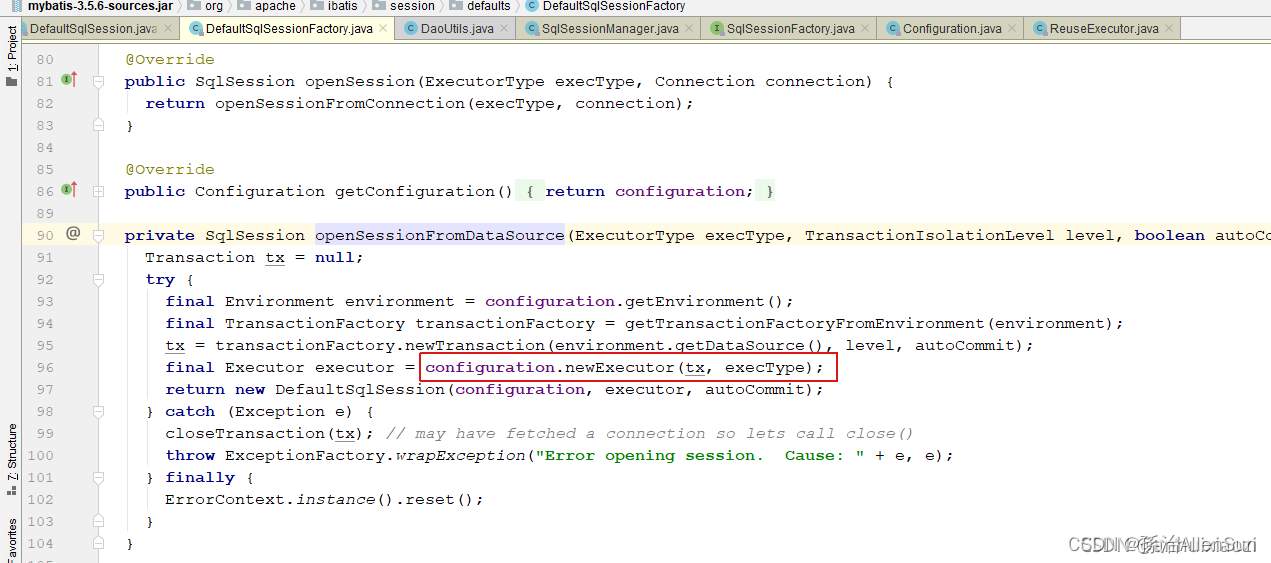
类创建

(6)模板模式【Executor同上】
(1)什么是模板模式:
学习模板模式:https://www.runoob.com/design-pattern/template-pattern.html -
相关阅读:
gpx4抑制剂-靶向癌症耐药治疗的新方法 | MedChemExpress
OFDM深入学习及MATLAB仿真
UDP的报文结构和注意事项
Windows下WSL将ubuntu挪位置-系统盘清理
PyQt GUI 编程-01
ES京东搜索
[go学习笔记.第九章.map] 1.map的介绍,声明,使用方式,crud操作以及遍历
使用proxy把后端返回的图片域名替换成目标域名
Python 简介
腾讯云GPU云服务器计算型GN7有哪些特点?适用于哪些场景?
- 原文地址:https://blog.csdn.net/weixin_44823875/article/details/127621974

- 最新文章
-
沪漂五周年了:我越来越迷茫了
Agentic Skill Routing 实战:别再把所有 Skill 塞进 AI Agent 上下文
MySQL-Seconds_behind_master的精度误差
[MAF预定义ChatClient中间件-03]CachingChatClient——利用缓存省钱省时间
AI的至暗历史:从万众期待到被政府撤资,AI的两次死亡徘徊
Agent OS :五种驯服不确定性的范式
PortSwigger SQL注入LAB11
数据库即时编译JIT
[Begin]AI Learn Data Day 0
深度学习进阶(二十七)现代 LLM 的核心架构设计其二:SwiGLU