-
html网页制作代码大全——大学生影视主题网页制作——图图影视影院5页HTML+CSS+JavaScript
HTML实例网页代码, 本实例适合于初学HTML的同学。该实例里面有设置了css的样式设置,有div的样式格局,这个实例比较全面,有助于同学的学习,本文将介绍如何通过从头开始设计个人网站并将其转换为代码的过程来实践设计。
精彩专栏推荐👇🏻👇🏻👇🏻👇🏻
❤ 【作者主页——获取更多优质源码】
❤ 【web前端期末大作业——毕设项目精品实战案例(1000套)】
一、网页介绍
1 网页简介:此作品为学生个人主页网页设计题材,HTML+CSS 布局制作,web前端期末大作业,大学生网页设计作业源码,这是一个不错的网页制作,画面精明,代码为简单学生水平, 非常适合初学者学习使用。
2.网页编辑:网页作品代码简单,可使用任意HTML编辑软件(如:Dreamweaver、HBuilder、Vscode 、Sublime 、Webstorm、Text 、Notepad++ 等任意html编辑软件进行运行及修改编辑等操作)。
3.知识应用:技术方面主要应用了网页知识中的: Div+CSS、鼠标滑过特效、Table、导航栏效果、Banner、表单、二级三级页面等,视频、 音频元素 、Flash,同时设计了Logo(源文件)所需的知识点。
一、网页效果


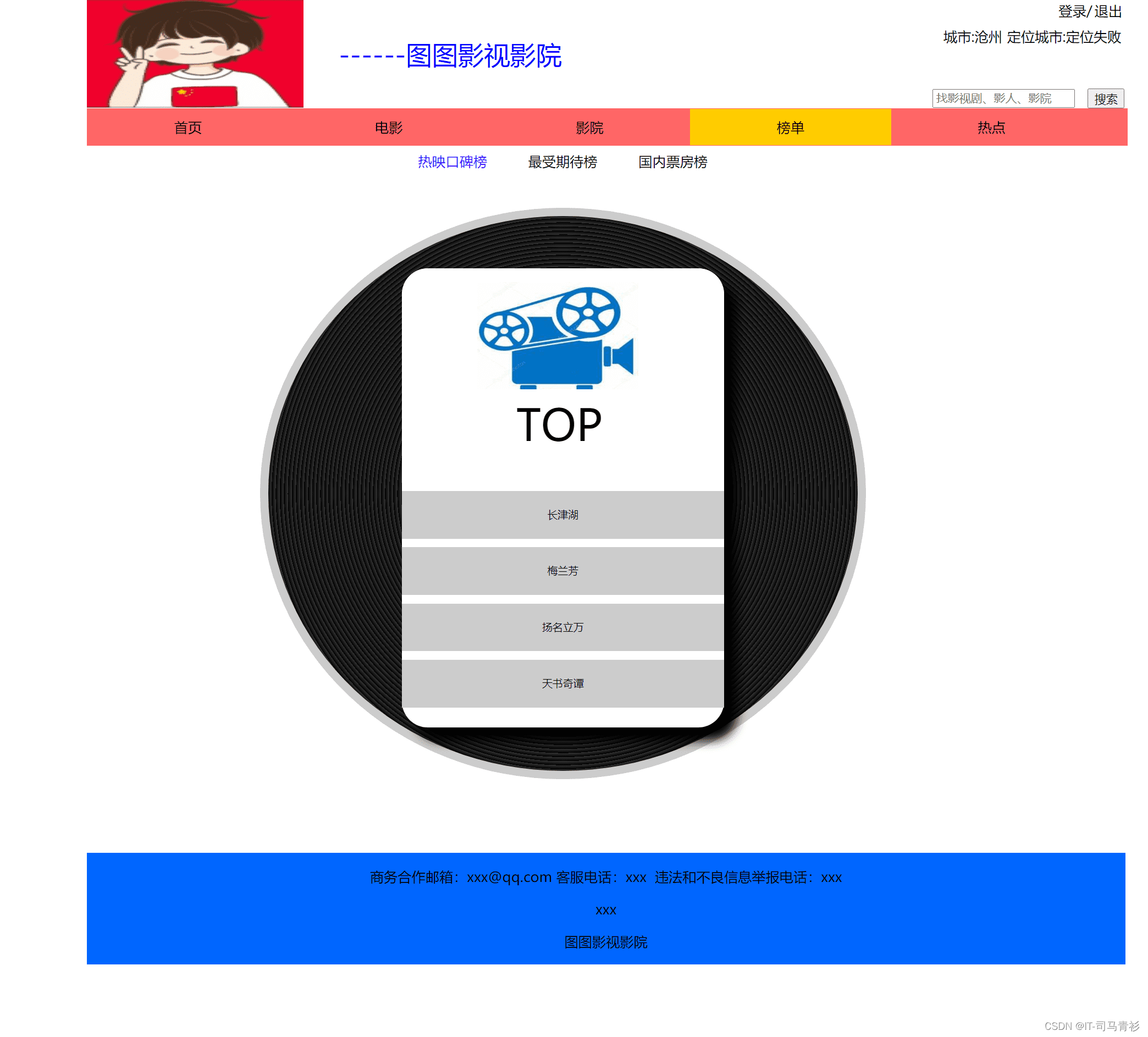


二、代码展示
1.HTML代码
代码如下(示例):以下仅展示部分代码供参考~
doctype html> <html> <head> <meta charset="utf-8"> <link rel="stylesheet" href="../css/bangdan.css"> <title>榜单title> head> <body> <div class="box"> <div class="box1"> <a href="tutu1.html"><span class="name"><span class="mingzi">------图图影视影院span>span>a> <div class="city1">城市:沧州div> <div class="city2"><div class="city3"><a href="#"><span class="mingzi">定位城市:定位失败span>a>div> <div class="city4">定位失败div>div> <div class="login"><a href="login.html"><span class="mingzi">登录/span>a>div> <div class="exit"><a href="tutu1.html"><span class="mingzi">退出span>a>div> <div class="search1"> <input type="text" class="input" placeholder="找影视剧、影人、影院"> div> <div class="search2"> <input class="submit" type="submit" value="搜索"> div> div> <div class="one"> <ul> <li><a href="tutu1.html" class="three"><span class="mingzi">首页span>a>li> <li><a href="movie.html" class="three"><span class="mingzi">电影span>a>li> <li><a href="yingyuan.html" class="three "><span class="mingzi">影院span>a>li> <li><a href="bangdan.html" class="three active"><span class="mingzi">榜单span>a>li> <li><a href="#" class="three"><span class="mingzi">热点span>a>li> ul> div> <div class="box2"> <span><a href="#" class="two active"><span class="mingzi">热映口碑榜span>a>span> <a href="#"><span class="sort4"><span class="mingzi">最受期待榜span>a><a href="#"> <span class="sort4"><span class="mingzi">国内票房榜span>a>div> <div class="box3"> <div class="bg"> <div class="sheet"> <span class="top">TOPspan> <p class="tp">p> <p><a href="https://v.qq.com/x/cover/jqq4vlwrxzfdxi4/p0020vf6862.html"><span class="mingzi">长津湖span>a>p> <p><a href="https://v.qq.com/x/cover/mzc00200kbornzq/c3304913l9d.html"><span class="mingzi">梅兰芳span>a>p> <p><a href="https://v.qq.com/x/cover/mzc00200v3x7zg9/t3308lhnf7i.html"><span class="mingzi">扬名立万span>a>p> <p><a href="https://v.qq.com/x/cover/mzc00200wh6nz2g/o3219tg84hr.html"><span class="mingzi">天书奇谭span>a>p> div> div> div> <div class="bottom"> <p> <a href="#"><span class="mingzi">商务合作邮箱:xxx@qq.comspan>a> <a href="#"><span class="mingzi">客服电话:xxxspan>a > <a href="#"><span class="mingzi">违法和不良信息举报电话:xxxspan>a> p> <p><a href="#"><span class="mingzi">xxxspan>a>p> <p> <a href="#"><span class="mingzi">图图影视影院span>a> p> div> div> body> html>- 1
- 2
- 3
- 4
- 5
- 6
- 7
- 8
- 9
- 10
- 11
- 12
- 13
- 14
- 15
- 16
- 17
- 18
- 19
- 20
- 21
- 22
- 23
- 24
- 25
- 26
- 27
- 28
- 29
- 30
- 31
- 32
- 33
- 34
- 35
- 36
- 37
- 38
- 39
- 40
- 41
- 42
- 43
- 44
- 45
- 46
- 47
- 48
- 49
- 50
- 51
- 52
- 53
- 54
- 55
- 56
- 57
- 58
- 59
- 60
- 61
- 62
2.CSS代码
body{ margin: 0 100px; padding: 0; } .box{ width: 1200px; position: relative; background: #FFF; } .box1{ width: 100%; height: 125px; background:url(../image/log.png) #FFF no-repeat; background-size: 250px 125px; } a{ text-decoration: none; color:#000; } .name{ width: 300px; height: 125px; position: absolute; left: 270px; top: 0px; line-height: 125px; text-align: center; font-size:30px; color:#00F; } .city1{ width: 87px; height: 25px; position: absolute; left: 980px; top: 30px; line-height: 25px; text-align: center; } .city2{ width: 146px; height: 25px; position: absolute; left: 1056px; top: 30px; line-height: 25px; text-align: center; } .city4 { width:146px; height:30px; display: none; position: absolute; background-color:#CCC; } .city2:hover .city4 { display: block; } .city2:hover{ border-bottom: 30px solid #666; } .login{ width: 70px; height: 25px; position: absolute; left: 1107px; top: 0px; line-height: 25px; text-align: center; } .exit{ width: 60px; height: 25px; position: absolute; left: 1150px; top: 0px; line-height: 25px; text-align: center; } .search1{ width: 100px; height: 25px; position: absolute; left: 977px; top: 101px; } .search2{ width: 50px; height: 25px; position: absolute; left: 1156px; top: 102px; } ul { list-style-type: none; margin: 0; padding: 0; overflow: hidden; border: 1px solid #F66; background-color:#F66; width:1200px; } li { float: left; } li a { display: block; color: #000; text-align: center; padding: 10px 100px; } li .active { background-color: #FC0; } .mingzi{ display:inline-block; } .mingzi:hover{ color:#F00; } span .active{ color:#30F; } .box2{ width:1100px; text-align:center; position:absolute; top:175px; } .box3{ width:1100px; position:absolute; top:190px; } .bg{ width:600px; height:550px; background-image:repeating-radial-gradient(circle at 50% 50%,#333,#000 1%); margin:50px auto; padding:40px; border-radius:50%; padding-top:50px; border:10px solid #ccc; } .sheet{ width:372px; height:530px; background:#fff; border-radius:30px; box-shadow:15px 15px 12px #000; margin:0 auto; } .sheet p{ width:372px; height:55px; background:#ccc no-repeat 70px 20px; margin-bottom:2px; font-size:10px; color:#d6d6d6; line-height:55px; text-align:center; font-family:"微软雅黑"; } .sheet .tp{ width:372px; height:247px; background:#fff; background-image:url(../image/yingyuantubiao.png); background-size:50% 50%; background-repeat:no-repeat; background-position:87px 16px,99px 192px; border-radius:30px 30px 0 0; } .top{ width:372px; height:60px; position:absolute; top:270px; left:360px; font-size:50px; line-height:60px; text-align:center; } .sheet .yj{ border-radius:0 0 30px 30px; } .bottom{ width:1200px; position:absolute; top:985px; text-align:center; background:#06F; }- 1
- 2
- 3
- 4
- 5
- 6
- 7
- 8
- 9
- 10
- 11
- 12
- 13
- 14
- 15
- 16
- 17
- 18
- 19
- 20
- 21
- 22
- 23
- 24
- 25
- 26
- 27
- 28
- 29
- 30
- 31
- 32
- 33
- 34
- 35
- 36
- 37
- 38
- 39
- 40
- 41
- 42
- 43
- 44
- 45
- 46
- 47
- 48
- 49
- 50
- 51
- 52
- 53
- 54
- 55
- 56
- 57
- 58
- 59
- 60
- 61
- 62
- 63
- 64
- 65
- 66
- 67
- 68
- 69
- 70
- 71
- 72
- 73
- 74
- 75
- 76
- 77
- 78
- 79
- 80
- 81
- 82
- 83
- 84
- 85
- 86
- 87
- 88
- 89
- 90
- 91
- 92
- 93
- 94
- 95
- 96
- 97
- 98
- 99
- 100
- 101
- 102
- 103
- 104
- 105
- 106
- 107
- 108
- 109
- 110
- 111
- 112
- 113
- 114
- 115
- 116
- 117
- 118
- 119
- 120
- 121
- 122
- 123
- 124
- 125
- 126
- 127
- 128
- 129
- 130
- 131
- 132
- 133
- 134
- 135
- 136
- 137
- 138
- 139
- 140
- 141
- 142
- 143
- 144
- 145
- 146
- 147
- 148
- 149
- 150
- 151
- 152
- 153
- 154
- 155
- 156
- 157
- 158
- 159
- 160
- 161
- 162
- 163
- 164
- 165
- 166
- 167
- 168
- 169
- 170
- 171
- 172
- 173
- 174
- 175
- 176
- 177
- 178
- 179
- 180
- 181
- 182
- 183
- 184
- 185
- 186
- 187
- 188
- 189
- 190
- 191
- 192
- 193
- 194
- 195
- 196
三、个人总结
一套合格的网页应该包含(具体可根据个人要求而定)
- 页面分为页头、菜单导航栏(最好可下拉)、中间内容板块、页脚四大部分;
- 所有页面相互超链接,可到三级页面,有5-10个页面组成;
- 页面样式风格统一布局显示正常,不错乱,使用Div+Css技术;
- 菜单美观、醒目,二级菜单可正常弹出与跳转;
- 要有JS特效,如定时切换和手动切换图片新闻;
- 页面中有多媒体元素,如gif、视频、音乐,表单技术的使用;
- 页面清爽、美观、大方,不雷同。
- 网站前端程序不仅要能够把用户要求的内容呈现出来,还要满足布局良好、界面美观、配色优雅、表现形式多样等要求。
四、精彩推荐
1.看到这里了就
【点赞收藏博文】三连支持下吧,你的支持是我创作的动力,【观注作者 |获取更多源码| 优质文章】。2.关注我带您学习各种前端插件、3D炫酷效果、图片展示、文字效果、以及整站模板 、大学生毕业HTML模板 、期末大作业模板 、等! 「在这里有好多 前端 开发者,一起探讨 前端 Node 知识,互相学习」!
3.以上内容技术相关问题可以相互学习交流
-
相关阅读:
el-table 懒加载自动展开节点
Log4j2自定义插件实现自定义日志打印功能(脱敏/加密)
手机怎么自动切换ip地址
阿里云服务器全方位介绍——看这一篇就够了
ROS Bridge 笔记(01)— apt 安装、源码编译安装、安装依赖、运行显示
LRU缓存机制
2、使用RedisTemplate实现基本数据类型增删改查
NAVICAT 15-自动运行-自动导出EXCEL 并自动发送邮件
NTT简介
面向阿克曼移动机器人(自行车模型)的LQR(最优二次型调节器)路径跟踪方法
- 原文地址:https://blog.csdn.net/qq_38517811/article/details/127582844